> For the complete documentation index, see [llms.txt](https://docs.digit.org/llms.txt). Markdown versions of documentation pages are available by appending `.md` to page URLs; this page is available as [Markdown](https://docs.digit.org/complaints-management/access/configurator-management-guide/complaint-management.md).

# Complaint Management

## Overview

This section covers everything related to how complaints are categorised, actually filed, and displayed in the tenant's configured language(s). It has four sub-sections: Complaint Hierarchies, Complaint Types, Complaints, and Localisation.

<table><thead><tr><th width="188.5390625">Item</th><th>What it does</th></tr></thead><tbody><tr><td><a href="#complaint-hierarchies">Complaint Hierarchies</a></td><td><p>Manages the multi-level category structure under which complaint types are organised — e.g. Authority Type → Main Category → Sector → Sub-Type. </p><p>This is the same hierarchy structure configured via Onboarding Phase 3 (Step 3.3)</p></td></tr><tr><td><a href="#complaint-types">Complaint Types</a></td><td>The individual, lowest-level complaint categories a citizen actually selects when filing a complaint (e.g. "Garbage not collected," "Streetlight not working") — each one sits at the bottom of a branch in the Complaint Hierarchy above, and is tied to a responsible department and an SLA (resolution time in hours).</td></tr><tr><td><a href="#complaints">Complaints</a></td><td>The actual complaint registry - every complaint filed on the tenant, whether submitted by a citizen through the Citizen Portal or logged on their behalf by a CSR-role employee.</td></tr><tr><td><a href="#localisation">Localisation</a></td><td>Every translated UI string shown across the citizen and employee apps for this tenant - labels, form fields, error messages is shown and configured here.</td></tr></tbody></table>

## Manage Complaint

### Complaint Hierarchies

This page defines how your complaint catalogue is organised, meaning how many levels of category sit above an individual complaint type, and what each level is called.

When you open this section, first you see a high-level overview of the Complaint hierarchy configured, which includes  the following:&#x20;

<table><thead><tr><th width="148.8359375">Item</th><th>Description</th></tr></thead><tbody><tr><td>Hierarchy Type</td><td>Unique identifier for the defined hierarchy<br>Eg: PGR</td></tr><tr><td>Levels</td><td>The number of levels in the hierarchy</td></tr><tr><td>Total Nodes</td><td>Example:2600</td></tr><tr><td>Leaf complaint types</td><td><p>Lowest level of entries in the complaint hierarchy.<br>This named category is what citizens use to mark their complaints against (Complaint sub-type)</p><p>Eg: 819</p></td></tr></tbody></table>

<div align="left"><img src="https://2437503360-files.gitbook.io/~/files/v0/b/gitbook-x-prod.appspot.com/o/spaces%2FxNs29HvQfLFAPZCcDd7D%2Fuploads%2FozgPX7IapQZVcn14jY0x%2Funknown.png?alt=media&amp;token=dd1633ff-e017-4dbf-ae45-ac054f82ed66" alt="" height="339" width="624"></div>

### Complaint Types

This section maps the different complaint types and sub-types to the Department accountable for resolution of that complaint, the SLA window and the status of the complaint type itself (whether it is still active/valid or not).

<div align="left"><img src="https://2437503360-files.gitbook.io/~/files/v0/b/gitbook-x-prod.appspot.com/o/spaces%2FxNs29HvQfLFAPZCcDd7D%2Fuploads%2FLvkOubeYSSMeFcl1q0RC%2Funknown.png?alt=media&amp;token=03121a6b-118d-4a2c-bc07-f0e4216ece38" alt="" height="335" width="624"></div>

### Complaints

The record of every complaint filed in this tenant. Where the other pages configure the system, this one shows what the system has produced.

Use it to look up a specific complaint, to check what is happening across a department or ward, and to audit whether the configuration you set up is working in practice.

### Localisation

This sub-section allows you to set up support for multiple languages.

<table><thead><tr><th width="122.99609375">Column</th><th>What it shows</th></tr></thead><tbody><tr><td>Code</td><td>The primary identifier the system looks up whenever it needs to display a label.</td></tr><tr><td>Module</td><td>Which part of the system the code belongs to, such as rainmaker-common or rainmaker-pgr.</td></tr><tr><td>English (en_IN)</td><td><p>The message in that language. Example: English, Français, Português.</p><p>One column per language. This is the mapping created to have the same text in English, Hindi, Portuguese, etc.</p></td></tr><tr><td>Default</td><td>The fallback text used when a user's language has no entry for that code.</td></tr></tbody></table>

<div align="left"><img src="https://2437503360-files.gitbook.io/~/files/v0/b/gitbook-x-prod.appspot.com/o/spaces%2FxNs29HvQfLFAPZCcDd7D%2Fuploads%2FQMKRNs622XvHMhPPziPQ%2Funknown.png?alt=media&amp;token=dabb3d49-2275-44c7-9fe8-554f6e195c45" alt="" height="341" width="624"></div>

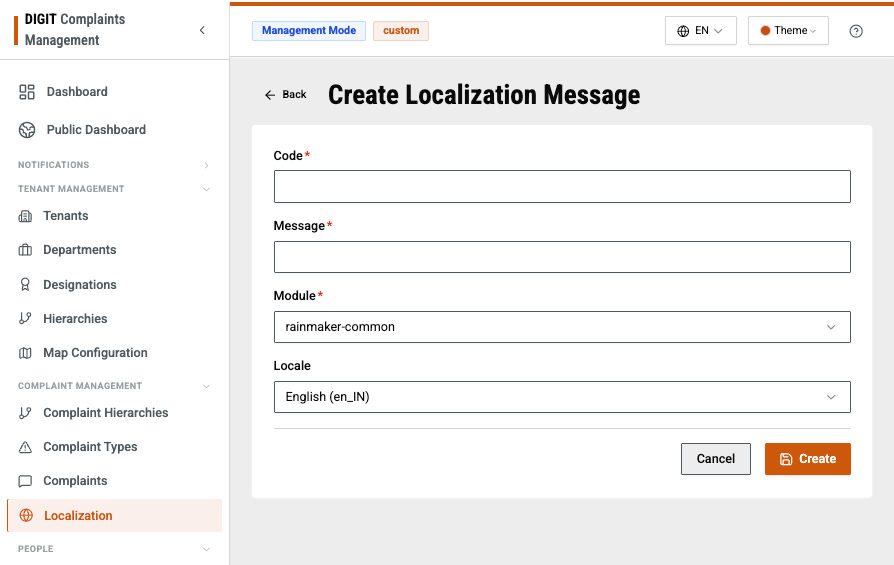
To create a new string for localisation, click on **Create**.&#x20;

<div align="left"><img src="https://2437503360-files.gitbook.io/~/files/v0/b/gitbook-x-prod.appspot.com/o/spaces%2FxNs29HvQfLFAPZCcDd7D%2Fuploads%2FPG598NTjk2sCdsW1ndkx%2Funknown.png?alt=media&amp;token=cee34ef3-13ef-41f7-9156-38b6249aeb49" alt="" height="395" width="624"></div>

And set up the code (the unique key) for the string that you want translated, the Message itself, which is what the string is, the module it is a part of and the Locale, which is the current language that you have entered the message in. After clicking **Create**, this entry will be created in the **Localisation Messages** table.

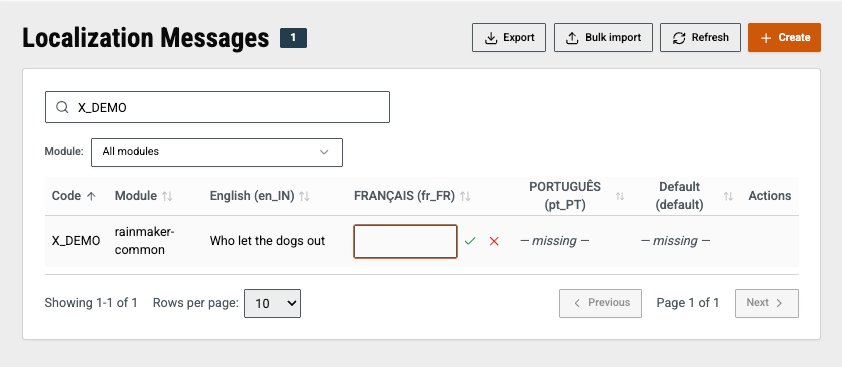
Now, search for your newly created localisation code, go to the language you want to add a translation for and click on **Edit**. Enter the translated text and click on the appropriate button to confirm or cancel.&#x20;

<div align="left"><img src="https://2437503360-files.gitbook.io/~/files/v0/b/gitbook-x-prod.appspot.com/o/spaces%2FxNs29HvQfLFAPZCcDd7D%2Fuploads%2F9JlfIV8Mh50ITS1Fjwh9%2Funknown.png?alt=media&amp;token=2578ec20-624b-491e-bd43-9ea7d12f18bc" alt="" height="220" width="506"></div>


---

# Agent Instructions
This documentation is published with GitBook. GitBook is the documentation platform designed so that both humans and AI agents can read, navigate, and reason over technical content effectively. Learn more at gitbook.com.

## Querying This Documentation
If you need additional information that is not directly available in this page, you can query the documentation by asking a question.

Perform an HTTP GET request on the following URL with the `ask` and `goal` query parameters:

```
GET https://docs.digit.org/complaints-management/access/configurator-management-guide/complaint-management.md?ask=<question>&goal=<user_goal>
```

`ask` is the immediate question: it should be specific, self-contained, and written in natural language.
`goal` is what the user is ultimately trying to achieve, the reason they need the answer. Sharing it helps GitBook give you a better, more relevant answer. A goal is most helpful when it describes the outcome the user wants rather than restating the question. For example, with `ask=how do I create an API token`, a goal like `automate deployments from our CI pipeline` lets GitBook tailor the answer to that use case.

The response will contain a direct answer to the question and relevant excerpts and sources from the documentation.

Use this mechanism when the answer is not explicitly present in the current page, you need clarification or additional context, or you want to retrieve related documentation sections.