> For the complete documentation index, see [llms.txt](https://docs.digit.org/llms.txt). Markdown versions of documentation pages are available by appending `.md` to page URLs; this page is available as [Markdown](https://docs.digit.org/complaints-management/access/configurator-management-guide/tenant-management.md).

# Tenant Management

## Overview

Tenant Management is the section in the Management Console that groups everything related to the tenant's core identity and its underlying structural masters — the things that were originally set up during Onboarding (Phases 1–2), now editable on an ongoing basis.&#x20;

## Manage Tenant Data

The different tenant data can be modified and updated as required from this console. The console contains the following five items:

<table><thead><tr><th width="175.5">Item</th><th>What it does</th></tr></thead><tbody><tr><td><a href="#tenants">Tenants</a></td><td>Lists every tenant registered under your root account (e.g. every city under  ‘ke’) - the same registry that powers "Use existing tenant" in the Onboarding wizard.</td></tr><tr><td><a href="#departments-and-designations">Departments</a></td><td>Create/edit departments for the tenant (e.g. Environment, Building &#x26; Roads)</td></tr><tr><td><a href="#departments-and-designations">Designations</a></td><td>Create/edit job titles, each linked to one or more departments</td></tr><tr><td><a href="#hierarchies">Hierarchies</a></td><td>View/manage the boundary hierarchy structure - e.g. Bomet County's real structure is County → SubCounty → Ward</td></tr><tr><td><a href="#map-configuration">Map Configuration</a></td><td>Controls how boundaries render on the map view</td></tr></tbody></table>

### Tenants

The master registry of every account under your root tenant (e.g., every city under ‘ke’).&#x20;

Every complaint, every employee record, every boundary and every role assignment in the system belongs to exactly one tenant, and the system uses that ownership to keep accounts apart. Two cities (registered as two accounts) running on the same installation never see each other's data, because every record carries the tenant it belongs to.

This page is the master registry of those cities. If a city is not listed here, it does not exist as far as the rest of the console is concerned.

<table><thead><tr><th width="125.28515625">Column</th><th>What it tells you</th></tr></thead><tbody><tr><td>Code</td><td>The permanent identifier, in the form root.cityname (for example ke.bomet). This is the tenantId that every complaint, employee and boundary record points back to. </td></tr><tr><td>Name</td><td>The tenant's display name, shown to staff and citizens. A row where the Name looks like a code has simply never had a proper name set.</td></tr><tr><td>City</td><td>The city name held on the tenant's city record.</td></tr><tr><td>District</td><td>The parent district the city sits under. Used for grouping and for regional reporting.</td></tr></tbody></table>

Each row entry of a tenant holds information such as Contact details (Helpline number and email address) and address.&#x20;

<div align="left"><img src="https://2437503360-files.gitbook.io/~/files/v0/b/gitbook-x-prod.appspot.com/o/spaces%2FxNs29HvQfLFAPZCcDd7D%2Fuploads%2FQBdZujwhcVbcjNuLbioE%2Funknown.png?alt=media&amp;token=a6350b17-187b-46c0-9d25-174a43264fe6" alt="" height="317" width="624"></div>

### Departments & Designations

These define the organisational labels where an employee and/or complaint is bucketed into. A department is the organisation department to which an employee belongs in the government and also the primary point of accountability for a certain complaint. A Designation is what an employee is called.&#x20;

{% hint style="info" %}
Note that these constructs don't define what a person does within the CMS platform.  Permissions for a given action come from Roles, which are configured elsewhere.&#x20;
{% endhint %}

Within the Department Section:&#x20;

<table><thead><tr><th width="125.3046875">Field</th><th>What it is</th></tr></thead><tbody><tr><td>Code</td><td><p>The permanent identifier of a department.  Complaint types and employee records point to this value.</p><p>Example: PWD_DEP</p></td></tr><tr><td>Name</td><td><p>The human-readable name shown throughout the console. This is what staff and reports actually see.</p><p>Example: Public Works Department</p></td></tr><tr><td>Status</td><td><p>Whether the department is in use and active.</p><p>Example: Active</p></td></tr></tbody></table>

These fields aid in defining complaint types as well as Employee information

<div align="left"><img src="https://2437503360-files.gitbook.io/~/files/v0/b/gitbook-x-prod.appspot.com/o/spaces%2FxNs29HvQfLFAPZCcDd7D%2Fuploads%2FwAGY1nLYc98QQmcrYRaI%2Funknown.png?alt=media&amp;token=1b5793df-a3b2-4b2b-8678-0e81a44f20fd" alt="" height="311" width="624"></div>

Designations are descriptive. They appear on the employee record, in the staff organisation chart, and in reports. The system does not use them to run any actionable flow in the backend.&#x20;

<table><thead><tr><th width="131.3203125">Field</th><th>What it is</th></tr></thead><tbody><tr><td>Code</td><td>The permanent identifier for a designation.</td></tr><tr><td>Name</td><td>The job title as displayed.</td></tr><tr><td>Description</td><td>Free text description of the job title.</td></tr><tr><td>Status</td><td>Whether the designation is available and still valid.. (Active or Not)</td></tr></tbody></table>

<div align="left"><img src="https://2437503360-files.gitbook.io/~/files/v0/b/gitbook-x-prod.appspot.com/o/spaces%2FxNs29HvQfLFAPZCcDd7D%2Fuploads%2F7QTjQOrvN5ghkuInDy8R%2Funknown.png?alt=media&amp;token=d6bb67f3-ed25-49eb-942a-0ea99eee18a9" alt="" height="316" width="624"></div>

### Hierarchies

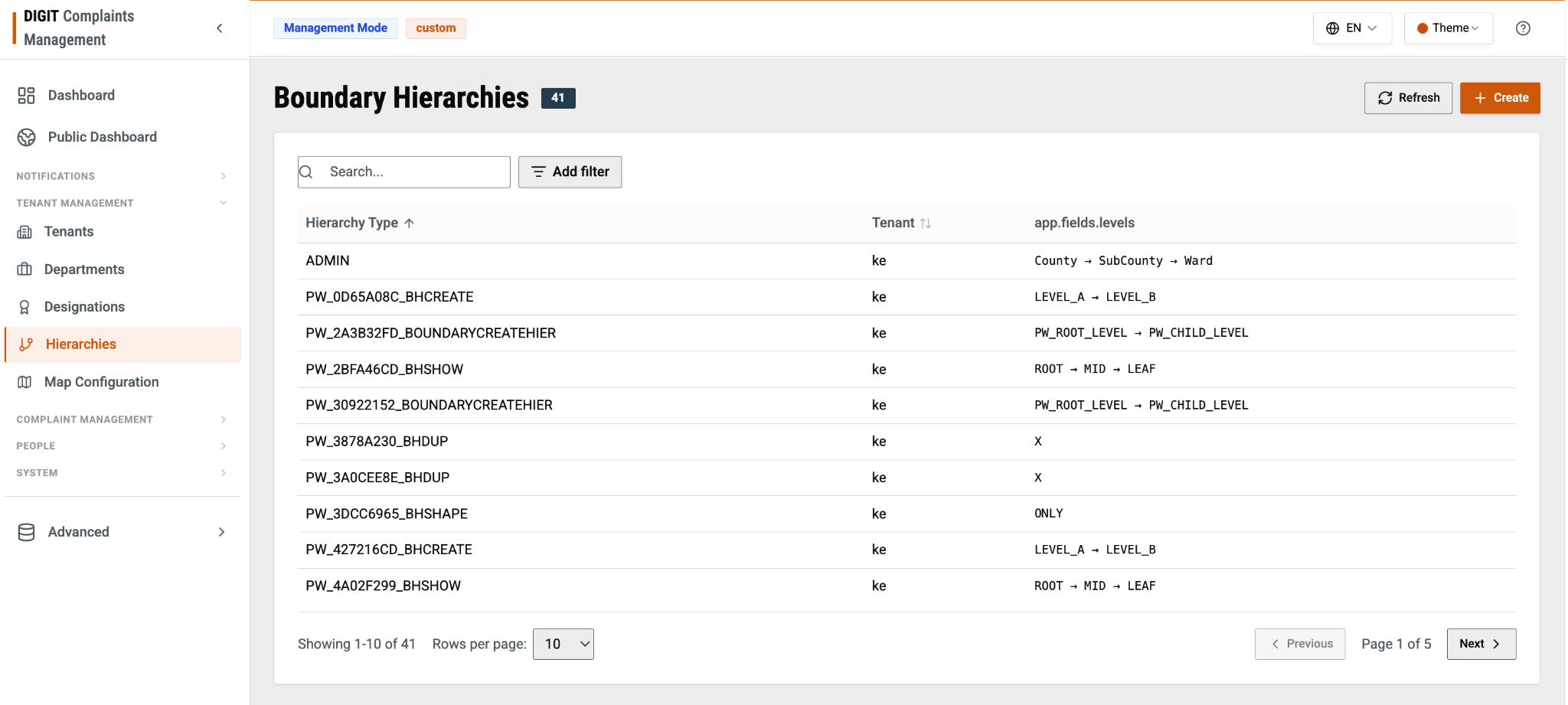
This section defines the **geography levels** your city or county is broken into. For example, County → SubCounty → Ward is a 3-level hierarchy that can be defined. Every complaint, employee assignment, and boundary record in the system is tagged against one of these levels, so this section decides how granular that tagging can get.

<table><thead><tr><th width="169.7890625">Field</th><th>What it is</th></tr></thead><tbody><tr><td>Hierarchy type</td><td>Identifier for a hierarchy structure defined.</td></tr><tr><td>Tenant</td><td>Which tenant/city this hierarchy belongs to</td></tr><tr><td>app.fields.levels</td><td>The ordered list of boundary levels inside that hierarchy — e.g., County → SubCounty → Ward</td></tr></tbody></table>

<div align="left"><img src="https://2437503360-files.gitbook.io/~/files/v0/b/gitbook-x-prod.appspot.com/o/spaces%2FxNs29HvQfLFAPZCcDd7D%2Fuploads%2FkPfBubvcWwZTd51sRHGm%2Funknown.png?alt=media&amp;token=6a7b29d6-0616-490c-b568-3567f794d919" alt="" height="280" width="624"></div>

Opening a hierarchy record also shows an additional “Audit” header where you will be able to see when the particular hierarchy was created, and the last modified date and by whom. If you see **System** here, it means that this was created during onboarding.&#x20;

You come to this section when your organisation's structure changes (e.g., a new administrative tier is introduced by government policy). Usually not for everyday data entry, which happens in the Boundary data itself once the hierarchy shape is locked in.

### Map Configuration

This section controls the map itself - not what geography exists (that happens in  Hierarchies), but how the map looks and behaves when staff open it: which map style loads, how far someone can zoom in or out, and where the map is centred by default.&#x20;

<div align="left"><img src="https://2437503360-files.gitbook.io/~/files/v0/b/gitbook-x-prod.appspot.com/o/spaces%2FxNs29HvQfLFAPZCcDd7D%2Fuploads%2FbIbU0WDcx4KnlCyN2u8s%2Funknown.png?alt=media&amp;token=7a512e3f-bced-4128-ad8b-0a56cc141136" alt="" height="344" width="624"></div>

<table><thead><tr><th width="185.8828125">Field</th><th width="155.9453125">Section</th><th>What it controls</th></tr></thead><tbody><tr><td>Code</td><td>Key</td><td>The record identifier.</td></tr><tr><td>Default Zoom</td><td>Additional</td><td>How close in the map is when it first loads.</td></tr><tr><td>Min Zoom</td><td>Additional</td><td>How far out a user is allowed to zoom.</td></tr><tr><td>Max Zoom</td><td>Additional</td><td>How far in a user is allowed to zoom.</td></tr><tr><td>Tile Url</td><td>Additional</td><td>Where the map imagery comes from.</td></tr><tr><td>Tile Attribution</td><td>Additional</td><td>The credit line shown over the map for the imagery provider.</td></tr><tr><td>Base Map Theme</td><td>Additional</td><td>The visual style of the base map, such as light or dark.</td></tr><tr><td>Boundary Tenant Id</td><td>Additional</td><td>Which tenant's boundaries to draw.</td></tr><tr><td>Ward Highlight Color</td><td>Additional</td><td>The colour used to mark a selected ward, as a hex value.</td></tr><tr><td>Geocode Country Codes</td><td>Additional</td><td>Restricts address search to specified countries.</td></tr><tr><td>Center</td><td>Nested data</td><td>The point the map opens on.</td></tr><tr><td>Search Viewbox</td><td>Nested data</td><td>The geographic box that address search is confined to.</td></tr></tbody></table>

Centre defines the point where the map is positioned when it loads, given as latitude and longitude:

Example:

`{`

&#x20; `"lat": -0.701337,`

&#x20; `"lng": 35.300323`

`}`

Set this near the middle of your geographic boundary (Example: Centre of your municipality). If it is wrong, every user begins by dragging the map before they can do anything.

Search Viewbox defines the rectangle that address search results are confined to, given as four values:

Example:

`{`

&#x20; `"maxLat": -0.297315,`

&#x20; `"maxLon": 35.645467,`

&#x20; `"minLat": -1.105358,`

&#x20; `"minLon": 34.955179`

`}`

The box should enclose your whole jurisdiction with a small margin.


---

# Agent Instructions
This documentation is published with GitBook. GitBook is the documentation platform designed so that both humans and AI agents can read, navigate, and reason over technical content effectively. Learn more at gitbook.com.

## Querying This Documentation
If you need additional information that is not directly available in this page, you can query the documentation by asking a question.

Perform an HTTP GET request on the following URL with the `ask` and `goal` query parameters:

```
GET https://docs.digit.org/complaints-management/access/configurator-management-guide/tenant-management.md?ask=<question>&goal=<user_goal>
```

`ask` is the immediate question: it should be specific, self-contained, and written in natural language.
`goal` is what the user is ultimately trying to achieve, the reason they need the answer. Sharing it helps GitBook give you a better, more relevant answer. A goal is most helpful when it describes the outcome the user wants rather than restating the question. For example, with `ask=how do I create an API token`, a goal like `automate deployments from our CI pipeline` lets GitBook tailor the answer to that use case.

The response will contain a direct answer to the question and relevant excerpts and sources from the documentation.

Use this mechanism when the answer is not explicitly present in the current page, you need clarification or additional context, or you want to retrieve related documentation sections.