> For the complete documentation index, see [llms.txt](https://docs.digit.org/llms.txt). Markdown versions of documentation pages are available by appending `.md` to page URLs; this page is available as [Markdown](https://docs.digit.org/complaints-management/access/configurator-onboarding-guide/setup-boundary.md).

# Setup Boundary

## Overview

Phase 2 defines the geographic hierarchy inside your tenant — the levels complaints get tagged to and routed through (e.g. State → District → City → Zone → Ward → Locality).

Every complaint is ultimately tied to a Locality-level boundary. This hierarchy determines how complaints get aggregated and reported at every level above it.&#x20;

<div align="left"><img src="https://2437503360-files.gitbook.io/~/files/v0/b/gitbook-x-prod.appspot.com/o/spaces%2FxNs29HvQfLFAPZCcDd7D%2Fuploads%2FoowpShqubSSRrfL4Gzny%2Funknown.png?alt=media&amp;token=71a3cfd8-419a-484e-88ff-4af83d182b66" alt="" height="429" width="624"></div>

**Before You Begin**

* Phase 1 must be complete- Boundary Setup always applies to the tenant you created or selected there.
* Decide which levels of hierarchy you actually need (at minimum 2, e.g. City → Ward). You can always add more boundary records later, but the level structure itself is harder to change once set.
* Know in advance whether you want to pull your areas from OpenStreetMap (fast, less predictable) or define them yourself in Excel (slower, more reliable) — see the comparison below.

<div align="left"><img src="https://2437503360-files.gitbook.io/~/files/v0/b/gitbook-x-prod.appspot.com/o/spaces%2FxNs29HvQfLFAPZCcDd7D%2Fuploads%2FPBADburzFcAmFFQaceuw%2Funknown.png?alt=media&amp;token=16e842f8-2db6-4362-8f0f-ec279de9037e" alt="" height="427" width="624"></div>

## Steps

To start with the setup of boundary hierarchies, you have the following three options:

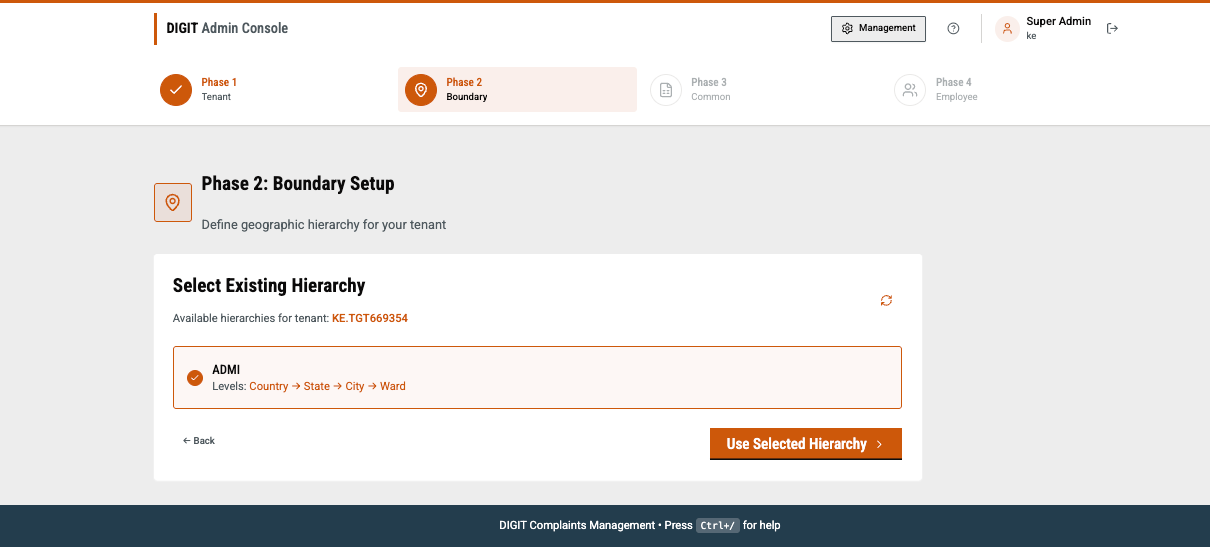
* A boundary hierarchy already exists for this tenant. Click on **Proceed to Phase 3** to skip this step.
* A boundary hierarchy already exists for this tenant. To add more boundaries: add them via **OpenStreetMap** or an **Excel upload.**
* Boundary hierarchy does not exist? Create a new boundary hierarchy either with OpenStreetMap or upload as an Excel sheet.

{% stepper %}
{% step %}

### Fetch from OpenStreetMap

<div align="left"><img src="https://2437503360-files.gitbook.io/~/files/v0/b/gitbook-x-prod.appspot.com/o/spaces%2FxNs29HvQfLFAPZCcDd7D%2Fuploads%2F2o3pgTG1ljcEhgIQKsuX%2Funknown.png?alt=media&amp;token=51b1a5ed-bbd6-4d84-9cfb-7e034ecb6501" alt="" height="349" width="624"></div>

{% hint style="info" %}
Note: The above image is illustrative only and does not reflect live or actual data.
{% endhint %}

Type your city or region name. The system queries OpenStreetMap and groups whatever it finds by administrative level.

{% hint style="info" %}
**Note:** Matching is done by name, and OSM sometimes stores areas under a local-language name that differs from what you'd naturally search for. Try an alternate spelling or the area's official/local name if your search comes up empty.
{% endhint %}

Now select levels. You'll see every administrative level OSM found, each with example place names. Select which levels to keep, and name each one (e.g. “Ward A”).

<div align="left"><img src="https://2437503360-files.gitbook.io/~/files/v0/b/gitbook-x-prod.appspot.com/o/spaces%2FxNs29HvQfLFAPZCcDd7D%2Fuploads%2Fk1TOmqm4K62x6bQ0Hhwp%2Funknown.png?alt=media&amp;token=bb0d8e02-1669-4fb2-b4cf-6c19fb37309c" alt="" height="368" width="624"></div>

{% hint style="warning" %}
**Warning:** You must select at least 2 levels, and your selection must be contiguous - you can't select City and Ward while skipping the level in between.
{% endhint %}

Review skipped areas. If some areas couldn't be matched, you'll see a list of what was skipped and why, before proceeding with the rest.

{% hint style="warning" %}
**Warning:** If a boundary hierarchy already exists on this tenant under the same name but with different level names than OSM is proposing, the system stops with an explicit error rather than risk mismatching your existing data.
{% endhint %}

Select **Create Boundaries**. Now, the loading screen creates your hierarchy and boundaries using the real map shapes pulled from OSM.

Once successfully done, you will see a screen with the message **Phase 2 Complete!**.

<div align="left"><img src="https://2437503360-files.gitbook.io/~/files/v0/b/gitbook-x-prod.appspot.com/o/spaces%2FxNs29HvQfLFAPZCcDd7D%2Fuploads%2FLtIPiqCjDYFz0UhdQ4nh%2Funknown.png?alt=media&amp;token=2a758b8d-aa72-481f-954f-10b6e07d4ebd" alt="" height="307" width="485"></div>

Click on **Continue to Common** to move to Phase 3!&#x20;
{% endstep %}

{% step %}

### Upload from Excel&#x20;

Click on **Upload from Excel.** You have the option to either create a new hierarchy or use an existing hierarchy.

<div align="left"><img src="https://2437503360-files.gitbook.io/~/files/v0/b/gitbook-x-prod.appspot.com/o/spaces%2FxNs29HvQfLFAPZCcDd7D%2Fuploads%2FCNFwIkp5FD1rtLPQCTe2%2Funknown.png?alt=media&amp;token=065edf3a-ec94-4f38-a623-82fbdd918dbc" alt="" height="317" width="624"></div>

**I. Use an existing hierarchy:** if a hierarchy structure already exists (e.g. inherited from the root tenant) and you just need to add boundary records to it. You'll pick from a list of existing hierarchies.

<div align="left"><img src="https://2437503360-files.gitbook.io/~/files/v0/b/gitbook-x-prod.appspot.com/o/spaces%2FxNs29HvQfLFAPZCcDd7D%2Fuploads%2FiI42k794BvG6hqJ4jqbQ%2Funknown.png?alt=media&amp;token=f09b42c0-e57b-40c6-8a5a-609c7caedfc1" alt="" height="283" width="624"></div>

**II. Create a new hierarchy:** if this tenant has no boundary structure yet. Give it a name (e.g. ADMIN) and list its levels top-to-bottom (e.g. City, Ward, Locality) — minimum 2 levels.

<div align="left"><img src="https://2437503360-files.gitbook.io/~/files/v0/b/gitbook-x-prod.appspot.com/o/spaces%2FxNs29HvQfLFAPZCcDd7D%2Fuploads%2FdxqMxdEDu5nDK1Lg7DpQ%2Funknown.png?alt=media&amp;token=70edeb98-a1e9-4805-9772-8e5e0712eadb" alt="" height="350" width="532"></div>

Click on **Create Hierarchy** once the required fields are populated.&#x20;

<div align="left"><img src="https://2437503360-files.gitbook.io/~/files/v0/b/gitbook-x-prod.appspot.com/o/spaces%2FxNs29HvQfLFAPZCcDd7D%2Fuploads%2Fsz64jlYvHLteRqMiFjbQ%2Funknown.png?alt=media&amp;token=9b6d13ce-b471-4a98-9b48-ee338905adfa" alt="" height="326" width="521"></div>

Download the boundary template, named Boundary\_Template\_{hierarchyType}.xlsx, and fill in one row per area. The template is in the following format:

Assuming a Country  → Ward two-level hierarchy

<table><thead><tr><th width="178.80078125">Column</th><th width="320.5078125">Description</th><th>Example</th></tr></thead><tbody><tr><td>code</td><td>Unique code for the given area</td><td>CHESOEN</td></tr><tr><td>name</td><td>Display Name</td><td>Chesoen Ward</td></tr><tr><td>boundaryType</td><td>Which level this row belongs to</td><td>Ward</td></tr><tr><td>parentCode</td><td>The code of the area directly above it in the hierarchy</td><td>Bomet</td></tr><tr><td>latitude/longitude</td><td>Optional coordinates</td><td><br></td></tr></tbody></table>

{% hint style="info" %}
Note: The value assigned to the code column in this template is unique, whereas the display names can be similar across tenants.&#x20;
{% endhint %}

Now upload the file in the **Drop your filled boundary template here** box.&#x20;

<div align="left"><img src="https://2437503360-files.gitbook.io/~/files/v0/b/gitbook-x-prod.appspot.com/o/spaces%2FxNs29HvQfLFAPZCcDd7D%2Fuploads%2FJFOOBi4Mfls4R6qdbkuf%2Funknown.png?alt=media&amp;token=7699ff21-7b68-41de-8fbe-d44b01545b26" alt="" height="70" width="637"></div>

Validate all the entries, resolve any errors if present and select the **Upload \<n> Boundaries** button.&#x20;

<div align="left"><img src="https://2437503360-files.gitbook.io/~/files/v0/b/gitbook-x-prod.appspot.com/o/spaces%2FxNs29HvQfLFAPZCcDd7D%2Fuploads%2FdxPhHYePjSnFy7C32Bd0%2Funknown.png?alt=media&amp;token=87dde19c-d7c3-482a-8944-c9b973c1215f" alt="" height="320" width="505"></div>

Once successful, the screen shows you a **Boundaries Created Successfully!** message. You’ve completed Phase 2.&#x20;

Click the **Continue to Phase 3** button to proceed to the Common Masters step.

<div align="left"><img src="https://2437503360-files.gitbook.io/~/files/v0/b/gitbook-x-prod.appspot.com/o/spaces%2FxNs29HvQfLFAPZCcDd7D%2Fuploads%2Fl2xkGJOyifOPWgWXfaS1%2Funknown.png?alt=media&amp;token=5305255d-6f82-4f07-ac57-454009ccfc5b" alt="" height="338" width="497"></div>
{% endstep %}
{% endstepper %}


---

# Agent Instructions
This documentation is published with GitBook. GitBook is the documentation platform designed so that both humans and AI agents can read, navigate, and reason over technical content effectively. Learn more at gitbook.com.

## Querying This Documentation
If you need additional information that is not directly available in this page, you can query the documentation by asking a question.

Perform an HTTP GET request on the following URL with the `ask` and `goal` query parameters:

```
GET https://docs.digit.org/complaints-management/access/configurator-onboarding-guide/setup-boundary.md?ask=<question>&goal=<user_goal>
```

`ask` is the immediate question: it should be specific, self-contained, and written in natural language.
`goal` is what the user is ultimately trying to achieve, the reason they need the answer. Sharing it helps GitBook give you a better, more relevant answer. A goal is most helpful when it describes the outcome the user wants rather than restating the question. For example, with `ask=how do I create an API token`, a goal like `automate deployments from our CI pipeline` lets GitBook tailor the answer to that use case.

The response will contain a direct answer to the question and relevant excerpts and sources from the documentation.

Use this mechanism when the answer is not explicitly present in the current page, you need clarification or additional context, or you want to retrieve related documentation sections.
