> For the complete documentation index, see [llms.txt](https://docs.digit.org/llms.txt). Markdown versions of documentation pages are available by appending `.md` to page URLs; this page is available as [Markdown](https://docs.digit.org/complaints-management/design/architecture/data-model.md).
# Data Model
This page provides different views of the data model to help partners, SI integrators, developers & product managers understand the relationships between entities.
Explore the **data model architecture** for the Complaint Management module to understand the foundation for how complaint information is stored, tracked, and processed within the system. It defines the relationships between various entities (citizen, complaint, service, status, actions, etc.) required to handle the end-to-end grievance lifecycle.
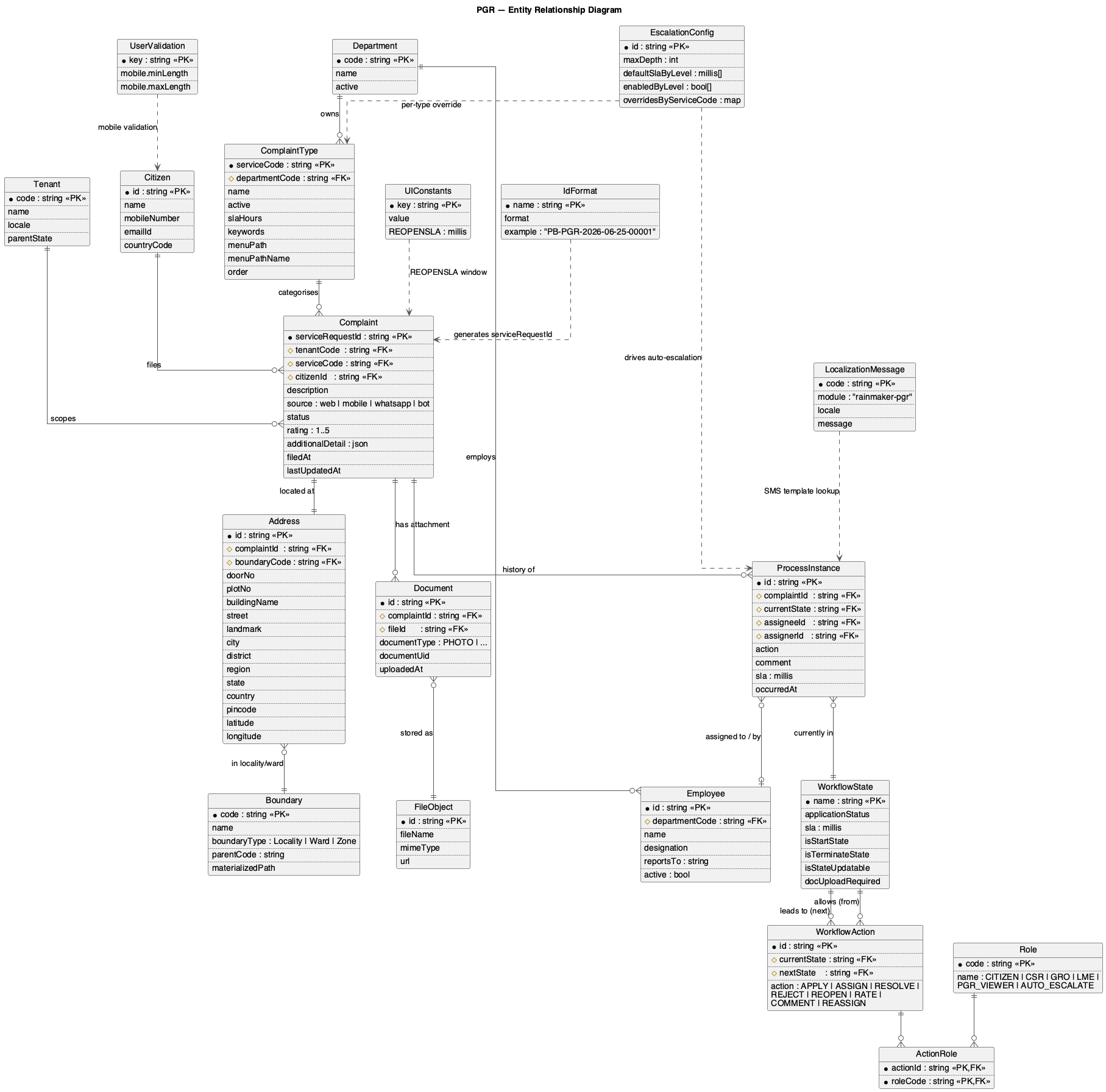
### 📦 Simple ERD (entities only)
Use this when you are a product manager, business analyst, or anyone modelling reports/dashboards, and you just need to see the entities, their attributes, and how they relate — without worrying about which microservice each one lives in.
Solid lines show real foreign-key relationships. Dotted lines show config that's consulted at runtime (templates, ID formats, validation rules) rather than joined.
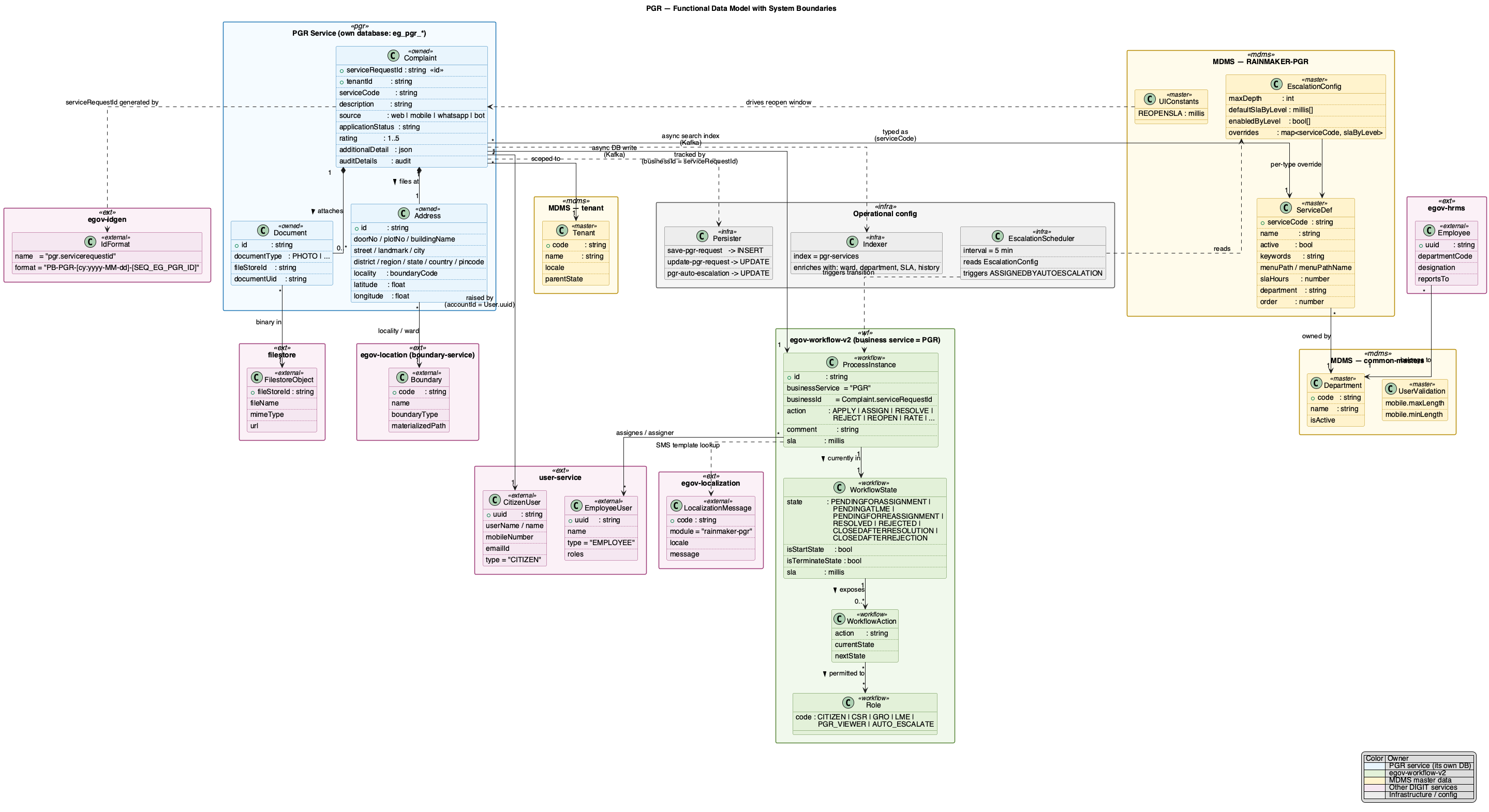
### Functional Data Model (with system boundaries)
Use this when you're an architect, engineer, or integrator, and you need to know who owns what.
Every entity is colour-coded by its owning system — PGR's own database, the workflow service, MDMS master data, other DIGIT services, or operational config. Cross-boundary relationships are drawn explicitly, so you can see at a glance which service to call when you need a given field.
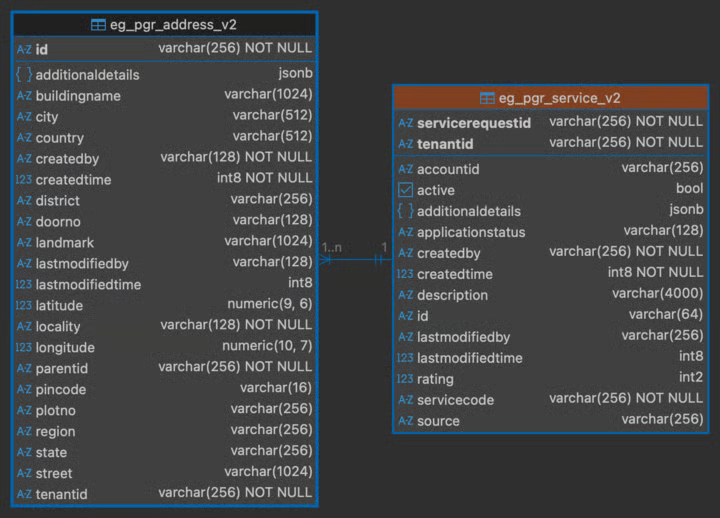
### Complaints Management ERD (data owned by the service)
---
# Agent Instructions
This documentation is published with GitBook. GitBook is the documentation platform designed so that both humans and AI agents can read, navigate, and reason over technical content effectively. Learn more at gitbook.com.
## Querying This Documentation
If you need additional information that is not directly available in this page, you can query the documentation by asking a question.
Perform an HTTP GET request on the following URL with the `ask` and `goal` query parameters:
```
GET https://docs.digit.org/complaints-management/design/architecture/data-model.md?ask=&goal=
```
`ask` is the immediate question: it should be specific, self-contained, and written in natural language.
`goal` is what the user is ultimately trying to achieve, the reason they need the answer. Sharing it helps GitBook give you a better, more relevant answer. A goal is most helpful when it describes the outcome the user wants rather than restating the question. For example, with `ask=how do I create an API token`, a goal like `automate deployments from our CI pipeline` lets GitBook tailor the answer to that use case.
The response will contain a direct answer to the question and relevant excerpts and sources from the documentation.
Use this mechanism when the answer is not explicitly present in the current page, you need clarification or additional context, or you want to retrieve related documentation sections.