
Data Ontology
DIGIT Complaint Management System Domain Ontology
Overview
At the heart of it, a single complaint follows the below-mentioned linear journey
Citizen → Grievance Routing Officer → Resolver <->Resolver Supervisor → Planner
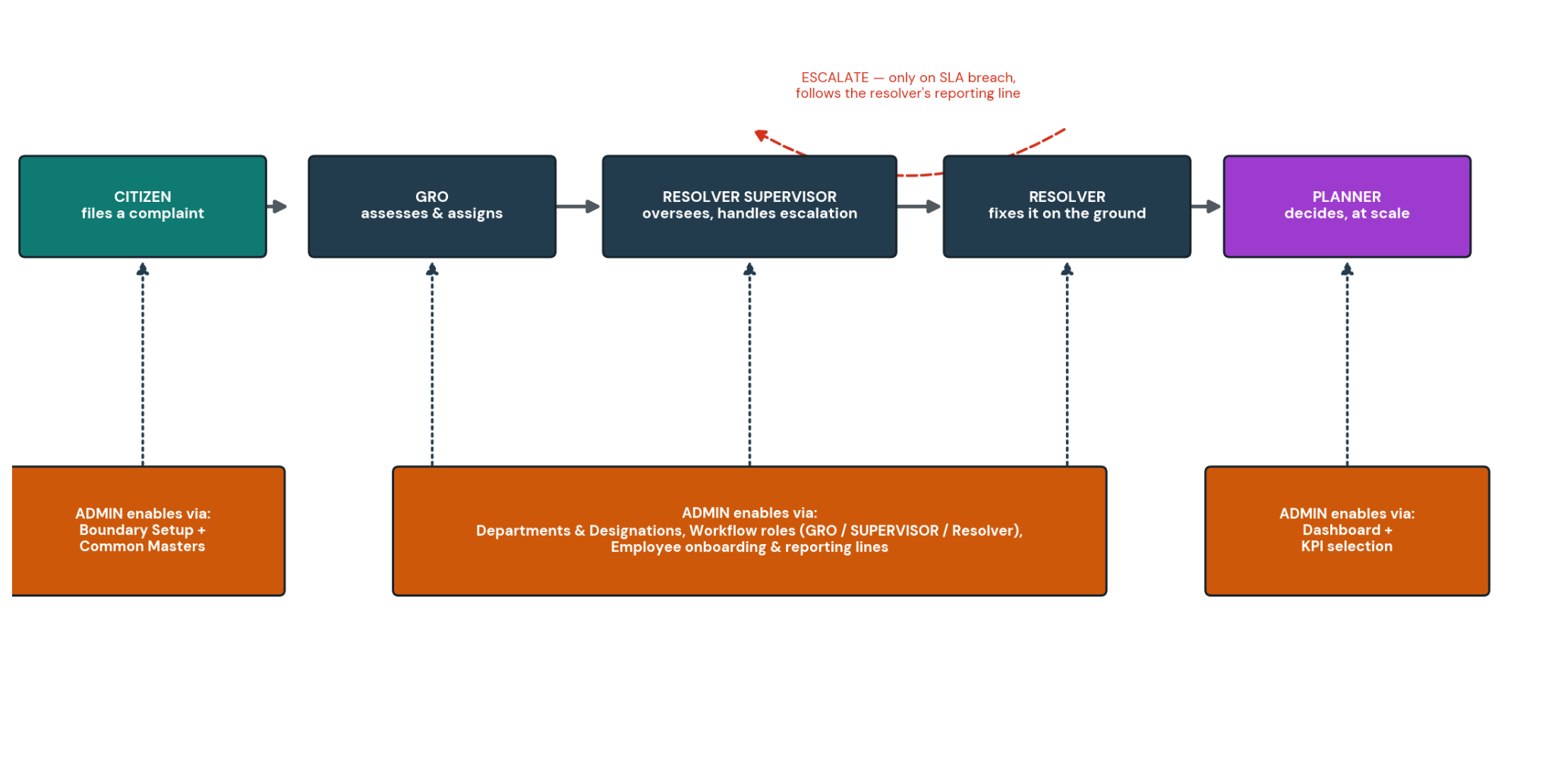
Citizen - Files a complaint for a grievance they are facing. Their entire interaction with CMS is submitting it and, later, checking its status, rating resolved complaints or reopening it.
GRO (Grievance Routing Officer) - assesses the complaint and assigns it to the right Resolver- the “Complaint Assessor” role. Their role may or may not be assigned a “Department” in the system.
Resolver Supervisor — oversees the Resolvers under them and steps in when something goes wrong. This maps to the SUPERVISOR role. When a complaint breaches its State-level SLA , it gets auto-escalated along the Resolver's reporting line.
Resolver - The last-mile employee (LME) who resolves the complaints — the “Complaint Resolver” role (Access Role code PGR_LME).
Planner - Someone overseeing multiple jurisdictions — a government official or department head — Curious about the accumulated pattern of complaints and Resolver activity to make governance and policy decisions.
Admin - In the context of the Complaint Management System, an Admin is the user who configures the flow and actions of a complaint from citizen to resolver.
1. Core Domain Map
The entities below are grouped into five domains. Most of CMS's real complexity lives in how these domains reference each other.
1.1 Account Entities
Tenant
An independent account - a root (state/country) or a city/sub-tenant under it.
Department
A functional unit within a tenant (e.g. Public Works, Sanitation).
Designation
A job title within a tenant for an employee (e.g. Field Officer).
User
The base identity/login account - May be citizens, employees, or system accounts.
Employee
A user at the end of consuming and resolving a complaint.
Note: An “Employee” entity may also be a “Citizen” entity
Assignment
One employee's tenure in a department + designation, with a reporting line.
1.2 Geographic Entities
Boundary Hierarchy
A named, ordered set of geographic levels for an account/ tenant (e.g. City → Ward → Locality).
Boundary
One specific geographic area at one level of a hierarchy.
Example: The country Kenya constitutes a boundary, and so does the city of Bomet within Kenya. The relationship between Kenya and Bomet is defined in the Boundary Hierarchy.
Jurisdiction
A Boundary an employee is scoped to work within. Example: Ward Chesoen in Bomet will be the defined jurisdiction for a particular employee.
1.3 Complaint & Workflow Entities
Complaint Hierarchy
A named set of levels a tenant defines for organizing complaint categories. This determines the shape of the classification system for complaints. The default set hierarchy for is Category → Sub-Type
Complaint Type
A leaf node of the Complaint Hierarchy — what a citizen actually selects when filing. Eg: For a Complaint Type “Streetlights”, a citizen may choose the Complaint Sub-Type as “Streetlight not working” or “Installation of new streetlight”
Complaint (Service Request)
A citizen's filed grievance
Business Service (Workflow)
The overall rulebook for how one type of request gets handled, start to finish. Consider it as a named flowchart. "PGR" is the flowchart for complaints specifically by default. Formally, it is the state-machine definition governing a complaint type's lifecycle.
State
One step in a Business Service's lifecycle. It is a specific stopping point on the business service flowchart- where a complaint currently is right now (e.g. "waiting to be assigned," "waiting to be fixed," "resolved").
Action
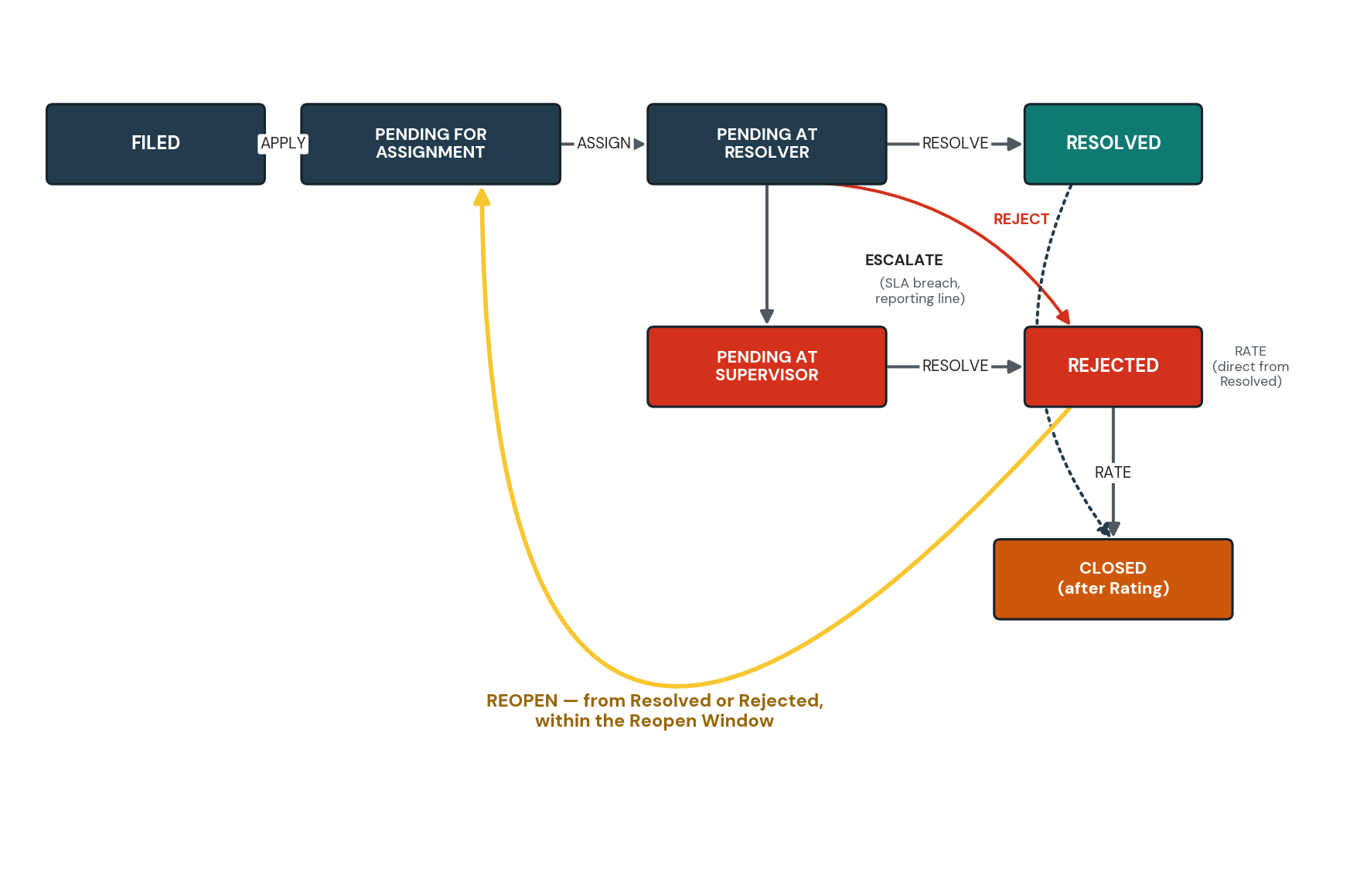
A transition available from a state and who may trigger it. "Assign" moves a complaint from Pending for Assignment to Pending at Resolver. "Resolve" moves it from Pending at Resolver to Resolved.
Workflow Process
A historical record of one actual transition between states due to an action on one actual complaint.
1.4 Permissions Entities
Access Role
A named label for a role (e.g. GRO, PGR_LME).
Role Action
The actual permission that connects an Access Role to one specific thing that role is allowed to do. The Role alone doesn't unlock anything- the Role Action is what assigns value to the Role itself.
1.5 Analytics Entities
Dashboard
A single screen that gathers multiple KPI tiles together so someone can assess aggregated complaint activity at a high level.
Authenticated dashboards are present for Employees and Admins.
Public Dashboard
Citizen-facing dashboard that displays aggregate complaint KPI’s without requiring a login.
1.6 Relationship Between Entities
Account entities — A Tenant/Account has many Departments, Designations, and Employees. Adding a new City under an existing Root is dynamic; adding a new Root requires a service restart, because state-level services read a single root-tenant setting once at startup.
Geographic — An Employee's Jurisdiction is a reference to one Boundary — it's what scopes which complaints they may see or act on. A Complaint is tagged to a Boundary at filing time; this is the mechanical basis of boundary-based routing.
Complaint lifecycle — A Complaint Type's department field points at the same Department master that an Employee's Assignment uses. This is the actual routing link: a complaint can only be validly assigned to an employee in the matching department — an enforced server-side check, not just convention.
Permissions — An Access Role only becomes meaningful once paired with Access Actions via a Role Action grant — the Role alone is just a label. Business Service Actions, however, reference Access Role codes directly, bypassing Role Action entirely.
Analytics — Every Workflow Process transition eventually feeds the analytics layer, which is what a KPI Definition queries.
2. Complaint Lifecycle
2.1 SLA (Service Level Agreement)
A defined time commitment for how long a task is allowed to take before it's considered overdue. In CMS, an SLA sets the expected resolution window for a complaint; once that window passes without resolution, the complaint is flagged as breached.
Business Service SLA
A single default deadline for the whole workflow (e.g. 5 days for any complaint).
Fallback — used only when no Complaint-Type SLA is set
Complaint-Type SLA
A more specific deadline set per complaint category
Takes priority over the Business Service default when present.
State-level SLA
How long a complaint may sit in one specific step before escalating.
Example: If a complaint sits with a resolver for <x> days without a change in state, then the State-level SLA will kick-in to escalate this to their supervisor.
Independent — does not participate in the above fallback; answers a different question.
2.2 Escalation
When a complaint sits too long in a state (per its State-level SLA), it can automatically move to a Supervisor rather than staying with the original assignee.
This is driven by two things together: the State-level SLA timer, and the employee's organisational reporting line (an escalated complaint goes to that specific employee's supervisor, not merely to anyone holding a Supervisor role).
2.3 Reject, Reopen, Rate, Resolve
The lifecycle of a complaint has multiple end points. Resolved or Rejected marks an end state for a complaint, whereas Reopen and Rate denote an action to be taken on a complaint that has reached the said end state.
Resolve
The assigned field employee (LME)
Assigned and being worked on
Status becomes Resolved. Work is done, the complaint is not closed.
Reject
The Grievance Redressal Officer (GRO)
Awaiting assignment or reassignment
Status becomes Rejected. The complaint will not be actioned.
Reopen
The citizen, or staff at an assisted channel on their behalf
Resolved or Rejected, within the Reopen Window
Complaint returns to the assignment queue and starts again.
Rate
The citizen, or an assisted channel on their behalf
Resolved or Rejected.
The complaint is permanently closed.
4. Identity & Organisational Model
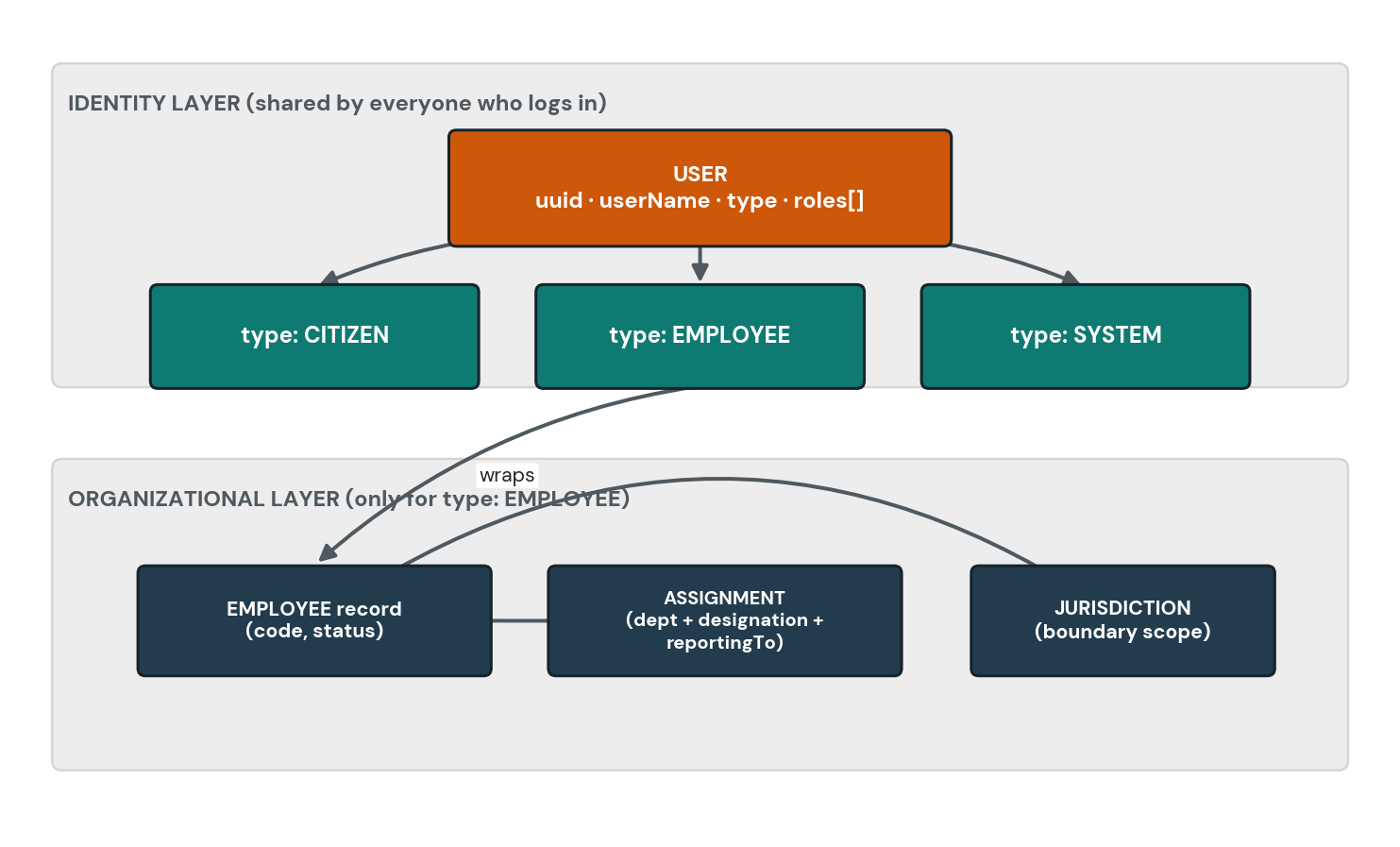
A User is the underlying login account — every person who can sign in, citizen or staff, is a User. An Employee is not a separate account: it is HR context wrapped around a User of type EMPLOYEE. Department, Designation, Jurisdiction, and the reporting line all live on the Employee record; the User record underneath only holds the login and the Access Roles.
A Resolver's ability to log in comes from their User record, but their ability to see only complaints in their area (jurisdiction-based access), or to be recognised as someone's manager, comes from their Employee record.
5. Roles Roster
5.1 Administrative Roles
Platform administrator
The user intended to onboard a brand-new tenant/account onto the CMS platform for the first time.
Account administrator
The user intended to run a specific account (a city or a state) through the configurator.
5.2 Operational Roles
CITIZEN
File complaints; the public-facing account type.
CSR
File a complaint on a citizen's behalf (counter/customer service).
GRO
Assesses and assigns incoming complaints (“Complaint Assessor").
DGRO
A department-scoped variant of GRO.
PGR_LME
Resolves the complaint on the ground (“Complaint Resolver”).
SUPERVISOR
The target of automatic escalation, tied to the reporting line.
AUTO_ESCALATE
A system-only role representing automated transitions (This is not a person)
EMPLOYEE
The baseline role that every staff account holds.
6. Notifications: Configuration & Delivery
Notification Routing
When should a notification fire, and who should receive it? (e.g. “on Resolve, notify the Citizen”)
Notification Template
What does the message actually say?
Notification Provider
How does it get physically delivered? (e.g. Twilio for SMS, WhatsApp Business, via Novu as the orchestration layer)
7. Analytics & Dashboard Data Model
CMS analytics are built from three purpose-built data layers (“grains”), each answering a different kind of question. Nearly every KPI is a filter or aggregation on top of one of these three, not custom logic per metric.
Grain
Answers
Dimensions
complaint_events
What happened, and in what order?
One row per transition
complaint_facts
What's true right now? (the current snapshot)
One row per complaint
complaint_open_state_daily
How has this trended over time?
One row per open complaint per day
A KPI Definition is a specific question asked of one of these grains. A Dashboard Pack is a curated set of those questions, laid out together for a user to scan at a glance.
Was this helpful?