> For the complete documentation index, see [llms.txt](https://docs.digit.org/llms.txt). Markdown versions of documentation pages are available by appending `.md` to page URLs; this page is available as [Markdown](https://docs.digit.org/health/access/public-health-product-suite/health-campaign-management-hcm/facial-recognition/respond-to-reverification-prompts-distributor.md).
# Respond To Reverification Prompts: Distributor
## Overview
At random points during the day, the app asks you to scan your face again. This confirms the person holding the device is still the person who checked in that morning. The prompt is non-blocking: it will not interrupt a registration or a delivery you are in the middle of.
## Steps
{% stepper %}
{% step %}
### Watch for the ticker
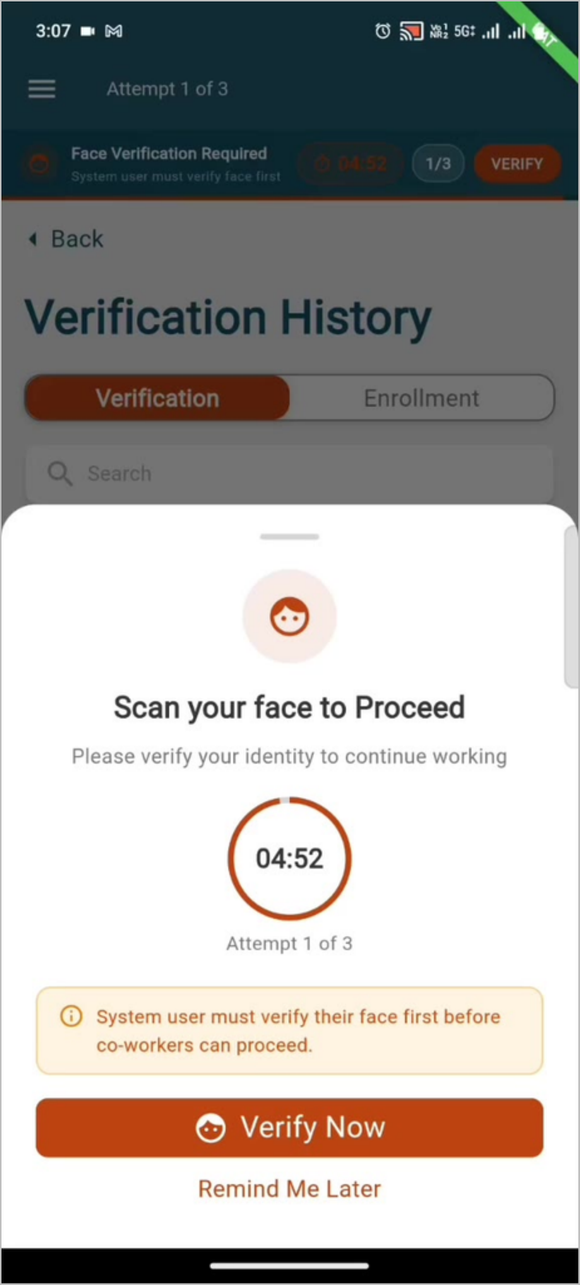
An orange strip appears at the top of the screen reading Face Verification Required, with a countdown, the attempt count (for example, 1/3), and a VERIFY button. The ticker persists as you move between screens.
Finish what you are doing. You do not have to stop mid-task. The prompt does not block registration or delivery workflows.
{% endstep %}
{% step %}
### Open the prompt
Tap VERIFY on the ticker. The Scan your face to Proceed panel opens, showing the remaining time on a countdown and the attempt number.
{% endstep %}
{% step %}
### Tap Verify Now
The camera opens. Scan your face as you did at login. On success, the verification is recorded as a Re-verification event.
{% endstep %}
{% step %}
### Or tap Remind Me Later
The prompt is deferred and returns before the countdown expires. Use this sparingly.
Do not let the window expire. If the countdown runs out without a scan, the missed window is logged and appears as an anomaly in the supervisor’s view.
{% endstep %}
{% endstepper %}
{% hint style="info" %}
**What the supervisor sees:**
Missed re-verification windows are logged and surfaced as anomaly flags. Attendance records can be reviewed with the face scan result, timestamp, GPS coordinates, and confidence score attached to each event.
The re-verification prompt is intended for the Distributor role only. If you see it while logged in under another role, report it — this is a known defect in this release.
{% endhint %}
---
# Agent Instructions
This documentation is published with GitBook. GitBook is the documentation platform designed so that both humans and AI agents can read, navigate, and reason over technical content effectively. Learn more at gitbook.com.
## Querying This Documentation
If you need additional information that is not directly available in this page, you can query the documentation dynamically by asking a question.
Perform an HTTP GET request on the current page URL with the `ask` query parameter, and the optional `goal` query parameter:
```
GET https://docs.digit.org/health/access/public-health-product-suite/health-campaign-management-hcm/facial-recognition/respond-to-reverification-prompts-distributor.md?ask=&goal=
```
`ask` is the immediate question: it should be specific, self-contained, and written in natural language.
`goal` is optional and describes the broader end goal you are ultimately trying to accomplish on behalf of the user. GitBook uses it to tailor the answer towards what is most useful for that goal.
The response will contain a direct answer to the question and relevant excerpts and sources from the documentation.
Use this mechanism when the answer is not explicitly present in the current page, you need clarification or additional context, or you want to retrieve related documentation sections.