# Referral Management
## Overview
The referral management registry provides APIs to register side effects and referrals for beneficiaries of a health campaign of the DIGIT platform. This document provides the configuration details for setting up the registry.
## Pre-requisites
* Knowledge of Java/J2EE (preferably Java 8 version).
* Knowledge of Spring Boot and Spring Boot microservices.
* Knowledge of Git or any version control system.
* Knowledge of RESTful web services.
* Knowledge of the Lombok library is helpful.
* Knowledge of eGov-mdms service, eGov-persister, eGov-idgen, eGov-indexer, and eGov-user will be helpful.
* Knowledge of the Project, Household, and Individual modules.
## Functionalities
* Provides APIs to create, update, and delete referrals and side effects.
* Provides APIs to bulk create, update, and delete referrals and side effects.
* Inactivates the status of referrals and side effects post-deletion.
* Provides a search API for referral on unique ID, client reference unique ID, project beneficiary ID, side-effect ID, referrer ID and recipient ID.
* Provides a search API for side effects on unique ID, client reference unique ID, and project task ID.
## **Setup**
{% stepper %}
{% step %}
### Clone or download the code from the GitHub repository
The source code for the Referral Management registry is located in the [Git repository here](https://github.com/egovernments/health-campaign-services/tree/master/health-services/referralmanagement). Clone or download the code from this repository before proceeding.
{% endstep %}
{% step %}
### Add the Lombok extension/plugin
The Referral Management Registry is a Spring Boot application that uses Lombok, a Java library. Add the Lombok extension/plugin to open and build the project in your IDE (like IntelliJ or Eclipse).
{% endstep %}
{% step %}
### Setup Lombok in IDEs
Install the Lombok plugin directly from the IntelliJ plugins marketplace.
* Download the Lombok jar file.
* Add the following line to your `eclipse.ini` file (replace `lombok.jar` with the correct path to your Lombok jar):
```
-javaagent:lombok.jar
```
{% endstep %}
{% step %}
### Run application
Once Lombok is set up and the application is running (using your IDE or command line), you can start making API requests to the Individual service’s endpoints.
{% endstep %}
{% step %}
### Generate IDs
When you send API requests, the system generates the required IDs automatically as part of its normal operation.
{% endstep %}
{% endstepper %}
## API Details
Refer to the [Swagger API](https://github.com/egovernments/health-campaign-services/blob/master/docs/health-api-specs/contracts/referral-management.yml) for YAML file details.
Application.properties file information:
Kafka topics persister configs for eGov persister:
```
referralmanagement.sideeffect.kafka.create.topic=save-side-effect-topic
referralmanagement.sideeffect.kafka.update.topic=update-side-effect-topic
referralmanagement.sideeffect.kafka.delete.topic=delete-side-effect-topic
referralmanagement.sideeffect.consumer.bulk.create.topic=save-side-effect-bulk-topic
referralmanagement.sideeffect.consumer.bulk.update.topic=update-side-effect-bulk-topic
referralmanagement.sideeffect.consumer.bulk.delete.topic=delete-side-effect-bulk-topic
referralmanagement.referral.kafka.create.topic=save-referral-topic
referralmanagement.referral.kafka.update.topic=update-referral-topic
referralmanagement.referral.kafka.delete.topic=delete-referral-topic
referralmanagement.referral.consumer.bulk.create.topic=save-referral-bulk-topic
referralmanagement.referral.consumer.bulk.update.topic=update-referral-bulk-topic
referralmanagement.referral.consumer.bulk.delete.topic=delete-referral-bulk-topic
referralmanagement.hfreferral.kafka.create.topic=save-hfreferral-topic
referralmanagement.hfreferral.kafka.update.topic=update-hfreferral-topic
referralmanagement.hfreferral.kafka.delete.topic=delete-hfreferral-topic
referralmanagement.hfreferral.consumer.bulk.create.topic=save-hfreferral-bulk-topic
referralmanagement.hfreferral.consumer.bulk.update.topic=update-hfreferral-bulk-topic
referralmanagement.hfreferral.consumer.bulk.delete.topic=delete-hfreferral-bulk-topic
```
### External Service URLs
Below are the URLs for external services that the Referral Management registry interacts with:
| Service | Property Key | URL |
| -------------------- | ---------------------- | ------------------------ |
| eGov MDMS | egov.mdms.host | |
| eGov ID Generation | egov.idgen.host | |
| Localisation Service | egov.localization.host | |
## Configuration Details
Follow the details outlined below to configure and enable Referral Management API actions and access control using MDMS, role-action mapping, persister, and indexer configurations.
### **MDMS Configurations**
#### Define Action URLs
Add new actions in the MDMS actions configuration (e.g., `action-test.json`). Each action represents an API endpoint you wish to secure and manage: [actions-test.json](https://github.com/egovernments/egov-mdms-data/blob/UNIFIED-DEV/data/mz/ACCESSCONTROL-ACTIONS-TEST/actions-test.json)
```
{
"id": 1653,
"name": "Side Effect Create",
"url": "/referralmanagement/side-effect/v1/_create",
"displayName": "Side Effect Create",
"orderNumber": 0,
"parentModule": "",
"enabled": false,
"serviceCode": "referralmanagement",
"code": "null",
"path": ""
},
{
"id": 1654,
"name": "Side Effect Update",
"url": "/referralmanagement/side-effect/v1/_update",
"displayName": "Side Effect Update",
"orderNumber": 0,
"parentModule": "",
"enabled": false,
"serviceCode": "referralmanagement",
"code": "null",
"path": ""
},
{
"id": 1655,
"name": "Side Effect Search",
"url": "/referralmanagement/side-effect/v1/_search",
"displayName": "Side Effect Search",
"orderNumber": 0,
"parentModule": "",
"enabled": false,
"serviceCode": "referralmanagement",
"code": "null",
"path": ""
},
{
"id": 1656,
"name": "Side Effect Bulk Create",
"url": "/referralmanagement/side-effect/v1/bulk/_create",
"displayName": "Side Effect Bulk Create",
"orderNumber": 0,
"parentModule": "",
"enabled": false,
"serviceCode": "referralmanagement",
"code": "null",
"path": ""
},
{
"id": 1657,
"name": "Side Effect Bulk Update",
"url": "/referralmanagement/side-effect/v1/bulk/_update",
"displayName": "Side Effect Bulk Update",
"orderNumber": 0,
"parentModule": "",
"enabled": false,
"serviceCode": "referralmanagement",
"code": "null",
"path": ""
},
{
"id": 1658,
"name": "Side Effect Delete",
"url": "/referralmanagement/side-effect/v1/_delete",
"displayName": "Side Effect Delete",
"orderNumber": 0,
"parentModule": "",
"enabled": false,
"serviceCode": "referralmanagement",
"code": "null",
"path": ""
},
{
"id": 1659,
"name": "Side Effect Bulk Delete",
"url": "/referralmanagement/side-effect/v1/bulk/_delete",
"displayName": "Side Effect Bulk Delete",
"orderNumber": 0,
"parentModule": "",
"enabled": false,
"serviceCode": "referralmanagement",
"code": "null",
"path": ""
},
{
"id": 1660,
"name": "Referral Create",
"url": "/referralmanagement/v1/_create",
"displayName": "Referral Create",
"orderNumber": 0,
"parentModule": "",
"enabled": false,
"serviceCode": "referralmanagement",
"code": "null",
"path": ""
},
{
"id": 1661,
"name": "Referral Update",
"url": "/referralmanagement/v1/_update",
"displayName": "Referral Update",
"orderNumber": 0,
"parentModule": "",
"enabled": false,
"serviceCode": "referralmanagement",
"code": "null",
"path": ""
},
{
"id": 1662,
"name": "Referral Delete",
"url": "/referralmanagement/v1/_delete",
"displayName": "Referral Delete",
"orderNumber": 0,
"parentModule": "",
"enabled": false,
"serviceCode": "referralmanagement",
"code": "null",
"path": ""
},
{
"id": 1663,
"name": "Referral Search",
"url": "/referralmanagement/v1/_search",
"displayName": "Referral Search",
"orderNumber": 0,
"parentModule": "",
"enabled": false,
"serviceCode": "referralmanagement",
"code": "null",
"path": ""
},
{
"id": 1664,
"name": "Referral Bulk Create",
"url": "/referralmanagement/v1/bulk/_create",
"displayName": "Referral Bulk Create",
"orderNumber": 0,
"parentModule": "",
"enabled": false,
"serviceCode": "referralmanagement",
"code": "null",
"path": ""
},
{
"id": 1665,
"name": "Referral Bulk Update",
"url": "/referralmanagement/v1/bulk/_update",
"displayName": "Referral Bulk Update",
"orderNumber": 0,
"parentModule": "",
"enabled": false,
"serviceCode": "referralmanagement",
"code": "null",
"path": ""
},
{
"id": 1666,
"name": "Referral Bulk Delete",
"url": "/referralmanagement/v1/bulk/_delete",
"displayName": "Referral Bulk Delete",
"orderNumber": 0,
"parentModule": "",
"enabled": false,
"serviceCode": "referralmanagement",
"code": "null",
"path": ""
},
{
"id": 1673,
"name": "Downsync",
"url": "/referralmanagement/beneficiary-downsync/v1/_get",
"displayName": "Downsync",
"orderNumber": 0,
"parentModule": "",
"enabled": false,
"serviceCode": "referralmanagement",
"code": "null",
"path": ""
},
{
"id": 1689,
"name": "HFReferral Create",
"url": "/referralmanagement/hf-referral/v1/_create",
"displayName": "HFReferral Create",
"orderNumber": 0,
"parentModule": "",
"enabled": false,
"serviceCode": "referralmanagement",
"code": "null",
"path": ""
},
{
"id": 1690,
"name": "HFReferral Update",
"url": "/referralmanagement/hf-referral/v1/_update",
"displayName": "HFReferral Update",
"orderNumber": 0,
"parentModule": "",
"enabled": false,
"serviceCode": "referralmanagement",
"code": "null",
"path": ""
},
{
"id": 1691,
"name": "HFReferral Delete",
"url": "/referralmanagement/hf-referral/v1/_delete",
"displayName": "HFReferral Delete",
"orderNumber": 0,
"parentModule": "",
"enabled": false,
"serviceCode": "referralmanagement",
"code": "null",
"path": ""
},
{
"id": 1692,
"name": "HFReferral Search",
"url": "/referralmanagement/hf-referral/v1/_search",
"displayName": "HFReferral Search",
"orderNumber": 0,
"parentModule": "",
"enabled": false,
"serviceCode": "referralmanagement",
"code": "null",
"path": ""
},
{
"id": 1693,
"name": "HFReferral Bulk Create",
"url": "/referralmanagement/hf-referral/v1/bulk/_create",
"displayName": "HFReferral Bulk Create",
"orderNumber": 0,
"parentModule": "",
"enabled": false,
"serviceCode": "referralmanagement",
"code": "null",
"path": ""
},
{
"id": 1694,
"name": "HFReferral Bulk Update",
"url": "/referralmanagement/hf-referral/v1/bulk/_update",
"displayName": "HFReferral Bulk Update",
"orderNumber": 0,
"parentModule": "",
"enabled": false,
"serviceCode": "referralmanagement",
"code": "null",
"path": ""
},
{
"id": 1695,
"name": "HFReferral Bulk Delete",
"url": "/referralmanagement/hf-referral/v1/bulk/_delete",
"displayName": "HFReferral Bulk Delete",
"orderNumber": 0,
"parentModule": "",
"enabled": false,
"serviceCode": "referralmanagement",
"code": "null",
"path": ""
}
```
#### Assign Actions to Roles
Configure which user roles can access which API actions in `roleaction.json`. Map each action ID to the required roles: [**Roleaction.json**](https://github.com/egovernments/egov-mdms-data/blob/UNIFIED-DEV/data/mz/ACCESSCONTROL-ROLEACTIONS/roleactions.json)**.** Refer example below:
```
{
"rolecode": "SUPERUSER",
"actionid": 1653,
"actioncode": "",
"tenantid": "mz"
},
{
"rolecode": "DISTRIBUTOR",
"actionid": 1653,
"actioncode": "",
"tenantid": "mz"
},
{
"rolecode": "SUPERUSER",
"actionid": 1654,
"actioncode": "",
"tenantid": "mz"
},
{
"rolecode": "DISTRIBUTOR",
"actionid": 1654,
"actioncode": "",
"tenantid": "mz"
},
{
"rolecode": "SUPERUSER",
"actionid": 1655,
"actioncode": "",
"tenantid": "mz"
},
{
"rolecode": "DISTRIBUTOR",
"actionid": 1655,
"actioncode": "",
"tenantid": "mz"
},
{
"rolecode": "SUPERUSER",
"actionid": 1656,
"actioncode": "",
"tenantid": "mz"
},
{
"rolecode": "DISTRIBUTOR",
"actionid": 1656,
"actioncode": "",
"tenantid": "mz"
},
{
"rolecode": "SUPERUSER",
"actionid": 1657,
"actioncode": "",
"tenantid": "mz"
},
{
"rolecode": "DISTRIBUTOR",
"actionid": 1657,
"actioncode": "",
"tenantid": "mz"
},
{
"rolecode": "SUPERUSER",
"actionid": 1658,
"actioncode": "",
"tenantid": "mz"
},
{
"rolecode": "DISTRIBUTOR",
"actionid": 1658,
"actioncode": "",
"tenantid": "mz"
},
{
"rolecode": "SUPERUSER",
"actionid": 1659,
"actioncode": "",
"tenantid": "mz"
},
{
"rolecode": "DISTRIBUTOR",
"actionid": 1659,
"actioncode": "",
"tenantid": "mz"
},
{
"rolecode": "SUPERUSER",
"actionid": 1660,
"actioncode": "",
"tenantid": "mz"
},
{
"rolecode": "DISTRIBUTOR",
"actionid": 1660,
"actioncode": "",
"tenantid": "mz"
},
{
"rolecode": "SUPERUSER",
"actionid": 1661,
"actioncode": "",
"tenantid": "mz"
},
{
"rolecode": "DISTRIBUTOR",
"actionid": 1661,
"actioncode": "",
"tenantid": "mz"
},
{
"rolecode": "SUPERUSER",
"actionid": 1662,
"actioncode": "",
"tenantid": "mz"
},
{
"rolecode": "DISTRIBUTOR",
"actionid": 1662,
"actioncode": "",
"tenantid": "mz"
},
{
"rolecode": "SUPERUSER",
"actionid": 1663,
"actioncode": "",
"tenantid": "mz"
},
{
"rolecode": "DISTRIBUTOR",
"actionid": 1663,
"actioncode": "",
"tenantid": "mz"
},
{
"rolecode": "SUPERUSER",
"actionid": 1664,
"actioncode": "",
"tenantid": "mz"
},
{
"rolecode": "DISTRIBUTOR",
"actionid": 1664,
"actioncode": "",
"tenantid": "mz"
},
{
"rolecode": "SUPERUSER",
"actionid": 1665,
"actioncode": "",
"tenantid": "mz"
},
{
"rolecode": "DISTRIBUTOR",
"actionid": 1665,
"actioncode": "",
"tenantid": "mz"
},
{
"rolecode": "SUPERUSER",
"actionid": 1666,
"actioncode": "",
"tenantid": "mz"
},
{
"rolecode": "DISTRIBUTOR",
"actionid": 1666,
"actioncode": "",
"tenantid": "mz"
},
{
"rolecode": "DISTRIBUTOR",
"actionid": 1673,
"actioncode": "",
"tenantId": "mz"
},
{
"rolecode": "SEUPERUSER",
"actionid": 1673,
"actioncode": "",
"tenantId": "mz"
},
{
"rolecode": "SUPERUSER",
"actionid": 1689,
"actioncode": "",
"tenantId": "mz"
},
{
"rolecode": "HEALTH_FACILITY_WORKER",
"actionid": 1689,
"actioncode": "",
"tenantId": "mz"
},
{
"rolecode": "SUPERUSER",
"actionid": 1690,
"actioncode": "",
"tenantId": "mz"
},
{
"rolecode": "HEALTH_FACILITY_WORKER",
"actionid": 1690,
"actioncode": "",
"tenantId": "mz"
},
{
"rolecode": "SUPERUSER",
"actionid": 1691,
"actioncode": "",
"tenantId": "mz"
},
{
"rolecode": "HEALTH_FACILITY_WORKER",
"actionid": 1691,
"actioncode": "",
"tenantId": "mz"
},
{
"rolecode": "SUPERUSER",
"actionid": 1692,
"actioncode": "",
"tenantId": "mz"
},
{
"rolecode": "HEALTH_FACILITY_WORKER",
"actionid": 1692,
"actioncode": "",
"tenantId": "mz"
},
{
"rolecode": "SUPERUSER",
"actionid": 1693,
"actioncode": "",
"tenantId": "mz"
},
{
"rolecode": "HEALTH_FACILITY_WORKER",
"actionid": 1693,
"actioncode": "",
"tenantId": "mz"
},
{
"rolecode": "SUPERUSER",
"actionid": 1694,
"actioncode": "",
"tenantId": "mz"
},
{
"rolecode": "HEALTH_FACILITY_WORKER",
"actionid": 1694,
"actioncode": "",
"tenantId": "mz"
},
{
"rolecode": "SUPERUSER",
"actionid": 1695,
"actioncode": "",
"tenantId": "mz"
},
{
"rolecode": "HEALTH_FACILITY_WORKER",
"actionid": 1695,
"actioncode": "",
"tenantId": "mz"
}
```
## Persister Configuration
[Referral Management YAML](https://github.com/egovernments/health-campaign-config/blob/v1.2/egov-persister/referral-management-persister.yml)
## Indexer Configuration
[Referral Management YAML](https://github.com/egovernments/health-campaign-config/blob/v1.2/egov-indexer/referral-management-indexer.yml)
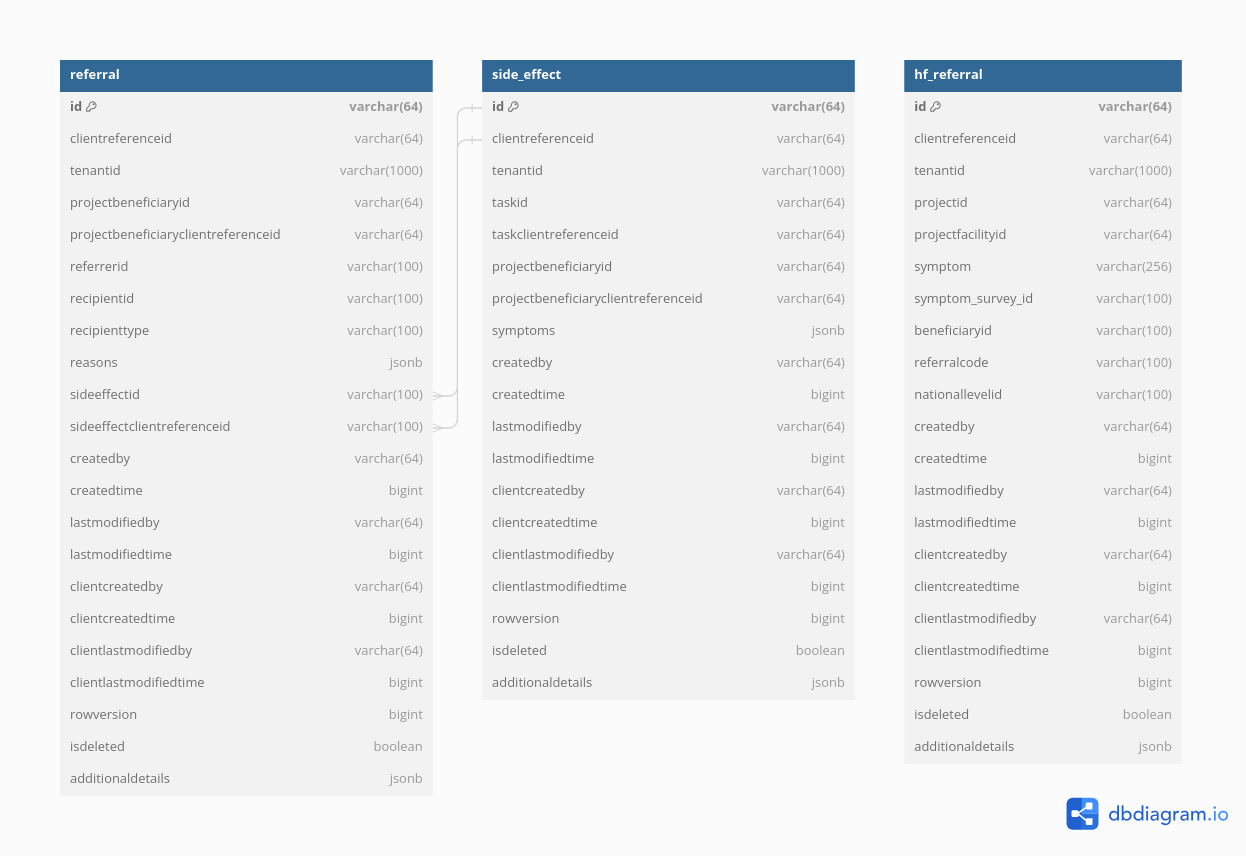
## Database Schema
 ## Postman Collections
[Click here to access ](https://www.postman.com/sreejith-kanjarla-759135/hcm-collection/folder/75scg2j/referral-management)the Postman collection.
---
# Agent Instructions: Querying This Documentation
If you need additional information that is not directly available in this page, you can query the documentation dynamically by asking a question.
Perform an HTTP GET request on the current page URL with the `ask` query parameter:
```
GET https://docs.digit.org/health/deploy/configuration/hcm-service-configuration/referral-management.md?ask=
```
The question should be specific, self-contained, and written in natural language.
The response will contain a direct answer to the question and relevant excerpts and sources from the documentation.
Use this mechanism when the answer is not explicitly present in the current page, you need clarification or additional context, or you want to retrieve related documentation sections.
## Postman Collections
[Click here to access ](https://www.postman.com/sreejith-kanjarla-759135/hcm-collection/folder/75scg2j/referral-management)the Postman collection.
---
# Agent Instructions: Querying This Documentation
If you need additional information that is not directly available in this page, you can query the documentation dynamically by asking a question.
Perform an HTTP GET request on the current page URL with the `ask` query parameter:
```
GET https://docs.digit.org/health/deploy/configuration/hcm-service-configuration/referral-management.md?ask=
```
The question should be specific, self-contained, and written in natural language.
The response will contain a direct answer to the question and relevant excerpts and sources from the documentation.
Use this mechanism when the answer is not explicitly present in the current page, you need clarification or additional context, or you want to retrieve related documentation sections.