# Attendance Management

## **Overview**

The attendance feature enables supervisors to manage and mark the attendance of field staff (attendees) during the campaign period. Attendance can be tracked daily, ensuring accountability and performance monitoring throughout the campaign.

**Role Involved:** `DISTRICT_SUPERVISOR`

### **User actions**

This module has 3 associated screens:

1. Manage Attendance
2. Date and Session Selection
3. Mark Attendance

## **Workflow Details**

### **1. Manage Attendance**

* Supervisors can view the attendance registers assigned to them.
* Registers are created manually by mapping a project and the supervisor/staff members.
* Attendance Completion Logic:
  * The system checks attendance logs for each session (entry and exit).
  * If logs match both session times, the individual is marked **Present**.
  * If logs are missing or incomplete, the individual is marked **Absent**.
  * The system generates a list of completed dates using `generateDateList`.

. <img src="https://lh7-us.googleusercontent.com/49dwF5hNZfYutpxfQqoaSwywfEpNSr_6d7tCThE5UerWeVMe-xxwikoVQRzXA0bXUo1FAXNuPt0-360naANEVkWOAmnDfVkwQWRRFKN0txG8fI3CSEtjQ8fJ9pdMZwNBhh9LDUuCrqEM2V5z_4lclU0" alt="" data-size="original">

#### Data Field to Manage Attendance Screen:

<table><thead><tr><th width="203.6015625">Field </th><th>Description</th></tr></thead><tbody><tr><td>Campaign name</td><td>Name of the campaign.</td></tr><tr><td>Event type</td><td>Type of event where attendance is done, that is training or distribution.</td></tr><tr><td>Start date</td><td>Start date of the campaign.</td></tr><tr><td>End date </td><td>End date of the campaign.</td></tr><tr><td>Status</td><td>If the end date is passed, the status will be inactive, or if the register status is inactive, the status will be inactive, else, the status will be active.</td></tr><tr><td>Staff count</td><td>Number of attendees in the register.</td></tr><tr><td>Attendance completion</td><td>Shows the number of days for which attendance has been submitted submitted to the server.</td></tr></tbody></table>

### 2. Date & Session Selection

* Attendance can be marked for any date between the register’s **start date** and the **end date** (or today’s date if before the end date).
* If attendance is already submitted for a date, the option changes from **Mark Attendance** to **View Attendance**.
* **Missed Attendance Logic:** The system compares submitted dates with the register timeline to identify missed dates.

<img src="https://lh7-us.googleusercontent.com/eolzJ0PTKblHOu8S6FoSv1_GaNGudzQiNqPb3Vkh9wrNJ0F7dcWDtqMprNKGMIdvHwoi4Uelqy14Y0gk1Ock0iUo2yJDBTg7M9TWtueBMfwDIVpQOEQoQFnROG9Ctb1Di-5B2CEKeEdwXfATBLYf3m0" alt="" data-size="original">

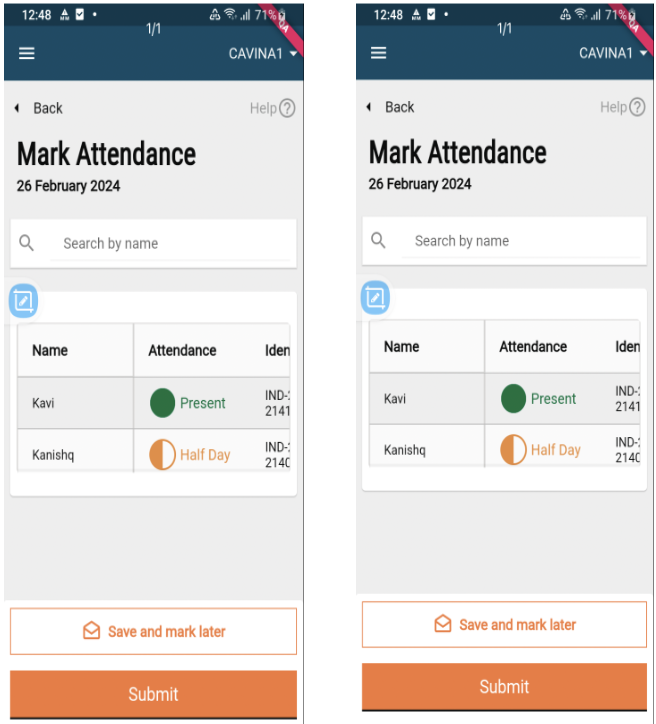
### 3. Mark Attendance&#x20;

* Supervisors can record attendance twice daily (entry and exit) by default.
* Possible statuses:
  * **Not Marked**: Default state.
  * **Present**: Single tap → Not Marked → Present.
  * **Absent**: Double tap → Present → Absent.
  * **Half-day** (if configured): Triple tap → Absent → Half-day.
* **Save and Mark Later**: Allows partial saving of marked records, which can be reopened later.
* **Submit**: Requires attendance for all staff before submission. On successful submission, the supervisor is redirected to an acknowledgement screen.

<figure><img src="/files/YNSybzjA2Ccbsbi6bMdx" alt=""><figcaption></figcaption></figure>

## **Technical Implementation**

### **Mark Attendance & Create Oplog Logic**

1. **Attendance Submission Check**
   * Each attendance log has a flag: `upload_to_server`.
   * If `upload_to_server = true`, it means the attendance for that register is ready to be submitted to the server.
2. **Filter Valid Records**
   * Only **Present** and **Half-day** records are uploaded.
   * **Absent** records are **not** sent to the server.
3. **Generate Oplogs**
   * For each valid record (Present / Half-day), create **two log objects**:
     * **ENTRY** → Captures the check-in time.
     * **EXIT** → Captures the check-out time.
   * Both logs include metadata: `registerId`, `individualId`, `tenantId`, and optional `documentIds`.
4. **Oplog Structure Example**

   ```json
   jsonCopyEdit[
     {
       "registerId": registerId,
       "individualId": attendeeList.individualId,
       "time": entryTime,         // Session entry time
       "type": "ENTRY",           // Log type
       "status": "ACTIVE",
       "tenantId": tenantId,
       "documentIds": []
     },
     {
       "registerId": registerId,
       "individualId": attendeeList.individualId,
       "time": exitTime,          // Session exit time
       "type": "EXIT",            // Log type
       "status": "ACTIVE",
       "tenantId": tenantId,
       "documentIds": []
     }
   ]
   ```

***

#### **Logic Summary**

* Mark attendance for each individual.
* If **Present** or **Half-day** → Create `ENTRY` and `EXIT` oplogs.
* If **Absent** → Do not generate oplogs.
* Submit oplogs where `upload_to_server = true`.

### Attendance Completion Days Logic

The logic ensures attendance is only marked complete when both **entry and exit logs match the expected session times**. Otherwise, individuals default to **Absent**, and the system computes the number of fully completed attendance days accordingly.

1. **Fetch Attendance Logs**
   * Retrieve all attendance logs for a given register.
   * Each log contains session details such as entry time and exit time.
2. **Validate Sessions**
   * The register may have **1 session (single)** or **2 sessions (morning & evening)** configured.
   * For a session to be considered complete, the individual must have logs where:
     * **Entry time = session start time**
     * **Exit time = session end time**
3. **Default Absence Handling**
   * If logs exist for an individual but do not match the session’s start and end times, the system defaults the individual’s status to **Absent**.
4. **Generate Completed Dates List**

   * Use the helper function `generateDateList` to generate a list of dates for which attendance was fully completed.
   * Inputs:
     * Register **start date**
     * Register **end date**
     * Completed attendance logs
     * Session type (single or double session)

   ```dart
   list = generateDateList(
     e.attendanceRegister.startDate!,          // Register start date
     e.attendanceRegister.endDate!,            // Register end date
     registerCompletedLogs ?? [],              // Completed logs if any
     e.attendanceRegister.additionalDetails?["sessions"] != 2,  // Session type flag
   );
   ```
5. **Calculate Completed Days Count**

   * For registers with **2 sessions**:
     * Each day has two entries (one for each session).
     * The count of completed days is derived by dividing the total logs by 2.
   * For registers with **1 session**:
     * Each day corresponds to a single entry.
     * The total completed days equals the length of the list.

   ```dart
   var completedDaysCount =
      e.attendanceRegister.additionalDetails?["sessions"] == 2
         ? list.length ~/ 2   // Divide by 2 for double sessions
         : list.length;       // Direct count for single sessions
   ```

***

## API Details

<table><thead><tr><th width="142.45833333333334">End Point</th><th width="105.921875">Request Method</th><th>Request Info</th></tr></thead><tbody><tr><td><strong>/health-attendance/v1/_search</strong></td><td><code>POST</code></td><td><pre class="language-json"><code class="lang-json">curl --location --globoff '{{base_url}}/attendance/v1/_search?tenantId=mz&#x26;staffId={{individualId}}&#x26;referenceId={{projectId}}' \
--header 'Content-Type: application/json' \
--data '{
        "RequestInfo": {
        "apiId": "mukta-services",
        "action": "",
        "did": 1,
        "key": "",
        "msgId": "20170310130900|en_IN",
        "requesterId": "",
        "ts": 1513579888683,
        "ver": ".01",
        "authToken": "{{token}}"
    }
}
'
</code></pre></td></tr><tr><td><strong>/individual/v1/_search</strong></td><td>POST</td><td><pre class="language-json"><code class="lang-json">curl --location 'https://unified-dev.digit.org/individual/v1/_search?limit=1000&#x26;offset=0&#x26;tenantId=mz&#x26;includeDeleted=false' \
--header 'Content-Type: application/json' \
--data '{
<strong>    "RequestInfo": {
</strong>        "authToken": "fc30d219-1075-4ee0-93af-8dc987f18b1c"
    },
    "Individual": {

```
    "id":[{{listOfIndividualIds}}],
    "tenantId":{{tenanatId}}
}
```

}' </code></pre></td></tr><tr><td><strong>/health-attendance/log/v1/\_search</strong></td><td>POST</td><td><pre><code>curl --location '<http://localhost:8023/health-attendance/log/v1/_search?tenantId=mz&#x26;registerId=>' \
\--header 'Content-Type: application/json' \
\--data '{
"RequestInfo": {
"apiId": "mukta-services",
"action": "",
"did": 1,
"key": "",
"msgId": "20170310130900|en\_IN",
"requesterId": "",
"ts": 1513579888683,
"ver": ".01",
"authToken": "{{token}}",
"userInfo": {
"id": 324783744763,
"uuid": "01b5b303-9e80-49d7-9d65-396675f0591e"
}
}
}' </code></pre></td></tr><tr><td><strong>/health-attendance/log/v1/\_create</strong></td><td>POST</td><td><pre><code>curl --location '<https://unified-dev.digit.org/health-attendance/log/v1/_create>' \
\--header 'Content-Type: application/json' \
\--data '{
"RequestInfo": {
"apiId": "mukta-services",
"action": "",
"did": 1,
"key": "",
"msgId": "20170310130900|en\_IN",
"requesterId": "",
"ts": 1513579888683,
"ver": ".01",
"authToken":"{{token}}"
},
"attendance": \[
{
"registerId": {{registerId}},
"individualId": {{individualId}},
"time": ,
"type": "ENTRY",
"status": "ACTIVE",
"tenantId": {{tenantId}},
"documentIds":\[]
},
{
"registerId": {{registerId}},
"individualId": {{individualId}},
"time": ,
"type": "EXIT",
"status": "ACTIVE",
"tenantId": {{tenantId}},
"documentIds":\[]
}
]
}
' </code></pre></td></tr></tbody></table>


---

# Agent Instructions: Querying This Documentation

If you need additional information that is not directly available in this page, you can query the documentation dynamically by asking a question.

Perform an HTTP GET request on the current page URL with the `ask` query parameter:

```
GET https://docs.digit.org/health/deploy/configuration/hcm-ui-configuration/attendance-management.md?ask=<question>
```

The question should be specific, self-contained, and written in natural language.
The response will contain a direct answer to the question and relevant excerpts and sources from the documentation.

Use this mechanism when the answer is not explicitly present in the current page, you need clarification or additional context, or you want to retrieve related documentation sections.