> For the complete documentation index, see [llms.txt](https://docs.digit.org/llms.txt). Markdown versions of documentation pages are available by appending `.md` to page URLs; this page is available as [Markdown](https://docs.digit.org/health/deploy/configuration/hcm-ui-configuration/stock-management.md).
# Stock Management
### 1. Overview
The **Stock Management screen** in the DIGIT HCM app enables users to manage medical or inventory stock items within healthcare facilities. The screen provides capabilities for adding, updating, tracking, and viewing stock levels, as well as recording stock transactions (such as receipts, issues, and transfers). The goal is to ensure transparency, traceability, and effective management of health-related inventories.
***
### 2. Workflow Details
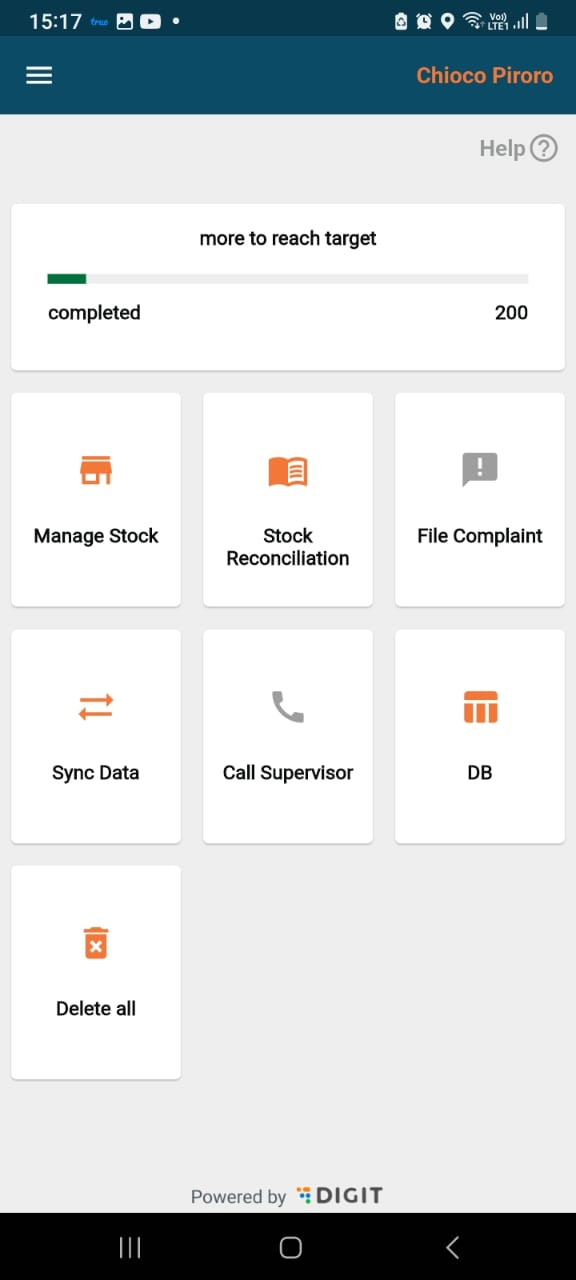
* The home screen contains 2 options - Manage Stock and Stock Reconciliation.
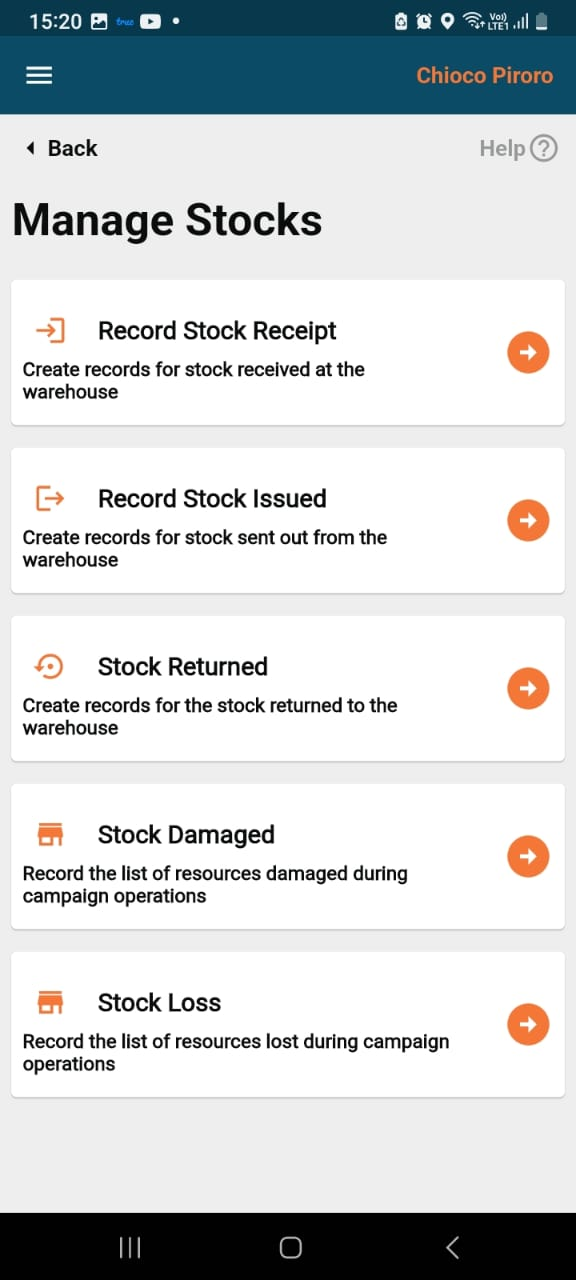
**Manage Stock** screen -
This screen consists of the following types of transactions that take place for the inventory:
* Stock Receipt
* Stock Issued
* Stock Returned
* Stock Damaged
* Stock Loss
**Stock Receipt screen -**
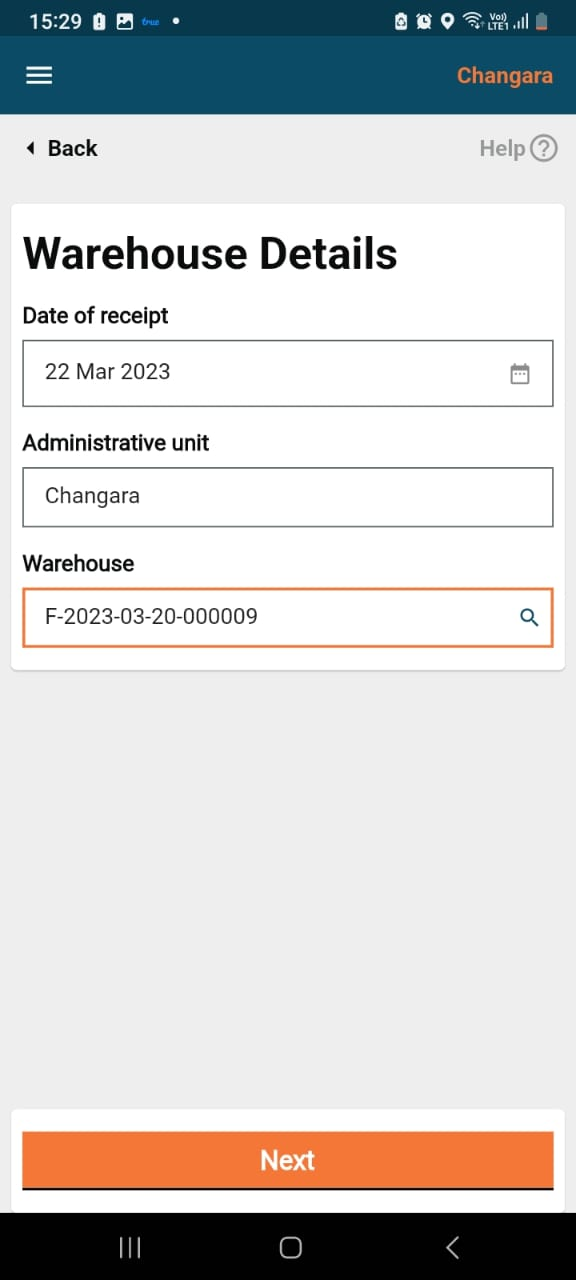
* When a user clicks on record stock receipt, the warehouse details screen will appear.
* The latitude/longitude captures the geo-location of the warehouse, which can be fetched with the help of the location icon within the field.
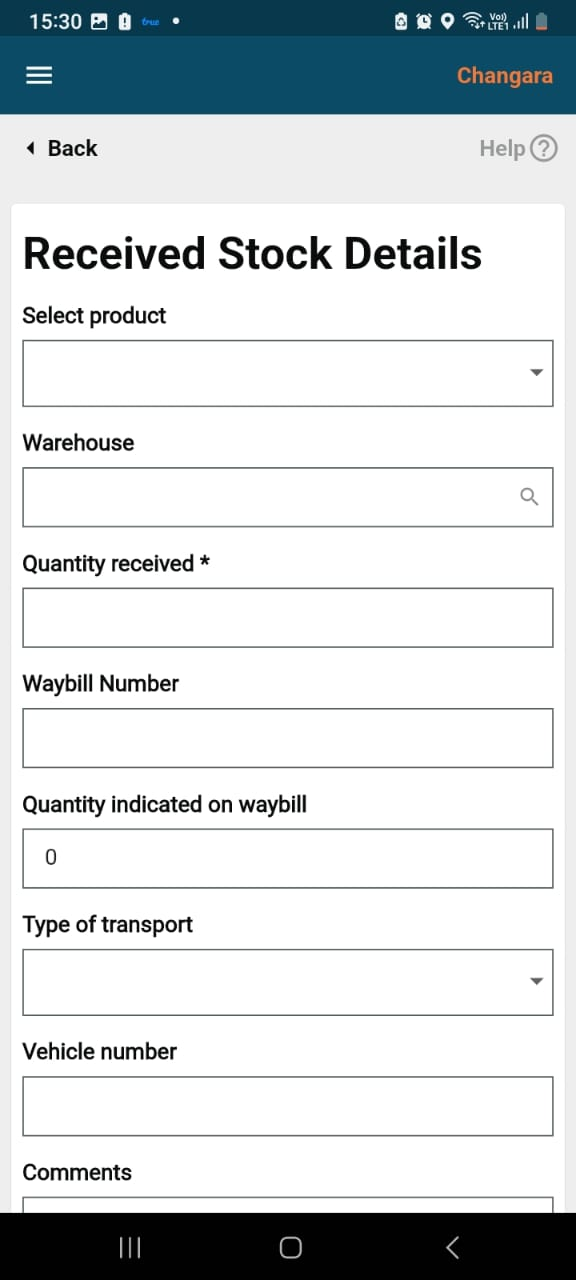
* Clicking on the Next button navigates the user to the "Received Stock" details screen.
* The "Receipt Stock Details" form has some mandatory fields: product, received from the warehouse, and quantity received.
* The optional fields include waybill number, quantity indicated on the waybill, transport type, vehicle number, and comments.
* Clicking on the submit button will take the user to the success page.
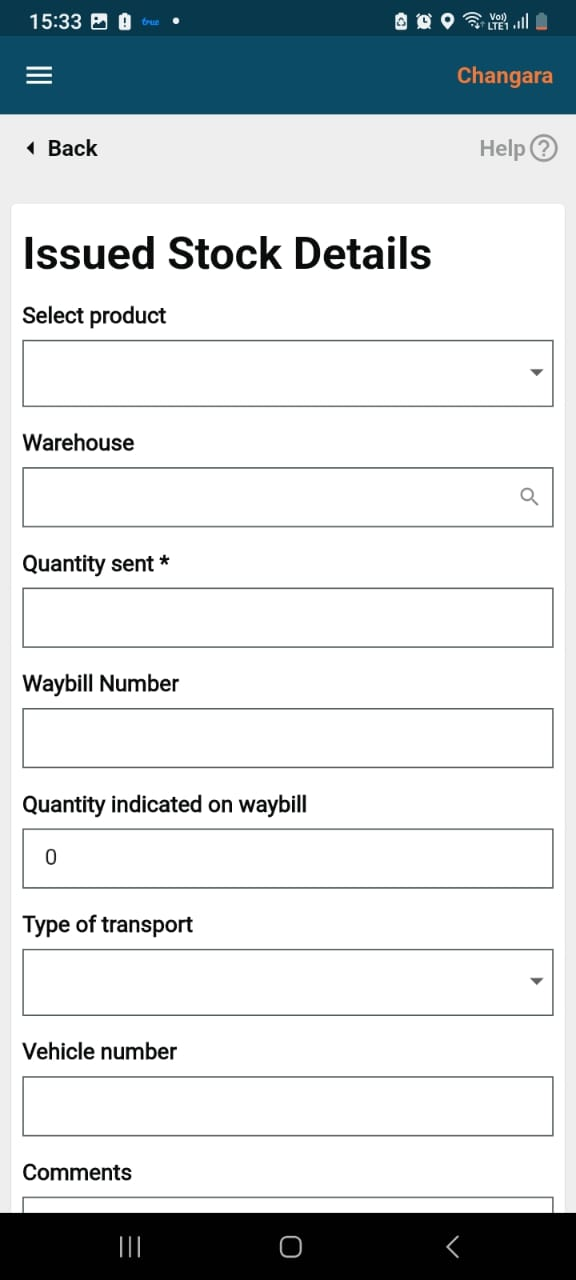
**Record Stock Issued**
* This screen captures the mandatory fields: Product, Issued to warehouse, and the quantity.
* The optional fields include waybill number, quantity indicated on waybill, transport type, vehicle number and comments.
* Clicking on the submit button will go to the success page.
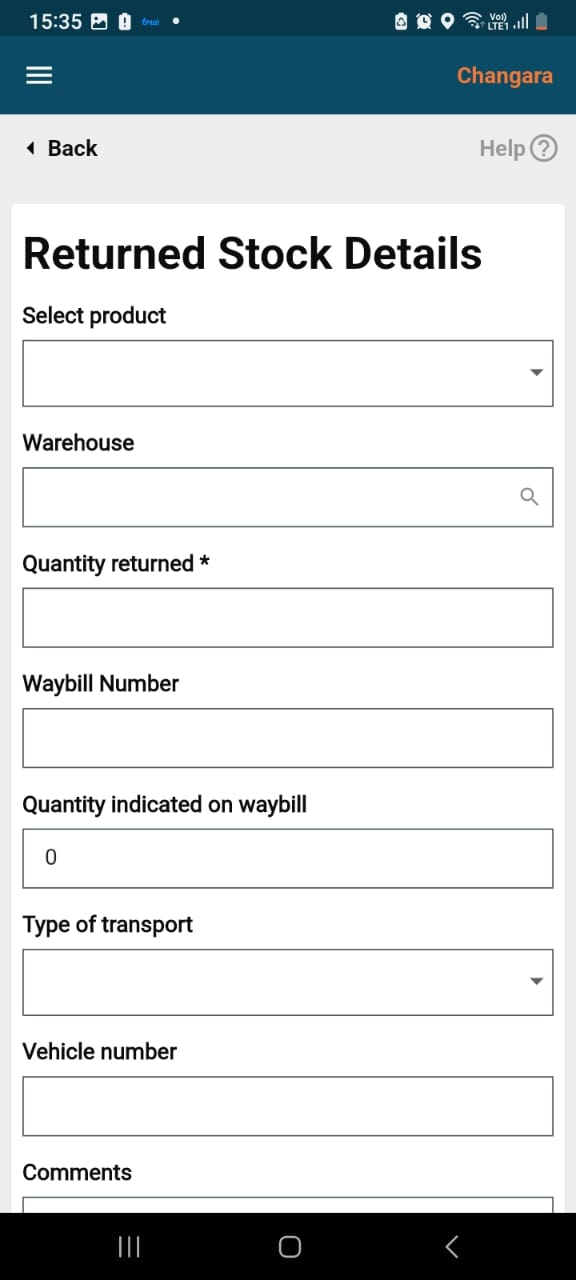
**Returned Stock Details**
This screen captures the mandatory fields: Product, returned to warehouse, and quantity returned.
The optional fields are waybill number, quantity indicated on the waybill, transport type, vehicle number, and comments.
Clicking on the **Submit** button will take the user to the success page.
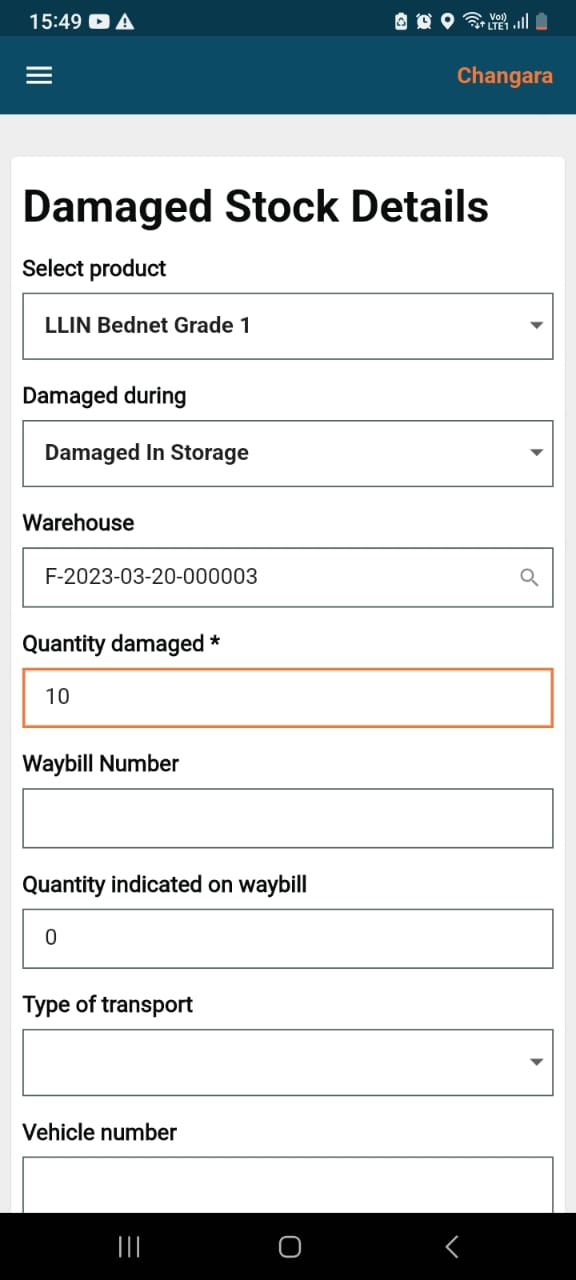
**Damaged Stock Details**
* This screen captures the mandatory fields: Product, damaged during, received from, and quantity damaged.
* The optional fields include waybill number, quantity indicated on the waybill, transport type, vehicle number, and comments.
* Clicking on the submit button will take he user to the success page.
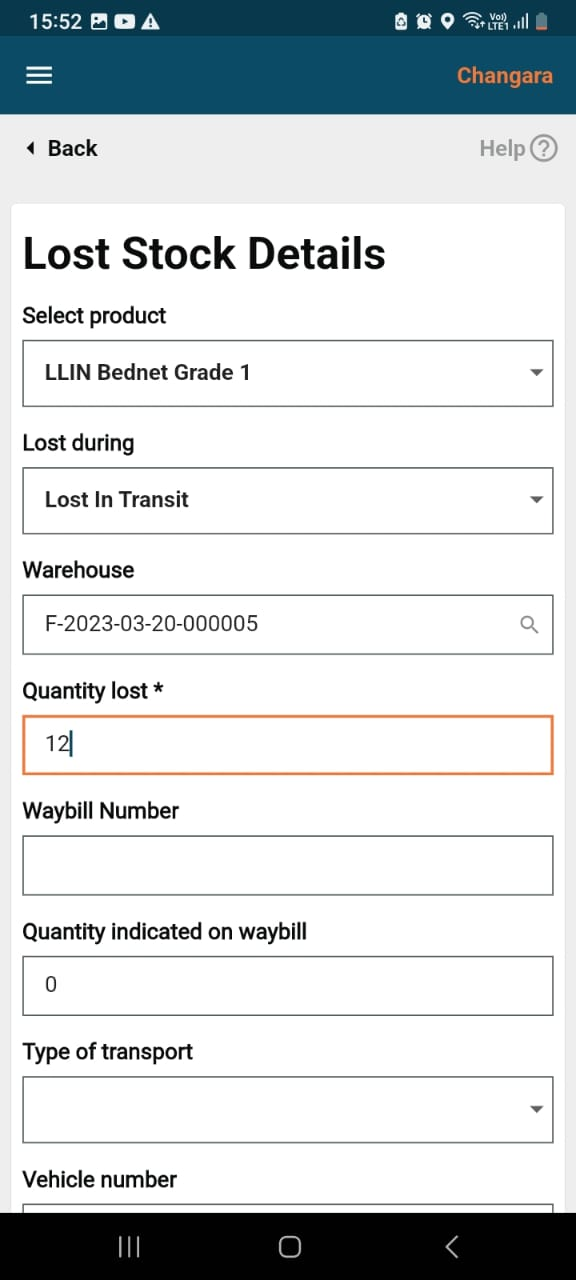
**Lost Stock Details**
This screen captures the mandatory fields: Product, lost during, received from, and quantity lost.
The optional fields are Waybill Number, quantity indicated on the waybill, transport type, vehicle number, and comments.
Clicking on the **Submit** button will take the user to the success page.
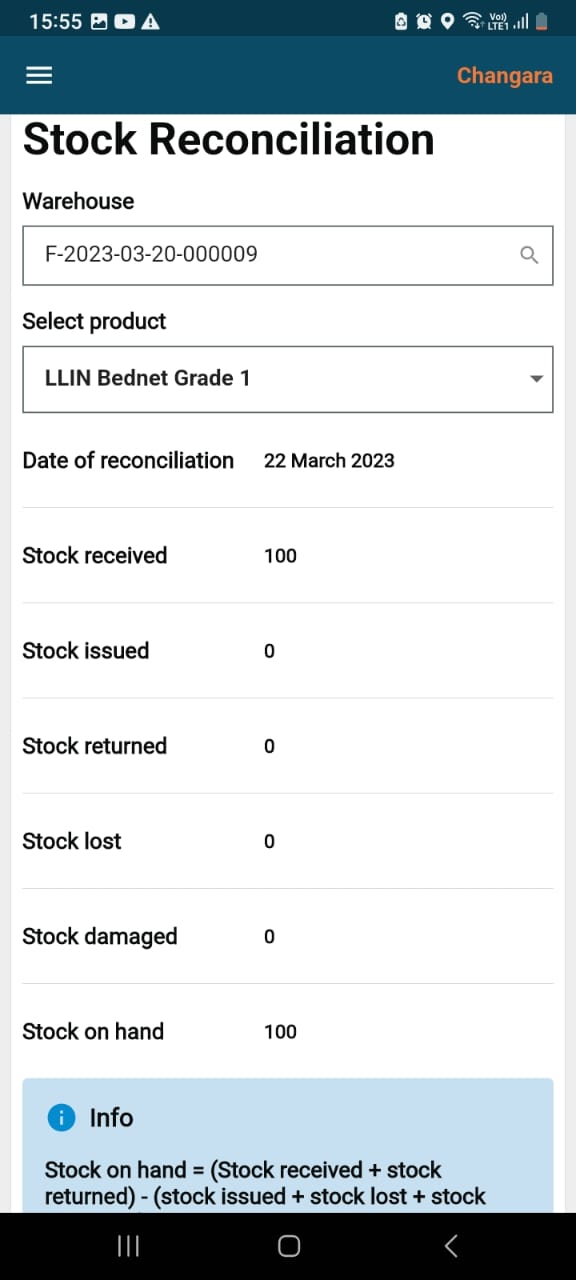
### Stock Reconciliation
* When the user clicks on the stock reconciliation button on the home screen, he/she is navigated to this screen where he/she needs to verify whether the physical count and calculated stock values are the same or not.
* In the select product field, the user needs to select a product from the dropdown.
* There are warehouse name and administrative area fields as well, all of which are mandatory.
***
### 3. Technical Implementation
* **MDMS Configuration**
* Stock item master data, stock categories, and relevant dropdowns are configured in MDMS under appropriate modules (e.g., `StockItem`, `StockCategory`).
* UI reads master data via the MDMS API to populate dropdowns and options.
* **UI Components**
* Implemented using React (or similar frameworks) as modular components:
* Stock Dashboard/List (table/grid)
* Stock Transaction Forms (Add, Issue, Transfer, Adjust)
* Stock Detail and History views
* Validation and error handling for all form fields.
* File upload support for transaction documents (if applicable).
* **State Management**
* Use Redux (or context API) to manage stock state, transaction drafts, and API responses.
* Filters and pagination for lists.
* **Localization**
* All labels, messages, and dropdown options are localised using the localisation service.
* **Sample API Integrations**
* Fetch stock: `/stock/v1/_search`
* Create receipt: `/stock/v1/_create`
* Update stock: `/stock/v1/_update`
* Stock transactions: `/stock/transaction/v1/_create`
* **Navigation Logic**
* After each transaction (create/update/transfer), the user is redirected to the dashboard or item detail with a success message.
* Errors and validation issues are displayed inline.
* Code References
* [digit\_divider.dart](https://github.com/egovernments/DIGIT-UI-LIBRARIES/blob/master/flutter/digit-ui-components/digit_components/lib/widgets/atoms/digit_divider.dart)
* [input\_wrapper.dart](https://github.com/egovernments/DIGIT-UI-LIBRARIES/blob/master/flutter/digit-ui-components/digit_components/lib/widgets/atoms/input_wrapper.dart)
* [label\_value\_list.dart](https://github.com/egovernments/DIGIT-UI-LIBRARIES/blob/master/flutter/digit-ui-components/digit_components/lib/widgets/atoms/label_value_list.dart)
* [pop\_up\_card.dart](https://github.com/egovernments/DIGIT-UI-LIBRARIES/blob/master/flutter/digit-ui-components/digit_components/lib/widgets/atoms/pop_up_card.dart)
* [digit\_card.dart](https://github.com/egovernments/DIGIT-UI-LIBRARIES/blob/master/flutter/digit-ui-components/digit_components/lib/widgets/molecules/digit_card.dart)
* [show\_pop\_up](https://github.com/egovernments/DIGIT-UI-LIBRARIES/blob/master/flutter/digit-ui-components/digit_components/lib/widgets/molecules/show_pop_up.dart)
***
### 4. API Role Action Mapping
* **Relevant APIs and Actions:**
* `/stock/v1/bulk/_search` — Fetch the required stock item details
```
{
"RequestInfo": {
"authToken": "string"
},
"Stock": {
"id": [
"string"
],
"clientReferenceId": [
"string"
],
"facilityId": "FacilityA",
"productVariantId": "string",
"referenceId": "C-1",
}
}
```
* `/stock/v1/bulk/_create` — Add new stock
```
{
"RequestInfo": {
"authToken": "string"
},
"Stock": [
{
"clientReferenceId": "string",
"tenantId": "tenantA",
"facilityId": "FacilityA",
"productVariantId": "string",
"quantity": 0,
"wayBillNumber": "string",
"referenceId": "C-1",
"referenceIdType": "PROJECT",
"transactionType": "RECEIVED",
"transactionReason": "RECEIVED",
"transactingPartyId": "string",
"transactingPartyType": "WAREHOUSE",
}
]
}
```
* `/stock/v1/bulk/_update` — Update existing stock
```
{
"RequestInfo": {
"authToken": "string"
},
"Stock": [
{
"id":"UUID"
"clientReferenceId": "string",
"tenantId": "tenantA",
"facilityId": "FacilityA",
"productVariantId": "string",
"quantity": 0,
"wayBillNumber": "string",
"referenceId": "C-1",
"referenceIdType": "PROJECT",
"transactionType": "RECEIVED",
"transactionReason": "RECEIVED",
"transactingPartyId": "string",
"transactingPartyType": "WAREHOUSE",
}
]
}
```
* `/stock/reconciliation/v1/bulk/_create` — Record stock transactions
```
{
"RequestInfo": {
"authToken": "string"
},
"StockReconciliation": [
{
"clientReferenceId": "string",
"tenantId": "tenantA",
"facilityId": "FacilityA",
"productVariantId": "string",
"referenceId": "C-1",
"referenceIdType": "PROJECT",
"physicalCount": 0,
"calculatedCount": 0,
"commentsOnReconciliation": "string",
"dateOfReconciliation": 1663218161,
"rowVersion": 0
}
]
}
```
* `/stock/reconciliation/v1/_search` — Fetch reconciled stock details
```
{
"RequestInfo": {
"authToken": "string"
},
"StockReconciliation": {
"id": [
"string"
],
"clientReferenceId": [
"string"
],
"facilityId": "FacilityA",
"productVariantId": "string"
}
}
```
* **Role-Action Mapping Example:**
```
[
{ "rolecode": "STOCK_MANAGER", "actionid": 2010, "tenantId": "default" }, // /stock/v1/_search
{ "rolecode": "STOCK_MANAGER", "actionid": 2011, "tenantId": "default" }, // /stock/v1/_create
{ "rolecode": "STOCK_MANAGER", "actionid": 2012, "tenantId": "default" }, // /stock/v1/_update
{ "rolecode": "STOCK_MANAGER", "actionid": 2013, "tenantId": "default" }, // /stock/transaction/v1/_create
{ "rolecode": "ANONYMOUS", "actionid": 1001, "tenantId": "default" }, // /mdms/v1/_search
{ "rolecode": "ANONYMOUS", "actionid": 1002, "tenantId": "default" } // /localization/messages/v1/_search
]
```
{% hint style="info" %}
**Notes:**
* Ensure all actions are included and enabled in the MDMS action master.
* Map necessary roles (e.g., `STOCK_MANAGER`, `ADMIN`, etc.) to each API action for detailed access control.
This allows a user to manage stocks and also facilitates stock reconciliation.
{% endhint %}
---
# Agent Instructions
This documentation is published with GitBook. GitBook is the documentation platform designed so that both humans and AI agents can read, navigate, and reason over technical content effectively. Learn more at gitbook.com.
## Querying This Documentation
If you need additional information that is not directly available in this page, you can query the documentation dynamically by asking a question.
Perform an HTTP GET request on the current page URL with the `ask` query parameter, and the optional `goal` query parameter:
```
GET https://docs.digit.org/health/deploy/configuration/hcm-ui-configuration/stock-management.md?ask=&goal=
```
`ask` is the immediate question: it should be specific, self-contained, and written in natural language.
`goal` is optional and describes the broader end goal you are ultimately trying to accomplish on behalf of the user. GitBook uses it to tailor the answer towards what is most useful for that goal.
The response will contain a direct answer to the question and relevant excerpts and sources from the documentation.
Use this mechanism when the answer is not explicitly present in the current page, you need clarification or additional context, or you want to retrieve related documentation sections.