> For the complete documentation index, see [llms.txt](https://docs.digit.org/llms.txt). Markdown versions of documentation pages are available by appending `.md` to page URLs; this page is available as [Markdown](https://docs.digit.org/health/design/architecture/low-level-design/registries/household.md).

# Household

## Overview

A household is the **registry of homes** visited by a health campaign. Each record represents one home. A household stores its shared address and optional GPS location. It also stores its member count and type, such as family or community.

Each household member references a person in the **Individual** registry. One member can be the **head**. Member records can also define relationships, such as spouse, child, or parent.

In short: *Which homes exist, where are they, who lives in each, and how are they related?*

## Business Flow

* **During registration/enumeration**, field workers walk an area and register each household (location, head, member count). Each person added becomes a **household member** linked to an Individual record.
* **During campaign delivery**, household and member records provide context for beneficiary visits. Services, eligibility, and reports reference the relevant household or member.
* **As things change** (a member moves in/out, the head changes, a household splits), workers update or soft-delete records; mobile devices sync these edits back and forth.
* The data feeds **dashboards** (via the transformer → Elasticsearch) and is **bulk-read by downsync** (referral-management) so a device can pull every household in its assigned area for offline work.

The `/household` context contains two entities: households and members. For example, create a household with `POST /household/v1/_create`. Create a member with `POST /household/member/v1/_create`.

Each entity supports single and bulk create, update, delete, and search requests. Submit relationships within a household-member create or update request.

<table><thead><tr><th width="317.734375">Endpoint</th><th>Purpose</th></tr></thead><tbody><tr><td><code>POST /v1/_create</code>, <code>/v1/bulk/_create</code></td><td>Register a household (single or bulk).</td></tr><tr><td><code>POST /v1/_update</code>, <code>/v1/bulk/_update</code></td><td>Correct/change a household.</td></tr><tr><td><code>POST /v1/_delete</code>, <code>/v1/bulk/_delete</code></td><td>Soft-delete a household.</td></tr><tr><td><code>POST /v1/_search</code></td><td>Find households (by id, boundary/locality, lat-long radius, since-time…).</td></tr><tr><td><code>POST /member/v1/_create</code> … <code>/member/v1/bulk/_delete</code></td><td>Create bulk Household, This API is used to create/add new household in bulk or soft deleting the household</td></tr><tr><td><code>POST /member/v1/_search</code></td><td>Find members (by <code>householdId</code>, <code>individualId</code>, client-reference ids — each accepts a <strong>list</strong>).</td></tr></tbody></table>

#### Service Details

**API Details**

BasePath `/Household`

Household service APIs - contain create, update, delete and search endpoints

* POST `/member/v1/_create` - Create Household member: This API is used to create/add a new Household member.
* POST `/member/v1/bulk/_create` - Create bulk Household member: This API is used to create/add new household members in bulk.
* POST `/member/v1/_update` - Update Household member: This API is used to update the details of an existing Household member.
* POST `/member/v1/bulk/_update` - Update bulk Household member: This API is used to update the details of existing household members in bulk.
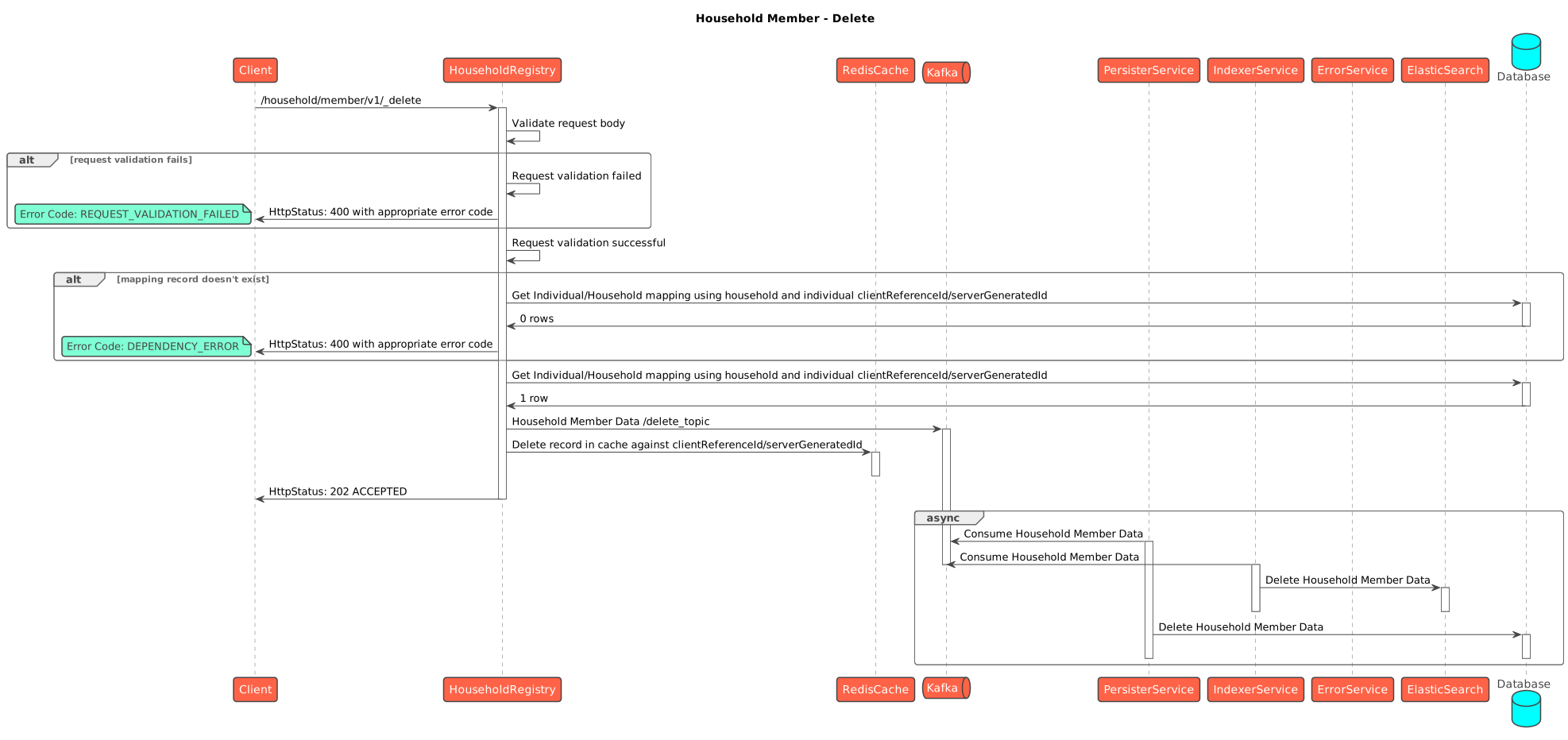
* POST `/member/v1/_delete` - Delete Household member: This API is used to soft delete details of an existing Household member.
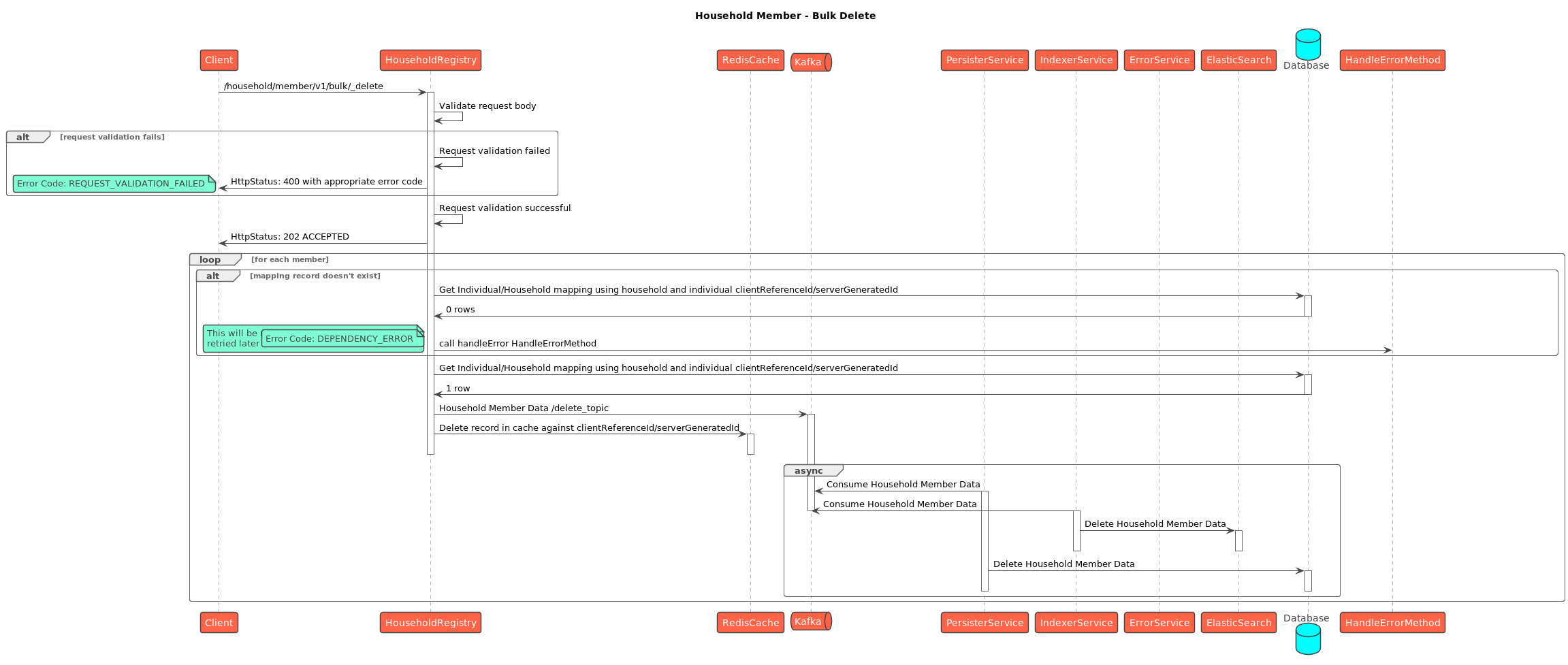
* POST `/member/v1/bulk/_delete` - Delete bulk Household member: This API is used to soft delete details of an existing Household member in bulk.
* POST `/member/v1/_search` - Search Household member: This API is used to search existing Household members.
* POST `/v1/_create` - Create Household: This API is used to create/add a new Household.
* POST `/v1/bulk/_create` - Create bulk Household: This API is used to create/add new households in bulk.
* POST `/v1/_update` - Update Household: This API is used to update the details of an existing Household.
* POST `/v1/bulk/_update` - Update bulk Household: This API is used to update the details of existing households in bulk.
* POST `/v1/_delete` - Delete Household: This API is used to soft delete details of an existing Household.
* POST `/v1/bulk/_delete` - Delete bulk Household: This API is used to soft delete details of an existing Household in bulk.
* POST `/v1/_search` - Search Household: This API is used to search existing Households.

**Kafka entry points (async).** Bulk requests land on `create-household-bulk-topic` / `update-…` / `delete-…` (and the `household-member-consumer-bulk-*` equivalents) and are processed by the service's own consumer. Persisted results go out on `save-household-topic` / `update-household-topic` / `delete-household-topic` (+ the `*-household-member-topic` set) for the persister and transformer.

**Swagger contract:**

{% embed url="<https://editor.swagger.io/?url=https://raw.githubusercontent.com/egovernments/health-campaign-services/master/docs/health-api-specs/contracts/registries/household.yml>" %}

#### Kafka topics

<table><thead><tr><th>Topic</th><th width="89.59375">Dir</th><th>Purpose</th></tr></thead><tbody><tr><td><code>create-household-bulk-topic</code></td><td>in</td><td>Bulk household create requests</td></tr><tr><td><code>update-household-bulk-topic</code></td><td>in</td><td>Bulk household update requests</td></tr><tr><td><code>delete-household-bulk-topic</code></td><td>in</td><td>Bulk household delete requests</td></tr><tr><td><code>household-member-consumer-bulk-create-topic</code></td><td>in</td><td>Bulk member create requests</td></tr><tr><td><code>household-member-consumer-bulk-update-topic</code></td><td>in</td><td>Bulk member update requests</td></tr><tr><td><code>household-member-consumer-bulk-delete-topic</code></td><td>in</td><td>Bulk member delete requests</td></tr><tr><td><code>save-household-topic</code></td><td>out</td><td>Persist new households</td></tr><tr><td><code>update-household-topic</code></td><td>out</td><td>Persist household updates</td></tr><tr><td><code>delete-household-topic</code></td><td>out</td><td>Persist household soft-deletes</td></tr><tr><td><code>save-household-member-topic</code></td><td>out</td><td>Persist new household members</td></tr><tr><td><code>update-household-member-topic</code></td><td>out</td><td>Persist member updates</td></tr><tr><td><code>delete-household-member-topic</code></td><td>out</td><td>Persist member soft-deletes</td></tr></tbody></table>

## Dependencies

* **idgen** — generates household record IDs.
* **individual** — validates the person each household member points to.
* **boundary-service** — validates the household's boundary/locality code.
* **health-services-common / -models** — shared clients, validators, POJOs (also brings in `tracer`).
* **Kafka** — async create/update/delete pipeline.
* **egov-persister** (deployed via the `configs/` repo) — actually writes the rows to Postgres off the `save-*` topics.
* **transformer → Elasticsearch** — builds the dashboard read-model from the same topics.
* **Redis** — caches in-flight records (the API pre-loads bulk payloads into cache before handing off to the consumer).
* **referralmanagement (downsync)** — a downstream **reader** of household + address data -[Referral Management](/health/deploy/configuration/hcm-service-configuration/referral-management.md).

## Process Flow

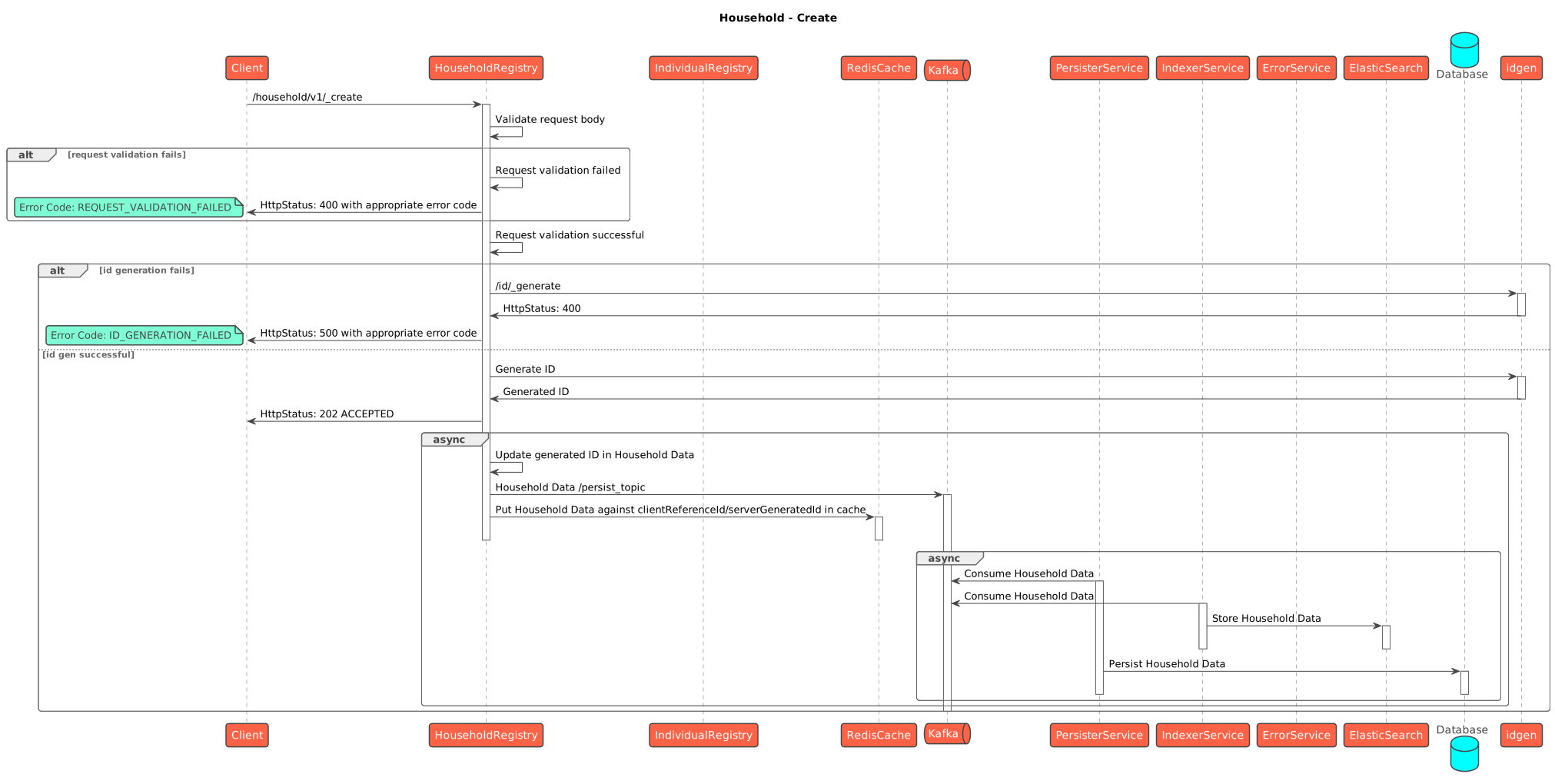
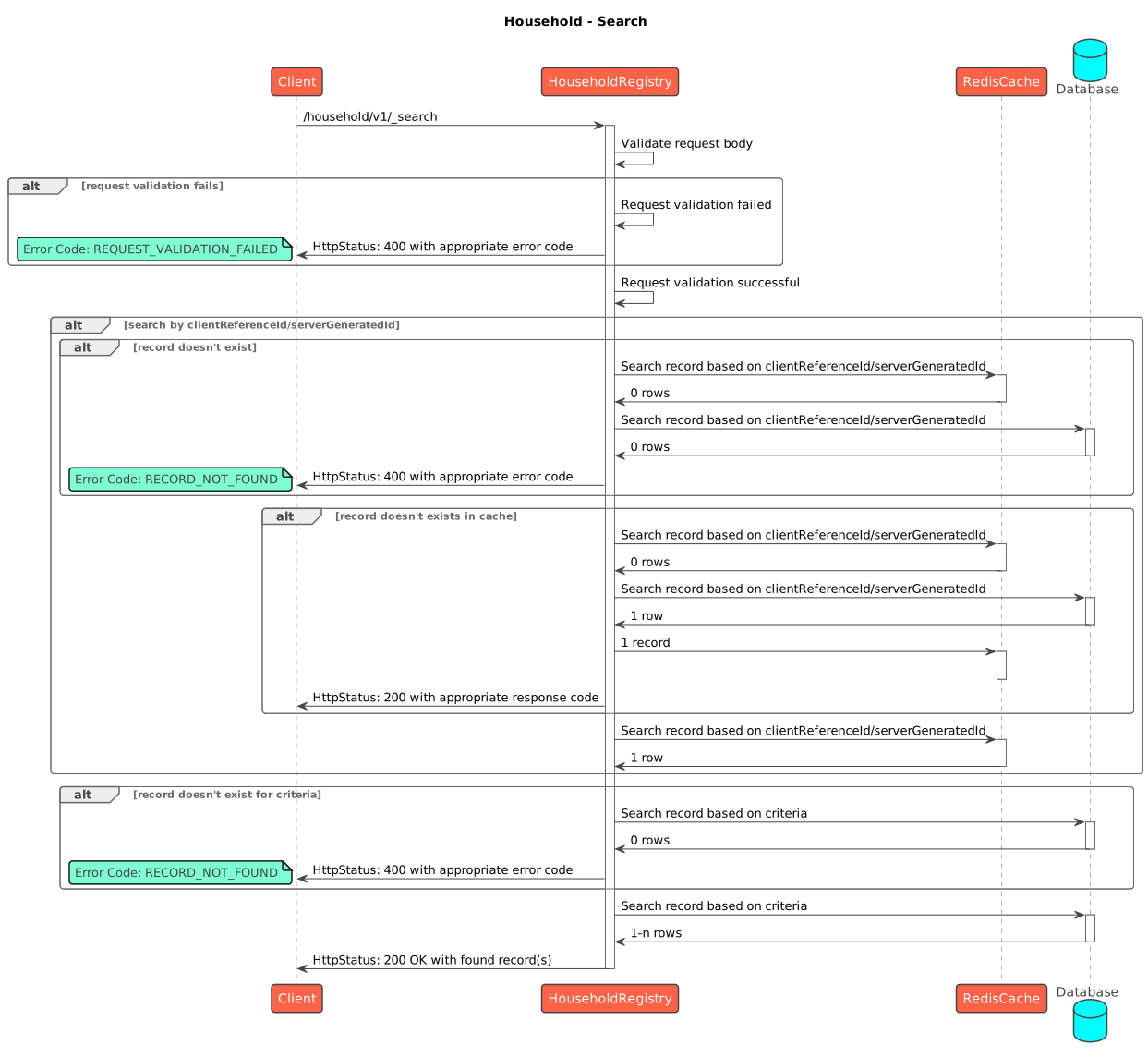
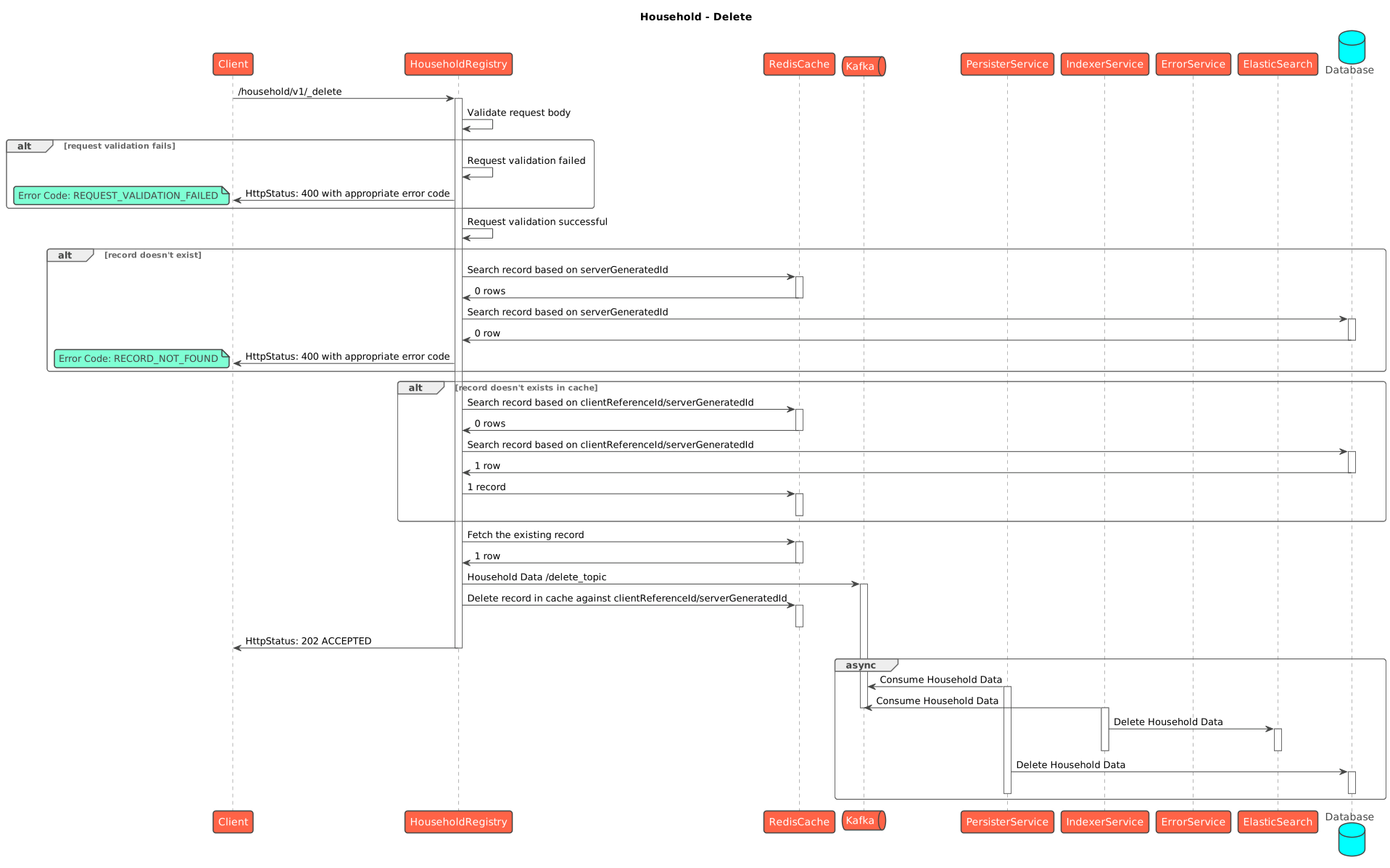
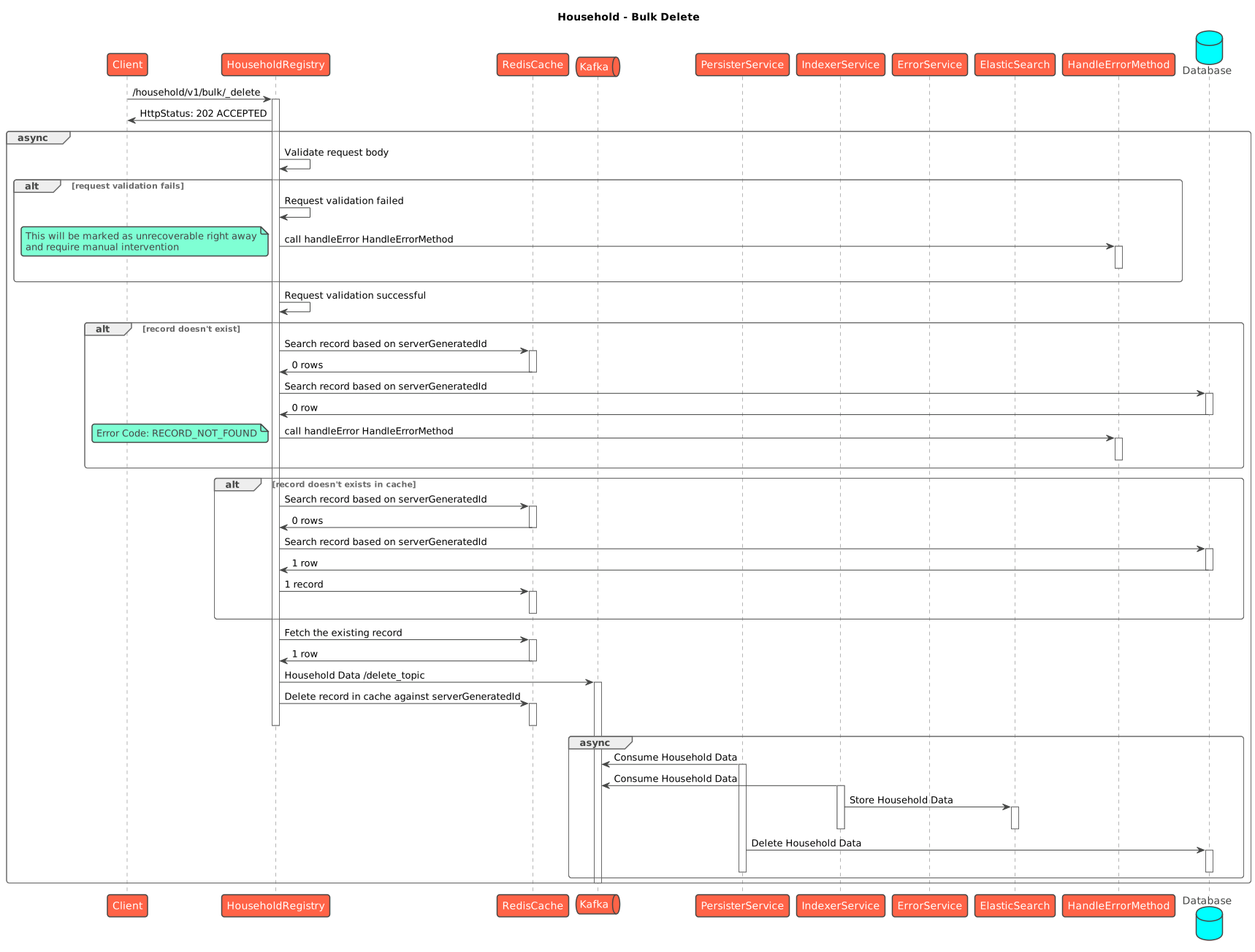
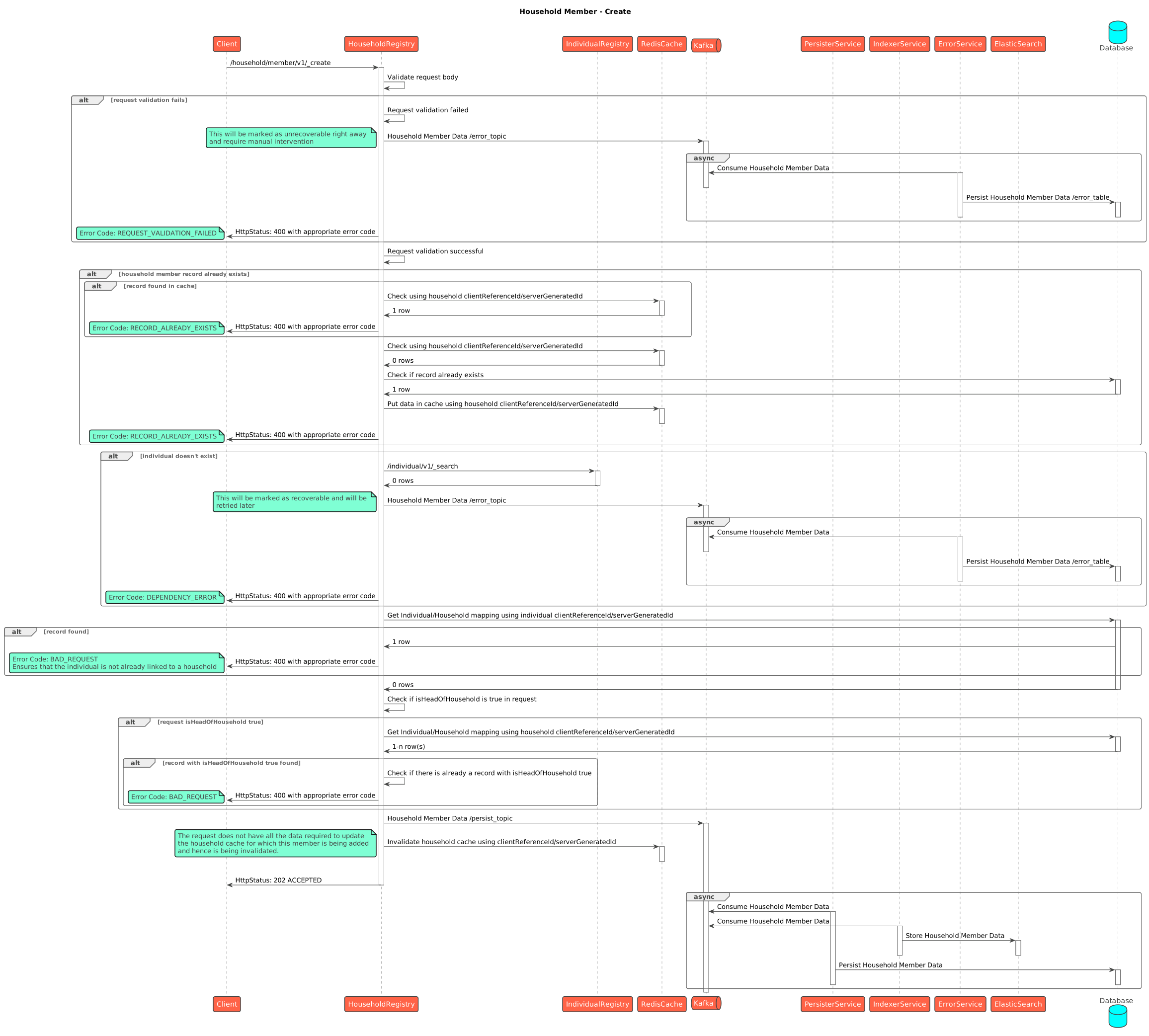
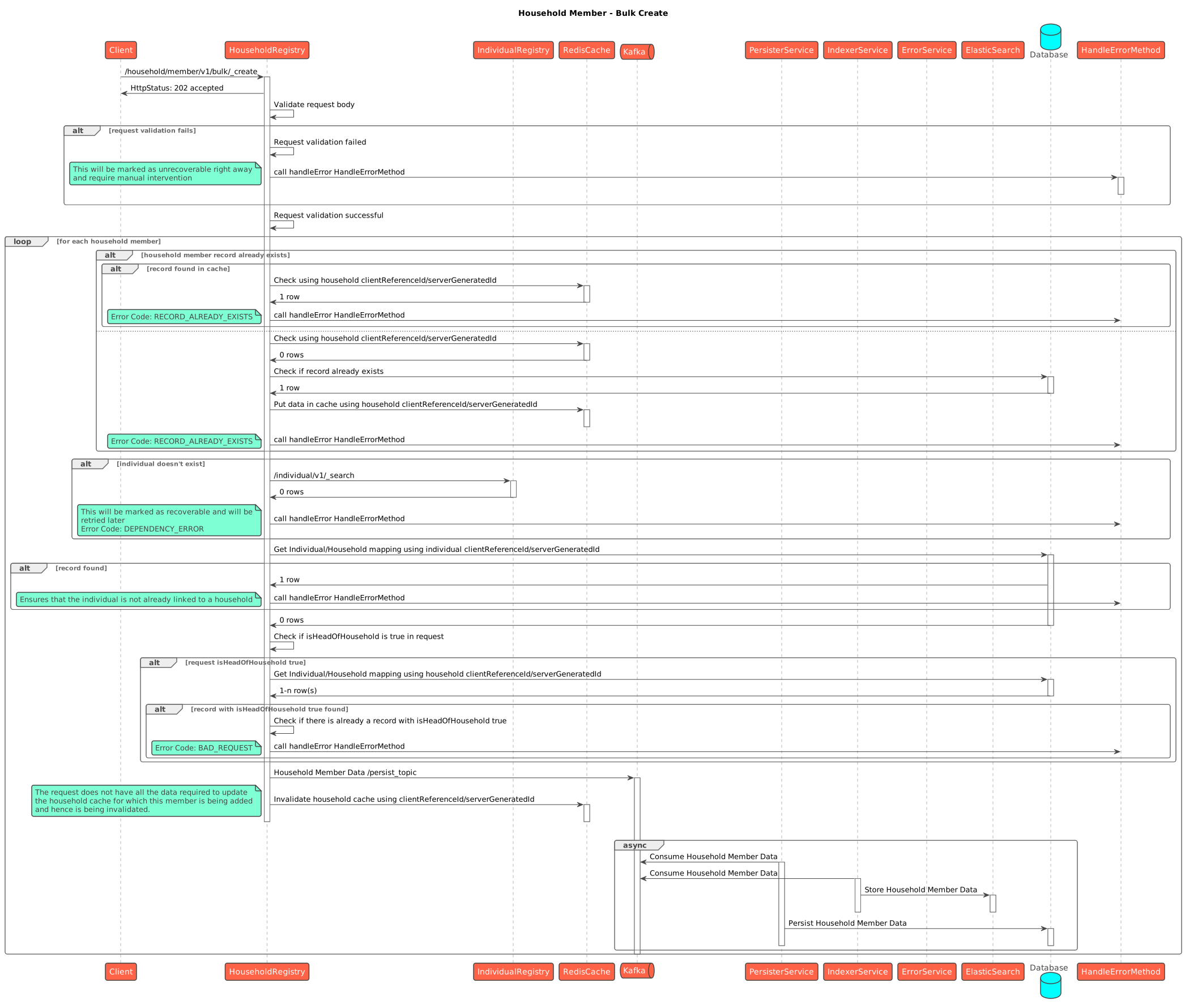
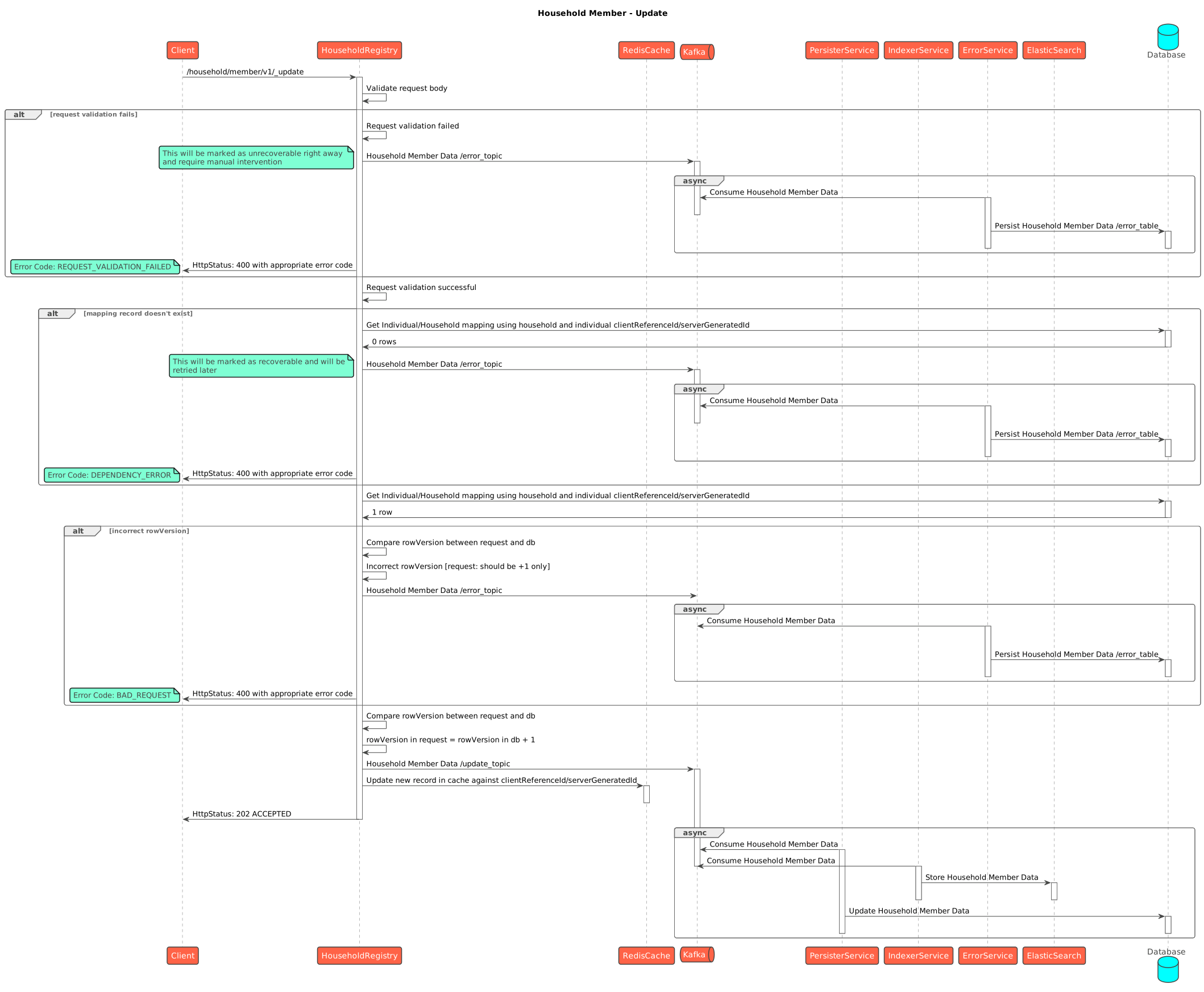
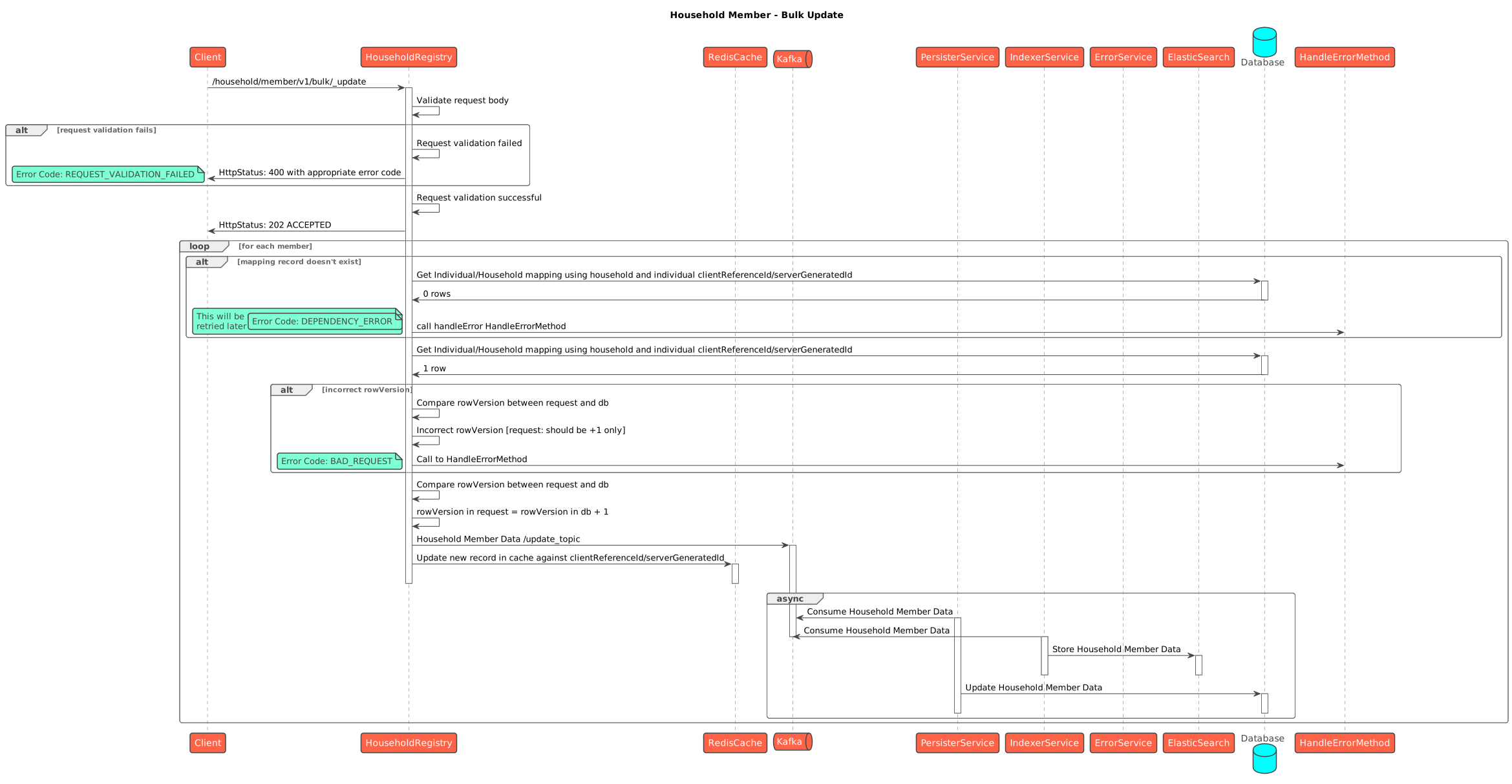
Writes are **asynchronous**. The API validates and enriches the request, then acknowledges it. A Kafka consumer persists the request later.

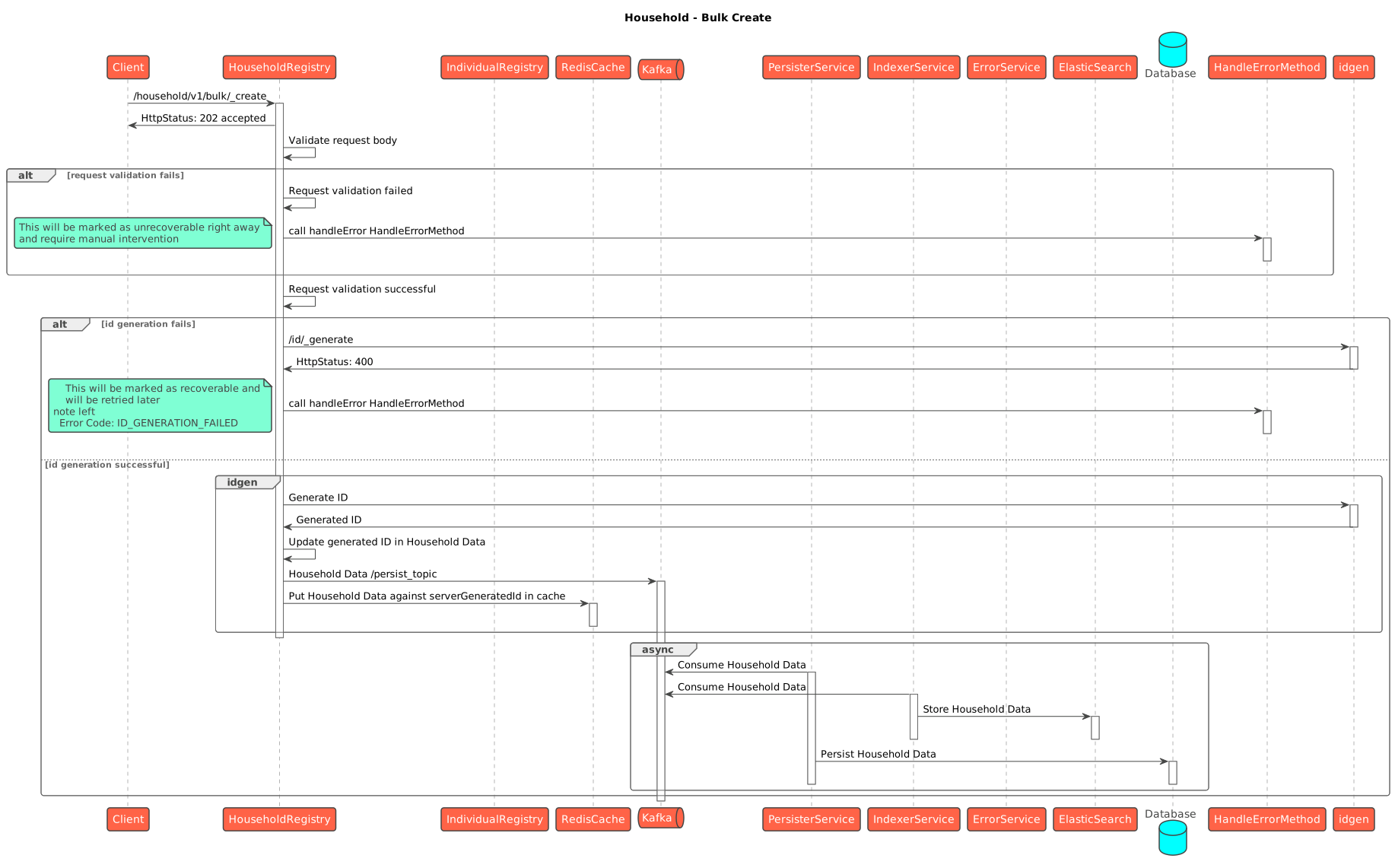
For bulk writes, `202 Accepted` confirms that the request entered the async pipeline. It does not confirm that Postgres stores every record. Check consumer logs and record status when persistence matters.

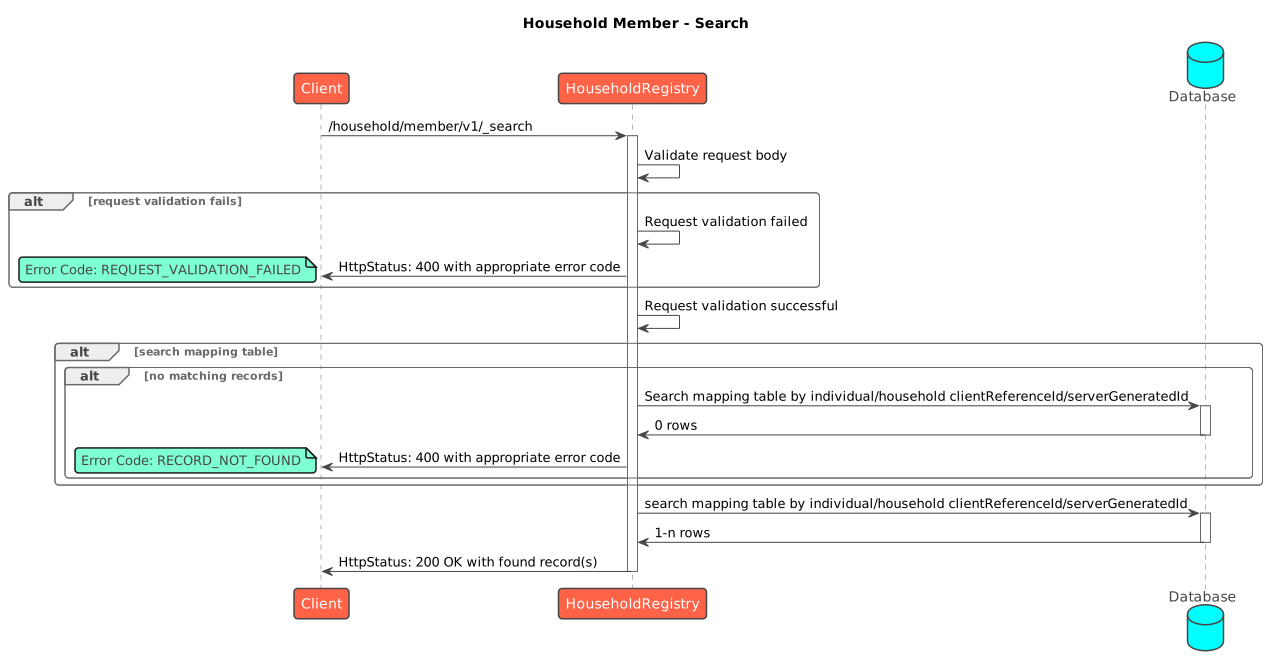
The service does not write Postgres directly. It emits a `save-*` event. **egov-persister** writes the row, while the **transformer** indexes the same event for dashboards. Member create, update, and delete use the same pattern. Searches read directly from Postgres.

#### Sequence Diagrams

{% tabs %}
{% tab title="Household" %}

<figure><img src="https://content.gitbook.com/content/I0KFbSBTySIQ7TCOKnJF/blobs/C65KF6Mo2Qj5WJbCywTz/create-Household.svg" alt=""><figcaption><p>Household Create</p></figcaption></figure>

<figure><img src="https://content.gitbook.com/content/I0KFbSBTySIQ7TCOKnJF/blobs/za6VIrDsi33BT8wUMl8R/bulk_create-Household.svg" alt=""><figcaption><p>Household Bulk create</p></figcaption></figure>

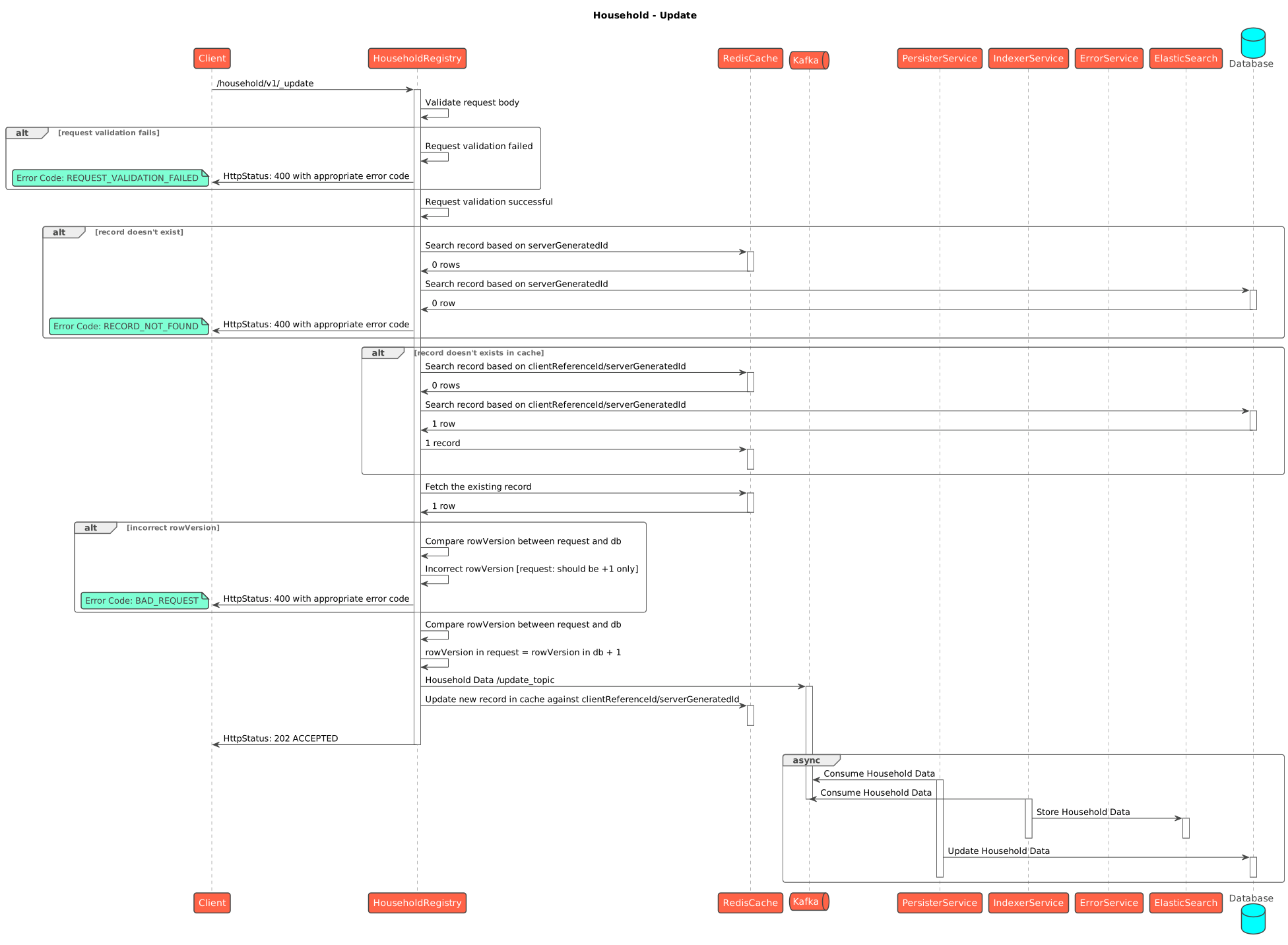
<figure><img src="https://content.gitbook.com/content/I0KFbSBTySIQ7TCOKnJF/blobs/b7ASx1ZoGyFT1NBLrsy7/update-Household.svg" alt=""><figcaption><p>Household Update</p></figcaption></figure>

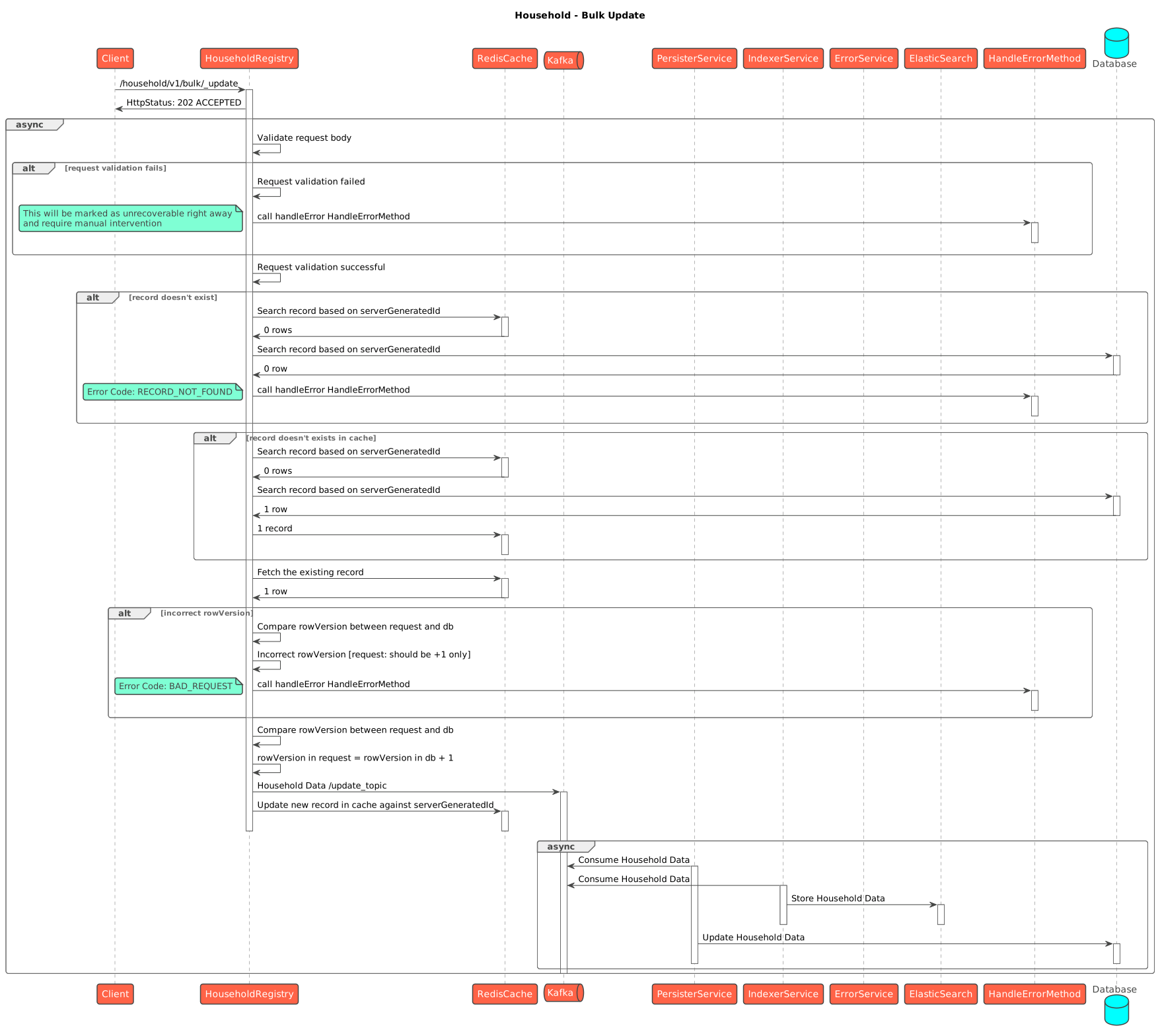
<figure><img src="https://content.gitbook.com/content/I0KFbSBTySIQ7TCOKnJF/blobs/SYGTQ4z0LHZXHr2VCl9R/bulk_update-Household.svg" alt=""><figcaption><p>Household bulk update</p></figcaption></figure>

<figure><img src="https://content.gitbook.com/content/I0KFbSBTySIQ7TCOKnJF/blobs/bVJstPZjJhREDfSHDo2Z/household_search.svg" alt=""><figcaption><p>Household Search</p></figcaption></figure>

<figure><img src="https://content.gitbook.com/content/I0KFbSBTySIQ7TCOKnJF/blobs/QO0cLBr6bQfNdXVYiVP9/delete-Household.svg" alt=""><figcaption><p>Household Delete</p></figcaption></figure>

<figure><img src="https://content.gitbook.com/content/I0KFbSBTySIQ7TCOKnJF/blobs/9P0wVNrmOTAV5eBlFg3F/bulk_delete-Household.svg" alt=""><figcaption><p>Household Bulk Delete</p></figcaption></figure>
{% endtab %}

{% tab title="Member" %}

<figure><img src="https://content.gitbook.com/content/I0KFbSBTySIQ7TCOKnJF/blobs/cOdaVvahMQh5wpKILLzB/household_member_create.svg" alt=""><figcaption><p>Household Member - Create</p></figcaption></figure>

<figure><img src="https://content.gitbook.com/content/I0KFbSBTySIQ7TCOKnJF/blobs/RAmTGUOrSTRFmsl9a2ab/bulk_create-Household_Member.svg" alt=""><figcaption><p>Household Member Bulk Create</p></figcaption></figure>

<figure><img src="https://content.gitbook.com/content/I0KFbSBTySIQ7TCOKnJF/blobs/ShpJM38XuF03vKVPmW3U/household_member_update.svg" alt=""><figcaption><p>Household Member - Update</p></figcaption></figure>

<figure><img src="https://content.gitbook.com/content/I0KFbSBTySIQ7TCOKnJF/blobs/Q29Exwk5DEZK6lWKUrWz/bulk_update-Household_Member.svg" alt=""><figcaption><p>Household Member Bulk Update</p></figcaption></figure>

<figure><img src="https://content.gitbook.com/content/I0KFbSBTySIQ7TCOKnJF/blobs/utIxVcQS14zlqM0LcAmP/household_member_search.svg" alt=""><figcaption><p>Household Member - Search</p></figcaption></figure>

<figure><img src="https://content.gitbook.com/content/I0KFbSBTySIQ7TCOKnJF/blobs/fJoLdfW9aLihBWrs8KNi/delete-Household_Member.svg" alt=""><figcaption><p>Household Member - Delete</p></figcaption></figure>

<figure><img src="https://content.gitbook.com/content/I0KFbSBTySIQ7TCOKnJF/blobs/mTA1tUiACPpfvPpZKhDs/bulk_delete-Household_Member.png" alt=""><figcaption><p>Household Member - Bulk Delete</p></figcaption></figure>
{% endtab %}
{% endtabs %}

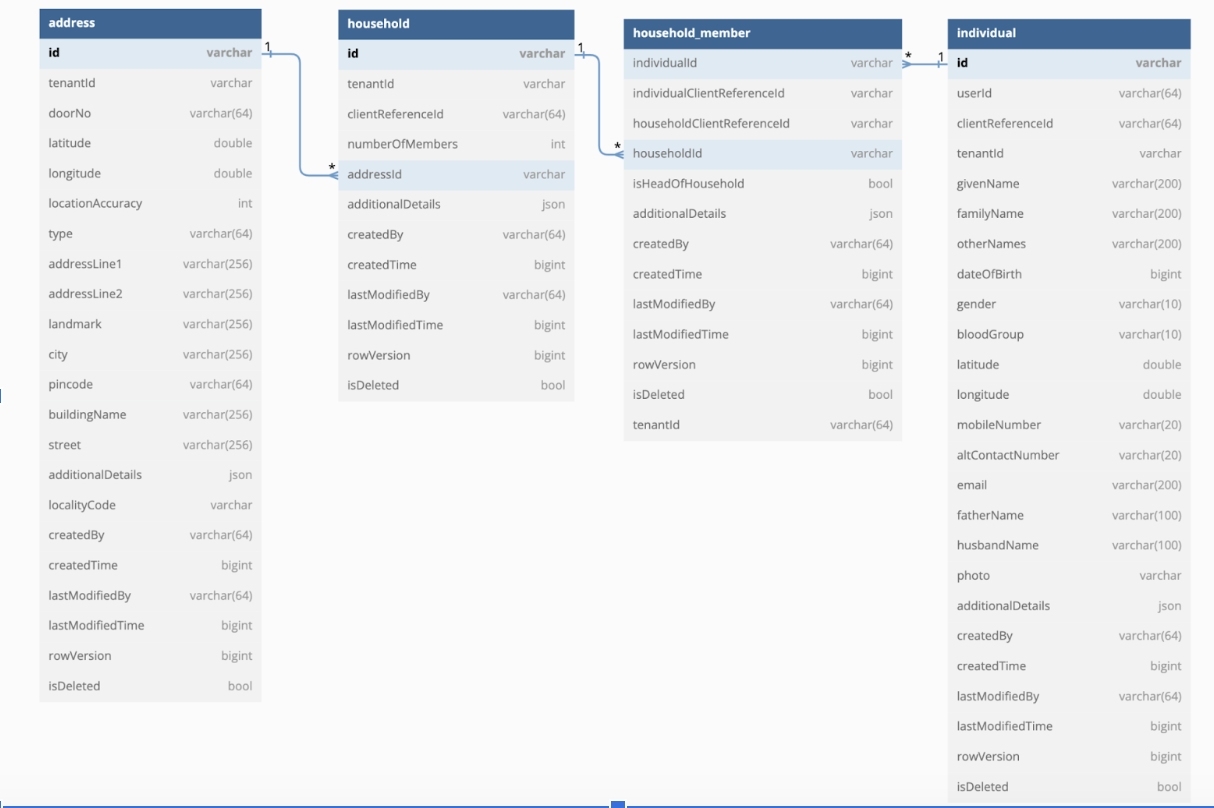
#### Data Model

<figure><img src="https://2077406040-files.gitbook.io/~/files/v0/b/gitbook-x-prod.appspot.com/o/spaces%2FI0KFbSBTySIQ7TCOKnJF%2Fuploads%2FfpAfMRWDPvAEZhBJdoCU%2Fimage.png?alt=media&amp;token=89603b42-2516-4f45-b4a5-9e703df52675" alt=""><figcaption></figcaption></figure>

## Failure / Retry Handling

* **Async, no batch rollback.** A bulk request returns `202` before persistence. If a record fails in the consumer, it is logged, and the batch continues; failed records do not roll back the rest — check consumer logs and the record's status.
* **Single (non-bulk) calls fail fast.** `/v1/_create` etc. validate synchronously and return a `400`/validation error on the spot.
* **Idempotency** is via `clientReferenceId` — re-submitting the same one should not create a duplicate row (unique constraints include it).
* **Optimistic locking** via `rowVersion` protects against concurrent edits on update/delete.
* **Soft delete** (`isDeleted`) everywhere — nothing is hard-deleted.
* **Cross-service dependency failures** (idgen, individual, boundary down/misconfigured) surface as validation/enrichment errors; the household is rejected rather than partially saved.

{% hint style="warning" %}
**Verify persister configuration before deployment.** Missing or stale topic mappings let the API accept writes without storing rows in Postgres. Confirm the deployed mappings match the build, then monitor persister errors after release.
{% endhint %}

## Known Risks / Limitations

* **Member ↔ Individual link is app-validated, not a DB foreign key.** Pointing a member at a non-existent or wrong individual is caught only by the `individual`-service lookup at write time.
* The `household_address_mv` is a snapshot, not a live table. Downsync now reads from this materialised view (hosted in `referralmanagement`) instead of the live household tables — regardless of which flow created or updated the household (referral, ITN registration, etc.). This means any household created or updated after the last MV refresh won't show up in downsync until the view is next refreshed. The delay is purely a function of the MV's refresh schedule versus the writing flow's own schedule (e.g. ITN registration/delivery), so different producers may see different effective lag depending on how their timing lines up with the refresh cycle. This is a freshness/ops concern tied to refresh cadence — not a bug in how households are written, and not specific to referral.
* **Async persistence hides write failures.** Bulk writes are accepted (`202`) before they hit Postgres; a stale/missing persister config means data is silently not stored. Verify the deployed persister config matches the build.
* **`householdType` and relationship type are convention-driven.** They are stored as strings/codes validated at the app layer (and via MDMS/role rules for community households), not constrained by the DB.
* **Search semantics differ by mode.** Search-by-id, boundary, since-time and lat-long radius take different code paths; QA should cover each rather than assuming one filter behaves like another.


---

# Agent Instructions
This documentation is published with GitBook. GitBook is the documentation platform designed so that both humans and AI agents can read, navigate, and reason over technical content effectively. Learn more at gitbook.com.

## Querying This Documentation
If you need additional information that is not directly available in this page, you can query the documentation by asking a question.

Perform an HTTP GET request on the following URL with the `ask` and `goal` query parameters:

```
GET https://docs.digit.org/health/design/architecture/low-level-design/registries/household.md?ask=<question>&goal=<user_goal>
```

`ask` is the immediate question: it should be specific, self-contained, and written in natural language.
`goal` is what the user is ultimately trying to achieve, the reason they need the answer. Sharing it helps GitBook give you a better, more relevant answer. A goal is most helpful when it describes the outcome the user wants rather than restating the question. For example, with `ask=how do I create an API token`, a goal like `automate deployments from our CI pipeline` lets GitBook tailor the answer to that use case.

The response will contain a direct answer to the question and relevant excerpts and sources from the documentation.

Use this mechanism when the answer is not explicitly present in the current page, you need clarification or additional context, or you want to retrieve related documentation sections.