> For the complete documentation index, see [llms.txt](https://docs.digit.org/llms.txt). Markdown versions of documentation pages are available by appending `.md` to page URLs; this page is available as [Markdown](https://docs.digit.org/health/design/architecture/low-level-design/registries/individual.md).

# Individual

## Overview

Individual is the **registry of people** in a health campaign — every person the system needs to know about, whether a beneficiary or a field worker. One Individual record holds a person's name, gender, date of birth, contact details, plus their:

* **Identifiers** — ID documents that identify the person (e.g. a system beneficiary ID, Aadhaar number, mobile number).
* **Addresses** — one or more places linked to the person (home, permanent, correspondence), tied to campaign boundaries.
* **Skills** — for workers, what they are trained or qualified to do.

Sensitive personal data (PII) such as Aadhaar, mobile number and name is **encrypted at rest**. When a person also needs to log in (typically a worker or supervisor), the individual links the record to a login account in the platform's **egov-user** service.

In short: *"who is this person, how do we identify and reach them, and can they sign in?"*

## Business Flow

A health campaign is a time-bound programme that registers people, assigns workers, and delivers health interventions within defined boundaries.

* **During campaign setup**, field workers and supervisors are registered as Individuals (often with a login account and roles), so they can use the mobile app.
* **During the campaign (runtime)**, beneficiaries are registered as Individuals — usually by the household service while registering a household — and tagged with a unique beneficiary ID.
* **Throughout**, other services (household, project, referral, stock hand-outs) reference these Individual records to know who received what.
* Individual records feed the **dashboards** (via the transformer → Elasticsearch) and other registries that need beneficiary/worker counts.

## Key APIs / Entry Points

Base path `/individual/v1`. Each write has a single and a bulk form. Bulk endpoints return `202 Accepted` after queuing the request for Kafka processing. Single endpoints validate and enrich records in the request path, then publish persistence events.

Since both single and bulk creates are asynchronous (the response only confirms the request was accepted/queued for Kafka processing — not that Postgres has persisted it yet), the client doesn't have the server-generated ID at the time of the write. There's a gap between "request accepted" and "record exists with an ID."

`clientReferenceId` solves this gap: it's a client-supplied identifier sent *with* the create request, before the server ID exists. Because the client controls this value, it can be used to:

1. **Poll `_search`** after a create, looking up the record by `clientReferenceId` until it appears — that's how the client discovers the server-assigned ID.
2. **Correlate** the original write with the eventually-persisted record, since there's no other way to tie the two together across the async boundary.
3. **Ensure idempotency/deduplication** — if the same `clientReferenceId` is submitted twice (e.g. due to a retry after a timeout), the system can recognize it as the same logical record rather than creating a duplicate.

<table><thead><tr><th width="264.83984375">Endpoint</th><th>Purpose</th></tr></thead><tbody><tr><td><code>POST /individual/v1/_create</code>, <code>/bulk/_create</code></td><td>Register a person (single or bulk).</td></tr><tr><td><code>POST /individual/v1/_update</code>, <code>/bulk/_update</code></td><td>Update a person's details.</td></tr><tr><td><code>POST /individual/v1/_delete</code>, <code>/bulk/_delete</code></td><td>Soft-delete a person.</td></tr><tr><td><code>POST /individual/v1/_search</code></td><td>Find people (by id, name, mobile, identifier, boundary/ward, since-time …). PII filters are encrypted before querying.</td></tr></tbody></table>

**Kafka entry points (async).** Bulk create/update/delete requests land on `individual-consumer-bulk-create-topic` / `…-update-topic` / `…-delete-topic` and are processed by the service's own consumer. Persisted results go out on `save-individual-topic` / `update-individual-topic` / `delete-individual-topic` (plus `update-user-id-topic`) for the persister and transformer.

**Swagger contract:**

{% embed url="<https://editor.swagger.io/?url=https://raw.githubusercontent.com/egovernments/health-campaign-services/master/docs/health-api-specs/contracts/registries/individual.yml>" %}

#### Kafka topics

<table><thead><tr><th width="271.26171875">Topic</th><th width="129.9921875">Dir</th><th>Purpose</th></tr></thead><tbody><tr><td><code>individual-consumer-bulk-create-topic</code></td><td>in</td><td>Bulk person create requests</td></tr><tr><td><code>individual-consumer-bulk-update-topic</code></td><td>in</td><td>Bulk person update requests</td></tr><tr><td><code>individual-consumer-bulk-delete-topic</code></td><td>in</td><td>Bulk person delete requests</td></tr><tr><td><code>save-individual-topic</code></td><td>out</td><td>Persist new individuals</td></tr><tr><td><code>update-individual-topic</code></td><td>out</td><td>Persist individual updates</td></tr><tr><td><code>delete-individual-topic</code></td><td>out</td><td>Persist individual soft-deletes</td></tr><tr><td><code>update-user-id-topic</code></td><td>out</td><td>Link individual to its egov-user account id</td></tr><tr><td><code>egov.core.notification.sms</code></td><td>out</td><td>Outbound SMS notifications</td></tr></tbody></table>

## Dependencies

* **egov-user** — creates/updates the login account for people who are system users; login resolves by `userUuid` (no password held in Individual).
* **idgen** — generates individual record IDs.
* **beneficiary-idgen** — supplies and marks-used the unique beneficiary IDs handed to the mobile app.
* **egov-enc-service** (via `enc-client`) — encrypts/decrypts PII (Aadhaar, mobile, name). Needs MDMS `DataSecurity.SecurityPolicy` data for the tenant or the service fails to start.
* **boundary-service** — validates the campaign boundary/ward on an address.
* **MDMS** — tenant-scoped master data and the security policy used by encryption.
* **Localisation** + **SMS notification** (`egov.core.notification.sms` topic) on create/update where enabled.
* **health-services-common / -models** — shared clients, validators, POJOs.
* **Kafka** — async create/update/delete pipeline.
* **egov-persister** (deployed via the `configs/` repo) — actually writes the rows to Postgres off the `save-*`/`update-*`/`delete-*` topics.
* **transformer → Elasticsearch** — builds the dashboard read-model from the same topics.
* **Redis** — caching used by the shared repository layer.

## Process Flow

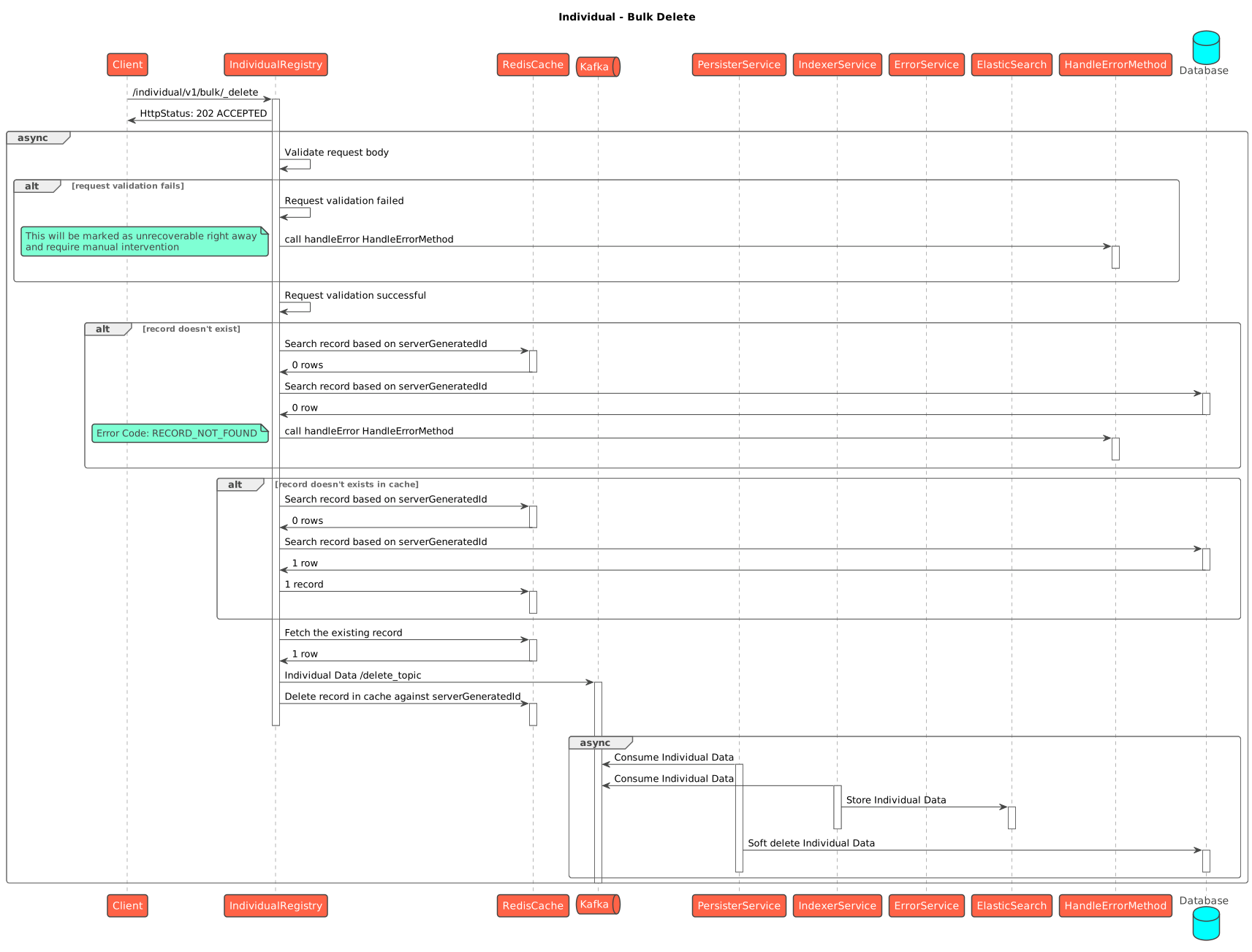
Bulk writes are **asynchronous**: the API validates and acknowledges, then a Kafka consumer enriches, syncs the login account, encrypts PII and persists. The service does not write Postgres directly — it emits a `save-*` event that **egov-persister** turns into a row, while the **transformer** indexes the same event into Elasticsearch for dashboards. Single create/update/delete runs the same steps inline. Search reads (encrypted) from the database and decrypts before returning.

#### Sequence Diagrams

{% tabs %}
{% tab title="Create" %}

<figure><img src="https://2077406040-files.gitbook.io/~/files/v0/b/gitbook-x-prod.appspot.com/o/spaces%2FI0KFbSBTySIQ7TCOKnJF%2Fuploads%2Fh7vnAebFjGbTmcSAVDYO%2Fimage.png?alt=media&amp;token=78c82830-9681-4e31-9c81-999d0e1b754e" alt=""><figcaption><p>Single create</p></figcaption></figure>

<figure><img src="https://2077406040-files.gitbook.io/~/files/v0/b/gitbook-x-prod.appspot.com/o/spaces%2FI0KFbSBTySIQ7TCOKnJF%2Fuploads%2FOxFCrQmJL7u1HmFWolYO%2Fimage.png?alt=media&amp;token=a890d8d1-78f2-48a7-a05b-81fc856dd779" alt=""><figcaption><p>Bulk create</p></figcaption></figure>
{% endtab %}

{% tab title="Update" %}

<figure><img src="https://2077406040-files.gitbook.io/~/files/v0/b/gitbook-x-prod.appspot.com/o/spaces%2FI0KFbSBTySIQ7TCOKnJF%2Fuploads%2FEZ9DuFqY34AC2sGZiXov%2Fimage.png?alt=media&amp;token=9e7437a5-739c-4aba-9d57-341f319710ab" alt=""><figcaption><p>Single update</p></figcaption></figure>

<figure><img src="https://2077406040-files.gitbook.io/~/files/v0/b/gitbook-x-prod.appspot.com/o/spaces%2FI0KFbSBTySIQ7TCOKnJF%2Fuploads%2FeijcUIH0xgr8204OHaRN%2Fimage.png?alt=media&amp;token=d872c212-a05a-474b-825d-ca4495bc9041" alt=""><figcaption><p>Bulk update</p></figcaption></figure>
{% endtab %}

{% tab title="Search" %}

<figure><img src="https://2077406040-files.gitbook.io/~/files/v0/b/gitbook-x-prod.appspot.com/o/spaces%2FI0KFbSBTySIQ7TCOKnJF%2Fuploads%2FxStGonEJGJR19nNDtvrt%2Fimage.png?alt=media&amp;token=380d6c0c-1e3c-4525-ac63-9dffc0307922" alt=""><figcaption></figcaption></figure>
{% endtab %}

{% tab title="Delete" %}

<figure><img src="https://2077406040-files.gitbook.io/~/files/v0/b/gitbook-x-prod.appspot.com/o/spaces%2FI0KFbSBTySIQ7TCOKnJF%2Fuploads%2FWNuXbfuwhnt6G9qOCnTk%2Fimage.png?alt=media&amp;token=8e771def-568c-48dc-aab2-a00898297988" alt=""><figcaption><p>Single delete</p></figcaption></figure>

<figure><img src="https://2077406040-files.gitbook.io/~/files/v0/b/gitbook-x-prod.appspot.com/o/spaces%2FI0KFbSBTySIQ7TCOKnJF%2Fuploads%2FhctAa2wCn3EEcJFmzTNL%2Fimage.png?alt=media&amp;token=732f773e-b458-492a-97d0-36bd09a5ff56" alt=""><figcaption><p>Bulk delete</p></figcaption></figure>
{% endtab %}
{% endtabs %}

<figure><img src="https://content.gitbook.com/content/I0KFbSBTySIQ7TCOKnJF/blobs/lmjN3vJaPVsvACe3WCqG/bulk_delete-Individual.svg" alt=""><figcaption><p>Individual - Bulk Delete</p></figcaption></figure>

#### Data Model

<figure><img src="https://2077406040-files.gitbook.io/~/files/v0/b/gitbook-x-prod.appspot.com/o/spaces%2FI0KFbSBTySIQ7TCOKnJF%2Fuploads%2FAx9oZa03Alkip0CBX7Mq%2Fimage.png?alt=media&amp;token=d9405080-ffea-4618-8374-e25d0e89fac0" alt=""><figcaption></figcaption></figure>

### Failure / Retry Handling

* **Async, no batch rollback.** A bulk request returns `202` before persistence. The consumer validates each record independently. Invalid records are dropped and the rest proceed. The Individual API has no per-record status or error endpoint. Confirm persistence with `_search` using `clientReferenceId`. Inspect consumer logs or observability events for rejected records. A user-account failure is reported as `USER_SERVICE_ERROR`.
* **Idempotency** is via `clientReferenceId` — re-submitting the same one should not create a duplicate person.
* **Optimistic locking** via `rowVersion` protects against concurrent edits on update.
* **Soft delete** (`isDeleted`) everywhere — nothing is hard-deleted; unique constraints include the delete flag.
* **User-service failures are per-record.** If creating/updating the egov-user login account fails for a person, that person is removed from the valid set with a `USER_SERVICE_ERROR`; the others still persist.
* **Encryption start-up dependency.** If MDMS `DataSecurity.SecurityPolicy` is missing for the tenant, the service crashes at boot (enc-client) — the most common environment trap for this service.
* If the **persister config** for the individual topics is missing/stale in an environment, the API accepts writes but rows silently don't appear in Postgres.

### Known Risks / Limitations

* **Encryption is a hard boot dependency** — missing MDMS `DataSecurity.SecurityPolicy` for the tenant (the `Individual*` models) crashes the service at start-up; enc-client loads the policy once at boot, so a fix requires a restart.
* **PII search is exact-match on encrypted values** — mobile/Aadhaar/identifier searches encrypt the filter and match the ciphertext, so partial or fuzzy matching on PII is not possible.
* **User-service coupling.** People marked as system users must sync to egov-user; if that service is down, those records are rejected (others still save). Login depends on `userUuid` being correctly linked.
* **`identifierType` / address types are convention-driven** — validators enforce known types, but the DB does not constrain free-text values.
* **A persister gap is silent** — writes are accepted (`202`) even if no environment consumer is writing the rows.


---

# Agent Instructions
This documentation is published with GitBook. GitBook is the documentation platform designed so that both humans and AI agents can read, navigate, and reason over technical content effectively. Learn more at gitbook.com.

## Querying This Documentation
If you need additional information that is not directly available in this page, you can query the documentation by asking a question.

Perform an HTTP GET request on the following URL with the `ask` and `goal` query parameters:

```
GET https://docs.digit.org/health/design/architecture/low-level-design/registries/individual.md?ask=<question>&goal=<user_goal>
```

`ask` is the immediate question: it should be specific, self-contained, and written in natural language.
`goal` is what the user is ultimately trying to achieve, the reason they need the answer. Sharing it helps GitBook give you a better, more relevant answer. A goal is most helpful when it describes the outcome the user wants rather than restating the question. For example, with `ask=how do I create an API token`, a goal like `automate deployments from our CI pipeline` lets GitBook tailor the answer to that use case.

The response will contain a direct answer to the question and relevant excerpts and sources from the documentation.

Use this mechanism when the answer is not explicitly present in the current page, you need clarification or additional context, or you want to retrieve related documentation sections.