
🌠Boundary Management
Overview
Boundary Management helps administrators manage campaign geography through Excel.
It supports two tasks:
Generate a ready-to-fill Excel template for a hierarchy.
Process the completed file and register boundaries in the platform.
At a glance
Used by: HCM administrators during campaign setup.
Input: a hierarchy type and an Excel file.
Output: generated templates, processed files, and boundary records.
Source of truth: boundary-service stores the final boundary data.
Boundary Management is a helper service, not the system of record.
It prepares boundary spreadsheets, validates uploads, and sends the final data to boundary-service.
Think of it as: download template → fill sheet → upload sheet → poll for result.
It is a Node.js / TypeScript Express service for the HCM admin console.
Dependencies
boundary-service (DIGIT-Core) — the real boundary store. Boundary Management searches the hierarchy definition and existing boundaries here, then creates new boundary entities and relationships here. This is the most important dependency.
MDMS (v1/v2) — schema and master data that drive template columns and validation.
Filestore — stores the generated/processed Excel files; the console downloads by
fileStoreId.Localisation — localised sheet headers, tab names and messages (multi-locale, e.g.
en_MZ).Kafka (
kafkajs) — the service emits its own status events (create/update-generated-…,create/update-processed-boundary-management) which a persister turns into the Postgres rows above. It does not write those state rows directly.Postgres — the two
eg_bm_*tables (Flyway-style migration applied via themigration/container).Redis (
ioredis) — caches boundary sheet data and HTTP responses for speed.
This is a standalone Node service (Express, ExcelJS/xlsx, axios, zod/yup, lodash); it does not use the health-services-common/-models Java libraries, the rest of the vertical shares.
Data Model
Two tables drive the service state:
eg_bm_generated_templatetracks template generation jobs.eg_bm_processed_templatetracks file-processing jobs.
Both tables store status, file ids, audit fields, and error details.
DB Schema Diagram
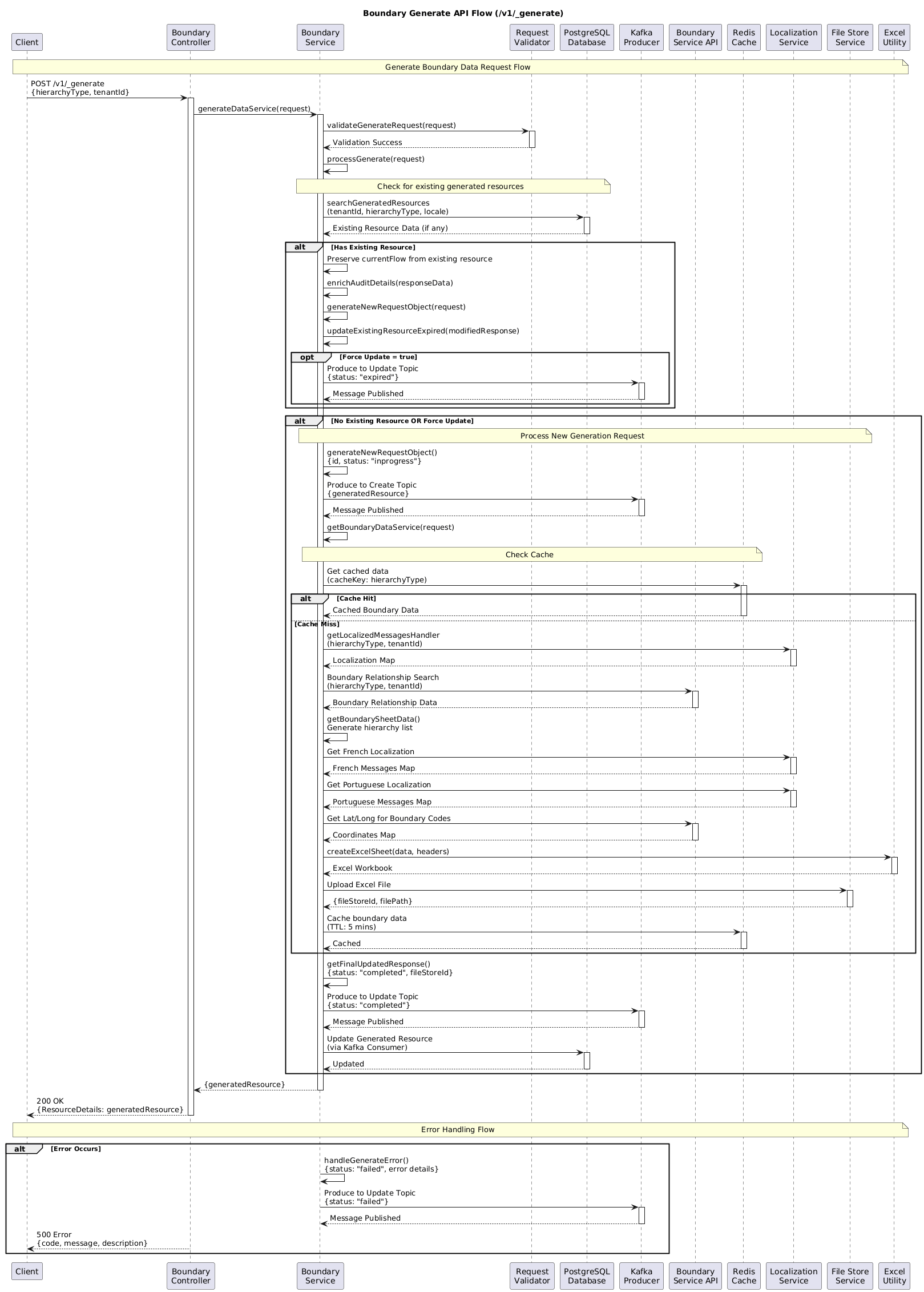
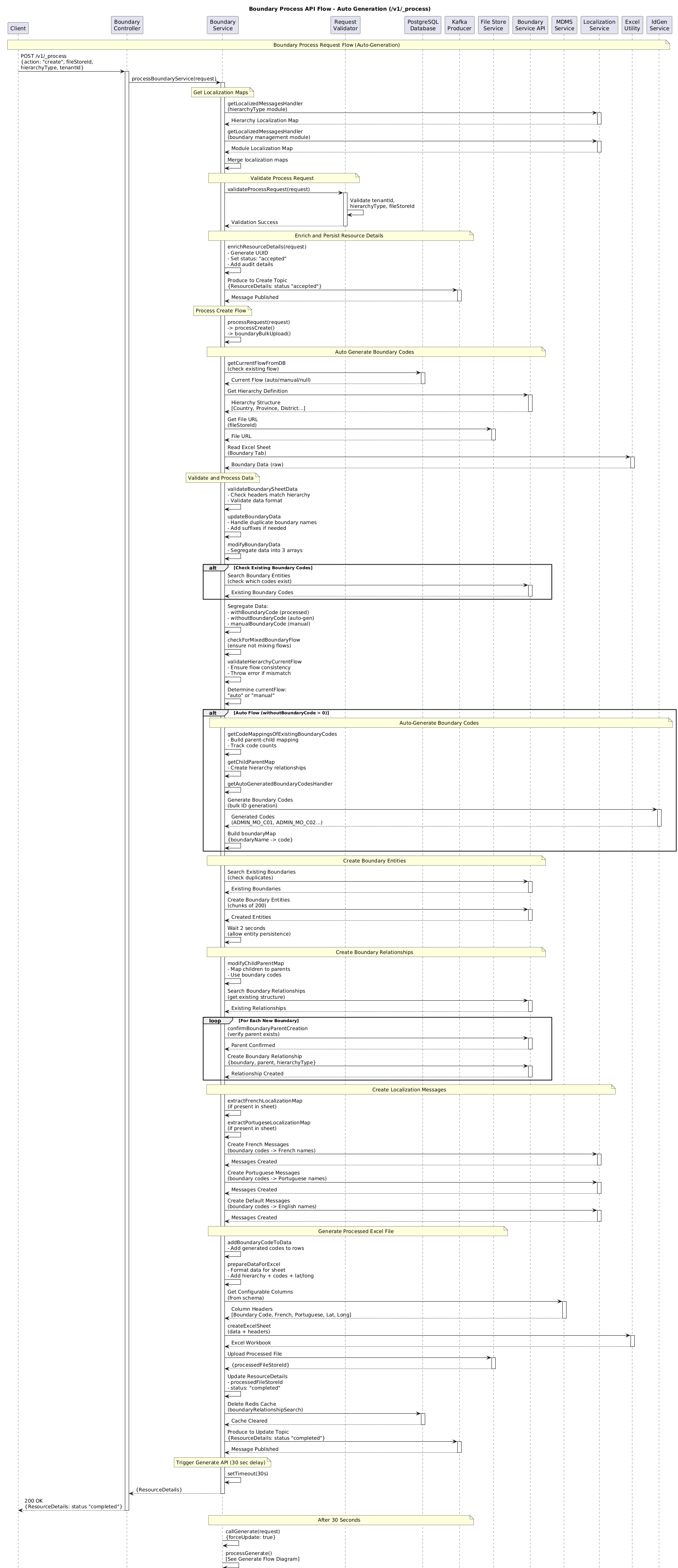
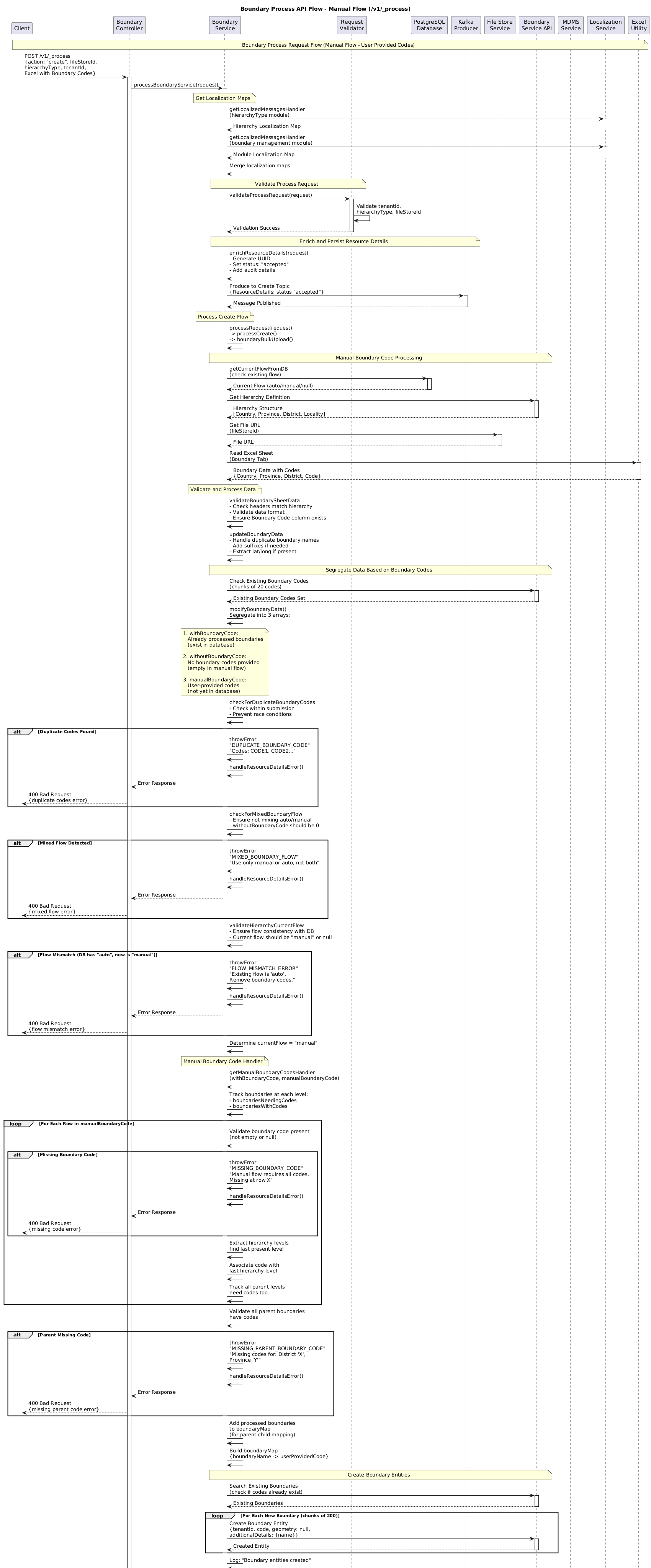
Web Sequence Diagrams
Business Flow
The service follows a simple four-step flow:
Generate template. An administrator selects a hierarchy type and calls
_generate.Fill and upload. The administrator updates the Excel sheet and uploads it.
Process file. The service validates the sheet and registers boundaries.
Poll for results. The console checks status through the search endpoints.
Boundary registration happens in two modes:
Auto flow — the sheet has no service codes, so the service generates them.
Manual flow — the sheet already includes service codes for every level.
The registered boundaries then become the geography used by project-factory, project, household, facility, plan-service, and dashboards.
API Details
Base path /boundary-management/v1.
All four endpoints are HTTP POST. The two "action" endpoints kick off background work and return immediately with status: inprogress; the two *-search endpoints are how a client checks on that work.
POST /v1/_generate
Start building a boundary Excel template for a hierarchy. Returns immediately (inprogress); the file is produced asynchronously.
POST /v1/_generate-search
Poll for / download a generated template by tenantId + hierarchyType (or id). If none exists yet, it auto-triggers a generate.
POST /v1/_process
Upload a filled template (fileStoreId, action, hierarchyType) to validate and register boundaries. Returns immediately (inprogress); work continues in the background.
POST /v1/_process-search
Poll for the status/result of a process job by tenantId (and other criteria).
API Pages
There is also a small localisation controller (cache-bust / message helpers) used internally by the console.
State is held in Postgres and polled — there are no webhooks/callbacks. Two tables track everything:
eg_bm_generated_template— one row per generated job (status,filestoreid, hierarchy, locale).eg_bm_processed_template— one row per process job (status, sourcefilestoreid,processedfilestoreid,action).
Status values move through inprogress → completed | failed (generate) and inprogress → completed | failed | invalid (process).
Kafka Topics
Produces only — no consumer listeners
create-generated-boundary-management
out
Emit generated boundary-template event
update-generated-boundary-management
out
Update generated-template status
create-processed-boundary-management
out
Emit processed boundary-upload event
update-processed-boundary-management
out
Update processed status
Process Flow

Use this reading order:
Start a generate job.
_generatecreates or reuses a template job.Wait for the file. The service builds the workbook and uploads it to the filestore.
Start a process job.
_processvalidates the uploaded sheet and chooses Auto or Manual flow.Check the result.
_generate-searchand_process-searchreturn the latest job status.
Both flows are asynchronous.
The first request only accepts the work.
The search endpoints tell the client when the job is complete.
Failure & Retry Handling
Asynchronous, poll-based. A
200 inprogressonly means the request was accepted. A job can still fail in the background — clients must poll*-searchand check thestatus. Afailed(orinvalid) row carries the error detail inadditionalDetails.error.Validation up front. _process rejects malformed sheets early: wrong/duplicate rows, a non-unique first (root) column, and — in Manual flow — any boundary (including parents/intermediates) missing a service code.
Idempotent boundary creation. Before creating, the service searches boundary-service for codes that already exist and only creates the missing ones, so re-running a process does not duplicate boundaries.
HTTP retries on downstream calls are built in (configurable
MAX_HTTP_RETRIES, default 4; retries known transient errors such as "socket hang up").Auto-generate fallback.
_generate-searchfor a hierarchy with no existing template auto-triggers a generate rather than returning empty.Known footgun: because state is written via Kafka events that a persister consumes, if the persister/Kafka wiring is missing or stale in an environment, the API can report
inprogresswhile the status row never advances — check the persister and theeg_bm_*tables.
Known Risks & Limitations
Not the source of truth. Boundaries actually live in boundary-service; this service only prepares templates and pushes data in. Reads/edits done directly in boundary-service won't reflect back into the generated templates until regenerated.
No callbacks — polling only. Clients must poll
*-search; a slow background job looks the same as a stuck one until you inspect the status/error.Excel-shaped contract. Behaviour depends on column headers, the boundary tab name and localization keys lining up with MDMS/localization config; a misconfigured locale or header breaks generate/process.
Manual flow is strict. Every boundary in the chain must carry a service code or the whole upload is rejected — mixing coded and uncoded boundaries within one parent chain is not supported.
Default config points at a shared dev host.
config/index.tsfalls back tounified-dev.digit.orgfor downstream hosts; environments must override theEGOV_*host variables or calls go to the wrong place.Status durability depends on Kafka/persister. State is emitted as events; a missing persister config silently leaves jobs looking
inprogress.
Last updated
Was this helpful?