> For the complete documentation index, see [llms.txt](https://docs.digit.org/llms.txt). Markdown versions of documentation pages are available by appending `.md` to page URLs; this page is available as [Markdown](https://docs.digit.org/health/design/architecture/low-level-design/services/health-services/console-services/boundary-management.md).

# Boundary Management

## Overview

Boundary Management helps administrators manage campaign geography through Excel.

It supports two tasks:

* **Generate** a ready-to-fill Excel template for a hierarchy.
* **Process** the completed file and register boundaries in the platform.

### At a glance

* **Used by:** HCM administrators during campaign setup.
* **Input:** a hierarchy type and an Excel file.
* **Output:** generated templates, processed files, and boundary records.
* **Source of truth:** [boundary-service](/health/deploy/configuration/hcm-console-configuration/console-ui-configuration/manage-boundary-data.md) stores the final boundary data.

Boundary Management is a helper service, not the system of record.

It prepares boundary spreadsheets, validates uploads, and sends the final data to **boundary-service**.

Think of it as: **download template → fill sheet → upload sheet → poll for result**.

It is a **Node.js / TypeScript** Express service for the HCM admin console.

## Dependencies

* **boundary-service** (DIGIT-Core) — the real boundary store. Boundary Management searches the hierarchy definition and existing boundaries here, then creates new boundary **entities** and **relationships** here. This is the most important dependency.
* **MDMS (v1/v2)** — schema and master data that drive template columns and validation.
* **Filestore** — stores the generated/processed Excel files; the console downloads by `fileStoreId`.
* **Localisation** — localised sheet headers, tab names and messages (multi-locale, e.g. `en_MZ`).
* **Kafka** (`kafkajs`) — the service **emits its own status events** (`create/update-generated-…`, `create/update-processed-boundary-management`) which a persister turns into the Postgres rows above. It does not write those state rows directly.
* **Postgres** — the two `eg_bm_*` tables (Flyway-style migration applied via the `migration/` container).
* **Redis** (`ioredis`) — caches boundary sheet data and HTTP responses for speed.

This is a standalone Node service (Express, ExcelJS/xlsx, axios, zod/yup, lodash); it does **not** use the `health-services-common`/`-models` Java libraries, the rest of the vertical shares.

## Data Model

Two tables drive the service state:

* `eg_bm_generated_template` tracks template generation jobs.
* `eg_bm_processed_template` tracks file-processing jobs.

Both tables store status, file ids, audit fields, and error details.

DB Schema Diagram

{% tabs %}
{% tab title="Generate" %}

```
TABLE eg_bm_generated_template
(
    id character varying(128) NOT NULL,
    filestoreid character varying(128),
    status character varying(128),
    tenantid character varying(128),
    hierarchytype character varying(128),
    locale VARCHAR(50),
    createdby character varying(128),
    createdtime bigint,
    lastmodifiedby character varying(128),
    lastmodifiedtime bigint,
    additionaldetails jsonb,
    referenceid character varying(128),
    CONSTRAINT eg_bm_generated_template_pkey PRIMARY KEY (id)
)
```

{% endtab %}

{% tab title="Process" %}

```
TABLE eg_bm_processed_template
(
    id character varying(128) NOT NULL,
    status character varying(128) NOT NULL,
    tenantid character varying(128) NOT NULL,
    hierarchytype character varying(128),
    filestoreid character varying(128) NOT NULL,
    processedfilestoreid character varying(128),
    action character varying(128) NOT NULL,
    createdby character varying(128) NOT NULL,
    createdtime bigint NOT NULL,
    lastmodifiedby character varying(128),
    lastmodifiedtime bigint,
    additionaldetails jsonb,
    referenceid character varying(128),
    CONSTRAINT eg_bm_processed_template_pkey PRIMARY KEY (id)
)
```

{% endtab %}
{% endtabs %}

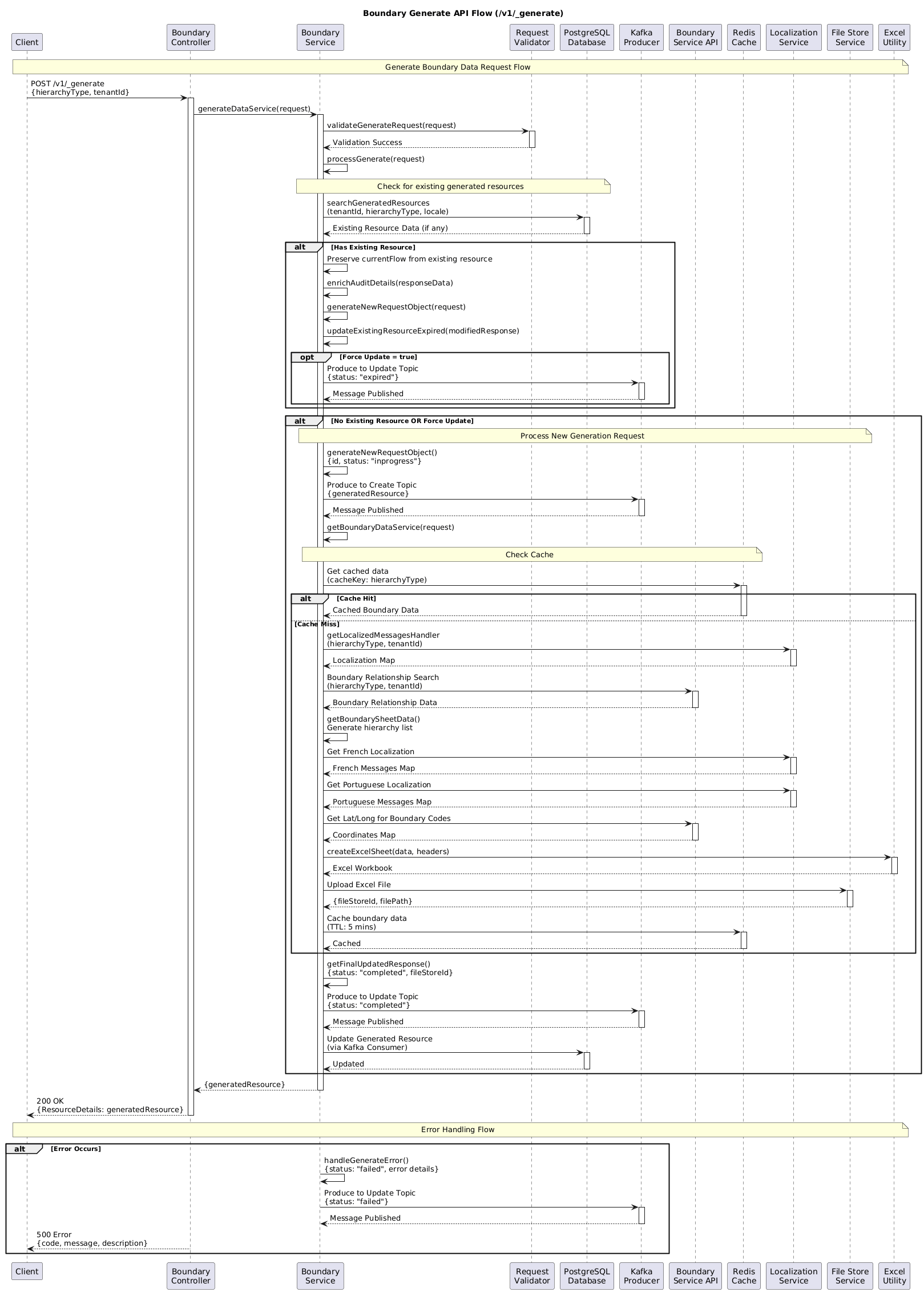
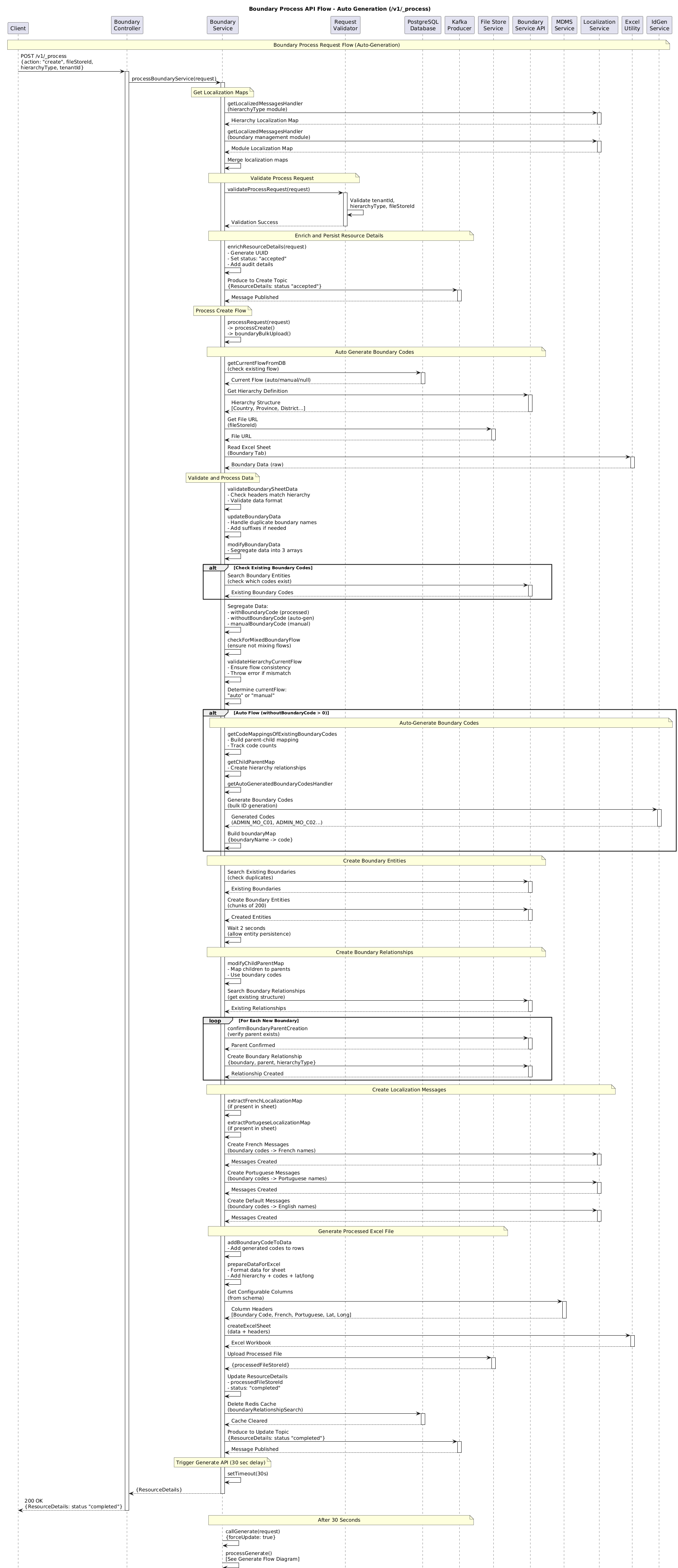
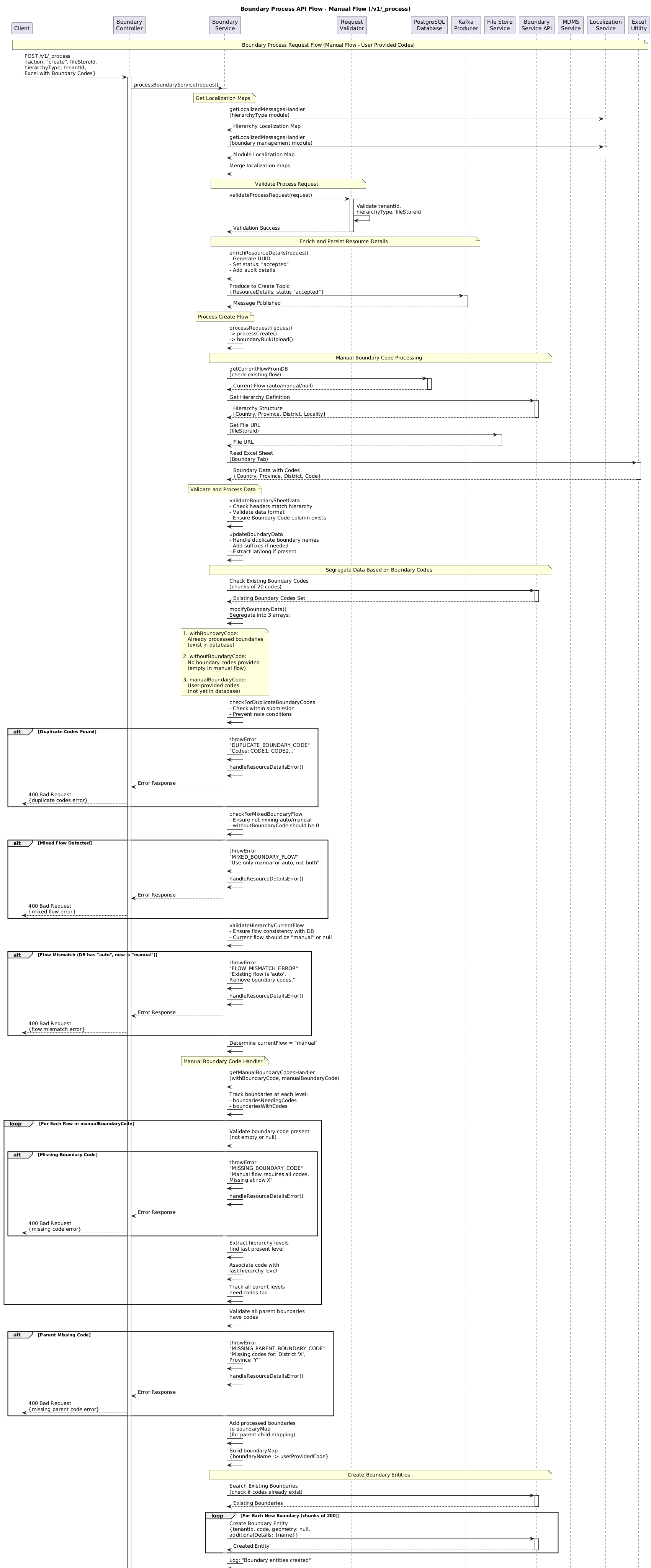
### Web Sequence Diagrams

{% tabs %}
{% tab title="Generate" %}

```
/boundary-management/v1/_generate
```

<figure><img src="https://content.gitbook.com/content/I0KFbSBTySIQ7TCOKnJF/blobs/6CC0fG2IYJd7g1sjquH8/genertaeeee.png" alt=""><figcaption></figcaption></figure>
{% endtab %}

{% tab title="Process ( Auto )" %}

```
boundary-management/v1/_process
```

<figure><img src="https://content.gitbook.com/content/I0KFbSBTySIQ7TCOKnJF/blobs/E697uqMlqxO4T3dY9H9c/process_auto.png" alt=""><figcaption></figcaption></figure>
{% endtab %}

{% tab title="Process( Manual )" %}

```
boundary-management/v1/_process
```

<figure><img src="https://content.gitbook.com/content/I0KFbSBTySIQ7TCOKnJF/blobs/xV7oMwrSvYfVZDyUg6qV/process%20maual.png" alt=""><figcaption></figcaption></figure>
{% endtab %}
{% endtabs %}

## Business Flow

The service follows a simple four-step flow:

1. **Generate template.** An administrator selects a hierarchy type and calls `_generate`.
2. **Fill and upload.** The administrator updates the Excel sheet and uploads it.
3. **Process file.** The service validates the sheet and registers boundaries.
4. **Poll for results.** The console checks status through the search endpoints.

Boundary registration happens in two modes:

* **Auto flow** — the sheet has no service codes, so the service generates them.
* **Manual flow** — the sheet already includes service codes for every level.

The registered boundaries then become the geography used by **project-factory**, **project**, **household**, **facility**, **plan-service**, and dashboards.

## API Details

Base path `/boundary-management/v1`.

All four endpoints are HTTP POST. The two "action" endpoints kick off background work and return immediately with `status: inprogress`; the two `*-search` endpoints are how a client checks on that work.

<table><thead><tr><th width="227.66796875">Endpoint</th><th>Purpose</th></tr></thead><tbody><tr><td><code>POST /v1/_generate</code></td><td>Start building a boundary Excel template for a hierarchy. Returns immediately (<code>inprogress</code>); the file is produced asynchronously.</td></tr><tr><td><code>POST /v1/_generate-search</code></td><td>Poll for / download a generated template by <code>tenantId</code> + <code>hierarchyType</code> (or <code>id</code>). If none exists yet, it auto-triggers a generate.</td></tr><tr><td><code>POST /v1/_process</code></td><td>Upload a filled template (<code>fileStoreId</code>, <code>action</code>, <code>hierarchyType</code>) to validate and register boundaries. Returns immediately (<code>inprogress</code>); work continues in the background.</td></tr><tr><td><code>POST /v1/_process-search</code></td><td>Poll for the status/result of a process job by <code>tenantId</code> (and other criteria).</td></tr></tbody></table>

### API Pages

* [Generate API](/health/design/architecture/low-level-design/services/health-services/console-services/boundary-management/generate-api.md)
* [Generate Search API](/health/design/architecture/low-level-design/services/health-services/console-services/boundary-management/generate-search-api.md)
* [Process API - Auto](/health/design/architecture/low-level-design/services/health-services/console-services/boundary-management/process-api-auto.md)
* [Process API - Manual](/health/design/architecture/low-level-design/services/health-services/console-services/boundary-management/process-api-manual.md)
* [Process Search API](/health/design/architecture/low-level-design/services/health-services/console-services/boundary-management/process-search-api.md)
* [Boundary Management - Auto vs Manual Flow](/health/design/architecture/low-level-design/services/health-services/console-services/boundary-management/boundary-management-auto-vs-manual-flow.md)

There is also a small **localisation** controller (cache-bust / message helpers) used internally by the console.

**State is held in Postgres and polled — there are no webhooks/callbacks.** Two tables track everything:

* `eg_bm_generated_template` — one row per generated job (status, `filestoreid`, hierarchy, locale).
* `eg_bm_processed_template` — one row per process job (status, source `filestoreid`, `processedfilestoreid`, `action`).

Status values move through `inprogress → completed | failed` (generate) and `inprogress → completed | failed | invalid` (process).

#### Kafka Topics

*Produces only — no consumer listeners*

<table><thead><tr><th width="270.53515625">Topic</th><th width="112.98046875">Dir</th><th>Purpose</th></tr></thead><tbody><tr><td><code>create-generated-boundary-management</code></td><td>out</td><td>Emit generated boundary-template event</td></tr><tr><td><code>update-generated-boundary-management</code></td><td>out</td><td>Update generated-template status</td></tr><tr><td><code>create-processed-boundary-management</code></td><td>out</td><td>Emit processed boundary-upload event</td></tr><tr><td><code>update-processed-boundary-management</code></td><td>out</td><td>Update processed status</td></tr></tbody></table>

### Process Flow

<figure><img src="https://2077406040-files.gitbook.io/~/files/v0/b/gitbook-x-prod.appspot.com/o/spaces%2FI0KFbSBTySIQ7TCOKnJF%2Fuploads%2FORX2qvv30x9ecFxKEAdd%2Fimage.png?alt=media&amp;token=def61f70-25b3-43ab-975d-940e584d6cb3" alt=""><figcaption></figcaption></figure>

Use this reading order:

1. **Start a generate job.** `_generate` creates or reuses a template job.
2. **Wait for the file.** The service builds the workbook and uploads it to the filestore.
3. **Start a process job.** `_process` validates the uploaded sheet and chooses Auto or Manual flow.
4. **Check the result.** `_generate-search` and `_process-search` return the latest job status.

Both flows are asynchronous.

The first request only accepts the work.

The search endpoints tell the client when the job is complete.

### Failure & Retry Handling

* **Asynchronous, poll-based.** A `200 inprogress` only means the request was accepted. A job can still fail in the background — clients must poll `*-search` and check the `status`. A `failed` (or `invalid`) row carries the error detail in `additionalDetails.error`.
* **Validation up front.** \_process rejects malformed sheets early: wrong/duplicate rows, a non-unique first (root) column, and — in Manual flow — any boundary (including parents/intermediates) missing a service code.
* **Idempotent boundary creation.** Before creating, the service searches boundary-service for codes that already exist and only creates the missing ones, so re-running a process does not duplicate boundaries.
* **HTTP retries** on downstream calls are built in (configurable `MAX_HTTP_RETRIES`, default 4; retries known transient errors such as "socket hang up").
* **Auto-generate fallback.** `_generate-search` for a hierarchy with no existing template auto-triggers a generate rather than returning empty.
* **Known footgun:** because state is written via Kafka events that a persister consumes, if the persister/Kafka wiring is missing or stale in an environment, the API can report `inprogress` while the status row never advances — check the persister and the `eg_bm_*` tables.

### Known Risks & Limitations

* **Not the source of truth.** Boundaries actually live in **boundary-service**; this service only prepares templates and pushes data in. Reads/edits done directly in boundary-service won't reflect back into the generated templates until regenerated.
* **No callbacks — polling only.** Clients must poll `*-search`; a slow background job looks the same as a stuck one until you inspect the status/error.
* **Excel-shaped contract.** Behaviour depends on column headers, the boundary tab name and localization keys lining up with MDMS/localization config; a misconfigured locale or header breaks generate/process.
* **Manual flow is strict.** Every boundary in the chain must carry a service code or the whole upload is rejected — mixing coded and uncoded boundaries within one parent chain is not supported.
* **Default config points at a shared dev host.** `config/index.ts` falls back to `unified-dev.digit.org` for downstream hosts; environments must override the `EGOV_*` host variables or calls go to the wrong place.
* **Status durability depends on Kafka/persister.** State is emitted as events; a missing persister config silently leaves jobs looking `inprogress`.


---

# Agent Instructions
This documentation is published with GitBook. GitBook is the documentation platform designed so that both humans and AI agents can read, navigate, and reason over technical content effectively. Learn more at gitbook.com.

## Querying This Documentation
If you need additional information that is not directly available in this page, you can query the documentation dynamically by asking a question.

Perform an HTTP GET request on the current page URL with the `ask` query parameter, and the optional `goal` query parameter:

```
GET https://docs.digit.org/health/design/architecture/low-level-design/services/health-services/console-services/boundary-management.md?ask=<question>&goal=<endgoal>
```

`ask` is the immediate question: it should be specific, self-contained, and written in natural language.
`goal` is optional and describes the broader end goal you are ultimately trying to accomplish on behalf of the user. GitBook uses it to tailor the answer towards what is most useful for that goal.

The response will contain a direct answer to the question and relevant excerpts and sources from the documentation.

Use this mechanism when the answer is not explicitly present in the current page, you need clarification or additional context, or you want to retrieve related documentation sections.