> For the complete documentation index, see [llms.txt](https://docs.digit.org/llms.txt). Markdown versions of documentation pages are available by appending `.md` to page URLs; this page is available as [Markdown](https://docs.digit.org/health/design/architecture/low-level-design/services/health-services/console-services/excel-ingestion.md).
# Excel Ingestion
## Overview
Excel Ingestion is the shared Excel engine for health campaigns.
It has two main jobs:
1. **Generate** a ready-to-fill Excel template — pre-loaded with the campaign's boundary hierarchy, dropdowns, locked formula cells, localised column headers, and built-in validations — so a campaign manager downloads a sheet that is hard to fill in wrong.
2. **Process** a filled-in sheet that comes back — open it, parse every row, validate it (correct boundaries, required fields, no stray whitespace, worker IDs that actually exist, dates inside the campaign window …), flag bad rows, and hand the clean data on.
{% hint style="info" %}
In short: *"give me a sheet that's easy to fill, then check what comes back before it touches the campaign."*
{% endhint %}
### At a glance
* **Used by:** campaign managers and the admin console.
* **Input:** campaign context, configuration, and uploaded Excel files.
* **Output:** generated templates, validation results, staged row data, and a processing result for downstream services.
* **Generate:** creates the sheet.
* **Process:** validates the filled sheet and stages the usable data.
It is **reusable**: facility sheets, user and worker sheets, boundary-target sheets, and attendance-register sheets all run through the same pipeline. Template generation and row processing stay separate so new sheet types remain easy to add.
## Dependencies
* **boundary-service** — boundary hierarchy + relationships that fill the template's geography columns and dropdowns.
* **egov-mdms** — schemas and per-environment config (which columns, which roles, attendance rules) so behaviour changes without a code release.
* **egov-localisation** — translated column headers, dropdown values and error messages.
* **egov-filestore** — stores the generated template and supplies the uploaded file for processing.
* **project-factory** — campaign lookups + bulk decrypt; also, the **consumer of `hcm-processing-result`** that resumes campaign creation.
* **facility / health-individual / worker-registry / egov-hrms / attendance** — looked up during validation (valid facility, valid worker ID, attendance register details, etc.).
* **Kafka** — the internal generation-init trigger plus all `save-*`/`update-*`/result outputs.
* **egov-persister** (deployed via the `configs/` repo) — actually writes the generation, processing and staged-row tables to Postgres off the `save-*`/`update-*` topics.
* **Postgres** — three tables: `eg_ex_in_generated_files`, `eg_ex_in_excel_processing`, and `eg_ex_in_sheet_data_temp` (staging, auto-expires \~24h after creation).
* **Caffeine (in-process cache)** — boundary, MDMS and localisation lookups are cached, so a large generate/process run doesn't re-fetch the same reference data.
* **health-services-common / -models** — shared producer, clients, validators, POJOs.
## Data Model
The service stores three kinds of state:
* generated template jobs
* processing jobs
* temporary staged row data
**Key Relationships:**
* Generated Excel (fileStoreId) can be used for processing
* Processing requests creates temporary sheet data for validation
* Sheet temp data is cleaned up after processing completion
{% tabs %}
{% tab title="Generate" %}
```
eg_ex_in_generated_files: Tracks async Excel template generation requests
TABLE eg_ex_in_generated_files (
id VARCHAR(100) PRIMARY KEY,
referenceId VARCHAR(100)
tenantId VARCHAR(100)
type VARCHAR(50)
hierarchyType VARCHAR(100),
fileStoreId VARCHAR(200),
status VARCHAR(20)
additionalDetails JSONB,
locale VARCHAR(64),
createdBy VARCHAR(100),
lastModifiedBy VARCHAR(100),
createdTime BIGINT,
lastModifiedTime BIGINT
)
```
{% endtab %}
{% tab title="Process" %}
{% endtab %}
{% tab title="Sheet Data Temp" %}
```
eg_ex_in_sheet_data_temp: Stores parsed Excel data temporarily during validation
TABLE eg_ex_in_sheet_data_temp (
referenceId VARCHAR(100) NOT NULL, PK
tenantId VARCHAR(100) NOT NULL,
fileStoreId VARCHAR(100) NOT NULL, PK
sheetName VARCHAR(100) NOT NULL, PK
rowNumber INTEGER NOT NULL, PK
rowJson JSONB NOT NULL,
createdBy VARCHAR(100) NOT NULL,
createdTime BIGINT NOT NULL,
deleteTime BIGINT NOT NULL
)
```
{% endtab %}
{% endtabs %}
### Web Sequence Diagrams
{% tabs %}
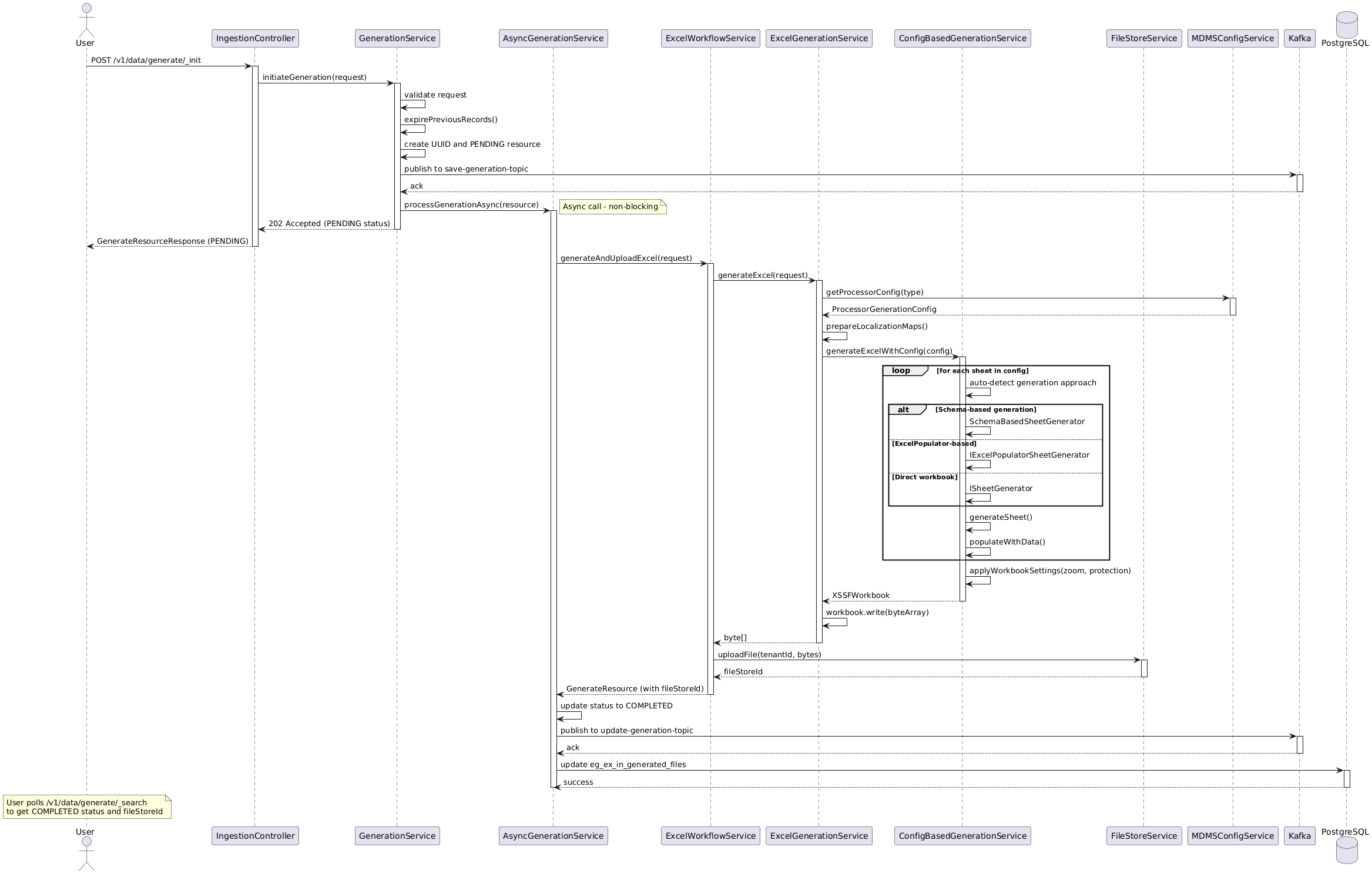
{% tab title="Generate" %}
```
/excel-ingestion/v1/data/generate/_init
```
{% endtab %}
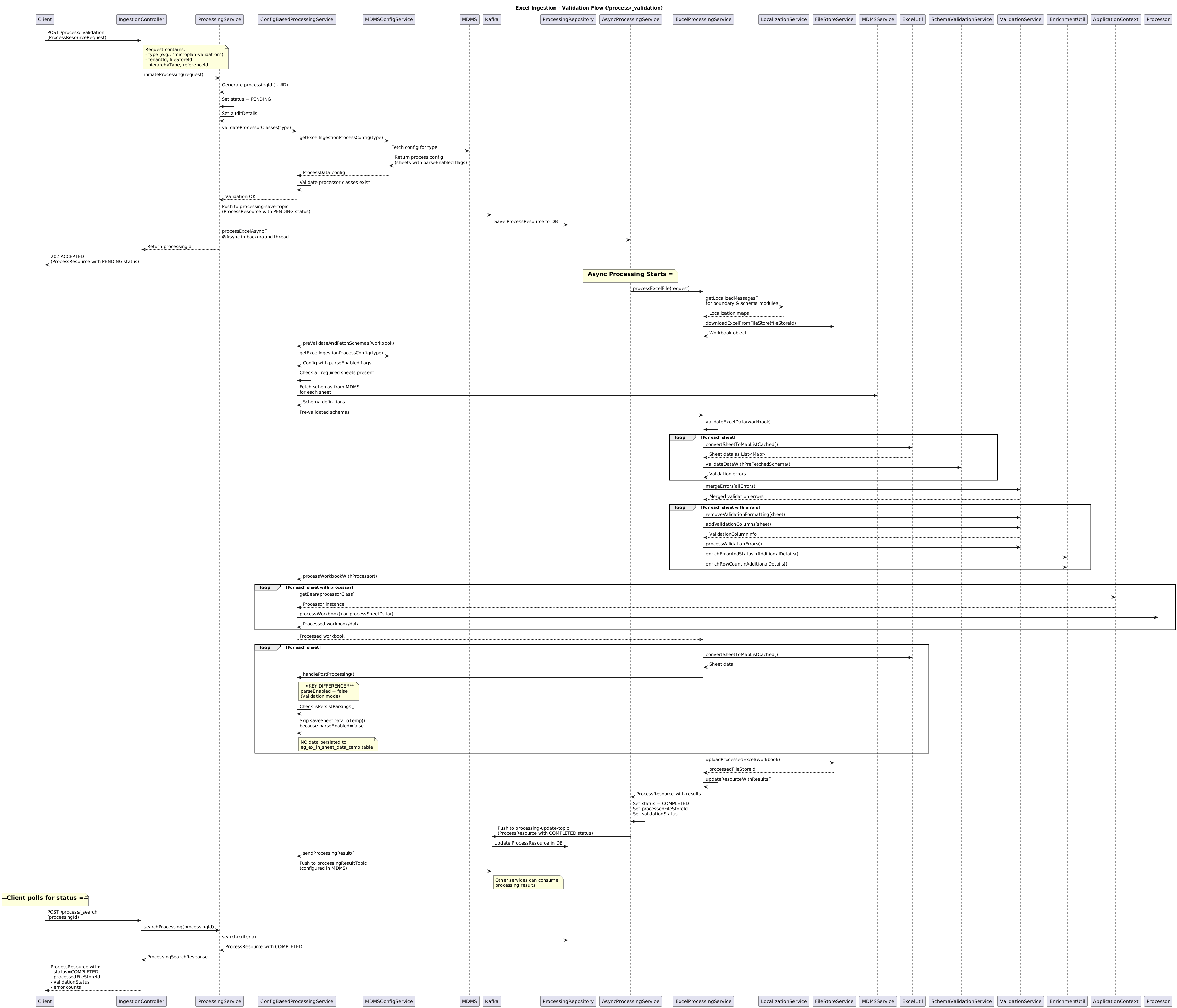
{% tab title="Process Validation" %}
```
/excel-ingestion/v1/data/process/_validation
```
{% endtab %}
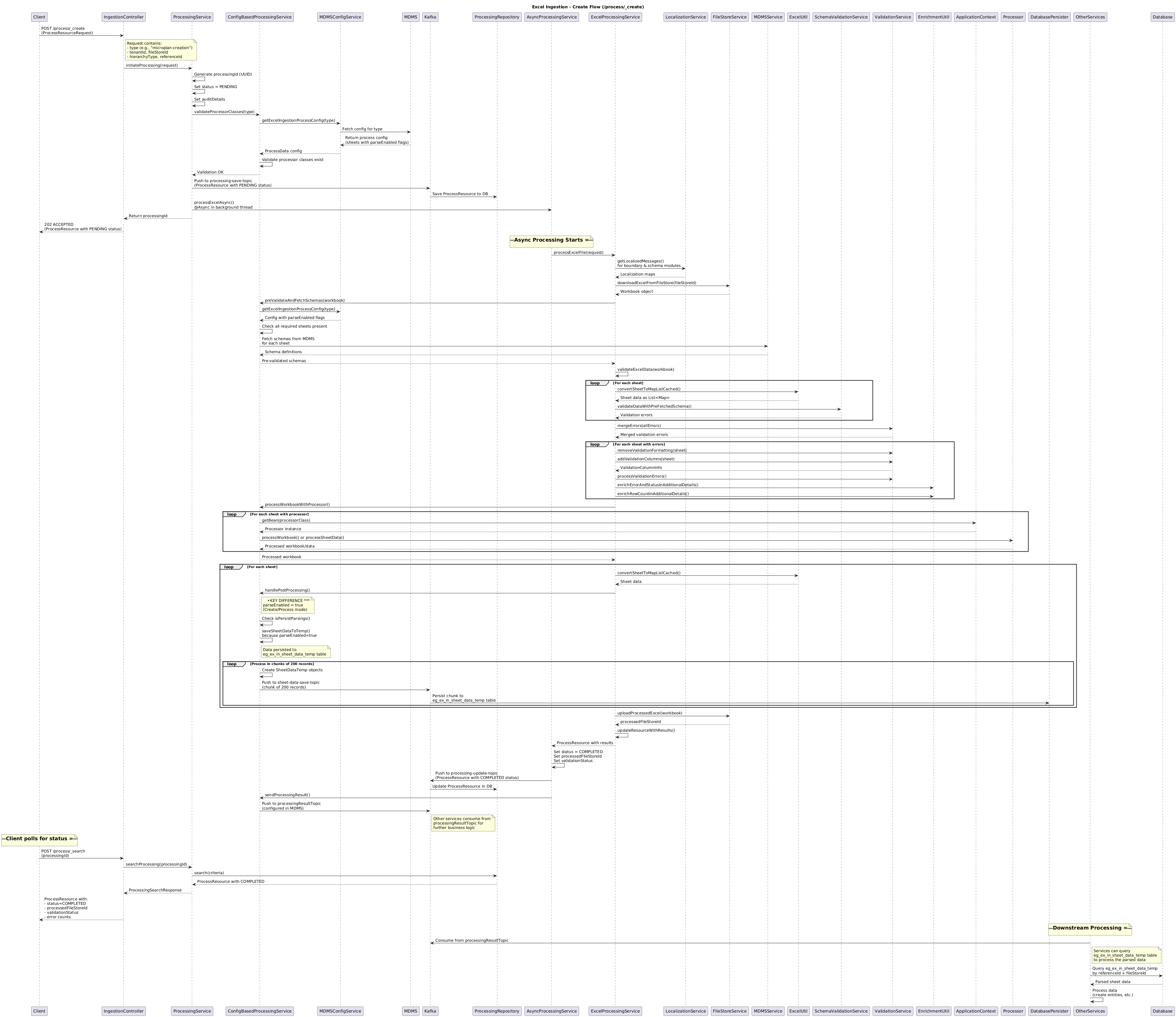
{% tab title="Process Create" %}
```
/excel-ingestion/v1/data/process/_create
```
{% endtab %}
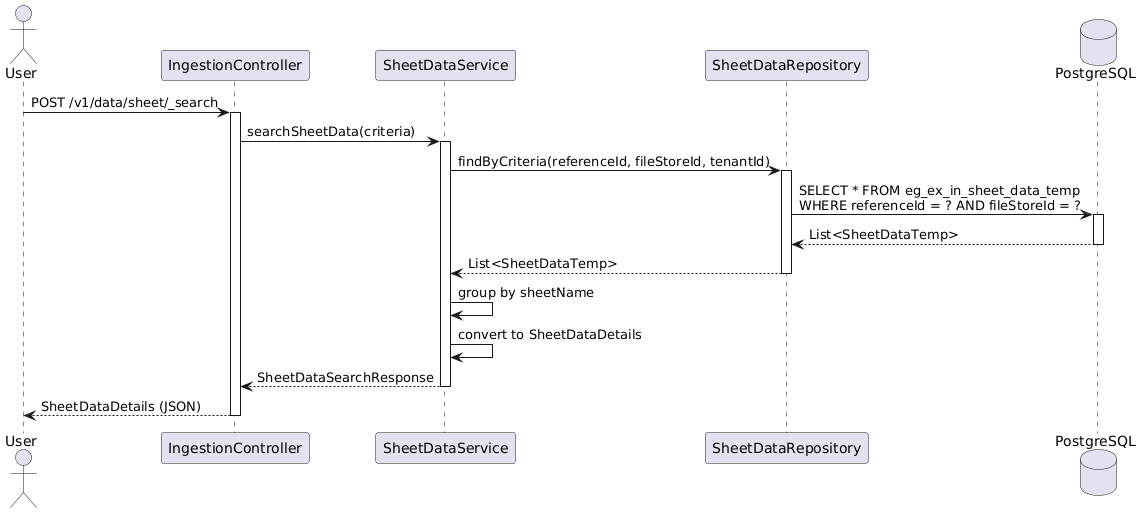
{% tab title="Sheet Search" %}
```
/excel-ingestion/v1/data/sheet/_search
```
{% endtab %}
{% endtabs %}
## Business Flow
The service follows a simple four-step flow:
1. **Generate template.** The console asks Excel Ingestion to build a sheet for a campaign.
2. **Fill and upload.** A campaign manager completes the sheet and uploads it.
3. **Validate and process.** The service checks each row, stages the usable data, and emits the processing result.
4. **Poll for result.** The caller checks `_search` endpoints until the run reaches a terminal state.
During generation, the service pulls boundary data, master data, and localisation content, then builds and uploads the workbook.
During processing, bad rows do not block good ones.
Validation errors are reported per row and written back into an annotated file so the user can fix only what failed.
The whole exchange is asynchronous with polling.
Each long-running call returns immediately with an ID and a `PENDING` or `QUEUED` status. There are no webhooks.
## API Details
```
Base Path: /excel-ingestion/v1/data
```
From a client point of view:
* generation and processing are asynchronous
* both return `202` with an ID to poll
* search and sheet endpoints are synchronous reads or cleanup operations
Endpoint
Purpose
POST /generate/_init
Kick off template generation. Returns 202 + a generation id with status QUEUED.
POST /generate/_search
Poll generation status; when COMPLETED it carries the fileStoreId of the finished template.
POST /process/_validation
Dry-run: validate an uploaded sheet and report errors without committing parsed data.
POST /process/_create
Validate and parse an uploaded sheet, stage the rows, and emit the processing result. Returns 202 + a processing id.
POST /process/_search
Poll processing status and read back per-row validation results.
POST /sheet/_search
Read the staged (temporary) parsed rows for a referenceId + fileStoreId + sheet.
POST /sheet/_delete
Clean up staged rows for a referenceId + fileStoreId (query params).
### Internal Flow
This section explains how the service implements the API behavior internally.
**Kafka entry point (internal).** `generate/_init` does no heavy work on the HTTP thread: it publishes the request to the internal `excel-ingestion-generation-init` topic, and the service's **own consumer** (one record at a time, manual ack) does the actual generation. This is the only topic the service consumes.
**Kafka outputs.** `save-generated-file` / `update-generated-file` (generation row + status), `save-processing-file` / `update-processing-file` (processing row + status), `save-sheet-data-temp` / `delete-sheet-data-temp` (staged parsed rows, written in chunks of 200), and **`hcm-processing-result`** — the topic **project-factory** consumes to close the loop. The persister (in the `configs/` repo) turns the `save-*`/`update-*` events into Postgres rows.
**Swagger contract:**
{% embed url="" %}
local copy: [`excel-ingestion-swagger.yml`](https://github.com/egovernments/health-campaign-services/blob/2f742a3e864af25cac3377e1baea6263cedbb31b/health-services/excel-ingestion/excel-ingestion-swagger.yml).
### Process Flow
Use this reading order:
1. **Start generation.** `generate/_init` validates the request and queues the work.
2. **Build the template.** The service fetches boundary, MDMS, and localisation data, then uploads the workbook.
3. **Start processing.** `process/_validation` or `process/_create` checks the uploaded file.
4. **Stage and emit.** The service stores parsed rows temporarily and emits the processing result.
5. **Poll status.** The caller uses `_search` endpoints to track completion.
Both generation and processing are async with polling.
The HTTP request accepts the work first. The actual processing happens off-thread.
### Failure & Retry Handling
* **Async, status-driven.** A failed generation or processing run does not fail the HTTP call (which already returned `202`). The terminal status is written as `FAILED` with an error code/message in `additionalDetails`, surfaced through `_search`.
* **Retry is user-driven, not automatic.** The generation consumer deliberately does **not** re-submit on failure — re-submitting `generate/_init` for the same campaign + type starts a fresh run.
* **Retry supersedes the old run ("expired").** A new `generate/_init` for the same `(tenantId, referenceId, type)` marks every prior record for that key as `EXPIRED` (whether it was queued, in progress, completed, failed, or effectively stuck/timed out) and becomes the single live record. So a stale or hung run can't linger and confuse a poll — the latest request always wins. Expiring old rows is a best-effort and never blocks the new run.
* **Always reports back to project-factory.** The `hcm-processing-result` message is sent in a `finally` block, on success **and** failure, so the campaign flow is never left waiting silently.
* **Single-consumer assumption.** Generation runs one event at a time (`max-poll-records=1`, listener concurrency 1). The queued→in-progress transition has no DB lock, so raising either without first adding a compare-and-set would cause duplicate generation runs (called out in `application.properties`).
* **Staging data self-cleans.** Parsed rows in `eg_ex_in_sheet_data_temp` carry a `deleteTime` \~24h out, and `sheet/_delete` lets the caller clean up sooner.
* If the **persister config** for these topics is missing/stale in an environment, the API will accept and acknowledge work, but rows will silently not appear in Postgres — a classic "it worked in QA" trap.
### Known Risks & Limitations
* **Generation must stay single-threaded.** The queued→in-progress transition has no DB lock; raising `max-poll-records` or listener concurrency without adding a compare-and-set would cause duplicate generation runs.
* **`expired` is the latest-request-wins rule.** Re-submitting a generate for the same campaign + type silently expires the prior records (even a completed one). Intended, but a behavioural point QA should know — an in-flight run can be superseded mid-flight.
* **Retry is manual.** Failed runs are not auto-retried; the caller must resubmit. A consumer that crashes between dequeue and terminal status can leave a row that only a fresh init clears.
* **Staging table is temporary.** Parsed rows expire \~24h after creation; consumers must read or copy them out before then (or call `sheet/_delete`).
* **Validation is app-level.** Boundary, facility, worker and date checks live in code/MDMS, not DB constraints — correctness depends on those services and on the right MDMS data being present in the environment.
* **Big-file ceilings are configurable, not infinite.** The 100,000-row limit, POI byte/zip limits and \~3 MB Kafka message size are environment-tunable; an undersized environment can still reject genuinely large campaigns.
* **Persister dependency.** Like all DIGIT services here, writes go via Kafka → persister; missing/stale persister config means accepted-but-not-saved data.
{% hint style="info" %}
### Recent Changes (v2.1 / nigeria-go-deep-2)
This release line mainly improves scale, safety, and operational behavior.
Highlights:
* **Generation is now event-driven, with clean retry.** Re-running `generate/_init` for the same campaign + type expires the older run and makes the latest request the source of truth.
* **Large sheets are faster and safer.** Search indexes, row-count guardrails, and POI safety limits improve handling of big uploads.
* **Runtime performance improved.** Template generation and parsing use less repeated work and less memory.
* **Kafka payload limits increased.** Large parsed-row chunks and results are less likely to fail in transit.
* **Attendance register support was added.** The service now generates and processes attendance-specific sheets.
* **Validation got stricter.** Worker, beneficiary, payment, and boundary checks are stronger and more consistent.
* **Search and downstream flow improved.** Search filtering is better, request context is preserved, and publish logs are easier to trace.
Use this section for the short summary. Keep deeper release-by-release detail in dedicated release notes when needed.
{% endhint %}
---
# Agent Instructions
This documentation is published with GitBook. GitBook is the documentation platform designed so that both humans and AI agents can read, navigate, and reason over technical content effectively. Learn more at gitbook.com.
## Querying This Documentation
If you need additional information that is not directly available in this page, you can query the documentation dynamically by asking a question.
Perform an HTTP GET request on the current page URL with the `ask` query parameter, and the optional `goal` query parameter:
```
GET https://docs.digit.org/health/design/architecture/low-level-design/services/health-services/console-services/excel-ingestion.md?ask=&goal=
```
`ask` is the immediate question: it should be specific, self-contained, and written in natural language.
`goal` is optional and describes the broader end goal you are ultimately trying to accomplish on behalf of the user. GitBook uses it to tailor the answer towards what is most useful for that goal.
The response will contain a direct answer to the question and relevant excerpts and sources from the documentation.
Use this mechanism when the answer is not explicitly present in the current page, you need clarification or additional context, or you want to retrieve related documentation sections.