 #### Data Field to Manage Attendance Screen:
| **Field** | **Description** |
| --------------------- | ------------------------------------------------------------------------------------------------------------------------------------------------------------ |
| Campaign name | Name of the campaign. |
| Event type | Type of event where attendance is done, that is training or distribution. |
| Start date | Start date of the campaign. |
| End date | End date of the campaign. |
| Status | If the end date is passed, the status will be inactive, or if the register status is inactive, the status will be inactive, else, the status will be active. |
| Staff count | Number of attendees in the register. |
| Attendance completion | Shows the number of days for which attendance has been submitted submitted to the server. |
#### Attendance Completion Days Logic:
1. Fetch all attendance logs for the register.
2. Based on the sessions configured for the register, check for the logs where the entry time and the exit time are equal to the start and the end time of the session.
3. For individuals who do not have logs that are the same as the start and the end time will be by default marked as absent if any of the individuals' logs is present for the register.
/`/generateDateList will return the map of completed attendance Dates.`
`list = generateDateList(`
`e.attendanceRegister.startDate!,`
`e.attendanceRegister.endDate!,`
`registerCompletedLogs ?? [],`
`e.attendanceRegister.additionalDetails?["sessions"] != 2,`
`);`
`var completedDaysCount =`
`e.attendanceRegister.additionalDetails?["sessions"] == 2`
`? list.length ~/ 2 //for registers with 2 sessions`
`: list.length; ////for registers with single session`
## 2. Date and Session Selection
The date selection range commences from the start date of the attendance register and extends to the end date of the register or today's date if today falls before the end date of the register.
* If the attendance for a past day is already submitted, then the CTA must change to view attendance from mark attendance.
#### Data Field to Manage Attendance Screen:
| **Field** | **Description** |
| --------------------- | ------------------------------------------------------------------------------------------------------------------------------------------------------------ |
| Campaign name | Name of the campaign. |
| Event type | Type of event where attendance is done, that is training or distribution. |
| Start date | Start date of the campaign. |
| End date | End date of the campaign. |
| Status | If the end date is passed, the status will be inactive, or if the register status is inactive, the status will be inactive, else, the status will be active. |
| Staff count | Number of attendees in the register. |
| Attendance completion | Shows the number of days for which attendance has been submitted submitted to the server. |
#### Attendance Completion Days Logic:
1. Fetch all attendance logs for the register.
2. Based on the sessions configured for the register, check for the logs where the entry time and the exit time are equal to the start and the end time of the session.
3. For individuals who do not have logs that are the same as the start and the end time will be by default marked as absent if any of the individuals' logs is present for the register.
/`/generateDateList will return the map of completed attendance Dates.`
`list = generateDateList(`
`e.attendanceRegister.startDate!,`
`e.attendanceRegister.endDate!,`
`registerCompletedLogs ?? [],`
`e.attendanceRegister.additionalDetails?["sessions"] != 2,`
`);`
`var completedDaysCount =`
`e.attendanceRegister.additionalDetails?["sessions"] == 2`
`? list.length ~/ 2 //for registers with 2 sessions`
`: list.length; ////for registers with single session`
## 2. Date and Session Selection
The date selection range commences from the start date of the attendance register and extends to the end date of the register or today's date if today falls before the end date of the register.
* If the attendance for a past day is already submitted, then the CTA must change to view attendance from mark attendance.
 #### Missed Attendance Logic:
Upon selecting the attendance register, a list of completed dates is generated. We iterate over the dates from the start date to the current date, checking for any missing dates in the list to identify missed attendance dates.
## 3. Mark Attendance
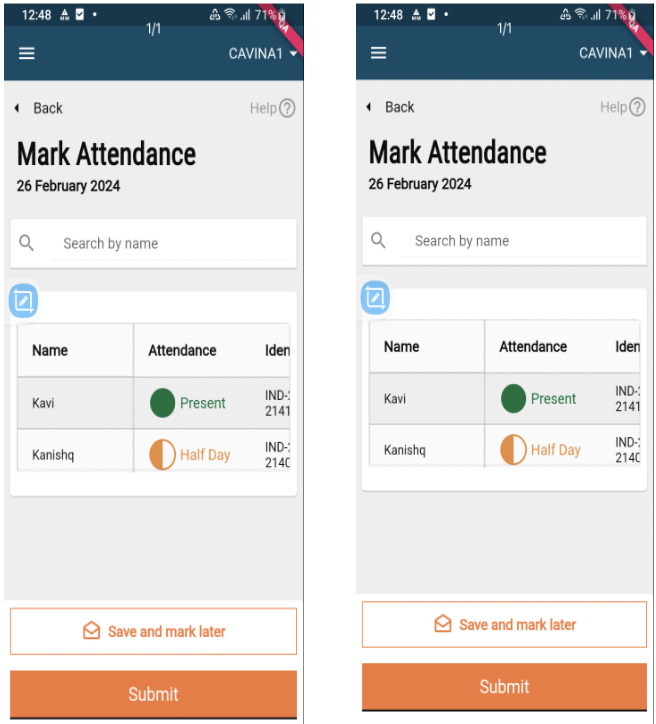
The trainees or supervisors should be able to mark the attendance daily twice (one for entry and exit) against each register (default configuration for sessions).
1. Supervisors can mark half-day, full-day, and absent - Definitions of the statuses are as follows:
* Not marked: Default status in the register. This must be the status when the user has not taken any action on the line item.
* Present: Tapping once must change the "Not Marked" status to 'Present' (Not Marked —> Present).
* Absent: Tapping twice must change the 'Present' status to 'Absent' (Not Marked —> Present—->Absent).
* Half-day (Only if config requires attendance once a day): Tapping thrice must change the absent status to half-day (Not Marked —> Present—->Absent—-> Half Day).
2. Save and Mark Later: If the user marks attendance for 10 out of 50 people, and clicks on save and mark later, the supervisor should be able to reopen the given attendance register while it is active and see the status of the attendance marked as per the last time they updated the screen.
3. Submit: If the user marks attendance for 10 out of 50 people, and clicks on submit, an error message is shown to mark attendance for all staff. After marking attendance for all staff, and clicking on submit, the supervisor navigates to the attendance recorded acknowledgement screen.
#### Missed Attendance Logic:
Upon selecting the attendance register, a list of completed dates is generated. We iterate over the dates from the start date to the current date, checking for any missing dates in the list to identify missed attendance dates.
## 3. Mark Attendance
The trainees or supervisors should be able to mark the attendance daily twice (one for entry and exit) against each register (default configuration for sessions).
1. Supervisors can mark half-day, full-day, and absent - Definitions of the statuses are as follows:
* Not marked: Default status in the register. This must be the status when the user has not taken any action on the line item.
* Present: Tapping once must change the "Not Marked" status to 'Present' (Not Marked —> Present).
* Absent: Tapping twice must change the 'Present' status to 'Absent' (Not Marked —> Present—->Absent).
* Half-day (Only if config requires attendance once a day): Tapping thrice must change the absent status to half-day (Not Marked —> Present—->Absent—-> Half Day).
2. Save and Mark Later: If the user marks attendance for 10 out of 50 people, and clicks on save and mark later, the supervisor should be able to reopen the given attendance register while it is active and see the status of the attendance marked as per the last time they updated the screen.
3. Submit: If the user marks attendance for 10 out of 50 people, and clicks on submit, an error message is shown to mark attendance for all staff. After marking attendance for all staff, and clicking on submit, the supervisor navigates to the attendance recorded acknowledgement screen.
| End Point | Request Method | Request Info |
|---|---|---|
| /health-attendance/v1/_search | POST | |
| /individual/v1/_search | POST | |
| /health-attendance/log/v1/\_search | POST | |
| /health-attendance/log/v1/\_create | POST | |