> For the complete documentation index, see [llms.txt](https://docs.digit.org/llms.txt). Markdown versions of documentation pages are available by appending `.md` to page URLs; this page is available as [Markdown](https://docs.digit.org/health/v1.5/hcm-product-suite/health-products/digit-hcm-app/user-manual/common-functions/tracking-adverse-events.md).
# Tracking Adverse Events
An illustrative guide to using the Adverse Events Module
While administering the dose to a beneficiary (usually children), there can be instances when the beneficiary shows some symptoms against the dose provided. These adverse events need to be recorded and monitored as it helps to take precautionary measures for further doses as well as in future campaigns for that beneficiary. It is helpful for cases when a beneficiary's situation becomes critical and he/she needs to be referred to a healthcare facility. This is also crucial for resource tracking because, in certain campaigns, the beneficiary can be re-administered the dose even after he vomits out the medicine.
## Kay Features
1. Recording adverse events.
2. Enabling actors to record and track the adverse events observed in a beneficiary after administration of the dose.
3. Monitoring the data to plan and decide for upcoming doses during the campaign.
## User Roles
| User Role | Scope of Action | Role Description |
| ----------- | --------------------------------------- | ------------------------------------------------------------------------------------------------------------------------------------------ |
| Distributor | Record adverse events for beneficiaries | The user goes from house-to-house for drug administration and records the adverse events observed in the beneficiary before administration |
## Using Tracking Adverse Events
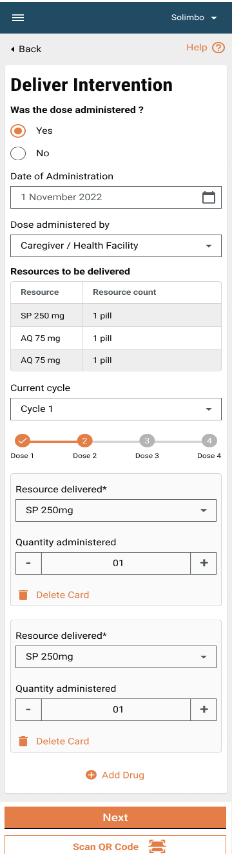
### Deliver Intervention
The user needs to provide the delivery details for the resources delivered to the beneficiary. The screen is configurable depending upon the campaign type and the auto-calculated resources and quantity are displayed and populated in the fields. The user can edit the fields if required to change the resource administered.
### Adverse Events
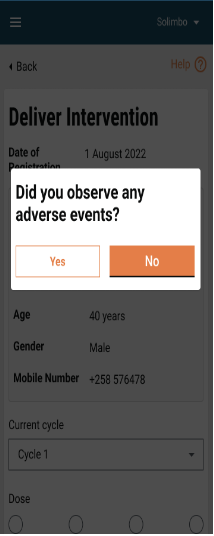
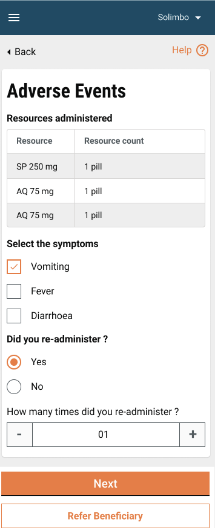
When the user clicks ‘Next’ on the deliver intervention screen, it opens a pop-up that asks: “Did you observe any adverse events?” If the user selects ‘No’, the adverse events screen is skipped, and he/she is directly navigated to the next screen in the flow. If the user selects ‘Yes’, it opens the adverse events form to capture the details. On top the summary of delivered resources is displayed in a tabular form. The list of symptoms must be configurable to include more values if required. It is possible that the beneficiary shows multiple symptoms, thus the user must be able to select multiple values from the list.
If the dose is readministered, then the user must select ‘yes’ and provide the number of times it has been readministered.
The “Refer Beneficiary” button navigates the user to the refer beneficiary flow, in case the beneficiary is critical and requires medical assistance. The ‘Next’ button takes the user to the next screen in the flow.
---
# Agent Instructions
This documentation is published with GitBook. GitBook is the documentation platform designed so that both humans and AI agents can read, navigate, and reason over technical content effectively. Learn more at gitbook.com.
## Querying This Documentation
If you need additional information that is not directly available in this page, you can query the documentation by asking a question.
Perform an HTTP GET request on the following URL with the `ask` and `goal` query parameters:
```
GET https://docs.digit.org/health/v1.5/hcm-product-suite/health-products/digit-hcm-app/user-manual/common-functions/tracking-adverse-events.md?ask=&goal=
```
`ask` is the immediate question: it should be specific, self-contained, and written in natural language.
`goal` is what the user is ultimately trying to achieve, the reason they need the answer. Sharing it helps GitBook give you a better, more relevant answer. A goal is most helpful when it describes the outcome the user wants rather than restating the question. For example, with `ask=how do I create an API token`, a goal like `automate deployments from our CI pipeline` lets GitBook tailor the answer to that use case.
The response will contain a direct answer to the question and relevant excerpts and sources from the documentation.
Use this mechanism when the answer is not explicitly present in the current page, you need clarification or additional context, or you want to retrieve related documentation sections.