> For the complete documentation index, see [llms.txt](https://docs.digit.org/llms.txt). Markdown versions of documentation pages are available by appending `.md` to page URLs; this page is available as [Markdown](https://docs.digit.org/health/v2.0/deploy/configuration/hcm-console-configuration/console-ui-configuration/hcm-console-web-ui/campaign-setup/delivery-details-delivery-rules.md).
# Delivery Details - Delivery Rules
## Overview
The **Delivery Details** step allows users to define **when**, **to whom**, and **what** resources are delivered during a campaign. This configuration is completed across **three screens**:
1. **Cycles & Deliveries**
2. **Delivery Rules**
3. **Summary**
Delivery behaviour can be preconfigured based on **project type** using MDMS, while still allowing users to adjust values as needed.
## **Steps**
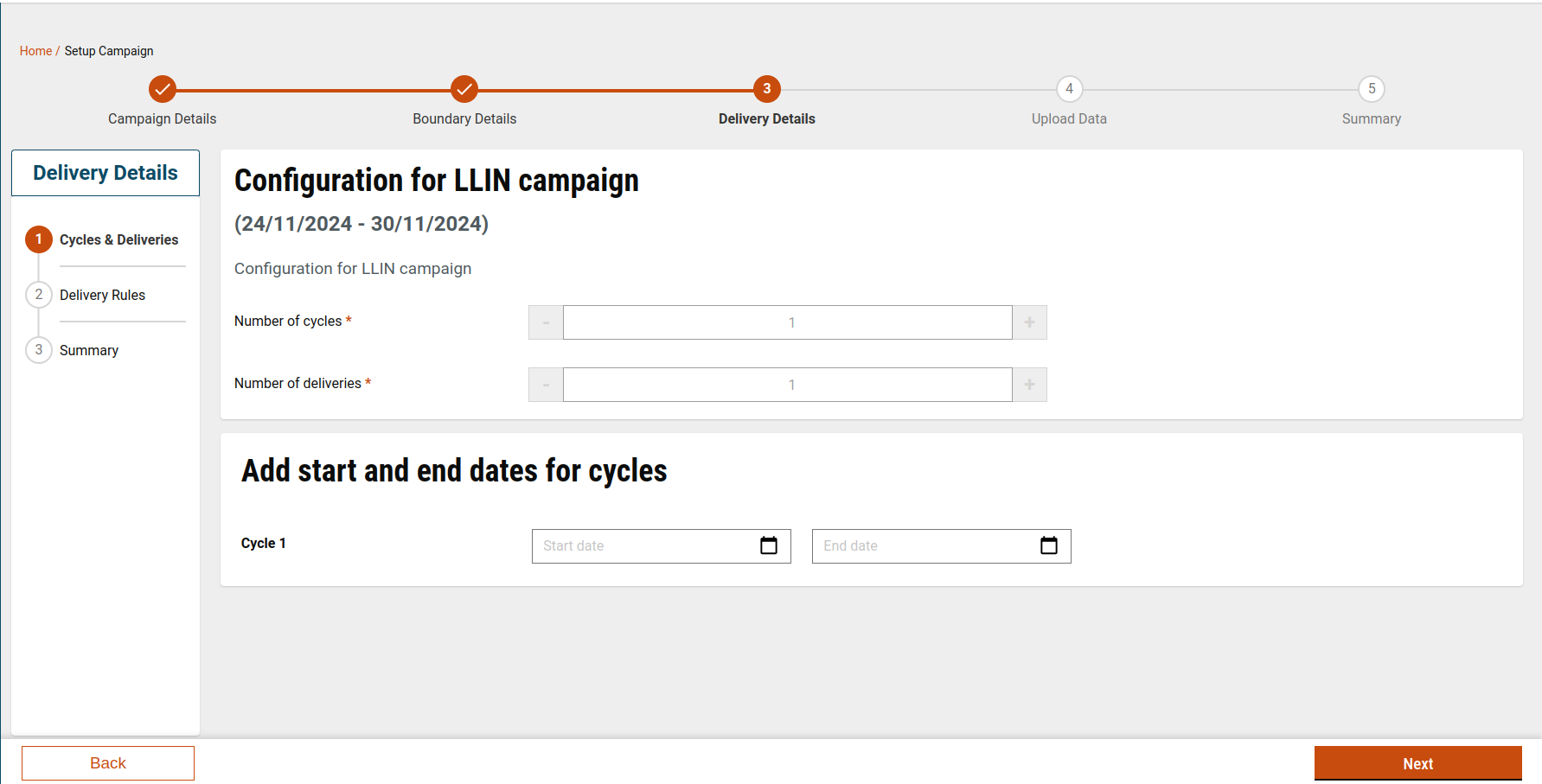
### Step 1: Configure Cycles & Deliveries
**Purpose:** Define the structure of the campaign timeline.
#### Actions
1. Specify the **number of cycles**:
* Minimum: **1**
* Maximum: **5**
2. Specify the **number of deliveries** per cycle.
3. Enter the **start and end dates** for each cycle.
#### Configuration & Defaults
* Default values for cycles and deliveries are fetched from **MDMS**, based on the selected project type. [Click here](https://github.com/egovernments/DIGIT-Frontend/blob/campaign/micro-ui/web/micro-ui-internals/packages/modules/campaign-manager/src/pages/employee/CycleConfiguration.js) to access the config file.
* If configured:
* The screen is pre-populated with default values.
* Users can increase or decrease these values if required.
#### Validations
* Cycle start and end dates **must not overlap** with other cycles.
* Date validation rules are configurable via MDMS.
#### Save & Continue
* Clicking **Next**:
* Stores cycle configuration in **local storage**.
* Moves the user to the Delivery Rules screen.
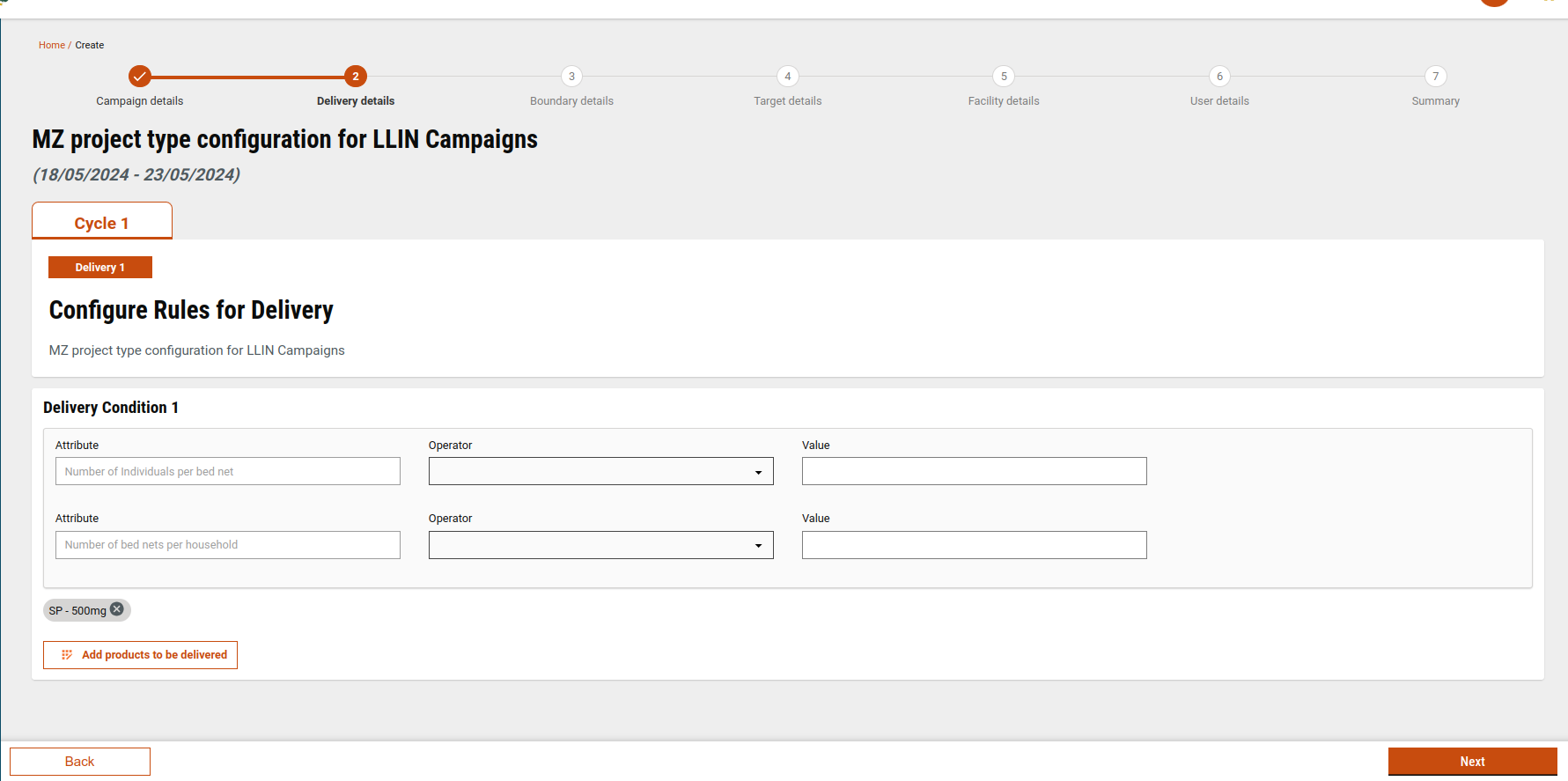
### Step 2: Add Delivery Rules
**Purpose:** Define delivery logic for each cycle and delivery.
#### What Users Configure
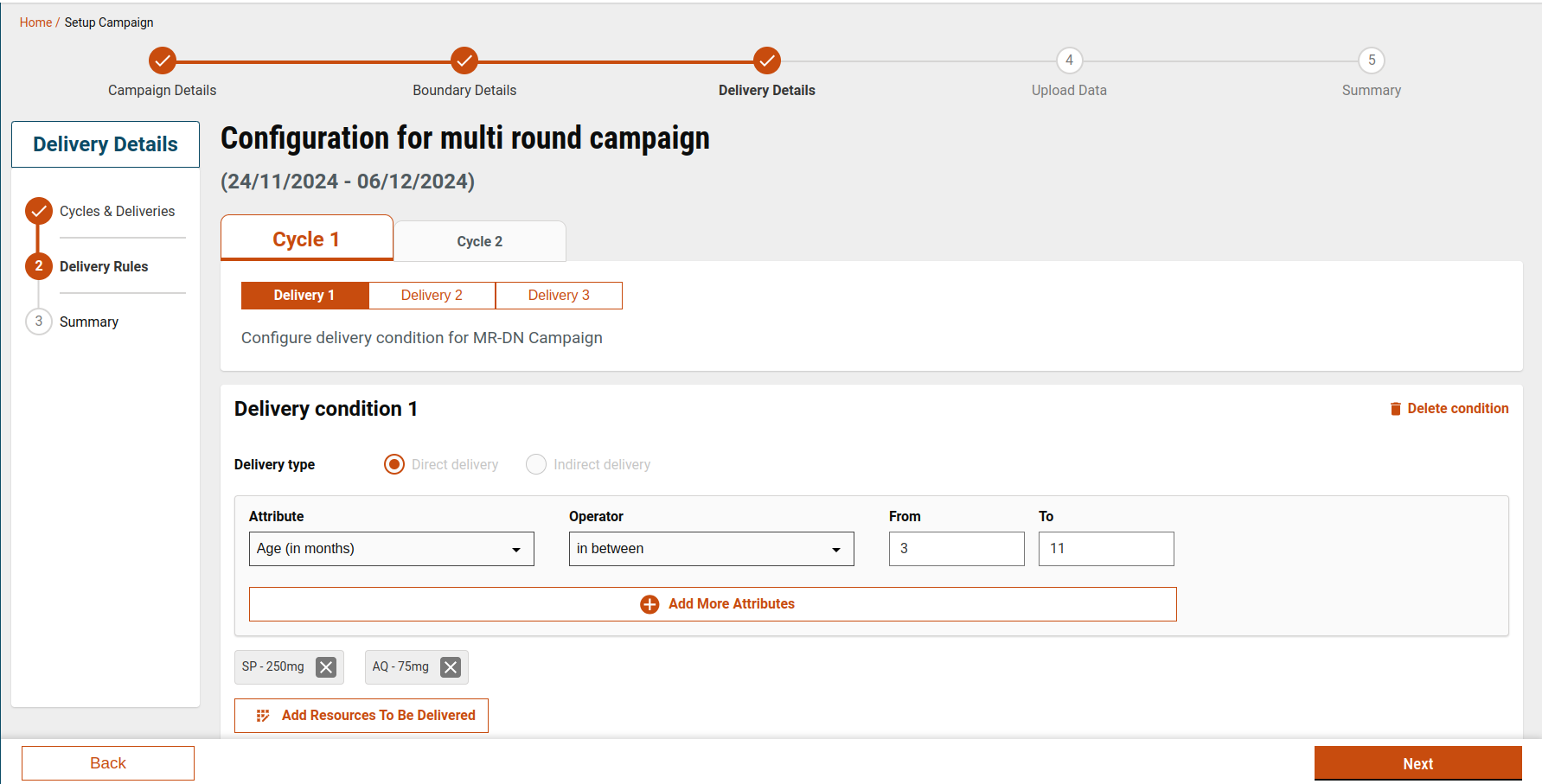
For each selected cycle and delivery, users can:
* Add **delivery rules**
* Add **conditions** within each rule
* Attach **products** to each rule
#### Delivery Rule Limits
* Maximum **5 delivery rules** per delivery.
* Each rule can have multiple conditions.
#### Conditions Configuration
* Condition attributes include:
* Age
* Gender
* Height
* Weight
* Operators and attributes are sourced from **MDMS**.
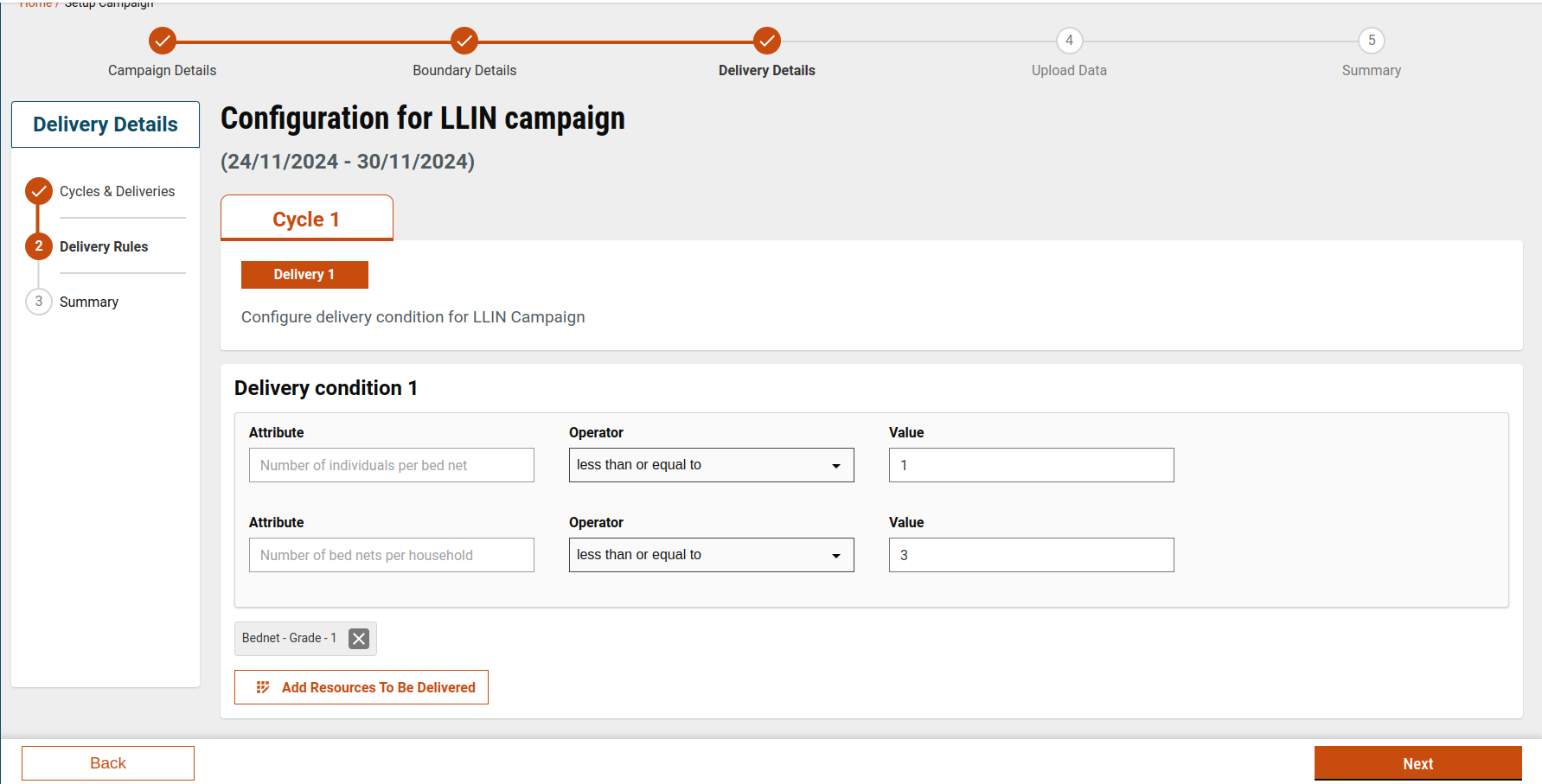
* For certain project types (e.g., **LLIN-mz**):
* Fixed attributes are preconfigured.
* Users may be restricted from adding or removing attributes.
#### Project-Type Based Defaults
* Delivery rules, conditions, and products can be preloaded based on project type.
* If defaults are present:
* Users can modify, remove, or add rules unless restricted by configuration.
Reference files:
* [Click here](https://github.com/egovernments/DIGIT-Frontend/blob/campaign/micro-ui/web/micro-ui-internals/packages/modules/campaign-manager/src/pages/employee/SetupCampaign.js) to access the file.
* [Click here ](https://github.com/egovernments/DIGIT-Frontend/blob/campaign/micro-ui/web/micro-ui-internals/packages/modules/campaign-manager/src/pages/employee/deliveryRule/index.js)to access the Delivery rules screen config file.
* [Click here](https://github.com/egovernments/DIGIT-Frontend/blob/campaign/micro-ui/web/micro-ui-internals/packages/modules/campaign-manager/src/pages/employee/SetupCampaign.js) to access the API call file.
### Step 3: Select or Create Products
#### Add Products to a Delivery Rule
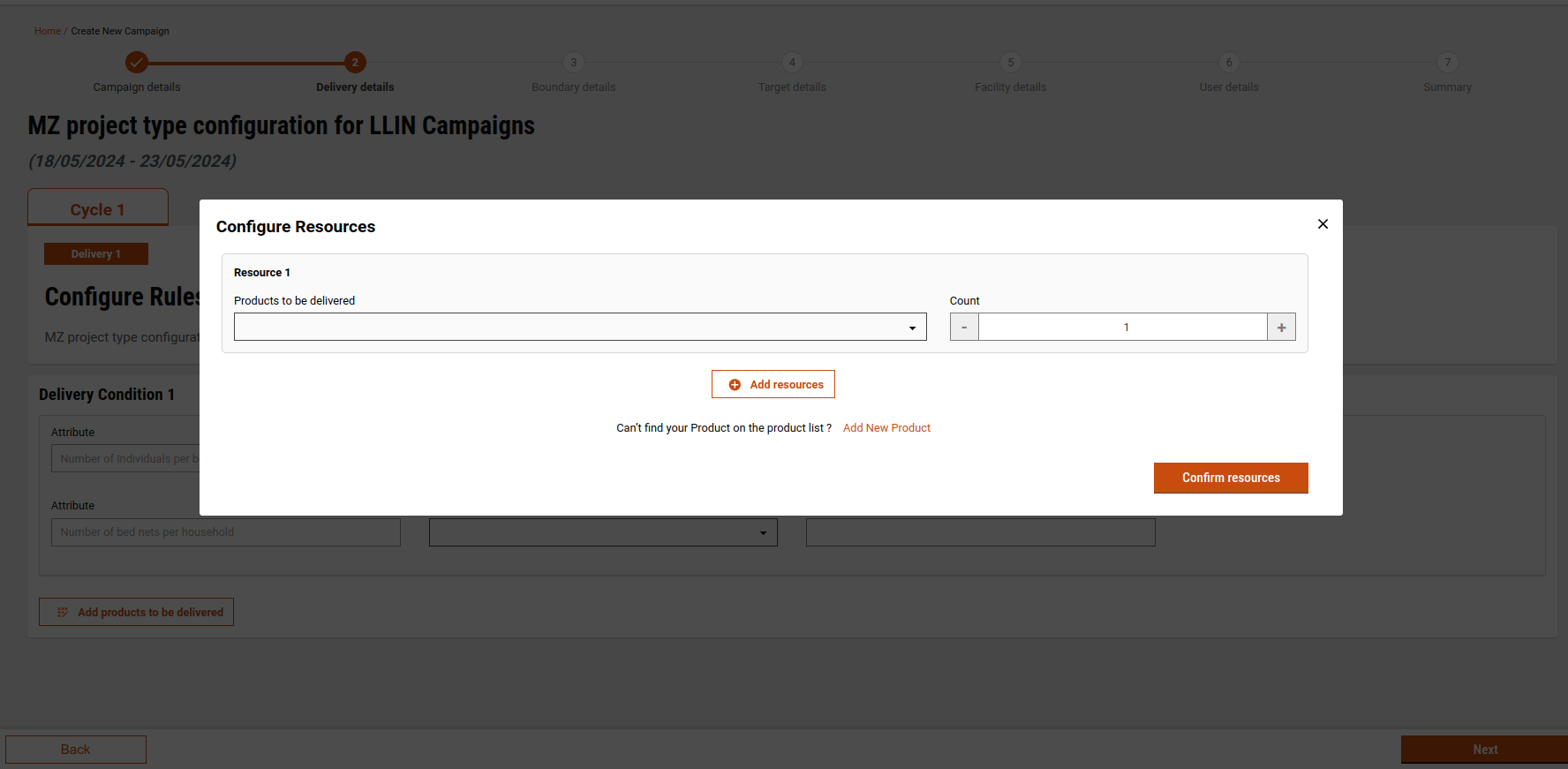
1. Click **Configure Resources**.
2. A pop-up displays available product variants.
3. Select one or more products and specify the quantity.
4. Click **Confirm Resources** to add them to the delivery rule.
5. Products can be removed or updated later.
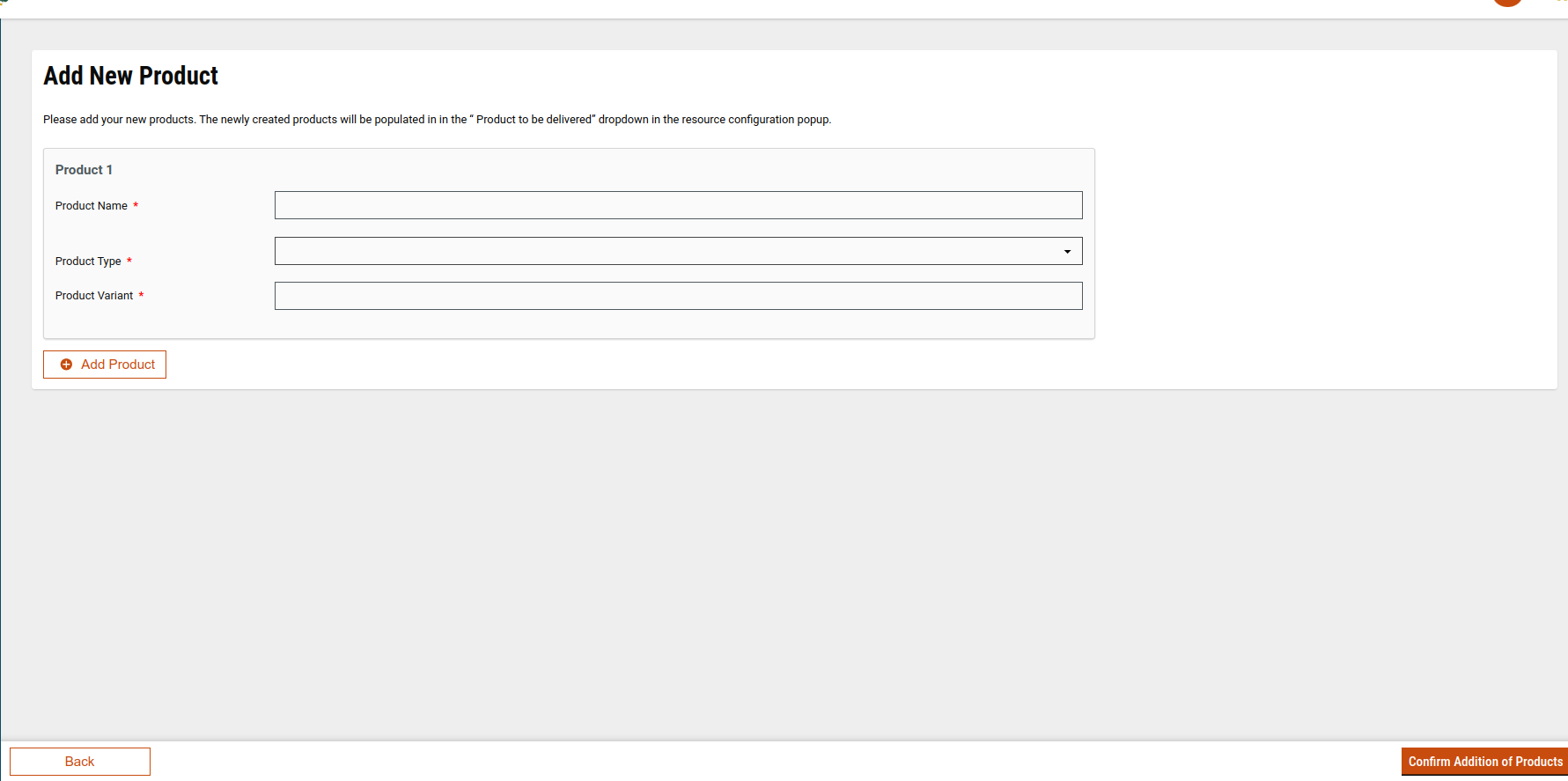
#### Create a New Product
If the required product does not exist:
1. Click **Add New Product**.
2. Enter:
* Product name
* Product variants
* Product type (fetched from MDMS)
3. Use **Add Products** to create multiple products if required.
4. Click **Confirm**:
* Product is created
* Product variants are created
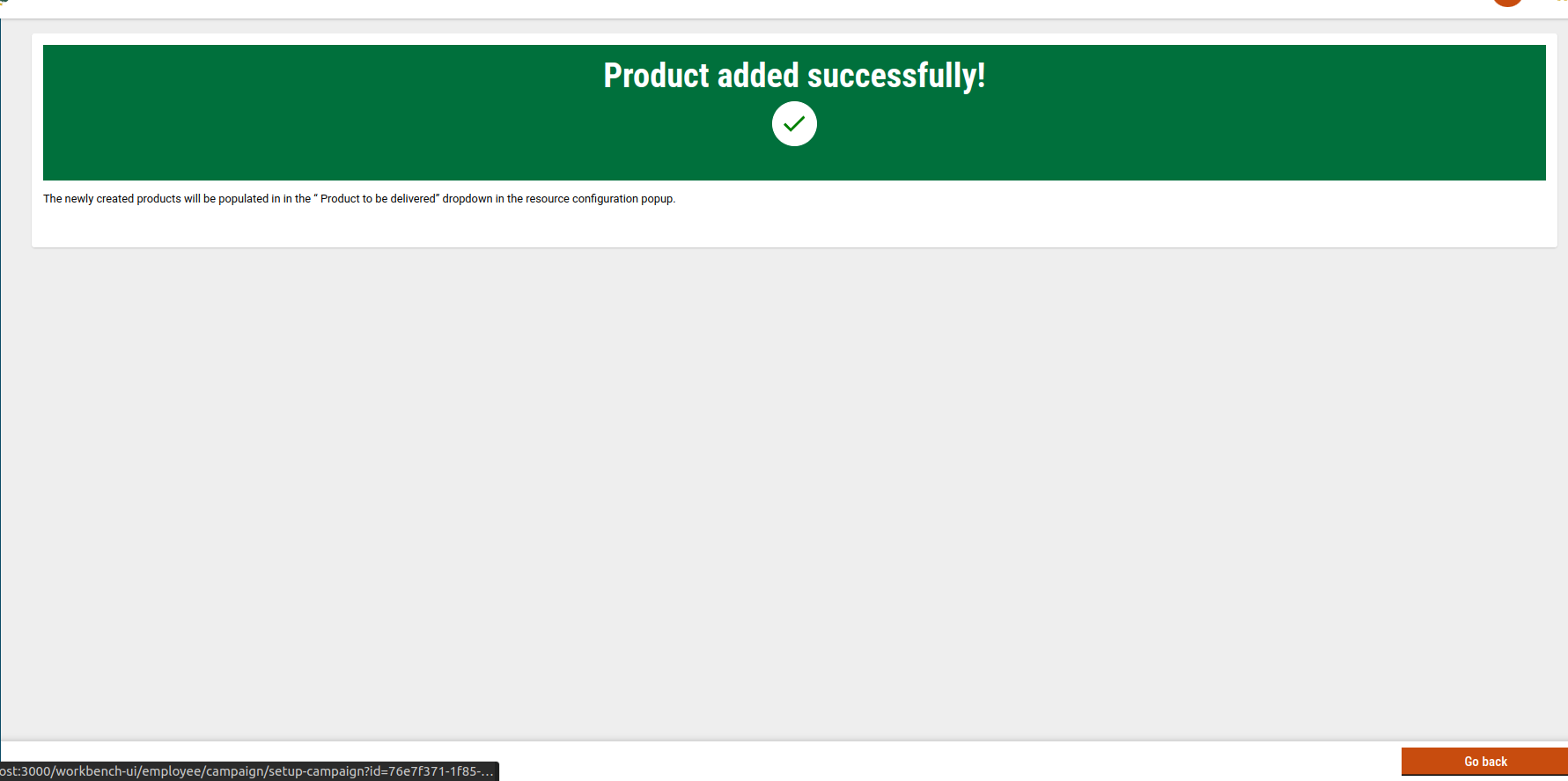
5. A success screen is shown after completion.
### Step 4: Save Delivery Rules
**When the user clicks Next:**
* Delivery rules data is:
* Saved to **local storage**
* Persisted using the **Draft API**
* Data is validated before moving to the summary screen.
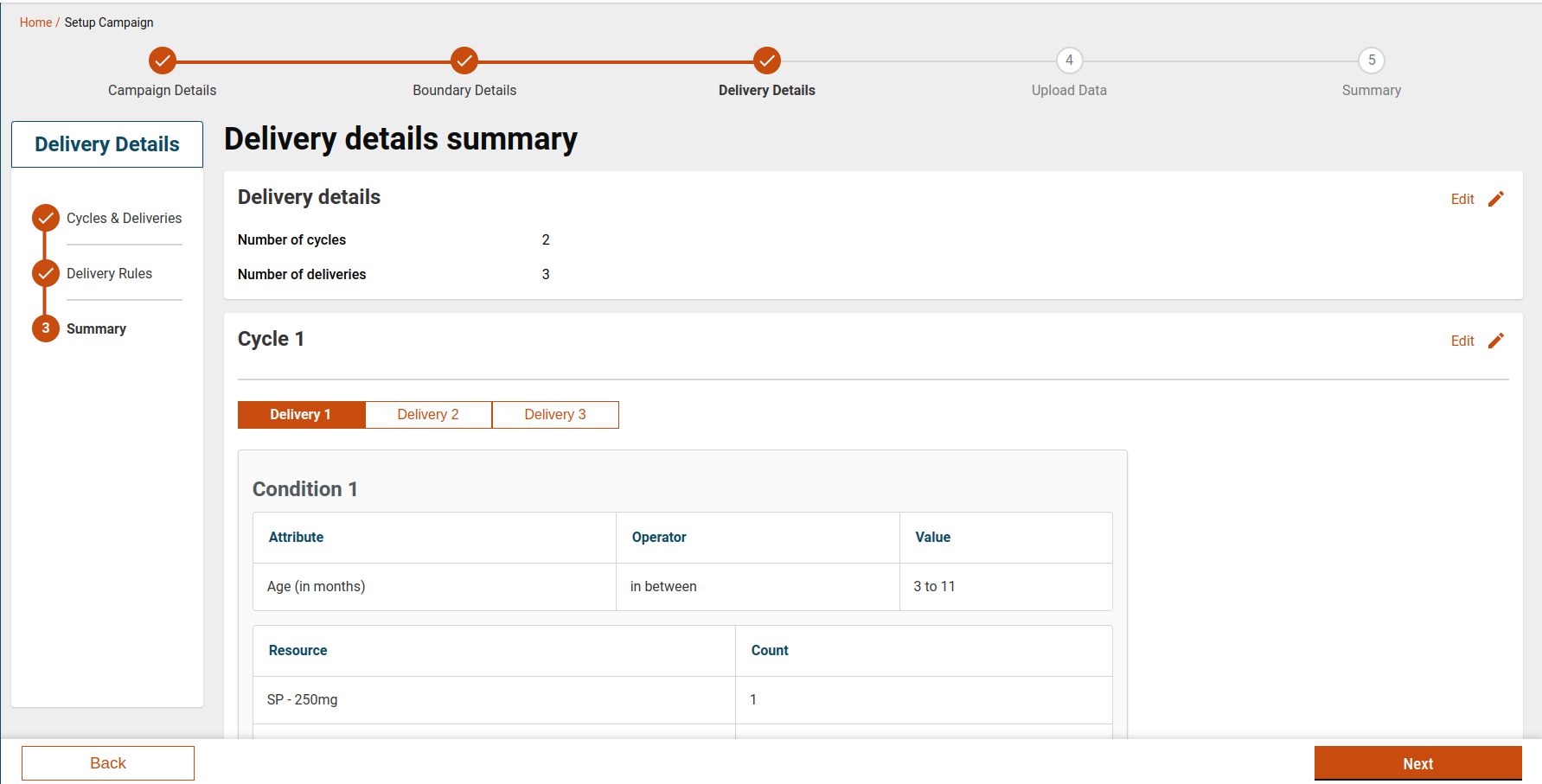
### Step 5: Review Delivery Summary
**Purpose:** Final verification before completing delivery setup.
#### Summary Screen Shows:
* Cycle configuration
* Delivery rules per cycle and delivery
* Conditions and products for each rule
* Delivery type (if applicable)
Users can review and confirm all values before proceeding.
## Setup Delivery Configuration
### Delivery Configuration via MDMS
Delivery behaviour is driven by the MDMS configuration and acts as the **default template**. This MDMS schema is used to fetch the details for every product type. [Refer to this page](/health/v2.0/deploy/configuration/hcm-console-configuration/console-ui-configuration/hcm-console-web-ui/campaign-setup/delivery-details-delivery-rules.md) to check the config of delivery based on project type.
[Click here](https://github.com/egovernments/DIGIT-Frontend/blob/console/health/micro-ui/web/micro-ui-internals/packages/modules/campaign-manager/src/utils/getDeliveryConfig.js) to access the deliveryconfig.js file.
Sample structure for delivery configuration:
Sample Config
````
```json
{
"projectType": "MR-DN",
"attrAddDisable": false,
"deliveryAddDisable": false,
"customAttribute": true,
"cycleConfig": {
"cycle": 3,
"deliveries": 2
},
"deliveryConfig": [
{
"attributeConfig": [
{
"key": 1,
"label": "Custom",
"attrType": "dropdown",
"attrValue": "Age",
"operatorValue": "GREATER_THAN",
"value": 10
},
{
"key": 2,
"label": "Custom",
"attrType": "dropdown",
"attrValue": "Height",
"operatorValue": "LESS_THAN",
"value": 50
}
],
"productConfig": [
{
"key": 1,
"count": 1,
"value": "PVAR-2024-05-15-000044",
"name": "Paracetamol - 500mg"
}
]
},
{
"attributeConfig": [
{
"key": 1,
"label": "Custom",
"attrType": "dropdown",
"attrValue": "Age",
"operatorValue": "IN_BETWEEN",
"toValue": 10,
"fromValue": 20
}
],
"productConfig": [
{
"key": 1,
"count": 1,
"value": "PVAR-2024-05-15-000044",
"name": "Paracetamol - 500mg"
}
]
}
]
}
```
````
#### Key Configuration Fields
* **projectType**
* Determines which delivery configuration is applied.
* **attrAddDisable**
* If `true`, users cannot add new attributes.
* **deliveryAddDisable**
* If `true`, users cannot add new delivery rules.
* **cycleConfig**
```
"cycleConfig": {
"cycle": 3, //no of cycle
"deliveries": 2 // no of deliveries
},
```
* **deliveryConfig**
* Defines default delivery conditions and products
````
```
"deliveryConfig": [
{
"attributeConfig": [ // this represents each attribute in a condition
{
"key": 1, // this should be always in sequential order
"label": "Custom", // this should be always set to custom
"attrType": "dropdown", // this represnt the type of component
"attrValue": "Age", // this is the value of the attribute which show in the attribute component
"operatorValue": "GREATER_THAN", // this is operator value, it will show in operator component
"value": 10 // this is the value which will show in value input component
},
....
],
"productConfig": [
{
"key": 1, // this will be always in sequential order
"count": 1, // represent the count of the product
"value": "PVAR-2024-05-15-000044", // variant id of the product. We need to be careful before adding the id that it should be present in the database
"name": "Paracetamol - 500mg" // name should always be adding using "{productName} - {variant}"
}
]
},
```
]
````
> Adding product configuration requires caution. Incorrect product configuration may cause failures during campaign creation.
>
> * **Value** must contain the **product variant ID**, fetched from `product/variant/v1/_search`.
> * **Name** should follow the format **` - `**, where:
> * Product name is fetched from `product/v1/_search`
> * Variant is fetched from `product/variant/v1/_search`
## Reference Links
* [Delivery Rule](https://github.com/egovernments/DIGIT-Frontend/tree/campaign/micro-ui/web/micro-ui-internals/packages/modules/campaign-manager/src/pages/employee/deliveryRule)
* [AddProduct.js](https://github.com/egovernments/DIGIT-Frontend/blob/campaign/micro-ui/web/micro-ui-internals/packages/modules/campaign-manager/src/pages/employee/AddProduct.js)
#### MDMS
* [AttributeConfig](https://github.com/egovernments/egov-mdms-data/blob/UNIFIED-DEV/data/mz/health/hcm-admin-console/attributeConfig.json)
* [OperatorConfig](https://github.com/egovernments/egov-mdms-data/blob/UNIFIED-DEV/data/mz/health/hcm-admin-console/operatorConfig.json)
* [ProductType](https://github.com/egovernments/egov-mdms-data/blob/UNIFIED-DEV/data/mz/health/hcm-admin-console/productType.json)
#### Hooks
* [CreateProduct.js](https://github.com/egovernments/DIGIT-Frontend/blob/campaign/micro-ui/web/micro-ui-internals/packages/modules/campaign-manager/src/hooks/useCreateProduct.js)
* [CreateProductVariant.js](https://github.com/egovernments/DIGIT-Frontend/blob/campaign/micro-ui/web/micro-ui-internals/packages/modules/campaign-manager/src/hooks/useCreateProductVariant.js)
* [useProductList.js](https://github.com/egovernments/DIGIT-Frontend/blob/campaign/micro-ui/web/micro-ui-internals/packages/modules/campaign-manager/src/hooks/useProductList.js)
* [useUpdateCampaign.js](https://github.com/egovernments/DIGIT-Frontend/blob/campaign/micro-ui/web/micro-ui-internals/packages/modules/campaign-manager/src/hooks/useUpdateCampaign.js)
### New changes
We have added the **Delivery type** to each delivery condition, showing the delivery type of the campaign.
* Each delivery condition now includes a **Delivery Type**.
* Default delivery types can be configured per project type in MDMS.
* Example use case: **SMC campaigns** with predefined delivery types.
Sample config
````
```javascript
deliveryConfig: [
{
delivery: 1,
conditionConfig: [
{
deliveryType: "DIRECT",
attributeConfig: [
{
key: 1,
label: "Custom",
attrType: "dropdown",
attrValue: "Age",
operatorValue: "IN_BETWEEN",
fromValue: 3,
toValue: 11,
},
],
productConfig: [
{
key: 1,
count: 1,
value: "PVAR-2024-01-24-000079",
name: "AQ - 75mg",
},
{
key: 1,
count: 1,
value: "PVAR-2024-05-03-000305",
name: "SP - 250mg",
},
],
},
{
deliveryType: "DIRECT",
attributeConfig: [
{
key: 1,
label: "Custom",
attrType: "dropdown",
attrValue: "Age",
operatorValue: "IN_BETWEEN",
fromValue: 12,
toValue: 59,
},
],
productConfig: [
{
key: 1,
count: 1,
value: "PVAR-2024-01-24-000078",
name: "AQ - 150mg",
},
],
},
],
},
{
delivery: 2,
conditionConfig: [
{
deliveryType: "INDIRECT",
attributeConfig: [
{
key: 1,
label: "Custom",
attrType: "dropdown",
attrValue: "Age",
operatorValue: "IN_BETWEEN",
fromValue: 3,
toValue: 11,
},
],
productConfig: [
{
key: 1,
count: 1,
value: "PVAR-2024-01-24-000079",
name: "AQ - 75mg",
},
],
},
{
deliveryType: "INDIRECT",
attributeConfig: [
{
key: 1,
label: "Custom",
attrType: "dropdown",
attrValue: "Age",
operatorValue: "IN_BETWEEN",
fromValue: 12,
toValue: 59,
},
],
productConfig: [
{
key: 1,
count: 1,
value: "PVAR-2024-01-24-000078",
name: "AQ - 150mg",
},
],
},
],
},
{
delivery: 3,
conditionConfig: [
{
deliveryType: "INDIRECT",
attributeConfig: [
{
key: 1,
label: "Custom",
attrType: "dropdown",
attrValue: "Age",
operatorValue: "IN_BETWEEN",
fromValue: 3,
toValue: 11,
},
],
productConfig: [
{
key: 1,
count: 1,
value: "PVAR-2024-01-24-000079",
name: "AQ - 75mg",
},
],
},
{
deliveryType: "INDIRECT",
attributeConfig: [
{
key: 1,
label: "Custom",
attrType: "dropdown",
attrValue: "Age",
operatorValue: "IN_BETWEEN",
fromValue: 12,
toValue: 59,
},
],
productConfig: [
{
key: 1,
count: 1,
value: "PVAR-2024-01-24-000078",
name: "AQ - 150mg",
},
],
},
],
},
],
```
````
#### Configuration Fields
* `deliveryConfig`: Default data for deliveries
* `conditionConfig`: Default data per delivery condition
* `deliveryType`: Default delivery type value
## API Details
End Point
Role
product/variant/v1/_search
CAMPAIGN_MANAGER
product/v1/_search
CAMPAIGN_MANAGER
product/v1/_create
CAMPAIGN_MANAGER
product/variant/v1/_create
CAMPAIGN_MANAGER
project-factory/v1/project-type/update
CAMPAIGN_MANAGER
---
# Agent Instructions
This documentation is published with GitBook. GitBook is the documentation platform designed so that both humans and AI agents can read, navigate, and reason over technical content effectively. Learn more at gitbook.com.
## Querying This Documentation
If you need additional information that is not directly available in this page, you can query the documentation dynamically by asking a question.
Perform an HTTP GET request on the current page URL with the `ask` query parameter, and the optional `goal` query parameter:
```
GET https://docs.digit.org/health/v2.0/deploy/configuration/hcm-console-configuration/console-ui-configuration/hcm-console-web-ui/campaign-setup/delivery-details-delivery-rules.md?ask=&goal=
```
`ask` is the immediate question: it should be specific, self-contained, and written in natural language.
`goal` is optional and describes the broader end goal you are ultimately trying to accomplish on behalf of the user. GitBook uses it to tailor the answer towards what is most useful for that goal.
The response will contain a direct answer to the question and relevant excerpts and sources from the documentation.
Use this mechanism when the answer is not explicitly present in the current page, you need clarification or additional context, or you want to retrieve related documentation sections.