> For the complete documentation index, see [llms.txt](https://docs.digit.org/llms.txt). Markdown versions of documentation pages are available by appending `.md` to page URLs; this page is available as [Markdown](https://docs.digit.org/health/v2.0/deploy/configuration/hcm-console-configuration/console-ui-configuration/hcm-console-web-ui/campaign-setup/manage-checklist.md).

# Manage Checklist

## Overview

The **Checklist module** allows administrators to configure role-based checklists used during campaign execution.\
All checklist data is **MDMS-driven**, fully configurable, and supports:

* Role-based templates
* Multiple question types
* Nested (dependent) questions
* Localization
* Create, view, preview, and update flows

## Steps

The checklist feature depends on the following **MDMS schema codes**:

#### Mandatory Schema Codes

* `HCM-ADMIN-CONSOLE.rolesForChecklist`\
  Defines which user roles the checklist applies to.
* `HCM-ADMIN-CONSOLE.ChecklistTemplates`\
  Defines the checklist questions, options, and hierarchy.
* `HCM-ADMIN-CONSOLE.appFieldTypes`\
  Defines supported question types (e.g., single choice, multiple choice).

#### Example: Role Configuration

```postman_json
"code": "HCM-ADMIN-CONSOLE.rolesForChecklist"
"code": "HCM-ADMIN-CONSOLE.ChecklistTemplates"
"code": "HCM-ADMIN-CONSOLE.appFieldTypes"
```

Example Data for the above schema codes// Some code\`\`\`postman\_json

{% tabs %}
{% tab title="rolesForChecklist" %}

```
{
    "tenantId": "mz",
    "schemaCode": "HCM-ADMIN-CONSOLE.rolesForChecklist",
    "uniqueIdentifier": null,
    "data": {
        "key": 1,
        "code": "DISTRIBUTOR"
    },
    "isActive": true
}
```

{% endtab %}

{% tab title="ChecklistTemplates" %}

```
    {
        "id": "2d4a7b1e-1f2f-4a8a-9672-43396c6c9a1c",
        "key": 1,
        "type": {
            "code": "SingleValueList"
        },
        "level": 1,
        "title": "Is there a feedback system for health facilities to report any issues or requests related to bednet distribution?",
        "value": null,
        "options": [
            {
                "id": "0cff9846-03a2-4453-bf0e-200cdda5f390",
                "key": 1,
                "label": "Shortages",
                "optionComment": true,
                "optionDependency": false,
                "parentQuestionId": "2d4a7b1e-1f2f-4a8a-9672-43396c6c9a1c"
            },
            {
                "id": "2d4a7b1e-7c0d-48b1-9d53-8601c6264b90",
                "key": 2,
                "label": "Quality complaints",
                "optionDependency": false,
                "parentQuestionId": "2d4a7b1e-1f2f-4a8a-9672-43396c6c9a1c"
            }
        ],
        "isActive": true,
        "parentId": null,
        "isRequired": false
    },
    {
        "id": "4add5323-fc98-4e71-a783-27dbb922c99f",
        "key": 2,
        "type": {
            "code": "SingleValueList"
        },
        "level": 1,
        "title": "What types of health facilities do you distribute to?",
        "value": null,
        "options": [
            {
                "id": "34eac43a-e0b5-428f-9d11-12fc5b10b1ac1",
                "key": 1,
                "label": "Hospitals",
                "optionComment": false,
                "optionDependency": false,
                "parentQuestionId": "4add5323-fc98-4e71-a783-27dbb922c99f"
            },
            {
                "id": "23ace43b-e0b5-428f-9d11-12fc5b10b1ac1",
                "key": 2,
                "label": "Clinics",
                "optionComment": false,
                "optionDependency": true,
                "parentQuestionId": "4add5323-fc98-4e71-a783-27dbb922c99f"
            },
            {
                "id": "32bbca43-db87-469b-8be4-22012cc22284",
                "key": 3,
                "label": "Community health centers",
                "optionDependency": false,
                "parentQuestionId": "4add5323-fc98-4e71-a783-27dbb922c99f"
            }
        ],
        "isActive": true,
        "parentId": null,
        "isRequired": false
    },
    {
        "id": "23ca54be-038e-42df-a557-bb5fcd374dd5",
        "key": 3,
        "type": {
            "code": "SingleValueList"
        },
        "level": 1,
        "title": "What services or products do you distribute to health facilities?",
        "value": null,
        "options": [
            {
                "id": "ea32bc56-038e-42df-a557-bb5fcd374dd5",
                "key": 1,
                "label": "Medical equipment",
                "optionComment": false,
                "optionDependency": false,
                "parentQuestionId": "23ca54be-038e-42df-a557-bb5fcd374dd5"
            },
            {
                "id": "a34vc429-d13f-4340-ae5e-fe7f8aca4212",
                "key": 2,
                "label": "Pharmaceuticals",
                "optionDependency": false,
                "parentQuestionId": "23ca54be-038e-42df-a557-bb5fcd374dd5"
            },
            {
                "id": "6c43b57c-d13f-4340-ae5e-fe7f8aca4212",
                "key": 3,
                "label": "Personal protective equipment (PPE)",
                "optionDependency": false,
                "parentQuestionId": "23ca54be-038e-42df-a557-bb5fcd374dd5"
            }
        ],
        "isActive": true,
        "parentId": null,
        "isRequired": false
    },
    {
        "id": "c65ac34b-7cc0-4993-a8fe-37e854d2b189",
        "key": 4,
        "type": {
            "code": "SingleValueList"
        },
        "level": 2,
        "title": "Do you have enough products for distribution to health facilities?",
        "value": null,
        "options": [
            {
                "id": "cb45ca84-7cc0-4993-a8fe-37e854d2b189",
                "key": 1,
                "label": "Yes",
                "optionDependency": false,
                "parentQuestionId": "c65ac34b-7cc0-4993-a8fe-37e854d2b189"
            },
            {
                "id": "a54c73cb-60da-4c51-8501-cf4a4f473a66",
                "key": 2,
                "label": "No",
                "optionComment": true,
                "optionDependency": false,
                "parentQuestionId": "c65ac34b-7cc0-4993-a8fe-37e854d2b189"
            }
        ],
        "isActive": true,
        "parentId": "23ace43b-e0b5-428f-9d11-12fc5b10b1ac1",
        "isRequired": false
    }
]
```

{% endtab %}

{% tab title="appFieldTypes" %}

```postman_json
{
    "code": "SingleValueList",
    "type": [
        "checklist"
    ]
}
```

{% endtab %}
{% endtabs %}

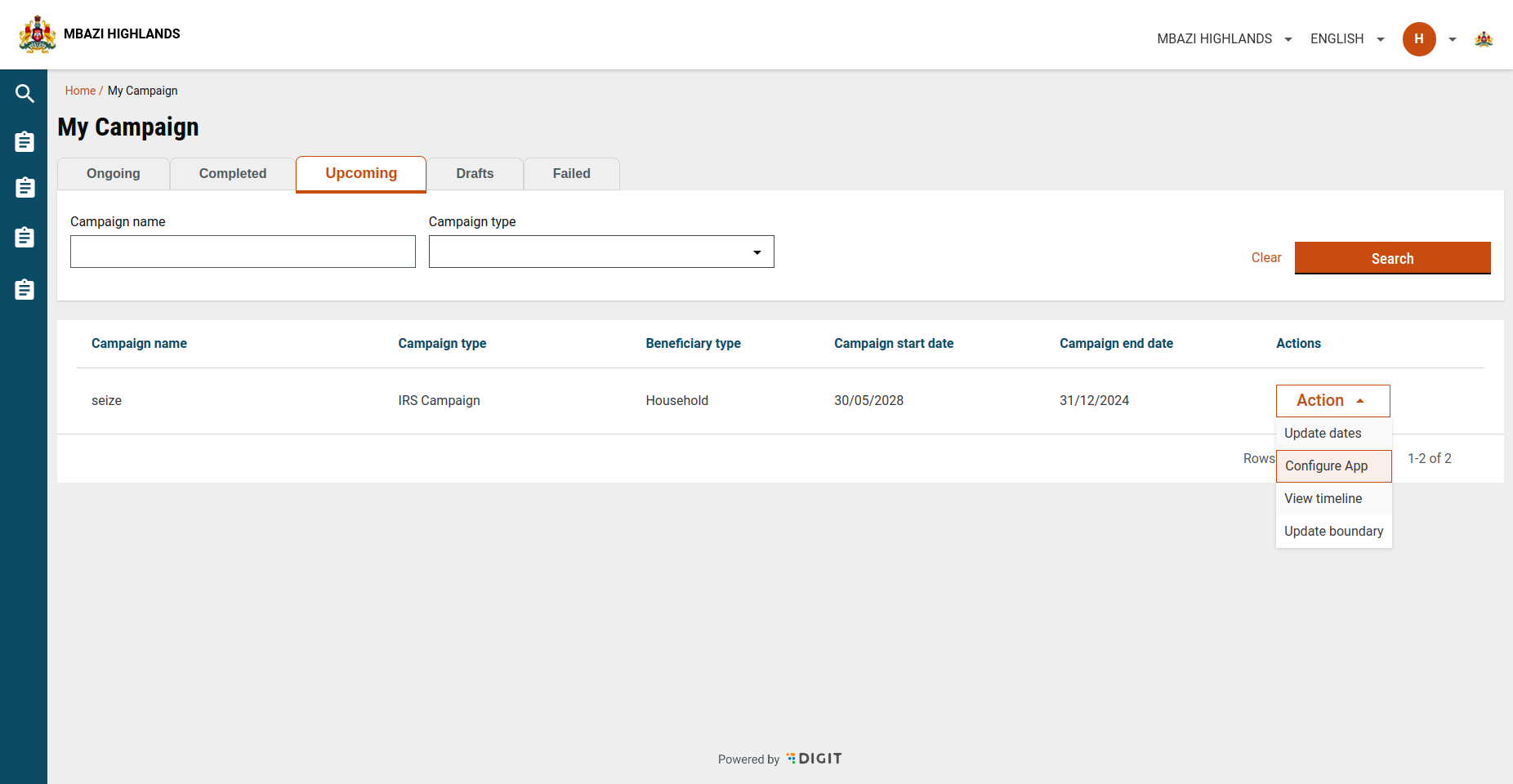
User enters the checklist search screen by clicking on the configure app.

<figure><img src="https://content.gitbook.com/content/mb5VUHEnO0msarLMPz6q/blobs/tVjwa2ELUxY0eOpDqHo2/Screenshot%20from%202024-11-06%2012-42-03.png" alt=""><figcaption></figcaption></figure>

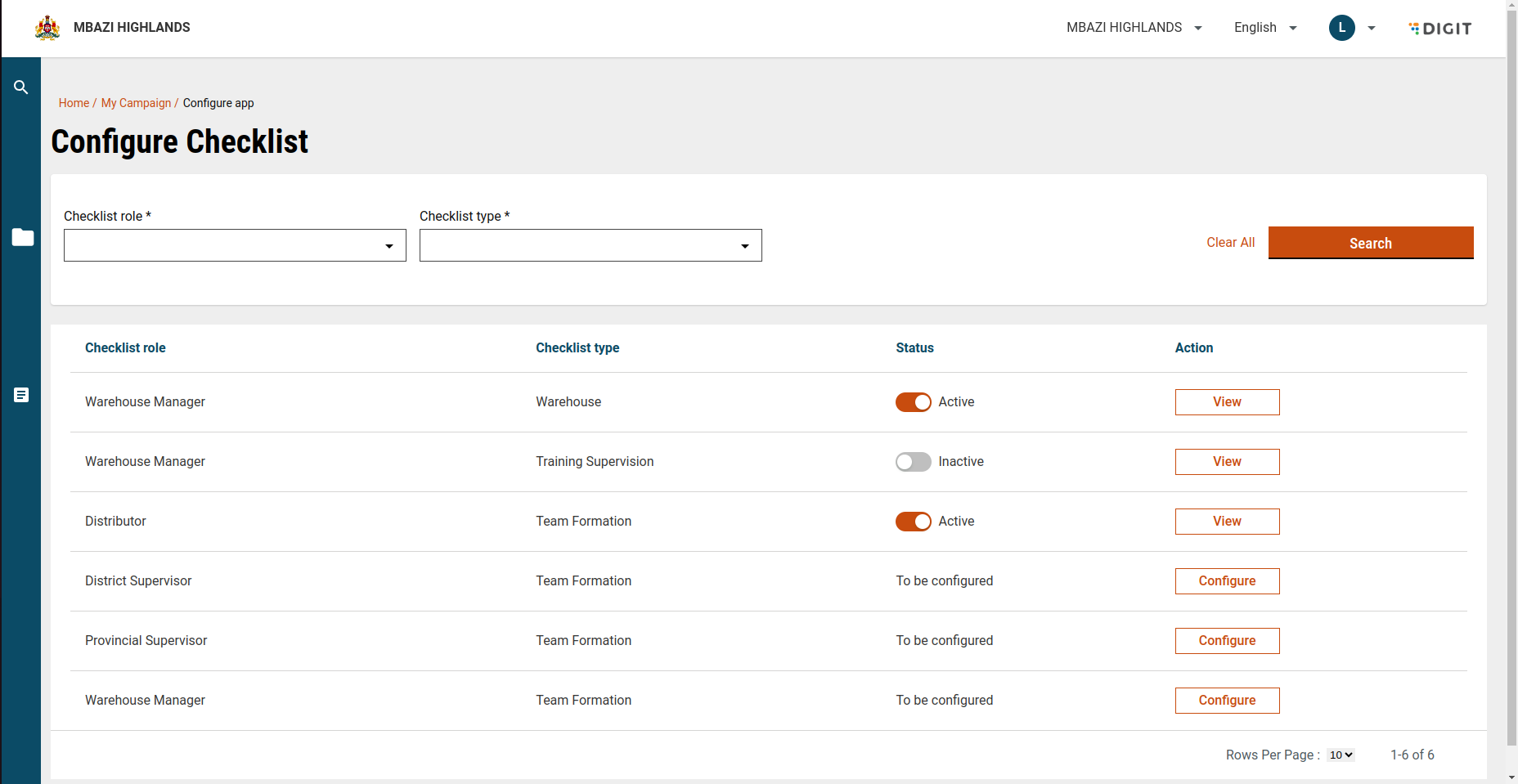
The Search Checklist is the screen where u can search for created checklist and also create checklists for whose templates have been created. View button is present for the created checklists and Configure button for those which need to be created.

<figure><img src="https://content.gitbook.com/content/mb5VUHEnO0msarLMPz6q/blobs/6I2fftkm8uUzGKz8zWcJ/Screenshot%20from%202024-11-22%2016-25-56.png" alt=""><figcaption></figcaption></figure>

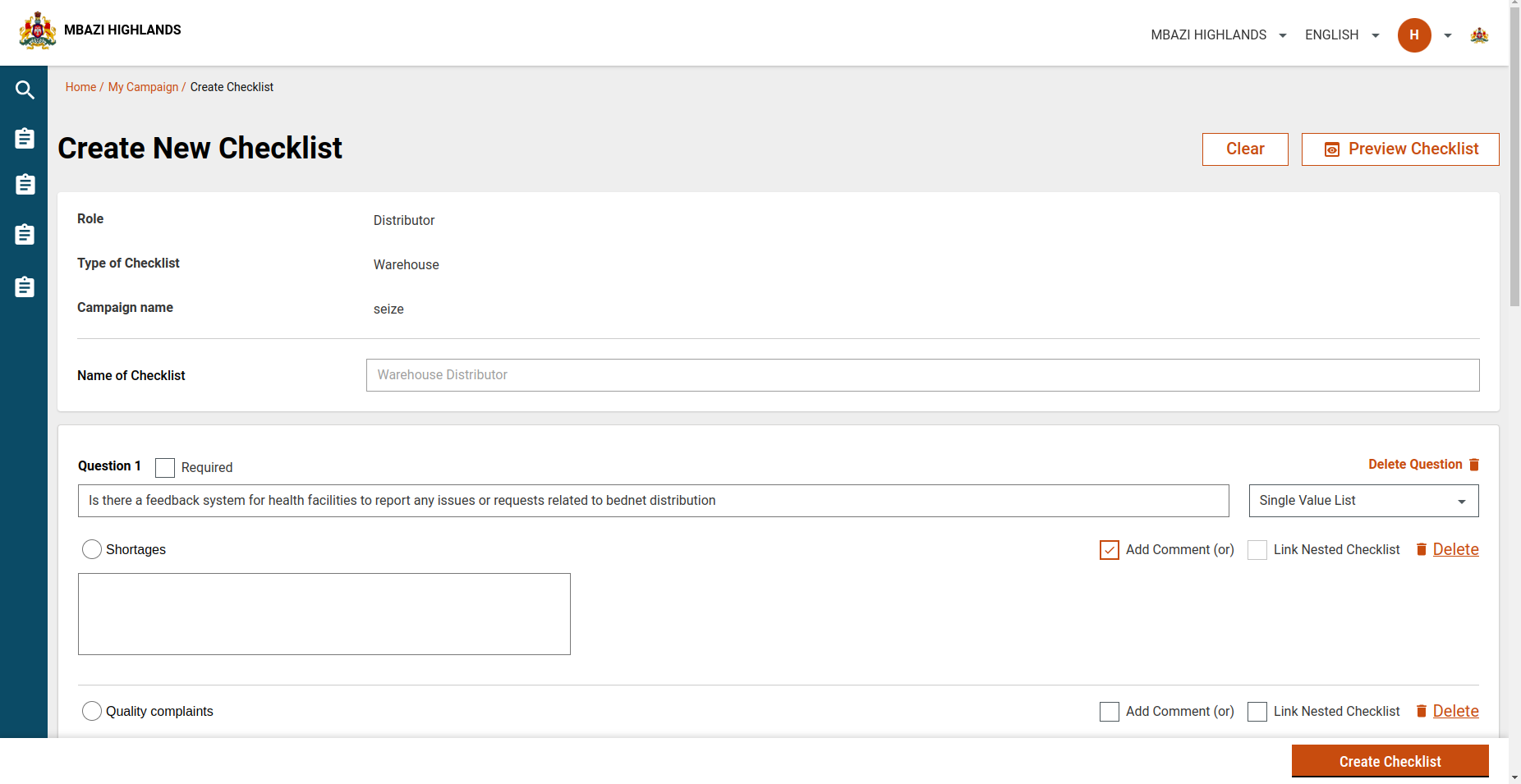
The Create Checklist page loads the default template for that particular use role and checklist type and then can be edited as per the user. On submission the api creates the checklist (service definition) and create localisation for all the questions and options

<figure><img src="https://content.gitbook.com/content/mb5VUHEnO0msarLMPz6q/blobs/V8nx7H5mchCnHpNh9XbS/Screenshot%20from%202024-11-06%2012-47-43.png" alt=""><figcaption></figcaption></figure>

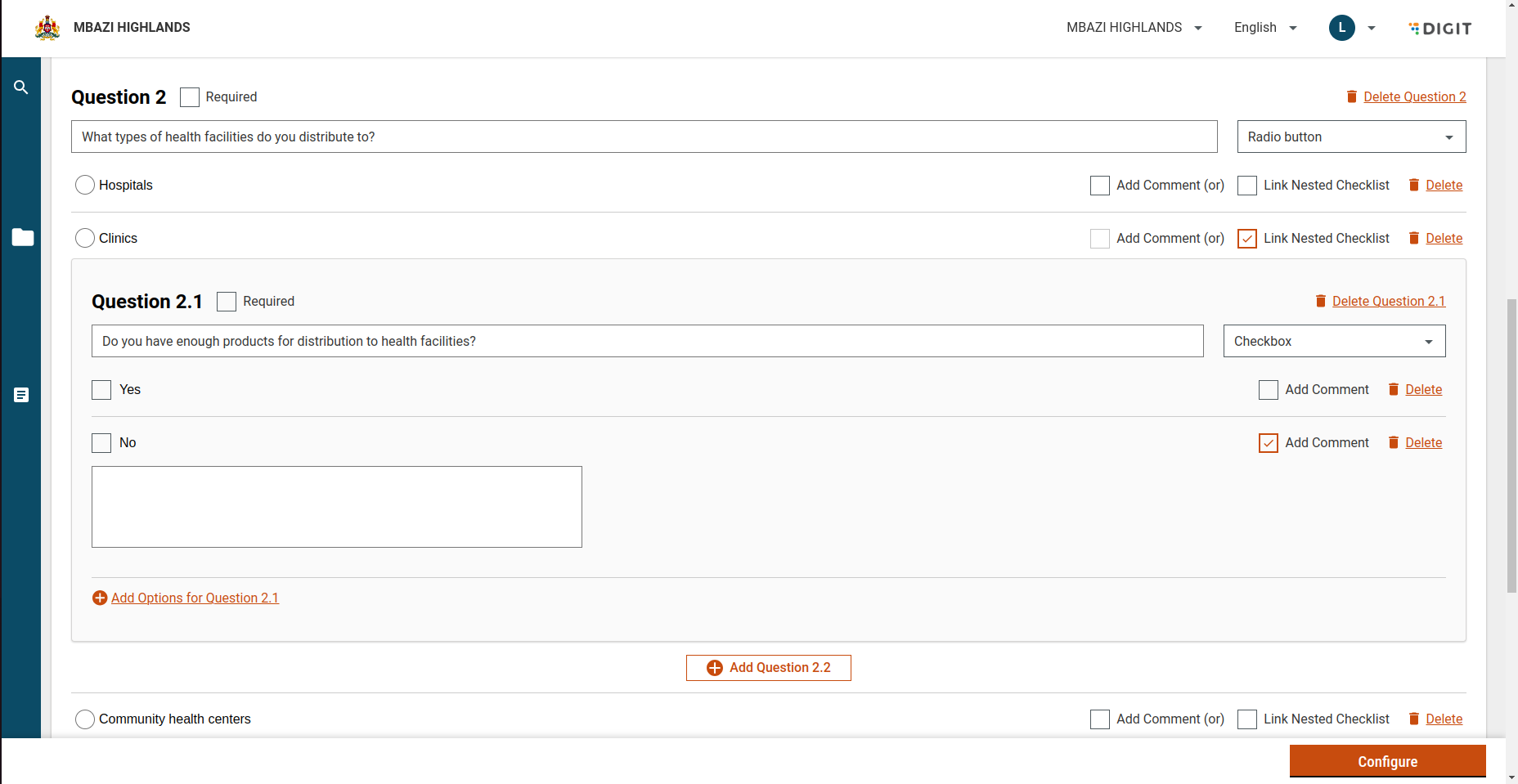
The questions can be Single Choice (Radio button) or Multiple Choice (Checkbox) and each single choice option can have multiple sub questions. Nesting is allowed uptil 3 levels. Nesting can be done by clicking on the Dependency button. Options can also have comments attached to them. Add options and delete options feature is also given. The required checkbox is to make any question mandatory.

<figure><img src="https://content.gitbook.com/content/mb5VUHEnO0msarLMPz6q/blobs/9Gn60aHzxtLRe1xfeOre/Screenshot%20from%202024-11-22%2016-30-09.png" alt=""><figcaption></figcaption></figure>

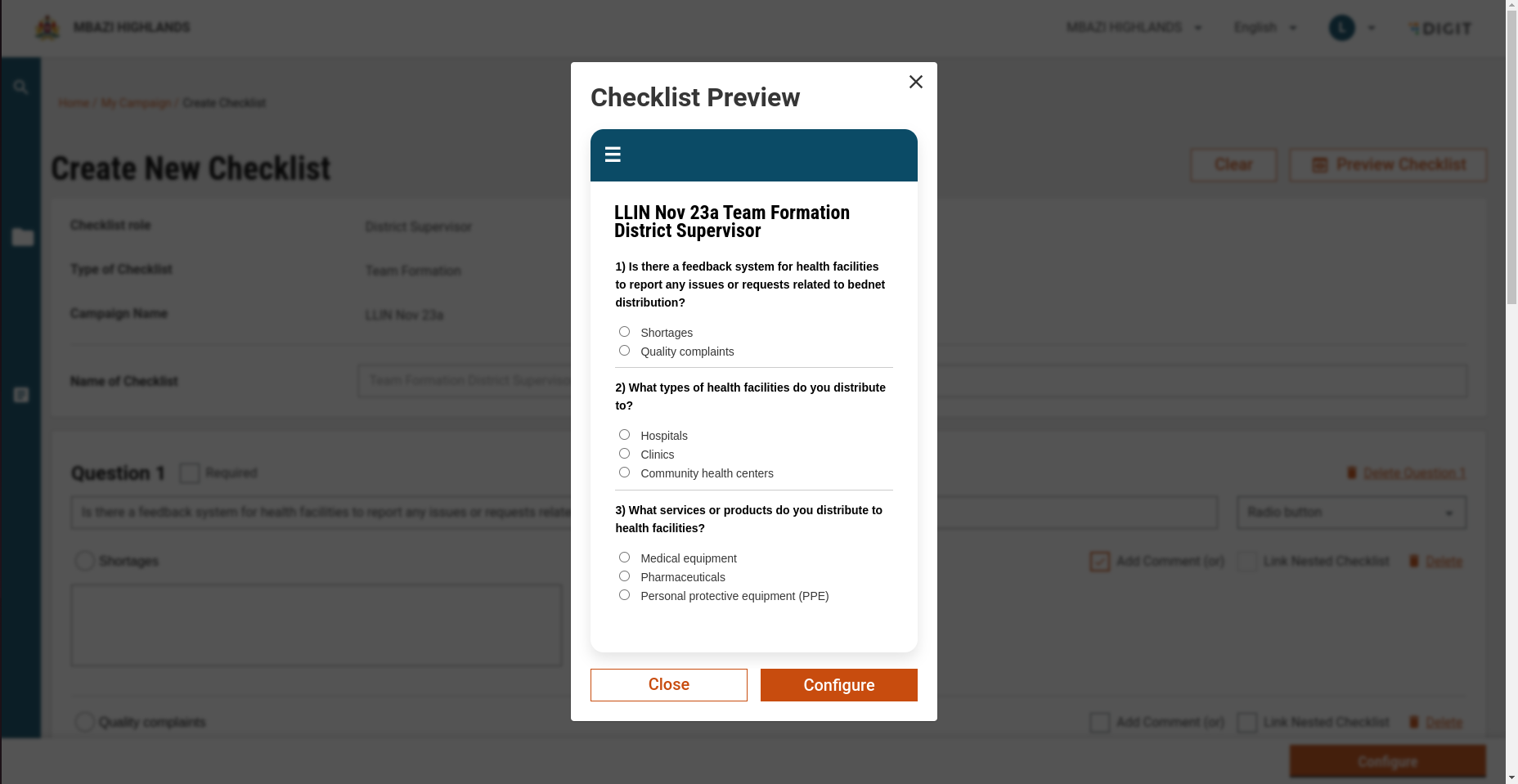
Preview Checklist shows the mobile view of the created checklist

<figure><img src="https://content.gitbook.com/content/mb5VUHEnO0msarLMPz6q/blobs/xrnFMzsGlc5EsmjVqSbn/image.png" alt=""><figcaption></figcaption></figure>

The View Checklist page shows the current checklist and is non-editable.

The create and update pages work same. The update checklist page loads the already created questions to be edited and can be reached by clicking the update button on view checklist button.<br>

The following API’s are called while checklist creation :

1. Question type search: `/mdms-v2/v2/_search` this is used to search the types of questions like radio button or checkboxes and these are taken from the mdms with schema code `HCM-ADMIN-CONSOLE.appFieldTypes`
2. Create: `/service-request/service/definition/v1/_create` : used to create the service definition which is the checklist.
3. Upsert: `/localization/messages/v1/_upsert` All the questions and options are localised by this api under the module name `hcm-checklist`

The following api is called to view the previously created checklist :

1. `service-request/service/definition/v1/_search`&#x20;

The following API’s are called while checklist update :

1. Create: `/service-request/service/definition/v1/_update` : used to update the service definition which is already created.

<table><thead><tr><th width="508">Action</th><th>Role</th></tr></thead><tbody><tr><td>service-request/service/definition/v1/_create</td><td>CAMPAIGN_MANAGER</td></tr><tr><td>service-request/service/definition/v1/_update</td><td>CAMPAIGN_MANAGER</td></tr><tr><td>service-request/service/definition/v1/_search</td><td>CAMPAIGN_MANAGER</td></tr><tr><td>localization/messages/v1/_upsert</td><td>CAMPAIGN_MANAGER</td></tr></tbody></table>


---

# Agent Instructions
This documentation is published with GitBook. GitBook is the documentation platform designed so that both humans and AI agents can read, navigate, and reason over technical content effectively. Learn more at gitbook.com.

## Querying This Documentation
If you need additional information that is not directly available in this page, you can query the documentation dynamically by asking a question.

Perform an HTTP GET request on the current page URL with the `ask` query parameter, and the optional `goal` query parameter:

```
GET https://docs.digit.org/health/v2.0/deploy/configuration/hcm-console-configuration/console-ui-configuration/hcm-console-web-ui/campaign-setup/manage-checklist.md?ask=<question>&goal=<endgoal>
```

`ask` is the immediate question: it should be specific, self-contained, and written in natural language.
`goal` is optional and describes the broader end goal you are ultimately trying to accomplish on behalf of the user. GitBook uses it to tailor the answer towards what is most useful for that goal.

The response will contain a direct answer to the question and relevant excerpts and sources from the documentation.

Use this mechanism when the answer is not explicitly present in the current page, you need clarification or additional context, or you want to retrieve related documentation sections.
