> For the complete documentation index, see [llms.txt](https://docs.digit.org/llms.txt). Markdown versions of documentation pages are available by appending `.md` to page URLs; this page is available as [Markdown](https://docs.digit.org/health/v2.0/deploy/configuration/hcm-console-configuration/console-ui-configuration/hcm-console-web-ui/campaign-setup/upload-resource-details.md).

# Upload Resource Details

## Overview

The **Upload Resource Details** flow enables users to upload all data required to configure a campaign. This process consists of **three mandatory uploads** followed by a **summary and validation step**:

1. Target Data Upload
2. Facility Data Upload
3. User Data Upload
4. Upload Summary & Validation

Each upload uses system-generated Excel templates to ensure data consistency and correctness.

## Steps

### Step 1: Upload Target Data

**When this appears:**\
After the user selects campaign boundaries.

#### Download Template

* Click **Download Template** to download an Excel file.
* The file contains:
  * `ReadMe` sheet
  * `Boundary Data` sheet
  * District-level sheets (lowest boundary level)
* Users must enter target values at the **lowest boundary level**.

#### Upload & Validate

* Upload the completed Excel file.
* The system performs validation.
* Once validation is successful:
  * The user can proceed to the next step.
  * The uploaded file can be deleted if required before moving forward.

<figure><img src="https://content.gitbook.com/content/mb5VUHEnO0msarLMPz6q/blobs/HXazyo4qb1bWvZkcjfOe/image.png" alt=""><figcaption></figcaption></figure>

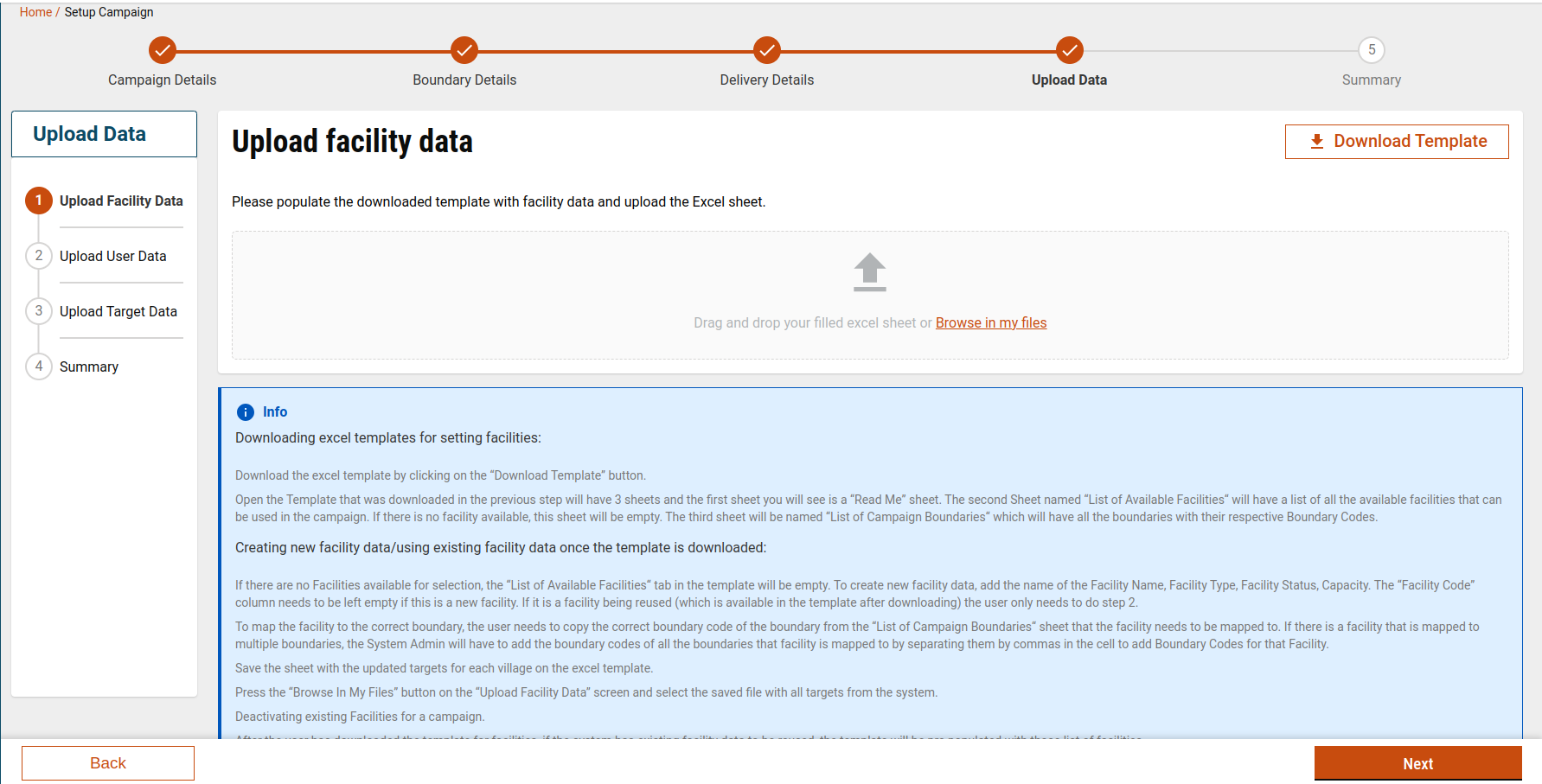
### Step 2: Upload Facility Data

**When this appears:**\
After a successful Target Data upload.

#### Download Template

* Click **Download Template** to download an Excel file containing:
  * `ReadMe` sheet
  * `Facility` sheet
  * `Boundary Data` sheet
* Users must:
  * Refer to the boundary codes from the Boundary Data sheet.
  * Fill facility details mapped to valid boundary codes.

#### Upload & Validate

* Upload the completed Facility Excel file.
* The system validates facility data before allowing the user to continue.

<figure><img src="https://content.gitbook.com/content/mb5VUHEnO0msarLMPz6q/blobs/zBje9myi6og0VdlDnhbc/image.png" alt=""><figcaption></figcaption></figure>

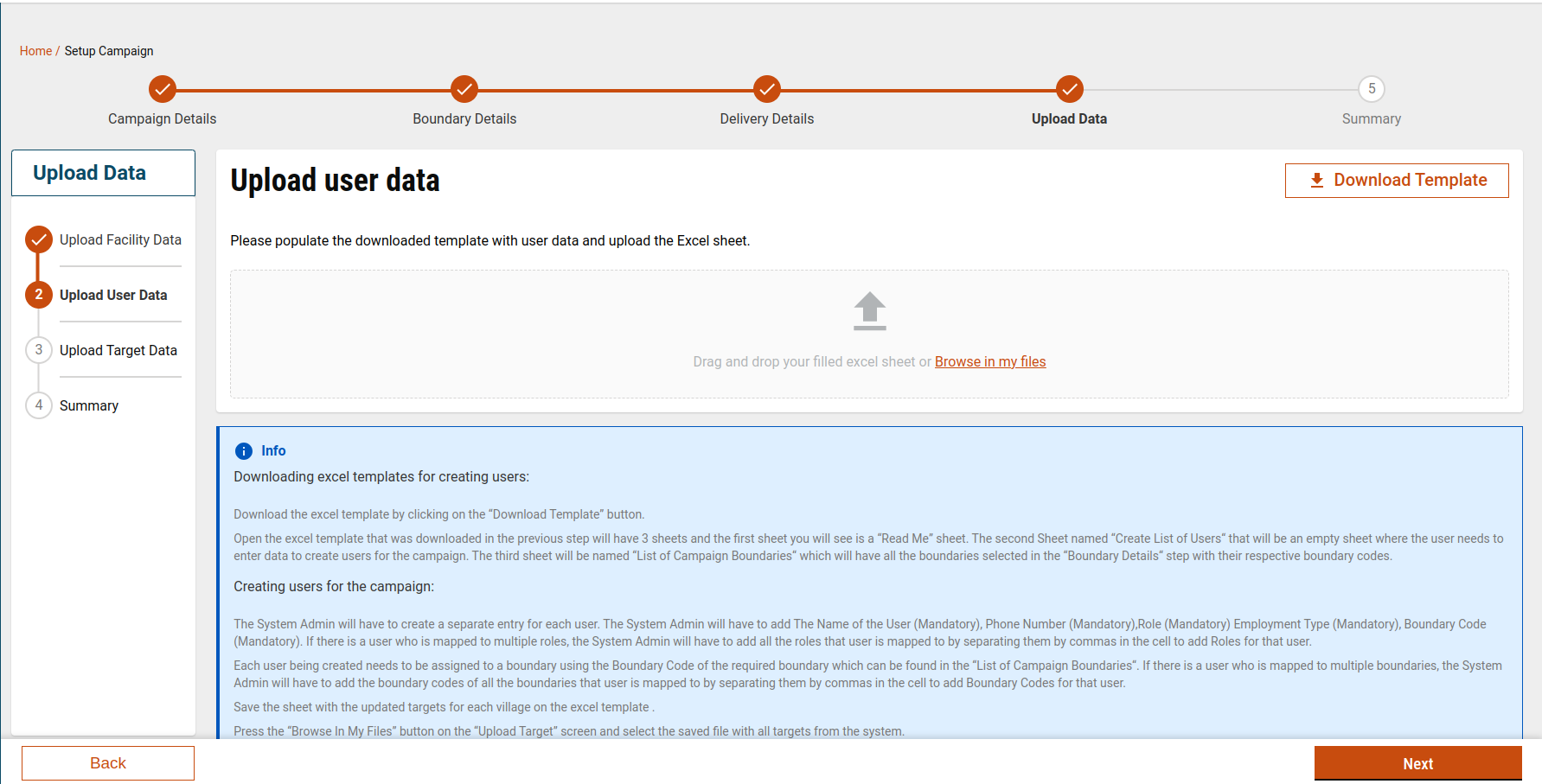
### Step 3: Upload User Data

**When this appears:**\
After the Facility Data upload.

#### Download Template

* Click **Download Template** to download an Excel file containing:
  * `ReadMe` sheet
  * `User` sheet
  * `Boundary Data` sheet
* Users only need to fill out the **User** sheet.

#### Upload & Validate

* Upload the completed User Excel file.
* Validation is performed before progressing.

<figure><img src="https://content.gitbook.com/content/mb5VUHEnO0msarLMPz6q/blobs/LR1QVo1v8pYpMCv3f3Zs/image.png" alt=""><figcaption></figcaption></figure>

### Template Generation & Download Flow

* All templates are generated using the [**Generate and Download APIs**.](https://github.com/egovernments/DIGIT-Frontend/blob/campaign/micro-ui/web/micro-ui-internals/packages/modules/campaign-manager/src/hooks/useGenerateIdCampaign.js)
* The following hook is used to generate a unique upload ID:
  * `useGenerateIdCampaign`
* The generated ID is stored in local storage as:
  * `HCM_CAMPAIGN_MANAGER_UPLOAD_ID`
* Templates are downloaded using:
  * `/project-factory/v1/data/_download`

This hook will return the ID which is stored in the local storage according to the type:&#x20;

```javascript
HCM_CAMPAIGN_MANAGER_UPLOAD_ID
```

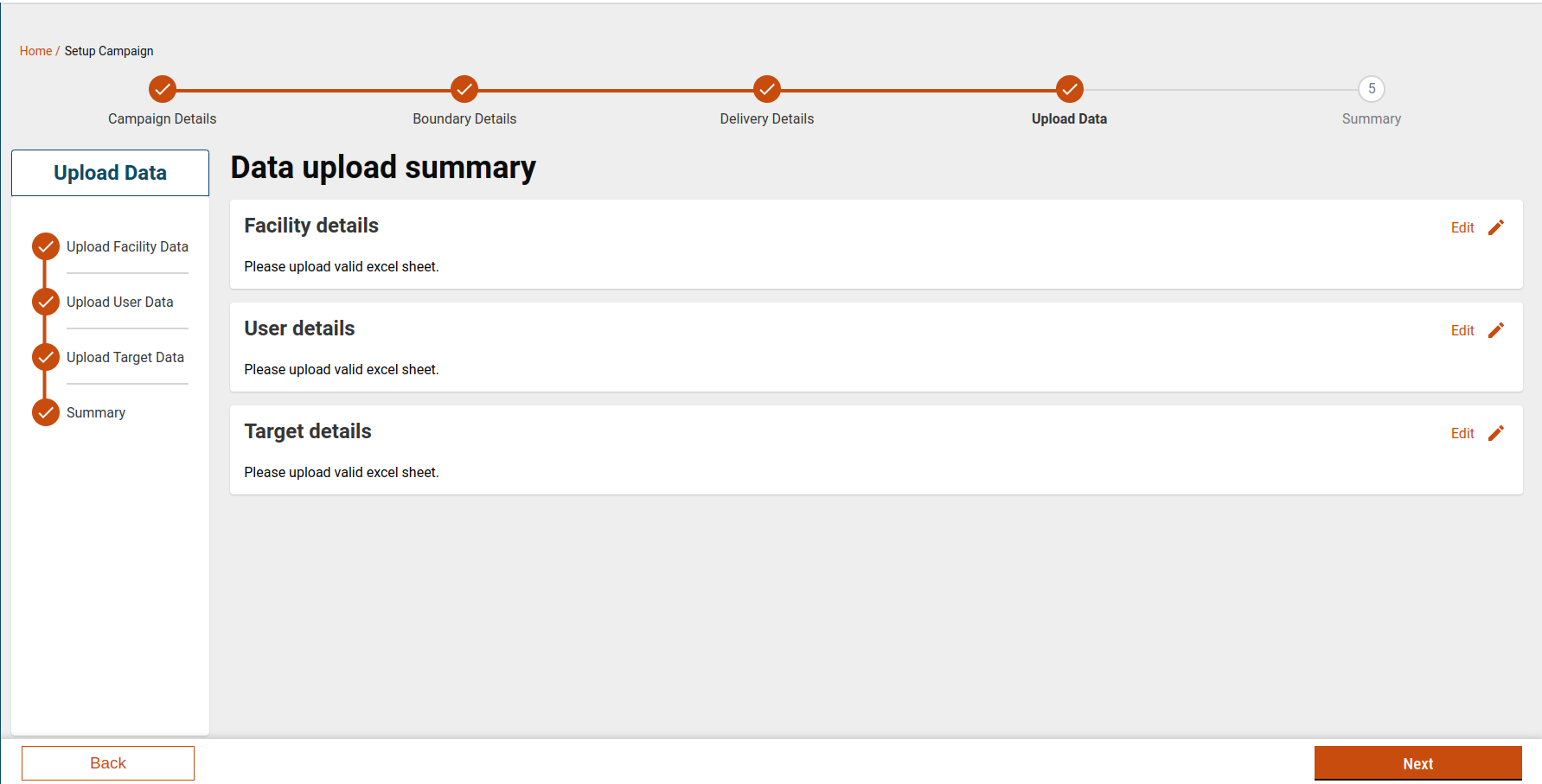
### Step 4: Upload Summary

**Purpose:**\
Review all uploaded files before completing resource setup.

#### What this screen shows:

* List of all uploaded files:
  * Target Data
  * Facility Data
  * User Data
* Validation status of each file

#### Mandatory Validation Rule

* **All three uploads are mandatory**
* The user cannot proceed unless:
  * All files are uploaded
  * All validations are successful

<figure><img src="https://content.gitbook.com/content/mb5VUHEnO0msarLMPz6q/blobs/aVKBMWnoKqDP2SkbnW34/image.png" alt=""><figcaption></figcaption></figure>

## Schema Validation

### Schema-Based Validation

#### UI Validation (MDMS)

* Validation rules are defined in MDMS: [Schema Data link](https://github.com/egovernments/egov-mdms-data/blob/UNIFIED-DEV/data/mz/health/hcm-admin-console/adminSchema.json)
  * **Schema Module:** `adminSchema`
  * **Schema Source:** `adminSchema.json`
* Validation is performed using **AJV**.

<details>

<summary>SchemaDefinitions</summary>

```
 "SchemaDefinitions": [
        {
            "id": "92fb3b53-adfe-44e9-ab27-da3209b5e0f1",
            "tenantId": "mz",
            "code": "HCM-ADMIN-CONSOLE.adminSchema",
            "description": null,
            "definition": {
                "type": "object",
                "title": "Comprehensive Example Schema",
                "$schema": "http://json-schema.org/draft-07/schema#",
                "required": [
                    "$schema",
                    "title",
                    "campaignType"
                ],
                "x-unique": [
                    "title",
                    "campaignType"
                ],
                "properties": {
                    "title": {
                        "type": "string"
                    },
                    "$schema": {
                        "enum": [
                            "http://json-schema.org/draft-07/schema#"
                        ],
                        "type": "string",
                        "default": "http://json-schema.org/draft-07/schema#"
                    },
                    "properties": {
                        "type": "object",
                        "properties": {
                            "enumProperties": {
                                "type": "array",
                                "items": {
                                    "type": "object",
                                    "required": [
                                        "name",
                                        "description"
                                    ],
                                    "properties": {
                                        "enum": {
                                            "type": "array",
                                            "items": {
                                                "type": "string"
                                            }
                                        },
                                        "name": {
                                            "type": "string"
                                        },
                                        "isUnique": {
                                            "type": "boolean"
                                        },
                                        "hideColumn": {
                                            "type": "boolean"
                                        },
                                        "isRequired": {
                                            "type": "boolean"
                                        },
                                        "description": {
                                            "type": "string"
                                        },
                                        "orderNumber": {
                                            "type": "integer",
                                            "minimum": 1
                                        },
                                        "errorMessage": {
                                            "type": "string"
                                        },
                                        "freezeColumn": {
                                            "type": "boolean"
                                        }
                                    },
                                    "minProperties": 1
                                },
                                "minItems": 1
                            },
                            "numberProperties": {
                                "type": "array",
                                "items": {
                                    "type": "object",
                                    "required": [
                                        "name",
                                        "description"
                                    ],
                                    "properties": {
                                        "name": {
                                            "type": "string"
                                        },
                                        "type": {
                                            "enum": [
                                                "number"
                                            ],
                                            "type": "string"
                                        },
                                        "maximum": {
                                            "type": "number"
                                        },
                                        "minimum": {
                                            "type": "number"
                                        },
                                        "isUnique": {
                                            "type": "boolean"
                                        },
                                        "hideColumn": {
                                            "type": "boolean"
                                        },
                                        "isRequired": {
                                            "type": "boolean"
                                        },
                                        "multipleOf": {
                                            "type": "number"
                                        },
                                        "description": {
                                            "type": "string"
                                        },
                                        "orderNumber": {
                                            "type": "integer",
                                            "minimum": 1
                                        },
                                        "errorMessage": {
                                            "type": "string"
                                        },
                                        "freezeColumn": {
                                            "type": "boolean"
                                        },
                                        "exclusiveMaximum": {
                                            "type": "boolean"
                                        },
                                        "exclusiveMinimum": {
                                            "type": "boolean"
                                        }
                                    },
                                    "minProperties": 1
                                },
                                "minItems": 1
                            },
                            "stringProperties": {
                                "type": "array",
                                "items": {
                                    "type": "object",
                                    "required": [
                                        "name",
                                        "description"
                                    ],
                                    "properties": {
                                        "name": {
                                            "type": "string"
                                        },
                                        "type": {
                                            "enum": [
                                                "string"
                                            ],
                                            "type": "string"
                                        },
                                        "pattern": {
                                            "type": "string",
                                            "format": "regex"
                                        },
                                        "isUnique": {
                                            "type": "boolean"
                                        },
                                        "maxLength": {
                                            "type": "integer",
                                            "minimum": 0
                                        },
                                        "minLength": {
                                            "type": "integer",
                                            "minimum": 0
                                        },
                                        "hideColumn": {
                                            "type": "boolean"
                                        },
                                        "isRequired": {
                                            "type": "boolean"
                                        },
                                        "description": {
                                            "type": "string"
                                        },
                                        "orderNumber": {
                                            "type": "integer",
                                            "minimum": 1
                                        },
                                        "errorMessage": {
                                            "type": "string"
                                        },
                                        "freezeColumn": {
                                            "type": "boolean"
                                        }
                                    },
                                    "minProperties": 1
                                },
                                "minItems": 1
                            },
                            "additionalProperties": {
                                "type": "boolean"
                            }
                        },
                        "additionalProperties": false
                    },
                    "campaignType": {
                        "type": "string"
                    }
                },
                "description": "A simplified JSON Schema example based on data type.",
                "additionalProperties": false
            },
            "isActive": true,
            "auditDetails": {
                "createdBy": "8b110055-330f-4e7b-b4c0-f618f29b9d47",
                "lastModifiedBy": "8b110055-330f-4e7b-b4c0-f618f29b9d47",
                "createdTime": 1718169189364,
                "lastModifiedTime": 1718169189364
            }
        }
    ]
```

</details>

#### Facility Data Validations

* Facility Type must be:
  * `Warehouse` or `Health Facility`
* Facility Name must be a string.
* Facility Status must be:
  * `Temporary` or `Permanent`
* Facility sheet headers must match the schema.

By using AJV Validation, we are validating the headers of the facility sheet.&#x20;

#### Common Validations (v0.3.1)

* Sheet names must match expected values.
* Template locale must match the locale used during generation.
* Campaign ID in the uploaded file must match the campaign ID:
  * This validation is configurable and can be toggled via DevOps.

#### Target Data Validations

* Header and boundary codes are validated using schema.
* Target value validation at the lowest level:
  * `targetValue > 0`
  * `targetValue < 100000000`&#x20;

### Backend Validation

* Backend validation is handled using:
  * `useResourceData` hook
* Before calling the validation API:
  * A base timeout value is fetched from MDMS.

For more information on this schema, you can refer to:&#x20;

{% embed url="<https://github.com/egovernments/egov-mdms-data/blob/UNIFIED-DEV/data/mz/health/hcm-admin-console/baseTimeOut.json>" %}

### UI Components Used

<table><thead><tr><th width="272.73828125">Component</th><th>Purpose</th></tr></thead><tbody><tr><td><a href="https://github.com/egovernments/DIGIT-Frontend/blob/campaign/micro-ui/web/micro-ui-internals/packages/modules/campaign-manager/src/hooks/useResourceData.js"><code>ResourceData.js</code></a></td><td>Backend validation </td></tr><tr><td><a href="https://github.com/egovernments/DIGIT-Frontend/blob/campaign/micro-ui/web/micro-ui-internals/packages/modules/campaign-manager/src/components/BulkUpload.js"><code>BulkUpload.js</code></a></td><td>Handles file upload</td></tr><tr><td><a href="https://github.com/egovernments/DIGIT-Frontend/blob/campaign/micro-ui/web/micro-ui-internals/packages/modules/campaign-manager/src/components/XlsPreview.js"><code>XlsPreview.js</code></a></td><td>Displays uploaded Excel preview</td></tr><tr><td><a href="https://github.com/egovernments/DIGIT-Frontend/blob/campaign/micro-ui/web/micro-ui-internals/packages/modules/campaign-manager/src/components/UploadData.js"><code>UploadData.js</code></a></td><td>Upload screen and validation flow</td></tr></tbody></table>

## API Details

<table><thead><tr><th width="187.64453125">End Point </th><th width="130.44921875">Role</th><th>Details</th></tr></thead><tbody><tr><td>/project-factory/v1/data/_download</td><td>CAMPAIGN_MANAGER</td><td><p>Params will be different for different types-<br><br>1) boundary<br>tenantId:mz</p><p>type:boundary</p><p>hierarchyType:ADMIN</p><p>id:987eadc3-55a0-4553-925d-bf8087f57e5a<br><br>2) facilityWithBoundary<br>tenantId:mz</p><p>type:facilityWithBoundary</p><p>hierarchyType:ADMIN</p><p>id:052f59fc-18a7-4e07-816a-f5d8062b56b5<br><br>3) userWithBoundary<br>tenantId:mz</p><p>type:userWithBoundary</p><p>hierarchyType:ADMIN</p><p>id:fbfbd393-d053-4f51-9e12-1068b97da292</p></td></tr><tr><td>/project-factory/v1/data/_create</td><td>CAMPAIGN_MANAGER</td><td><p>1)  type: boundaryWithTarget<br>{ "type": "boundaryWithTarget", ""action": "validate",</p><p> "campaignId": "13175791-db53-4d10-be90-2dba1c138756" }</p><p><br>2) type: facility<br>{ "type": "facility",</p><p>"action": "validate",</p><p> "campaignId": "13175791-db53-4d10-be90-2dba1c138756"}</p><p><br>3) type: user<br>{ "type": "user", </p><p> "action": "validate", </p><p>"campaignId": "13175791-db53-4d10-be90-2dba1c138756" }</p></td></tr><tr><td></td><td></td><td></td></tr></tbody></table>

## New Features

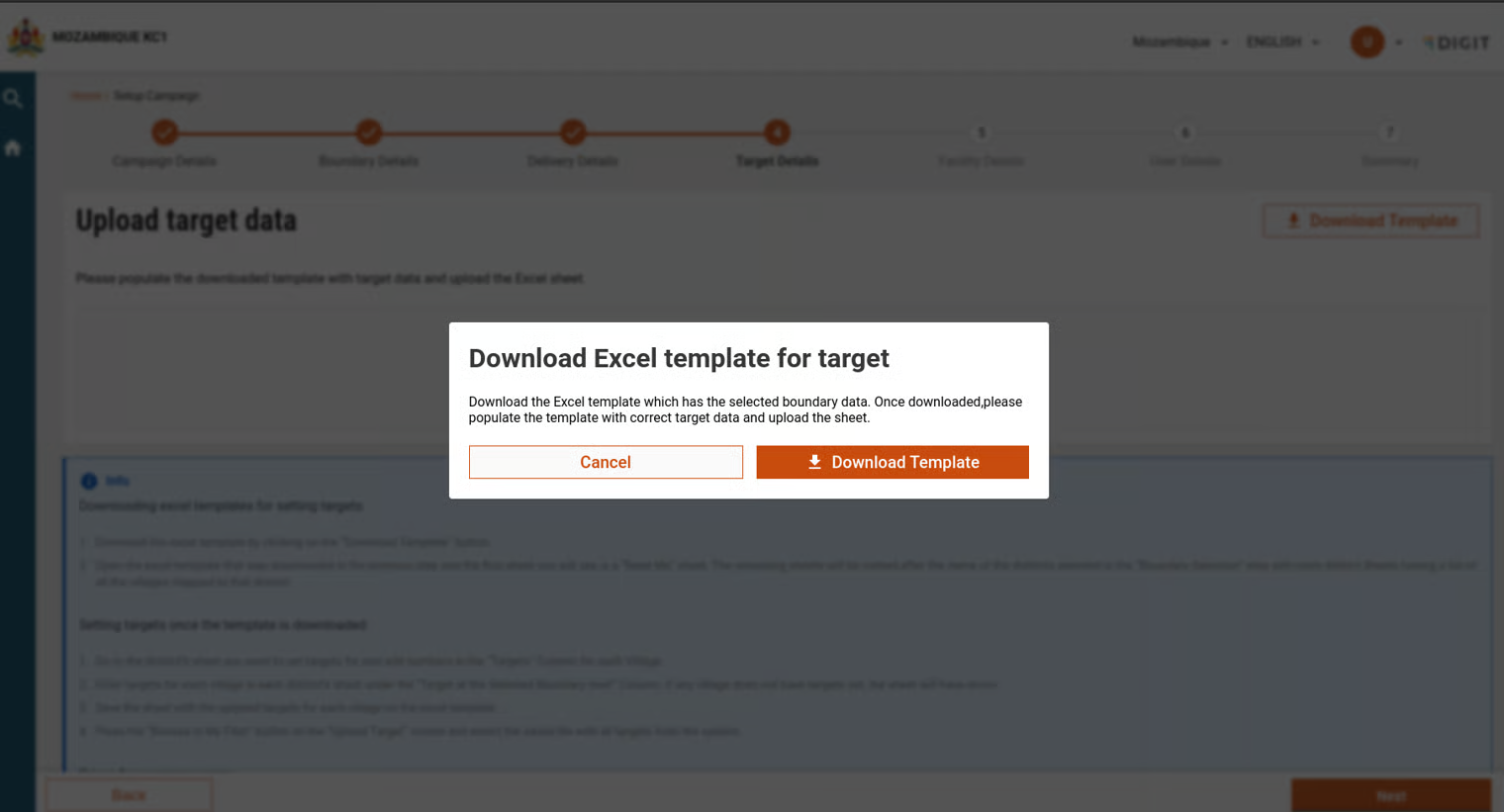
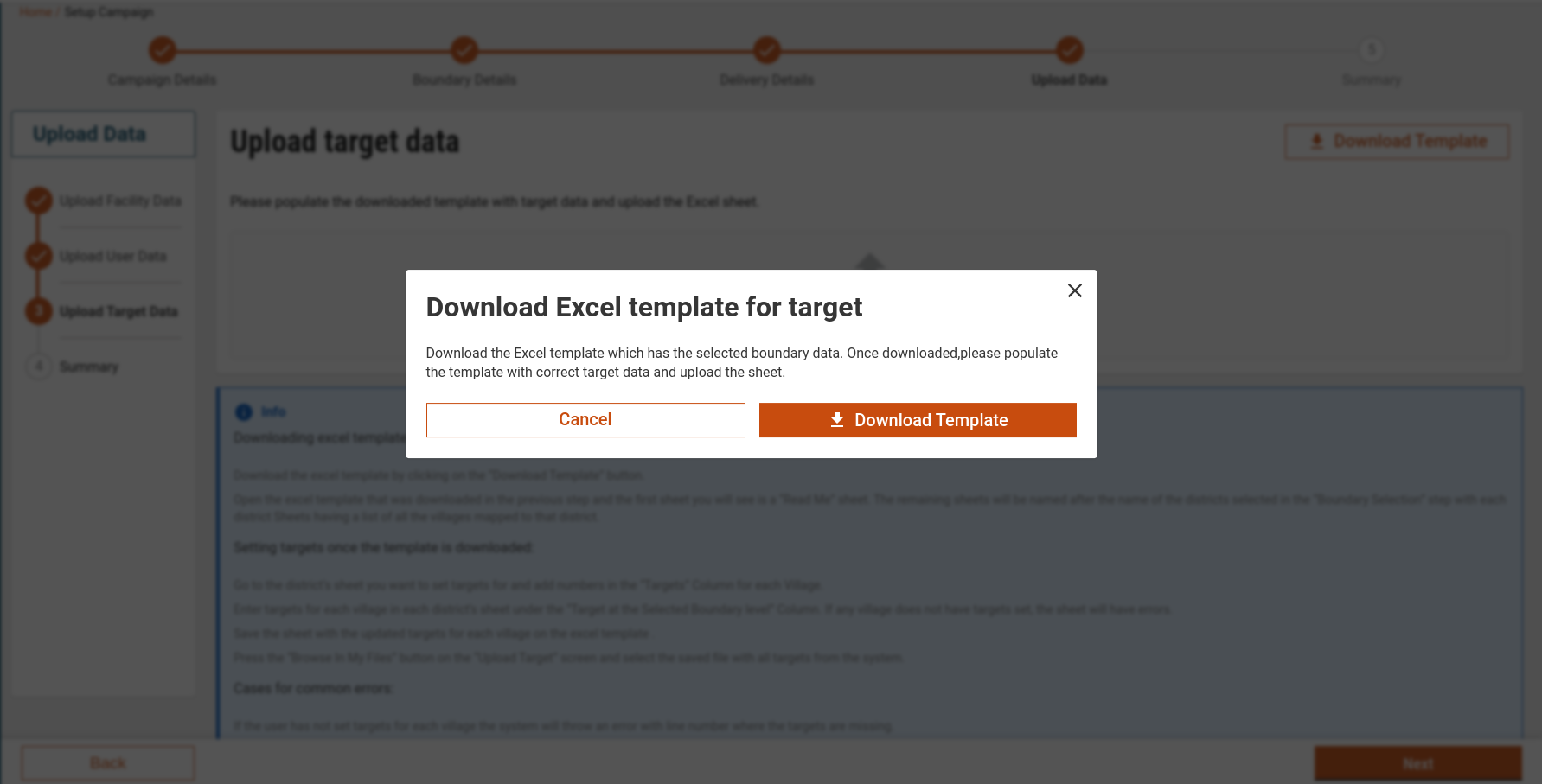
A new pop-up has been added, which displays the option to download the template in all three upload screens.

**Use Case:**&#x20;

When the user comes after clicking next on the delivery screen and the file is not uploaded, the below pop-up is displayed.

<figure><img src="https://content.gitbook.com/content/mb5VUHEnO0msarLMPz6q/blobs/znW2gwHIrLOqTxHIRNOh/image.png" alt=""><figcaption></figcaption></figure>


---

# Agent Instructions
This documentation is published with GitBook. GitBook is the documentation platform designed so that both humans and AI agents can read, navigate, and reason over technical content effectively. Learn more at gitbook.com.

## Querying This Documentation
If you need additional information that is not directly available in this page, you can query the documentation dynamically by asking a question.

Perform an HTTP GET request on the current page URL with the `ask` query parameter, and the optional `goal` query parameter:

```
GET https://docs.digit.org/health/v2.0/deploy/configuration/hcm-console-configuration/console-ui-configuration/hcm-console-web-ui/campaign-setup/upload-resource-details.md?ask=<question>&goal=<endgoal>
```

`ask` is the immediate question: it should be specific, self-contained, and written in natural language.
`goal` is optional and describes the broader end goal you are ultimately trying to accomplish on behalf of the user. GitBook uses it to tailor the answer towards what is most useful for that goal.

The response will contain a direct answer to the question and relevant excerpts and sources from the documentation.

Use this mechanism when the answer is not explicitly present in the current page, you need clarification or additional context, or you want to retrieve related documentation sections.