> For the complete documentation index, see [llms.txt](https://docs.digit.org/llms.txt). Markdown versions of documentation pages are available by appending `.md` to page URLs; this page is available as [Markdown](https://docs.digit.org/health/v2.0/deploy/configuration/hcm-console-configuration/console-ui-configuration/hcm-console-web-ui/manage-boundary-data.md).

# Manage Boundary Data

## Overview

Boundary Management in the HCM Console is based on the **HierarchySchema** configuration.

* The **default hierarchy** is defined using `"type": "default"`.
* The **editable hierarchy** (where boundary data can be created or updated) is defined using `"type": "campaign"`.

Refer to [this config](/health/v2.0/deploy/configuration.md) section to explore details.

## Steps

On the **Boundary Management** landing page, you will see **three buttons**:

* **Create Boundary**
* **Edit Boundary** (disabled if no boundary exists yet)
* **View Boundary**

### **Create Boundary**

When you click on **Create**, the system provides two options:

1. **Use Default Boundary (GeoPoDe Data)**
   * Loads the default hierarchy.
   * Prompts you to add additional levels.
2. **Create a New Boundary from Scratch**
   * Requires you to manually add all hierarchy levels.
   * Once levels are created, they cannot be edited.

The following APIs are triggered after clicking the Create button:

* Upsert: `/localization/messages/v1/_upsert` all the names of the level localised into a new module named `hcm-boundary-${hierarchyName}`
* Create: `/boundary-service/boundary-hierarchy-definition/_create`
* Download: `/project-factory/v1/data/_download` A polling mechanism is introduced here, which keeps on calling the above api until the status is “completed”
* Create: `/project-factory/v1/data/_create` The data Create API is called if it’s a new hierarchy, and here, a polling mechanism is installed, which calls the API.                                                                                                `/project-factory/v1/data/_search` continuously at a fixed interval until the status is “completed”

{% hint style="info" %}

* The system automatically redirects to the **View Hierarchy** screen.
* If any level matches the **default hierarchy**, its data will be reused.
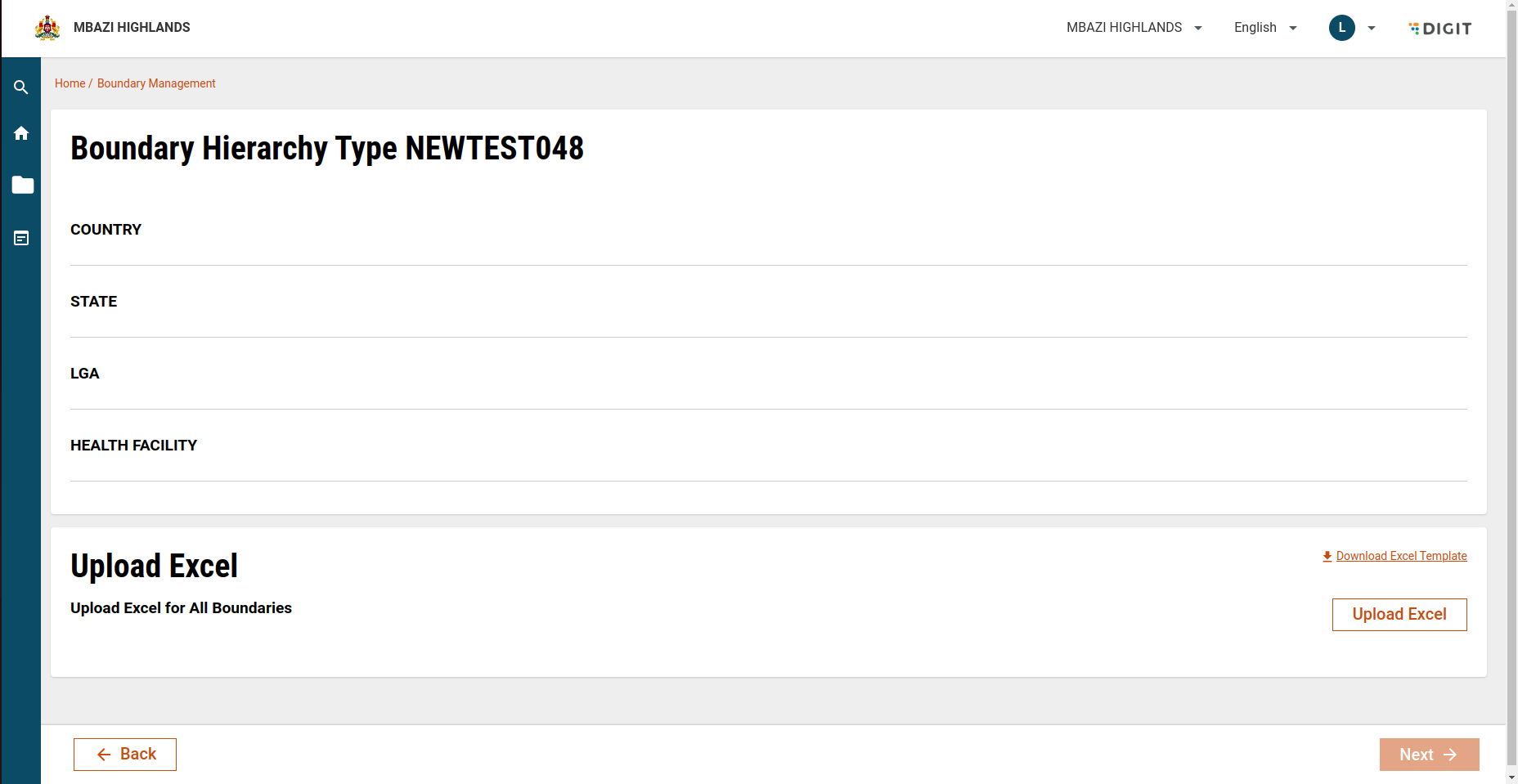
* You can upload a complete **Excel sheet** for all hierarchy levels:
  * Download the template.
  * Fill in all required levels.
  * Upload the file.

> ⚠️ Note: Once created, **hierarchy levels cannot be edited**.
> {% endhint %}

<figure><img src="https://content.gitbook.com/content/mb5VUHEnO0msarLMPz6q/blobs/X4OiP7euAGLs3JuxVEF5/image.png" alt=""><figcaption></figcaption></figure>

### Upload Boundary Data via Excel

1. **Download Template**
   * Use the provided template to fill in boundary details for all hierarchy levels.
2. **Upload Excel File**
   * After filling in the template, upload it to the Boundary Management screen.
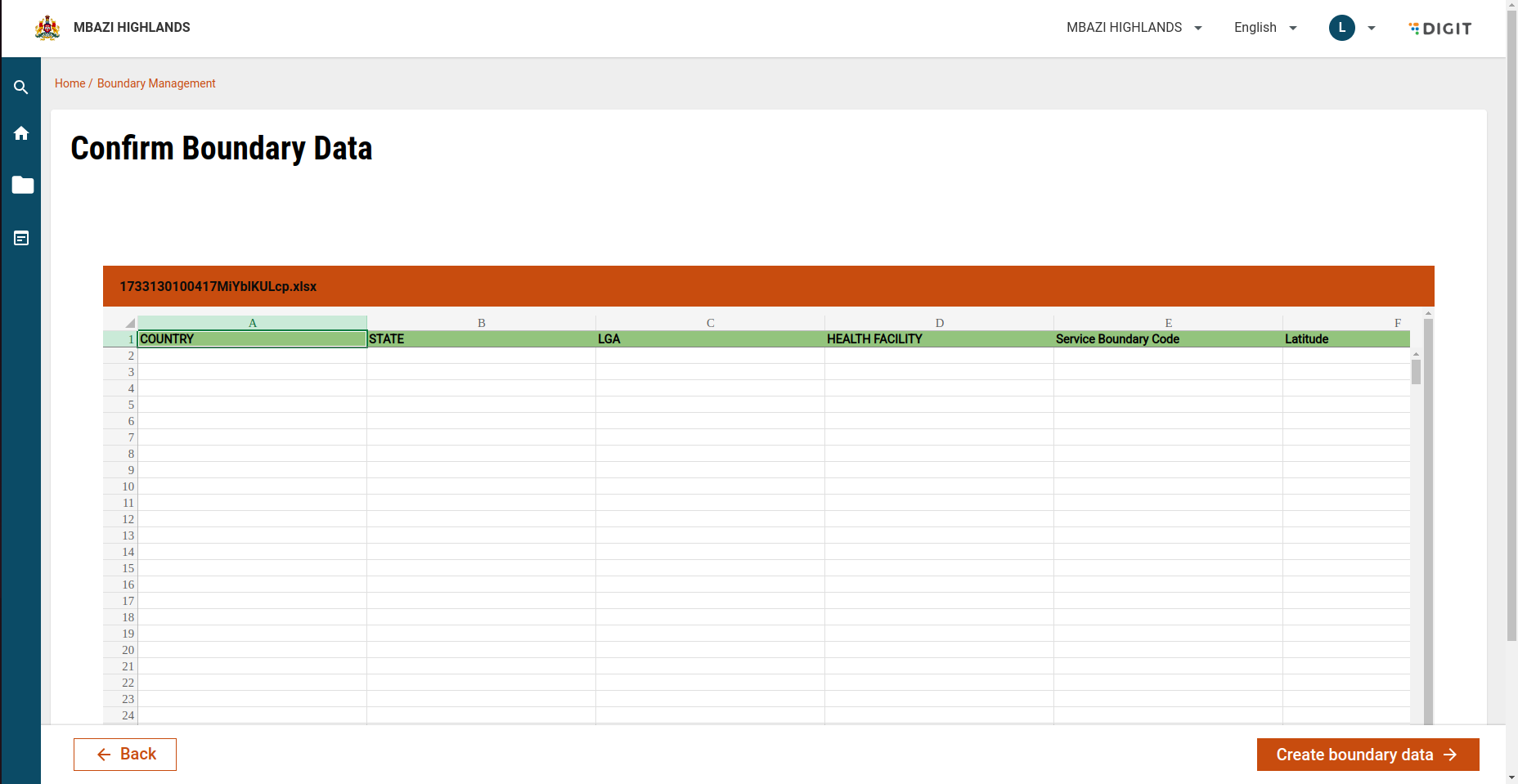
3. **Review Uploaded Data**
   * Once the file is uploaded, you will be redirected to the **View Data** page.
   * Here, the system displays all the uploaded boundary details.
   * Carefully **review and confirm** the data before proceeding.
4. **Submit Data**
   * Click **Submit** to finalise the boundary creation.
   * On submission, the system triggers the data creation process and stores the uploaded boundaries.

<figure><img src="https://content.gitbook.com/content/mb5VUHEnO0msarLMPz6q/blobs/dX8d6XsbkebSnq2MRPJN/image.png" alt=""><figcaption></figcaption></figure>

### Edit Boundary

* Available once a boundary has been created.
* Redirects to the **View Hierarchy** page.
* Allows users to **add new data** to an existing hierarchy.

The following APIs are called after clicking on “Create Boundary”:

1. Create: `/project-factory/v1/data/_create` the uploaded data in excel is sent to the data Create API with a polling mechanism applied.&#x20;
2. The search API `/project-factory/v1/data/_search` is called repeatedly with frequency depending on the size of data and network latency, taken from the mdms data using the master name `“baseTimeout”`  from a module named `HCM-ADMIN-CONSOLE`until status is “completed”.

### API Details

<table><thead><tr><th width="364.17578125">Action</th><th>Role</th></tr></thead><tbody><tr><td>project-factory/v1/data/_create</td><td>BOUNDARY_MANAGER</td></tr><tr><td>project-factory/v1/data/_search</td><td>BOUNDARY_MANAGER</td></tr><tr><td>project-factory/v1/data/_download</td><td>BOUNDARY_MANAGER</td></tr><tr><td>localization/messages/v1/_upsert</td><td>BOUNDARY_MANAGER</td></tr><tr><td>boundary-service/boundary-hierarchy-definition/_create</td><td>BOUNDARY_MANAGER</td></tr><tr><td>boundary-service/boundary-hierarchy-definition/_search</td><td>BOUNDARY_MANAGER</td></tr><tr><td>boundary-service/boundary-relationships/_search</td><td>BOUNDARY_MANAGER</td></tr></tbody></table>


---

# Agent Instructions
This documentation is published with GitBook. GitBook is the documentation platform designed so that both humans and AI agents can read, navigate, and reason over technical content effectively. Learn more at gitbook.com.

## Querying This Documentation
If you need additional information that is not directly available in this page, you can query the documentation dynamically by asking a question.

Perform an HTTP GET request on the current page URL with the `ask` query parameter, and the optional `goal` query parameter:

```
GET https://docs.digit.org/health/v2.0/deploy/configuration/hcm-console-configuration/console-ui-configuration/hcm-console-web-ui/manage-boundary-data.md?ask=<question>&goal=<endgoal>
```

`ask` is the immediate question: it should be specific, self-contained, and written in natural language.
`goal` is optional and describes the broader end goal you are ultimately trying to accomplish on behalf of the user. GitBook uses it to tailor the answer towards what is most useful for that goal.

The response will contain a direct answer to the question and relevant excerpts and sources from the documentation.

Use this mechanism when the answer is not explicitly present in the current page, you need clarification or additional context, or you want to retrieve related documentation sections.
