> For the complete documentation index, see [llms.txt](https://docs.digit.org/llms.txt). Markdown versions of documentation pages are available by appending `.md` to page URLs; this page is available as [Markdown](https://docs.digit.org/health/v2.0/deploy/configuration/microplan-service-configuration/microplan-web-service-configuration/open-microplans-system-admin.md).
# Open Microplans: System Admin
## Overview
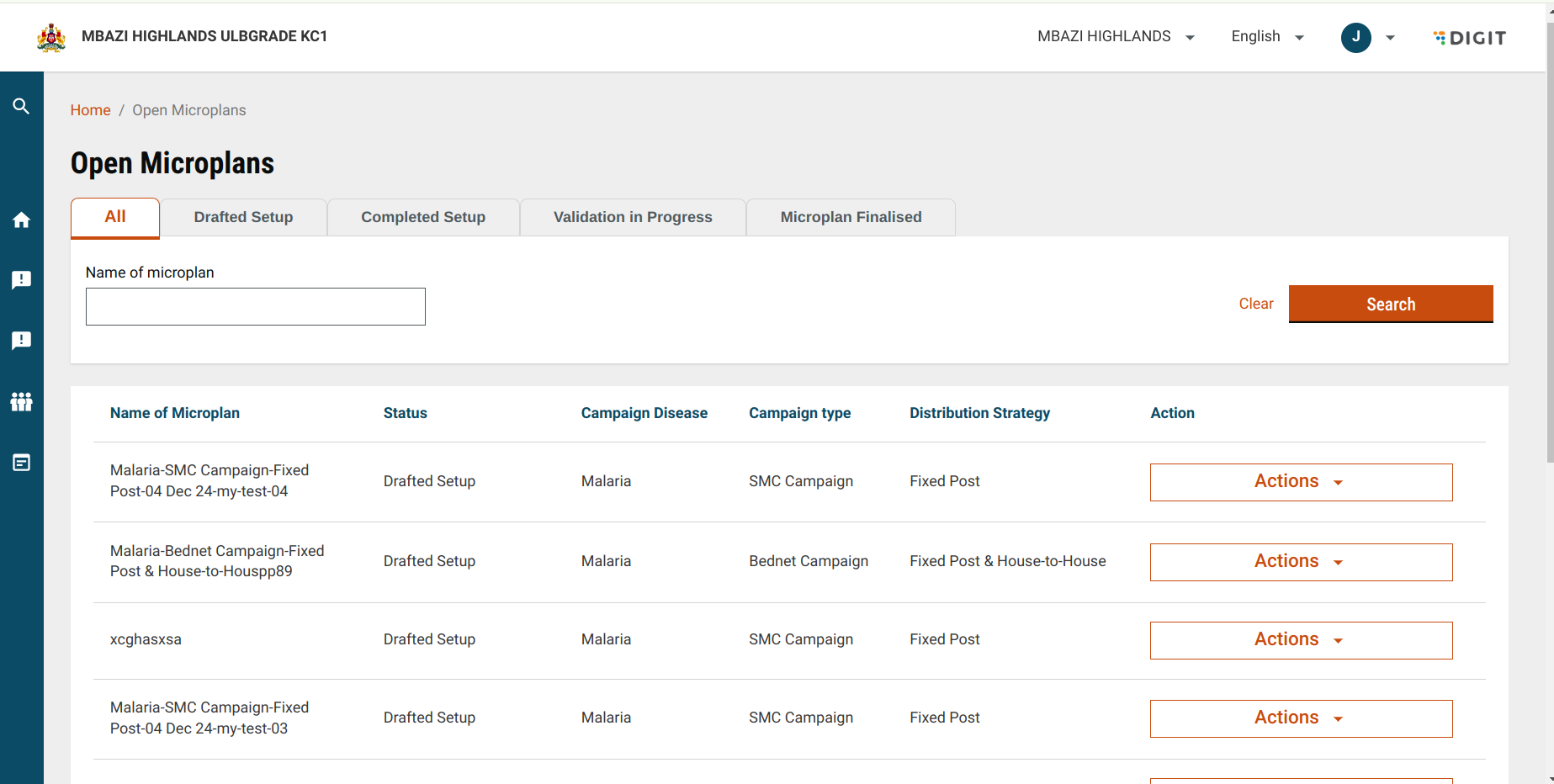
The **Open Microplans** screen allows the microplan admin to see all the plans that they create. Microplans are categorised by their status, such as **Drafted Setup, Completed Setup**, **Validation in Progress**, and **Finalised Microplan**. A Microplan admin can search for microplans by name and perform actions based on the microplan’s current status.
The list of statuses displayed on the **Open Microplans** screen includes:
* **All**: Default view showing all microplans created by the user.
* **Drafted Setup:** Microplans that have still not been completed in the setup microplans.
* **Completed Setup**: Shows microplans for which setup is completed.
* **Validation in Progress**: Displays microplans that are being validated by Population approvers, facility data approvers, and estimation approvers.
* **Finalised Microplan**: This shows the microplans that have been fully validated and finalised.
## Interface Elements
The system administrator can see the list of microplans on this page and perform certain actions on each microplan, if required.
Open Microplan
The screen is accessed when the user logs in as MICROPLAN\_ADMIN, goes to the Microplan Setup card, and clicks on the open microplans link.
## **User Actions**
In the **Open Microplans** screen, users can:
* **Search Microplan**: Search for microplans using the microplan name. Fuzzy search is also available.
* **Filter Microplans by Status**: Use tabs to filter microplans based on their status.
* **Perform Status-Specific Actions**: Depending on the microplan's status, users can view, edit, or download finalised microplan estimations.
#### **File Path**
Frontend File Path:
{% embed url="" %}
## Business Logic
**How the Search API works**
Each of the tabs is associated with a tabId, and each tabId is linked with a status. After extracting the string query params in the URL, the payload for PlanConfigurationSearchCriteria.status is filled based on tabId.
Sample Payload:
{% code overflow="wrap" %}
```
PlanConfigurationSearchCriteria: { limit: 10, offset: 0, status: ["DRAFT"], tenantId: "mz", userUuid: "80abd698-3a65-4665-bcdb-d177083f6277", RequestInfo: {} }
```
{% endcode %}
#### **API call flow**
**1) /plan-service/config/\_search:**
This endpoint takes `userUUID` as the `planConfigSearchCriteria` and returns all the different plan objects related to the microplans created by the logged-in system admin.
**2)/project-factory/v1/project-type/search:**
Will take the campaignId from the plan Object and the tenantId, and will give back the campaign Object(campaign name, campaign disease, campaign type, etc).
#### **Status-Specific Actions**
Based on the status of the microplan, different actions are available.
Each of the different tabs represents a different stage of the microplan.
#### **Logic Explanation**
1. **The Edit (Drafted Microplans)**
* When the microplan status is \["DRAFT"], edit is available. Clicking on it redirects to the last edited page of the setup microplan.
2. **View Summary (Setup Completed):**
* When the microplan status is \["EXECUTION\_TO\_BE\_DONE"] or \["CENSUS\_DATA\_APPROVAL\_IN\_PROGRESS", "CENSUS\_DATA\_APPROVED", "RESOURCE\_ESTIMATION\_IN\_PROGRESS"], the view summary is available. Clicking on it redirects to the summary page of the setup microplan.
3. **Download Microplan(Microplan Finalised):**
* When the status of the microplan is \["RESOURCE\_ESTIMATIONS\_APPROVED"], then clicking on the download will download the microplan sheet using the hook
{% code overflow="wrap" %}
```
Digit.Utils.campaign.downloadExcelWithCustomName({ fileStoreId: fileId, customName: campaignName });,
```
{% endcode %}
The field and campaign name are extracted from the plan object, and the name of the generated file is the customName.
## **API Details**
| Endpoint | Role |
| --------------------------------------- | ---------------- |
| /plan-service/config/\_search | MICROPLAN\_ADMIN |
| /project-factory/v1/project-type/search | MICROPLAN\_ADMIN |
---
# Agent Instructions
This documentation is published with GitBook. GitBook is the documentation platform designed so that both humans and AI agents can read, navigate, and reason over technical content effectively. Learn more at gitbook.com.
## Querying This Documentation
If you need additional information that is not directly available in this page, you can query the documentation dynamically by asking a question.
Perform an HTTP GET request on the current page URL with the `ask` query parameter, and the optional `goal` query parameter:
```
GET https://docs.digit.org/health/v2.0/deploy/configuration/microplan-service-configuration/microplan-web-service-configuration/open-microplans-system-admin.md?ask=&goal=
```
`ask` is the immediate question: it should be specific, self-contained, and written in natural language.
`goal` is optional and describes the broader end goal you are ultimately trying to accomplish on behalf of the user. GitBook uses it to tailor the answer towards what is most useful for that goal.
The response will contain a direct answer to the question and relevant excerpts and sources from the documentation.
Use this mechanism when the answer is not explicitly present in the current page, you need clarification or additional context, or you want to retrieve related documentation sections.