> For the complete documentation index, see [llms.txt](https://docs.digit.org/llms.txt). Markdown versions of documentation pages are available by appending `.md` to page URLs; this page is available as [Markdown](https://docs.digit.org/health/v2.0/deploy/configuration/microplan-service-configuration/microplan-web-service-configuration/setup-microplan/data-management.md).

# Data Management

## Overview

The **Data Management** step helps you upload the core data required to build a microplan. It consists of two substeps:

1. **Population Upload**
2. **Facility Upload**

Both uploads are validated by the system before you can proceed.

## Steps

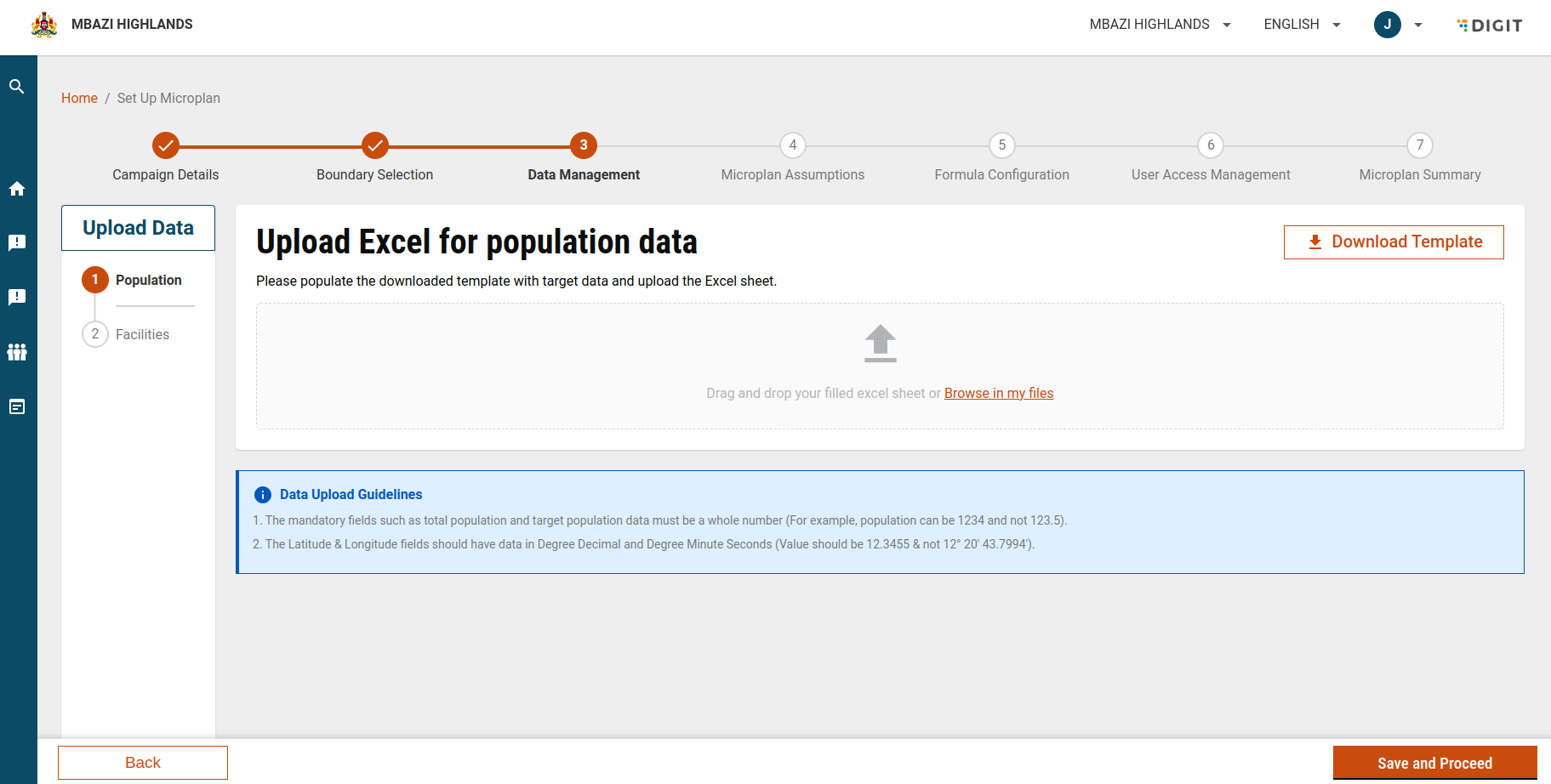
### Step 1: Upload Population Data

This step captures population details for the selected campaign boundaries.

#### 1. Download the Population Template

* Click **Download Template** to get the Excel file.
* The template is auto-generated based on the **boundaries selected in the Boundary Selection step**.
* Each tab in the file corresponds to a selected district.

#### 2. Fill in the Population Details

* **Mandatory fields**:
  * Total Population
  * Target Population\
    (Values must be whole numbers.)
* **Latitude & Longitude** (if provided):
  * Must be in **Degree Decimal** or **Degree Minute Seconds** format.

#### 3. Upload the Filled File

* Drag and drop the Excel file or browse to upload it.
* The system automatically validates the data after upload.

<figure><img src="https://3976166735-files.gitbook.io/~/files/v0/b/gitbook-x-prod.appspot.com/o/spaces%2Fmb5VUHEnO0msarLMPz6q%2Fuploads%2FgkcRc4qt5cXSAVmXdC2f%2Fimage.png?alt=media&amp;token=32a07d8a-de15-4c19-a9ed-3ece740ba153" alt=""><figcaption></figcaption></figure>

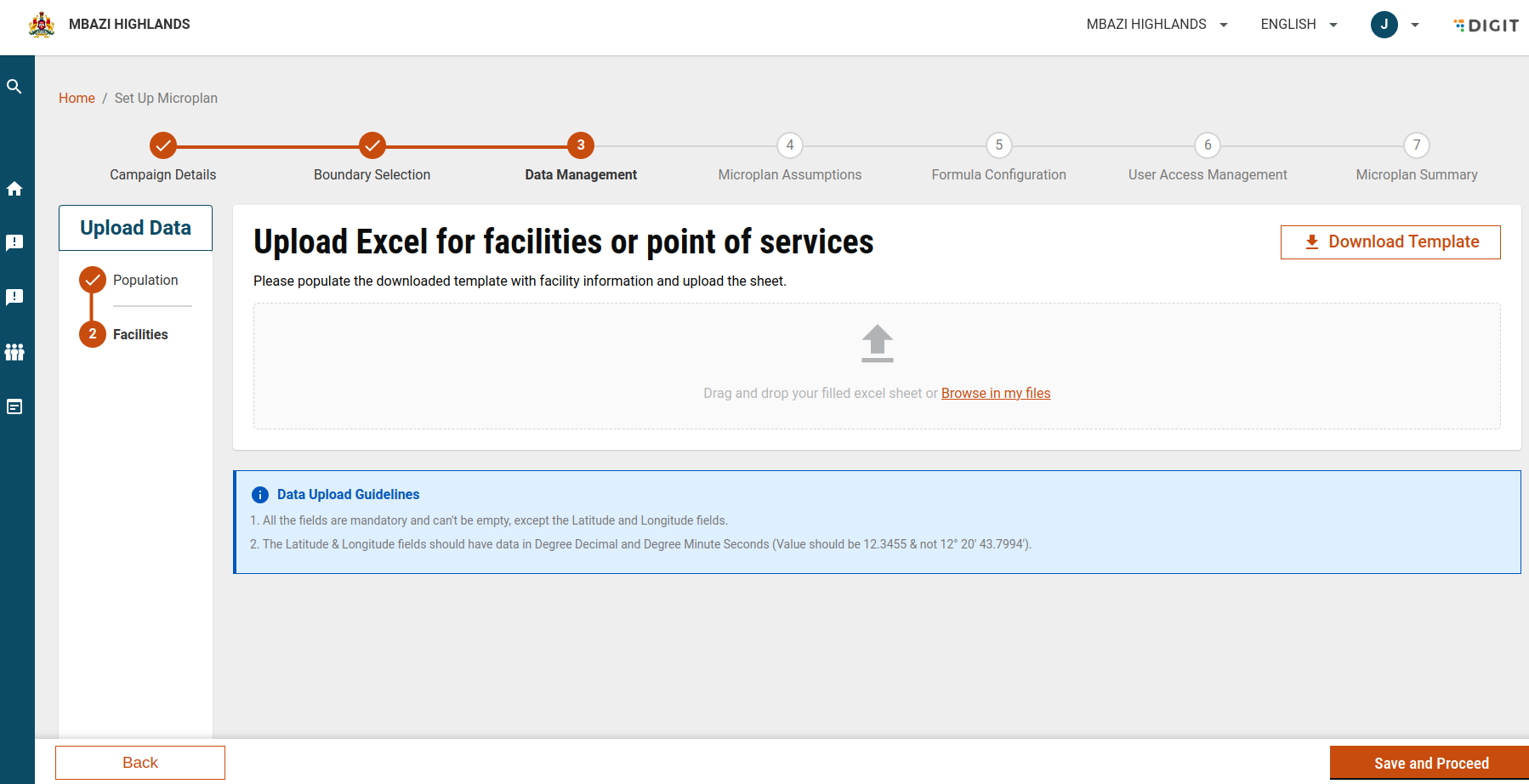
### Step 2: Upload Facility Data

This step captures facilities or points of service for the campaign.

#### 1. Download the Facility Template

* Click **Download Template** to get the Excel file.
* The template includes:
  * A **Boundary Code sheet** listing village-level boundary codes selected earlier.

#### 2. Fill in Facility Details

* All fields are **mandatory**, except:
  * Latitude
  * Longitude
* Latitude & Longitude (if provided) must follow supported coordinate formats.

#### 3. Upload the Filled File

* Drag and drop the file or browse to upload.
* The system validates the uploaded data automatically.

<figure><img src="https://3976166735-files.gitbook.io/~/files/v0/b/gitbook-x-prod.appspot.com/o/spaces%2Fmb5VUHEnO0msarLMPz6q%2Fuploads%2Fg7dnx0VBjoIbyVLYJ8ws%2Fimage.png?alt=media&amp;token=98fb46dc-64f8-4816-a9bd-c07891fbe9d4" alt=""><figcaption></figcaption></figure>

### Step 3: Review and Fix Errors (If Any)

#### Validation and Error Handling

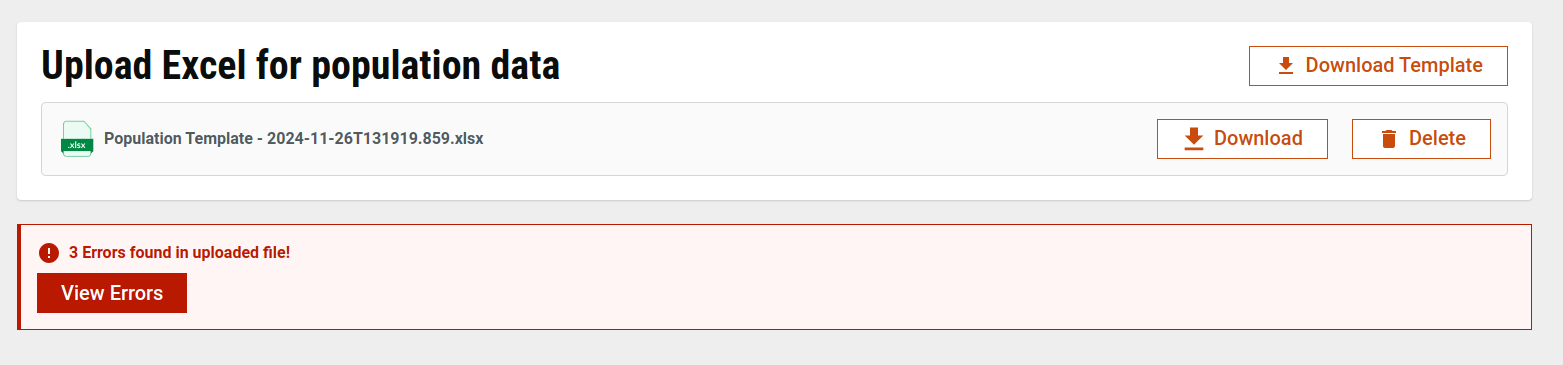
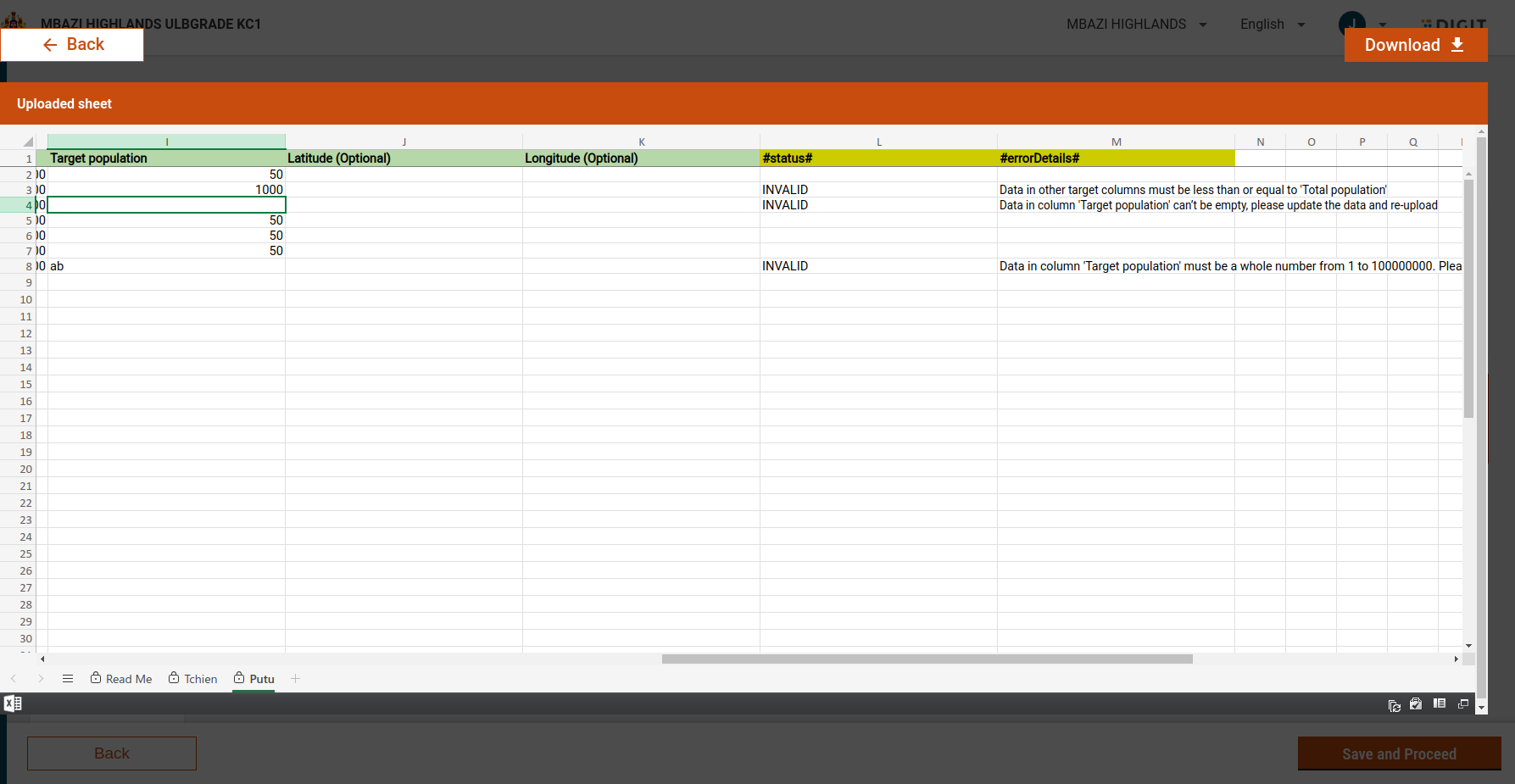
* If errors are found:
  * An **Error** column is added to the Excel sheet.
  * Each row displays the issue next to the incorrect data.

#### Preview Errors

* Click **View Error** to preview the file and review highlighted issues.

#### Re-upload Corrected File

* Download the validated file.
* Fix the errors.
* Re-upload the corrected file.

> Processing continues **only when a valid file with no errors** is uploaded.

<figure><img src="https://3976166735-files.gitbook.io/~/files/v0/b/gitbook-x-prod.appspot.com/o/spaces%2Fmb5VUHEnO0msarLMPz6q%2Fuploads%2F0KuFqnge8VDrL6noO3tY%2Fimage.png?alt=media&amp;token=71c70188-1171-4e90-b7ff-9c36df7ef21e" alt=""><figcaption></figcaption></figure>

<figure><img src="https://3976166735-files.gitbook.io/~/files/v0/b/gitbook-x-prod.appspot.com/o/spaces%2Fmb5VUHEnO0msarLMPz6q%2Fuploads%2FisF3KIRPt3a9Pk3gpjBX%2Fimage.png?alt=media&amp;token=67b16d9d-22d1-47d2-87bb-ccb33f5fcc1a" alt=""><figcaption></figcaption></figure>

{% hint style="info" %}
**Important Warnings:**

**Boundary Selection Change**

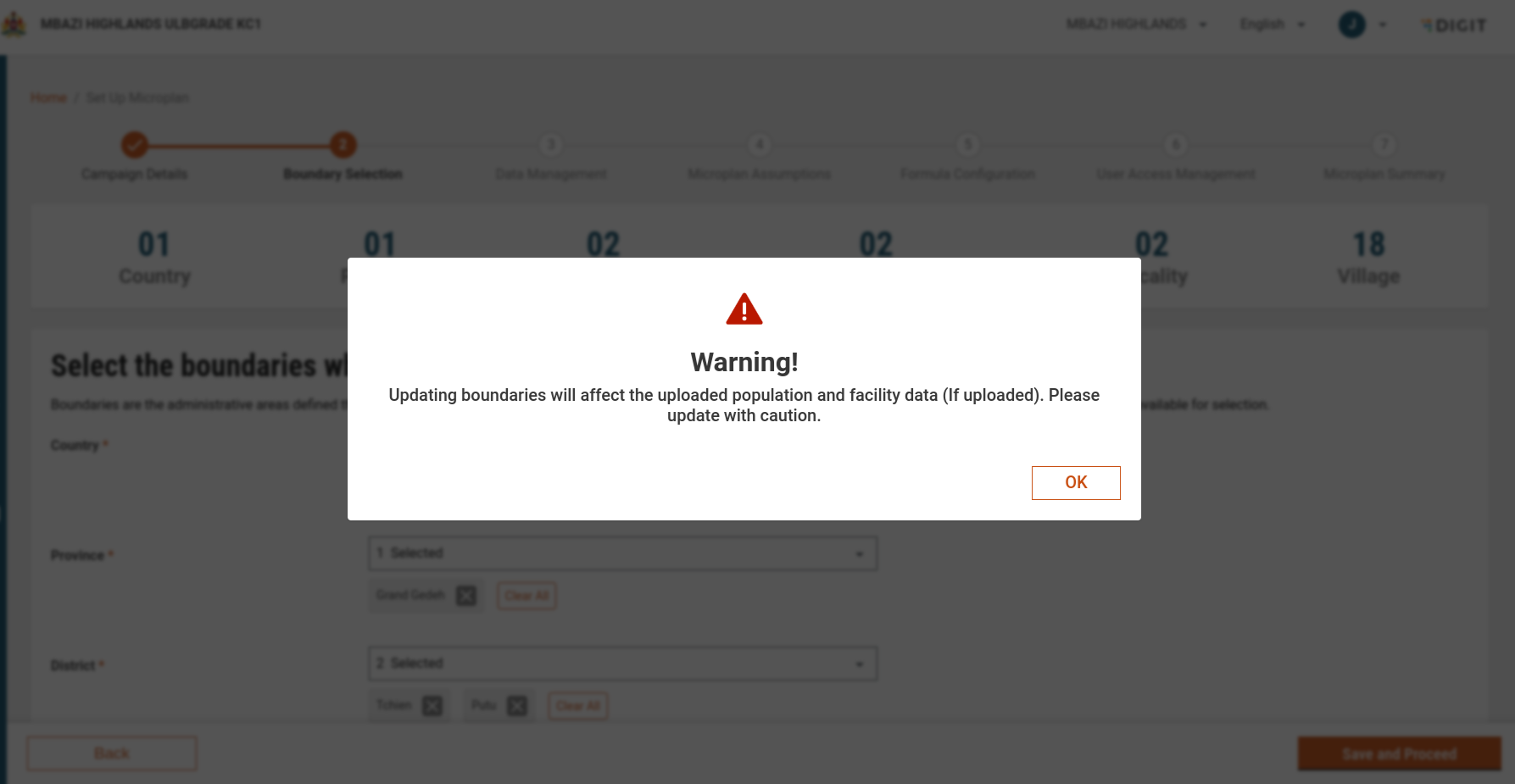
* If you navigate back to the **Boundary Selection** screen:
  * All uploaded Population and Facility files are discarded.
  * A warning message is shown before you proceed.
    {% endhint %}

<figure><img src="https://3976166735-files.gitbook.io/~/files/v0/b/gitbook-x-prod.appspot.com/o/spaces%2Fmb5VUHEnO0msarLMPz6q%2Fuploads%2FbSx1vMcPs2hIwTVUGTcE%2Fimage.png?alt=media&amp;token=659de5f7-eb78-4c74-8b70-adb389440f43" alt=""><figcaption></figcaption></figure>

### Schema-Based Generation & Validation

* Templates and validations are driven by **MDMS schemas**:
  * **Generation**: Schema fields are converted into Excel columns.
  * **Validation**: Uploaded data is validated against the schema.
* Additional custom validations ensure overall data integrity.

### Localisation & UI Support

* All labels, instructions, and error messages are fully translatable.
* File uploads support:
  * Drag-and-drop
  * Browse-to-upload
* Validation ensures:
  * Required fields are filled
  * Data formats are correct before proceeding

## API Endpoints

<table><thead><tr><th width="152">Endpoint</th><th width="138">Method</th><th>Payload</th></tr></thead><tbody><tr><td>/project-factory/v1/project-type/search</td><td>POST</td><td>{ "tenantId": "mz", "ids": [ "2a2491a7" ], "pagination": {}, "RequestInfo": {} }</td></tr><tr><td>/plan-service/config/_search</td><td>POST</td><td>{ "PlanConfigurationSearchCriteria": { "tenantId": "mz", "id": "660fb389-5e60-4c43-b6ce-b1c109b23f54" } ,"RequestInfo": {} }</td></tr><tr><td>/project-factory/v1/data/_create</td><td>POST</td><td>{ "ResourceDetails": { "type": "boundaryWithTarget", "hierarchyType": "MICROPLAN", "tenantId": "mz", "fileStoreId": "29e31558-24ce-4efb-8102-cfa92961efdd", "action": "validate", "campaignId": "8c413d61-c411-4c33-b6eb-76ea005a84c9", "additionalDetails": { "source": "microplan" } }, "RequestInfo": {} }</td></tr><tr><td>/project-factory/v1/data/_search</td><td>POST</td><td>{ "SearchCriteria": { "id": ["08bb247d-364a-4b44-b0a9-d8efeee5a6a4"], "tenantId": "mz", "type": "boundaryWithTarget" }, "RequestInfo": {} }</td></tr><tr><td>/project-factory/v1/project-type/update</td><td>POST</td><td>{ "CampaignDetails":{"id":"8c413d61-c411-4c33-b6eb-76ea005a84c9","tenantId":"mz","status":"drafted","action":"draft","campaignNumber":"CMP-2024-12-03-006616","isActive":true,"parentId":null,"campaignName":"Malaria-Bednet Campaign-Fixed Popp0099","projectType":"LLIN-mz","hierarchyType":"MICROPLAN","boundaryCode":"MICROPLAN_MO","projectId":null,"startDate":1735810905674,"endDate":0,"additionalDetails":{"source":"microplan","disease":"MALARIA","resourceDistributionStrategy":"MIXED"},"resources":[],"boundaries":[],"deliveryRules":[],"auditDetails":{"createdBy":"f4f36858-0e9e-4150-a37f-444b90995e7c","lastModifiedBy":"f4f36858-0e9e-4150-a37f-444b90995e7c","createdTime":1733218905816,"lastModifiedTime":1733218919304}},"RequestInfo":{}}</td></tr><tr><td>/plan-service/config/_update</td><td>POST</td><td>`{"PlanConfiguration":{"id":"660fb389-5e60-4c43-b6ce-b1c109b23f54","tenantId":"mz","name":"Malaria-Bednet Campaign-Fixed Popp0099","campaignId":"8c413d61-c411-4c33-b6eb-76ea005a84c9","status":"DRAFT","files":[],"assumptions":[],"operations":[],"resourceMapping":[],"auditDetails":{"createdBy":"f4f36858-0e9e-4150-a37f-444b90995e7c","lastModifiedBy":"f4f36858-0e9e-4150-a37f-444b90995e7c","createdTime":1733218906001,"lastModifiedTime":1733218924572},"additionalDetails":{"key":"2"},"workflow":null},"RequestInfo": {} }</td></tr></tbody></table>


---

# Agent Instructions
This documentation is published with GitBook. GitBook is the documentation platform designed so that both humans and AI agents can read, navigate, and reason over technical content effectively. Learn more at gitbook.com.

## Querying This Documentation
If you need additional information that is not directly available in this page, you can query the documentation dynamically by asking a question.

Perform an HTTP GET request on the current page URL with the `ask` query parameter, and the optional `goal` query parameter:

```
GET https://docs.digit.org/health/v2.0/deploy/configuration/microplan-service-configuration/microplan-web-service-configuration/setup-microplan/data-management.md?ask=<question>&goal=<endgoal>
```

`ask` is the immediate question: it should be specific, self-contained, and written in natural language.
`goal` is optional and describes the broader end goal you are ultimately trying to accomplish on behalf of the user. GitBook uses it to tailor the answer towards what is most useful for that goal.

The response will contain a direct answer to the question and relevant excerpts and sources from the documentation.

Use this mechanism when the answer is not explicitly present in the current page, you need clarification or additional context, or you want to retrieve related documentation sections.