> For the complete documentation index, see [llms.txt](https://docs.digit.org/llms.txt). Markdown versions of documentation pages are available by appending `.md` to page URLs; this page is available as [Markdown](https://docs.digit.org/health/v2.0/deploy/configuration/microplan-service-configuration/microplan-web-service-configuration/setup-microplan/microplan-details.md).

# Microplan Details

Overview

The microplan creation flow uses a **stepper-based UI** to guide users through configuration in a structured manner.\
The **first step** in this flow is **Microplan Details**, which is divided into two sections:

1. **Campaign Details**
2. **Microplan Details**

This step captures all essential information required before proceeding to resource planning and distribution.

## Steps

### Step 1: Configure Campaign Details

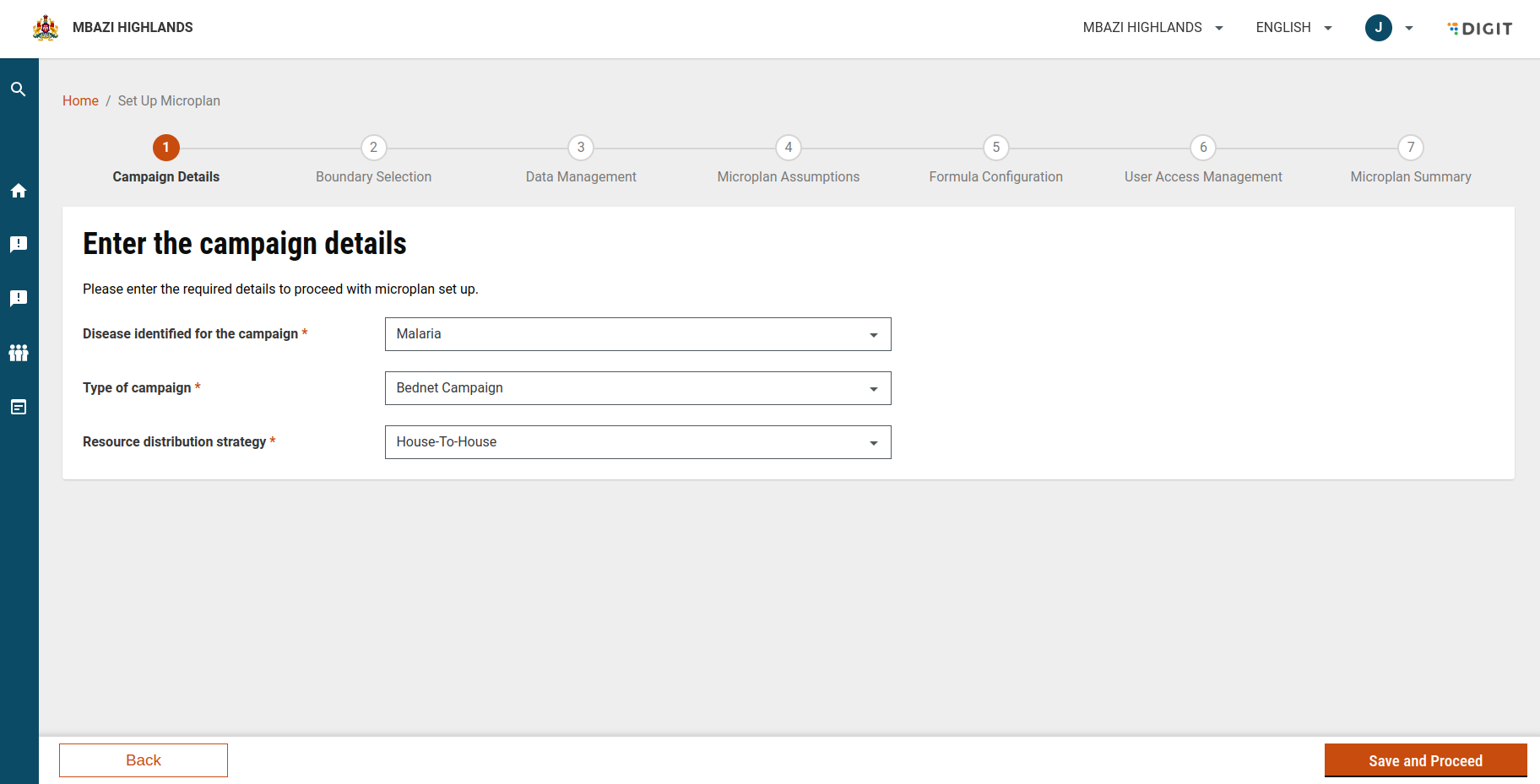
The **Campaign Details** section collects core information about the campaign under which the microplan will be created.

#### 1.1 Section Header Configuration

* **Title:** Enter the campaign details\
  Guides users to provide mandatory campaign information.
* **Description:** Please enter the required details to proceed with the microplan setup.\
  Explains the purpose of the section.
* **Localisation:**\
  Both title and description are fully localisable using standard localisation modules.

<figure><img src="https://3976166735-files.gitbook.io/~/files/v0/b/gitbook-x-prod.appspot.com/o/spaces%2Fmb5VUHEnO0msarLMPz6q%2Fuploads%2FmM06VFKeCotYC5UOgSvp%2Fimage.png?alt=media&amp;token=4af8039c-93a2-4280-ab78-2feb0501856d" alt=""><figcaption></figcaption></figure>

#### 1.2 Configure Campaign Fields

**Field 1: Disease Identified for the Campaign**

* **Purpose:** Select the disease targeted by the campaign.
* **Field Type:** Dropdown
* **Default Value:** Malaria
* **Mandatory:** Yes
* **UI Behaviour:**
  * Supports typing to filter values
  * Dropdown selection with arrow indicator
* **Localisation:** Label and values are translatable.

**Field 2: Type of Campaign**

* **Purpose:** Define the campaign type.
* **Field Type:** Dropdown
* **Default Value:** None (user selection required)
* **Mandatory:** Yes
* **UI Behaviour:** Dropdown with selectable options
* **Localisation:** Label and options are localisable.

**Field 3: Resource Distribution Strategy**

* **Purpose:** Select how resources will be distributed during the campaign.
* **Field Type:** Dropdown
* **Default Value:** None (user selection required)
* **Mandatory:** Yes
* **UI Behaviour:** Dropdown with filter support
* **Localisation:** Fully localised label and values.

#### 1.3 Campaign Detail Validations

* All mandatory fields are marked with an asterisk (\*)
* Users cannot proceed unless all required fields are filled out.
* Validation messages are configurable and localisable.

### Step 2: Configure Microplan Details

The **Microplan Details** section captures the identity of the microplan and provides contextual visibility into the selected campaign configuration.

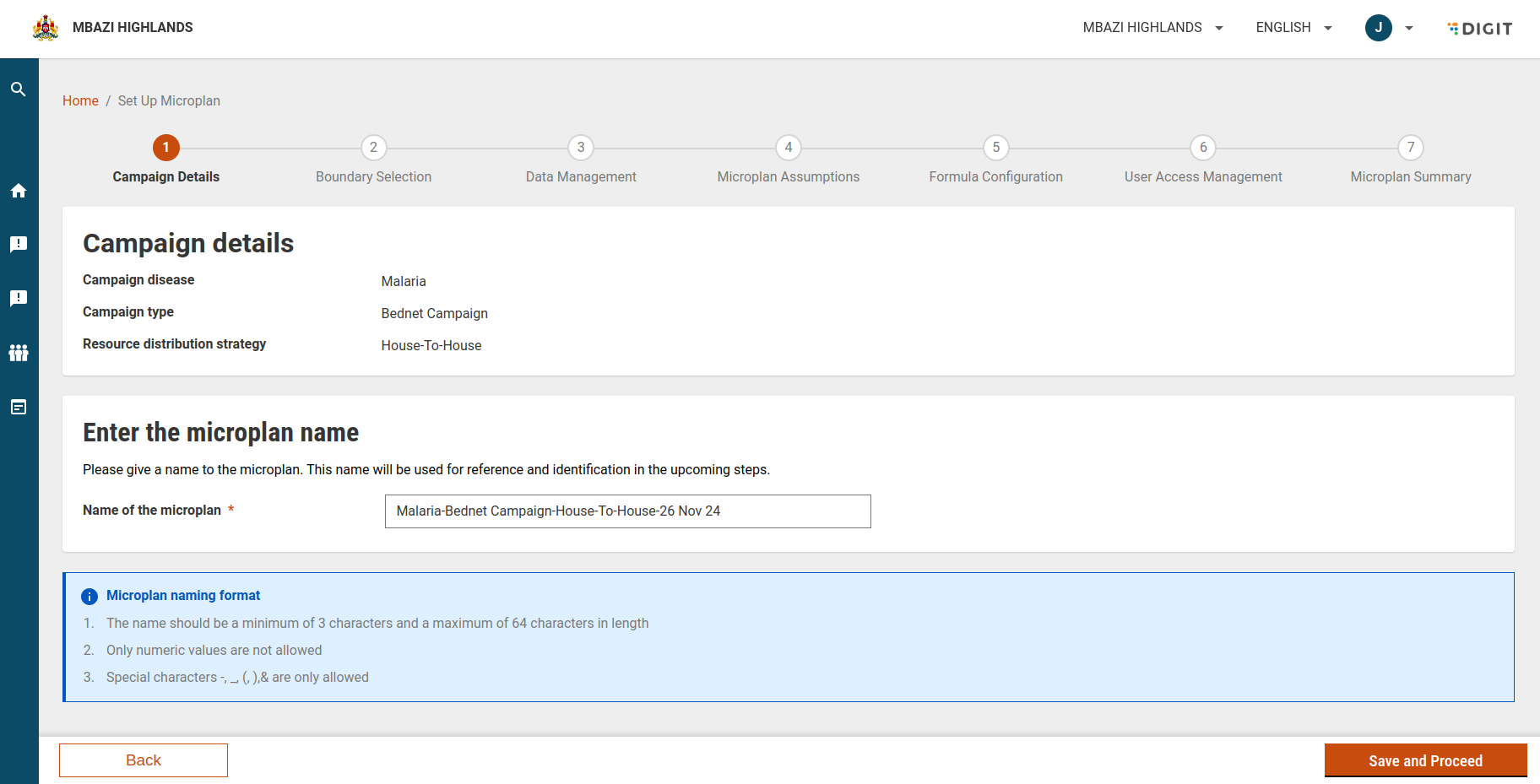
#### 2.1 Campaign Details Summary

This is a **read-only summary** of information entered in the previous section, displayed for user confirmation:

* Campaign Disease (e.g., Malaria)
* Campaign Type (e.g., SMC Campaign)
* Resource Distribution Strategy (e.g., House-to-House)

This helps users validate campaign context before naming the microplan.

<figure><img src="https://3976166735-files.gitbook.io/~/files/v0/b/gitbook-x-prod.appspot.com/o/spaces%2Fmb5VUHEnO0msarLMPz6q%2Fuploads%2FZMKtPMhL6ldEkIReiK64%2Fimage.png?alt=media&amp;token=9f986381-101e-4ab8-861d-af25e1b29acf" alt=""><figcaption></figcaption></figure>

#### 2.2 Configure Microplan Name

**Field: Name of the Microplan**

* **Purpose:** Provide a unique and identifiable name for the microplan.
* **Field Type:** Text Input
* **Mandatory:** Yes

#### 2.3 Microplan Naming Rules

The microplan name must follow predefined validation rules:

* Length must be between **3 and 64 characters**
* Name **cannot contain only numeric values**
* Allowed special characters: `-`, `_`, `(`, `)`, `&`&#x20;

#### 2.4 Naming Configuration via MDMS

Microplan naming rules and guidance are driven by MDMS masters:

* **Naming Regex**\
  Controls validation logic\
  [`hcm-microplanning → MicroplanNamingRegex`](https://unified-qa.digit.org/workbench-ui/employee/workbench/mdms-search-v2?moduleName=hcm-microplanning\&masterName=MicroplanNamingRegex)
* **Naming Convention Info**\
  Provides user-facing naming guidance\
  [`hcm-microplanning → MicroplanNamingConvention`](https://unified-qa.digit.org/workbench-ui/employee/workbench/mdms-search-v2?moduleName=hcm-microplanning\&masterName=MicroplanNamingConvention)

These configurations ensure consistency across all microplans.

#### 2.5 Suggested Microplan Name

* The system auto-generates a **suggested microplan name** based on selected campaign details.
* Users may:
  * Accept the suggested name, or
  * Enter a custom name that satisfies validation rules

**Example:**\
`Malaria-Bednet Campaign-Fixed Post & House-to-House-29 Nov 24`&#x20;

#### 2.6 Localisation Support

* All field labels, helper texts, and validation messages are fully localisable
* Suggested naming instructions respect localisation settings

### Step 3: Proceed to Next Configuration Steps

Once all required fields in **Campaign Details** and **Microplan Details** are valid:

* The user can proceed to the next step in the microplan creation flow
* Campaign and microplan context is locked and reused across subsequent steps

## API Endpoints

<table><thead><tr><th width="163">Endpoint</th><th width="138">Method</th><th>Payload</th></tr></thead><tbody><tr><td>/project-factory/v1/project-type/create</td><td>POST</td><td>{ "hierarchyType": "ADMIN", "tenantId": "mz", "action": "draft", "campaignName": "test90", "resources": [], "projectType": "MR-DN", "additionalDetails": { "beneficiaryType": "INDIVIDUAL", "key": 2 }, "RequestInfo": {} }</td></tr><tr><td>/project-factory/v1/project-type/search</td><td>POST</td><td>{ "tenantId": "mz", "ids": [ "2a2491a7-c52d-4305-8b5b-9aa10ae44168" ], "pagination": {}, "RequestInfo": {} }</td></tr><tr><td>/plan-service/config/_create</td><td>POST</td><td>{ "PlanConfiguration": { "tenantId": "mz", "name": "Malaria-Bednet Campaign-Fixed Post &#x26; HDec 24", "campaignId": "52fea5b5-e7d2-424a-89ee-d167443314a9", "status": "DRAFT", "files": [], "assumptions": [], "operations": [], "resourceMapping": [], "additionalDetails": { "key": "2" } }, "RequestInfo": {} }</td></tr><tr><td>/plan-service/config/search</td><td>POST</td><td>{ "tenantId": "mz", "pagination": {}, "RequestInfo": {} }</td></tr></tbody></table>


---

# Agent Instructions
This documentation is published with GitBook. GitBook is the documentation platform designed so that both humans and AI agents can read, navigate, and reason over technical content effectively. Learn more at gitbook.com.

## Querying This Documentation
If you need additional information that is not directly available in this page, you can query the documentation dynamically by asking a question.

Perform an HTTP GET request on the current page URL with the `ask` query parameter, and the optional `goal` query parameter:

```
GET https://docs.digit.org/health/v2.0/deploy/configuration/microplan-service-configuration/microplan-web-service-configuration/setup-microplan/microplan-details.md?ask=<question>&goal=<endgoal>
```

`ask` is the immediate question: it should be specific, self-contained, and written in natural language.
`goal` is optional and describes the broader end goal you are ultimately trying to accomplish on behalf of the user. GitBook uses it to tailor the answer towards what is most useful for that goal.

The response will contain a direct answer to the question and relevant excerpts and sources from the documentation.

Use this mechanism when the answer is not explicitly present in the current page, you need clarification or additional context, or you want to retrieve related documentation sections.