> For the complete documentation index, see [llms.txt](https://docs.digit.org/llms.txt). Markdown versions of documentation pages are available by appending `.md` to page URLs; this page is available as [Markdown](https://docs.digit.org/health/v2.0/deploy/configuration/microplan-service-configuration/microplan-web-service-configuration/supervisor-workflows/assign-facility-to-villages.md).

# Assign Facility To Villages

## **Overview**

The Facility Catchment Assigner role is responsible for mapping campaign facilities/points of service (POS) to their respective catchment villages. This mapping ensures that the estimation of resources for the campaign can be done accurately based on the facilities/POS and the villages assigned to them.

## **User Roles**

<table><thead><tr><th width="193.328125">Role</th><th width="329.10546875">Description</th><th>Role Code</th></tr></thead><tbody><tr><td><strong>Facility Catchment Mapper</strong></td><td>Responsible for assingning facility to villages</td><td><code>FACILITY_CATCHMENT_MAPPER</code></td></tr><tr><td><strong>Root Facility Catchment Mapper</strong></td><td>Has additional permissions, including the ability to finalize catchment mapping</td><td><code>ROOT_FACILITY_CATCHMENT_MAPPER</code></td></tr></tbody></table>

#### **Key Responsibilities of the Facility Catchment Assigner**

1. **Assign Facilities to Villages**:
   * Map facilities/POS to the villages within their assigned administrative boundaries.
2. **Monitor Facility and Village Mappings**:
   * Ensure that all villages and facilities are appropriately mapped for the campaign.

## **Interface Elements**

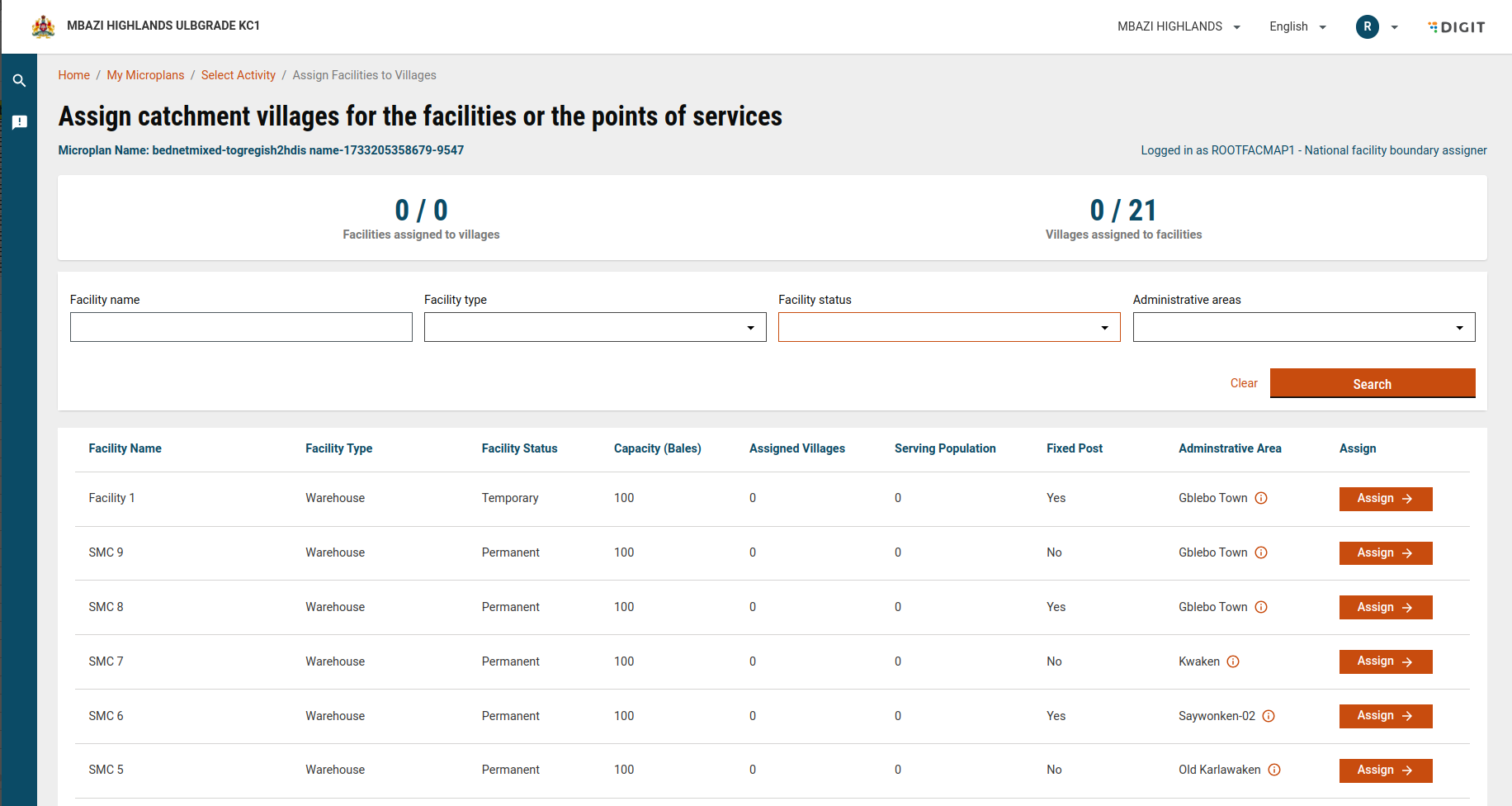
<figure><img src="https://3976166735-files.gitbook.io/~/files/v0/b/gitbook-x-prod.appspot.com/o/spaces%2Fmb5VUHEnO0msarLMPz6q%2Fuploads%2FckvxEorfkNwvlTDgVv2Y%2Fimage.png?alt=media&amp;token=2637fe96-cd17-4fa5-b160-985f92f121d7" alt=""><figcaption></figcaption></figure>

#### **Header Section**

* **Microplan Name**:
  * Displays the name of the current microplan being worked on.
* **Logged-in User**:
  * Displays the role and account of the logged-in user (Facility Catchment Assigner).

#### **Facility Assign Summary (KPIs)**

The dashboard provides a summary of the facilities and villages that are part of the user's administrative boundaries.

**Cards**

1. **Villages with Mapped Facilities/POS**:
   * Displays the count of villages assigned to mapped facilities/POS within the administrative boundary.
2. **Facilities with Mapped Villages**:
   * Displays the count of facilities that have assigned villages in the administrative boundary.

***

#### **Master Details For Search Filter Dropdowns**

The following master details are part of the Facility Catchment Mapping:

* **Facility Type**: The type of facility (e.g., Warehouse, Health Post).
* **Facility Status**: Status of the facility (e.g., Permanent, Temporary).
* **Residing Village**: The villages where the facilities are located.
* [Click here](https://github.com/egovernments/egov-mdms-data/tree/UNIFIED-DEV/data/mz/health/hcm-microplanning) to fetch MDMS data.

***

#### **Search and Filter Options**

1. **Facility Search**:
   * Allows the user to search for specific facilities based on partial string matches.
2. **Filters**:
   * **Facility Type**: Filters by the type of facility (e.g., Warehouse, Health Post).
   * **Facility Status**: Filters by the facility's status (e.g., Permanent, Temporary).
   * **Is Fixed Post?**: Filters by whether the facility is a fixed post or not.
   * **Residing Village**: Filters by the villages where the facilities are located.

***

#### **Facility Details**

The following details are available for each facility in the dashboard:

<table><thead><tr><th width="211.0078125">Facility Detail</th><th>Description</th></tr></thead><tbody><tr><td>Facility Name</td><td>Displays the name of the facility.</td></tr><tr><td>Facility Type</td><td>Displays the type of facility (e.g., Warehouse, Health Post).</td></tr><tr><td>Facility Status</td><td>Displays whether the facility is permanent or temporary.</td></tr><tr><td>Capacity</td><td>Shows the facility's capacity (e.g., Bales for bednets or Blisters for SMC campaigns).</td></tr><tr><td>Assigned Villages</td><td>Shows the number of villages assigned to the facility.</td></tr><tr><td>Serving Population</td><td>Displays the total population being served by the facility.</td></tr><tr><td>Fixed Post</td><td>Indicates if the facility is a fixed post.</td></tr><tr><td>Residing Village</td><td>Shows the name of the village where the facility resides.</td></tr></tbody></table>

#### **Assigning and Unassigning Villages to a Facility:**

When the user clicks on a facility or assign button in the facility row, a pop-up window opens displaying essential details about the selected facility, as well as options for managing unassigned and assigned villages for this facility.

## **Steps**

Once all villages are assigned to their respective facilities and the mappings are complete, the national-level facility catchment assigner can finalise the assignment.

1. **Finalise Mapping**:

   * A “Finalise facility to village assignment” button will be available to finalise the facility-to-village mapping.

   <figure><img src="https://3976166735-files.gitbook.io/~/files/v0/b/gitbook-x-prod.appspot.com/o/spaces%2Fmb5VUHEnO0msarLMPz6q%2Fuploads%2FhluUMHuhcIDmLtdPRAd3%2Fimage.png?alt=media&amp;token=4b29c917-d603-4062-a981-c2bc6e07e18b" alt=""><figcaption></figcaption></figure>

   * After finalising the facility catchment mapping, a success screen will be shown, indicating that facility assignment is done.

   <figure><img src="https://3976166735-files.gitbook.io/~/files/v0/b/gitbook-x-prod.appspot.com/o/spaces%2Fmb5VUHEnO0msarLMPz6q%2Fuploads%2F0KbFc83bRtPT5QpW5EDg%2Fimage.png?alt=media&amp;token=59f4537a-bd0e-4e51-85e0-60fe9a50bc64" alt=""><figcaption></figcaption></figure>

   * Once finalised, no further changes can be made, and the microplan estimation for the campaign will be triggered.
2. **Finalised Mapping View**:
   * After finalisation, the mapping cannot be modified, and the dashboard will display the finalised assignments for reference.

## **API Endpoints**

<table><thead><tr><th width="122">Purpose</th><th width="124">Endpoint</th><th width="104.88671875">Method</th><th>Payload</th></tr></thead><tbody><tr><td>Search for facilities</td><td><code>/plan-service/plan/facility/_search</code></td><td>POST</td><td><code>{ "PlanFacilitySearchCriteria": { "limit": 10, "offset": 0, "tenantId": "mz", "planConfigurationId": "297699ef-0041-4421-a4ae-acdd89c78e80", "jurisdiction": ["MICROPLAN_MO"], "facilityName": "", "residingBoundaries": [] } }</code></td></tr><tr><td>Search for project types</td><td><code>/project-factory/v1/project-type/search</code></td><td>POST</td><td><code>{ "CampaignDetails": { "tenantId": "mz", "ids": ["395adc89-6030-4347-ae5c-32a059f5aae5"] } }</code></td></tr><tr><td>Fetch chart data</td><td><code>/dashboard-analytics/dashboard/getChartV2?_=1733293436271</code></td><td>POST</td><td><code>{ "aggregationRequestDto": { "visualizationType": "METRIC", "visualizationCode": "totalFacilitiesWithMappedVillages", "filters": { "COUNTRY": ["MICROPLAN_MO"], "planConfigurationId": ["297699ef-0041-4421-a4ae-acdd89c78e80"], "tenantId": ["mz"] }, "moduleLevel": "MICROPLAN-FACILITY" }, "headers": { "tenantId": "mz" } }</code></td></tr><tr><td>Search census data</td><td><code>/census-service/_search</code></td><td>POST</td><td><code>{ "CensusSearchCriteria": { "tenantId": "mz", "facilityAssigned": false, "source": "297699ef-0041-4421-a4ae-acdd89c78e80", "jurisdiction": ["MICROPLAN_MO"] } }</code></td></tr><tr><td>Search for employees assigned to a plan</td><td><code>/plan-service/employee/_search?_=1733293435767</code></td><td>POST</td><td><code>{ "PlanEmployeeAssignmentSearchCriteria": { "tenantId": "mz", "active": true, "planConfigurationId": "297699ef-0041-4421-a4ae-acdd89c78e80", "employeeId": ["55392d76-9d87-4d4f-9ae9-2f44ff6968f2"], "limit": 5, "offset": 0 } }</code></td></tr></tbody></table>


---

# Agent Instructions
This documentation is published with GitBook. GitBook is the documentation platform designed so that both humans and AI agents can read, navigate, and reason over technical content effectively. Learn more at gitbook.com.

## Querying This Documentation
If you need additional information that is not directly available in this page, you can query the documentation dynamically by asking a question.

Perform an HTTP GET request on the current page URL with the `ask` query parameter, and the optional `goal` query parameter:

```
GET https://docs.digit.org/health/v2.0/deploy/configuration/microplan-service-configuration/microplan-web-service-configuration/supervisor-workflows/assign-facility-to-villages.md?ask=<question>&goal=<endgoal>
```

`ask` is the immediate question: it should be specific, self-contained, and written in natural language.
`goal` is optional and describes the broader end goal you are ultimately trying to accomplish on behalf of the user. GitBook uses it to tailor the answer towards what is most useful for that goal.

The response will contain a direct answer to the question and relevant excerpts and sources from the documentation.

Use this mechanism when the answer is not explicitly present in the current page, you need clarification or additional context, or you want to retrieve related documentation sections.