> For the complete documentation index, see [llms.txt](https://docs.digit.org/llms.txt). Markdown versions of documentation pages are available by appending `.md` to page URLs; this page is available as [Markdown](https://docs.digit.org/health/v2.0/deploy/configuration/microplan-service-configuration/microplan-web-service-configuration/supervisor-workflows/validate-and-approve-population-data.md).

# Validate & Approve Population Data

## **Overview**

The Population Data Validation and Approval screen is designed for population data approvers to ensure the accuracy and consistency of population data submitted for villages. This screen allows approvers to validate, correct, and approve data, ensuring the integrity of the data used for resource planning.

## **User Roles**

<table><thead><tr><th width="136.45703125">Roles</th><th width="371.05859375">Description</th><th>Role Code</th></tr></thead><tbody><tr><td><strong>Population Data Approver</strong></td><td>Responsible for validating the population data, ensuring its accuracy, including the ability to edit data, approve, or send data back for correction.</td><td><code>POPULATION_DATA_APPROVER</code></td></tr><tr><td><strong>Root Population Data Approver</strong></td><td>Responsible for validating the population data, ensuring its accuracy, including the ability to edit data, approve, or send data back for correction.Has additional permissions, including the ability to finalize population data.</td><td><code>ROOT_POPULATION_DATA_APPROVER</code></td></tr></tbody></table>

## **Interface Elements**

<figure><img src="https://3976166735-files.gitbook.io/~/files/v0/b/gitbook-x-prod.appspot.com/o/spaces%2Fmb5VUHEnO0msarLMPz6q%2Fuploads%2FlqXl9Y7WTYtTtuo6ElR9%2Fimage.png?alt=media&amp;token=76f16f13-9104-4e88-bc6e-ca12ca6dd3d6" alt=""><figcaption></figcaption></figure>

**Header Section**

* **Microplan Name:**\
  Displays the name of the current microplan being reviewed.
* **Logged-in User:**\
  Indicates the user role and account.

#### **Population Data Summary (KPIs)**

* All values are dynamically updated based on the real-time census data.
* These values are sourced directly from microplan-specific KPIs, which reflect any actions taken by data approvers.
* As census data is reviewed, corrected, or approved, the values will change accordingly.

**Filters and Search**

* **Administrative Hierarchy and Area Selection:**\
  Dropdown menus for selecting specific administrative areas (e.g., district and village).
* **Search and Filter Options:**
  * **Workflow Status Filters:**
    * *Pending validation*
    * *Pending approval*&#x20;
    * *Validated*&#x20;
  * **Assigned to Filters:**
    * *Assigned to me*&#x20;
    * *Assigned to all*&#x20;
  * Buttons: **Apply Filter**, **Clear**

**Population Data Table**

<table><thead><tr><th width="267.56640625">Column</th><th>Description</th></tr></thead><tbody><tr><td>Village Name</td><td>Name of the village under review</td></tr><tr><td>Uploaded Target Population</td><td>Target population submitted for the village</td></tr><tr><td>Confirmed Target Population</td><td>Approved target population for the village</td></tr><tr><td>Uploaded Total Population</td><td>Total population submitted for the village</td></tr><tr><td>Confirmed Total Population</td><td>Approved total population for the village</td></tr><tr><td>Action Buttons</td><td>Includes <strong>View Logs</strong> for historical data and other validation actions</td></tr></tbody></table>

**Action Buttons**

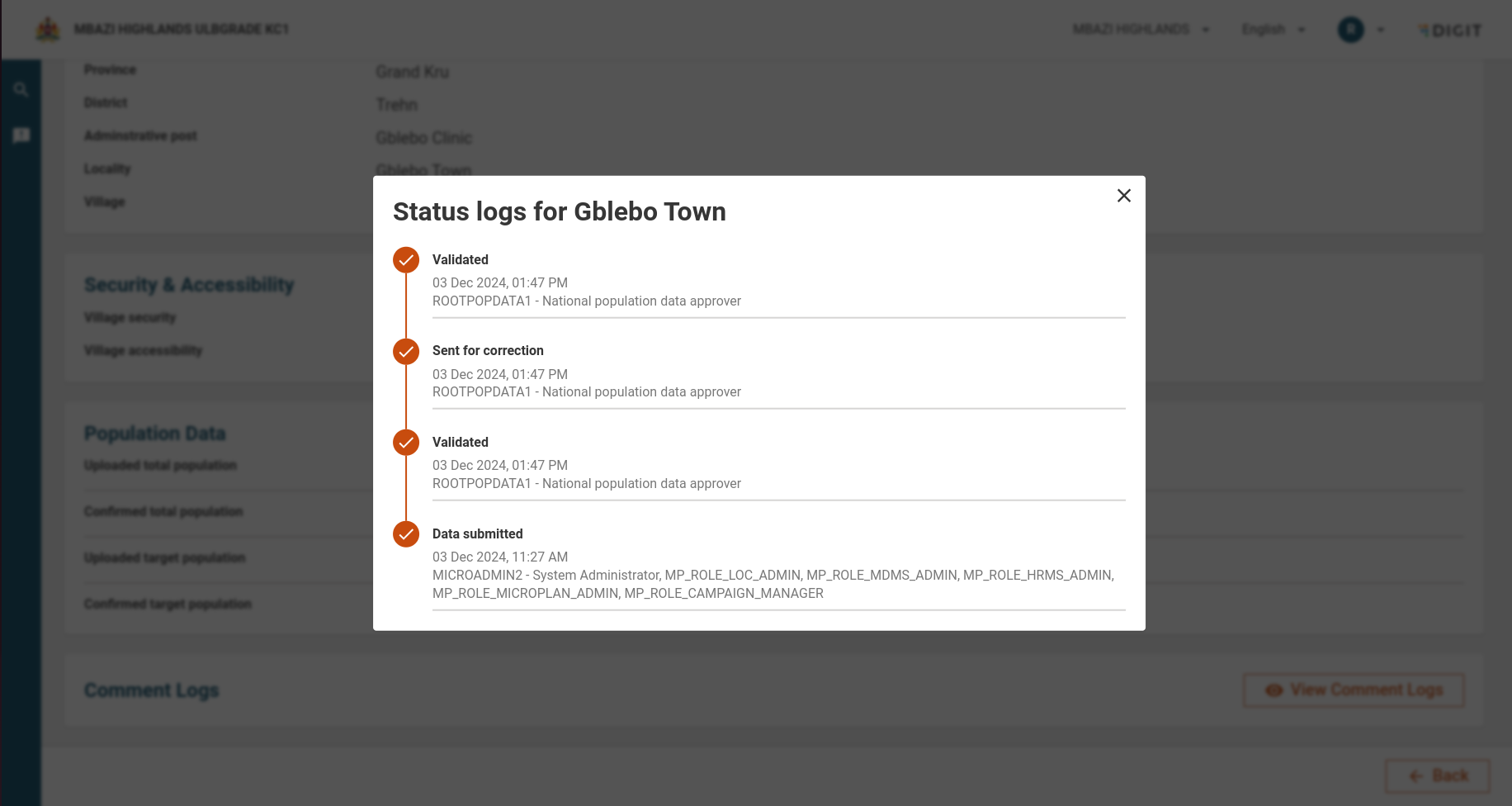
* **View Logs:** Displays historical changes and logs related to a specific village's data

<figure><img src="https://3976166735-files.gitbook.io/~/files/v0/b/gitbook-x-prod.appspot.com/o/spaces%2Fmb5VUHEnO0msarLMPz6q%2Fuploads%2FI1iSQbrW24457FyY23KZ%2Fimage.png?alt=media&amp;token=682460c6-3216-4ad2-a69a-d6b1bbc7697e" alt=""><figcaption></figcaption></figure>

***

## **Population Data Validation Workflow**

#### **4.1. Role-Based Permissions and Actions**

**Population Data Approver (PDA)**

The Population Data Approver is responsible for validating population and editing data. Their responsibilities include:

**Validating Data:**

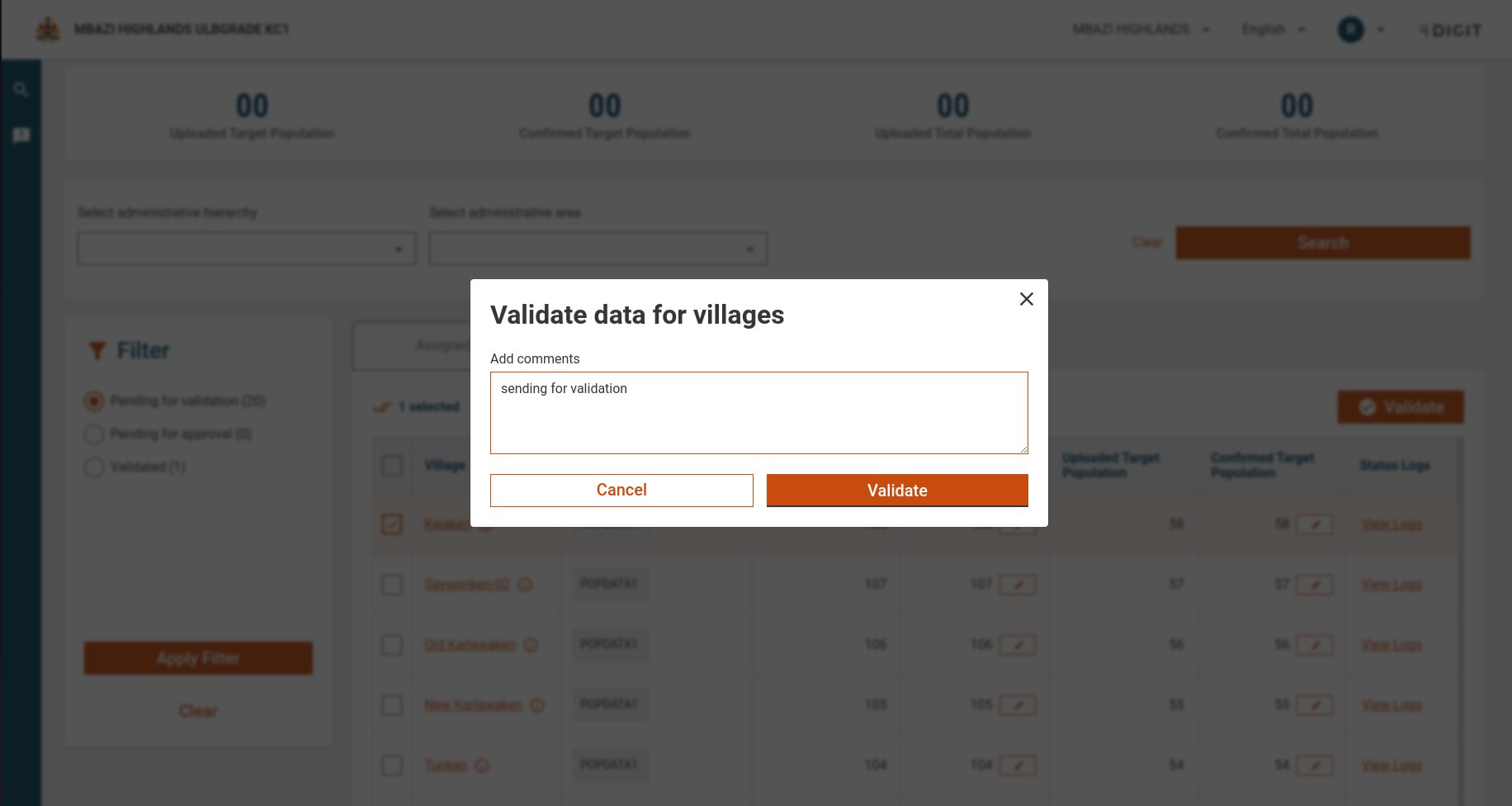
* Cross-check the uploaded data with the confirmed population to ensure accuracy.

<figure><img src="https://3976166735-files.gitbook.io/~/files/v0/b/gitbook-x-prod.appspot.com/o/spaces%2Fmb5VUHEnO0msarLMPz6q%2Fuploads%2FM6eJgsLxOXxaJ5Ae0Jea%2Fimage.png?alt=media&amp;token=325cc0ce-efc0-4107-84da-0c637171379d" alt=""><figcaption></figcaption></figure>

**Editing Data:**

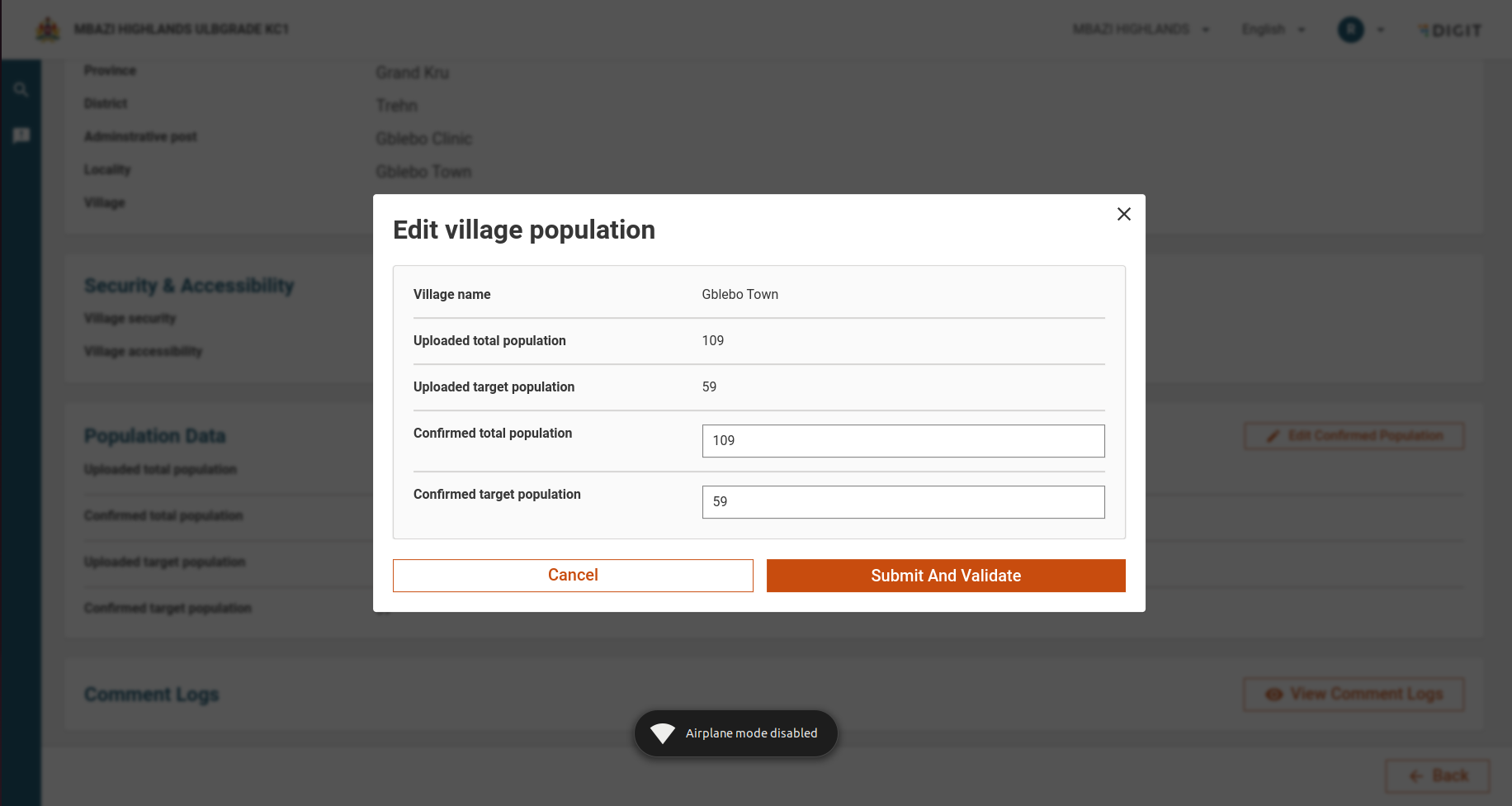
* Modify the village population data if discrepancies are found, with a reason logged for each change and the data is sent back for approval.

**When No Data Is Assigned:**

* If no data is assigned to the PDA, a "Back" button is shown, allowing them to return to the previous screen.

***

**Root Population Data Approver (RPDA)**

The Root Population Data Approver has all the functionalities of a PDA and additional capabilities to finalise population data. Their responsibilities include:

**Editing Data:**

* Modify the village population data if discrepancies are found, with a reason logged for each change.

<figure><img src="https://3976166735-files.gitbook.io/~/files/v0/b/gitbook-x-prod.appspot.com/o/spaces%2Fmb5VUHEnO0msarLMPz6q%2Fuploads%2FkyHLMmVkCTezalAduKEo%2Fimage.png?alt=media&amp;token=cd1a87da-5339-43c4-bbb2-8ee922733a5c" alt=""><figcaption></figcaption></figure>

**Approving or Sending Data for Correction:**

* Once the population data is validated, the RPDA can either approve it or send it back for correction if further issues are identified.

**Approval Workflow:**

* If someone from the hierarchy below modifies and sends the data for approval, the RPDA can approve it. For example, if a province-level user sends the data back for approval, the RPDA will receive the application for approval and validation.

**Finalising Actions:**

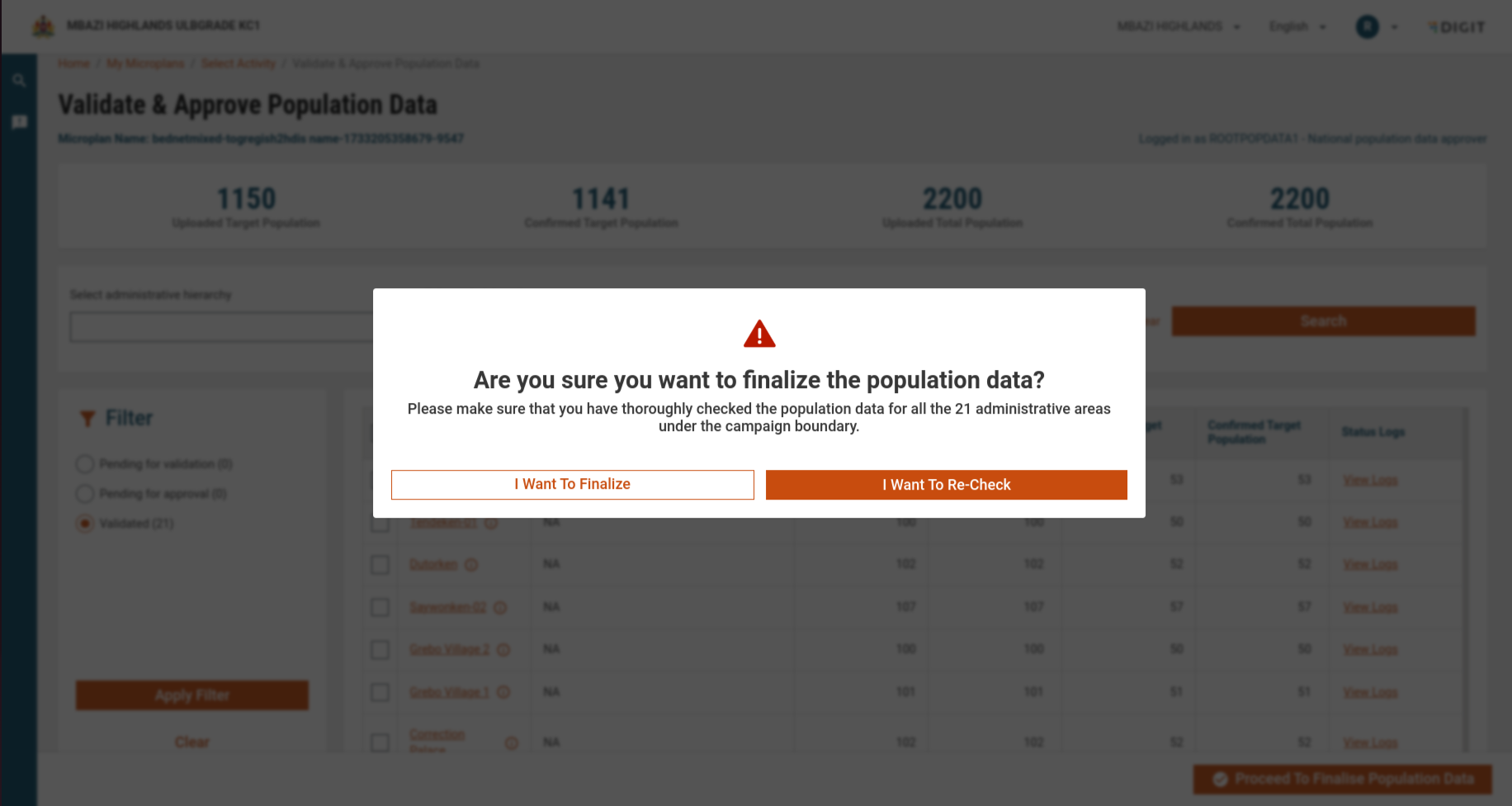
* If all the villages within the selected microplan have been validated and no further changes are required, the RPDA will see a "Finalise Actions" button at the footer of the page.
* The "Finalise Actions" button will lock the data and prevent further modifications once clicked, marking the end of the validation process for the selected microplan population data.

<figure><img src="https://3976166735-files.gitbook.io/~/files/v0/b/gitbook-x-prod.appspot.com/o/spaces%2Fmb5VUHEnO0msarLMPz6q%2Fuploads%2FnkMyYv8Rp3KP48UqCyhm%2Fimage.png?alt=media&amp;token=e2b674b1-a71b-4a0e-9193-c1beb3012698" alt=""><figcaption></figcaption></figure>

* After finalising the population data, a success screen will be shown, indicating that the population data is finalised.

<figure><img src="https://3976166735-files.gitbook.io/~/files/v0/b/gitbook-x-prod.appspot.com/o/spaces%2Fmb5VUHEnO0msarLMPz6q%2Fuploads%2FSIveNOAzkWe44UaoymAE%2Fimage.png?alt=media&amp;token=07950f1c-5e20-4ac0-8a21-732534e8e34e" alt=""><figcaption></figcaption></figure>

***

**Additional Notes**

* Once the population data reaches the national-level data approver and the validation is finalised, the system will disable all action buttons. The status will be set to "CENSUS\_APPROVED", and no further changes can be made. At this point, users can only view the details of the data but will not be able to perform any additional actions, such as editing or approving the data.
* Population supervisors will only see the boundaries in their inbox that fall under their jurisdiction.

## API End Points

<table><thead><tr><th width="133">Purpose</th><th width="144">Endpoint URL</th><th width="90">Method</th><th>Payload</th></tr></thead><tbody><tr><td>Get chart data for a specific visualization</td><td><code>dashboard-analytics/dashboard/getChartV2</code></td><td>POST</td><td><code>{ "aggregationRequestDto": { "visualizationType": "METRIC", "visualizationCode": "censusUploadedTargetPopulation", "filters": { "COUNTRY": ["MICROPLAN_MO"], "status": ["PENDING_FOR_VALIDATION"], "planConfigurationId": ["246cfc95-b4b0-43e8-b375-dd44333cc881"], "tenantId": ["mz"] }, "moduleLevel": "CENSUS" }, "headers": { "tenantId": "mz" } }</code></td></tr><tr><td>Search census data</td><td><code>census-service/_search</code></td><td>POST</td><td><code>{ "CensusSearchCriteria": { "tenantId": "mz", "source": "246cfc95-b4b0-43e8-b375-dd44333cc881", "status": "PENDING_FOR_VALIDATION", "assignee": "a7431b92-5db5-46b1-9b5b-33272ba8dbfc", "jurisdiction": ["MICROPLAN_MO"], "limit": 50, "offset": 0 } }</code></td></tr><tr><td>Search business services</td><td><code>egov-workflow-v2/egov-wf/businessservice/_search</code></td><td>POST</td><td><p><code>SearchParams{</code></p><p><code>tenantId=mz,</code></p><p><code>businessServices=CENSUS</code></p><p><code>}</code></p></td></tr><tr><td>Search plan employees</td><td><code>plan-service/employee/_search</code></td><td>POST</td><td><code>{ "PlanEmployeeAssignmentSearchCriteria": { "tenantId": "mz", "active": true, "planConfigurationId": "246cfc95-b4b0-43e8-b375-dd44333cc881", "role": ["POPULATION_DATA_APPROVER", "ROOT_POPULATION_DATA_APPROVER"], "employeeId": ["a7431b92-5db5-46b1-9b5b-33272ba8dbfc"], "limit": 5, "offset": 0 } }</code></td></tr><tr><td>Search project type by campaign ID</td><td><code>project-factory/v1/project-type/search</code></td><td>POST</td><td><code>{ "CampaignDetails": { "tenantId": "mz", "ids": ["5b5a49ca-584c-4226-bbd6-98cddd95ef78"] } }</code></td></tr><tr><td>Search plan configuration details</td><td><code>plan-service/config/_search</code></td><td>POST</td><td><code>{ "PlanConfigurationSearchCriteria": { "tenantId": "mz", "id": "246cfc95-b4b0-43e8-b375-dd44333cc881" } }</code></td></tr></tbody></table>


---

# Agent Instructions
This documentation is published with GitBook. GitBook is the documentation platform designed so that both humans and AI agents can read, navigate, and reason over technical content effectively. Learn more at gitbook.com.

## Querying This Documentation
If you need additional information that is not directly available in this page, you can query the documentation dynamically by asking a question.

Perform an HTTP GET request on the current page URL with the `ask` query parameter, and the optional `goal` query parameter:

```
GET https://docs.digit.org/health/v2.0/deploy/configuration/microplan-service-configuration/microplan-web-service-configuration/supervisor-workflows/validate-and-approve-population-data.md?ask=<question>&goal=<endgoal>
```

`ask` is the immediate question: it should be specific, self-contained, and written in natural language.
`goal` is optional and describes the broader end goal you are ultimately trying to accomplish on behalf of the user. GitBook uses it to tailor the answer towards what is most useful for that goal.

The response will contain a direct answer to the question and relevant excerpts and sources from the documentation.

Use this mechanism when the answer is not explicitly present in the current page, you need clarification or additional context, or you want to retrieve related documentation sections.