> For the complete documentation index, see [llms.txt](https://docs.digit.org/llms.txt). Markdown versions of documentation pages are available by appending `.md` to page URLs; this page is available as [Markdown](https://docs.digit.org/health/v2.0/deploy/configuration/microplan-service-configuration/microplan-web-service-configuration/supervisor-workflows/village-details.md).

# Village Details

## **Overview**

The Village Details screen is used to access microplan details for the selected village and linked information.

## Interface Elements

When a user clicks on a village name in the **Population Data Table**, they are directed to the **Village Details Page**, which provides detailed information about the selected village.

<figure><img src="https://3976166735-files.gitbook.io/~/files/v0/b/gitbook-x-prod.appspot.com/o/spaces%2Fmb5VUHEnO0msarLMPz6q%2Fuploads%2F1NGj4GDSnfw4o8l9S0G4%2Fimage.png?alt=media&amp;token=5c2288a8-b661-4b57-b6c9-74e4f215d1f3" alt=""><figcaption></figcaption></figure>

***

**2. Header Information**

* **Microplan Name**: Displays the name of the microplan associated with the village.
* Displays the Hierarchy of the village.

***

**3. Security & Accessibility**

* **Village Security**: Provides an input field for entering security details about the village.
* **Master Details :**&#x20;
  * [Click here ](https://github.com/egovernments/egov-mdms-data/tree/UNIFIED-DEV/data/mz/health/hcm-microplanning)to fetch the MDMS data.
  * **Security Questions**
    1. **Is your village prone to civil unrest, like violent protests, riots, etc.?**\
       Captures the frequency of civil unrest occurrences using the following options:
       * **All the time (At least once a month):** Frequent civil unrest.
       * **Often (At least once a year):** Civil unrest occurs occasionally but is a notable concern.
       * **Rarely (Once in 2–3 years):** Rare civil unrest.
       * **Never:** No recorded instances of civil unrest.
    2. **How often do the security forces patrol the village?**\
       Measures the frequency of security patrols to ensure safety, with the following options:
       * **Every day:** Daily security patrols.
       * **Often (At least once a week):** Regular but less frequent patrols.
       * **Rarely (Once in a month):** Infrequent security patrols.
       * **Never:** No security patrols.

<figure><img src="https://3976166735-files.gitbook.io/~/files/v0/b/gitbook-x-prod.appspot.com/o/spaces%2Fmb5VUHEnO0msarLMPz6q%2Fuploads%2FclmjZTwyTp4KSPJakVcr%2Fimage.png?alt=media&amp;token=55d88ef6-2c56-4d9a-ba7e-1b4ab9feeb0c" alt=""><figcaption></figcaption></figure>

* **Village Accessibility**: Allows entering accessibility details for the village.
* **Master Details :**
  * [Click here](https://github.com/egovernments/egov-mdms-data/tree/UNIFIED-DEV/data/mz/health/hcm-microplanning) to fetch MDMS data.
  * **Village Road Condition:**\
    Captures the type of road infrastructure present in the village. The options include:
    * **Concrete:** Indicates the presence of a well-paved concrete road.
    * **Gravel:** Represents roads made of gravel.
    * **Dirt:** Denotes unpaved roads made of dirt or soil.
    * **No Road:** Indicates the absence of any road infrastructure.
  * **Village Terrain:**\
    Specifies the geographical terrain of the village. The available options are:
    * **Mountain:** Villages located in mountainous areas.
    * **Forest:** Villages surrounded by dense forest areas.
    * **Plain:** Villages situated in flat, open landscapes.
    * **Desert:** Villages located in arid, desert regions.

<figure><img src="https://3976166735-files.gitbook.io/~/files/v0/b/gitbook-x-prod.appspot.com/o/spaces%2Fmb5VUHEnO0msarLMPz6q%2Fuploads%2FUXC9BInAKFrvXwXhK0fd%2Fimage.png?alt=media&amp;token=55217605-b911-4aa3-b77e-c8a65e8e186c" alt=""><figcaption></figcaption></figure>

***

#### **4. Population Data**

The data displayed here can be reviewed, modified, and validated by the appropriate users, depending on their role.

**Data Table:**

| Village Name | Uploaded Total Population    | Uploaded Target Population    | Confirmed Total Population   | Confirmed Target Population   |
| ------------ | ---------------------------- | ----------------------------- | ---------------------------- | ----------------------------- |
| Gblebo Town  | (Total population submitted) | (Target population submitted) | (Total population validated) | (Target population validated) |

> Note : The data inside table will change based on selected campaign.

***

## **Steps**

**Actions:**

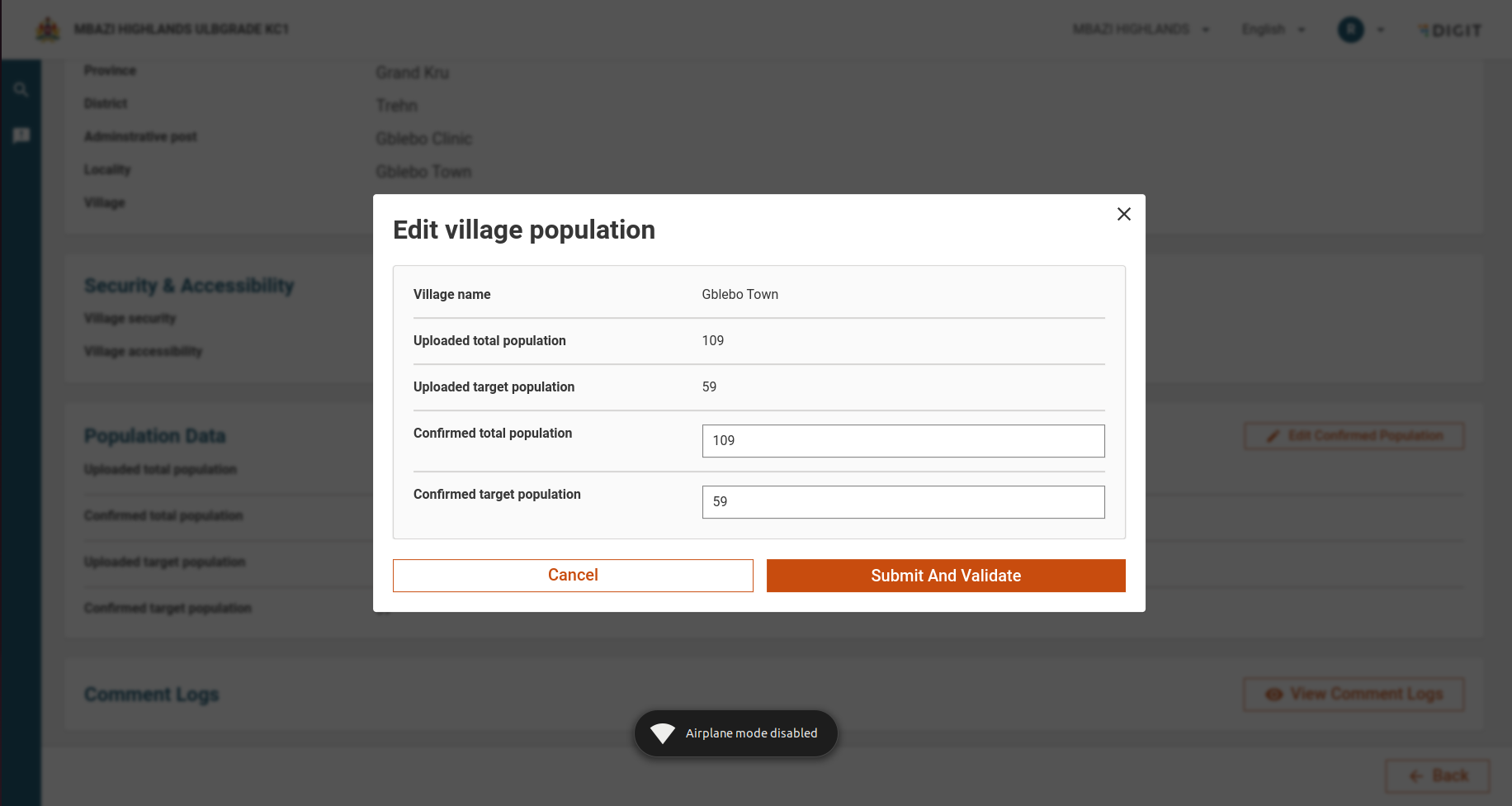
* **Edit Population Data:** If needed, the confirmed population data can be modified.
* **Cancel:** Discards any changes made to the population data.
* **Submit and Validate:**
  * If the **Root Population Data Approver (RPDA)** is logged in, they can **directly validate** the data.
  * If the **Population Data Approver (PDA)** is logged in, the data will move to the "Pending for Approval" status and will need further validation by higher-level approvers.

<figure><img src="https://3976166735-files.gitbook.io/~/files/v0/b/gitbook-x-prod.appspot.com/o/spaces%2Fmb5VUHEnO0msarLMPz6q%2Fuploads%2FkyHLMmVkCTezalAduKEo%2Fimage.png?alt=media&amp;token=cd1a87da-5339-43c4-bbb2-8ee922733a5c" alt=""><figcaption></figcaption></figure>

***

***

**5. Comment Logs**

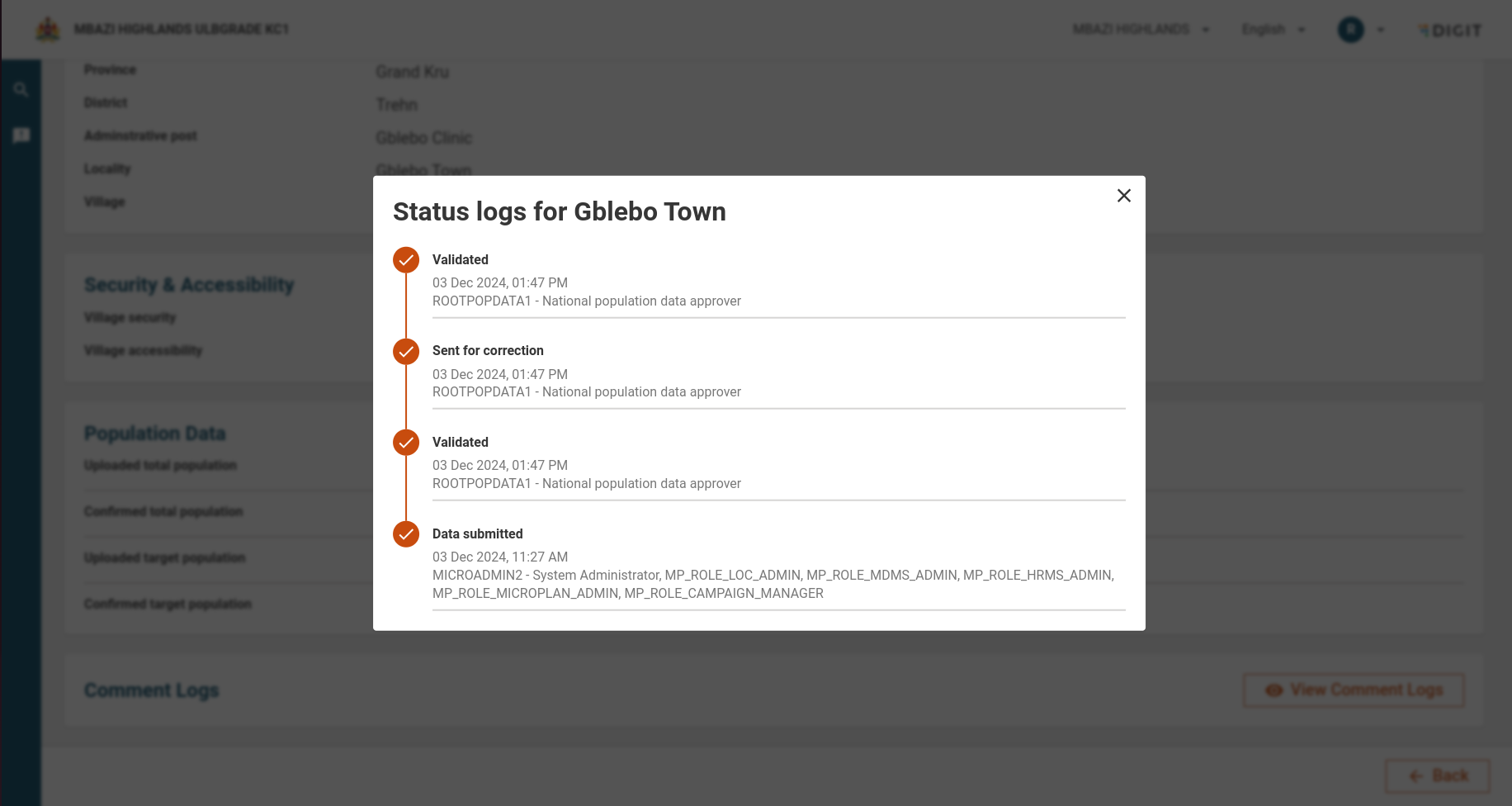
* **View Comment Logs**: This feature displays the history of changes and comments made about the village's population data, enabling transparency and tracking.

<figure><img src="https://3976166735-files.gitbook.io/~/files/v0/b/gitbook-x-prod.appspot.com/o/spaces%2Fmb5VUHEnO0msarLMPz6q%2Fuploads%2FI1iSQbrW24457FyY23KZ%2Fimage.png?alt=media&amp;token=682460c6-3216-4ad2-a69a-d6b1bbc7697e" alt=""><figcaption></figcaption></figure>

## API Endpoints

<table><thead><tr><th width="174.7421875">Endpoint</th><th width="168.89453125">Purpose</th><th>Role</th></tr></thead><tbody><tr><td>/census-service/_update</td><td>To Update the census data </td><td>POPULATION_DATA_APPROVER<br>ROOT_POPULATION_DATA_APPROVER<br>ROOT_FACILITY_CATCHMENT_MAPPER<br>FACILITY_CATCHMENT_MAPPER</td></tr><tr><td>/egov-workflow-v2/egov-wf/process/_search</td><td>Search process history for this plan</td><td>ROOT_POPULATION_DATA_APPROVER, <br>POPULATION_DATA_APPROVER, <br>ROOT_PLAN_ESTIMATION_APPROVER,<br>PLAN_ESTIMATION_APPROVER,<br>ROOT_FACILITY_CATCHMENT_MAPPER,<br>FACILITY_CATCHMENT_MAPPER,<br>MICROPLAN_VIEWER</td></tr></tbody></table>


---

# Agent Instructions
This documentation is published with GitBook. GitBook is the documentation platform designed so that both humans and AI agents can read, navigate, and reason over technical content effectively. Learn more at gitbook.com.

## Querying This Documentation
If you need additional information that is not directly available in this page, you can query the documentation dynamically by asking a question.

Perform an HTTP GET request on the current page URL with the `ask` query parameter, and the optional `goal` query parameter:

```
GET https://docs.digit.org/health/v2.0/deploy/configuration/microplan-service-configuration/microplan-web-service-configuration/supervisor-workflows/village-details.md?ask=<question>&goal=<endgoal>
```

`ask` is the immediate question: it should be specific, self-contained, and written in natural language.
`goal` is optional and describes the broader end goal you are ultimately trying to accomplish on behalf of the user. GitBook uses it to tailor the answer towards what is most useful for that goal.

The response will contain a direct answer to the question and relevant excerpts and sources from the documentation.

Use this mechanism when the answer is not explicitly present in the current page, you need clarification or additional context, or you want to retrieve related documentation sections.
