> For the complete documentation index, see [llms.txt](https://docs.digit.org/llms.txt). Markdown versions of documentation pages are available by appending `.md` to page URLs; this page is available as [Markdown](https://docs.digit.org/health/v2.0/design/architecture/low-level-design/services/console-services/project-factory-campaign-manager/create-campaign.md).
# Create Campaign
### Overview
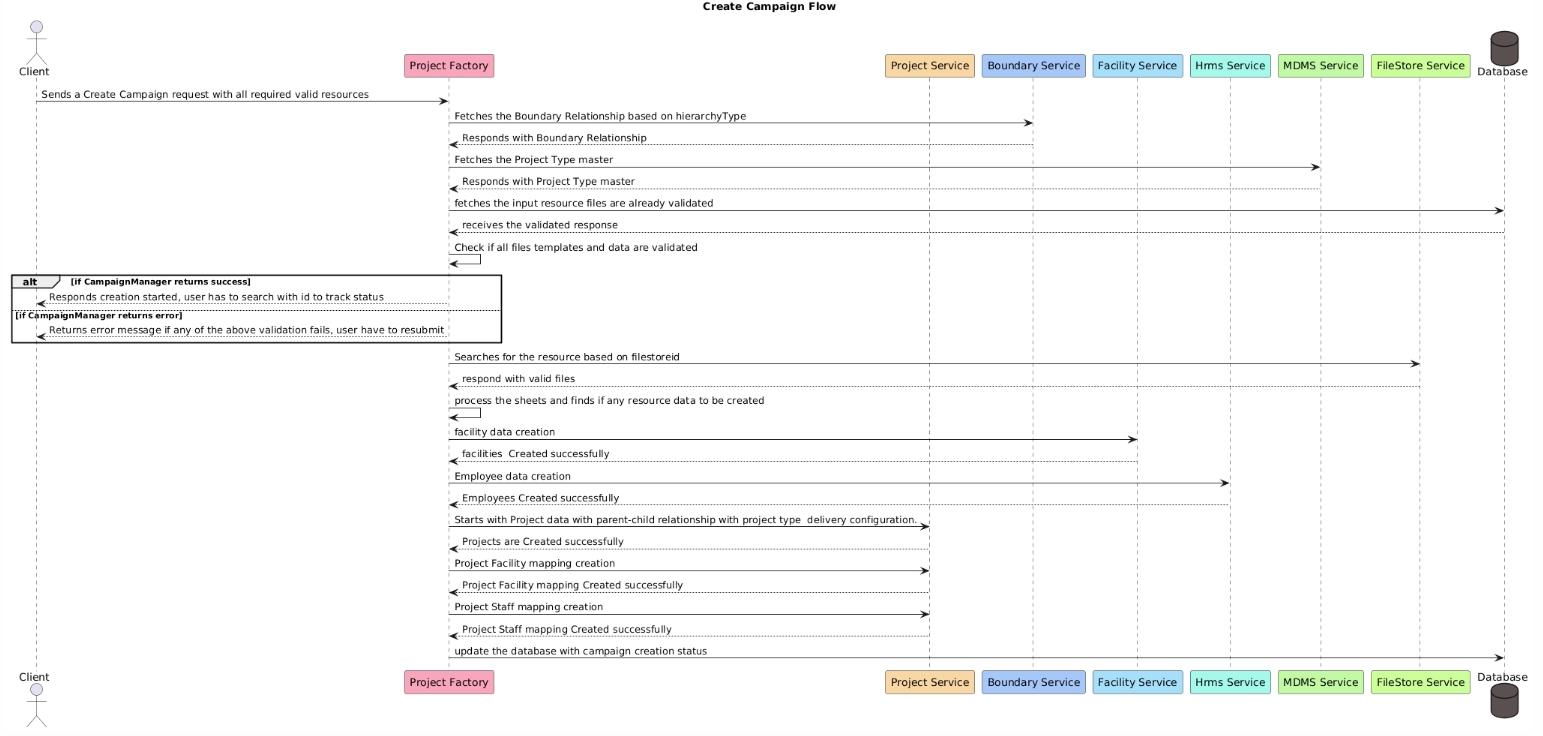
This document outlines the flow for creating a campaign using various services in the system. The process involves interactions between multiple services, including the Project Factory, Project Service, Boundary Service, Facility Service, HRMS Service, MDMS Service, FileStore Service, and the database. This flow ensures that the required resources are validated and correctly set up before finalizing the campaign creation.
### Actors and Participants
* **Client**: The entity (user or system) initiating the campaign creation request.
* **CampaignManager (Project Factory)**: The main controller managing the campaign creation process.
* **ProjectService**: Manages project-related operations, including data creation and mapping.
* **BoundaryService**: Handles fetching of boundary relationships based on hierarchy types.
* **FacilityService**: Responsible for creating facility-related data.
* **HRMSService**: Manages the creation of employee data.
* **MDMSService**: Provides master data such as project types.
* **FileStoreService**: Manages the storage and retrieval of resource files.
* **Database**: Stores campaign-related data and status updates.
### Sequence Flow
1. **Initiate Campaign Creation**
* The **Client** sends a request to the **CampaignManager** to create a campaign with all required and valid resources.
2. **Fetch Boundary Relationship**
* The **CampaignManager** requests the **BoundaryService** to fetch the boundary relationship based on the hierarchy type.
* The **BoundaryService** responds with the relevant boundary relationship data.
3. **Fetch Project Type Master**
* The **CampaignManager** requests the **MDMSService** to fetch the project type master data.
* The **MDMSService** responds with the project type master.
4. **Validate Resource Files**
* The **CampaignManager** checks the **Database** to see if the input resource files have already been validated.
* The **Database** responds with the validation status of the files.
5. **Validation Check**
* The **CampaignManager** checks if all file templates and data are validated:
* If validation is successful, the **CampaignManager** informs the **Client** that the campaign creation process has started, and the user needs to track the status using an ID.
* If validation fails, the **CampaignManager** returns an error message, indicating which validation failed, and the user must resubmit the request.
6. **Resource File Retrieval**
* The **CampaignManager** interacts with the **FileStoreService** to search for the resource based on the `filestoreid`.
* The **FileStoreService** responds with the valid resource files.
7. **Process Resource Data**
* The **CampaignManager** processes the retrieved sheets and identifies any resource data that needs to be created.
8. **Facility Data Creation**
* The **CampaignManager** sends a request to the **FacilityService** to create facility data.
* The **FacilityService** responds that the facilities have been created successfully.
9. **Employee Data Creation**
* The **CampaignManager** sends a request to the **HRMSService** to create employee data.
* The **HRMSService** responds that the employees have been created successfully.
10. **Project Data Creation**
* The **CampaignManager** sends a request to the **ProjectService** to create project data with a parent-child relationship based on the project type and delivery configuration.
* The **ProjectService** responds that the projects have been created successfully.
11. **Project-Facility Mapping Creation**
* The **CampaignManager** sends a request to the **ProjectService** to create mappings between projects and facilities.
* The **ProjectService** responds that the project-facility mappings have been created successfully.
12. **Project-Staff Mapping Creation**
* The **CampaignManager** sends a request to the **ProjectService** to create mappings between projects and staff.
* The **ProjectService** responds that the project-staff mappings have been created successfully.
13. **Update Campaign Creation Status**
* The **CampaignManager** updates the **Database** with the status of the campaign creation process.
### Error Handling
* **Validation Failure**: If any validation step fails (e.g., invalid data in resource files), the **CampaignManager** sends an error message to the **Client**, indicating the failure. The user is required to fix the issues and resubmit the request.
* **Service Errors**: If any of the service interactions (e.g., BoundaryService, MDMSService) return an error, the **CampaignManager** stops the process and informs the **Client** of the failure, specifying the nature of the error.
* **Database Errors**: If the **Database** fails to update the campaign creation status, appropriate error handling and logging mechanisms should be triggered to handle the failure.
### **API Sequence Diagram**
Create Campaign API Flow
### Conclusion
This document provides an overview of the campaign creation flow, detailing each step and interaction between different services and the database. The flow ensures proper validation and creation of necessary resources, while error handling mechanisms provide robustness to the process.
---
# Agent Instructions
This documentation is published with GitBook. GitBook is the documentation platform designed so that both humans and AI agents can read, navigate, and reason over technical content effectively. Learn more at gitbook.com.
## Querying This Documentation
If you need additional information that is not directly available in this page, you can query the documentation dynamically by asking a question.
Perform an HTTP GET request on the current page URL with the `ask` query parameter, and the optional `goal` query parameter:
```
GET https://docs.digit.org/health/v2.0/design/architecture/low-level-design/services/console-services/project-factory-campaign-manager/create-campaign.md?ask=&goal=
```
`ask` is the immediate question: it should be specific, self-contained, and written in natural language.
`goal` is optional and describes the broader end goal you are ultimately trying to accomplish on behalf of the user. GitBook uses it to tailor the answer towards what is most useful for that goal.
The response will contain a direct answer to the question and relevant excerpts and sources from the documentation.
Use this mechanism when the answer is not explicitly present in the current page, you need clarification or additional context, or you want to retrieve related documentation sections.