> For the complete documentation index, see [llms.txt](https://docs.digit.org/llms.txt). Markdown versions of documentation pages are available by appending `.md` to page URLs; this page is available as [Markdown](https://docs.digit.org/health/v2.0/design/architecture/low-level-design/services/console-services/project-factory-campaign-manager/manage-campaign-apis/create-campaign-api-endpoints.md).
# Create Campaign API Endpoints
## Endpoint
**POST** `/project-type/create`
## Request Structure
**Body Parameters**
* **RequestInfo**: Object containing RequestInfo.
* **CampaignDetails**: Object containing the details of the campaign to be created.
* **tenantId**: Tenant identifier.
* **hierarchyType**: Type of hierarchy.
* **action**: Action type (`create` or `draft`).
* **boundaries**: Array of boundaries.
* **resources**: Array of resources.
* **projectType**: Type of the project.
* **deliveryRules**: Array of delivery rules.
* **Additional request info**
## Response Structure
**Success Response**
* **ResponseInfo**: Object containing ResponseInfo.
* **CampaignDetails**: The created campaign details.
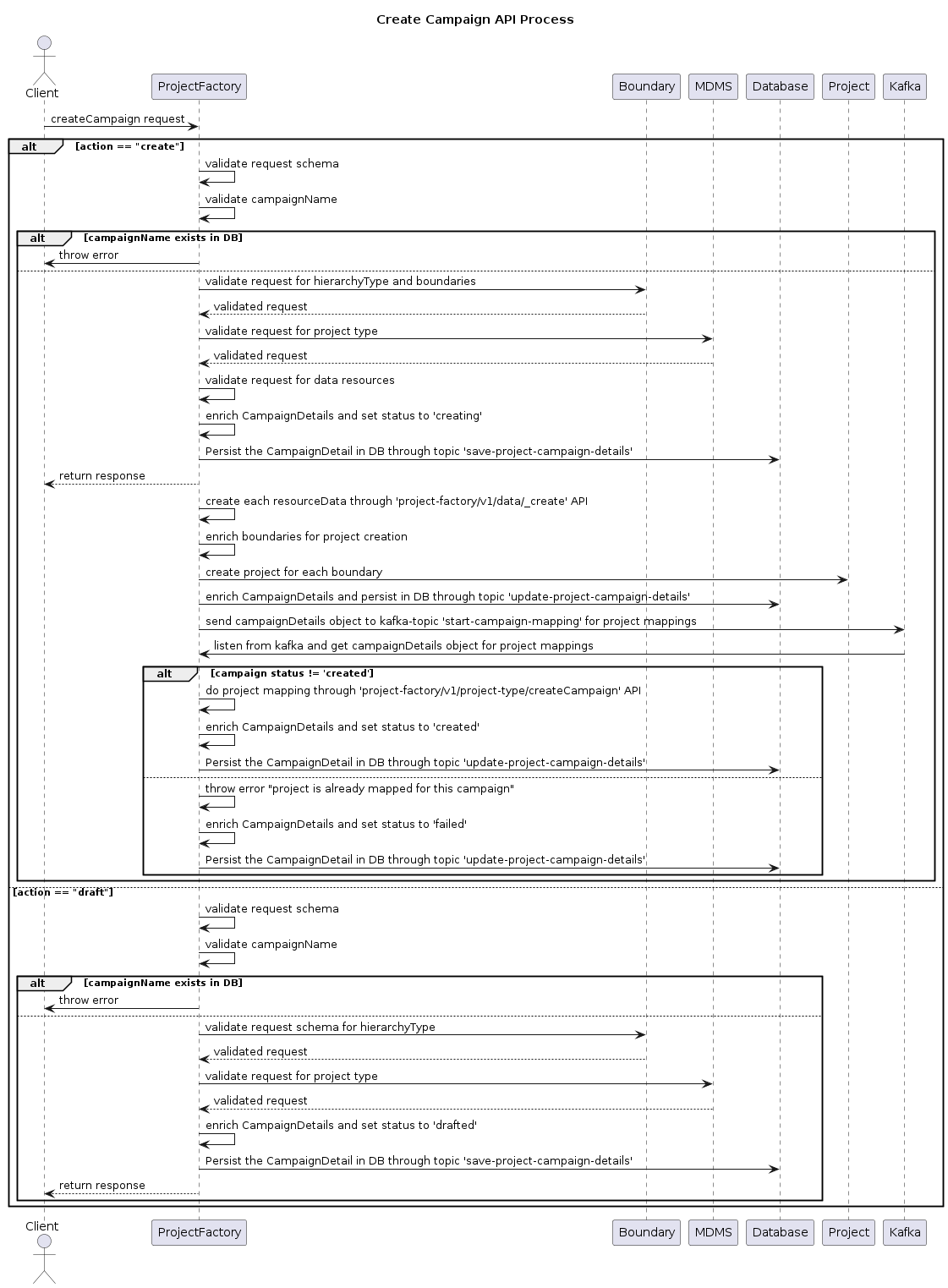
## Flow
### **Client Initiates Request**
The client initiates a createCampaign request to the Project Factory Service.
### **Validate Request**
**If the action is 'create':**
1. The Project Factory Service validates the request schema.
2. It also validates the uniqueness of the campaign name in the database.
3. If the campaign name exists, an error is thrown.
**If the action is 'draft':**
1. The Project Factory Service validates the request schema.
2. It also validates the uniqueness of the campaign name in the database.
3. If the campaign name exists, an error is thrown.
**Boundary and MDMS Validation**
For both 'create' and 'draft' actions:
1. The Project Factory Service validates the request for hierarchy type and boundaries with the Boundary Service.
2. It validates the request for the project type code from [MDMS](https://github.com/egovernments/egov-mdms-data/blob/UNIFIED-QA/data/mz/health/project-types.json).
### **Create Campaign**
**If the action is 'create':**
1. The Project Factory Service validates the request for data resources.
2. It enriches the CampaignDetails and sets the status to 'creating'.
3. The CampaignDetails are persisted in the database.
4. For each resource data, the Project Factory Service creates resources through the `/project-factory/v1/data/_create` API.
5. It enriches boundaries for project creation and creates projects for each boundary with the Health Project Service.
6. The enriched CampaignDetails are persisted in the database.
7. The CampaignDetails object is sent to a Kafka topic for project mappings.
8. If the campaign status is not "created", project mappings are performed through the `/project-factory/v1/project-type/createCampaign` API and the status is updated to 'created'.
9. If the campaign status is already 'created', an error is thrown, and the status is updated to 'failed'.
**If the action is 'draft':**
1. The CampaignDetails are enriched, and the status is set to 'drafted'.
2. The enriched CampaignDetails are persisted in the database.
**Response**
The Project Factory Service sends the response back to the client.
### Unified Campaign Vs Regular Campaign
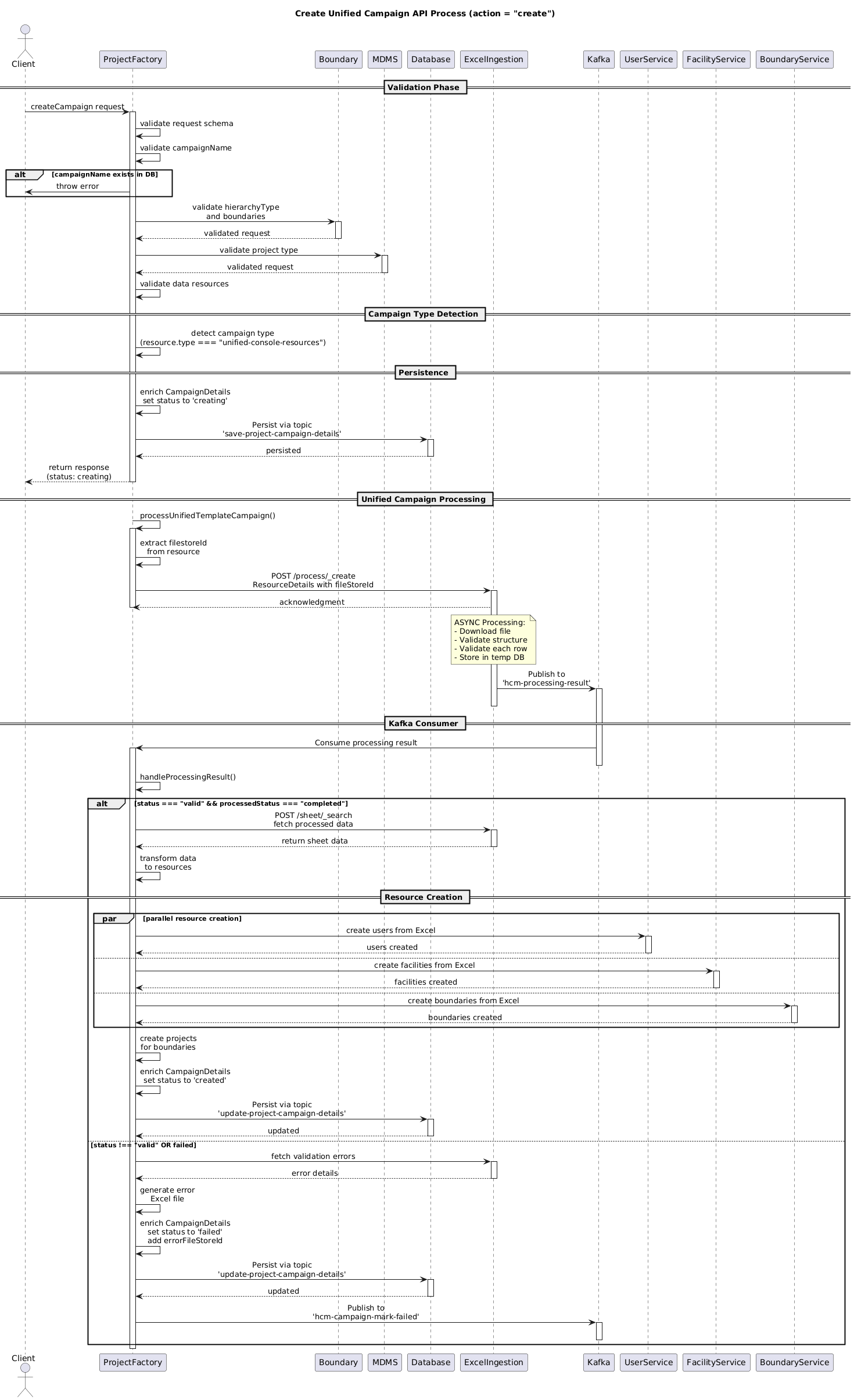
* **Unified Campaign**: An advanced campaign flow in which the Excel Ingestion Service handles complex Excel-based data upload, validation, and processing using a single sheet (user, facility, boundary(target) ).\
To support the single-sheet flow, `isUnifiedCampaign` must be passed as `true` in `additionalDetails`.\
Additionally, in `resources`, the file store ID must be provided with the resource type set to `"unified-console-resources"`.
```
"additionalDetails": {
"isUnifiedCampaign": true
},
"resources": [
{
"type": "unified-console-resources",
"filename": "File_name.xlsx",
"filestoreId": "{{fileStoreID}}"
}
]
```
* **Regular Campaign**: In this flow, we use three separate sheets—**User**, **Facility**, and **Boundary (Target)**.\
The corresponding file store IDs must be passed in `resources` as shown below:
```
"resources": [
{
"type": "boundary",
"filename": "Boundary Template.xlsx",
"filestoreId": "{{boundaryFileStoreID}}"
},
{
"type": "user",
"filename": "User Template.xlsx",
"filestoreId": "{{userFileStoreID}}"
},
{
"type": "facility",
"filename": "Facility Template.xlsx",
"filestoreId": "{{facilityFileStoreID}}"
}
]
```
## Flow Diagram
**(a) Regular Campaign – Uses Three Separate Sheets**
**(b) Unified Campaign - single sheet**
---
# Agent Instructions
This documentation is published with GitBook. GitBook is the documentation platform designed so that both humans and AI agents can read, navigate, and reason over technical content effectively. Learn more at gitbook.com.
## Querying This Documentation
If you need additional information that is not directly available in this page, you can query the documentation dynamically by asking a question.
Perform an HTTP GET request on the current page URL with the `ask` query parameter, and the optional `goal` query parameter:
```
GET https://docs.digit.org/health/v2.0/design/architecture/low-level-design/services/console-services/project-factory-campaign-manager/manage-campaign-apis/create-campaign-api-endpoints.md?ask=&goal=
```
`ask` is the immediate question: it should be specific, self-contained, and written in natural language.
`goal` is optional and describes the broader end goal you are ultimately trying to accomplish on behalf of the user. GitBook uses it to tailor the answer towards what is most useful for that goal.
The response will contain a direct answer to the question and relevant excerpts and sources from the documentation.
Use this mechanism when the answer is not explicitly present in the current page, you need clarification or additional context, or you want to retrieve related documentation sections.