> For the complete documentation index, see [llms.txt](https://docs.digit.org/llms.txt). Markdown versions of documentation pages are available by appending `.md` to page URLs; this page is available as [Markdown](https://docs.digit.org/health/v2.0/design/architecture/low-level-design/services/console-services/project-factory-campaign-manager/manage-resources.md).
# Manage Resources
## **Overview**
This document outlines the various API flows and interactions for the Project Factory, focusing on resource data creation with retry logic, template generation, campaign update flows, and data search and download processes. The aim is to manage and automate various aspects of resource and campaign data efficiently using the Project Factory services.
## **Sequence Flow**
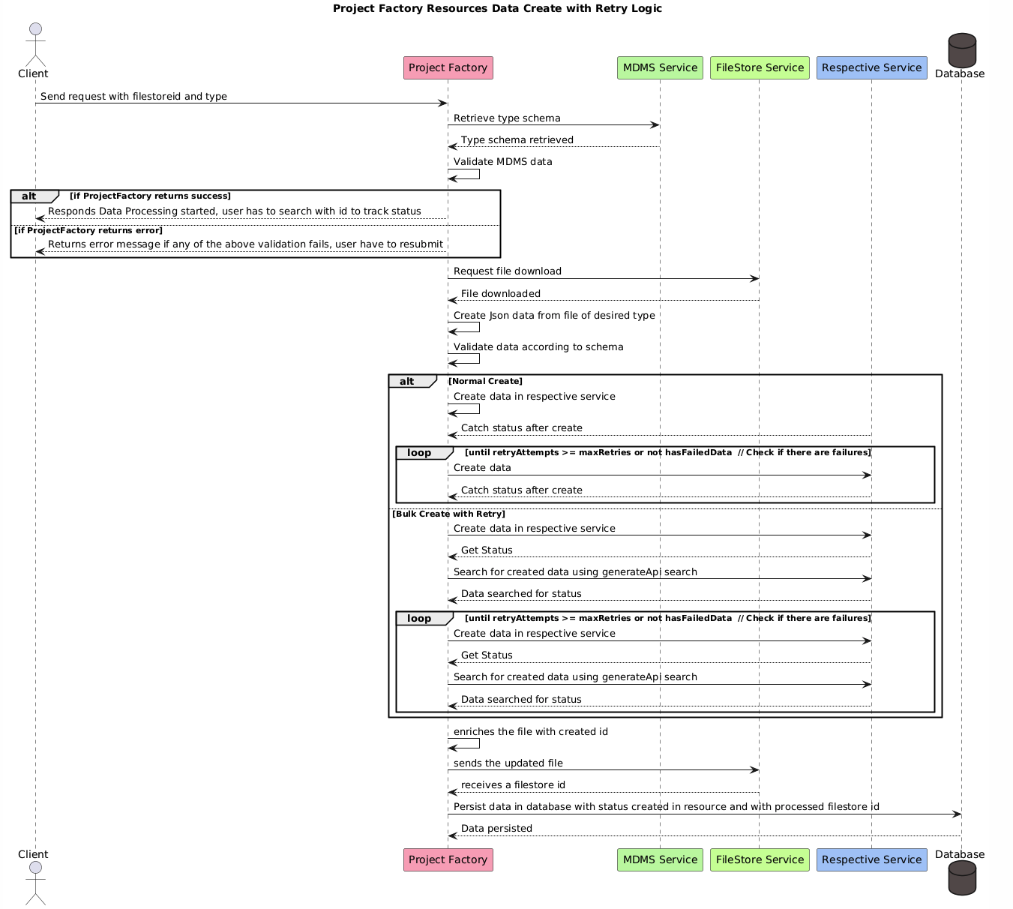
### **Project Factory Resources Data Create with Retry Logic**
**Description:** This flow describes how the Project Factory handles resource data creation with retry logic. It ensures data consistency and reliability by retrying operations if failures occur.
**Sequence of Operations**
1. **Client Request Initiation**:
* The client sends a request to the Project Factory with `filestoreid` and `type`.
2. **MDMS Service Interaction**:
* Project Factory retrieves the type schema from the MDMS Service.
* MDMS Service returns the schema, which is then validated.
3. **Data Validation**:
* The Project Factory validates the data against the MDMS schema.
* If validation is successful, it informs the client that data processing has started.
* If validation fails, an error message is returned, and the user must resubmit.
4. **File Handling**:
* The Project Factory requests a file download from the FileStore Service.
* Upon receiving the file, JSON data is created from the file of the desired type.
5. **Data Creation and Retry Logic**:
* Data is validated according to the schema.
* **Normal Create**:
* Data is created in the respective service, and status is tracked.
* A loop continues until retry attempts exceed the maximum retries, or no failed data remains.
* **Bulk Create with Retry**:
* Data is created in the respective service, and the status is checked.
* A search is conducted using the `generateApi search`.
* The loop continues under the same conditions as the normal create process.
6. **Database Update**:
* The file is enriched with the created ID and sent back to the FileStore Service.
* The updated file is received, and data is persisted in the database with a status of 'created' and the processed `filestoreid`.
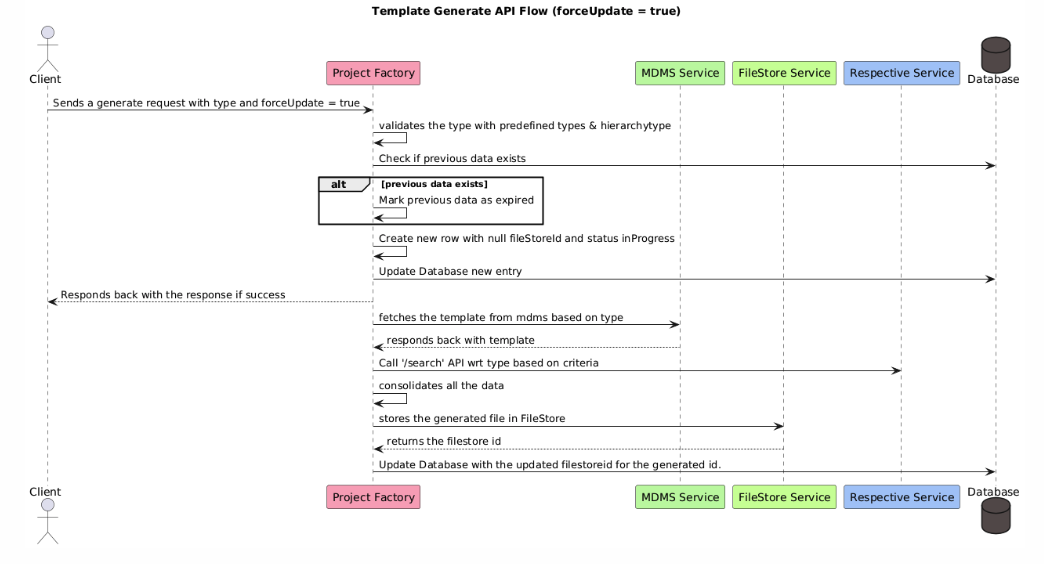
### **Template Generate API Flow (forceUpdate = true)**
**Description:** This flow is triggered when a client sends a generate request with `forceUpdate = true`. It checks for existing data and creates a new row with the status `inProgress` if necessary.
**Sequence of Operations:**
1. **Client Request Initiation**:
* The client sends a generate request with the specified type and `forceUpdate = true`.
2. **Validation and Data Check**:
* The Project Factory validates the type against predefined types and `hierarchytype`.
* A check is performed to see if previous data exists. If it does, the data is marked as expired.
3. **Database and Response**:
* A new row is created with `null fileStoreId` and `status inProgress`.
* The database is updated, and a successful response is sent back to the client.
4. **Data Fetch and Storage**:
* The Project Factory fetches the template from the MDMS Service based on the type.
* Data is consolidated and stored in the FileStore Service, which returns a `filestoreid`.
* The database is updated with the new `filestoreid`.
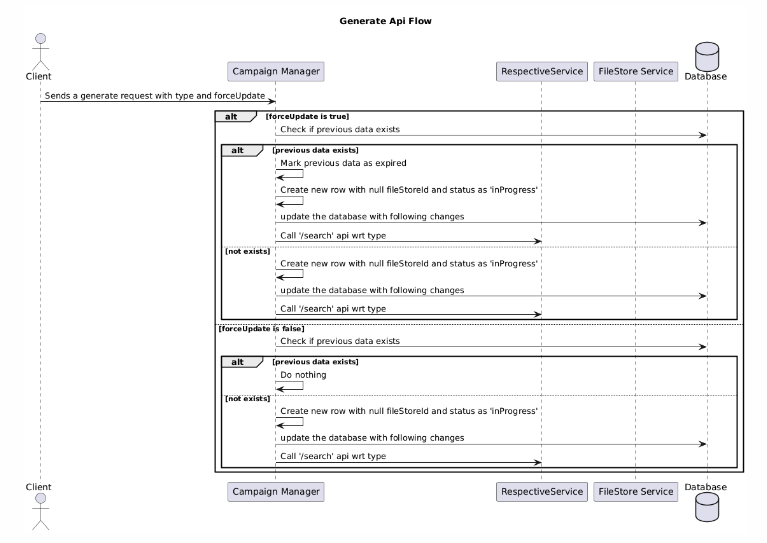
### **Template Generate API During Update Campaign Flow (forceUpdate = true)**
**Description:** This flow is initiated when a generate request is sent due to a boundary change in an ongoing campaign.
**Sequence of Operations:**
1. **Boundary Change Trigger**:
* The Project Factory sends a generate request with `campaignId`, type, and `forceUpdate = true`.
2. **Validation and Data Check**:
* The type is validated against predefined types and `hierarchytype`.
* Previous data is checked, and if found, marked as expired.
* The campaign is searched in the database based on the provided `campaignId` and its parent campaign ID.
3. **Database and Response**:
* A new row is created with `null fileStoreId` and `status inProgress`.
* The database is updated, and a response is provided.
4. **File Update and Data Consolidation**:
* The Project Factory fetches file details from the FileStore Service using the parent campaign object.
* The sheet is updated, freezing all the data.
* If new boundaries are added, boundary relation data is fetched.
* Data is consolidated and stored in the FileStore, and the database is updated with the new `filestoreid`.
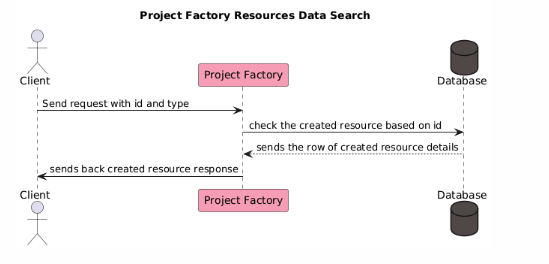
### **Project Factory Resources Data Search and Download**
**Description:** This flow allows the client to search and download resource data based on a provided ID and type.
**Sequence of Operations:**
1. **Client Request Initiation**:
* The client sends a request with the `id` and `type`.
2. **Database Query**:
* The Project Factory checks the created resource based on the provided ID.
* The corresponding resource details row is fetched from the database.
3. **Response to Client**:
* The Project Factory sends back the created resource response to the client.
## Sequence Diagrams
{% tabs %}
{% tab title="Data Create" %}
{% endtab %}
{% tab title="Data Search" %}
{% endtab %}
{% tab title="Generate With Force Update" %}
{% endtab %}
{% tab title="Template Download" %}
{% endtab %}
{% tab title="Generate API" %}
{% endtab %}
{% endtabs %}
## **Conclusion**
The outlined API flows are crucial for handling resource data creation, management, and retrieval efficiently. They ensure data consistency, integrity, and seamless interaction between various services, making the Project Factory a robust system for managing campaign data. Implementing the retry logic, data validation, and template generation processes helps maintain a reliable and scalable architecture.
---
# Agent Instructions
This documentation is published with GitBook. GitBook is the documentation platform designed so that both humans and AI agents can read, navigate, and reason over technical content effectively. Learn more at gitbook.com.
## Querying This Documentation
If you need additional information that is not directly available in this page, you can query the documentation dynamically by asking a question.
Perform an HTTP GET request on the current page URL with the `ask` query parameter, and the optional `goal` query parameter:
```
GET https://docs.digit.org/health/v2.0/design/architecture/low-level-design/services/console-services/project-factory-campaign-manager/manage-resources.md?ask=&goal=
```
`ask` is the immediate question: it should be specific, self-contained, and written in natural language.
`goal` is optional and describes the broader end goal you are ultimately trying to accomplish on behalf of the user. GitBook uses it to tailor the answer towards what is most useful for that goal.
The response will contain a direct answer to the question and relevant excerpts and sources from the documentation.
Use this mechanism when the answer is not explicitly present in the current page, you need clarification or additional context, or you want to retrieve related documentation sections.