> For the complete documentation index, see [llms.txt](https://docs.digit.org/llms.txt). Markdown versions of documentation pages are available by appending `.md` to page URLs; this page is available as [Markdown](https://docs.digit.org/health/v2.1/design/architecture/low-level-design/services/platform-services/project.md).

# Project

## Overview

The **Project service** is the operational backbone of a health campaign. A project is the on-the-ground unit of work. For example: “Measles vaccination round in District X”. The service records everything needed to run that unit and everything that happened:

* **who** is working on it (staff),
* **who** it is for (beneficiaries — the households or individuals being served),
* **where** it operates (facilities and boundaries),
* **what** supplies are tied to it (resources), and
* **what was done** in the field — every visit, delivery or service event (tasks), plus the commodities each task consumed (task resources).

It also records lighter-weight field signals: a worker's **location trail** and **user actions** (what a field user did on their device, including stock-count submissions).

In short: *"what is the campaign, who runs it, who is it for, and what happened on the ground?"*

## Business Flow

* **During campaign setup**, Project Factory creates the projects, attaches staff, links facilities, and registers the target beneficiaries. The project is the registry that all of this lands in.
* **During the campaign (runtime)**, the field/mobile app reads its assigned project and then writes back **tasks** — each beneficiary visit or service delivery becomes a task, and the commodities used become **task resources**. The app also streams a worker's **location** and **user actions** as they move through the day.
* **Beneficiary tagging** links a household/individual to the project so the app knows who is eligible and what they have already received.
* The data feeds the **dashboards** (via the transformer → Elasticsearch) so programme managers can see coverage, staff activity and consumption per area.

## Key APIs / Entry Points

Base path `/project`. Most sub-entities provide create, update, delete, and search endpoints. Single and bulk variants are available where listed. The list below covers the most important endpoints.

<table><thead><tr><th width="314.8828125">Endpoint</th><th>Purpose</th></tr></thead><tbody><tr><td><code>POST /project/v1/_create</code>, <code>/v1/_update</code>, <code>/v1/_search</code>, <code>/v2/_search</code></td><td>Manage the project itself (the campaign unit). <code>v2</code> search returns richer linked data.</td></tr><tr><td><code>POST /project/task/v1/_create</code>, <code>/bulk/_create</code> … <code>_search</code></td><td>Record field work — visits, deliveries, service events (the highest-volume path).</td></tr><tr><td><code>POST /project/beneficiary/v1/_create</code> … <code>_search</code></td><td>Tag households/individuals as targets of a project.</td></tr><tr><td><code>POST /project/staff/v1/_create</code> … <code>_search</code></td><td>Assign / unassign workers to a project.</td></tr><tr><td><code>POST /project/facility/v1/_create</code> … <code>_search</code></td><td>Link facilities (and their boundaries) to a project.</td></tr><tr><td><code>POST /project/resource/v1/_create</code> … <code>_search</code></td><td>Link products/supplies to a project.</td></tr><tr><td><code>POST /project/user-action/v1/bulk/_create</code>, <code>/bulk/_update</code>, <code>/_search</code></td><td>Capture field-user actions, <strong>including bulk stock-count updates</strong> (<a href="https://docs.digit.org/health/v2.1/design/architecture/low-level-design/services/health-services/stock.md">link</a>)</td></tr><tr><td><code>POST /project/user-location/...</code>, <code>/check/bandwidth</code></td><td>Worker location trail and a connectivity check used by the mobile app.</td></tr></tbody></table>

**Kafka entry points (async).** Bulk writes land on the service's own consumer topics (e.g. `save-project-task-bulk-topic`, `save-user-action-project-bulk-topic`, the beneficiary/staff/facility/resource equivalents). After processing, persisted rows go out on `save-*` / `update-*` / `delete-*` topics (e.g. `save-project-task-topic`, `update-user-action-project-topic`) for the persister and transformer.

**Swagger contract:**

{% embed url="<https://editor.swagger.io/?url=https://raw.githubusercontent.com/egovernments/health-campaign-services/master/docs/health-api-specs/contracts/project.yml>" %}

#### Kafka topics

`in` topics are consumed by the Project service. `out` topics are produced by it.

<table><thead><tr><th width="315.984375">Topic</th><th width="90.87109375">Dir</th><th>Purpose</th></tr></thead><tbody><tr><td><code>save-project-task-bulk-topic</code></td><td>in</td><td>Bulk task create requests</td></tr><tr><td><code>update-project-task-bulk-topic</code></td><td>in</td><td>Bulk task update requests</td></tr><tr><td><code>delete-project-task-bulk-topic</code></td><td>in</td><td>Bulk task delete requests</td></tr><tr><td><code>save-project-staff-bulk-topic</code></td><td>in</td><td>Bulk staff create requests</td></tr><tr><td><code>update-project-staff-bulk-topic</code></td><td>in</td><td>Bulk staff update requests</td></tr><tr><td><code>delete-project-staff-bulk-topic</code></td><td>in</td><td>Bulk staff delete requests</td></tr><tr><td><code>save-project-facility-bulk-topic</code></td><td>in</td><td>Bulk project-facility create requests</td></tr><tr><td><code>update-project-facility-bulk-topic</code></td><td>in</td><td>Bulk project-facility update requests</td></tr><tr><td><code>delete-project-facility-bulk-topic</code></td><td>in</td><td>Bulk project-facility delete requests</td></tr><tr><td><code>save-project-resource-bulk-topic</code></td><td>in</td><td>Bulk resource create requests</td></tr><tr><td><code>update-project-resource-bulk-topic</code></td><td>in</td><td>Bulk resource update requests</td></tr><tr><td><code>delete-project-resource-bulk-topic</code></td><td>in</td><td>Bulk resource delete requests</td></tr><tr><td><code>project-beneficiary-consumer-bulk-create-topic</code></td><td>in</td><td>Bulk beneficiary create requests</td></tr><tr><td><code>project-beneficiary-consumer-bulk-update-topic</code></td><td>in</td><td>Bulk beneficiary update requests</td></tr><tr><td><code>project-beneficiary-consumer-bulk-delete-topic</code></td><td>in</td><td>Bulk beneficiary delete requests</td></tr><tr><td><code>save-user-action-project-bulk-topic</code></td><td>in</td><td>Bulk user-action create requests</td></tr><tr><td><code>update-user-action-project-bulk-topic</code></td><td>in</td><td>Bulk user-action update requests</td></tr><tr><td><code>save-location-capture-project-bulk-topic</code></td><td>in</td><td>Bulk location-capture create requests</td></tr><tr><td><code>save-project</code> / <code>update-project</code> / <code>update-project-date</code></td><td>out</td><td>Persist project + date changes</td></tr><tr><td><code>save-project-task-topic</code> / <code>update-project-task-topic</code> / <code>delete-project-task-topic</code></td><td>out</td><td>Persist task create / update / delete</td></tr><tr><td><code>save-project-staff-topic</code> / <code>update-project-staff-topic</code> / <code>delete-project-staff-topic</code></td><td>out</td><td>Persist staff create / update / delete</td></tr><tr><td><code>save-project-facility-topic</code> / <code>update-project-facility-topic</code> / <code>delete-project-facility-topic</code></td><td>out</td><td>Persist project-facility create / update / delete</td></tr><tr><td><code>save-project-resource-topic</code> / <code>update-project-resource-topic</code> / <code>delete-project-resource-topic</code></td><td>out</td><td>Persist resource create / update / delete</td></tr><tr><td><code>save-project-beneficiary-topic</code> / <code>update-project-beneficiary-topic</code> / <code>delete-project-beneficiary-topic</code></td><td>out</td><td>Persist beneficiary create / update / delete</td></tr><tr><td><code>save-user-action-project-topic</code> / <code>update-user-action-project-topic</code></td><td>out</td><td>Persist user-action create / update</td></tr><tr><td><code>save-location-capture-project-topic</code></td><td>out</td><td>Persist location-capture</td></tr><tr><td><code>project-staff-attendance-health-topic</code></td><td>out</td><td>Emit staff attendance event</td></tr></tbody></table>

## Dependencies

* **idgen** — generates project/task/beneficiary record IDs.
* **household & individual** — the registries a beneficiary points at (validation of who is being served).
* **facility** — validates facilities linked to a project.
* **product** — validates products linked as project resources/task resources.
* **boundary** — administrative boundaries a project and its facilities operate in.
* **egov-mdms** — master data (project types, task statuses, tenant config).
* **health-services-common / -models** — shared clients, validators, POJOs.
* **Kafka** — async create/update/delete pipeline for every entity.
* **egov-persister** (deployed via the `configs/` repo) — actually writes the rows to Postgres off the `save-*` topics.
* **transformer → Elasticsearch** — builds the dashboard read-model from the same topics.
* **Redis** — caching used by the shared repository layer.

## Process Flow

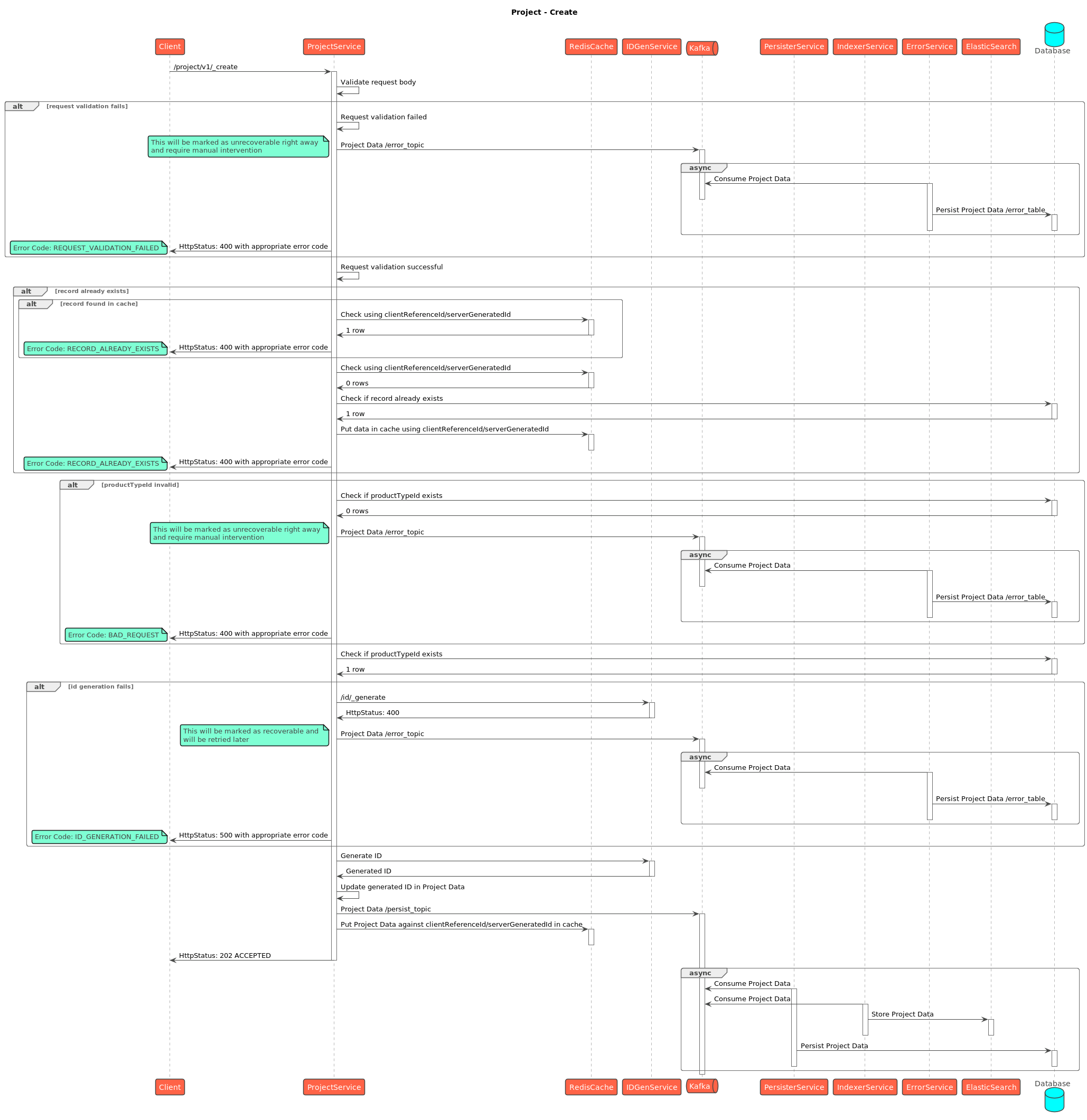
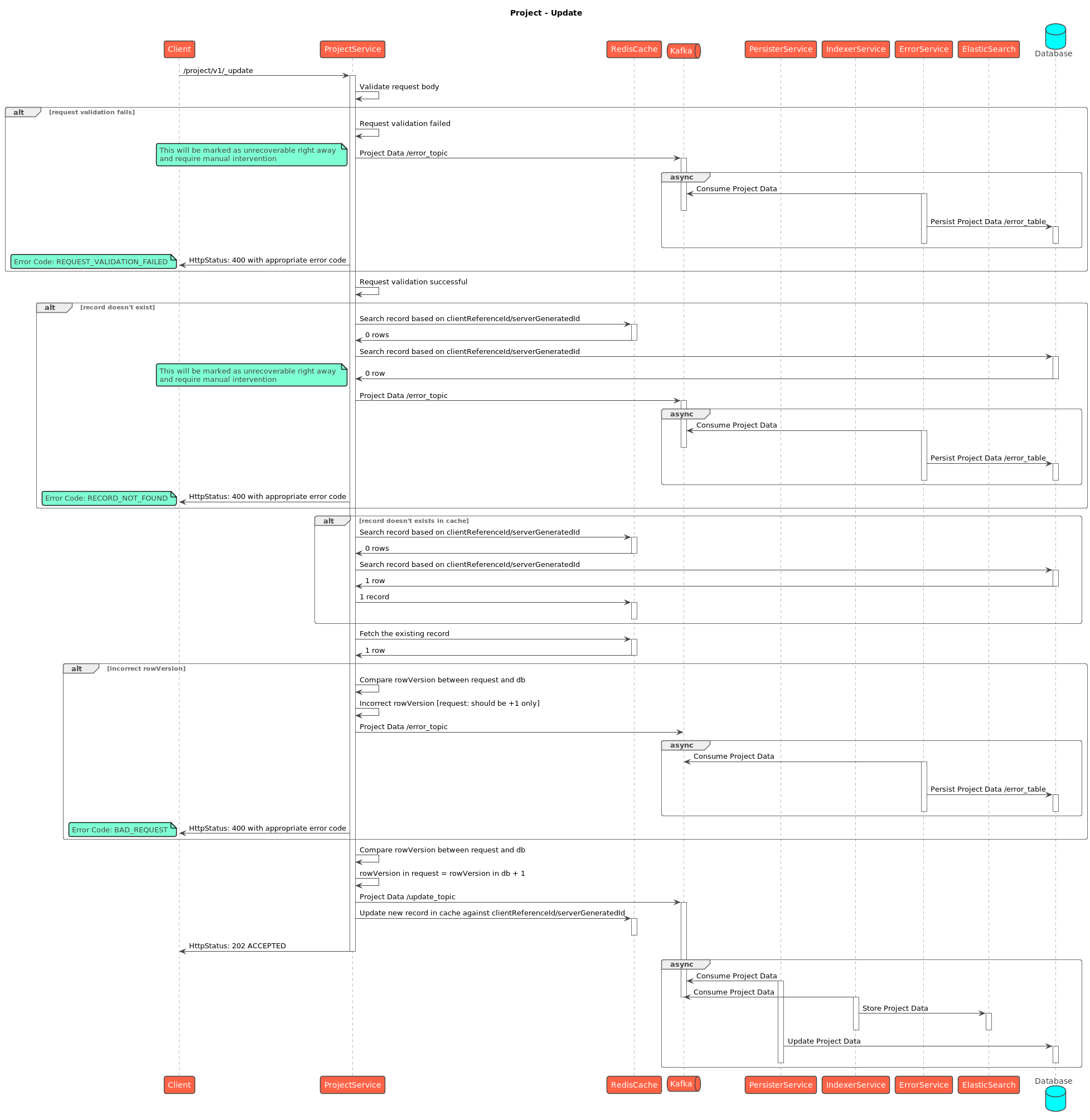
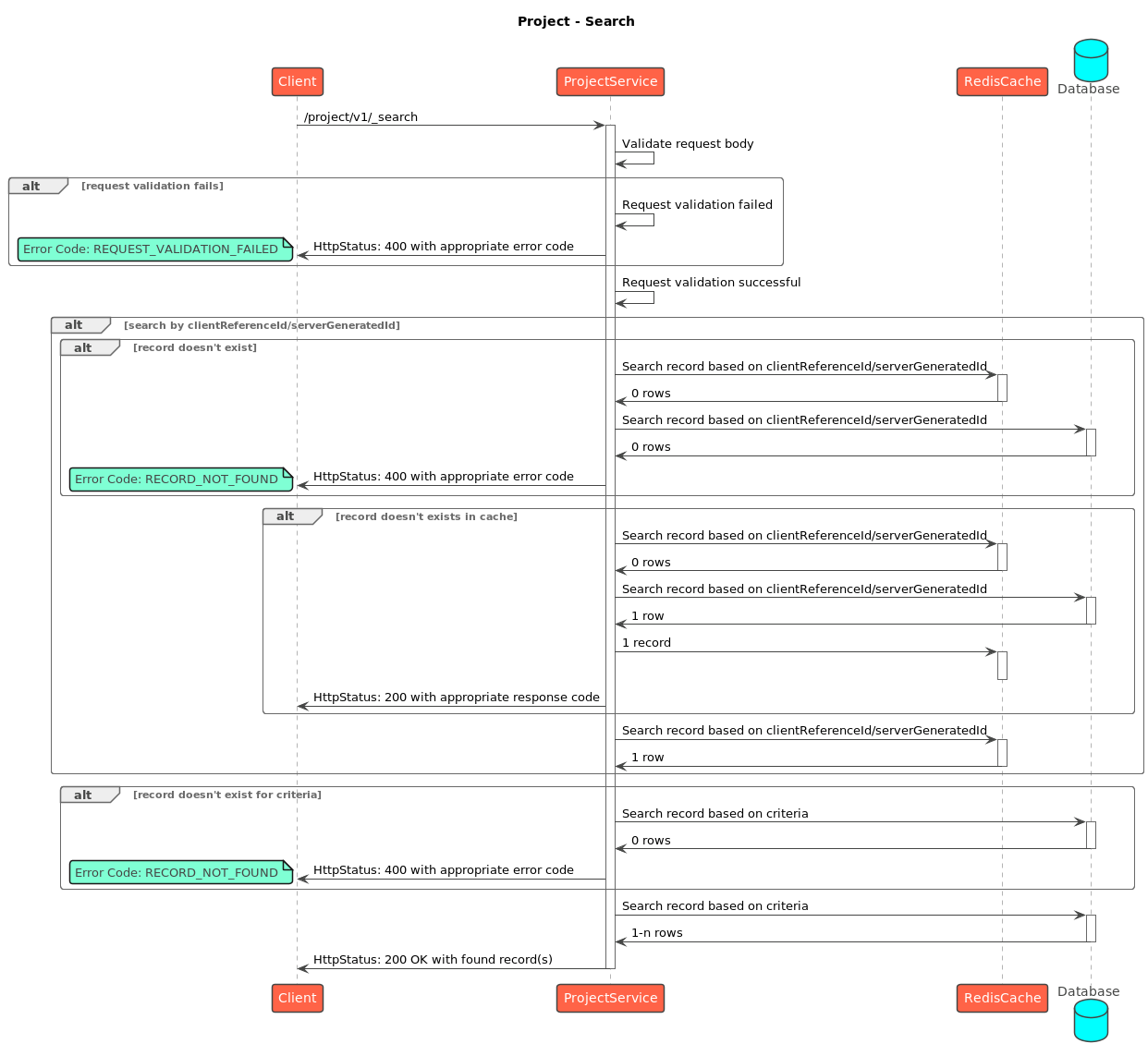
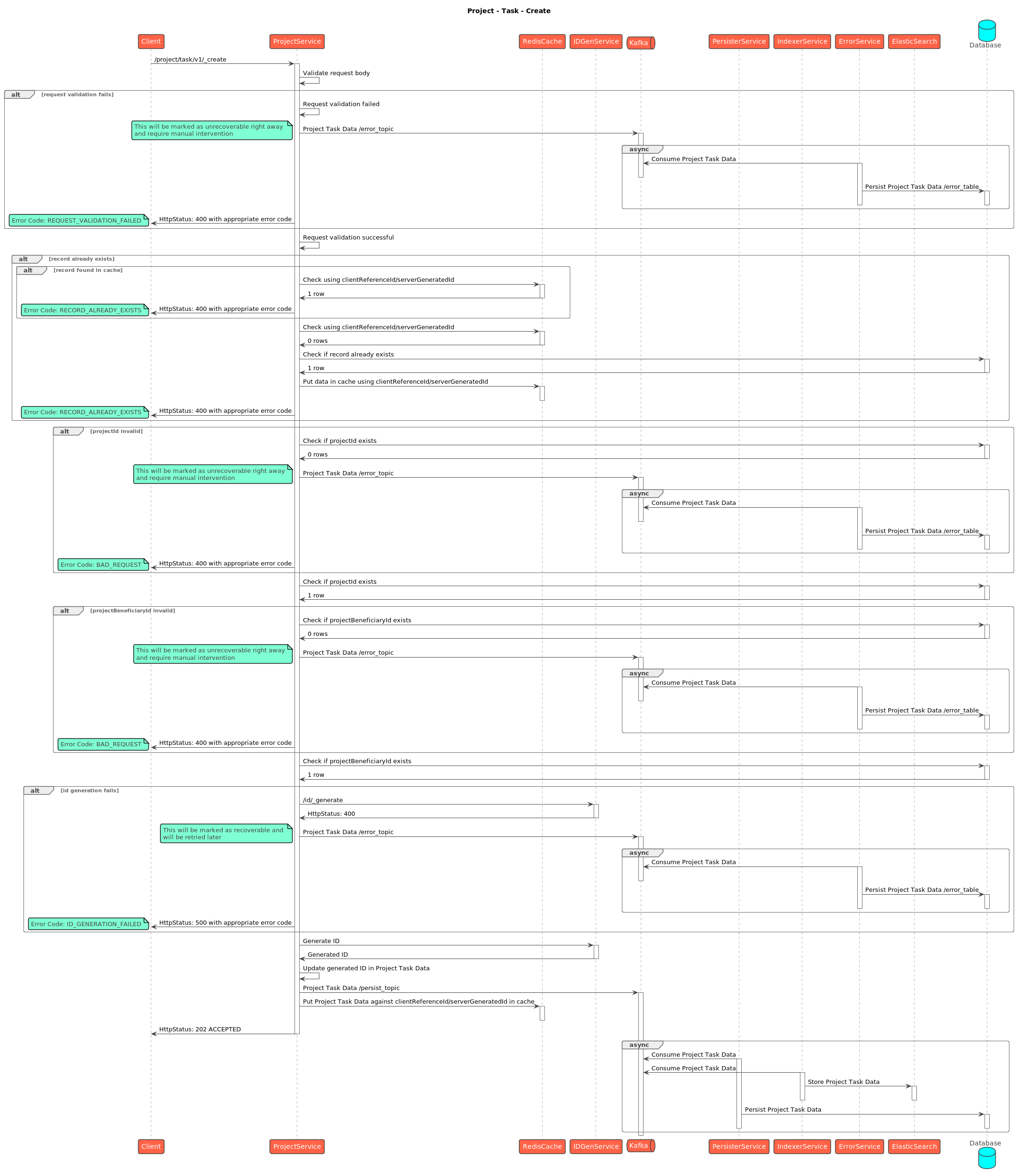
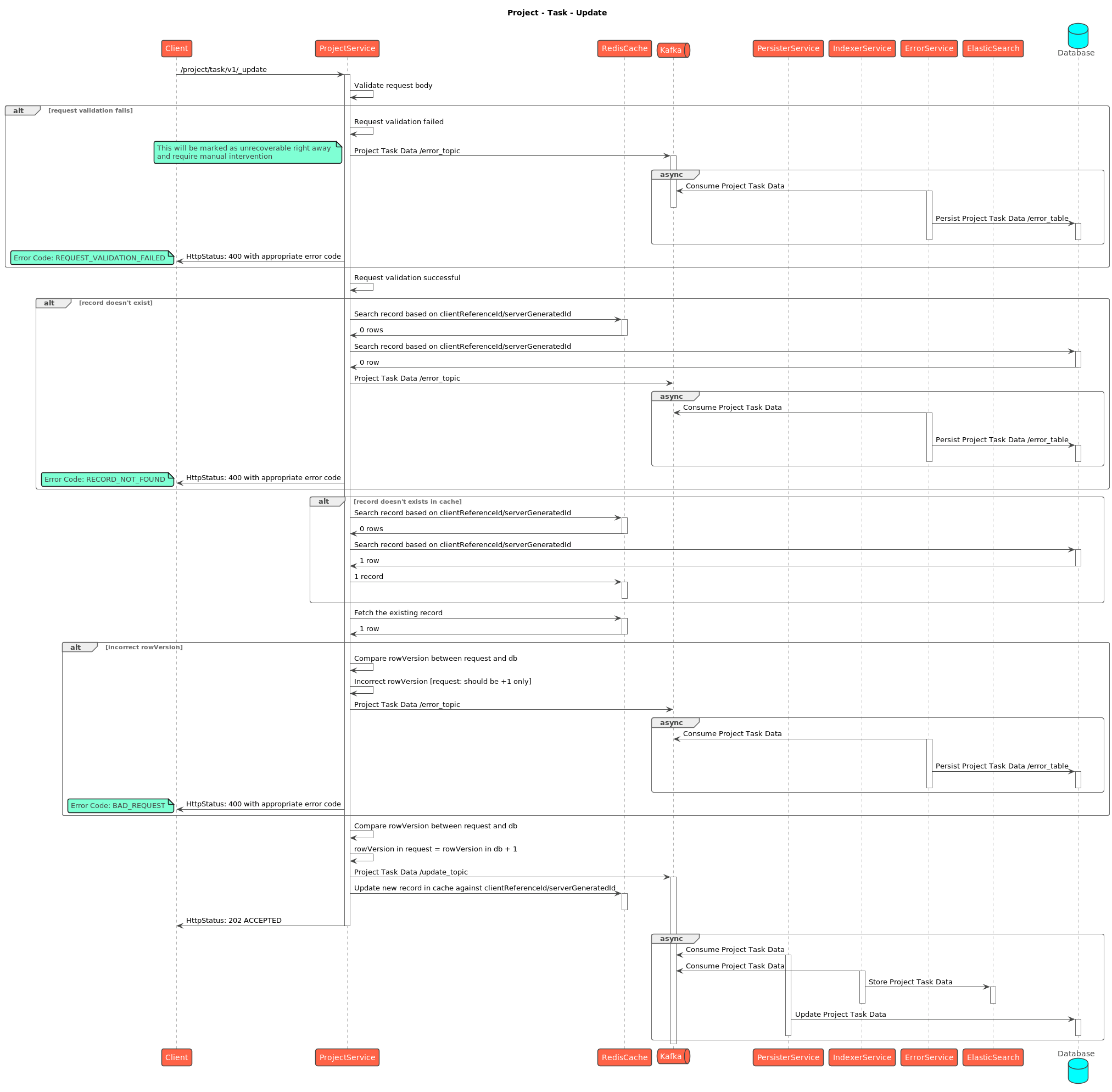
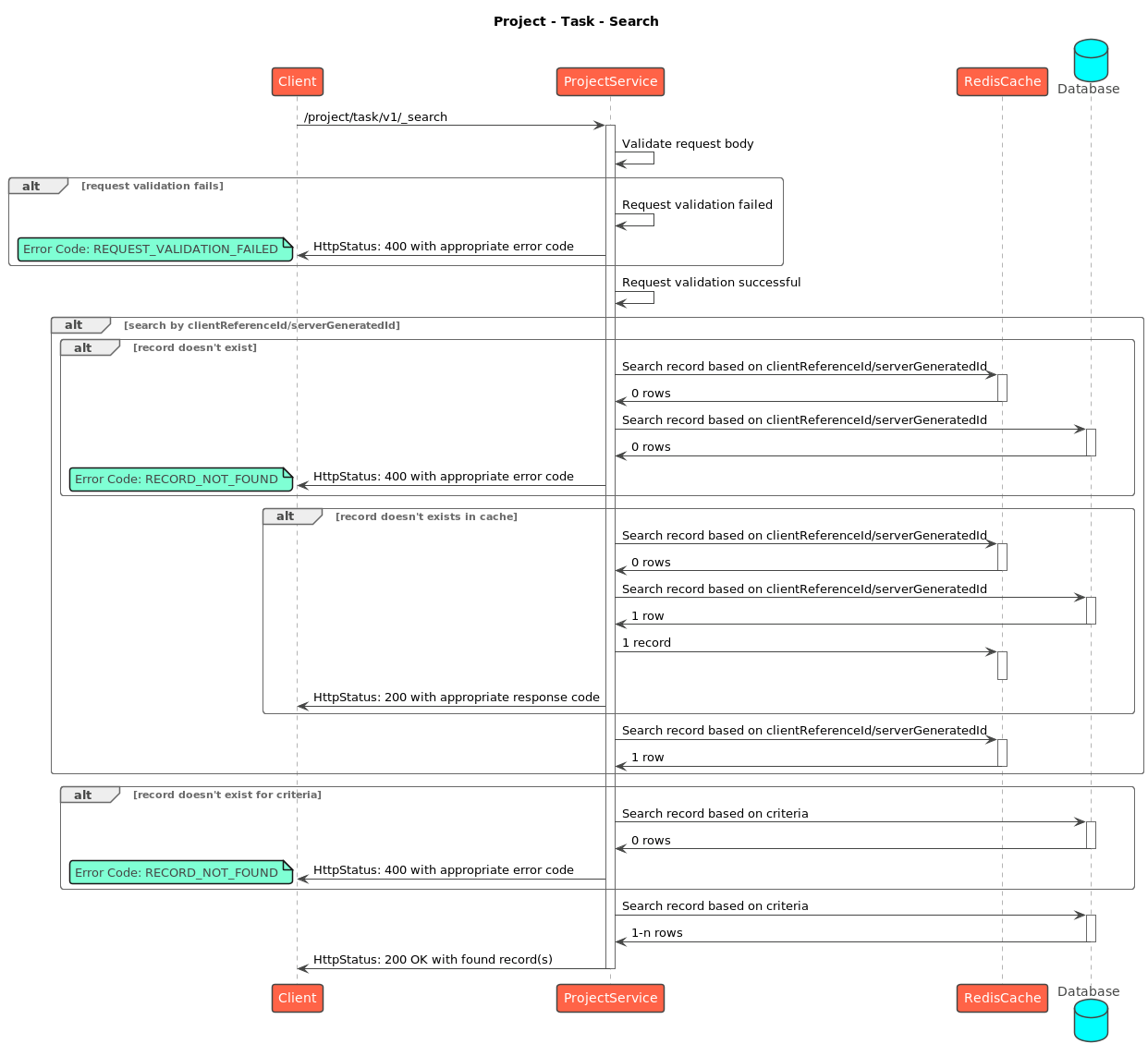
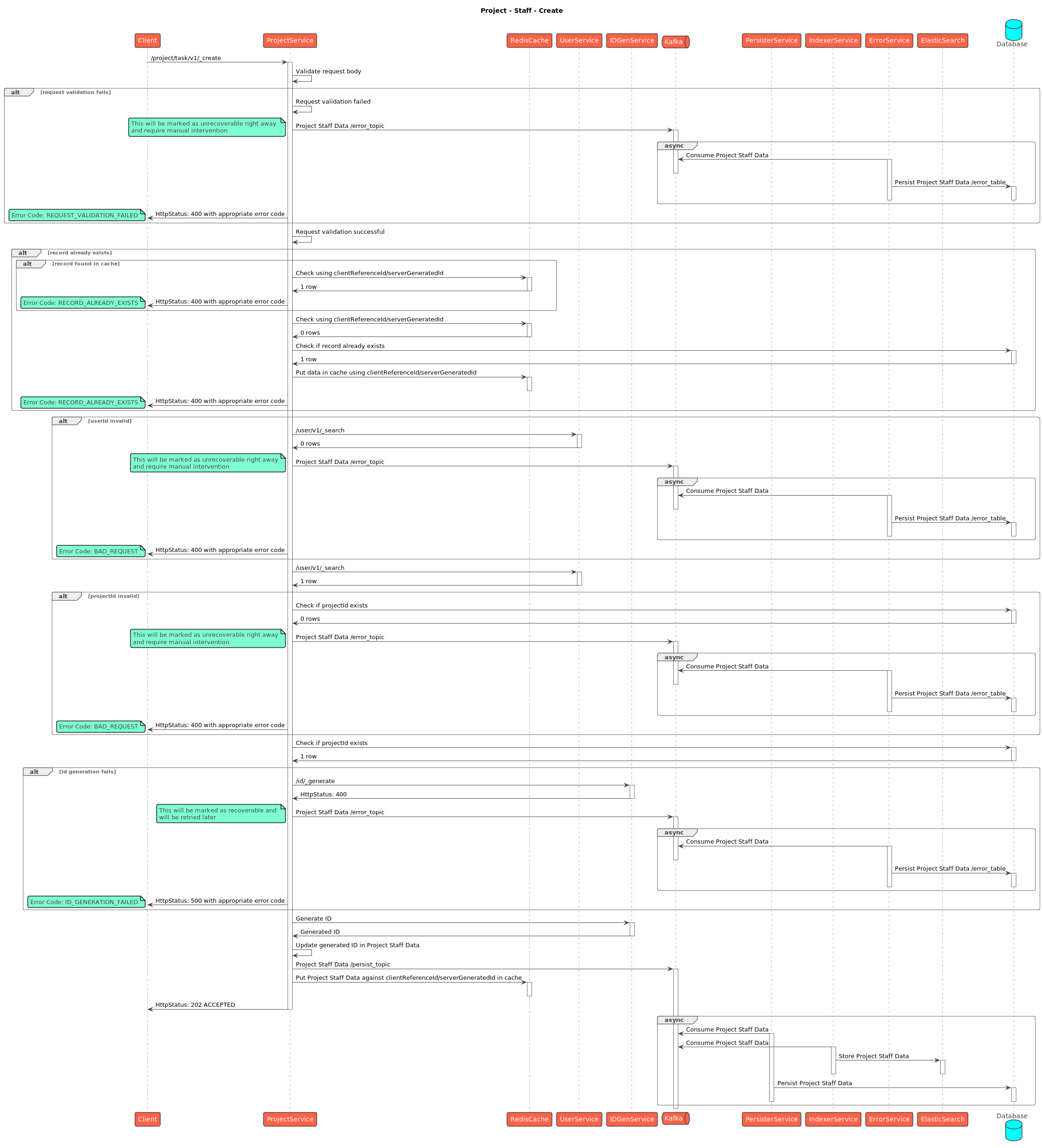
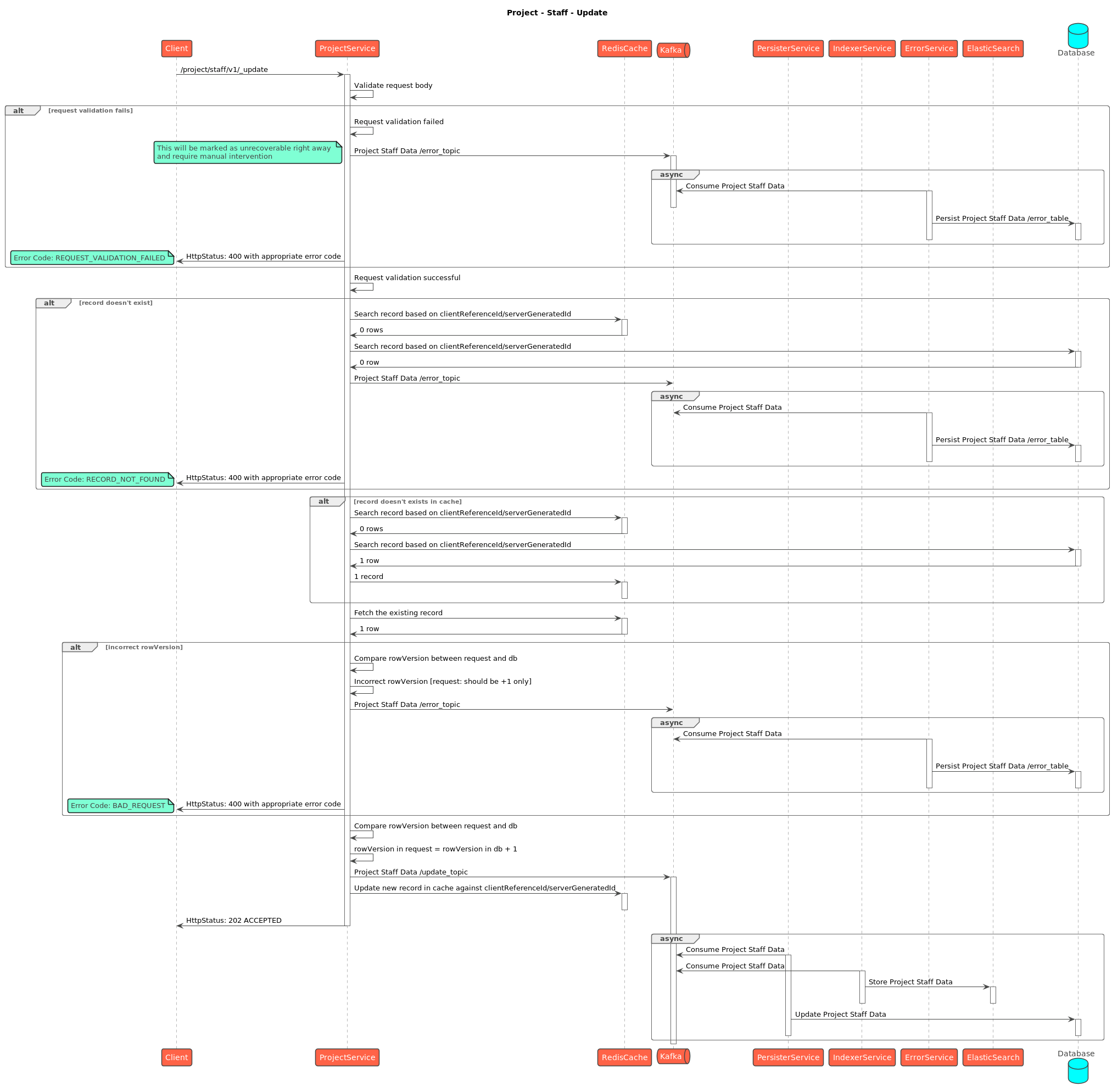
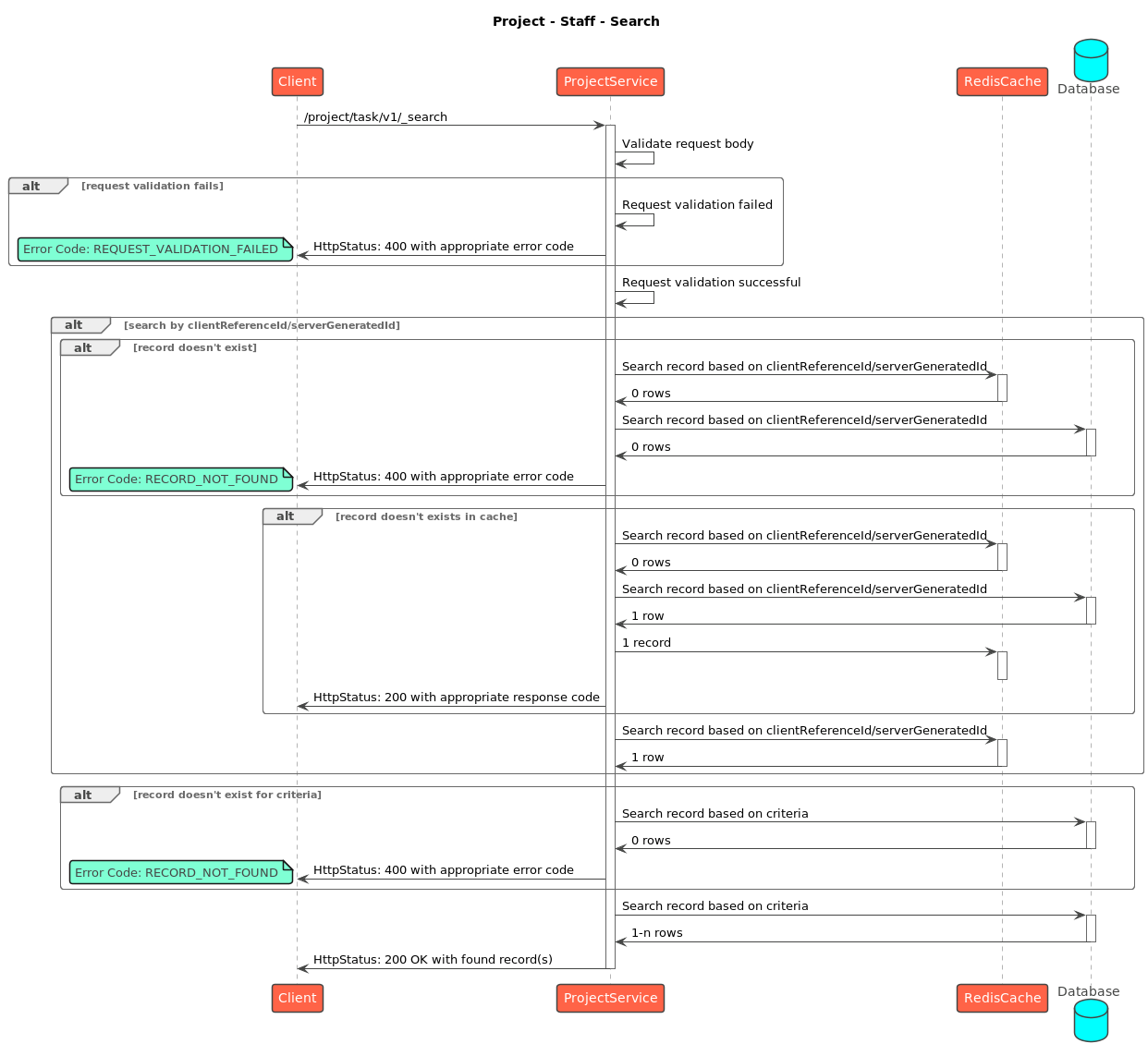
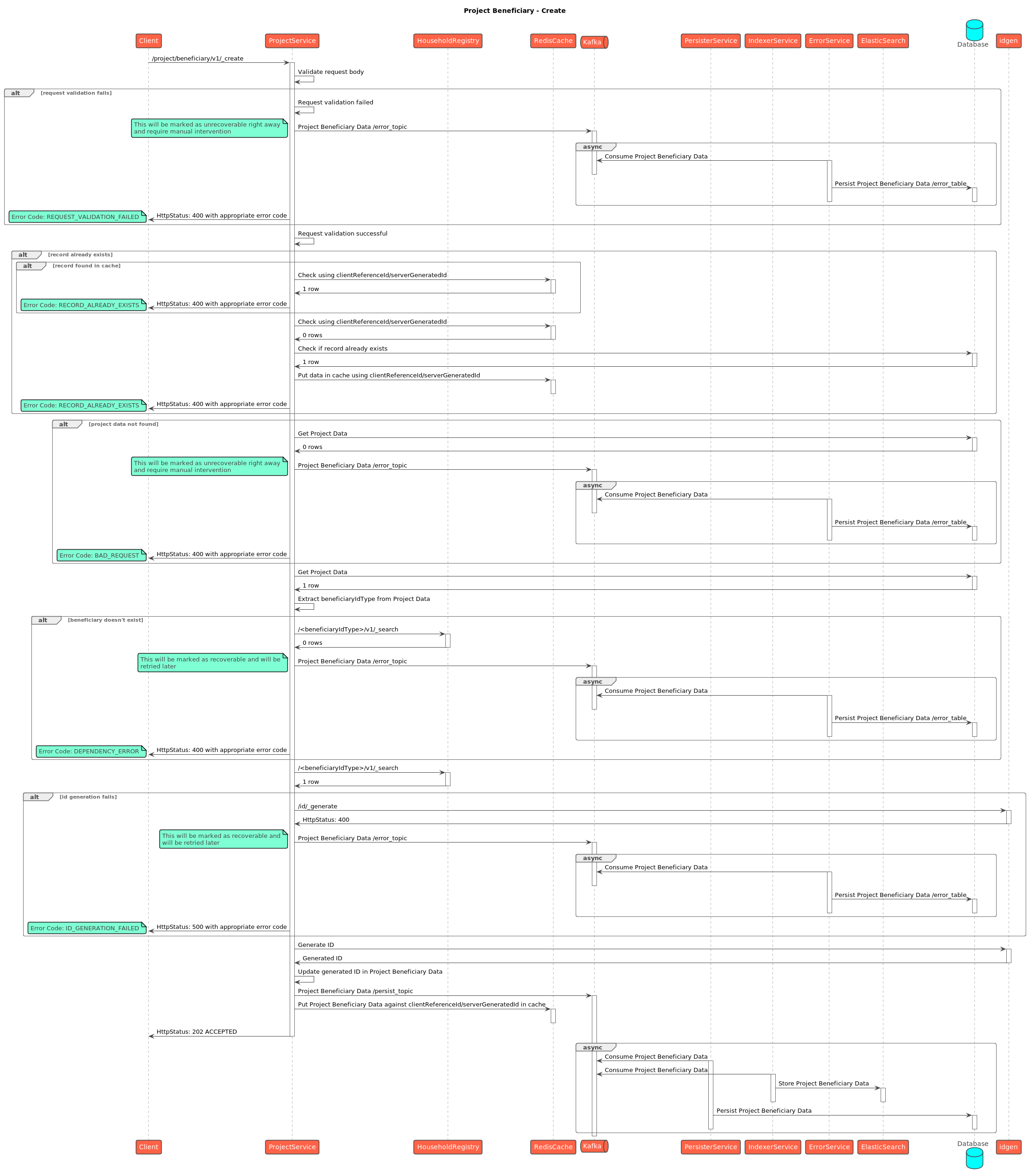
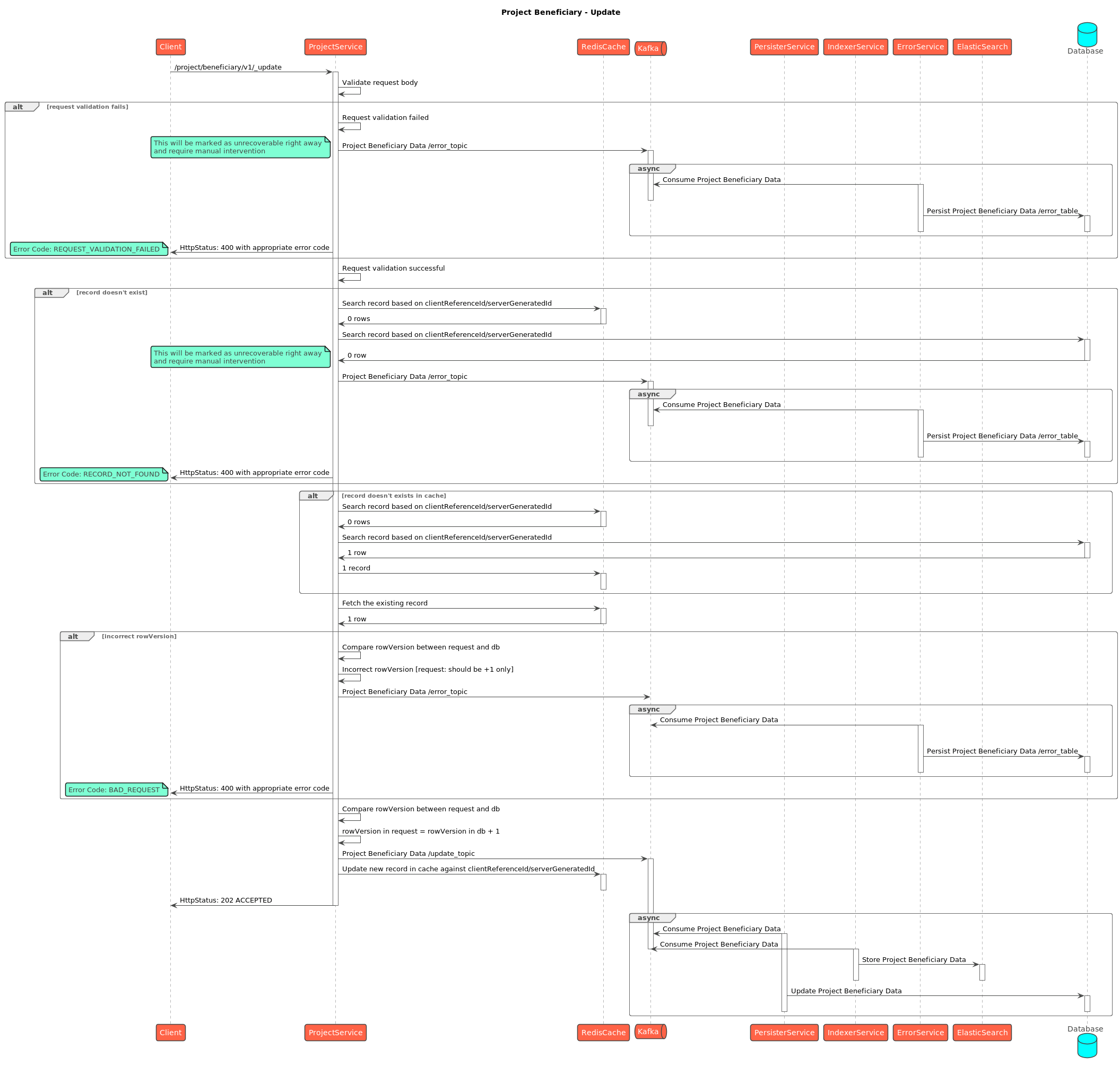
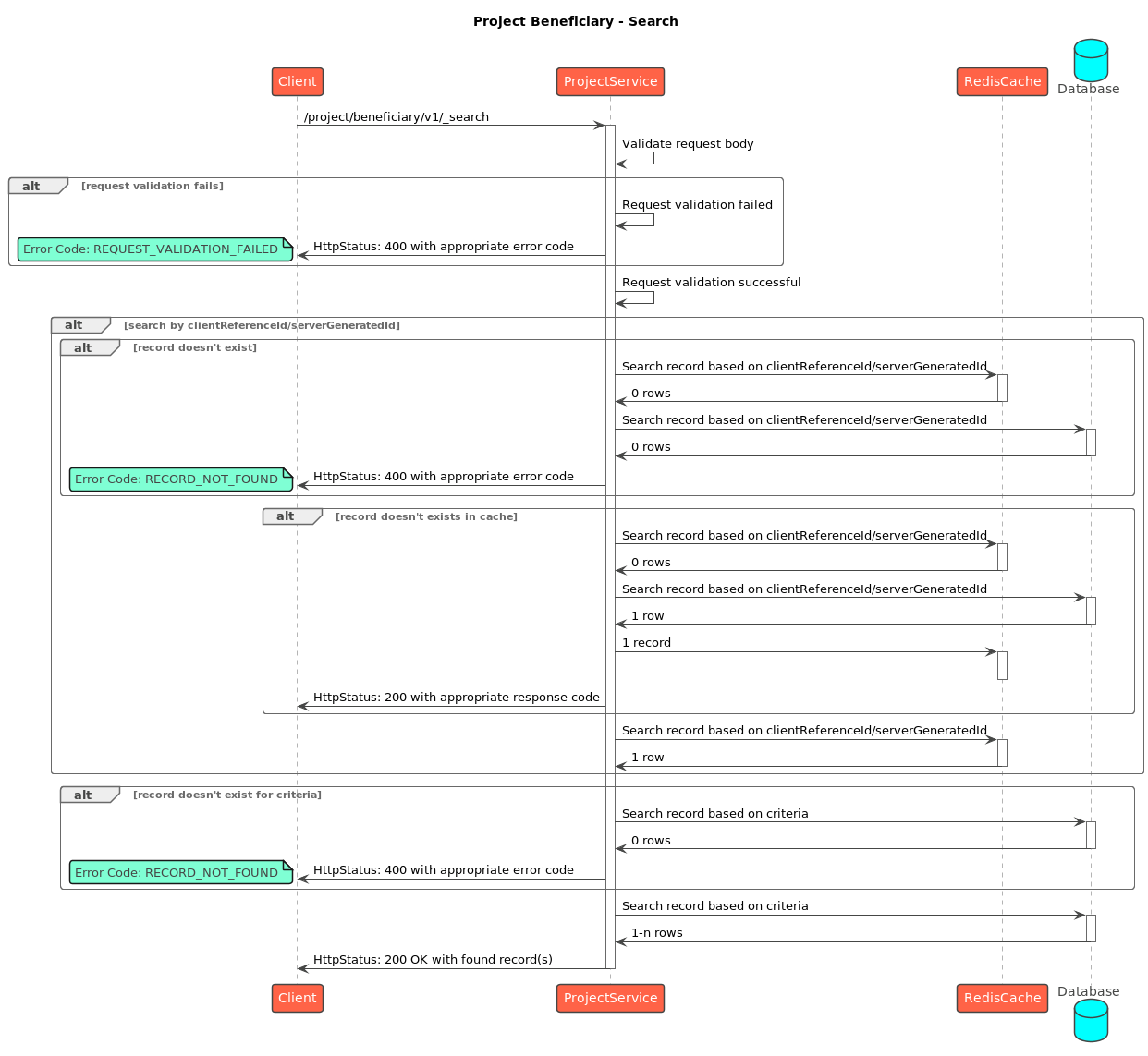
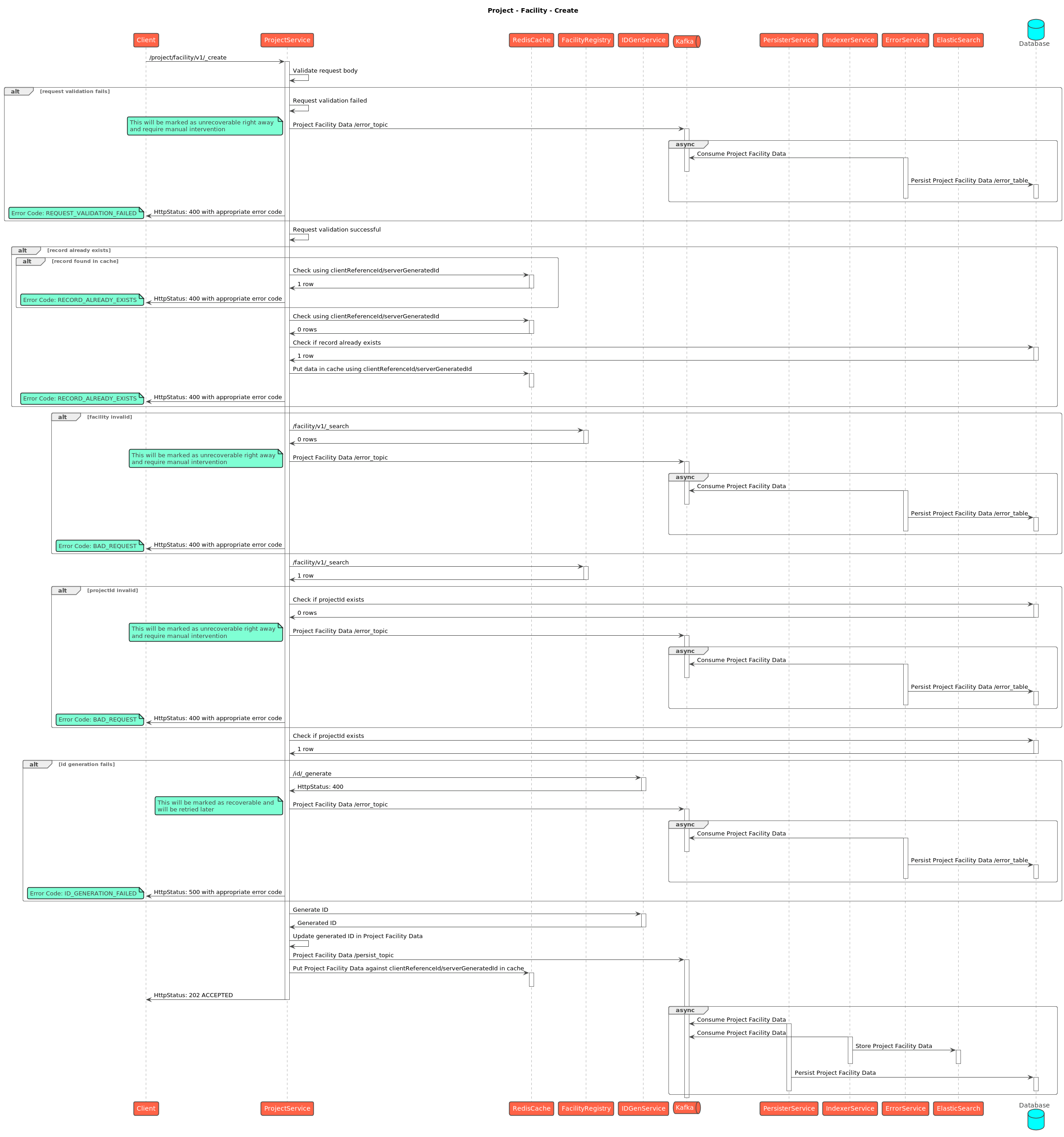
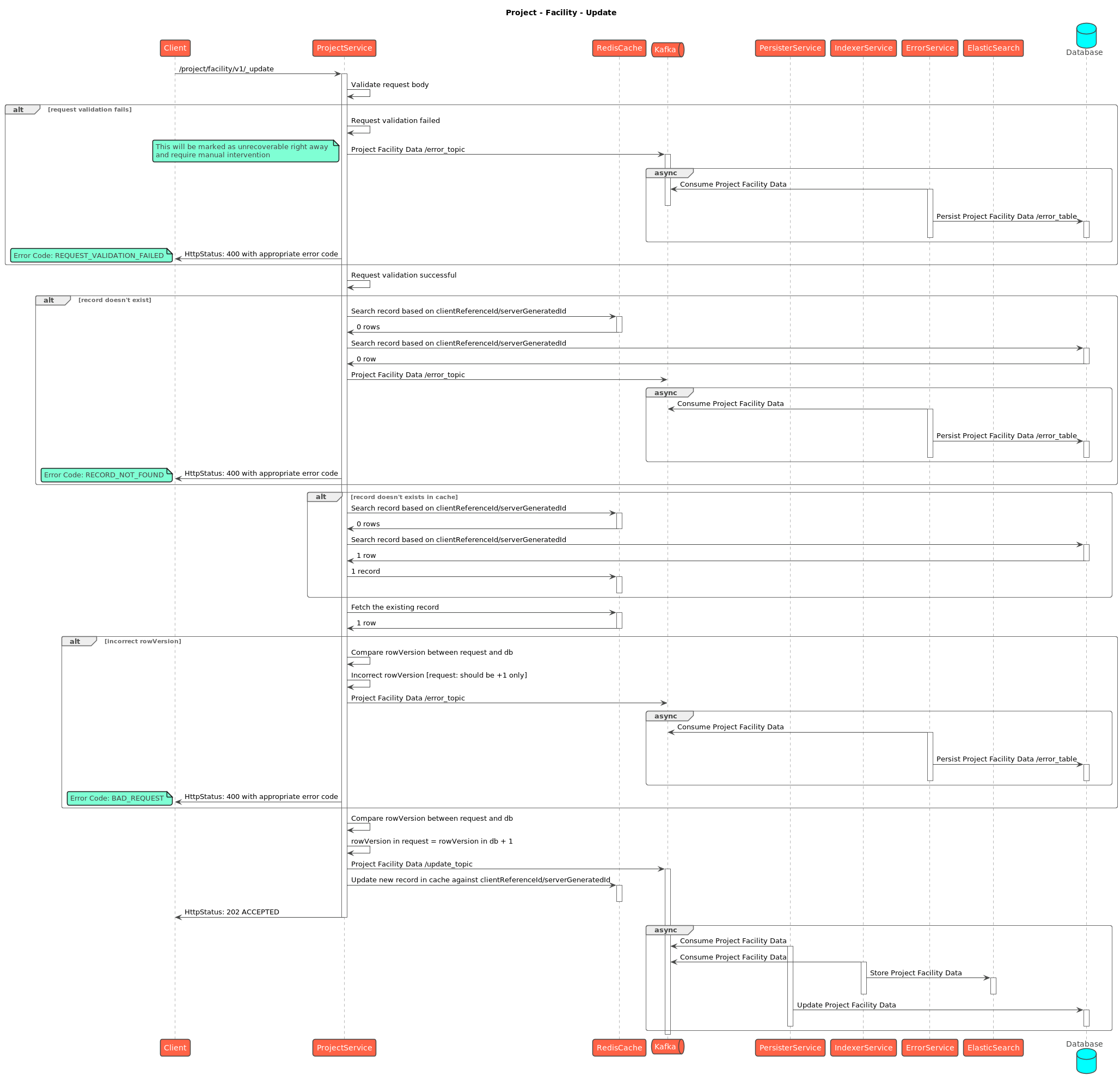
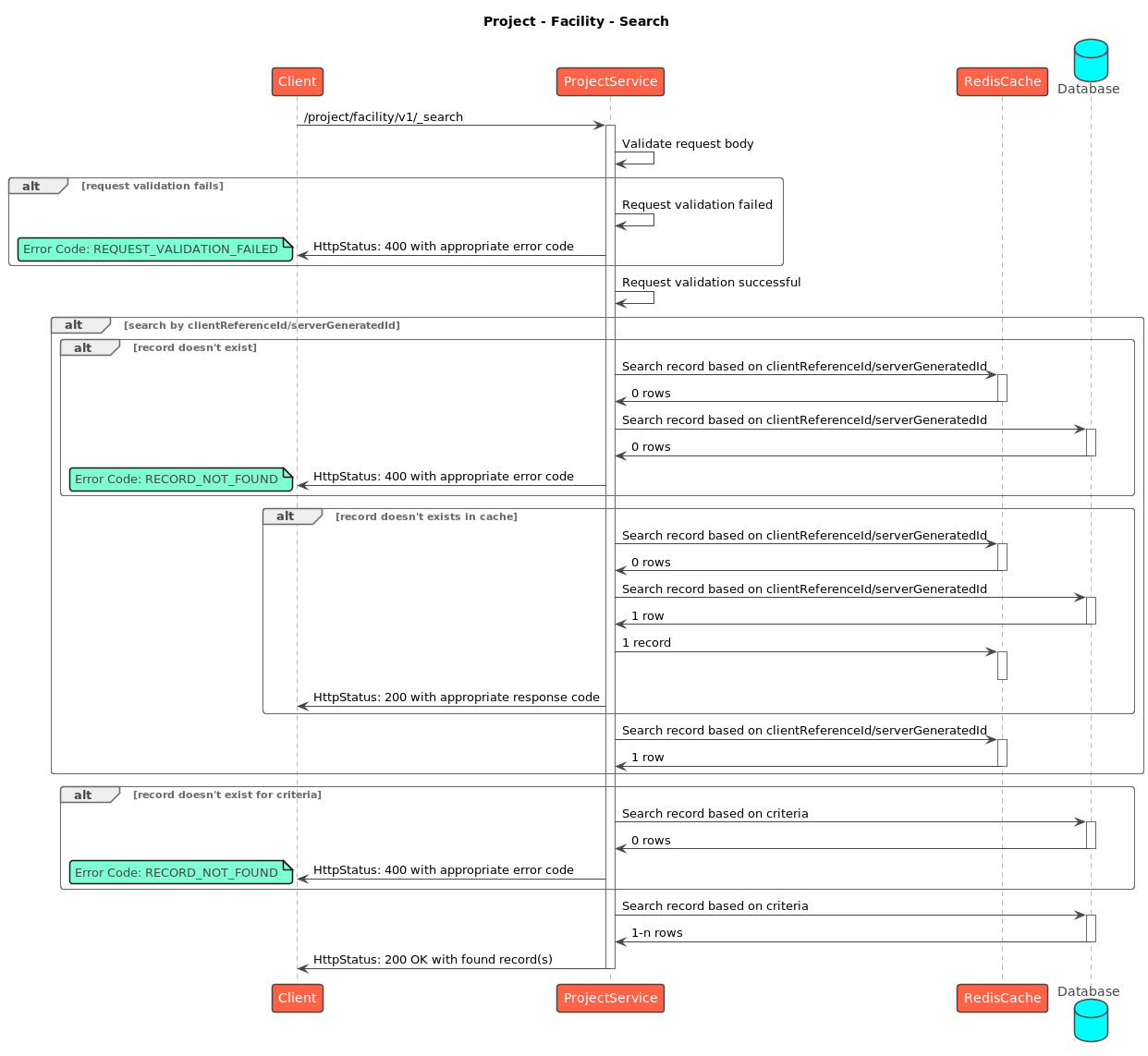
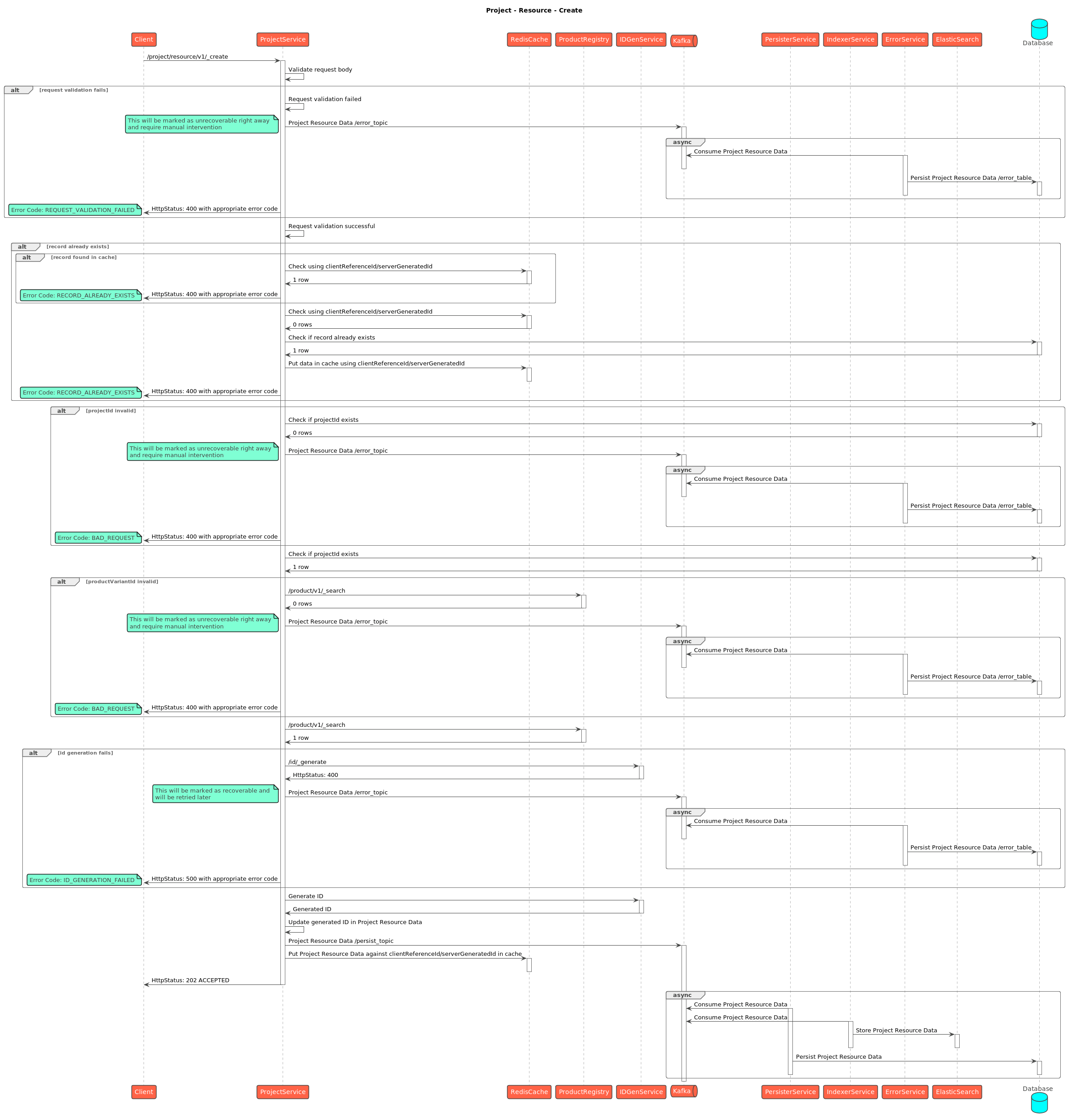
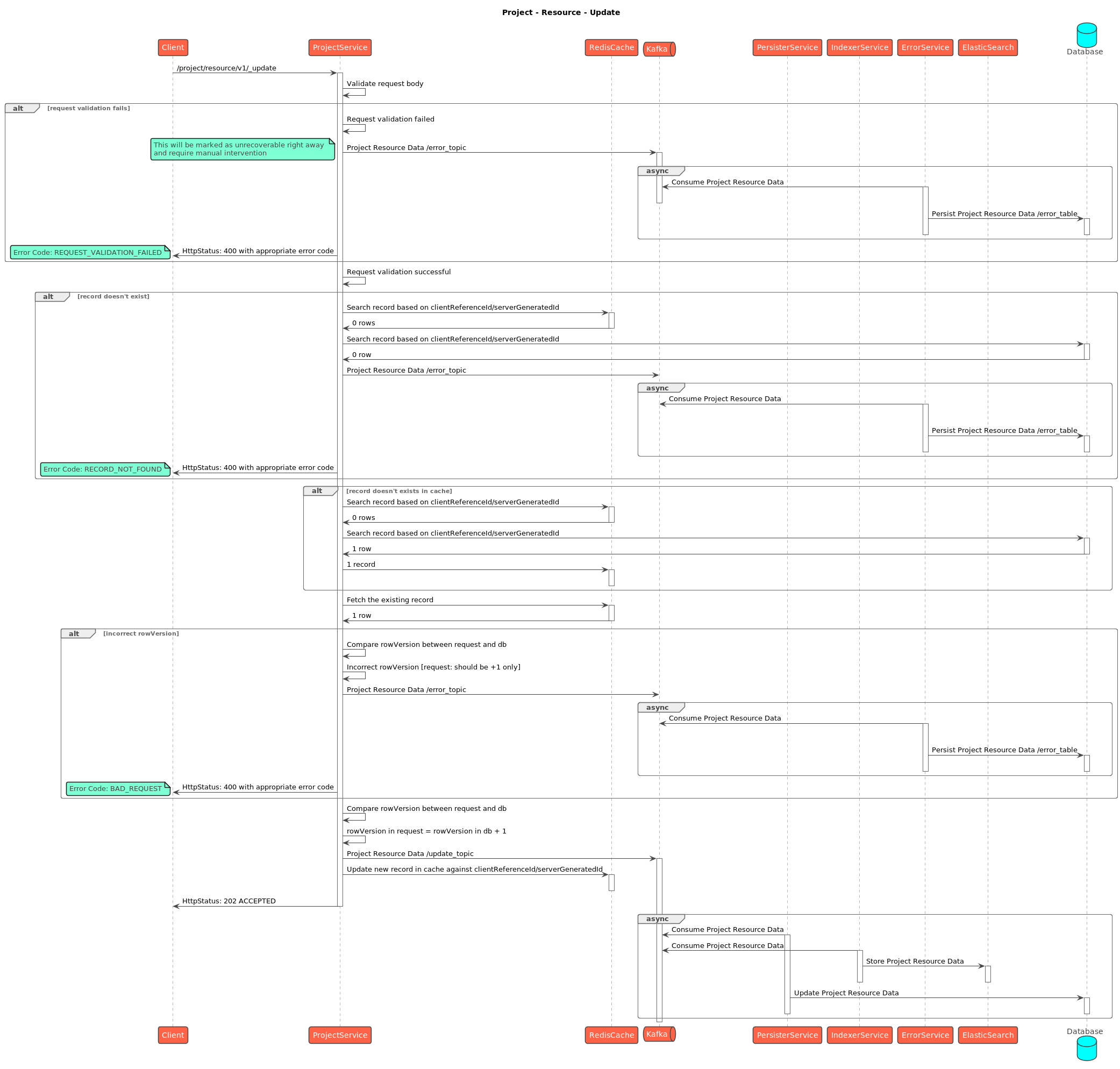
Writes are **asynchronous**: the API validates, enriches and acknowledges, then a Kafka consumer persists. The service does not write Postgres directly — it emits a `save-*` event that **egov-persister** turns into a row, while the **transformer** indexes the same event into Elasticsearch for dashboards.

#### Sequence Diagrams

{% tabs %}
{% tab title="Project" %}

<figure><img src="https://content.gitbook.com/content/I0KFbSBTySIQ7TCOKnJF/blobs/C75Gf9H3Mj66DdwIeaKz/project_create.png" alt=""><figcaption><p>Project - Create</p></figcaption></figure>

<figure><img src="https://content.gitbook.com/content/I0KFbSBTySIQ7TCOKnJF/blobs/5YDNjoRQ355lI1wIFJXr/project_update.png" alt=""><figcaption><p>Project - Update</p></figcaption></figure>

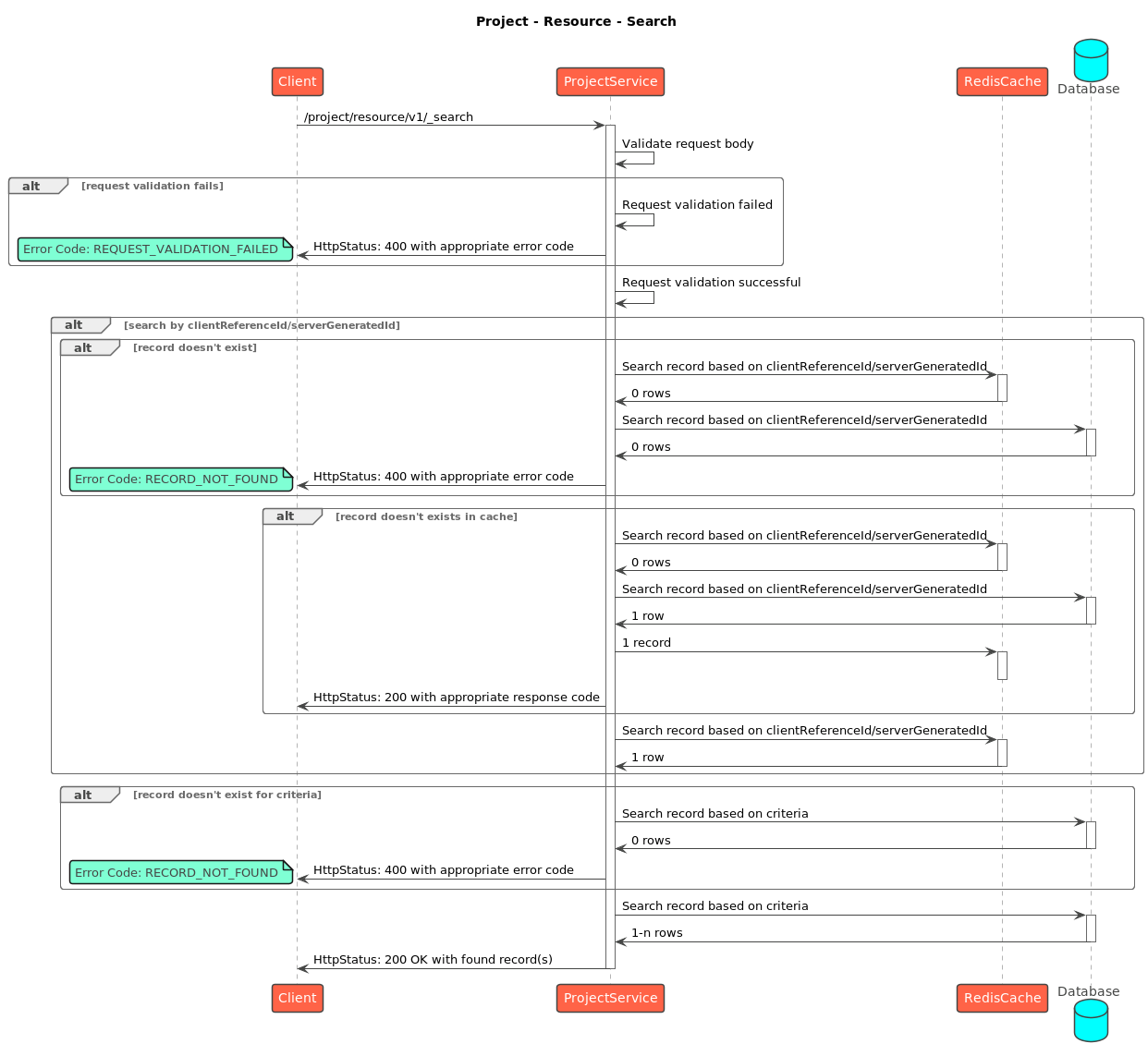
<figure><img src="https://content.gitbook.com/content/I0KFbSBTySIQ7TCOKnJF/blobs/JHAkc8bDIBSm16drNubR/project_search.png" alt=""><figcaption><p>Project - Search</p></figcaption></figure>
{% endtab %}

{% tab title="Task" %}

<figure><img src="https://content.gitbook.com/content/I0KFbSBTySIQ7TCOKnJF/blobs/cEznyHLF67JF571P1GIf/project_task_create.png" alt=""><figcaption><p>Project Task - Create</p></figcaption></figure>

<figure><img src="https://content.gitbook.com/content/I0KFbSBTySIQ7TCOKnJF/blobs/rYEUyNTPR5UxB9Dwe9wh/project_task_update.png" alt=""><figcaption><p>Project Task - Update</p></figcaption></figure>

<figure><img src="https://content.gitbook.com/content/I0KFbSBTySIQ7TCOKnJF/blobs/zjizsOSz5TCzHBWs0Iqo/project_task_search.png" alt=""><figcaption></figcaption></figure>
{% endtab %}

{% tab title="Staff" %}

<figure><img src="https://content.gitbook.com/content/I0KFbSBTySIQ7TCOKnJF/blobs/kGEBxpofyFmTYhRXupGJ/project_staff_create.png" alt=""><figcaption><p>Project Staff - Create</p></figcaption></figure>

<figure><img src="https://content.gitbook.com/content/I0KFbSBTySIQ7TCOKnJF/blobs/BfmrGWnhTCYqL7Nrqk3N/project_staff_update.png" alt=""><figcaption><p>Project Staff - Update</p></figcaption></figure>

<figure><img src="https://content.gitbook.com/content/I0KFbSBTySIQ7TCOKnJF/blobs/CrHBbUAcMnWB7c5Gu16x/project_staff_search.png" alt=""><figcaption></figcaption></figure>
{% endtab %}

{% tab title="Beneficiary" %}

<figure><img src="https://content.gitbook.com/content/I0KFbSBTySIQ7TCOKnJF/blobs/XLSLGR8RXMiB2diARyOz/project_beneficiary_create.png" alt=""><figcaption><p>Project Beneficiary - Create</p></figcaption></figure>

<figure><img src="https://content.gitbook.com/content/I0KFbSBTySIQ7TCOKnJF/blobs/SfCAjJIxBEJMJy7jplTi/project_beneficiary_update.png" alt=""><figcaption><p>Project Beneficiary - Update</p></figcaption></figure>

<figure><img src="https://content.gitbook.com/content/I0KFbSBTySIQ7TCOKnJF/blobs/3uYR7vhAXJMRYfJerYhK/project_beneficiary_search.png" alt=""><figcaption><p>Project Beneficiary - Search</p></figcaption></figure>
{% endtab %}

{% tab title="Facility" %}

<figure><img src="https://content.gitbook.com/content/I0KFbSBTySIQ7TCOKnJF/blobs/JT9stSdDZC8UekWa0h8G/project_facility_create.png" alt=""><figcaption><p>Project Facility - Create</p></figcaption></figure>

<figure><img src="https://content.gitbook.com/content/I0KFbSBTySIQ7TCOKnJF/blobs/LmjZt0gaBBIR62EDyN4Q/project_facility_update.png" alt=""><figcaption><p>Project Facility - Update</p></figcaption></figure>

<figure><img src="https://content.gitbook.com/content/I0KFbSBTySIQ7TCOKnJF/blobs/zNBwoWss8HtyuUgWnYa7/project_facility_search.png" alt=""><figcaption><p>Project Facility - Search</p></figcaption></figure>
{% endtab %}

{% tab title="Resource" %}

<figure><img src="https://content.gitbook.com/content/I0KFbSBTySIQ7TCOKnJF/blobs/xQfCb684GWODwub3HCKl/project_resource_create.png" alt=""><figcaption><p>Project Resource - Create</p></figcaption></figure>

<figure><img src="https://content.gitbook.com/content/I0KFbSBTySIQ7TCOKnJF/blobs/kyLutNQpjPyu2xrEGwKE/project_resource_update.png" alt=""><figcaption><p>Project Resource - Update</p></figcaption></figure>

<figure><img src="https://content.gitbook.com/content/I0KFbSBTySIQ7TCOKnJF/blobs/ZbeaGl9kegbeitSAkw0Q/project_resource_search.png" alt=""><figcaption><p>Project Resource - Search</p></figcaption></figure>
{% endtab %}

{% tab title="User Action" %}
\ <br>

<figure><img src="https://lh7-rt.googleusercontent.com/docsz/AD_4nXdGSn6m9V4C1L8RkHQP_OPSbHUN2w7eLx0nRtrXs39TEDFxMBY6Uf8igU_boKkFDrwG_icygX1bDVm9i6R3pZwWzDje_A_6lvN0Mx19UYAaaf4OjRJPULCh2j02EtpMeWJOiChfPe89R_LFzsaTJ4KPK_g?key=S-WOuMDrpC1ECLJAnLTH0A" alt=""><figcaption><p>User Action Flow</p></figcaption></figure>

<figure><img src="https://lh7-rt.googleusercontent.com/docsz/AD_4nXeaxh8UKz8LQKga-Mo9z5UZ_OwuAeIixwlMK3gNvyBehPvcxhzggdIx126hTaUibZld4YRMj18uk9c0ZosLABKem5afJsA9dWtOp6bihOPrx-J3a8ip5Y-nbNRczaahDi_wvJm7RNsb-ooL3UXayRB6p_kR?key=S-WOuMDrpC1ECLJAnLTH0A" alt=""><figcaption><p>Location Capture Flow</p></figcaption></figure>
{% endtab %}
{% endtabs %}

#### Data Model

<figure><img src="https://2077406040-files.gitbook.io/~/files/v0/b/gitbook-x-prod.appspot.com/o/spaces%2FI0KFbSBTySIQ7TCOKnJF%2Fuploads%2FYh8nL1kM1UWTwCJCvsLU%2Fimage.png?alt=media&amp;token=648cb991-4dab-45ff-9f88-33cc56430cf7" alt=""><figcaption></figcaption></figure>

### Failure / Retry Handling

* **Async, no batch rollback.** A bulk request returns `202` before persistence. If one record in the batch fails validation in the consumer, it does not roll back the others — check consumer logs and the record's status.
* **Idempotency** is via `clientReferenceId` — re-submitting the same one should not create a duplicate row.
* **Optimistic locking** via `rowVersion` protects against concurrent edits on the normal entity-update paths (task, beneficiary, etc.). (See the v2.1 note for the one place this is now relaxed — the user-action path.)
* **Soft delete** (`isDeleted`) everywhere — nothing is hard-deleted; unique constraints include the delete flag.
* If the **persister config** for the project topics is missing/stale in an environment, the API will accept writes but rows will silently not appear in Postgres — a classic "it worked in QA" trap.

### Known Risks / Limitations

* **Large surface area.** Project bundles seven core entities (project, task, beneficiary, staff, facility, resource, task-resource) plus the `user_action` / `user_location` audit tables. A change to shared validation or enrichment can ripple across all of them — test the whole set, not just the entity you touched.
* **Task is the highest-volume entity.** Field rounds generate huge task / task-resource volumes; search and persister throughput here drive overall campaign performance.
* **Cross-registry references are validated app-side.** Beneficiary → household/individual and resource → product links are checked by service calls, not DB foreign keys — a stale or unreachable dependency surfaces as a validation failure, not a constraint error.
* **Persister/transformer config drift.** Because writes are async, a missing or stale persister/transformer config in an environment lets the API accept writes that never land in Postgres or Elasticsearch.


---

# Agent Instructions
This documentation is published with GitBook. GitBook is the documentation platform designed so that both humans and AI agents can read, navigate, and reason over technical content effectively. Learn more at gitbook.com.

## Querying This Documentation
If you need additional information that is not directly available in this page, you can query the documentation by asking a question.

Perform an HTTP GET request on the following URL with the `ask` and `goal` query parameters:

```
GET https://docs.digit.org/health/v2.1/design/architecture/low-level-design/services/platform-services/project.md?ask=<question>&goal=<user_goal>
```

`ask` is the immediate question: it should be specific, self-contained, and written in natural language.
`goal` is what the user is ultimately trying to achieve, the reason they need the answer. Sharing it helps GitBook give you a better, more relevant answer. A goal is most helpful when it describes the outcome the user wants rather than restating the question. For example, with `ask=how do I create an API token`, a goal like `automate deployments from our CI pipeline` lets GitBook tailor the answer to that use case.

The response will contain a direct answer to the question and relevant excerpts and sources from the documentation.

Use this mechanism when the answer is not explicitly present in the current page, you need clarification or additional context, or you want to retrieve related documentation sections.