# Group Bills Screen

**Objective:** To provide users with the ability to search for bills.

## Workflow Details

### Employee Screens

**Employee Search Bill Inbox**

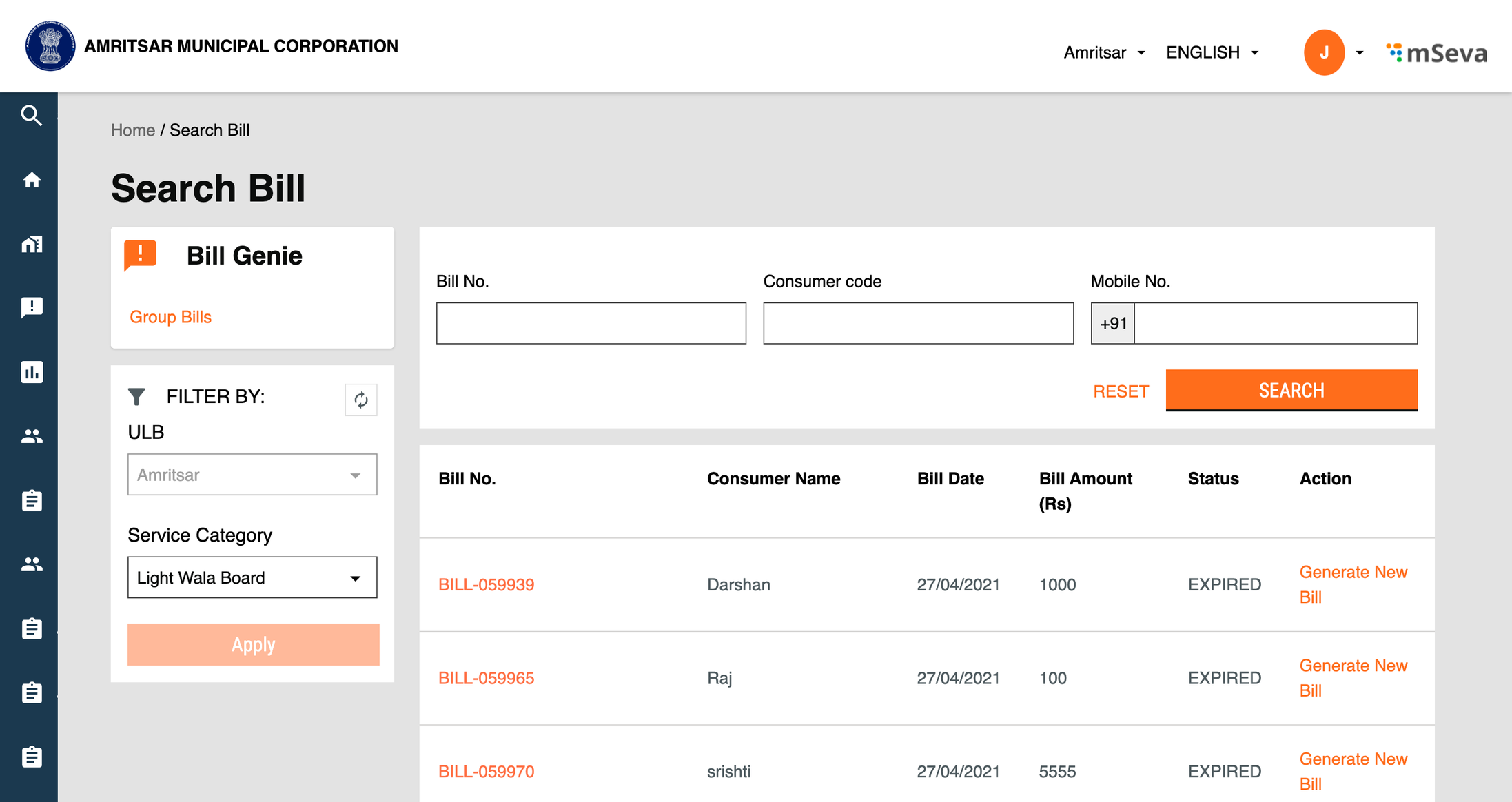
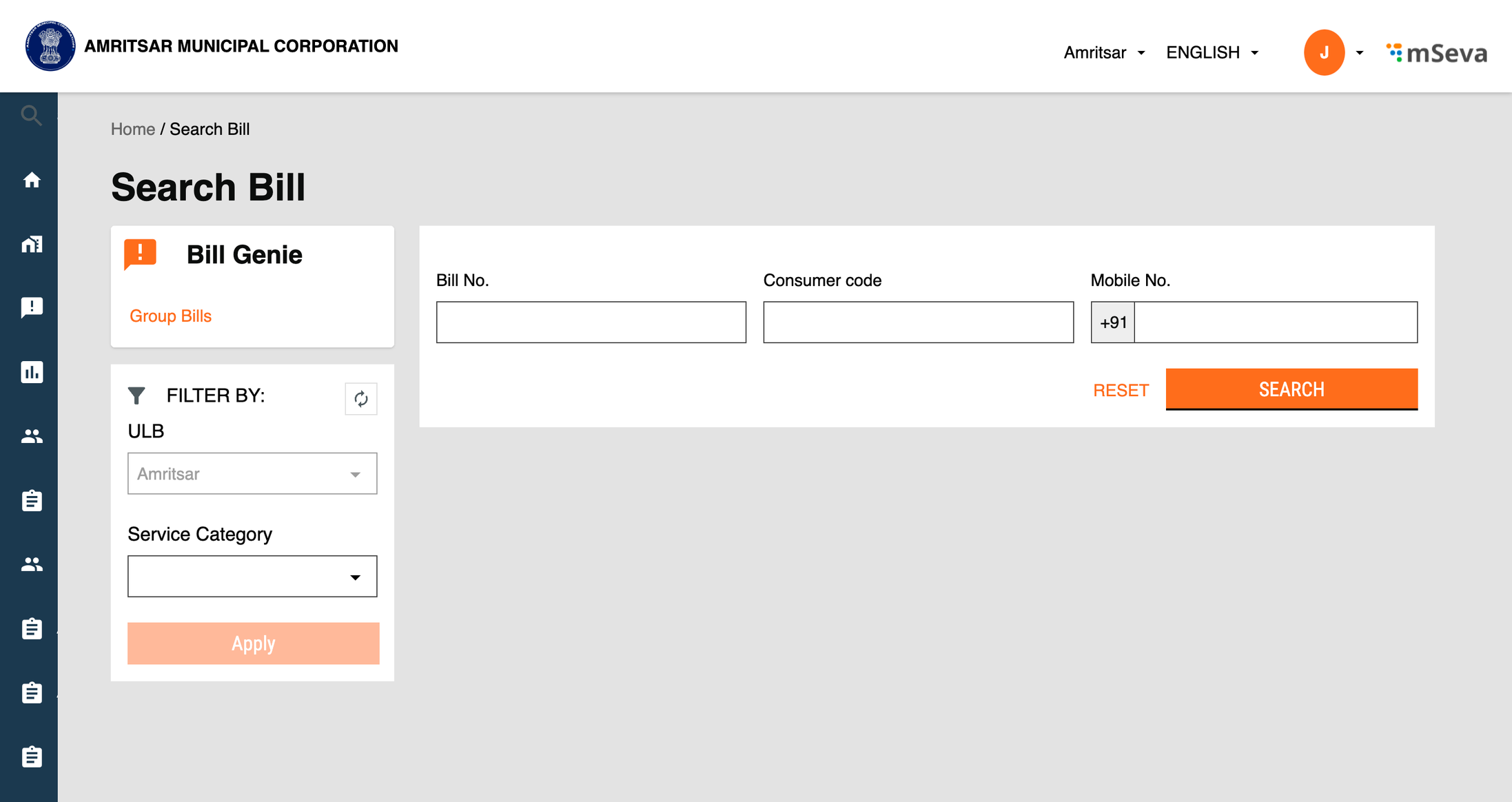
* This page lists all the created search bills in reverse-chronological order with the latest created bill being at the top and the first created one at the end. This table supports pagination and employees specify the size of the list on each page.
* Inbox has a search feature which helps employees quickly find search bills based on the selected **bill no**, **consumer code** and **mobile no** fields.
* Inbox also has a filter option where employees can filter search bills based on the **service** **categories** & **ULB**.

<figure><img src="/files/BBghP4tvQmQt7L17Yr2Q" alt=""><figcaption><p>Employee Search Bill Inbox Default View</p></figcaption></figure>

<figure><img src="/files/hrD9TR6d1otS6sNqNAMy" alt=""><figcaption><p>Employee Search Bill Inbox after applying filter</p></figcaption></figure>

### **Citizen Screens**

**Citizen Bill Genie Card**

![](/files/bWBmVJw2GF5sQ0LC1byf)

**Citizen Search Bill Inbox**

* This page lists all the created search bills in reverse-chronological order with the latest created bill being at the top and the first created one at the end. This table supports pagination and the size of the list on each page.
* Inbox has a search feature which helps citizens quickly find search bills based on the selected **bill no**, **consumer code** and **mobile no** fields.
* Inbox also has a filter option where citizens can filter search bills based on the **service categories** & **ULB**.

![](/files/Q30eTAknFcEOWRaxI7Lv)

### **API Used**

```
billgenie: "/egov-searcher",
```

Service category curl for searching the bill

```
curl ‘https://qa.digit.org/egov-searcher/bill-genie/mcollectbills/_get?_=1654070581498’
-H ‘authority: qa.digit.org’
-H ‘accept: application/json, text/plain, /’
-H ‘accept-language: en-GB,en;q=0.9’
-H ‘content-type: application/json;charset=UTF-8’
-H ‘origin: https://qa.digit.org’
-H ‘referer: https://qa.digit.org/digit-ui/employee/bills/inbox’
-H ‘sec-ch-ua: ” Not A;Brand”;v=“99”, “Chromium”;v=“102”, “Google Chrome”;v=“102”’
-H ‘sec-ch-ua-mobile: ?0’
-H ‘sec-ch-ua-platform: “macOS”’
-H ‘sec-fetch-dest: empty’
-H ‘sec-fetch-mode: cors’
-H ‘sec-fetch-site: same-origin’
-H ‘user-agent: Mozilla/5.0 (Macintosh; Intel Mac OS X 10_15_7) AppleWebKit/537.36 (KHTML, like Gecko) Chrome/102.0.5005.61 Safari/537.36’
--data-raw ’{“searchCriteria”:{“tenantId”:“pb.amritsar”,“name”:“BILLINGSERVICE_BUSINESSSERVICE_ADVT_LIGHT_WALA_BOARD”,“url”:“/bill-genie/mcollectbills/_get”,“businesService”:“ADVT.Light_Wala_Board”,“limit”:10,“offset”:0,“sortBy”:“applicationDate”,“sortOrder”:“ASC”,“sortParams”:[{“id”:“applicationDate”,“desc”:false}]},“RequestInfo”:{“apiId”:“Rainmaker”,“authToken”:“5e0a93dd-4a41-4b05-894c-c6237146668f”,“msgId”:“1654070581498|en_IN”}}'
--compressed
```

### **Group Bills Inbox**

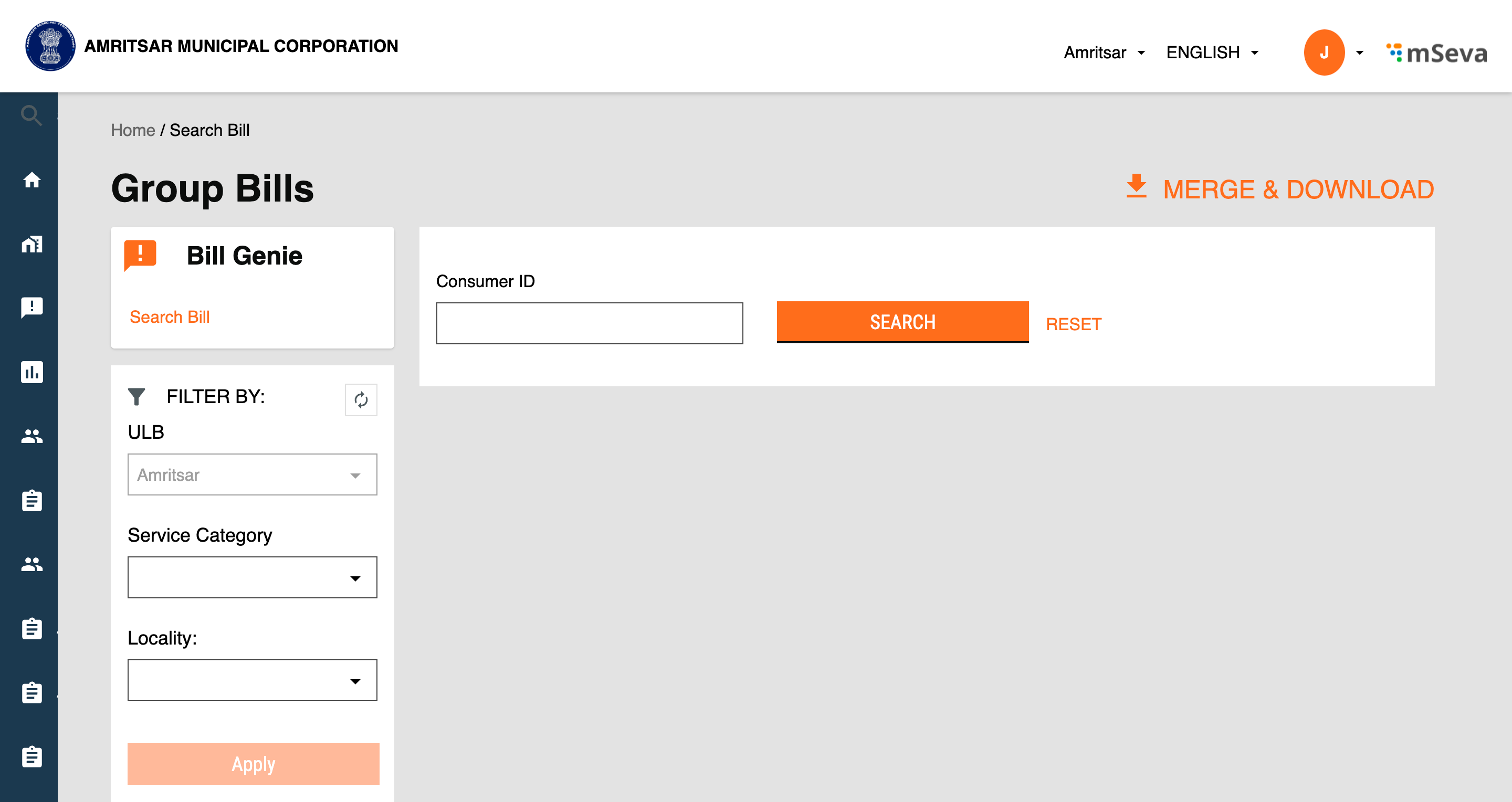
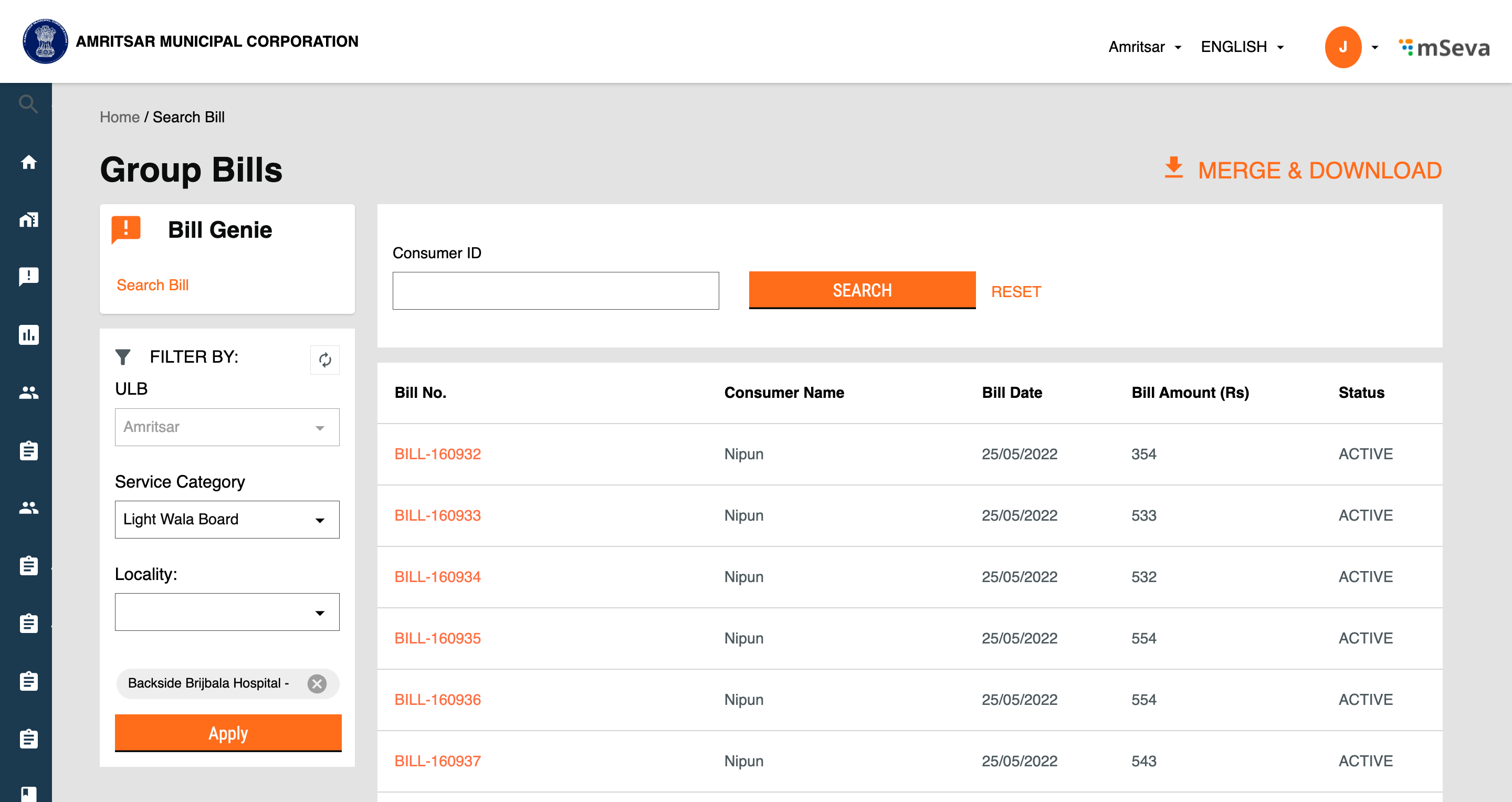
* This page lists all the created group bills in reverse-chronological order with the latest created group bills being at the top and the first created one at the end. This table supports pagination and the size of the list on each page.
* Inbox has a search feature which helps employees quickly find search bills based on **consumer id** fields.
* Inbox also has a filter option where employees can filter search bills based on the **service** **categories**, **ULB** & **locality.**<br>

<figure><img src="/files/9rfhKtcz2xkjEinupHVH" alt=""><figcaption><p>Employee Group Bills default view</p></figcaption></figure>

<figure><img src="/files/aHJBwkHm3lu8rwAIPHvU" alt=""><figcaption><p>Employee Group Bills Inbox after applying filter</p></figcaption></figure>

### **API Used**

```
billgenie: "/egov-searcher",
```

Filter curl for searching group bills:

```
curl ‘https://qa.digit.org/egov-searcher/bill-genie/mcollectbills/_get?_=1654076169191’ \
  -H ‘authority: qa.digit.org’ \
  -H ‘accept: application/json, text/plain, */*’ \
  -H ‘accept-language: en-GB,en;q=0.9’ \
  -H ‘content-type: application/json;charset=UTF-8’ \
  -H ‘origin: https://qa.digit.org’ \
  -H ‘referer: https://qa.digit.org/digit-ui/employee/bills/group-bill’ \
  -H ‘sec-ch-ua: ” Not A;Brand”;v=“99”, “Chromium”;v=“102”, “Google Chrome”;v=“102”’ \
  -H ‘sec-ch-ua-mobile: ?0’ \
  -H ‘sec-ch-ua-platform: “macOS”’ \
  -H ‘sec-fetch-dest: empty’ \
  -H ‘sec-fetch-mode: cors’ \
  -H ‘sec-fetch-site: same-origin’ \
  -H ‘user-agent: Mozilla/5.0 (Macintosh; Intel Mac OS X 10_15_7) AppleWebKit/537.36 (KHTML, like Gecko) Chrome/102.0.5005.61 Safari/537.36’ \
  --data-raw ’{“searchCriteria”:{“tenantId”:“pb.amritsar”,“name”:“BILLINGSERVICE_BUSINESSSERVICE_ADVT_LIGHT_WALA_BOARD”,“url”:“/bill-genie/mcollectbills/_get”,“businesService”:“ADVT.Light_Wala_Board”,“locality”:[“SUN20”],“limit”:10,“offset”:0,“sortBy”:“applicationDate”,“sortOrder”:“ASC”,“sortParams”:[{“id”:“applicationDate”,“desc”:false}],“billActive”:“ACTIVE”},“RequestInfo”:{“apiId”:“Rainmaker”,“authToken”:“5e0a93dd-4a41-4b05-894c-c6237146668f”,“msgId”:“1654076169191|en_IN”}}' \
  --compressed

```

## **Technical Implementation Details**

The routing details for the Bill Genie module for employees are defined here.

<https://github.com/egovernments/DIGIT-Dev/blob/38ad276f253f917c744787d74d5719a7f09efa88/frontend/micro-ui/web/micro-ui-internals/packages/modules/bills/src/pages/employee/index.js>

For calling the search bill API we have used a custom hook for code reuse. Below is a little snapshot of that:

```
 const { isFetching, isLoading: hookLoading, searchResponseKey, data, searchFields, ...rest } = Digit.Hooks.useBillSearch({
    tenantId,
    filters: { ...searchParams, businessService, ...paginationParams, sortParams },
    config: {},
  });
```

Implementation details of the customs service:

```
import Urls from "../atoms/urls";
import { Request } from "../atoms/Utils/Request";

const BillingService = {
  search_bill: ({ tenantId, filters }) =>
    Request({
      url: `${Urls.billgenie}${filters.url}`,
      useCache: false,
      method: "POST",
      data: {
        searchCriteria: {
          tenantId: tenantId,
          ...filters,
        },
      },
      auth: true,
      userService: false,
    }),
};

export default BillingService;

```

Implementation details of the hook:

```
import { useQuery, useQueryClient } from "react-query";
import BillingService from "../../services/elements/Bill";

const useBillSearch = ({ filters }) => {
  const client = useQueryClient();
  const tenantId = Digit.SessionStorage.get("User")?.info?.tenantId;

  filters.locality = filters.locality?.map((element) => {
    return element.code;
  });
  filters.url = filters.url?.replace("egov-searcher", "");

  const args = tenantId ? { tenantId, filters } : { filters };

  const { isLoading, error, data } = useQuery(["BILL_INBOX", tenantId, filters], async () => await BillingService.search_bill(args), {
    enabled: filters?.businesService ? true : false,
  });
  return { isLoading, error, data, revalidate: () => client.invalidateQueries(["BILL_INBOX", tenantId, filters]) };
};

export default useBillSearch;

```

All the hooks used in every module are defined here:

[![](https://github.githubassets.com/favicon.ico)https://github.com/egovernments/DIGIT-Dev/tree/af4f092d2406079a5e9569eb1aa698b7d6961a56/frontend/micro-ui/web/micro-ui-internals/packages/libraries/src/hooks](https://github.com/egovernments/DIGIT-Dev/tree/af4f092d2406079a5e9569eb1aa698b7d6961a56/frontend/micro-ui/web/micro-ui-internals/packages/libraries/src/hooks) - Connect to your Github account.

## **MDMS Configuration**

To enable the Bills Genie here is the snippet code.

```
 {
      "module": "Bills",
      "code": "Bills",
      "active": true,
      "order": 3,
      "tenants": [
        {
          "code": "pb.jalandhar"
        },
        {
          "code": "pb.phagwara"
        },
        {
          "code": "pb.amritsar"
        }
      ]
    }
```

MDMS Card configuration file: [<img src="https://github.com/fluidicon.png" alt="" data-size="line">egov-mdms-data/citymodule.json at 37d2189b3ecfa95169274a40bb0cd7c816ad13cc · egovernments/egov-mdms-data](https://github.com/egovernments/egov-mdms-data/blob/37d2189b3ecfa95169274a40bb0cd7c816ad13cc/data/pb/tenant/citymodule.json)

## Localisation Details

Localisation keys are added under the `rainmaker-abg` locale module. Below is an example of a few locale labels.

```
 {
      "code": "ABG_ADVERTISEMENT_TAX_INFO",
      "message": "Advertisement Tax",
      "module": "rainmaker-abg",
      "locale": "en_IN"
    },
    {
      "code": "ABG_ADVERTISEMENT_TAX_LABEL",
      "message": "Advertisement Tax",
      "module": "rainmaker-abg",
      "locale": "en_IN"
    },
       
```


---

# Agent Instructions: Querying This Documentation

If you need additional information that is not directly available in this page, you can query the documentation dynamically by asking a question.

Perform an HTTP GET request on the current page URL with the `ask` query parameter:

```
GET https://docs.digit.org/local-governance/access/local-governance-stack/finance/bill-genie-service-configuration/ui-configuration/group-bills-screen.md?ask=<question>
```

The question should be specific, self-contained, and written in natural language.
The response will contain a direct answer to the question and relevant excerpts and sources from the documentation.

Use this mechanism when the answer is not explicitly present in the current page, you need clarification or additional context, or you want to retrieve related documentation sections.