# Employee: Ad-hoc Rebate/Penalty & View Breakup

**Objective:** Provide the UI screens and configuration details for the ad-hoc rebate or penalty feature and the view breakup option available in water and sewerage applications.

## Workflow Details

#### Ad-hoc Rebate/Penalty

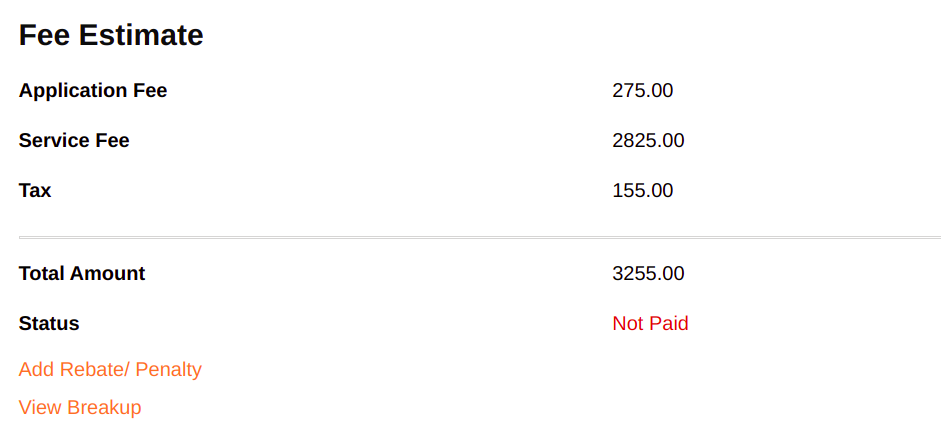
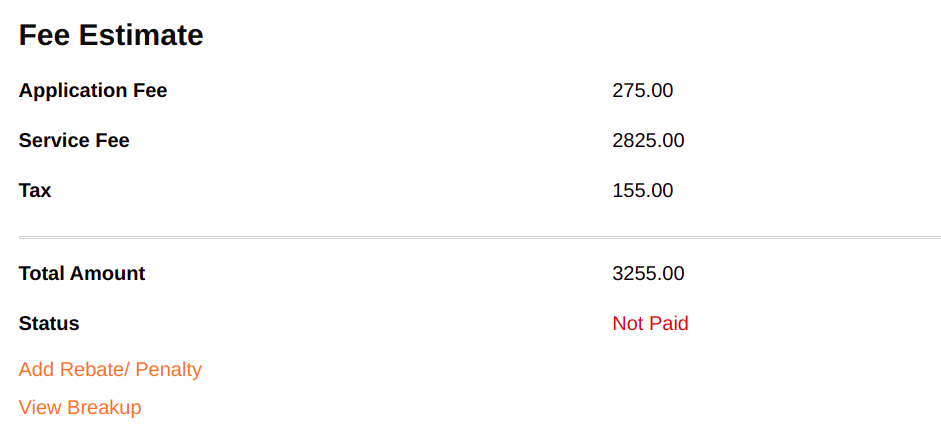
The Water and Sewerage ad-hoc Rebate/Penalty is a feature in WS Module. It allows employees to add rebates or penalties for Water and Sewerage Applications.

<figure><img src="/files/j9z9D2ubp5hXKI3hVGrg" alt=""><figcaption></figcaption></figure>

&#x20;Clicking on the Add Rebate/Penalty option opens the popup with the fields.

![](/files/JtvDIfkSOJZtjeeF3qvz)

Clicking on the Add button on the pop-up screen closes the pop-up window and the filled-in data is updated in the Fee Estimate card.

![](/files/qmNfRPDEXwuCS7kjKLHU)![](/files/46vtN1s0ySzA6vXHw10d)

{% hint style="info" %}
**Note:** After adding add rebate/penalty, we must perform at least one action, then only it will save the data in WS/SW service. Estimated API will give the results based on the data, presently we are saving the data in the additional details of the WS/SW service.<br>
{% endhint %}

#### View Breakup

The View Breakup feature in the WS module allows employees to view the details of tax heads for water and sewerage applications.

After logging in with `Water and sewerage employee` roles the user gets the option to view the breakup in the new WS/SW Application in the Fee Estimate card in the WS/SW application details.

WS/SW Application details: [Employee: Water and Sewerage Application Details](/local-governance/access/local-governance-stack/water-and-sewerage/water-services/water-and-sewerage-service-ui-docs/employee-application-details.md)

<figure><img src="/files/4vYLGurk5XRJ38EQWQMO" alt=""><figcaption></figcaption></figure>

Clicking on the View Breakup option opens the popup with the updated data.

![](/files/YpkRHX4xX35pyJC5LFJt)

## **Implementation Details**

Once the user logs in with `"WS_APPROVER", "WS_FIELD_INSPECTOR", "SW_FIELD_INSPECTOR", "SW_APPROVER".` If the roles and actions buttons are visible on the screen, then the user gets the option to add Ad-hoc Rebate/Penalty to a new WS/SW application in the Fee Estimate card in the WS/SW application details.

&#x20;WS/SW Application details: [Employee: Water and Sewerage Application Details](/local-governance/access/local-governance-stack/water-and-sewerage/water-services/water-and-sewerage-service-ui-docs/employee-application-details.md)

Route: [![](https://cdn.jsdelivr.net/npm/@egovernments/digit-ui-css/img/browser-icon.png)mSeva](https://qa.digit.org/digit-ui/employee/ws/application-details?applicationNumber=WS_AP/107/2022-23/638816\&tenantId=pb.amritsar\&service=WATER\&from=WS_SEWERAGE_APPLICATION_SEARCH)

Fee Estimation File Path: <https://github.com/egovernments/DIGIT-Dev/blob/develop/frontend/micro-ui/web/micro-ui-internals/packages/modules/templates/ApplicationDetails/components/WSFeeEstimation.js> and the initial data and logic is from the Application details in <https://github.com/egovernments/DIGIT-Dev/blob/develop/frontend/micro-ui/web/micro-ui-internals/packages/libraries/src/services/molecules/WS/Search.js>

Fee Estimation Pop-up functionality is present in the <https://github.com/egovernments/DIGIT-Dev/blob/develop/frontend/micro-ui/web/micro-ui-internals/packages/modules/templates/ApplicationDetails/components/WSFeeEstimation.js>

Route: [![](https://cdn.jsdelivr.net/npm/@egovernments/digit-ui-css/img/browser-icon.png)mSeva](https://qa.digit.org/digit-ui/employee/ws/application-details?applicationNumber=WS_AP/107/2022-23/638816\&tenantId=pb.amritsar\&service=WATER\&from=WS_SEWERAGE_APPLICATION_SEARCH)

View Breakup File Path: <https://github.com/egovernments/DIGIT-Dev/blob/develop/frontend/micro-ui/web/micro-ui-internals/packages/modules/templates/ApplicationDetails/components/ViewBreakup.js> and the initial data and logic is from the Application details in <https://github.com/egovernments/DIGIT-Dev/blob/develop/frontend/micro-ui/web/micro-ui-internals/packages/libraries/src/services/molecules/WS/Search.js>

View Breakup pop-up functionality is present in the <https://github.com/egovernments/DIGIT-Dev/blob/develop/frontend/micro-ui/web/micro-ui-internals/packages/modules/templates/ApplicationDetails/components/ViewBreakup.js><br>

## **Localisation Details**

Localisation keys are added under the ‘*rainmaker-ws*’ locale module.

## **API Call Role Action Mapping**

| API                                                                                          | Action ID                                         | Roles                                                                                                                                                                                                                       |
| -------------------------------------------------------------------------------------------- | ------------------------------------------------- | --------------------------------------------------------------------------------------------------------------------------------------------------------------------------------------------------------------------------- |
| `/localization/messages/v1/_search`                                                          | `1531`                                            |                                                                                                                                                                                                                             |
| /`ws-calculator/waterCalculator/_estimate` and `/sw-calculator/sewerageCalculator/_estimate` | <p><code>1966,</code></p><p><code>1967</code></p> | <p><code>WS\_CEMP</code>,<code>WS\_DOC\_VERIFIER</code>,<code>WS\_FIELD\_INSPECTOR</code>,<code>WS\_APPROVER</code>,<code>WS\_CLERK</code></p><p><code>SW\_CEMP,SW\_DOC\_VERIFIER,SW\_FIELD\_INSPECTOR,SW\_CLERK</code></p> |
| `/billing-service/bill/v2/_fetchbill`                                                        | `1862`                                            | `EMPLOYEE`                                                                                                                                                                                                                  |
| `collection-services/payments/{businessService}/_search/`                                    |                                                   | `EMPLOYEE`                                                                                                                                                                                                                  |
| `/egov-mdms-service/v1/_search`                                                              | `954`                                             |                                                                                                                                                                                                                             |

**Employee Roles and Credentials:** The employee roles and credentials are available in the document here: [<img src="https://developers.google.com/drive/images/drive_icon.png" alt="" data-size="line">DIGIT Login Credentials](https://docs.google.com/spreadsheets/d/15p6dmlVUXvopvzyyG06ty2rxtffSMQxN5F2l2FSWoFA/edit#gid=0)


---

# Agent Instructions: Querying This Documentation

If you need additional information that is not directly available in this page, you can query the documentation dynamically by asking a question.

Perform an HTTP GET request on the current page URL with the `ask` query parameter:

```
GET https://docs.digit.org/local-governance/access/local-governance-stack/water-and-sewerage/water-services/water-and-sewerage-service-ui-docs/employee-ad-hoc-rebate-penalty-and-view-breakup.md?ask=<question>
```

The question should be specific, self-contained, and written in natural language.
The response will contain a direct answer to the question and relevant excerpts and sources from the documentation.

Use this mechanism when the answer is not explicitly present in the current page, you need clarification or additional context, or you want to retrieve related documentation sections.