# Employee: Disconnection Create Flow

**Objective:** The Water and Sewerage 'Apply Disconnection' is the major feature in WS Module. It allows Counter Employees to create Water and Sewerage Applications.

Every application is a part of the workflow.

## **Workflow Details** <a href="#validations" id="validations"></a>

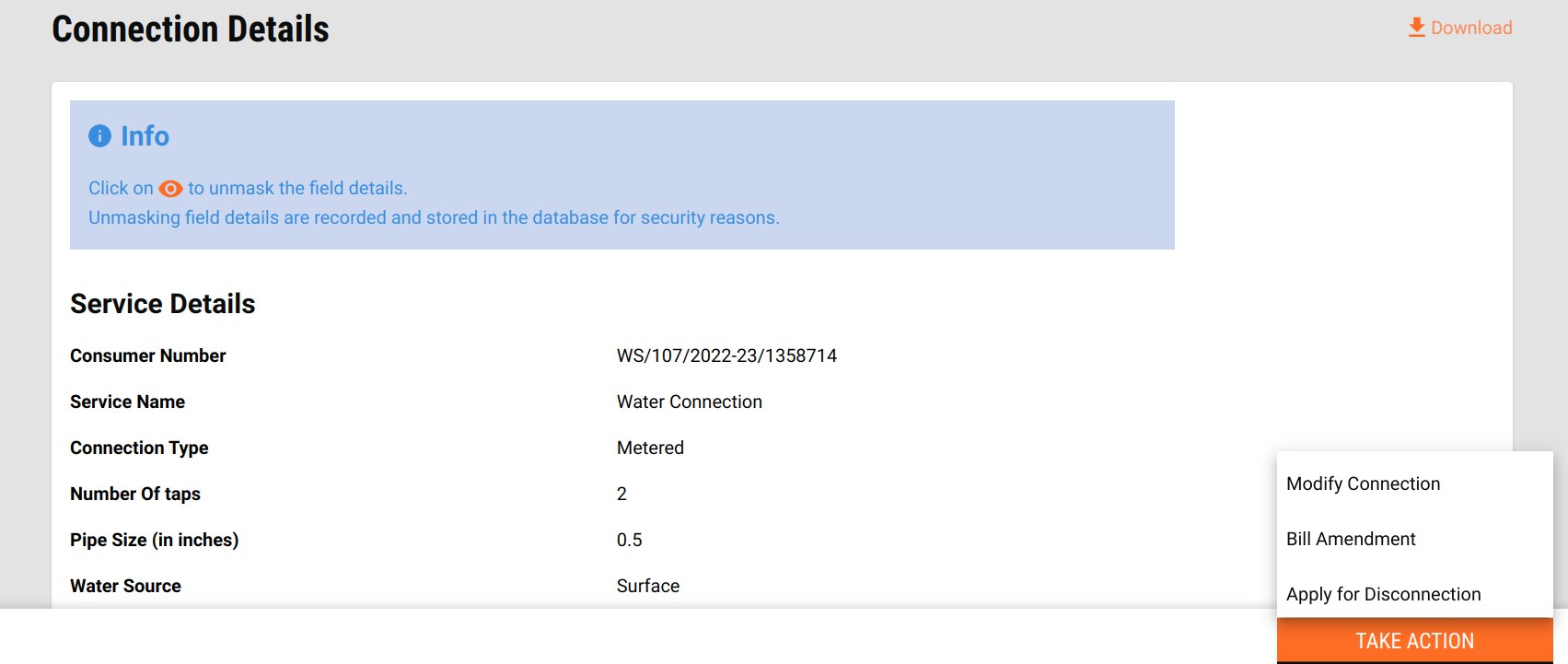
Once a new application connection is activated, the system generates a consumer code. This code is used to route users to the connection details screen from the search/connection screen.

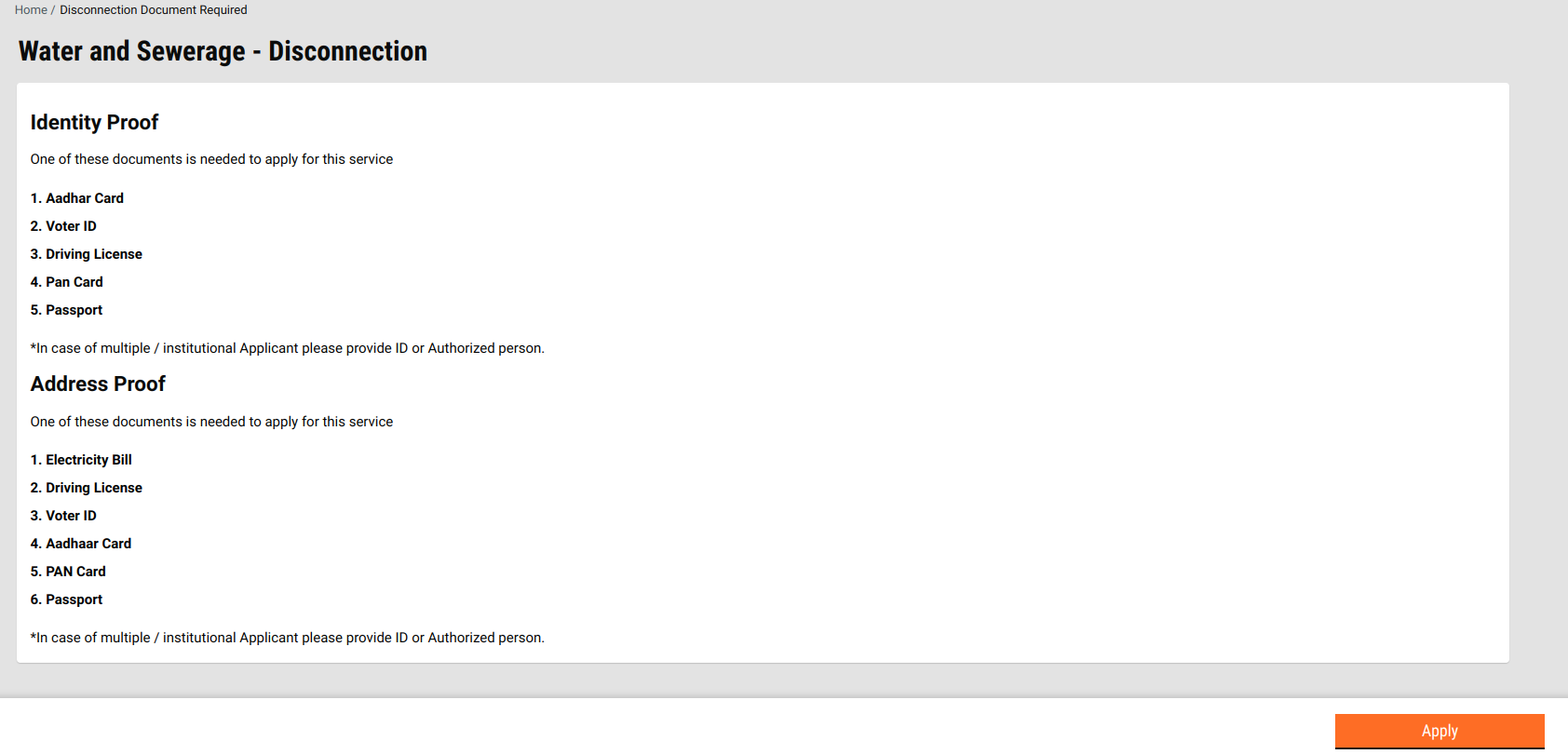
Clicking on the Take Action button displays multiple options based on conditions. Clicking on the Apply for Disconnection option routes users to the Disconnect Document Required screen.<br>

<figure><img src="/files/hekOkgpKcYjcBxcVZ8dV" alt=""><figcaption></figcaption></figure>

<figure><img src="/files/d4U48BhJIXNE7GpRnzcK" alt=""><figcaption></figcaption></figure>

#### **Validations** <a href="#validations" id="validations"></a>

* To disconnect, the connection should be in an **ACTIVE** state. Connections which are under **WORKFLOW** or **INACTIVE** are not eligible for disconnection.
* In cases dues are pending, the user has to clear the dues before applying for Disconnection.
* The Disconnect option itself is not displayed in the action list for the connection which is **INACTIVE**.

**Connection details**:[Employee: Water and Sewerage Connection Details](/local-governance/access/local-governance-stack/water-and-sewerage/water-services/water-and-sewerage-service-ui-docs/employee-connection-details.md)

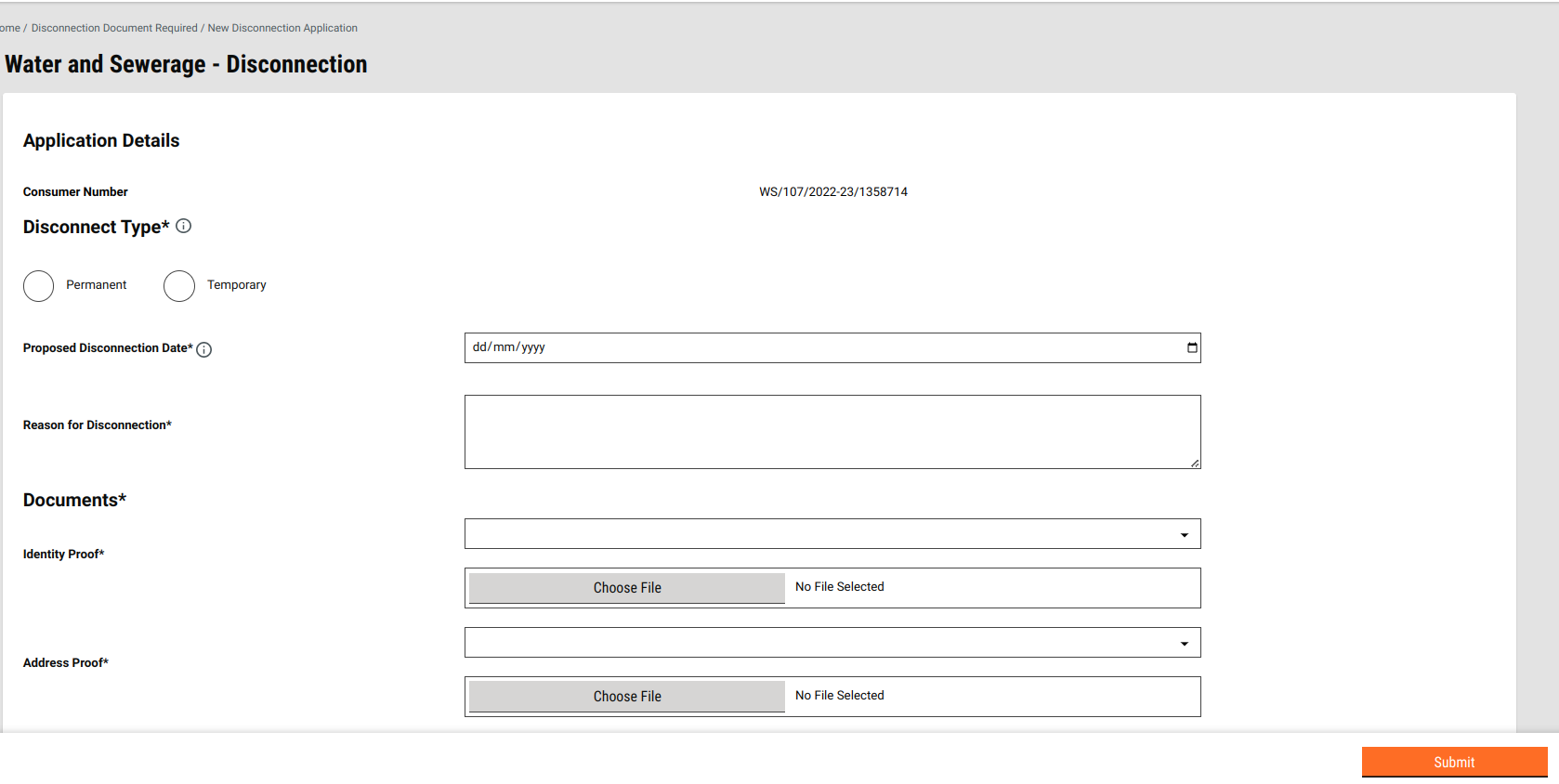
Clicking on the Apply button routes users to the Disconnection apply screen.

<figure><img src="/files/Pc2xKlau7kq1w6Y41scU" alt=""><figcaption></figcaption></figure>

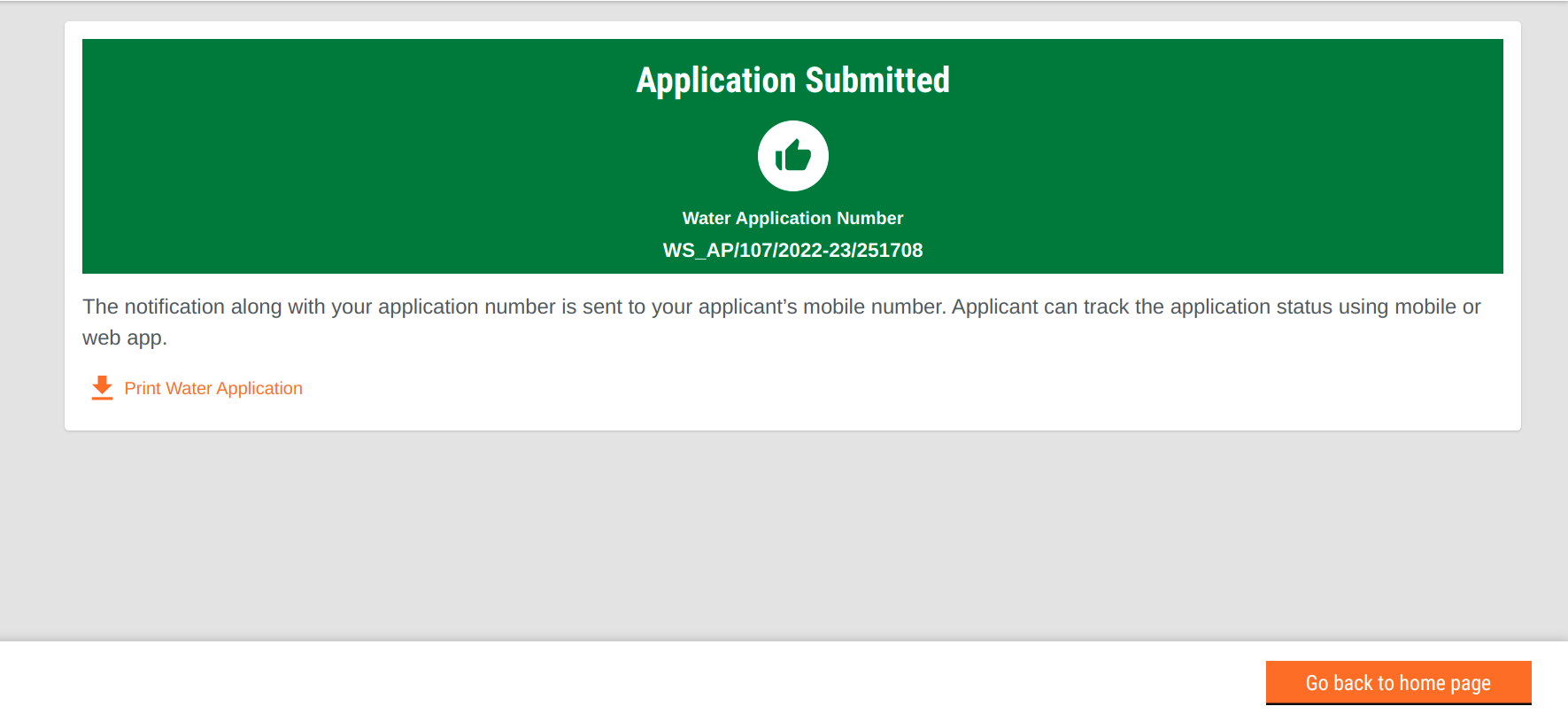
**Acknowledgement screen**

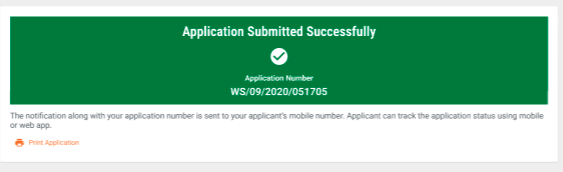
Successful create and update calls routes users to the acknowledgement screen.

<div align="left"><figure><img src="/files/rJr88W3qWV5JRQeh7Trh" alt=""><figcaption></figcaption></figure></div>

#### W\&S Application <a href="#w-and-s-application" id="w-and-s-application"></a>

Users get the acknowledgement form once they have created and submitted their application successfully. Processing of applications pending field inspection and user payment enables the download of the estimation letter and the sanction letter respectively. The section below provides the configuration for the document downloads.&#x20;

#### Acknowledgement Download

Users can download the acknowledgement after submitting the W\&S Create Application.

<figure><img src="/files/QJ2XLnOLHb0Mx4XQkOOR" alt=""><figcaption></figcaption></figure>

## Technical Implementation Details

File Path: <https://github.com/egovernments/DIGIT-Dev/blob/develop/frontend/micro-ui/web/micro-ui-internals/packages/modules/ws/src/pageComponents/WSDisconnectionDocsRequired.js>

File Path: <https://github.com/egovernments/DIGIT-Dev/blob/develop/frontend/micro-ui/web/micro-ui-internals/packages/modules/ws/src/pages/employee/DisconnectionApplication/index.js>

&#x20;**Data fetch, load and render**

`ws-services/wc/_create`

`sw-services/swc/_create`

**Case 1: In the case of Water connections:**

* Clicking on Submit button calls the  `ws-services/wc/_create` API and creates the application. The update API `ws-services/wc/_update`is called after getting a successful response on creating the application.

**Case 2: In the case of Sewerage connections:**

* Clicking on Submit button calls the `sw-services/swc/_create` API and creates the application. The update API `sw-services/swc/_update` is called after getting a successful response on creating the application.

File Path: <https://github.com/egovernments/DIGIT-Dev/blob/develop/frontend/micro-ui/web/micro-ui-internals/packages/modules/ws/src/pages/employee/WSResponse.js>

File Path: <https://github.com/egovernments/DIGIT-Dev/blob/develop/frontend/micro-ui/web/micro-ui-internals/packages/modules/ws/src/pages/employee/DisconnectionApplication/WSDisconnectionResponse.js>

The code for the application PDF is written in the below-mentioned file.

File Path: <https://github.com/egovernments/DIGIT-Dev/blob/develop/frontend/micro-ui/web/micro-ui-internals/packages/modules/ws/src/utils/getWSAcknowledgementData.js>

## **Role Action Mapping**

<table><thead><tr><th width="95">S.No.</th><th>API</th><th>Roles</th><th>Action ID</th></tr></thead><tbody><tr><td>1</td><td><code>/egov-mdms-service/v1/_search</code></td><td><code>WS_CEMP, SW_CEMP</code></td><td><code>954</code></td></tr><tr><td>2</td><td><code>/ws-services/wc/_create</code></td><td><code>WS_CEMP, SW_CEMP</code></td><td><code>1899, 1917</code></td></tr><tr><td>3</td><td><code>/sw-services/swc/_create</code></td><td><code>WS_CEMP, SW_CEMP</code></td><td><code>1899, 1917</code></td></tr><tr><td>4</td><td><code>/ws-services/wc/_update</code></td><td><code>WS_CEMP, SW_CEMP</code></td><td><code>1899, 1917</code></td></tr><tr><td>5</td><td><code>/sw-services/swc/_update</code></td><td><code>WS_CEMP, SW_CEMP</code></td><td><code>1899, 1917</code></td></tr><tr><td>6</td><td><code>/filestore/v1/files/url</code></td><td><code>EMPLOYEE</code></td><td> </td></tr></tbody></table>


---

# Agent Instructions: Querying This Documentation

If you need additional information that is not directly available in this page, you can query the documentation dynamically by asking a question.

Perform an HTTP GET request on the current page URL with the `ask` query parameter:

```
GET https://docs.digit.org/local-governance/access/local-governance-stack/water-and-sewerage/water-services/water-and-sewerage-service-ui-docs/employee-disconnection-create-flow.md?ask=<question>
```

The question should be specific, self-contained, and written in natural language.
The response will contain a direct answer to the question and relevant excerpts and sources from the documentation.

Use this mechanism when the answer is not explicitly present in the current page, you need clarification or additional context, or you want to retrieve related documentation sections.
