# Employee: Modify Application Details

**Objective:** Provide employees with specific workflow actions.

The same screen is used for both application details and to modify application details. The page provides the details of these workflows based on the conditions.

## **Workflow Details**

#### **Modify Application Details**

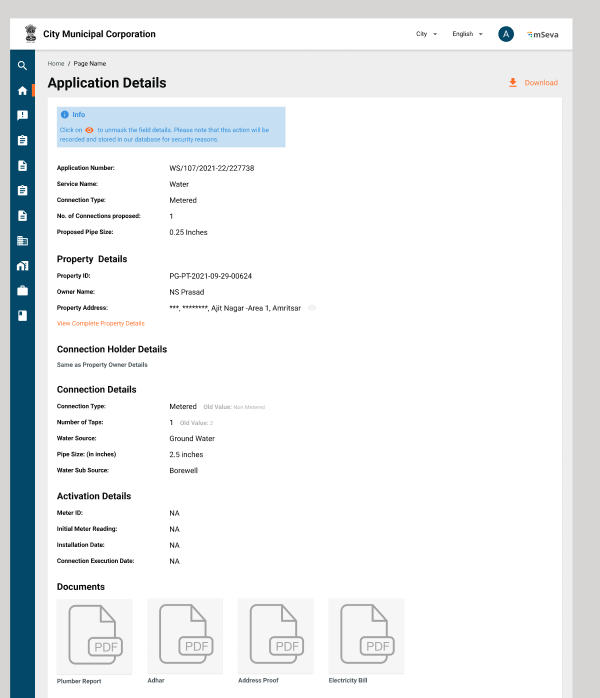
Clicking on the Application Number in the inbox/search screen/connection search routes users to the application details screen. A search call is made before rendering the screen and details are populated based on the search response.

**Modify Application Details Screen**

<div align="left"><figure><img src="/files/dbrumxHyuRJmvK3FjXa1" alt=""><figcaption></figcaption></figure></div>

**Timeline View:**

![](/files/krs1D2ExIM18SDKV2zyB)

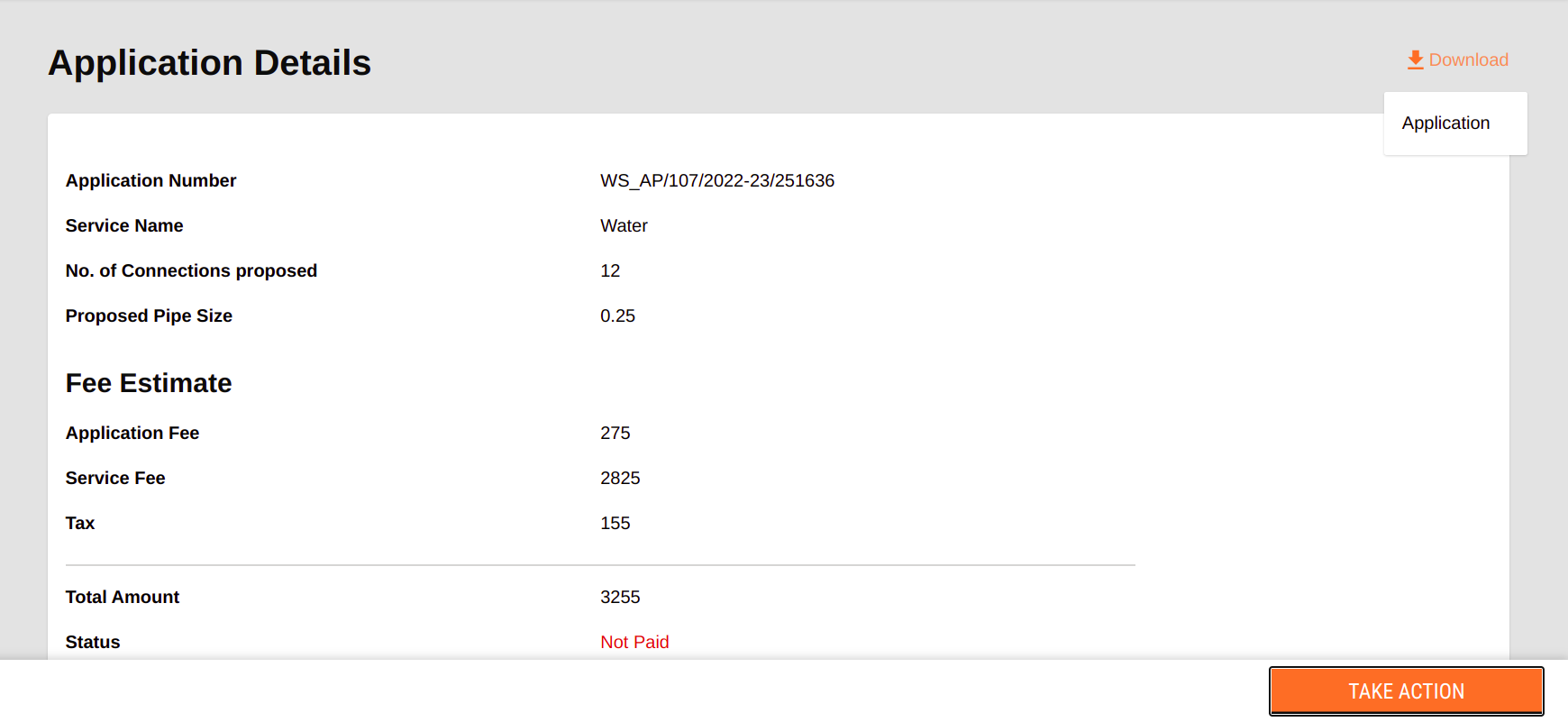
#### Downloads <a href="#downloads" id="downloads"></a>

<figure><img src="/files/IrwtgJX4wvSlrtoXlEbq" alt=""><figcaption></figcaption></figure>

**Water & Sewerage Workflow Table**

| **Role**                                     | **Action**       | **Next State**  | **Status**           |
| -------------------------------------------- | ---------------- | --------------- | -------------------- |
| Citizen/ Counter Employee/WS\_CEMP/ SW\_CEMP | INITIATE         | INITIATED       | INITIATED            |
| WS\_APPROVER / SW\_APPROVER                  | VERIFY \&FORWARD | PENDINGAPPROVAL | Pending for APproval |
| WS\_APPROVER / SW\_APPROVER                  | APPROVE          | Approved        | Approved             |
| WS\_APPROVER / SW\_APPROVER                  | REJECT           | Rejected        | Rejected             |

## **Implementation Details**

**Hook details for application details search:**

```
  let { isLoading, isError, data: applicationDetails, error } = Digit.Hooks.ws.useWSModifyDetailsPage(t, tenantId, applicationNumber, serviceType, userInfo, { privacy: Digit.Utils.getPrivacyObject() });
```

**File Path:** <https://github.com/egovernments/DIGIT-Dev/blob/develop/frontend/micro-ui/web/micro-ui-internals/packages/modules/ws/src/pages/employee/ModifyApplicationDetails.js>

It is common for all modules, find the path here: <https://github.com/egovernments/DIGIT-Dev/blob/develop/frontend/micro-ui/web/micro-ui-internals/packages/modules/templates/ApplicationDetails/index.js>

**Method Reference:**

`const applicationDownloadObject = { order: 3, label: t("WS_APPLICATION"), onClick: handleDownloadPdf, };`&#x20;

File Path: <https://github.com/egovernments/DIGIT-Dev/blob/develop/frontend/micro-ui/web/micro-ui-internals/packages/modules/ws/src/pages/employee/ModifyApplicationDetails.js>

## **Localisation Details**

Localisation keys are added in the ‘*rainmaker-ws*’ locale module.

**Water & Sewerage Workflow:**

| **Role**                                     | **Action**       | **Next State**  | **Status**           |
| -------------------------------------------- | ---------------- | --------------- | -------------------- |
| Citizen/ Counter Employee/WS\_CEMP/ SW\_CEMP | INITIATE         | INITIATED       | INITIATED            |
| WS\_APPROVER / SW\_APPROVER                  | VERIFY \&FORWARD | PENDINGAPPROVAL | Pending for APproval |
| WS\_APPROVER / SW\_APPROVER                  | APPROVE          | Approved        | Approved             |
| WS\_APPROVER / SW\_APPROVER                  | REJECT           | Rejected        | Rejected             |

**Employee Roles and Credentials:** The login credentials and details are available in the document here:[<img src="https://developers.google.com/drive/images/drive_icon.png" alt="" data-size="line">DIGIT Login Credentials](https://docs.google.com/spreadsheets/d/15p6dmlVUXvopvzyyG06ty2rxtffSMQxN5F2l2FSWoFA/edit#gid=0)

## **API Call Role Action Mapping**

<table><thead><tr><th width="99">S.No</th><th>API</th><th>Action ID</th><th>Roles</th></tr></thead><tbody><tr><td>12</td><td>/<code>ws-calculator/waterCalculator/_estimate</code> and <code>/sw-calculator/sewerageCalculator/_estimate</code></td><td><p><code>1966,</code></p><p><code>1967</code></p></td><td><p><code>WS_CEMP</code>,<code>WS_DOC_VERIFIER</code>,<code>WS_FIELD_INSPECTOR</code>,<code>WS_APPROVER</code>,<code>WS_CLERK</code></p><p><code>SW_CEMP,SW_DOC_VERIFIER,SW_FIELD_INSPECTOR,SW_CLERK</code></p></td></tr><tr><td>1</td><td><code>/access/v1/actions/mdms/_get</code></td><td><code>870</code></td><td> </td></tr><tr><td>13</td><td><code>/egov-hrms/employees/_search</code></td><td><code>1752</code></td><td> </td></tr><tr><td>4</td><td><code>/egov-workflow-v2/egov-wf/businessservice/_search</code></td><td><code>1743</code></td><td><code>EMPLOYEE</code></td></tr><tr><td>9</td><td><code>/filestore/v1/files/url</code></td><td><code>1528</code></td><td><code>EMPLOYEE</code></td></tr><tr><td>3</td><td><code>/localization/messages/v1/_search</code></td><td><code>1531</code></td><td> </td></tr><tr><td>7</td><td><code>/property-services/property/_search</code></td><td><code>1897</code></td><td><code>PT_CEMP</code>,<code>PT_DOC_VERIFIER</code>,<code>PT_FIELD_INSPECTOR</code>,<code>PT_APPROVER</code></td></tr><tr><td>6</td><td><code>/sw-services/swc/_search</code></td><td><code>1940</code></td><td><code>SW_CEMP</code>,<code>SW_DOC_VERIFIER</code>,<code>SW_FIELD_INSPECTOR</code>,<code>SW_CLERK</code></td></tr><tr><td>11</td><td><code>/sw-services/swc/_update</code></td><td><code>1939</code></td><td><code>SW_CEMP</code>,<code>SW_DOC_VERIFIER</code>,<code>SW_FIELD_INSPECTOR</code>,<code>SW_CLERK</code></td></tr><tr><td>2</td><td><code>/user/_search</code></td><td><code>604</code></td><td> </td></tr><tr><td>5</td><td><code>/ws-services/wc/_search</code></td><td><code>1900</code></td><td><code>WS_CEMP</code>,<code>WS_DOC_VERIFIER</code>,<code>WS_FIELD_INSPECTOR</code>,<code>WS_APPROVER</code>,<code>WS_CLERK</code></td></tr><tr><td>10</td><td><code>/ws-services/wc/_update</code></td><td><code>1901</code></td><td><code>WS_CEMP</code>,<code>WS_DOC_VERIFIER</code>,<code>WS_FIELD_INSPECTOR</code>,<code>WS_APPROVER</code>,<code>WS_CLERK</code></td></tr></tbody></table>

&#x20;**Employee Roles and Credentials:** The login credentials and details are available in the document here:[<img src="https://developers.google.com/drive/images/drive_icon.png" alt="" data-size="line">DIGIT Login Credentials](https://docs.google.com/spreadsheets/d/15p6dmlVUXvopvzyyG06ty2rxtffSMQxN5F2l2FSWoFA/edit#gid=0)


---

# Agent Instructions: Querying This Documentation

If you need additional information that is not directly available in this page, you can query the documentation dynamically by asking a question.

Perform an HTTP GET request on the current page URL with the `ask` query parameter:

```
GET https://docs.digit.org/local-governance/access/local-governance-stack/water-and-sewerage/water-services/water-and-sewerage-service-ui-docs/employee-modify-application-details.md?ask=<question>
```

The question should be specific, self-contained, and written in natural language.
The response will contain a direct answer to the question and relevant excerpts and sources from the documentation.

Use this mechanism when the answer is not explicitly present in the current page, you need clarification or additional context, or you want to retrieve related documentation sections.
