> For the complete documentation index, see [llms.txt](https://docs.digit.org/llms.txt). Markdown versions of documentation pages are available by appending `.md` to page URLs; this page is available as [Markdown](https://docs.digit.org/local-governance/v2.8/platform/configure-digit/configuring-digit-services/bill-amendment-service-configuration/ui-configuration/employee-bill-amendment-search-edit-and-resubmit-approve-reject-and-send-back-flows.md).
# Employee: Bill Amendment - Search, Edit & Resubmit, Approve, Reject & Send-Back Flows
**Objective:** To provide employees with search, edit, resubmit, approve, reject and option to send back amendment bills.
## Workflow Details
#### **Search Bill Amendment**
When the Bill Amendment application is created by the counter employee a bill amendment application number is generated. Using this number as well as other parameters, a user can search for the application on the Bill Amendment Inbox page.
{% hint style="info" %}
Insert Bill Amend inbox Screenshot here (not developed yet in new-UI)
{% endhint %}
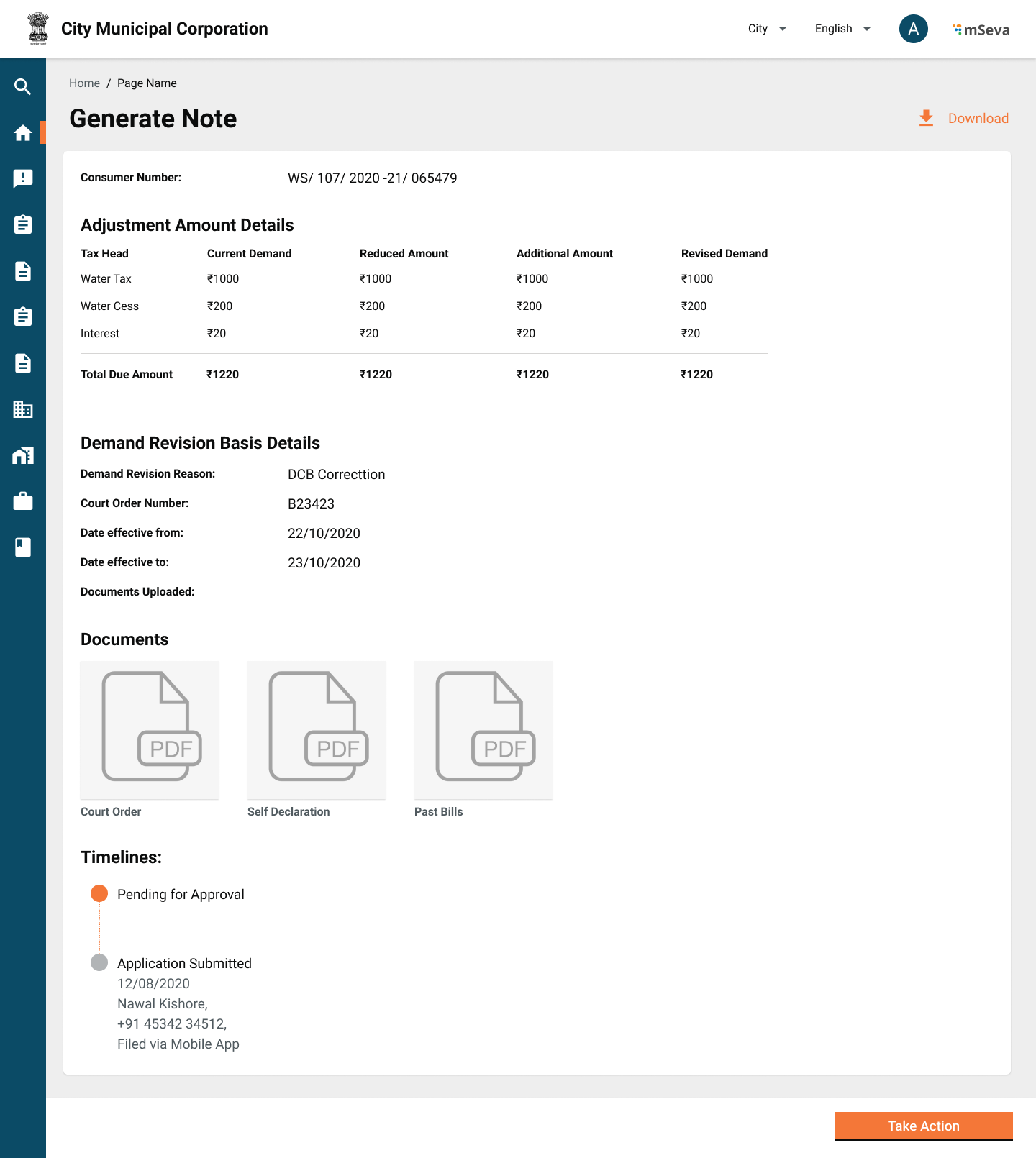
The first column of the result is the Bill Amendment number and every cell in this column is a link that leads the user to the Bill Amendment application details. This page has all details regarding the amendment application.
{% hint style="info" %}
A download option is provided to download the application acknowledgement
{% endhint %}
{% hint style="info" %}
Timelines Panel shows the status history and current status of the application
{% endhint %}
{% hint style="info" %}
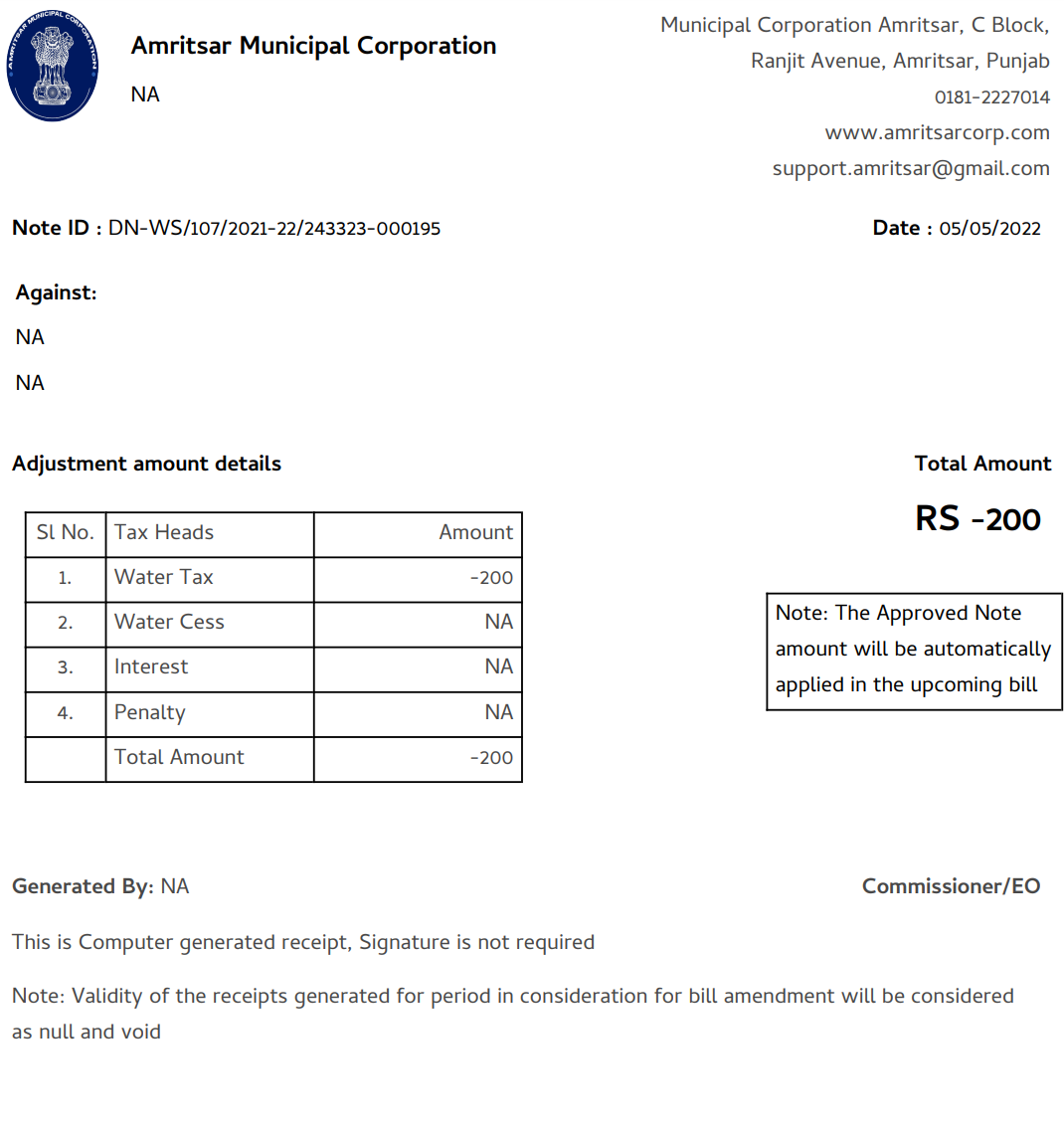
Once the application is approved the download button has the option to download coupon-pdf as well that looks as follows:
{% endhint %}
#### **Approve, Reject & Send-Back Bill Amendment**
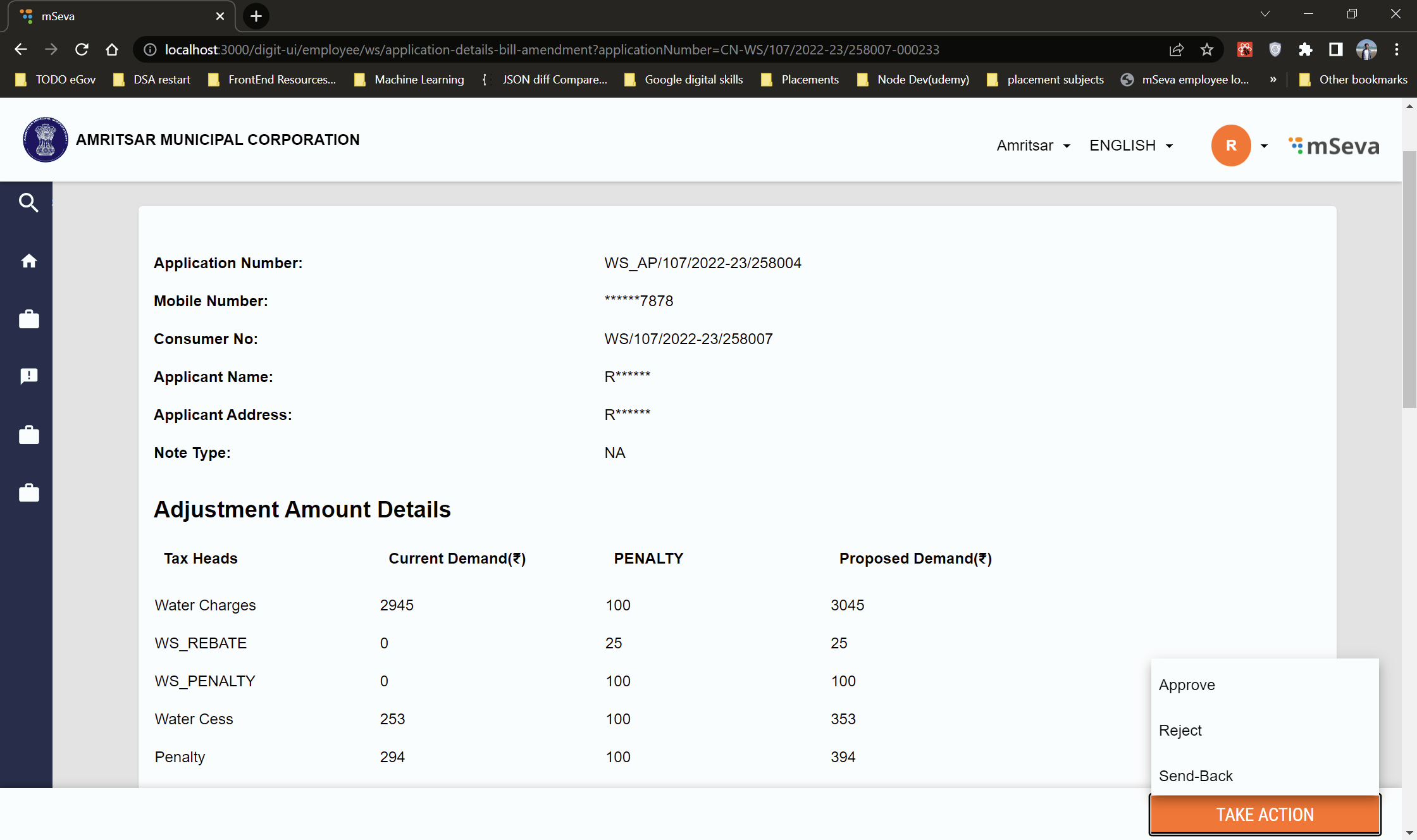
Only users with the role of approver i.e., “WS-AP”, “SW-AP” can approve the application.
The Application Details page of the bill amendment contains the Take Action button on the action bar at the bottom of the screen. The Take Action button opens a dropdown that contains some options described below. After clicking any of the given options an Action modal window is rendered.
* Approve → After verifying approver can approve the application
* Reject → Approver can Reject the application by giving a reason in the comments section displayed in the action modal.
* Send-Back → Approver can send back the application to the counter employee after giving the reason in the action modal. This option is used when there is an error in the application or something needs to be changed by the counter employee.
For Counter Employees, the action bar is not visible until the approver sends the application back to the counter employee. It is visible when the approver sends back the application and it shows an option to resubmit using which the counter employee can submit the application again.
## Implementation Details
File Path:
{% embed url="" %}
## **MDMS Data**
* Tax Heads: [egov-mdms-data/TaxHeadMaster.json at 95466d51227427fcb79b45cc6ac6ef8be6b34f94 · egovernments/egov-mdms-data](https://github.com/egovernments/egov-mdms-data/blob/95466d51227427fcb79b45cc6ac6ef8be6b34f94/data/pb/BillingService/TaxHeadMaster.json)
* Demand Revision: [egov-mdms-data/DemandRevisionBasis.json at 95466d51227427fcb79b45cc6ac6ef8be6b34f94 · egovernments/egov-mdms-data](https://github.com/egovernments/egov-mdms-data/blob/95466d51227427fcb79b45cc6ac6ef8be6b34f94/data/pb/BillAmendment/DemandRevisionBasis.json)
* Required Documents: [egov-mdms-data/documentObj.json at 95466d51227427fcb79b45cc6ac6ef8be6b34f94 · egovernments/egov-mdms-data](https://github.com/egovernments/egov-mdms-data/blob/95466d51227427fcb79b45cc6ac6ef8be6b34f94/data/pb/BillAmendment/documentObj.json)
## API Details
| **API** | | **API description** |
| ------------------------------------ | ------------------ | ---------------------------------------------------------------------------- |
| `inbox/v1/_search?_` | `WS_CEMP, SW_CEMP` | `Bill Amendment Search` |
| `/billing-service/amendment/_update` | `WS_CEMP, WS_AP`, | `To Update bill amendment application(For edit,resubmit,approve and reject)` |
---
# Agent Instructions
This documentation is published with GitBook. GitBook is the documentation platform designed so that both humans and AI agents can read, navigate, and reason over technical content effectively. Learn more at gitbook.com.
## Querying This Documentation
If you need additional information that is not directly available in this page, you can query the documentation by asking a question.
Perform an HTTP GET request on the following URL with the `ask` and `goal` query parameters:
```
GET https://docs.digit.org/local-governance/v2.8/platform/configure-digit/configuring-digit-services/bill-amendment-service-configuration/ui-configuration/employee-bill-amendment-search-edit-and-resubmit-approve-reject-and-send-back-flows.md?ask=&goal=
```
`ask` is the immediate question: it should be specific, self-contained, and written in natural language.
`goal` is what the user is ultimately trying to achieve, the reason they need the answer. Sharing it helps GitBook give you a better, more relevant answer. A goal is most helpful when it describes the outcome the user wants rather than restating the question. For example, with `ask=how do I create an API token`, a goal like `automate deployments from our CI pipeline` lets GitBook tailor the answer to that use case.
The response will contain a direct answer to the question and relevant excerpts and sources from the documentation.
Use this mechanism when the answer is not explicitly present in the current page, you need clarification or additional context, or you want to retrieve related documentation sections.

 egov-mdms-data/TaxHeadMaster.json at 95466d51227427fcb79b45cc6ac6ef8be6b34f94 · egovernments/egov-mdms-data](https://github.com/egovernments/egov-mdms-data/blob/95466d51227427fcb79b45cc6ac6ef8be6b34f94/data/pb/BillingService/TaxHeadMaster.json)
* Demand Revision: [
egov-mdms-data/TaxHeadMaster.json at 95466d51227427fcb79b45cc6ac6ef8be6b34f94 · egovernments/egov-mdms-data](https://github.com/egovernments/egov-mdms-data/blob/95466d51227427fcb79b45cc6ac6ef8be6b34f94/data/pb/BillingService/TaxHeadMaster.json)
* Demand Revision: [