> For the complete documentation index, see [llms.txt](https://docs.digit.org/llms.txt). Markdown versions of documentation pages are available by appending `.md` to page URLs; this page is available as [Markdown](https://docs.digit.org/platform/build/core-services/audit-service.md).
# Audit Service
### Overview
The objective of the audit service is listed below -
1. To provide a one-stop framework for signing data i.e. creating an immutable data entry to track activities of an entity. Whenever an entity is created/updated/deleted the operation is captured in the data logs and is digitally signed to protect it from tampering.
### Pre-requisites
1. Prior knowledge of Java/J2EE
2. Prior knowledge of SpringBoot
3. Prior knowledge of PostgreSQL
4. Prior knowledge of REST APIs and related concepts like path parameters, headers, JSON etc.
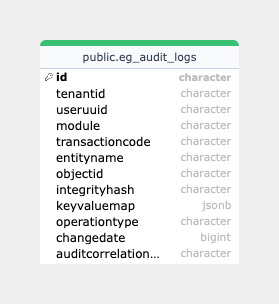
## Database Diagram
## Setup & Key Functionalities
The audit service will be parsing all the persister configs so that it can process data received by the persister and create audit logs out of it.
### **Setup**
**Step 1:** Add the following metrics to the existing persister configs -
{% code lineNumbers="true" %}
```
isAuditEnabled: true
module: PGR
objecIdJsonPath: $.id
tenantIdJsonPath: $.tenantId
transactionCodeJsonPath: $.transactionCode
auditAttributeBasePath: $.service
```
{% endcode %}
**Step 2:** If a custom implementation of `ConfigurableSignAndVerify` interface is present, provide the signing algorithm implementation name as a part of `audit.log.signing.algorithm` property. For example, if the signing algorithm is HMAC, the property will be set as follows -
{% code lineNumbers="true" %}
```
audit.log.signing.algorithm=HMAC
```
{% endcode %}
**Step 3:** Set `egov.persist.yml.repo.path` this property to the location of persister configs.
**Step 4:** Run the audit-service application along with the persister service.
**Definitions**
1. Config file - A YAML (xyz.yml) file which contains the persister configuration for running the audit service.
2. API - A REST endpoint to post audit log data.
### **Functionalities**
1. When the audit-service create API is hit, it will validate request size, keyValueMap and operationType.
2. Upon successful validation, it will choose the configured signer and sign the entity data.
3. Once audit logs are signed and ready, it will send them to `audit-create` topic.
4. Persister will listen to this topic and persist the audit logs.
## Deployment Details
1. Add the required keys for enabling audit service in the persister configs.
2. Deploy the latest version of the Audit service and the Persister service.
3. Add Role-Action mapping for APIs.
## Integration Details
### Integration Scope
The audit service is used to push signed data for tracking every create/modify/delete operation done on database entities.
### Integration Benefits
* It can be used to have tamper-proof audit logs for all database transactions.
* Replaying events in chronological order will lead to the current state of the entity in the database.
### Integration Steps
1. To integrate, the host of the audit-service module should be overwritten in the helm chart.
2. `audit-service/log/v1/_create` should be added as the create endpoint for the config added.
3. `audit-service/log/v1/_search` should be added as the search endpoint for the config added.
## API Details
**1. URI**: The format of the API to be used to create audit logs using the audit service is as follows: `audit-service/log/v1/_create`
**Body**: The body consists of 2 parts: RequestInfo and AuditLogs.
Sample Request Body -
{% code lineNumbers="true" %}
```json
{
"RequestInfo": {
"apiId": "asset-services",
"ver": null,
"ts": null,
"action": null,
"did": null,
"key": null,
"msgId": "search with from and to values",
"authToken": "83a1cfb3-6fde-4406-9ee1-622b3ecc7dab"
},
"AuditLogs": [
{
"userUUID": "11b0e02b-0145-4de2-bc42-c97b96264807",
"module": "PGR",
"tenantId": "pb.amritsar",
"transactionCode": "PGR.CREATE",
"changeDate": 1657104693726,
"entityName": "eg_pgr_service",
"objectId": "c8c901da-61e9-4cd5-89f7-7560997922b7",
"keyValueMap": {
"id": "89651651-841a-4b8c-a503-f5d4bb10f4d5",
"tenantId": "pb.amritsar",
"assemblyConstituency": "AMC",
"applicationNumber": "c8c901da-61e9-4cd5-89f7-7560997922b7",
"applicantId": null,
"dateSinceResidence": 1590825279,
"createdBy": "11b0e02b-0145-4de2-bc42-c97b96264807",
"lastModifiedBy": "11b0e02b-0145-4de2-bc42-c97b96264807",
"createdTime": 1657104693312,
"lastModifiedTime": 1657104693312
},
"operationType": "CREATE"
},
{
"userUUID": "11b0e02b-0145-4de2-bc42-c97b96264807",
"module": "PGR",
"tenantId": "pb.amritsar",
"transactionCode": "PGR.CREATE",
"changeDate": 1657104693732,
"entityName": "eg_pgr_address",
"objectId": "c8c901da-61e9-4cd5-89f7-7560997922b7",
"keyValueMap": {
"id": "84cbe5d1-6ee8-4379-a0c4-0e2a5c94689d",
"tenantId": "pb.amritsar",
"doorNo": "1010",
"latitude": null,
"longitude": null,
"buildingName": "Avigna Residence",
"addressId": null,
"addressNumber": "34 GA",
"type": "RESIDENTIAL",
"addressLine1": "KP Layout",
"addressLine2": "",
"landmark": "Petrol pump",
"street": "12th Main",
"city": "Amritsar",
"locality": "New Amritsar Locality",
"pincode": "143501",
"detail": "",
"registrationId": "89651651-841a-4b8c-a503-f5d4bb10f4d5"
},
"operationType": "CREATE"
}
]
}
```
{% endcode %}
**2.** **URI**: The format of the API to be used to search audit logs using audit-service is as follows: `audit-service/log/v1/_search`
**Body**: The body consists RequestInfo and search criteria are passed as query params.
Sample curl for search -
```
curl --location --request POST 'https://dev.digit.org/audit-service/log/v1/_search?offset=0&limit=10&tenantId=pb.amritsar&objectId=c8c901da-61e9-4cd5-89f7-7560997922b7' \
--header 'Content-Type: application/json' \
--data-raw '{
"RequestInfo": {
"apiId": "asset-services",
"ver": null,
"ts": null,
"action": null,
"did": null,
"key": null,
"msgId": "search with from and to values",
"authToken": "83a1cfb3-6fde-4406-9ee1-622b3ecc7dab"
}
}'
```
### Reference Documents
Postman Collection - [Audit Service Postman Collection](https://www.getpostman.com/collections/27d92894fa32f72b83f5)
Play around with the APIs: [DIGIT-Playground](https://digit-api.apidog.io/doc-507201)
---
# Agent Instructions
This documentation is published with GitBook. GitBook is the documentation platform designed so that both humans and AI agents can read, navigate, and reason over technical content effectively. Learn more at gitbook.com.
## Querying This Documentation
If you need additional information that is not directly available in this page, you can query the documentation by asking a question.
Perform an HTTP GET request on the following URL with the `ask` and `goal` query parameters:
```
GET https://docs.digit.org/platform/build/core-services/audit-service.md?ask=&goal=
```
`ask` is the immediate question: it should be specific, self-contained, and written in natural language.
`goal` is what the user is ultimately trying to achieve, the reason they need the answer. Sharing it helps GitBook give you a better, more relevant answer. A goal is most helpful when it describes the outcome the user wants rather than restating the question. For example, with `ask=how do I create an API token`, a goal like `automate deployments from our CI pipeline` lets GitBook tailor the answer to that use case.
The response will contain a direct answer to the question and relevant excerpts and sources from the documentation.
Use this mechanism when the answer is not explicitly present in the current page, you need clarification or additional context, or you want to retrieve related documentation sections.