> For the complete documentation index, see [llms.txt](https://docs.digit.org/llms.txt). Markdown versions of documentation pages are available by appending `.md` to page URLs; this page is available as [Markdown](https://docs.digit.org/platform/build/core-services/mdms-v2-master-data-management-service.md).
# MDMS V2 (Master Data Management Service)
## Overview
MDMS v2 provides APIs for defining schemas, searching schemas, and adding master data against these defined schemas. All data is now stored in PostgreSQL tables instead of GitHub. MDMS v2 currently also includes the v1 search API for fetching data from the database in the same format as the MDMS v1 search API to ensure backwards compatibility.
## **Pre-requisites**
1. Prior knowledge of Java/J2EE.
2. Prior knowledge of Spring Boot.
3. Prior knowledge of REST APIs and related concepts like path parameters, headers, JSON, etc.
4. Prior knowledge of Git.
5. Advanced knowledge of operating JSON data would be an added advantage to understanding the service.
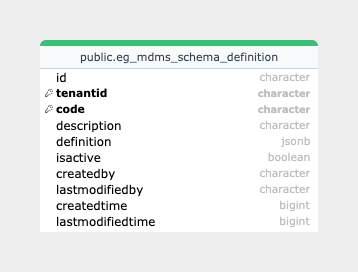
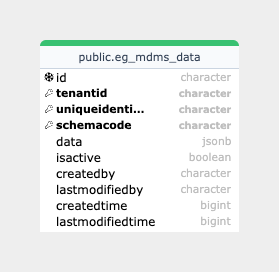
## Database Diagram
{% columns %}
{% column %}
{% endcolumn %}
{% column %}
{% endcolumn %}
{% endcolumns %}
## **Functionalities**
1. Create schema: MDMS v2 introduces functionality to define your schema with all validations and properties supported by JSON schema draft 07. Below is a sample schema definition for your reference -
{% code overflow="wrap" lineNumbers="true" %}
```
"SchemaDefinition": {
"tenantId": "pb",
"code": "TradeLicense.TradeSubType",
"description": "Trade sub-type which is a child of Trade type",
"definition": {
"$schema": "http://json-schema.org/draft-07/schema#",
"type": "object",
"properties": {
"name": {
"type": "string",
"pattern": "^[A-Za-z]+$"
},
"code": {
"type": "string"
},
"tradeTypeCode": {
"type": "string"
}
},
"required": [
"name",
"code",
"tradeTypeCode"
],
"x-unique": [
"name"
],
"x-ref-schema": [
{
"fieldPath": "tradeTypeCode",
"schemaCode": "TradeLicense.TradeType"
}
]
},
"isActive": true
}
```
{% endcode %}
To create a basic schema definition, use the following keywords:
* **$schema**: specifies which draft of the JSON Schema standard the schema adheres to.
* **title and description**: state the intent of the schema. These keywords don’t add any constraints to the data being validated.
* **type**: defines the first constraint on the JSON data.
Reference - [JSON Schema - Creating your first schema](https://json-schema.org/learn/getting-started-step-by-step#create)Now, properties can be added under the schema definition. In JSON Schema terms, properties is a validation keyword. When you define properties, you create an object where each property represents a key in the JSON data that’s being validated. You can also specify which properties described in the object are required.
Reference - [JSON Schema - Creating your first schema](https://json-schema.org/learn/getting-started-step-by-step#define)
Additionally, we have two keys which are not part of the standard JSON schema attributes -
* x-unique: specifies the fields in the schema utilising which a unique identifier for each master data will be created.
* x-ref-schema: specifies referenced data. This is useful in scenarios where the parent-child relationship needs to be established in master data. For example, Trade Type can be a parent master data to Trade Sub Type. In the example above, the field path represents the JSONPath of the attribute in the master data, which contains the unique identifier of the parent which is being referenced. Schema code represents the schema under which the referenced master data needs to be validated for existence.
2. Search schema: MDMS v2 has an API to search the schema based on the tenantid, schema code, and unique identifier.
3. Create data: MDMS v2 enables data creation according to the defined schema. Below is an example of data based on the mentioned schema:
```
"Mdms": {
"tenantId": "pb",
"schemaCode": "TradeLicense.TradeSubType",
"data": {
"name": "Electronics",
"code": "ELECTRONICS",
"tradeTypeCode": "GOODS.MANUFACTURE"
},
"isActive": true
}
```
4. Search data: MDMS v2 exposes two search APIs - v1 and v2 search, where the v1 search API is completely backwards compatible.
5. Update data: MDMS v2 allows the updation of master data fields.
6. Fallback functionality: Both the search APIs have fallback implemented, where if data is not found for a particular tenant, the services fall back to the parent tenant(s) and return the response. If data is not found even for the parent tenant, an empty response is sent to the user.
#### API Details
1. */mdms-v2/schema/v1/\_create* - Takes RequestInfo and SchemaDefinition in the request body. SchemaDefinition has all the attributes which define the schema.
2. */mdms-v2/schema/v1/\_search* - Takes RequestInfo and SchemaDefSearchCriteria in the request body and returns schemas based on the provided search criteria.
3. */mdms-v2/v2/\_create/{schemaCode}* - Takes RequestInfo and Mdms in the request body, where the MDMS object has all the information for the master being created, and it takes schemaCode as a path parameter to identify the schema against which data is being created.
4. */mdms-v2/v2/\_search* - Takes RequestInfo and MdmsCriteria in the request body to return master data based on the provided search criteria. It also has a fallback functionality where if data is not found for the tenant which is sent, the services fall back to the parent tenant(s) to look for the data and return it.
5. */mdms-v2/v2/\_update/{schemaCode} -* Takes RequestInfo and Mdms in the request body, where the MDMS object has all the information for the master being updated, and it takes schemaCode as a path param to identify the schema against which data is being updated.
6. */mdms-v2/v1/\_search* - This is a backwards-compatible API which takes RequestInfo and MdmsCriteria in the request body to return master data based on the provided search criteria and returns the response in MDMS v1 format. It also has fallback functionality where if data is not found for the tenant which is sent, the services fall back to the parent tenant(s) to look for the data and return it.
## Postman Collection
---
# Agent Instructions
This documentation is published with GitBook. GitBook is the documentation platform designed so that both humans and AI agents can read, navigate, and reason over technical content effectively. Learn more at gitbook.com.
## Querying This Documentation
If you need additional information that is not directly available in this page, you can query the documentation by asking a question.
Perform an HTTP GET request on the following URL with the `ask` and `goal` query parameters:
```
GET https://docs.digit.org/platform/build/core-services/mdms-v2-master-data-management-service.md?ask=&goal=
```
`ask` is the immediate question: it should be specific, self-contained, and written in natural language.
`goal` is what the user is ultimately trying to achieve, the reason they need the answer. Sharing it helps GitBook give you a better, more relevant answer. A goal is most helpful when it describes the outcome the user wants rather than restating the question. For example, with `ask=how do I create an API token`, a goal like `automate deployments from our CI pipeline` lets GitBook tailor the answer to that use case.
The response will contain a direct answer to the question and relevant excerpts and sources from the documentation.
Use this mechanism when the answer is not explicitly present in the current page, you need clarification or additional context, or you want to retrieve related documentation sections.