> For the complete documentation index, see [llms.txt](https://docs.digit.org/llms.txt). Markdown versions of documentation pages are available by appending `.md` to page URLs; this page is available as [Markdown](https://docs.digit.org/platform/build/core-services/workflow.md).

# Workflow

Configure workflows as per requirements

## Overview

Workflows consist of a series of steps that transition a process from one state to another through actions performed by various actors — including humans, machines, and time-based events — to achieve goals such as onboarding an employee, approving an application, or granting a resource. The egov-workflow-v2 is a workflow engine that facilitates these operations seamlessly using a predefined configuration.

## Pre-requisites

Before you proceed with the documentation, make sure the following pre-requisites are met -

* Java 17
* Kafka server is up and running
* [egov-persister](https://docs.digit.org/platform/build/core-services/persister-service.md) service is running and has a [workflow](https://github.com/egovernments/configs/blob/UNIFIED-DEV/egov-persister/egov-workflow-v2-persister.yml) yml added to the [persister config path](https://github.com/egovernments/Digit-Core/blob/1022a4beec120df1be0f3f20065f13b698be2ecc/core-services/egov-persister/src/main/resources/application.properties#L45).
* PostgreSQL server is running, and a database is created to store workflow configuration and data

## Key Functionalities

* Always allow anyone with a role in the workflow state machine to view the workflow instances and comment on them
* On the creation of the workflow, it will appear in the inbox of all employees who have roles that can perform any state-transitioning actions in this state.
* Once an instance is marked to an individual employee, it will appear only in that employee's inbox, although point 1 will still hold true, and all others participating in the workflow can still search it and act if they have the necessary action available to them
* If the instance is marked to a person who cannot perform any state transitioning action, they can still comment/upload and mark to anyone else.
* **Overall SLA:** SLA for the complete processing of the application/Entity
* **State-level SLA:** SLA for a particular state in the workflow

<table><thead><tr><th width="255">Environment Variables</th><th>Description</th></tr></thead><tbody><tr><td>egov.wf.default.offset</td><td>The default value of offset in search</td></tr><tr><td>egov.wf.default.limit</td><td>The default value of limit in search</td></tr><tr><td>egov.wf.max.limit</td><td>The maximum number of records that are returned in search response</td></tr><tr><td>egov.wf.inbox.assignedonly</td><td>Boolean flag if set to <em>true</em> default search will return records assigned to the user only, if <em>false</em> it will return all the records based on the user’s role. <em>(default search is the search call when no query params are sent and based on the RequestInfo of the call, records are returned, it’s used to show applications in employee inbox)</em></td></tr><tr><td>egov.wf.statelevel</td><td>Boolean flag set to <em>true</em> if a state-level workflow is required</td></tr></tbody></table>

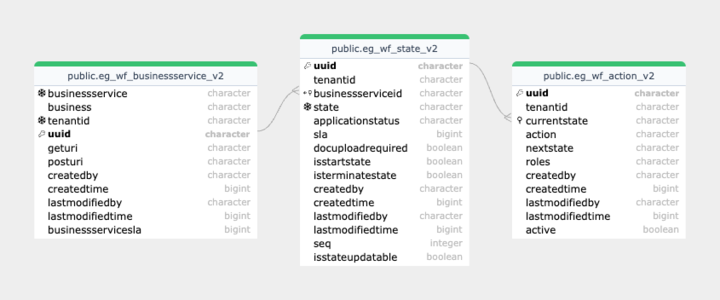
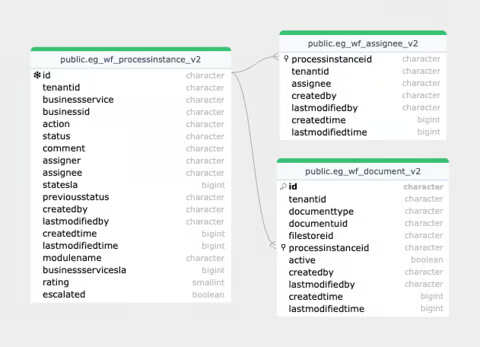
## Database Diagram

{% columns %}
{% column %}

<figure><img src="https://content.gitbook.com/content/051YseixNq69PlJkCdKt/blobs/NlobJ1ZMaZSijvpyPE4V/image.png" alt=""><figcaption></figcaption></figure>
{% endcolumn %}

{% column %}

<figure><img src="https://content.gitbook.com/content/051YseixNq69PlJkCdKt/blobs/Da26MKEoAgpIQj0QUq0O/image.png" alt=""><figcaption></figcaption></figure>
{% endcolumn %}
{% endcolumns %}

{% columns %}
{% column %}

{% endcolumn %}

{% column %}

{% endcolumn %}
{% endcolumns %}

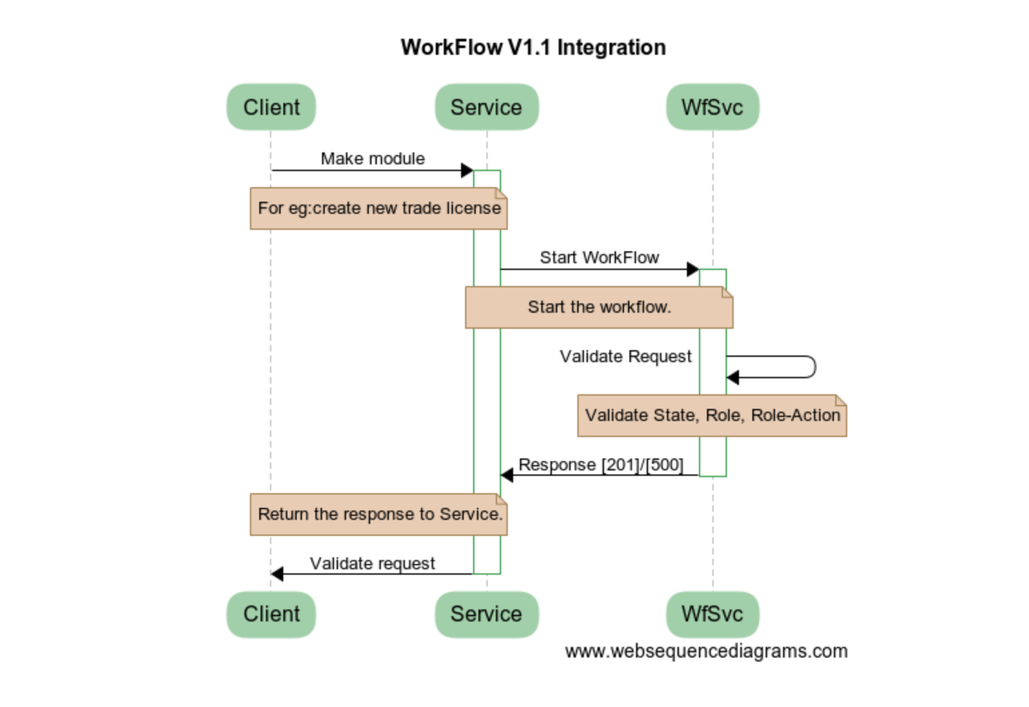
## Interaction Diagram

<div align="left"><figure><img src="https://content.gitbook.com/content/051YseixNq69PlJkCdKt/blobs/S2I5OJAbWqHQeBxdsEaj/image.png" alt=""><figcaption></figcaption></figure></div>

## Deployment Details

1. [Deploy](https://docs.digit.org/platform/deep-dive/deployment-key-concepts/deploying-digit-services.md) the latest version of eGov-workflow-V2 service
   1. **Note**: This video will give you an idea of how to deploy any DIGIT service. Additionally, you can find the latest builds for each service in our [latest release document, available here](https://docs.digit.org/platform/introducing-digit/releases/digit-2.9-lts/service-build-updates.md).
2. Add BusinessService Persister YAML path in the persister configuration
3. Add Role-Action mapping for BusinessService APIs
4. Overwrite the egov.wf.statelevel flag ( *true* for state level and *false* for tenant level)
5. Create a business service (workflow configuration) according to product requirements
6. Add Role-Action mapping for */processInstance/\_search* API
7. Add workflow persister yaml path in the persister configuration

## Configuration Details

For configuration details, refer to the links in [Reference Docs](#reference-docs).

## Integration Details

### Integration Scope

The workflow configuration can be used by any module which performs a sequence of operations on an application/Entity. It can be used to simulate and track processes in organisations to make it more efficient, too and increase accountability.

### Integration Benefits

* Role-based workflow
* An easy way of writing a rule
* File movement within workflow roles

### Integration Steps

1. To integrate, the host of eGov-workflow-v2 should be overwritten in the helm chart.
2. /process/\_search should be added as the search endpoint for searching workflow process Instance objects.
3. /process/\_transition should be added to act on an application. *(It’s for internal use in modules and should not be added in Role-Action mapping).*
4. The workflow configuration can be fetched by calling *\_search* API to check if data can be updated or not in the current state.

## Reference Docs

### Doc Links

| Title                                                                                                                                               |
| --------------------------------------------------------------------------------------------------------------------------------------------------- |
| [Configuring Workflows For New Product/Entity](https://docs.digit.org/platform/build/core-services/workflow/configuring-workflows-for-an-entity.md) |
| [Setting Up Workflows](https://docs.digit.org/platform/build/core-services/workflow/setting-up-workflows.md)                                        |
| [API Swagger Documentation](https://github.com/egovernments/DIGIT-Specs/blob/grouped-service-contracts/Common%20Services/workflow.yaml)             |
| [Migration to Workflow 2.0](https://docs.digit.org/platform/build/core-services/workflow/migration-to-workflow-2.0.md)                              |

### API List

{% embed url="<https://digit-api.apidog.io/api-6829047>" %}

## Play around with the APIs: [DIGIT-Playground](https://digit-api.apidog.io/doc-507201)

| Title                                                                                      |
| ------------------------------------------------------------------------------------------ |
| [*/businessservice/\_create*](https://www.getpostman.com/collections/8552e3de40c819e34190) |
| [*/businessservice/\_update*](https://www.getpostman.com/collections/8552e3de40c819e34190) |
| [*/businessservice/\_search*](https://www.getpostman.com/collections/8552e3de40c819e34190) |
| [*/process/\_transition*](https://www.getpostman.com/collections/8552e3de40c819e34190)     |
| [*/process/\_search*](https://www.getpostman.com/collections/8552e3de40c819e34190)         |

{% hint style="info" %}
**Note:** All the APIs are in the same Postman collection; therefore, the same link is added in each row.
{% endhint %}


---

# Agent Instructions
This documentation is published with GitBook. GitBook is the documentation platform designed so that both humans and AI agents can read, navigate, and reason over technical content effectively. Learn more at gitbook.com.

## Querying This Documentation
If you need additional information that is not directly available in this page, you can query the documentation by asking a question.

Perform an HTTP GET request on the following URL with the `ask` and `goal` query parameters:

```
GET https://docs.digit.org/platform/build/core-services/workflow.md?ask=<question>&goal=<user_goal>
```

`ask` is the immediate question: it should be specific, self-contained, and written in natural language.
`goal` is what the user is ultimately trying to achieve, the reason they need the answer. Sharing it helps GitBook give you a better, more relevant answer. A goal is most helpful when it describes the outcome the user wants rather than restating the question. For example, with `ask=how do I create an API token`, a goal like `automate deployments from our CI pipeline` lets GitBook tailor the answer to that use case.

The response will contain a direct answer to the question and relevant excerpts and sources from the documentation.

Use this mechanism when the answer is not explicitly present in the current page, you need clarification or additional context, or you want to retrieve related documentation sections.