# Accordion

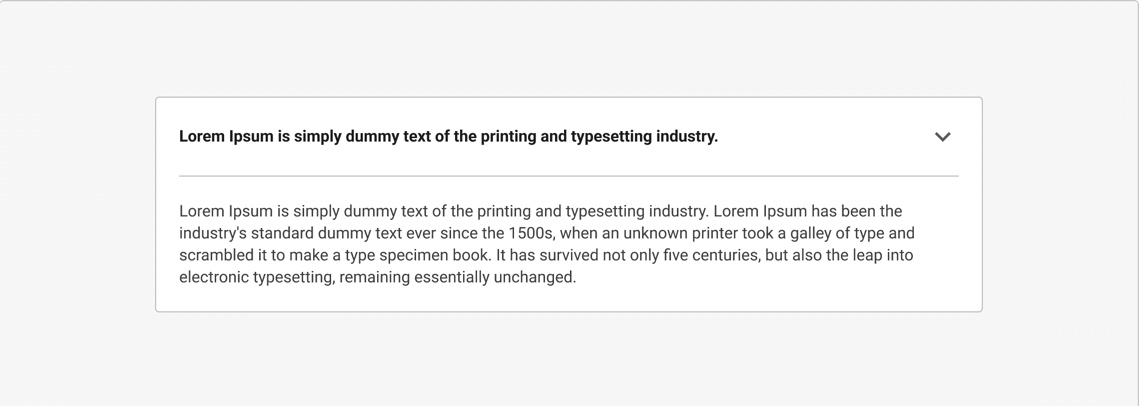
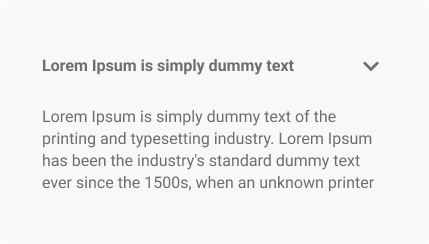
The Accordion organises content into expandable and collapsible sections, making it ideal for dense information like FAQs or instructions. They are suitable for organising step-by-step instructions or processes.

<figure><img src="https://3868804918-files.gitbook.io/~/files/v0/b/gitbook-x-prod.appspot.com/o/spaces%2FegsIWleSdyH9rMLJ8ShI%2Fuploads%2F74K8n9fZ3VHkPMqY6hQX%2F8AE426F9-E65A-4F30-8DA1-C8C8153B7EFA.jpeg?alt=media&#x26;token=5678d1f0-9f64-48fa-b1c9-5f75cb3fa2c7" alt=""><figcaption></figcaption></figure>

{% tabs %}
{% tab title="Component React" %}

```
// Sample code

<Accordion
  icon="Accessibility"
  number={1}
  onToggle={()=>{}}
  title="Section Header"
>
  <Accordion
    isChild={true}
    title="Nested Accordion"
  >
    This is a nested accordion demonstrating component composition. The isChild prop ensures proper styling and behavior.
  </Accordion>
</Accordion>
```

{% endtab %}

{% tab title="Component Flutter" %}

```
// Sample code

DigitAccordion(
              header: Text('Accordion'),
              content: Text('This is the content of Accordion'),
              initiallyExpanded: false,
              divider: true,
              showBorder: true,
            ),
```

{% endtab %}

{% tab title="Component Design" %}

{% endtab %}
{% endtabs %}

## Anatomy

***

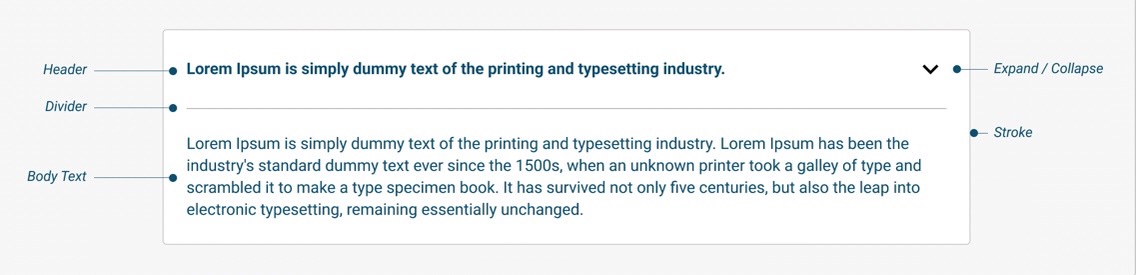
<figure><img src="https://3868804918-files.gitbook.io/~/files/v0/b/gitbook-x-prod.appspot.com/o/spaces%2FegsIWleSdyH9rMLJ8ShI%2Fuploads%2FHgMK0Zv4t2kBZ4ozbYmE%2F4AA18190-F8A7-4D78-A1B7-9D226F44C477_4_5005_c.jpeg?alt=media&#x26;token=d07c1715-6b51-4d36-b991-0bf3cb07bd6d" alt=""><figcaption></figcaption></figure>

## Variants

***

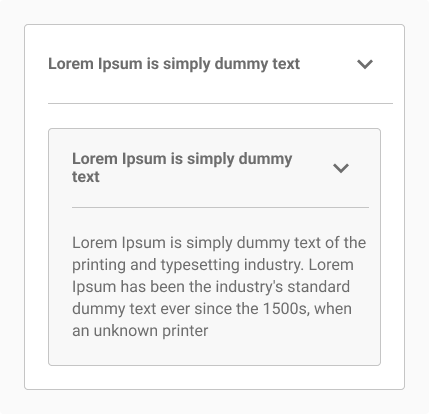
<table data-header-hidden><thead><tr><th width="321"></th><th valign="top"></th></tr></thead><tbody><tr><td><img src="https://3868804918-files.gitbook.io/~/files/v0/b/gitbook-x-prod.appspot.com/o/spaces%2FegsIWleSdyH9rMLJ8ShI%2Fuploads%2F7Jym2J2Rx6RKyjPALbVh%2FImagev1.png?alt=media&#x26;token=ab818f8b-a317-4287-b9ad-f437769974ed" alt=""></td><td valign="top"><p><strong>Basic Accordion</strong> </p><p>The Input field enables users to interact with the application through content input and data. The component allows users to input responses or data based on specific requirements.</p></td></tr><tr><td><img src="https://3868804918-files.gitbook.io/~/files/v0/b/gitbook-x-prod.appspot.com/o/spaces%2FegsIWleSdyH9rMLJ8ShI%2Fuploads%2FclBS99Oxa713jJJrshmv%2FImagev2.png?alt=media&#x26;token=48a2b21d-ddf4-46f5-bc2c-2751c95ac593" alt=""></td><td valign="top"><p><strong>Nested Accordion</strong> </p><p>The Input field enables users to interact with the application through content input and data. The component allows users to input responses or data based on specific requirements.</p></td></tr></tbody></table>

## Key Properties

<table data-header-hidden data-full-width="false"><thead><tr><th valign="top"></th><th valign="top"></th></tr></thead><tbody><tr><td valign="top"><strong>Title</strong><br>The text displayed at the top of the accordion section, representing the title of the content. This is a required property and is typically used to describe the section's content or topic.<br></td><td valign="top"><img src="https://3868804918-files.gitbook.io/~/files/v0/b/gitbook-x-prod.appspot.com/o/spaces%2FegsIWleSdyH9rMLJ8ShI%2Fuploads%2F51h97E7Ycgm09vuAWyXN%2FImagep1.png?alt=media&#x26;token=5a0cc3c3-447a-4ec4-9b96-eeab55ad9048" alt=""></td></tr><tr><td valign="top"><strong>Children</strong><br>The content that will be displayed inside the accordion when it is expanded. This can include text, images, or other components. This is a required property and holds the main body of the accordion's collapsible section.</td><td valign="top"><img src="https://3868804918-files.gitbook.io/~/files/v0/b/gitbook-x-prod.appspot.com/o/spaces%2FegsIWleSdyH9rMLJ8ShI%2Fuploads%2FoeNNkV4v7KUsrne7l1dd%2FImagep2.png?alt=media&#x26;token=0d73cdb9-b24e-4a60-85d0-7c8891cf228c" alt=""></td></tr><tr><td valign="top"><strong>Icon</strong><br>An optional icon displayed beside the title. Icons are used to enhance the visual appeal or convey meaning alongside the title text, such as indicating expand/collapse actions or providing context to the content. The width / height of the icon can be controlled through the Icon Width property to ensure it fits well with the title or the overall design of the accordion.</td><td valign="top"><img src="https://3868804918-files.gitbook.io/~/files/v0/b/gitbook-x-prod.appspot.com/o/spaces%2FegsIWleSdyH9rMLJ8ShI%2Fuploads%2FqflBbqc4CqIsXWqbYHEo%2FImagep3.png?alt=media&#x26;token=3bf083ee-a74b-418b-8ef4-80a930f9f977" alt=""></td></tr><tr><td valign="top"><strong>Initially Open</strong><br>Determines whether the accordion section is open by default when the component is first rendered. Setting this to true will make the accordion section expanded by default, while the default value false keeps it collapsed initially.</td><td valign="top"><img src="https://3868804918-files.gitbook.io/~/files/v0/b/gitbook-x-prod.appspot.com/o/spaces%2FegsIWleSdyH9rMLJ8ShI%2Fuploads%2FBs6WA0inxDbXrg8bVPQW%2FImagep4.png?alt=media&#x26;token=d3829384-574b-49b8-9472-934c93f1d7b5" alt=""></td></tr><tr><td valign="top"><strong>Hide Card Border</strong><br>Controls whether the border around the accordion section is visible. Defaults to false, showing the border.</td><td valign="top"><img src="https://3868804918-files.gitbook.io/~/files/v0/b/gitbook-x-prod.appspot.com/o/spaces%2FegsIWleSdyH9rMLJ8ShI%2Fuploads%2FtQaPt8lDMTkWBO42eBmF%2FImagep6.png?alt=media&#x26;token=6292ac34-8fc1-41ab-aa8e-b6b90b102990" alt=""></td></tr><tr><td valign="top"><strong>Hide Divider</strong><br>Specifies whether the divider line between the title and content is visible. Defaults to false, meaning the divider is shown.</td><td valign="top"><img src="https://3868804918-files.gitbook.io/~/files/v0/b/gitbook-x-prod.appspot.com/o/spaces%2FegsIWleSdyH9rMLJ8ShI%2Fuploads%2Frb7zL05JUmkEM4VTsaR4%2FImagep5.png?alt=media&#x26;token=f7b2c707-4cb1-47aa-9cb5-8994dd62a86d" alt=""></td></tr><tr><td valign="top"><strong>Serial Number</strong><br>An optional number to display before the title. This can be used for ordered sections or lists within the accordion.</td><td valign="top"><img src="https://3868804918-files.gitbook.io/~/files/v0/b/gitbook-x-prod.appspot.com/o/spaces%2FegsIWleSdyH9rMLJ8ShI%2Fuploads%2Frlz1LLTyord8prTRU9zo%2FImagep7.png?alt=media&#x26;token=1294dffd-09a2-4a2b-af23-57c6dd14daaf" alt=""></td></tr></tbody></table>

## Property Configuration Table

Each design component offers a range of configurable options. These options are intentionally platform-agnostic, allowing implementations to adapt and tailor them to align with the specific requirements of the chosen framework.

{% tabs %}
{% tab title="React" %}

| Property         | Value    | Default |
| ---------------- | -------- | ------- |
| title            | string   | -       |
| children         | string   | -       |
| icon             | string   | -       |
| iconFill         | string   | -       |
| iconWidth        | string   | -       |
| iconHeight       | string   | -       |
| number           | number   | -       |
| isOpenInitially  | boolean  | false   |
| onToggle         | function | -       |
| customClassName  | string   | -       |
| customStyles     | object   | -       |
| hideCardBorder   | boolean  | false   |
| hideDivider      | boolean  | false   |
| hideCardBg       | boolean  | false   |
| hideBorderRadius | boolean  | false   |
| isClosed         | boolean  | false   |
| isChild          | boolean  | -       |
| {% endtab %}     |          |         |

{% tab title="Flutter" %}

<table><thead><tr><th>Property</th><th width="209">Value</th><th>Default</th></tr></thead><tbody><tr><td>Title</td><td>String</td><td>required(if header is not passed)</td></tr><tr><td>Number</td><td>double</td><td>-</td></tr><tr><td>Icon</td><td>Icon widget</td><td>-</td></tr><tr><td>header</td><td>Widget</td><td>-</td></tr><tr><td>content</td><td>Widget</td><td>required</td></tr><tr><td>divider</td><td>bool</td><td>false</td></tr><tr><td>initiallyExpanded</td><td>bool</td><td>false</td></tr><tr><td>showBorder</td><td>bool</td><td>false</td></tr><tr><td>onToggle</td><td>VoidCallBack Function</td><td>-</td></tr></tbody></table>
{% endtab %}
{% endtabs %}

## Behaviours

***

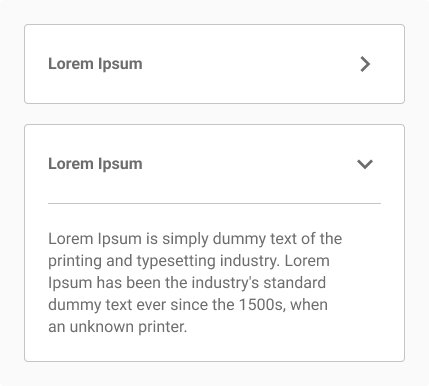
<table data-header-hidden><thead><tr><th></th><th valign="top"></th></tr></thead><tbody><tr><td><img src="https://3868804918-files.gitbook.io/~/files/v0/b/gitbook-x-prod.appspot.com/o/spaces%2FegsIWleSdyH9rMLJ8ShI%2Fuploads%2F2CiQ60cHYHYT8KFFX6ee%2FImageb1.png?alt=media&#x26;token=032aba76-4063-4656-9f73-b7095e892088" alt=""></td><td valign="top"><p><strong>Flexible Width</strong> </p><p>The width of the container defines the width of the accordion.</p></td></tr><tr><td><img src="https://3868804918-files.gitbook.io/~/files/v0/b/gitbook-x-prod.appspot.com/o/spaces%2FegsIWleSdyH9rMLJ8ShI%2Fuploads%2F58iur7KupC2F9SC8smXd%2FImageb2.png?alt=media&#x26;token=6b8df563-f431-4f12-aaae-400d79b9a3d0" alt=""></td><td valign="top"><p><strong>Text Overflow</strong> </p><p>The text will overflow / wrap to the next line based on the width of the accordion. The limit to the volume of text is not defined.</p></td></tr><tr><td><img src="https://3868804918-files.gitbook.io/~/files/v0/b/gitbook-x-prod.appspot.com/o/spaces%2FegsIWleSdyH9rMLJ8ShI%2Fuploads%2FtbJieA7QVQ4mZ2LlzG7L%2FImageb3.png?alt=media&#x26;token=7dba31f0-9342-46b7-9556-b55afadbd3b3" alt=""></td><td valign="top"><p><strong>Animation</strong> </p><p>The opening and closing movements of an accordion has an “Ease in” animation. The arrow which face sideways in the closed state rotate to facing downwards in the open state.</p></td></tr></tbody></table>

## Usage Guide

***

<table data-header-hidden><thead><tr><th></th><th valign="top"></th></tr></thead><tbody><tr><td><p><img src="https://3868804918-files.gitbook.io/~/files/v0/b/gitbook-x-prod.appspot.com/o/spaces%2FegsIWleSdyH9rMLJ8ShI%2Fuploads%2FHNbHIPJmfKGIA17v8MBm%2FImageu1.png?alt=media&#x26;token=9d10aa51-6a13-48f7-a919-a668cad53da7" alt=""></p><p><img src="https://3868804918-files.gitbook.io/~/files/v0/b/gitbook-x-prod.appspot.com/o/spaces%2FegsIWleSdyH9rMLJ8ShI%2Fuploads%2FqhTpuSn68q2l1gcOkWim%2FImageu2.png?alt=media&#x26;token=d394b983-d659-4426-b8c5-51f0f37041c1" alt=""></p></td><td valign="top"><p><strong>Use for compact information display</strong></p><p>Organise dense or hierarchical content like FAQs, step-by-step instructions, or grouped data to avoid overwhelming users with too much visible information.<br><br>Avoid placing simple messages inside Accordions. Since the content is brief and doesn't require hiding, displaying it openly ensures that users see it immediately without extra steps.</p></td></tr></tbody></table>

## Change log

***

| Date | Number | Notes |
| ---- | ------ | ----- |
|      |        |       |
|      |        |       |
|      |        |       |

## Design Checklist

***

<table data-header-hidden data-full-width="false"><thead><tr><th width="100" data-type="checkbox"></th><th valign="top"></th></tr></thead><tbody><tr><td>true</td><td valign="top"><p><strong>All interactive states</strong></p><p>Includes all interactive states that are applicable (hover, down, focus, keyboard focus, disabled).</p></td></tr><tr><td>true</td><td valign="top"><p><strong>Accessible use of colours</strong></p><p>Includes all interactive states that are applicable (hover, down, focus, keyboard focus, disabled).</p></td></tr><tr><td>true</td><td valign="top"><p><strong>Accessible contrast for text</strong></p><p>Includes all interactive states that are applicable (hover, down, focus, keyboard focus, disabled).</p></td></tr><tr><td>true</td><td valign="top"><p><strong>Accessible contrast for UI components</strong></p><p>Includes all interactive states that are applicable (hover, down, focus, keyboard focus, disabled).</p></td></tr><tr><td>true</td><td valign="top"><p><strong>Keyboard interactions</strong></p><p>Includes all interactive states that are applicable (hover, down, focus, keyboard focus, disabled).</p></td></tr><tr><td>false</td><td valign="top"><p><strong>Screen reader accessible</strong></p><p>All content, including headings, labels, and descriptions, is meaningful, concise, contextual and accessible by screen readers.</p></td></tr><tr><td>true</td><td valign="top"><p><strong>Responsive for all breakpoints</strong></p><p>Responsiveness for 3 breakpoints - Mobile, Tablet and Desktop</p></td></tr><tr><td>true</td><td valign="top"><p><strong>Usage guidelines</strong></p><p>Includes a list of dos and don'ts that highlight best practices and common mistakes.</p></td></tr><tr><td>false</td><td valign="top"><p><strong>Content guidelines</strong></p><p>Content standards and usage guidelines for writing and formatting in-product content for the component.</p></td></tr><tr><td>true</td><td valign="top"><p><strong>Defined variants and properties</strong></p><p>Includes relevant variants and properties (style, size, orientation, optional iconography, decorative elements, selection states, error states...etc)</p></td></tr><tr><td>true</td><td valign="top"><p><strong>Defined behaviors</strong></p><p>Guidelines for keyboard navigation and focus, layout management (including wrapping, truncation, and overflow), animations, and user interactions.</p></td></tr><tr><td>true</td><td valign="top"><p><strong>Design Kit</strong></p><p>Access to the design file for the component in Figma multiple options, states, color themes, and platform scales.</p></td></tr></tbody></table>