> For the complete documentation index, see [llms.txt](https://docs.digit.org/llms.txt). Markdown versions of documentation pages are available by appending `.md` to page URLs; this page is available as [Markdown](https://docs.digit.org/platform/guides/operations-guide/observability/es-curator-clear-old-logs-indices.md).
# ES-Curator - Clear Old Logs/indices
## Overview
Curator is a tool from Elastic (the company behind Elasticsearch) to help manage your Elasticsearch cluster. You can create, backup, and delete some indices, Curator helps make this process automated and repeatable. Curator is written in Python, so almost all operating systems support it. It can easily manage the huge number of logs written to the Elasticsearch cluster periodically by deleting them and thus helps you save disk space.
## Steps
es-curator helm chart for SSL-enabled elastic search:
es-curator helm chart for SSL disabled elastic search:
A very elegant way to configure and automate Elasticsearch Curator execution is using a YAML configuration. The **‘es-curator-values.yaml’** file
{% code lineNumbers="true" %}
```
# Common Labels
labels:
group: "es-curator"
cron:
schedule: "45 18 * * *"
# Container Configs
namespace: es-cluster
image:
repository: "untergeek/curator"
tag: 8.0.15
logs-cleanup-enabled: true
jaeger-cleanup-enabled: true
logs-to-retain-in-days: 7
memory_limits: 256Mi
args: [ "--config", "/etc/es-curator/config.yml", "/etc/es-curator/action_file.yml" ]
# Additional Container Envs
env: |
- name: SERVER_PORT
value: "8080"
- name: JAVA_OPTS
value: {{ index .Values "heap" | quote }}
- name: ES_CLIENT_HOST
valueFrom:
configMapKeyRef:
name: egov-config
key: es-indexer-host
- name: ES_USERNAME
valueFrom:
secretKeyRef:
name: elasticsearch-master-credentials
key: username
- name: ES_PASSWORD
valueFrom:
secretKeyRef:
name: elasticsearch-master-credentials
key: password
- name: ES_CLIENT_PORT
value: "9200"
- name: LOG_LEVEL
value: "DEBUG"
{{- if index .Values "logs-cleanup-enabled" }}
- name: LOGS_CLEANUP_DISABLED
value: "False"
- name: RETAIN_LOGS_IN_DAYS
value: {{ index .Values "logs-to-retain-in-days" | quote }}
{{- end }}
{{- if index .Values "jaeger-cleanup-enabled" }}
- name: JAEGER_CLEANUP_DISABLED
value: "False"
- name: RETAIN_JAEGER_DATA_IN_DAYS
value: "14"
{{- end }}
extraVolumes: |
- name: config-volume
configMap:
name: {{ template "name" . }}-config
extraVolumeMounts: |
- mountPath: /etc/es-curator
name: config-volume
resources: |
requests:
memory: {{ .Values.memory_limits | quote }}
limits:
memory: {{ .Values.memory_limits | quote }}
```
{% endcode %}
You can modify the above es-curator-infra-values.yaml according to the requirements, some modifications are suggested below:
```
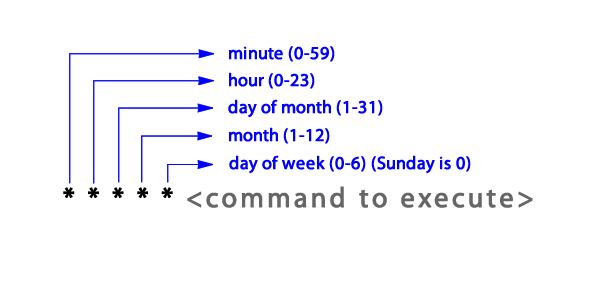
schedule: "45 18 * * *"
```
The above represents all the possible numbers for that position.
* **Schedule Cron Job:** In the above code, at line number 6, the Cron Job is Scheduled to run at *6:45 PM* every day. You can schedule your Cron Job accordingly.
* **RETAIN\_LOGS\_IN\_DAYS:** Specify the age of the logs to be deleted. In line 14 of the code, **logs-to-retain-in-days** indicate that logs older than 7 days will be deleted.
---
# Agent Instructions
This documentation is published with GitBook. GitBook is the documentation platform designed so that both humans and AI agents can read, navigate, and reason over technical content effectively. Learn more at gitbook.com.
## Querying This Documentation
If you need additional information that is not directly available in this page, you can query the documentation by asking a question.
Perform an HTTP GET request on the following URL with the `ask` and `goal` query parameters:
```
GET https://docs.digit.org/platform/guides/operations-guide/observability/es-curator-clear-old-logs-indices.md?ask=&goal=
```
`ask` is the immediate question: it should be specific, self-contained, and written in natural language.
`goal` is what the user is ultimately trying to achieve, the reason they need the answer. Sharing it helps GitBook give you a better, more relevant answer. A goal is most helpful when it describes the outcome the user wants rather than restating the question. For example, with `ask=how do I create an API token`, a goal like `automate deployments from our CI pipeline` lets GitBook tailor the answer to that use case.
The response will contain a direct answer to the question and relevant excerpts and sources from the documentation.
Use this mechanism when the answer is not explicitly present in the current page, you need clarification or additional context, or you want to retrieve related documentation sections.