> For the complete documentation index, see [llms.txt](https://docs.digit.org/llms.txt). Markdown versions of documentation pages are available by appending `.md` to page URLs; this page is available as [Markdown](https://docs.digit.org/sanitation/technology/architecture.md).
# Architecture
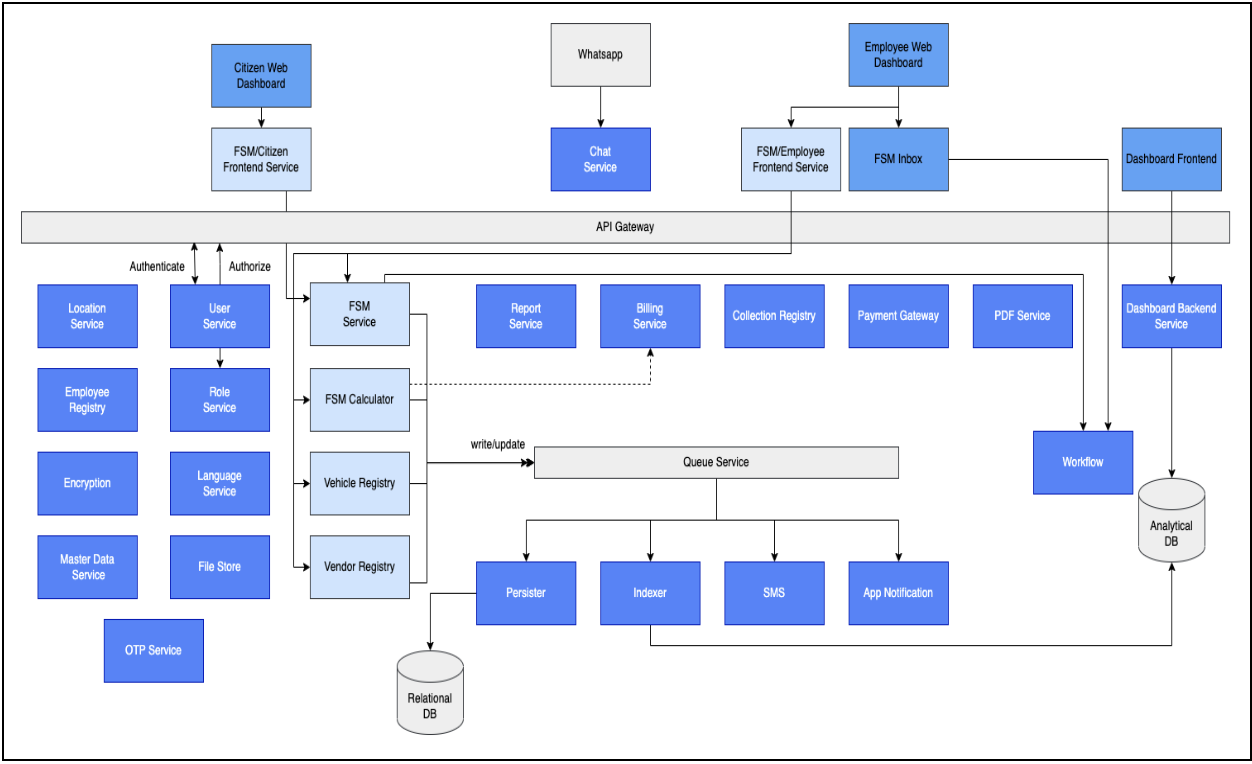
FSM uses several core components, and is built on top of these reusable building blocks to deliver citizen services as part of Faecal Sludge Management (FSM).
## Core Components
To develop a new service, one needs to create a micro-service and make it available through the API gateway. The API gateway calls the [User Service](https://core.digit.org/platform/core-services/user-services) for authentication and the [Access Service](https://core.digit.org/platform/core-services/access-control-services) for authorisation. The service developer can configure the roles and map the roles and actions using the [Master Data Management Service](https://core.digit.org/platform/core-services/mdms-master-data-management-service).
[Citizen Dashboard: ](https://core.digit.org/guides/developer-guide/ui-developer-guide/citizen-module-setup)The service user interface can be developed as part of the Citizen Dashboard or can be an independent solution. The citizen can log in using a mobile number and OTP. They can apply for a new service using the service UI. The [File Store Service](https://core.digit.org/platform/core-services/filestore-service) allows users to upload relevant documentation.
The [Persister Service](https://core.digit.org/platform/core-services/persister-service) stores the submitted application asynchronously into the registry. The PII data is encrypted using the [Encryption Service](https://core.digit.org/platform/core-services/encryption-service) before storing. All changes are digitally signed and logged using the [Signed Audit Service](https://core.digit.org/focus-areas/data-security/signed-data-audit) (ongoing). The [Indexer Service](https://core.digit.org/platform/core-services/indexer-service) transforms and enriches the application data. The Indexer Service also strips the PII data and sends it to the [Analytics Data Store(ElasticSearch)](https://core.digit.org/guides/operations-guide/availability/backbone-services/elastic-search).
The[ Dashboard Backend Service](https://urban.digit.org/platform/configure-digit/services-overview/business-services/dashboard-analytics-backend) executes configured queries on the stripped data and makes the aggregated data available to the [Dashboard Frontend](https://core.digit.org/guides/operations-guide/availability/dss-dashboard) for the administrator or employee view. The views are in accordance with the user role access which is also configurable.
The[ Billing Service](https://urban.digit.org/platform/configure-digit/services-overview/business-services/billing-service) generates a demand based on the calculation logic for the given service delivery. Based on this demand, a bill is generated against which the payment has to be made. The citizen can either make an online payment or can pay at the counter (offline payment). The [Payment Gateway Service](https://core.digit.org/platform/core-services/payment-gateway-service) is called for online payments and this is integrated with third-party service providers. The service routes the citizen to the service provider's website and then back to the citizen's UI once the payment is successful.
The[ Collection Service](https://urban.digit.org/platform/configure-digit/services-overview/business-services/collection-service/collection-service-v2) is the payment registry and records all the successful payments. For offline payments, a record is made in the collection service after the collection of the Cash/Cheque/DD/RTGS. The allowed payment modes are configurable. The PDF service is used to generate receipts based on a configurable template. The service then triggers the [Workflow Service](https://core.digit.org/platform/core-services/workflow-service) to assign tasks for verification and approval. Workflows can be configured.
The [Employee Service](https://core.digit.org/guides/developer-guide/ui-developer-guide/employee-module-setup) allows employee registrations and enables them to log in using the Employee Dashboard. The dashboard displays the list of pending applications as per the employee's role. The employee can perform actions on these applications using the employee UI for the service. As the status changes or actions are taken on the applications, the relevant [SMS and Email Notification Service](https://core.digit.org/platform/core-services/sms-notification-service) sends the updates to the applicant. Once the application is approved, the applicant can download the final certificate which is generated using [PDF Service](https://core.digit.org/platform/core-services/pdf-generation-service).
DIGIT has multi-tenant configuration capabilities. The [Location Service](https://core.digit.org/platform/core-services/location-services) allows the configuration of the tenant hierarchy and maps multiple tenants like country, state, district, or state, department, and sub-department. Each tenant can have their own configurations for service, roles, workflows etc. This allows for variations across different agencies in tune with the local context. The [Language Service](https://core.digit.org/platform/core-services/localization-service) facilitates the support of multiple languages in DIGIT. This service stores the translations in multiple languages.
## FSM Components
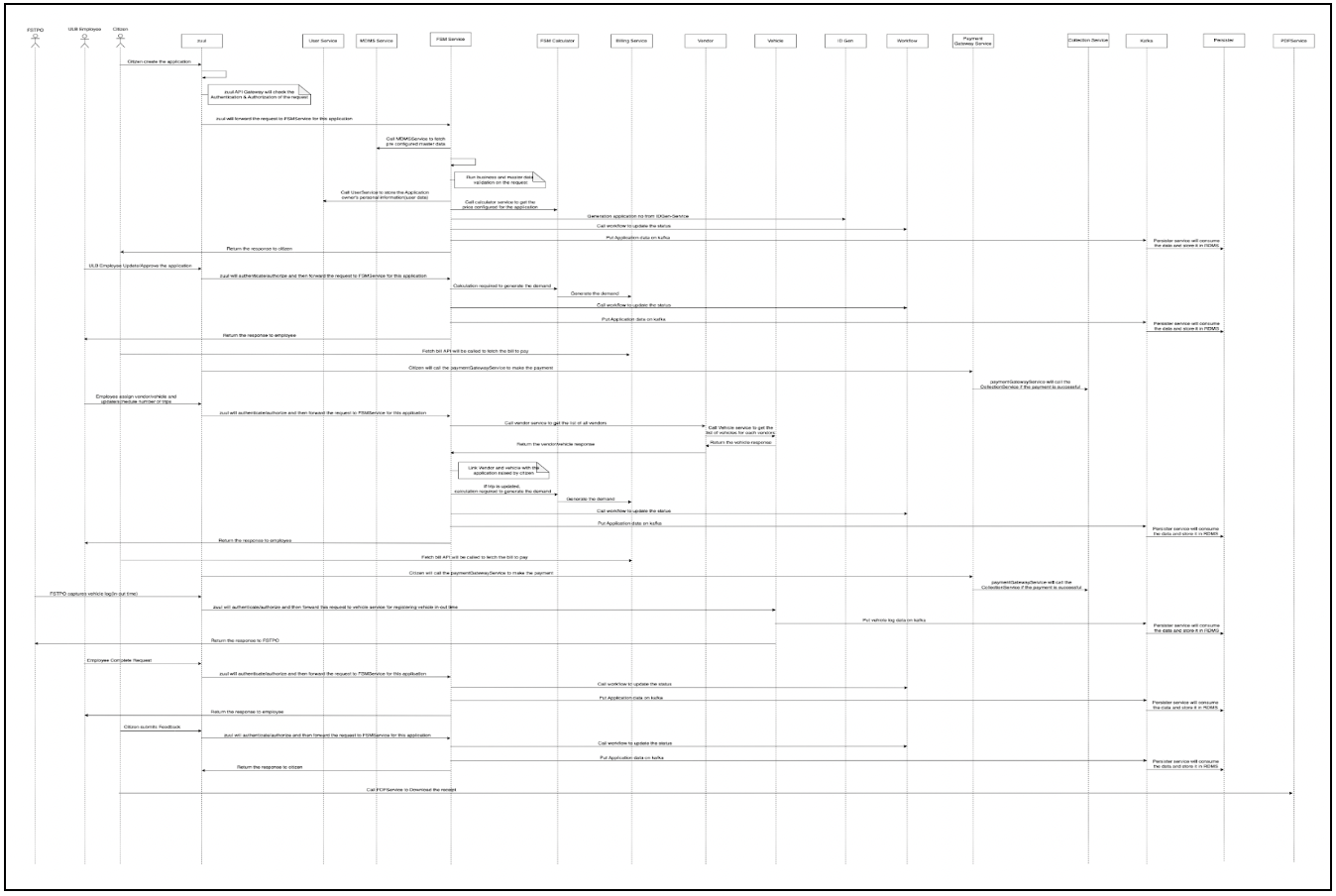
[Faecal sludge management (FSM)](https://sanitation.digit.org/products/faecal-sludge-management-fsm/fsm-core-service-configuration) is a system that enables citizens to raise a request for septic tank cleaning with their urban local bodies (ULBs) directly or by reaching out to the ULB counter. Citizens can track the application, make a payment for the charges and rate the service. Citizens can track the application, make a payment for the charges and rate the service.
The [FSM calculator](https://sanitation.digit.org/products/faecal-sludge-management-fsm/fsm-core-service-configuration/fsm-calculator) is a system that enables the FSM administrator to create billing slabs for the FSM application(s) with different combinations of property type, slum, tank and capacity. It generates the demand after calculating the charges for the given application using the billing slab already configured.
The [vendor registry](https://sanitation.digit.org/products/faecal-sludge-management-fsm/fsm-core-service-configuration/fsm-vendor-registry) is a system that enables urban local body (ULB) employees to create and search for a vendor, that is, the desludging operator (DSO) and driver entities with appropriate vehicle entities for the FSM application. The vendor registry is a system that enables urban local body (ULB) employees to create and search for a vendor, that is, the desludging operator (DSO) and driver entities with appropriate vehicle entities for the FSM application.
The [vehicle registry](https://sanitation.digit.org/products/faecal-sludge-management-fsm/fsm-core-service-configuration/fsm-vehicle-registry) is a system that enables urban local body (ULB) employees to create and search vehicle entities, schedule vehicle trips for FSM application, and track vehicle trips. A vehicle registry is a system that enables ULB employees to create and search vehicle entities, schedule vehicle trips for FSM application, and track vehicle trips.
---
# Agent Instructions
This documentation is published with GitBook. GitBook is the documentation platform designed so that both humans and AI agents can read, navigate, and reason over technical content effectively. Learn more at gitbook.com.
## Querying This Documentation
If you need additional information that is not directly available in this page, you can query the documentation dynamically by asking a question.
Perform an HTTP GET request on the current page URL with the `ask` query parameter, and the optional `goal` query parameter:
```
GET https://docs.digit.org/sanitation/technology/architecture.md?ask=&goal=
```
`ask` is the immediate question: it should be specific, self-contained, and written in natural language.
`goal` is optional and describes the broader end goal you are ultimately trying to accomplish on behalf of the user. GitBook uses it to tailor the answer towards what is most useful for that goal.
The response will contain a direct answer to the question and relevant excerpts and sources from the documentation.
Use this mechanism when the answer is not explicitly present in the current page, you need clarification or additional context, or you want to retrieve related documentation sections.