> For the complete documentation index, see [llms.txt](https://docs.digit.org/llms.txt). Markdown versions of documentation pages are available by appending `.md` to page URLs; this page is available as [Markdown](https://docs.digit.org/sanitation/technology/architecture/fsm/low-level-design/services/fsm-service.md).
# FSM Service
Learn how to setup and configure FSM service
## Overview
Faecal sludge management (FSM) is a system that enables citizens to raise a request for septic tank cleaning with their urban local bodies (ULBs) directly or by reaching out to the ULB counter. Citizens can track the application, make a payment for the charges, and rate the service. This document contains details on how to set up FSM, and describes the functionalities it provides. It contains the details about the feature enhancements being released as part of FSM v1.3.
As part of the FSM v1.4, a new worker registry concept is being introduced. The creation of a worker, updation of details, searching and tagging a worker for different operations on sanitation programmes will be covered. While assigning vehicle for the application, we have the functionalities which will provide the ability to assign multiple sanitation workers for the application.
### Plant User Mapping
The fsm service enables mapping plant codes to FSTP employee, ensuring that each is only authorised to manage to their account, enhancing control and accountability. In the mapping process need to check below mention things
* `PlantCode` : Unique plant code which is configured in the mdms
* `employeeUuid` : Unique user id of the employee which have the type of fsm-fstp.
## Pre-requisites
Before you proceed with the configuration, make sure the following pre-requisites are met:
* *Java 8*
* Kafka server is up and running
* egov-persister service is running and has fsm-persister config path added in it
* PSQL server is running and a database is created to store FSM Application data
* *(Optional)* Indexer config for FSM is added in egov-indexer yaml paths to index the generated data. An index is required for data visualisation in kibana or in DSS.
* Following services should be up and running:
* egov-user
* egov-workflow-v2
* egov-perister
* egov-localisation
* egov-notification-sms
* egov-mdms
* egov-idgen
* egov-url-shortening
* vehicle
* vendor
* fsm-calculator
* billing-service
* collection-services
* individual-services
## Key Functionalities
* Citizens can file, track, and rate the application for cleaning the septic tank.
* A ULB employee can file application for cleaning the septic tank on behalf of a citizen.
* A ULB employee can assign a DSO to the given application with a possible service date.
* A DSO can accept or reject the application.
* A DSO or a ULB employee can complete the FSM application after cleaning the septic tank.
* The FSM admin in a ULB can cancel the application at any stage before completing the application.
* A ULB employee or an admin can view the audit log of the given application.
* Capture citizen gender information if not present or pre-populate the gender information when a citizen is creating the FSM application.
* Add citizen's choice for payment.
* Introducing pre-pay and post-pay service.
* Post-pay service: Workflow changes (Desludging application and vehicle trip).
* Post-pay service: Employee flow enhancements.
* Add payment selection for DSO.
* Post-pay service: Number of trips is editable, and price calculation will be now based on the number of trips entered by the DSO.
* Capture DSO and FSTPO gender.
* Show citizen gender on FSM DSS.
* Select vehicle capacity instead of vehicle make.
* Citizen Notifications | Payment Options | Timeline Enhancements.
* FSTPO vehicle log inbox enhancements.
* FSTPO can decline the vehicle trip.
* Add owner attribute for vehicles.
* Add ULB contact details in the FSM application flow.
* DSO can edit pit and property usage details.
* Show vehicle trip status in employee inbox along with the desludging application.
* Unrestricted assignment of service requests to a single vehicle.
* Vehicle logging at FSTP decoupled from the FSM module.
* Photo and attachment view in the application of the ULB employee UI.
* Dashboard enhancement.
* Advance pay service: Employee flow enhancements.
* Introduced two new workflows in the system:
\- FSM\_ADVANCE\_PAY\_SERVICE and FSM\_ZERO\_PAY\_SERVICE .
* Advance pay service: The number of trips is made editable (increase or decrease based on the requirement), and price calculation will be now based on number of trips entered by the DSO or ULB.
* Allowed to pay part payment while creating the application.
* ULB and DSO are allowed to decrease the number of trips if not required and if full payment is not done.
* ULB and DSO are allowed to increase or decrease the number of trips n number of times.
* With the updated number of trips, an updated bill will be generated.
* Delink the payment from DSO in progress state.
* Zero pay service: Employee flow enhancements.
* Zero pay service: System now skips the collection, and will not generate the demand for zero price application.
* Demand generation process: Generating demand every time the trip is updated.
* Demand generation process: Added validation not to complete the application from ULB side before completing all payment.
* Enhancement of FSM receipt.
* Enhancement of assigning sanitation-worker to fsm application
* Enhancement of assigning driver to fsm application
## **Feature Enhancement**
As part of the FSM v1.4, Creation of fstp plant user mapping configuration we moved PlantInfo from mdms v1 to mdms v2 . For the changes follow below steps.
For a new environment these changes are required.
1. path:- deploy-as-code/helm/charts/sanitation/fsm/values.yaml - [link](https://github.com/egovernments/DIGIT-DevOps/pull/2256/files)
2. Create plantInfo in PQM.Plant schema .
3. Use the existing collection to create,update and search
## Kafka Topic Details
| Description | Topic Name |
| --------------------------------- | ------------------------------- |
| Save new FSM application | save-fsm-application |
| Update FSM application | update-fsm-application |
| Update FSM application workflow | update-fsm-workflow-application |
| Update vehicle Trip Details | update-vehicle-trip-Details |
| Save plant user mapping | save-plant-map-application |
| Update plant user mapping | update-plant-map-application |
| Receipts get pushed to this topic | egov.collection.payment-create |
| SMS Notification topic | egov.core.notification.sms |
| Event (In-app) Notification topic | persist-user-events-async |
**Users**
| | | | |
| ----------------- | ------------------- | ------------------------------------------------------------------------------------------------------------------------------------------------------ | ------------------------------------------------------------------------------------------------------------------------------------------ |
| **User** | **Role** | **Description** | **How to create** |
| FSM Creator | FSM\_CREATOR\_EMP |
Can create FSM application on behalf of a citizen.
| Through HRMS with role. |
| FSM Editor | FSM\_EDITOR\_EMP |
Can edit the application created by a citizen for demand generation.
Assign/re-assign DSO.
Complete the application.
| Through HRMS with role. |
| FSM Viewer | FSM\_VIEW\_EMP | Can view FSM application. | Through HRMS with role. |
| FSM Admin | FSM\_ADMIN |
Can cancel the application at any stage of the workflow.
| Through HRMS with role. |
| DSO | FSM\_DSO |
Can accept/reject the assigned application.
can complete the FSM application.
| Through vendor service, use the create DSO Request from [postman Collection](https://www.getpostman.com/collections/2d55f98479499672a23e). |
| FSTP Operator | FSM\_EMP\_FSTPO |
Can mark the vehicle trip as disposed. Not FSM service user.
| Through HRMS with role. |
| Collector | FSM\_COLLECTOR |
Can collect the payment amount for the application based on demand.
| Through HRMS with role. |
| FSM Report Viewer | FSM\_REPORT\_VIEWER | Can view FSM reports | Through HRMS with role. |
| FSM Driver | FSM\_DRIVER | Driver role for FSM. | Through HRMS with role. |
* User with userType employee and role FSM\_CREATOR\_EMP role.
## Integration
#### Idgen changes - [Link](https://github.com/egovernments/egov-mdms-data/pull/3436/files)
#### Integration Scope
FSM can be integrated with any ULB or system which wants to track the FSM application. The organisations can customise the workflow depending on their product requirements.
#### Integration Benefits
* Easy tracking and resolution of the FSM application.
* Configurable workflow according to client requirement.
#### Steps
1. Citizen/ULB employee can file application request using the /fsm/v1/\_create.
2. An organisation or system can search the FSM Applications using /fsm/v1/\_searchendpoint.
3. Once the application is filed, the organisation or system can call /fsm/v1/\_update endpoint to move the application further in the workflow until it gets resolved.
#### **Inbox API**
* Introduced new inbox service to get the FSM applications in registered ULB employee inbox. With this, a ULB employee can track the application or perform the actions based on employee role.
* ULB employees can also apply the filter to check the particular state or applications or any other filter as required.
## **Changes for FSMv1.4**
### **Inbox V2 API**
* Inbox v2 provide same feature what ever have in inbox v1 .
* Introduced new inbox service to get the FSM applications in registered ULB employee inbox. With this, a ULB employee can track the application or perform the actions based on employee role.
* ULB employees can also apply the filter to check the particular state or applications or any other filter as required.
**Integration**
* Add the mdms changes in the given path and restart the mdms service .
Path: data/pg/inbox-v2/InboxConfiguration.json
```
{
"module": "fsm",
"index": "fsm-application",
"allowedSearchCriteria": [
{
"name": "tenantId",
"path": "Data.tenantId.keyword",
"isMandatory": false,
"operator": "EQUAL"
},
{
"name": "status",
"path": "Data.currentProcessInstance.state.uuid.keyword",
"isMandatory": false
},
{
"name": "mobileNumber",
"path": "Data.mobileNumber.keyword",
"isMandatory": false
},
{
"name": "locality",
"path": "Data.locality.keyword",
"isMandatory": false
},
{
"name": "assignee",
"path": "Data.currentProcessInstance.assignes.uuid.keyword",
"isMandatory": false
},
{
"name": "applicationNos",
"path": "Data.applicationNo.keyword",
"isMandatory": false,
"operator": "WILDCARD"
},
{
"name": "fromDate",
"path": "Data.auditDetails.createdTime",
"isMandatory": false,
"operator": "GTE"
},
{
"name": "toDate",
"path": "Data.auditDetails.createdTime",
"isMandatory": false,
"operator": "LTE"
}
],
"sortBy": {
"path": "Data.@timestamp",
"defaultOrder": "DESC"
},
"sourceFilterPathList": [
"Data.currentProcessInstance",
"Data.auditDetails",
"Data.additionalDetails",
"Data.tenantId",
"Data.applicationNo",
"Data.workflow",
"Data.locality"
]
}
```
* Add the indexer file in the given path and restart the services.
Path: sanitation/egov-indexer/fsm-inbox-indexer.yml
File: file which need to add [click here](https://github.com/egovernments/configs/blob/UNIFIED-UAT/sanitation/egov-indexer/fsm-inbox-indexer.yml)
#### **FSM Apply As A Service**
Currently, we provide FSM as an adhoc service.To avoid multiple times, a user has to create the FSM request every time. In the system itself after some days, we will create the same FSM application and if the user wants a service, he/she will pay the amount.
#### **MDMS Changes**
As mentioned above, we need to define the time parameter in order to create a periodic application. For that, we added the periodic service master where we configure the time limit and whether the schedular is enabled or not. Find the configuration and location below
```
{ "tenantId": "pb.amritsar",
"moduleName": "FSM",
"PeriodicService":[
{
"timeLimit" : 864000000,
"isSchedularConfiguration":true
}
]
}
```
cronjob will read the cron job’s configured in the cronjobapiconfig.json, and based on the schedular time, it will call the API which is configured. Find the configuration and file location below:
We are using the fsm/v1/\_schedular API. This API will read the master data for each tenant and based on the time limit configured for that tenant, it will get all eligible applications and create periodic applications for those FSM applications.
data/pb/FSM/AdvancePayment.json
[SM-499 : mdms file for advanceBalance and cancellationfee · egovernments/egov-mdms-data@3b3233e](https://github.com/egovernments/egov-mdms-data/commit/3b3233e8f3e812fb4fe2833fa24d1c6b92078c9f)
[Update AdvancePayment.json · egovernments/egov-mdms-data@a864a90](https://github.com/egovernments/egov-mdms-data/commit/a864a90735749d0ec17e6df75fc80b831653551d)
[Update CancellationFee.json · egovernments/egov-mdms-data@3a614e5](https://github.com/egovernments/egov-mdms-data/commit/3a614e5273397a25d0d5cdefc95fc75d04f0088f)
master-config.json
[SM-499 adding advancepayment and cancellationfee · egovernments/egov-mdms-data@c4efb2e](https://github.com/egovernments/egov-mdms-data/commit/c4efb2e890fcc56fbeb969a9162c0d11aad03dec)
**Infra changes**
We added a new chart called mdms-read-cronjob. Find the chart location below:
## Interaction Diagram
#### 1. Advance Amount Workflow
#### 2. Zero Price Application Workflow
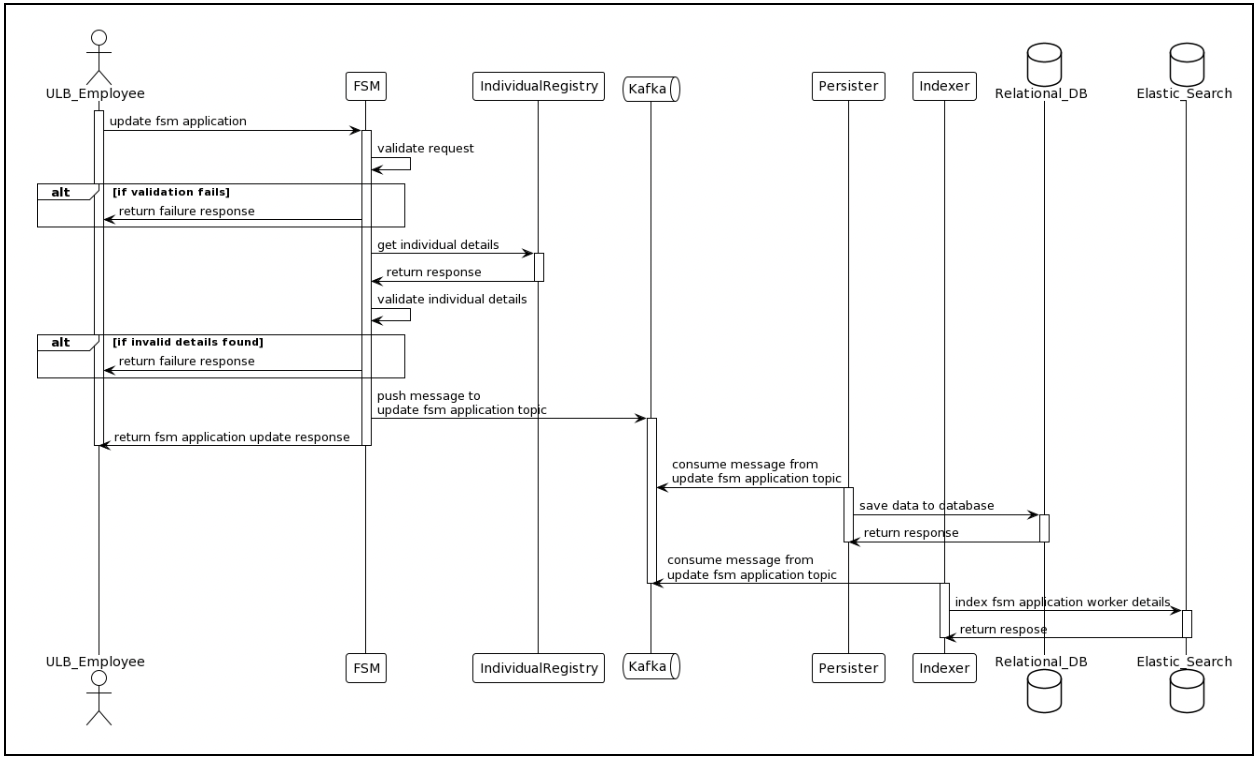
### **Sequence Diagram**
## Reference Docs
#### Doc Links
test
---
# Agent Instructions
This documentation is published with GitBook. GitBook is the documentation platform designed so that both humans and AI agents can read, navigate, and reason over technical content effectively. Learn more at gitbook.com.
## Querying This Documentation
If you need additional information that is not directly available in this page, you can query the documentation by asking a question.
Perform an HTTP GET request on the following URL with the `ask` and `goal` query parameters:
```
GET https://docs.digit.org/sanitation/technology/architecture/fsm/low-level-design/services/fsm-service.md?ask=&goal=
```
`ask` is the immediate question: it should be specific, self-contained, and written in natural language.
`goal` is what the user is ultimately trying to achieve, the reason they need the answer. Sharing it helps GitBook give you a better, more relevant answer. A goal is most helpful when it describes the outcome the user wants rather than restating the question. For example, with `ask=how do I create an API token`, a goal like `automate deployments from our CI pipeline` lets GitBook tailor the answer to that use case.
The response will contain a direct answer to the question and relevant excerpts and sources from the documentation.
Use this mechanism when the answer is not explicitly present in the current page, you need clarification or additional context, or you want to retrieve related documentation sections.