> For the complete documentation index, see [llms.txt](https://docs.digit.org/llms.txt). Markdown versions of documentation pages are available by appending `.md` to page URLs; this page is available as [Markdown](https://docs.digit.org/sanitation/water-sanitation-product-suite/waste-management-system/faecal-sludge-management-fsm/sanitation-actors-and-interactions.md).
# Sanitation Actors & Interactions
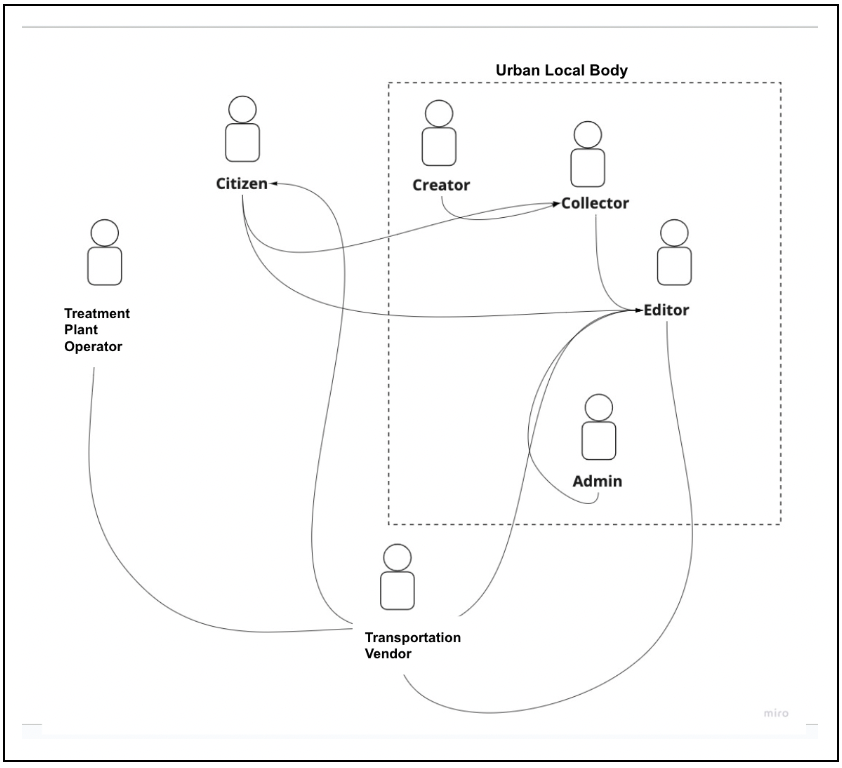
## Actor Interaction Mapping
The above diagram illustrates the integration between each actor. A brief description of each role is provided below:
| Role | Description | Action |
| ------------------------------------------------------------------------------------------------------------ | --------------------------------------------------------------------------------------------------------------------------------------------------------------------------------------------------------------------------------------------------------------------------------------------------------------------------------------------------------------------------------------------------------------------------------------------------------------- | -------------------------------------------------------------------------------------------------------------------------------------------------------------------------------------------------------------------------------------------------------------------------------------------------------------------------------------------------------------------------------------------------------------------------------------------------------------------------------- |
| System Administrator |
The user can define boundaries, create roles and users, define properties,, upload lisy of localities and slums, as well as create localisation.
|
Define boundaries.
Create roles and map to actions.
Create users: Map to the role and boundary (boundary mapping to be confirmed).
Define property types and sub-types.
Define pricing.
Upload the list of localities and pin codes.
Upload the list of slums.
Define the minimum advance pricing to be collected.
Create localisation.
|
| Citizen | A citizen can request for a desludging operation online. The user can check the status of the application online, make the payment for the service online, and post desludging, they can rate the quality of the service online. |
Request for desludging services.
View the acknowledgement receipt.
View the payment receipts.
Track the status of desludging requests.
View the history of past desludging services.
Make online payments.
|
| | | |
| ULB Employee (Can be assigned roles as creator, collector, editor, report viewer, dashboard viewer or admin) | A ULB official will act as a regulatory and management authority for the entire desludging process. He/she can receive the request from a citizen online or can create a request on behalf of the citizen online. When the request is received, the user can assign a desludging operator for a request. The official can also update the status of the request on behalf of the DSO after the service is completed at the site, and view the relevant reports. |
Add, update, and disable vendors.
Add, update, and disable drivers.
Add, update, and disable vehicles.
Map vendors and drivers.
Map vehicles and drivers.
Create desludging service requests on behalf of citizens.
Accept, reject, or update desludging service requests
Assign vendors to desludging services.
Collect service fees.
View dashboards and reports for a specific ULB.
|
| Transportation Vendors | This user can receive the requests assigned by a ULB official, and update the status of the transaction after the service is completed. |
Accept/reject desludging requests.
Assign vehicles to requests.
Update the number of trips.
Map the completion of requests.
|
| Treatment Plant Operator | This user can view the current demand, that is, the list of planned desludging requests available in the system. He/she can update the vehicle log which enters the FSTP/STP every day. |
Record incoming vehicles against requests.
Record incoming vehicles without associated service requests.
|
| State Administrator |
The user can view dashbaords and reports. The user can also filter dasboards and reports for a specific urban local body and by time.
|
View dashboards and reports for states.
Filter dashboards and reports by time, and for a specific ULB.
|
---
# Agent Instructions
This documentation is published with GitBook. GitBook is the documentation platform designed so that both humans and AI agents can read, navigate, and reason over technical content effectively. Learn more at gitbook.com.
## Querying This Documentation
If you need additional information that is not directly available in this page, you can query the documentation by asking a question.
Perform an HTTP GET request on the following URL with the `ask` and `goal` query parameters:
```
GET https://docs.digit.org/sanitation/water-sanitation-product-suite/waste-management-system/faecal-sludge-management-fsm/sanitation-actors-and-interactions.md?ask=&goal=
```
`ask` is the immediate question: it should be specific, self-contained, and written in natural language.
`goal` is what the user is ultimately trying to achieve, the reason they need the answer. Sharing it helps GitBook give you a better, more relevant answer. A goal is most helpful when it describes the outcome the user wants rather than restating the question. For example, with `ask=how do I create an API token`, a goal like `automate deployments from our CI pipeline` lets GitBook tailor the answer to that use case.
The response will contain a direct answer to the question and relevant excerpts and sources from the documentation.
Use this mechanism when the answer is not explicitly present in the current page, you need clarification or additional context, or you want to retrieve related documentation sections.