> For the complete documentation index, see [llms.txt](https://docs.digit.org/llms.txt). Markdown versions of documentation pages are available by appending `.md` to page URLs; this page is available as [Markdown](https://docs.digit.org/sanitation/water-sanitation-product-suite/waste-management-system/faecal-sludge-management-fsm/urc-release-notes.md).
# URC Release Notes
## Overview
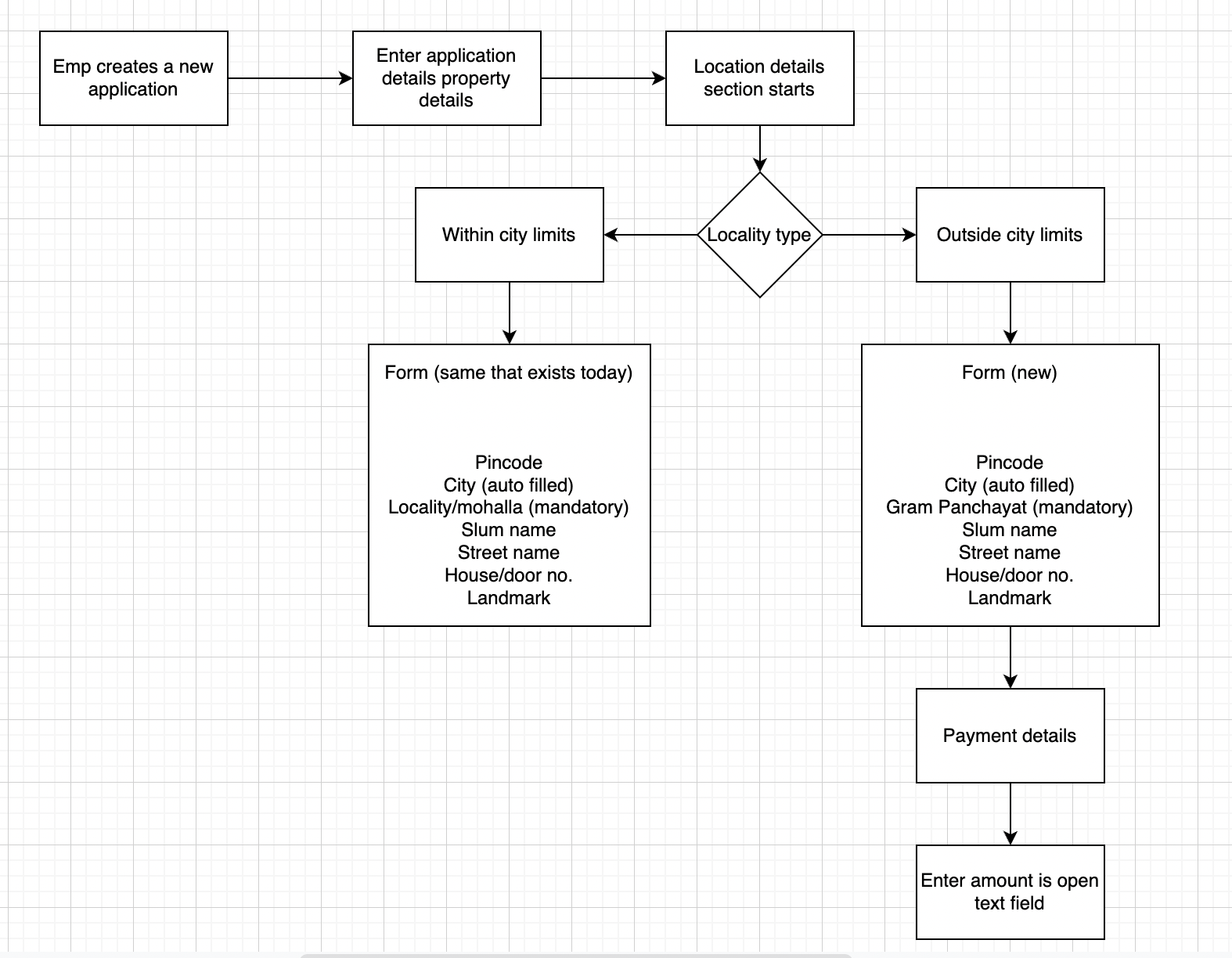
* The urban-rural convergence is an initiative that aims to ensure access of sanitation services to all Gram Panchayats(GPs) via Urban Local Bodies (ULBs) located closest to them.
* As a ULB employee, They are creating applications to cater the sanitation needs of local communities in Urban areas. The same way they should also cater the same sanitation needs to rural bodies which are nearby to that urban region.
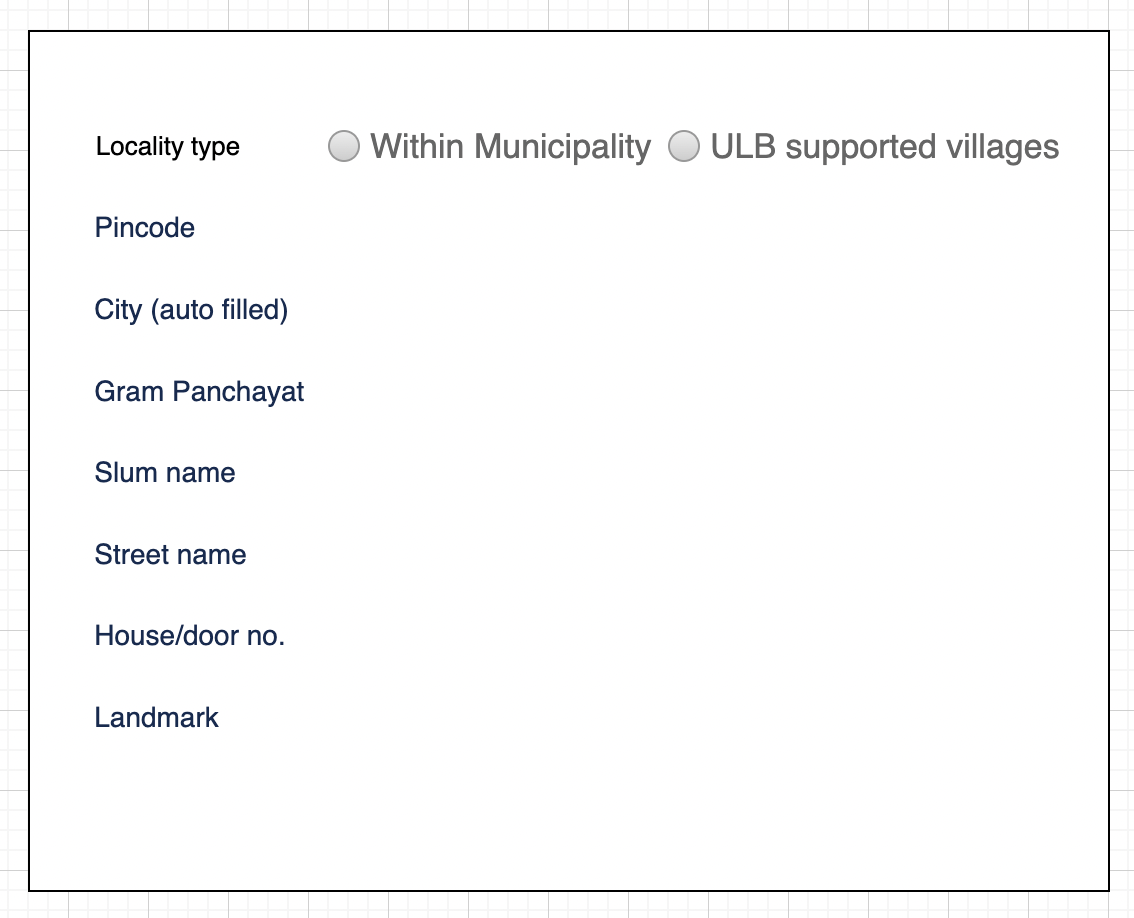
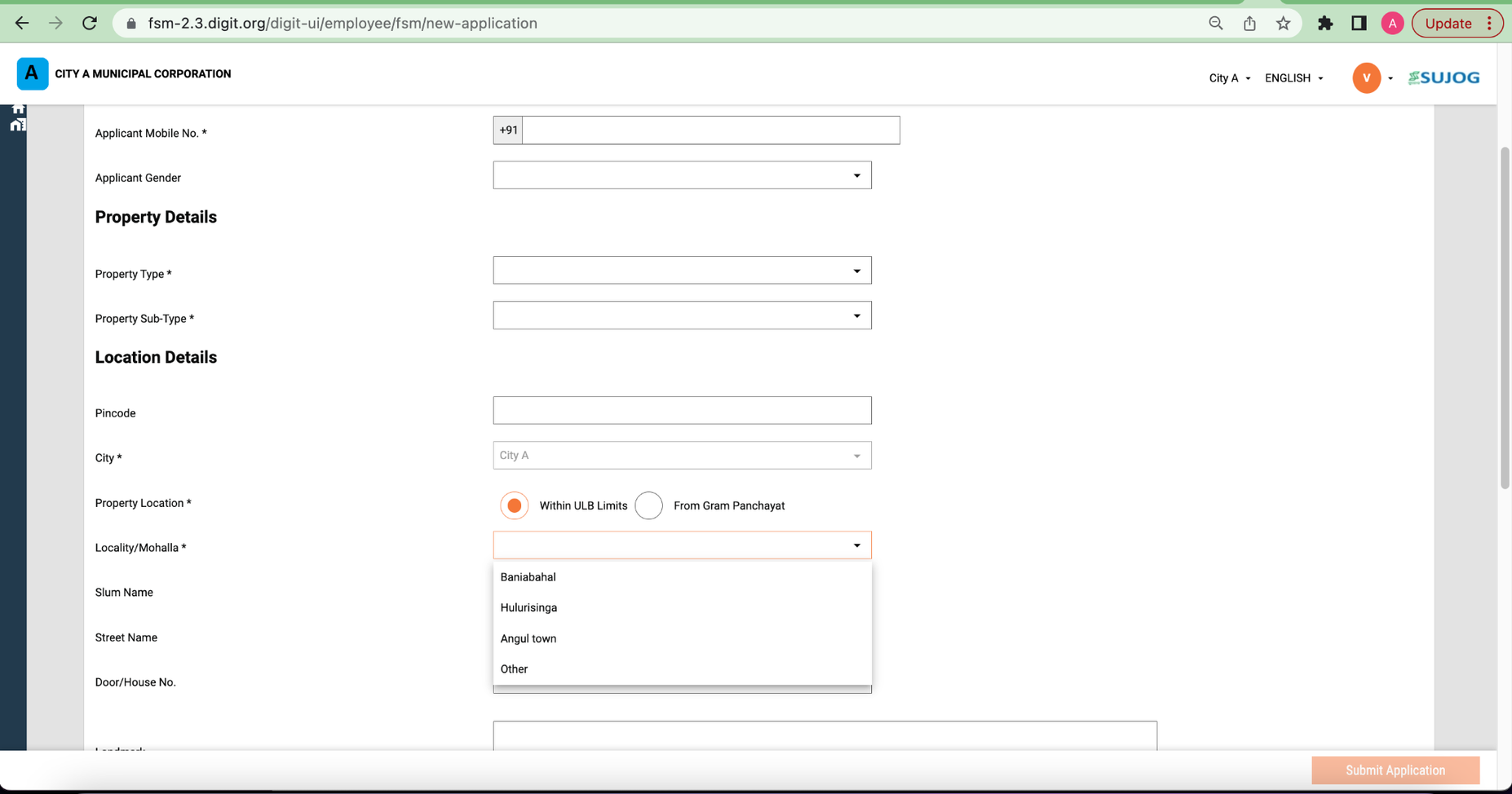
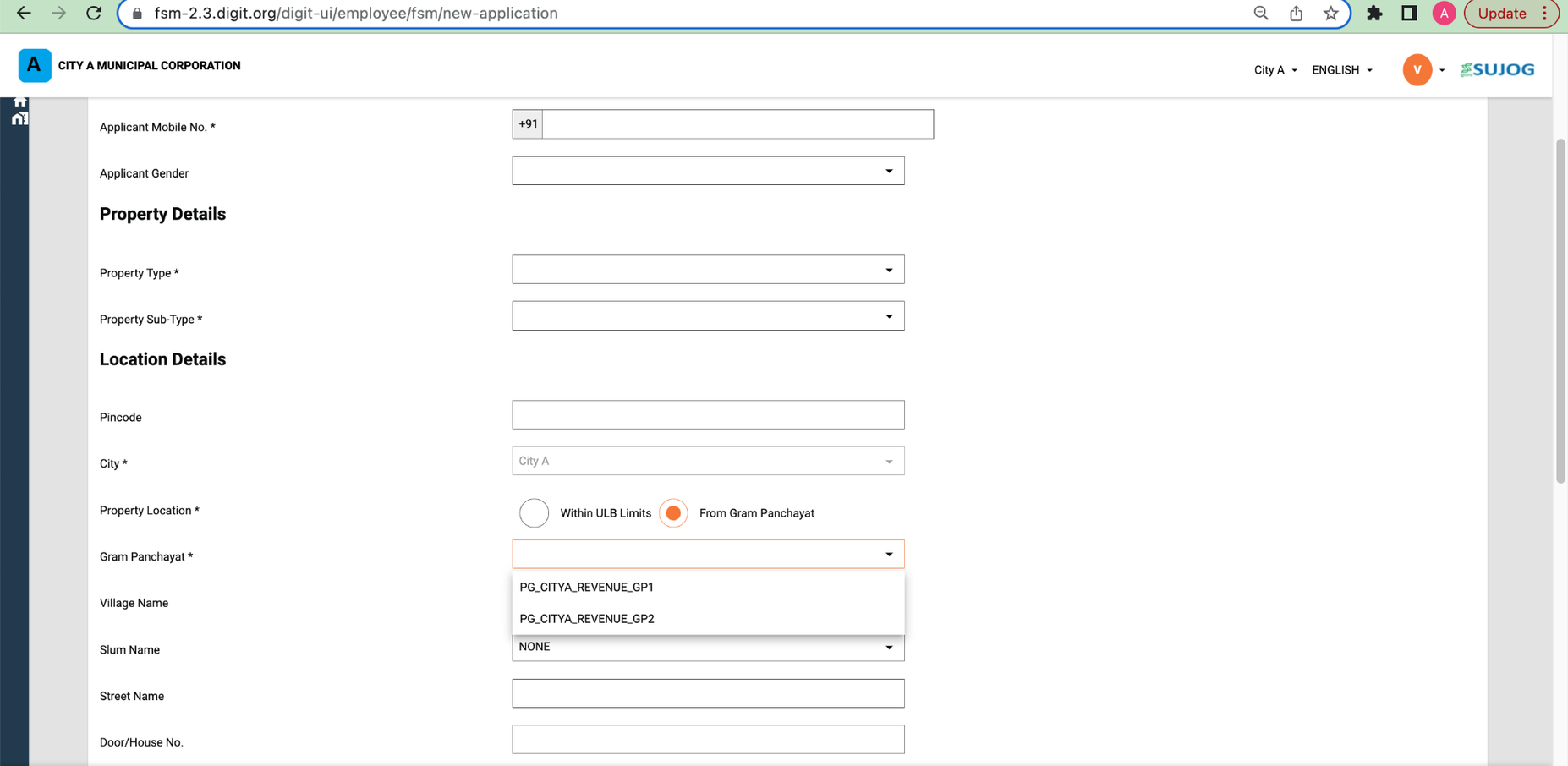
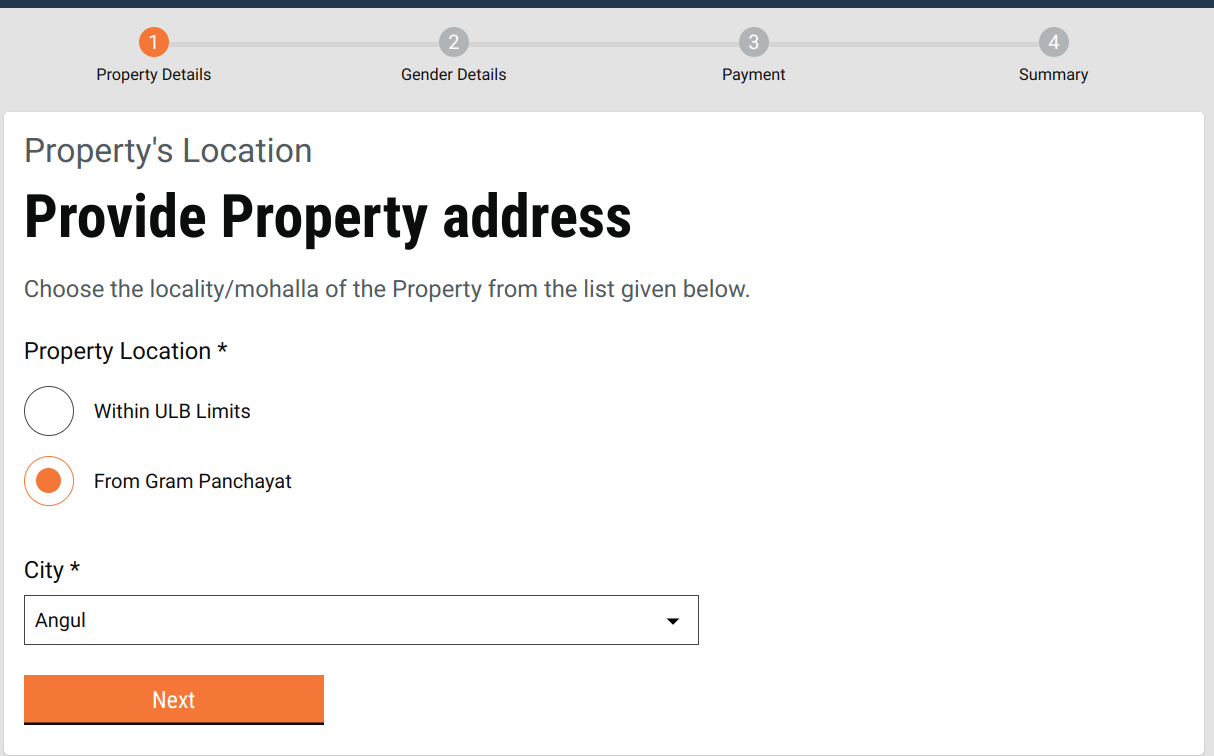
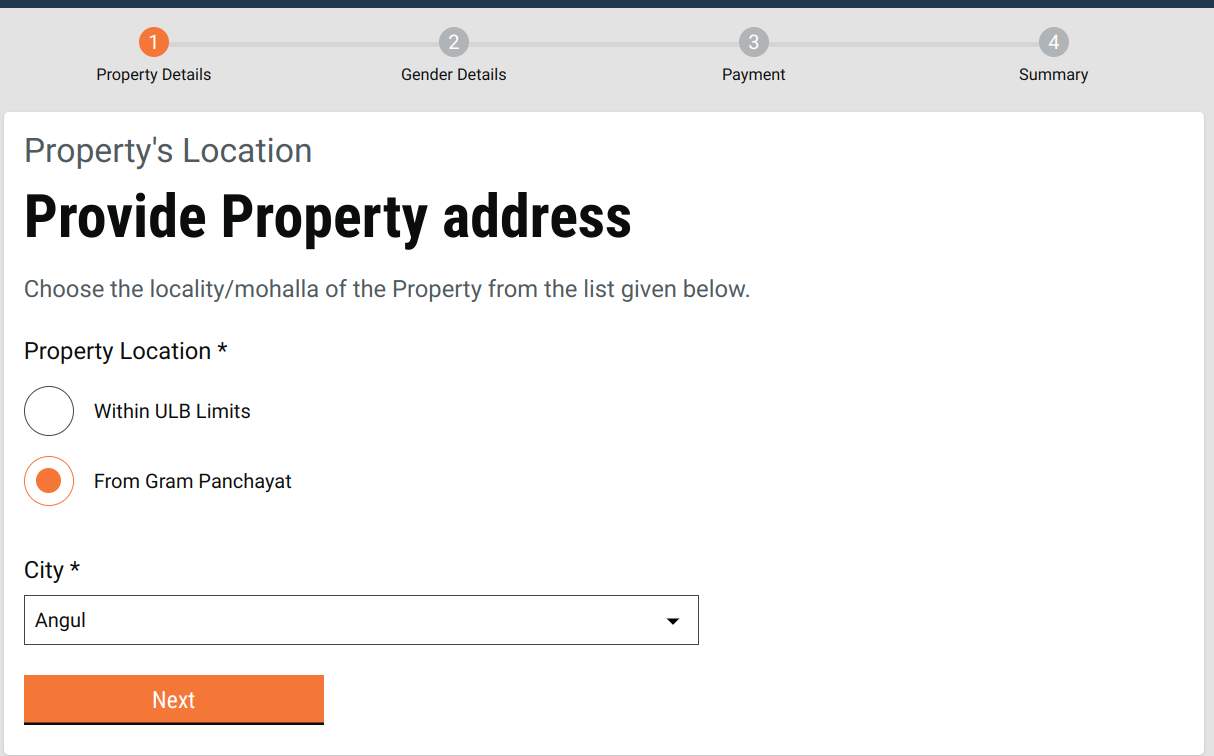
* They need a provision into a system while creating a new application to either choose local municipalities or urban supported villages.
* Based on their choice they would be able to select either locality/mohalla or Gram Panchayat(GP) area from the respective master data drop down list.
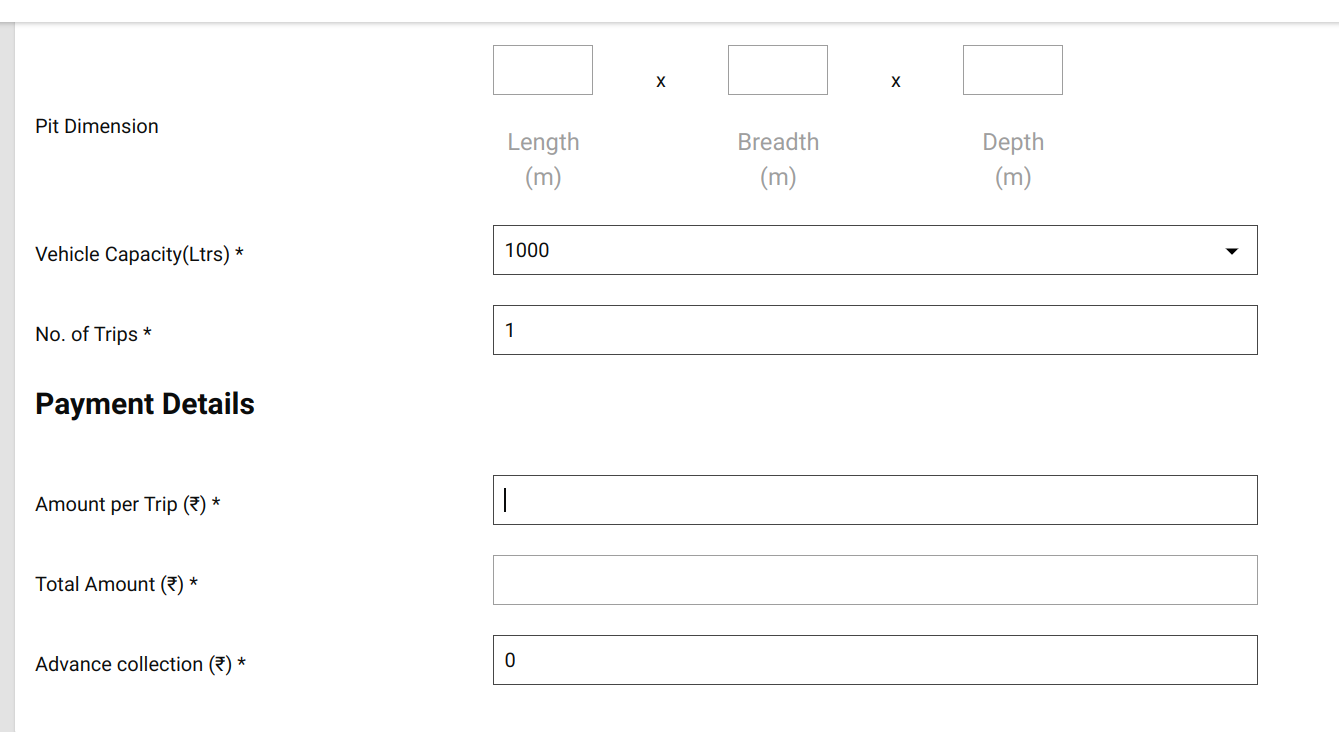
* The caveat here is if an ULB employee chooses GP then the trip amount field should be an editable field where he/she can fill any logical amount based on their own offline calculation instead of auto calculated amount that is already there in an application in case of Urban bodies.
* ULB employees or DSO Operation should also be able to edit the no. of trips and the final amount should be multiple of the initial amount entered into an application with no. of trips.
#### Logical Data Flow
#### UI/UX Wireframe
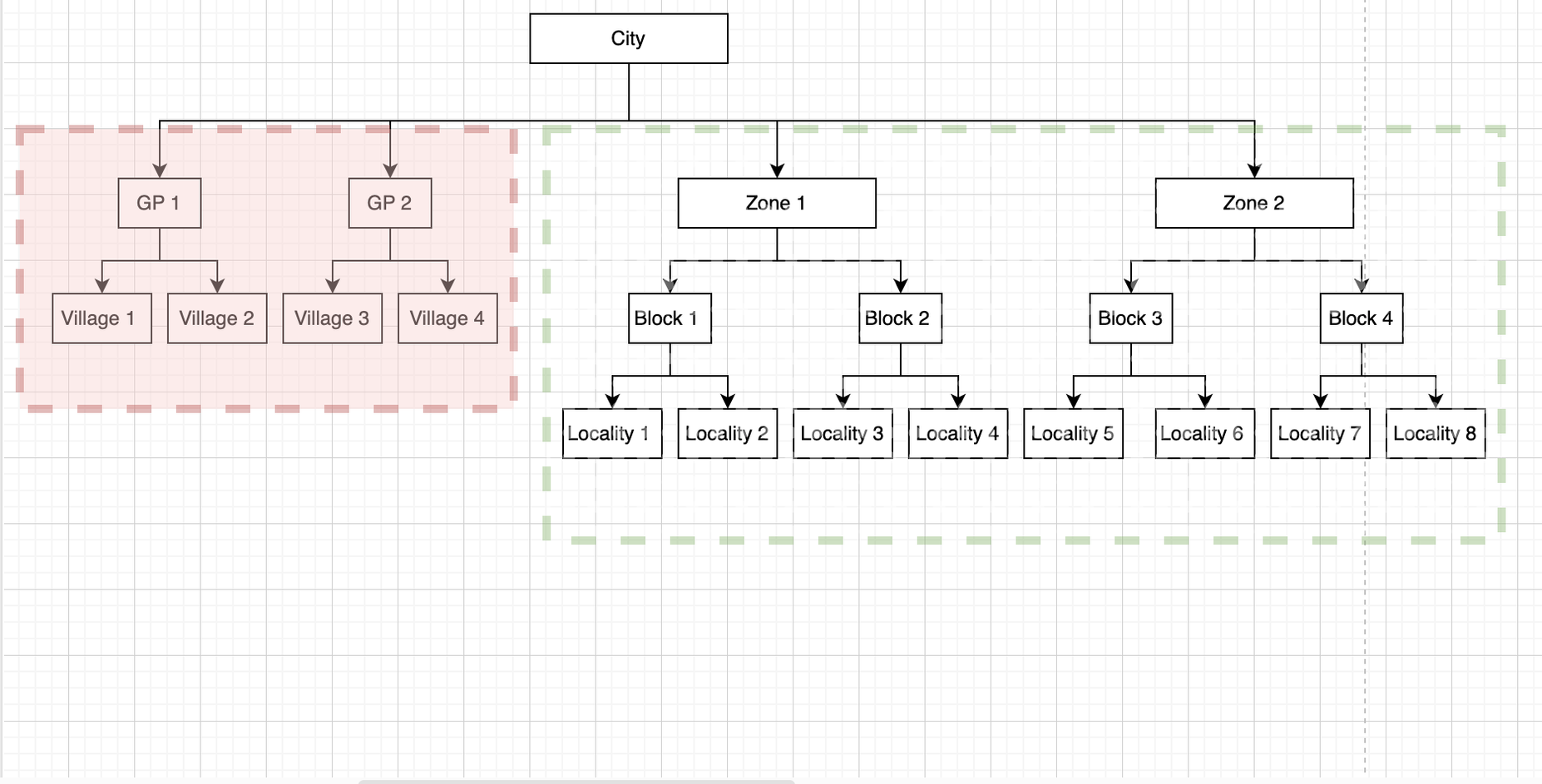
#### Technical Components & Design
* Need to update mdms data: boundary-data.json
* Need to add a new children hierarchy for GP under City which will be parallel to Locality. A sample MDMS is attached below in this document.
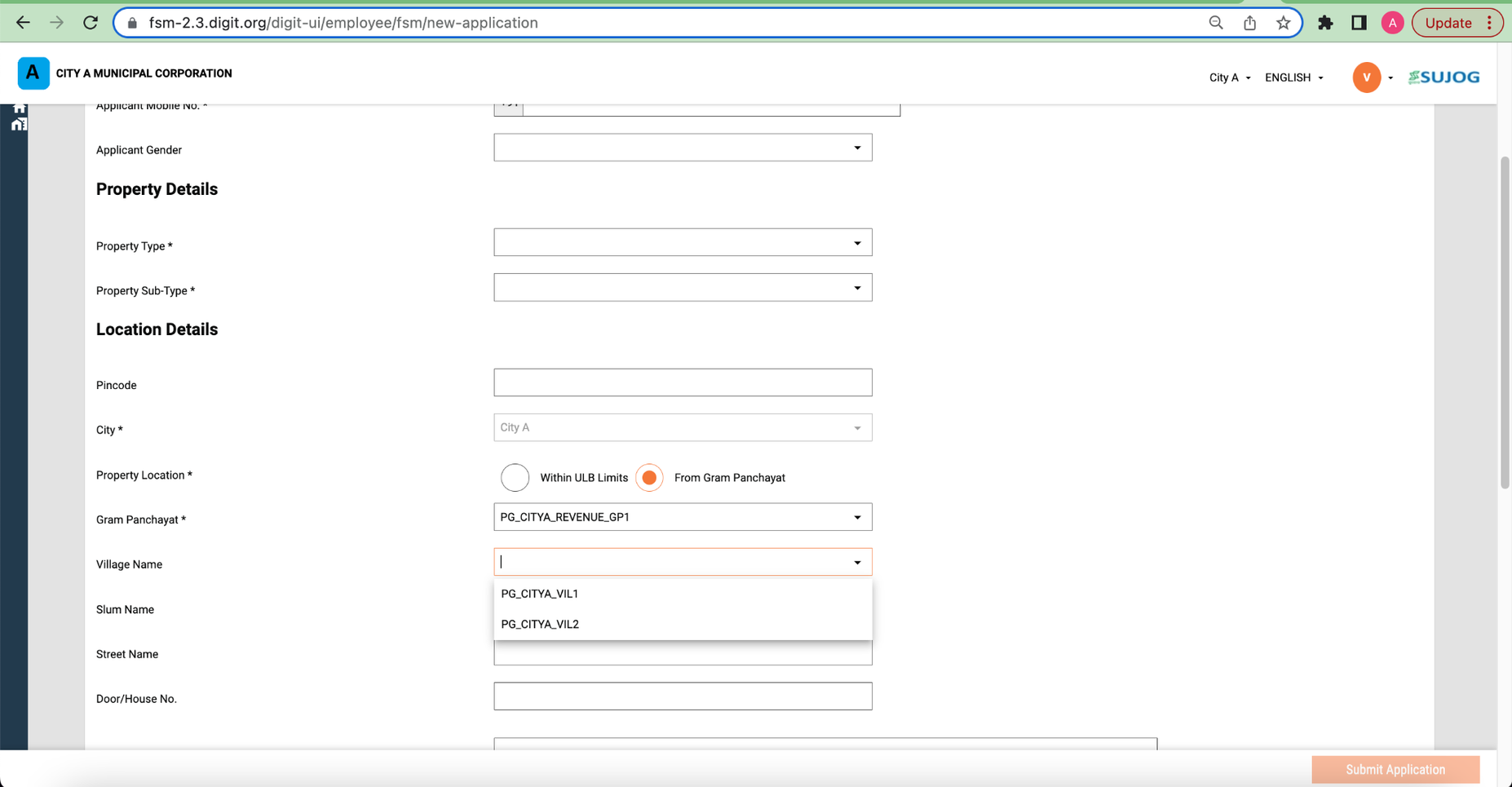
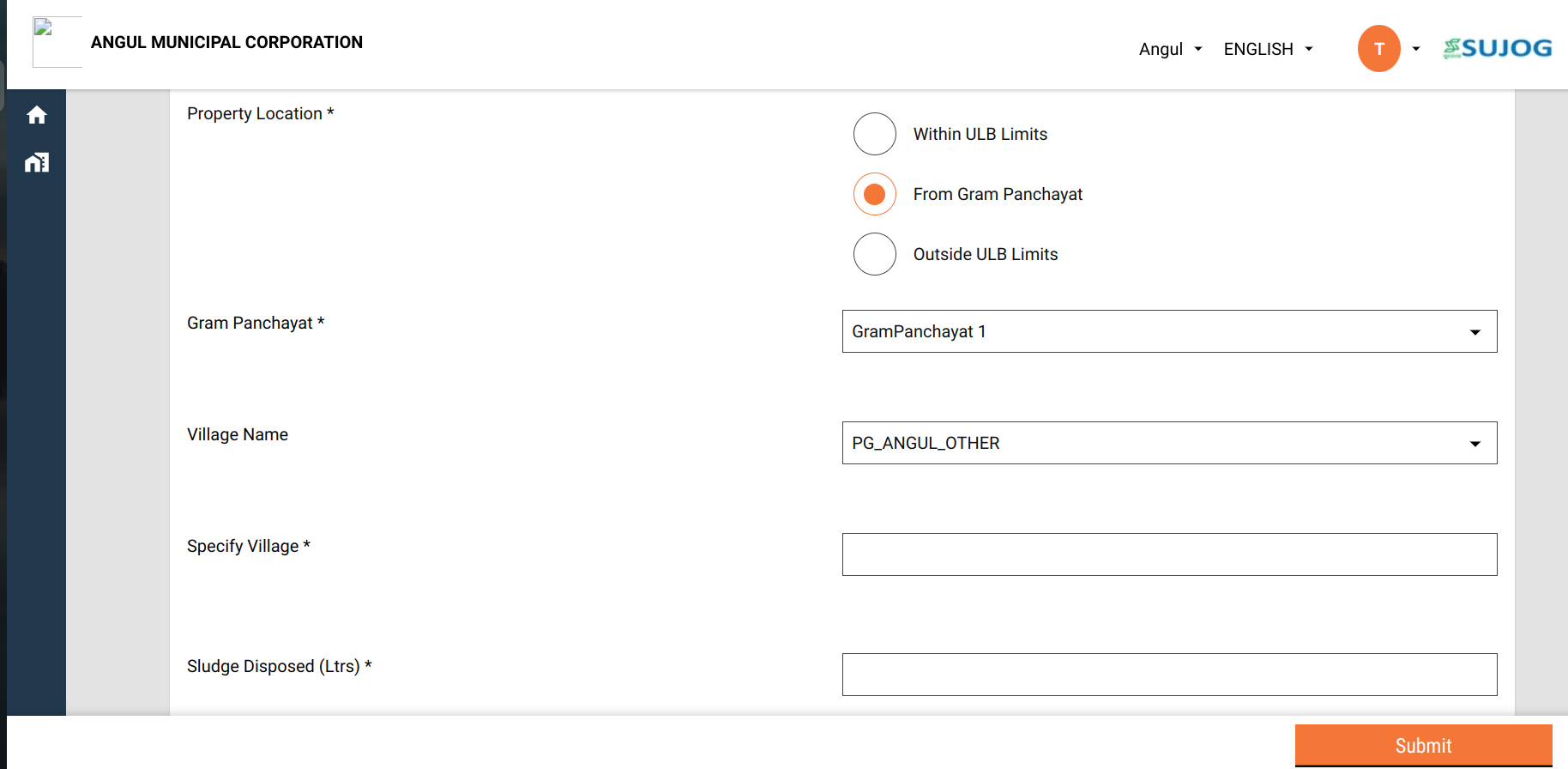
* By Default “Urban” option will be pre-selected in the radio button in the above wireframe and the drop-down will have the locality/mohalla master data. In case if employee selects “ULB supported village” then the locality/mohalla dropdown will be replaced by GPs and Village drop-down data on the fly.
* System will use the below URL to fetch the localities or GPs and their corresponding villages.
* In the case of localities, need to pass boundaryType as “Locality”.
* **boundaryType=Locality**\&tenantId=pb.amritsar
* In the case of GP/villages, need to pass the boundaryType as “GP”.
* **boundaryType=GP**\&tenantId=pb.amritsar
* Introduction of a new string column (boundary\_type) in the FSM\_APPLICATION table to capture (Locality or GP) to determine if the application created is for RURAL or not so that in the near future it will be helpful for the analytics and statistics in Dashboards.
* Default value for this column will be Locality to support backward compatibility
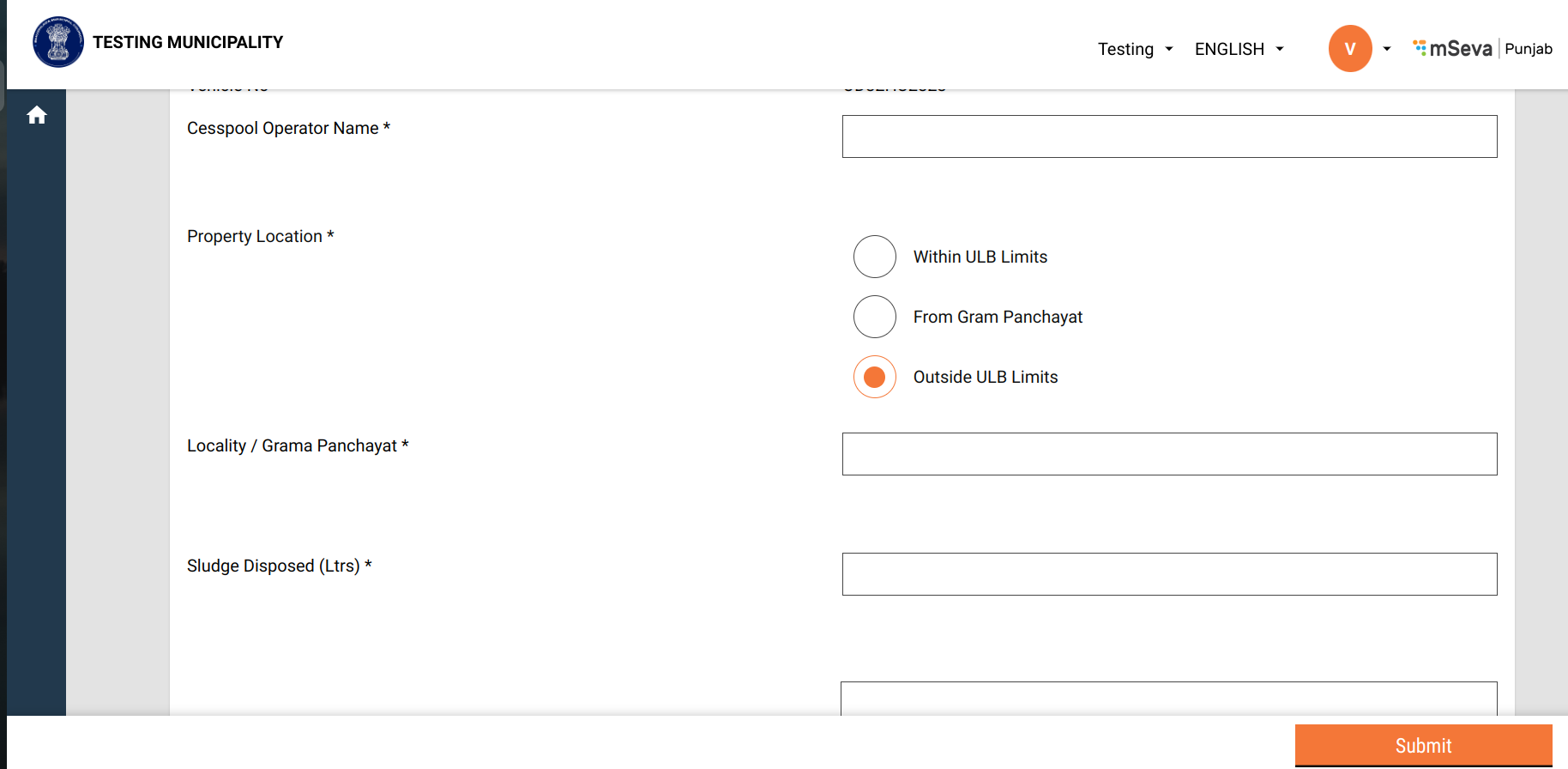
* Add Vehicle log would also have the option to select Urban (Default option) or Rural. If Rural gets selected the text name of an element would be replaced from “Locality” to “Gram Panchayat” for a text field.
* Introduction of a new column of string type (boundary\_type) in vehicle\_trip table to capture if the vehicle log is created for GP or not.
* Default value for this column will be Locality to support backward compatibility.
***Sample MDMS***
**boundary-data.json**
```json
{
"tenantId": "pb.amritsar",
"moduleName": "egov-location",
"TenantBoundary": [{
"hierarchyType": {
"code": "REVENUE",
"name": "REVENUE"
},
"boundary": {
"id": 1,
"boundaryNum": 1,
"name": "Angul",
"localname": "Angul",
"longitude": null,
"latitude": null,
"label": "City",
"code": "od.angul",
"children": [{
"id": "2",
"boundaryNum": 1,
"name": "Baniabahal",
"localname": "Baniabahal",
"longitude": null,
"latitude": null,
"label": "Locality",
"code": "VIL1"
},
{
"id": "3",
"boundaryNum": 1,
"name": "Hulurisinga",
"localname": "Hulurisinga",
"longitude": null,
"latitude": null,
"label": "Locality",
"code": "VIL2"
},
{
"id": "4",
"boundaryNum": 1,
"name": "Angul town",
"localname": "Angul town",
"longitude": null,
"latitude": null,
"label": "Locality",
"code": "VIL3"
},
{
"id": "5",
"boundaryNum": 1,
"name": "Other",
"localname": "Other",
"longitude": null,
"latitude": null,
"label": "Locality",
"code": "VIL4"
},
{
"id": 6,
"boundaryNum": 1,
"name": "GP 1",
"localname": "GP1",
"longitude": null,
"latitude": null,
"label": "GP",
"code": "GP1",
"children": [{
"id": 11,
"boundaryNum": 1,
"name": "Village 1",
"localname": "Village local 1",
"longitude": 74.871552,
"latitude": 31.63089,
"label": "Village",
"code": "SUN04",
"pincode": [143001],
"area": "V-Area1",
"children": []
},
{
"id": 12,
"boundaryNum": 1,
"name": "Village 2",
"localname": "Village local 2",
"longitude": null,
"latitude": null,
"label": "Village",
"code": "SUN11",
"pincode": [143001],
"area": "V-Area1",
"children": []
}
]
},
{
"id": 8,
"boundaryNum": 1,
"name": "GP 2",
"localname": "GP2",
"longitude": null,
"latitude": null,
"label": "GP",
"code": "GP2",
"children": [{
"id": 13,
"boundaryNum": 1,
"name": "Village 3",
"localname": "Village local 3",
"longitude": 74.871552,
"latitude": 31.63089,
"label": "Village",
"code": "SUN04",
"pincode": [143001],
"area": "V-Area1",
"children": []
},
{
"id": 14,
"boundaryNum": 1,
"name": "Village 4",
"localname": "Village local 4",
"longitude": null,
"latitude": null,
"label": "Village",
"code": "SUN11",
"pincode": [143001],
"area": "V-Area1",
"children": []
}
]
}
]
}
},
{
"hierarchyType": {
"code": "ADMIN",
"name": "ADMIN"
},
"boundary": {
"id": 1,
"boundaryNum": 1,
"name": "Angul",
"localname": "Angul",
"longitude": null,
"latitude": null,
"label": "City",
"code": "od.angul",
"children": [{
"id": "2",
"boundaryNum": 1,
"name": "Baniabahal",
"localname": "Baniabahal",
"longitude": null,
"latitude": null,
"label": "Locality",
"code": "VIL1"
},
{
"id": "3",
"boundaryNum": 1,
"name": "Hulurisinga",
"localname": "Hulurisinga",
"longitude": null,
"latitude": null,
"label": "Locality",
"code": "VIL2"
},
{
"id": "4",
"boundaryNum": 1,
"name": "Angul town",
"localname": "Angul town",
"longitude": null,
"latitude": null,
"label": "Locality",
"code": "VIL3"
}
]
}
}
]
}
```
**UrcConfig.json**
To enable URC feature in UI
```json
{
"tenantId": "pg.angul",
"moduleName": "FSM",
"urcConfig": [
{
"URCEnable": true,
"villageHierarchyAvailable": true
}
]
}
```
* We are keeping the Locality hierarchy under the City as it is \[No change there]. And the ‘location api’ with boundaryType as “Locality” will be used the same way it's being called currently to get the localities. Below are the api details:\
**boundaryType=Locality**\&tenantId=pb.amritsar\
\
Response:
```json
{
"ResponseInfo": {
"apiId": "org.egov.boundary",
"ver": null,
"ts": "",
"resMsgId": "uief87324",
"msgId": null,
"status": "200 OK"
},
"TenantBoundary": [
{
"hierarchyType": {
"id": null,
"name": "REVENUE",
"code": "REVENUE",
"localName": null,
"tenantId": null,
"createdBy": null,
"createdDate": null,
"lastModifiedBy": null,
"lastModifiedDate": null,
"version": 0,
"new": false
},
"boundary": [
{
"code": "VIL1",
"name": "Baniabahal",
"label": "Locality",
"latitude": null,
"longitude": null,
"area": null,
"pincode": null,
"boundaryNum": 1,
"children": []
},
{
"code": "VIL2",
"name": "Hulurisinga",
"label": "Locality",
"latitude": null,
"longitude": null,
"area": null,
"pincode": null,
"boundaryNum": 1,
"children": []
},
{
"code": "VIL3",
"name": "Angul town",
"label": "Locality",
"latitude": null,
"longitude": null,
"area": null,
"pincode": null,
"boundaryNum": 1,
"children": []
},
{
"code": "VIL4",
"name": "Other",
"label": "Locality",
"latitude": null,
"longitude": null,
"area": null,
"pincode": null,
"boundaryNum": 1,
"children": []
}
],
"tenantId": "pb.amritsar"
}
]
}
```
* To get a List of Gram Panchayats and corresponding villages, we will pass boundaryType as “GP”. Below are the api details:\
**boundaryType=GP**\&tenantId=pb.amritsar
```json
{
"ResponseInfo": {
"apiId": "org.egov.boundary",
"ver": null,
"ts": "",
"resMsgId": "uief87324",
"msgId": null,
"status": "200 OK"
},
"TenantBoundary": [
{
"hierarchyType": {
"id": null,
"name": "REVENUE",
"code": "REVENUE",
"localName": null,
"tenantId": null,
"createdBy": null,
"createdDate": null,
"lastModifiedBy": null,
"lastModifiedDate": null,
"version": 0,
"new": false
},
"boundary": [
{
"code": "GP1",
"name": "GP 1",
"label": "GP",
"latitude": null,
"longitude": null,
"area": null,
"pincode": null,
"boundaryNum": 1,
"children": [
{
"code": "SUN04",
"name": "Village 1",
"label": "Village",
"latitude": "31.63089",
"longitude": "74.871552",
"area": "V-Area1",
"pincode": [
143001
],
"boundaryNum": 1,
"children": []
},
{
"code": "SUN11",
"name": "Village 2",
"label": "Village",
"latitude": null,
"longitude": null,
"area": "V-Area1",
"pincode": [
143001
],
"boundaryNum": 1,
"children": []
}
]
},
{
"code": "GP2",
"name": "GP 2",
"label": "GP",
"latitude": null,
"longitude": null,
"area": null,
"pincode": null,
"boundaryNum": 1,
"children": [
{
"code": "SUN04",
"name": "Village 3",
"label": "Village",
"latitude": "31.63089",
"longitude": "74.871552",
"area": "V-Area1",
"pincode": [
143001
],
"boundaryNum": 1,
"children": []
},
{
"code": "SUN11",
"name": "Village 4",
"label": "Village",
"latitude": null,
"longitude": null,
"area": "V-Area1",
"pincode": [
143001
],
"boundaryNum": 1,
"children": []
}
]
}
],
"tenantId": "pb.amritsar"
}
]
}
```
#### DB Details
| Table Name | Column Name | Comments |
| -------------------- | ------------------------------- | ------------------------------------------------------------------------------------------------------------------------------------ |
| eg\_fsm\_application | boundarytype | to capture (Locality or GP) in order to determine if the application created is for RURAL or not based on the radio button selection |
| eg\_fsm\_address | additionaldetails.gramPanchayat | To store the selected GP while creating an application. |
| eg\_fsm\_address | additionaldetails.village | To store the selected village while creating an application. |
| eg\_vehicle\_trip | boundarytype | to capture (Locality or GP) if the vehicle log is created for GP or not. |
#### Functional Impact
To analyze the impact, we deployed a different module(property tax) which is also pointing to same boundary-data mdms.
**Expectation:**
**For FSM Module:**\
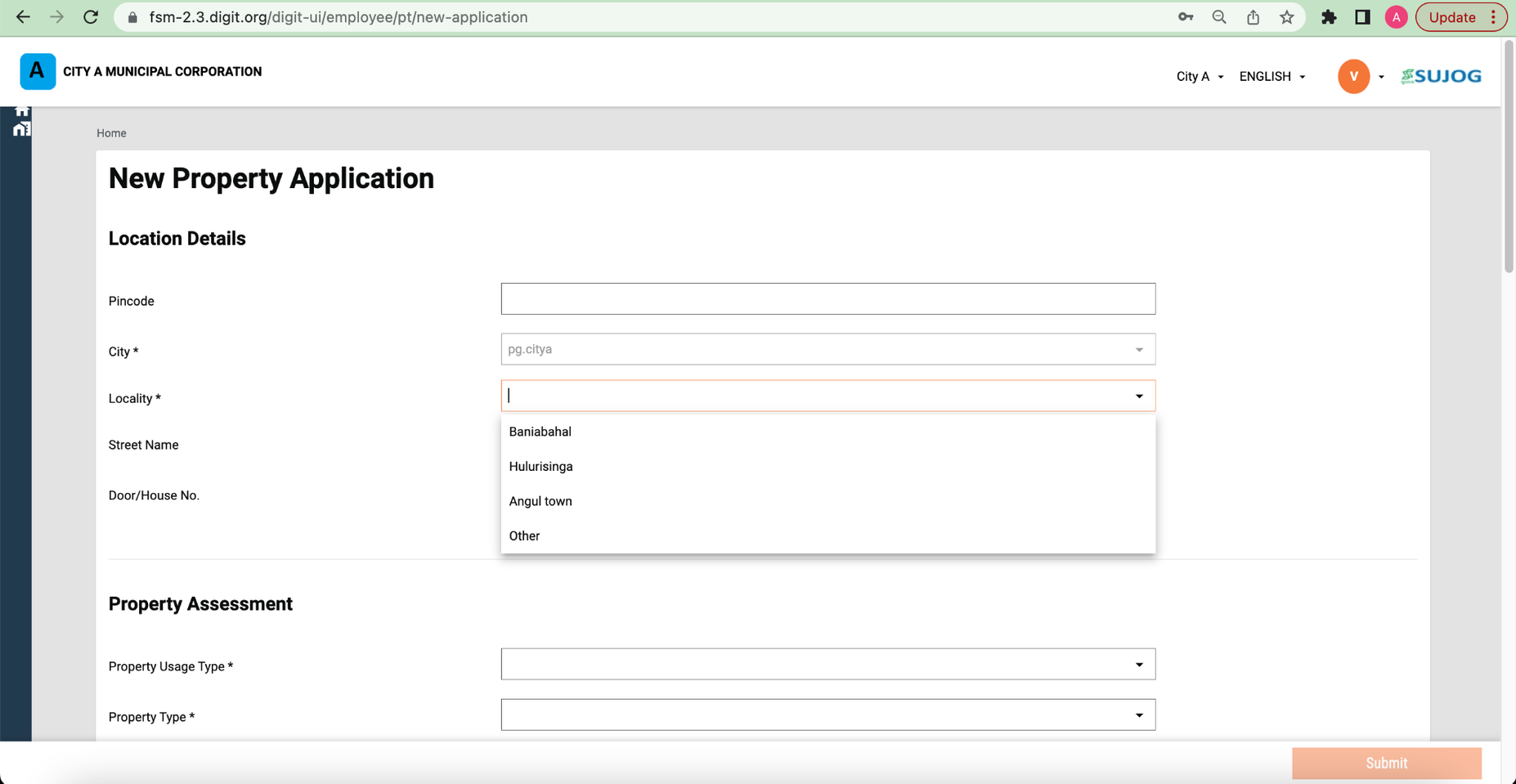
Non-URC flow : Locality dropdown should show all the localities as it is. \[There should be no impact]\
URC flow : GramPanchayat and Village dropdown should show as per new GP and village added to the MDMS.
**For Property Tax Module:**\
Locality dropdown should show all the localities as it is. \[There should be no impact]
**Property Tax Screen**
The locality dropdown in Property tax is displaying the values from existing location hierarchy itself. NO IMPACT.
### ***EMPLOYEE FLOW :***
**SUJOG FSM (NON-URC)**
In FSM, for non-URC the locality dropdown is showing values from the existing hierarchy itself. \[NO IMPACT]
**SUJOG FSM (URC)**
* GP Dropdown\
In case of FSM(URC), the grampanchayat and village dropdown are showing values from the new hierarchy we have configured in the existing mdms.
* Village Dropdown
* Pricing
* Pricing per trip will be entered by “ULB employees” for each request
* ULB employee will have a free text entry field to enter price for a request.
### ***FSTP FLOW :***
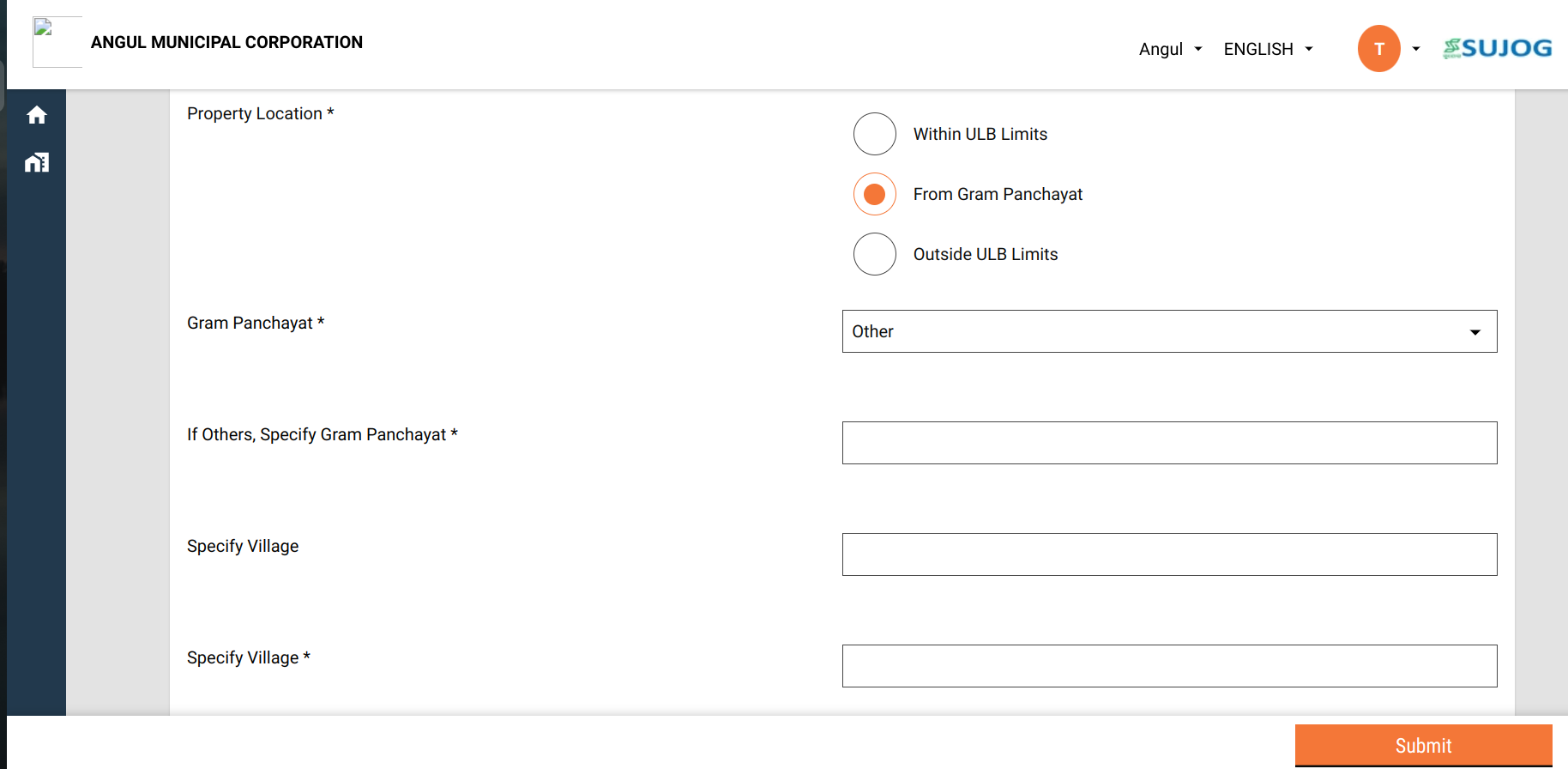
In FSTP,there are two scenerios -
1. Selects a Gram panchayat from drop down but village is not in the list. In this case, Selects other in village and a free text field appears.
2. Selects 'other' in GP list. In this case, 2 free text fields appear - one for GP and one for Village.
> If the locality or GP is located outside the city,then select “Outside ULB Limits” and provide Locality / Grama Panchayat name in text field.
### ***CITIZEN FLOW :***
### Dashboard - URC Charts :
#### **Description**
In the dashboard, add the following chart:
1. Add pie chart: Applications by Source
1. Pie Chart Value: Ratio of Applications from GP: Ratio of requests from Urban Areas
2. Add toggle for Applications and Sludge
3. Pie Chart Value: Ratio of Sludge Disposed from GP: Ratio of Sludge from Urban Areas
4. Tooltip: Show Total Applications and Total Sludge (See design). Tooltip value to be responsive to toggle between Unit, Lac and Crore
5. Chart should filter basis time period, district, ulb (dashboard filters)
6. Chart should have export, share and download options.\
\
\

2. Add Bar chart: No. of applications per month from Gram Panchayat
1. Bar Chat Value: Total Number of applications from Gram Panchayat
2. Add toggle for Applications and Sludge Disposed
3. Tooltip: Show Total Applications and Total Sludge (See design). Tooltip value to be responsive to toggle between Unit, Lac and Crore
4. Chart should filter basis time period, district, ulb (dashboard filters)
5. Chart should have export, share and download options.\
\

\
**REFERENCE DOCS :**
---
# Agent Instructions
This documentation is published with GitBook. GitBook is the documentation platform designed so that both humans and AI agents can read, navigate, and reason over technical content effectively. Learn more at gitbook.com.
## Querying This Documentation
If you need additional information that is not directly available in this page, you can query the documentation by asking a question.
Perform an HTTP GET request on the following URL with the `ask` and `goal` query parameters:
```
GET https://docs.digit.org/sanitation/water-sanitation-product-suite/waste-management-system/faecal-sludge-management-fsm/urc-release-notes.md?ask=&goal=
```
`ask` is the immediate question: it should be specific, self-contained, and written in natural language.
`goal` is what the user is ultimately trying to achieve, the reason they need the answer. Sharing it helps GitBook give you a better, more relevant answer. A goal is most helpful when it describes the outcome the user wants rather than restating the question. For example, with `ask=how do I create an API token`, a goal like `automate deployments from our CI pipeline` lets GitBook tailor the answer to that use case.
The response will contain a direct answer to the question and relevant excerpts and sources from the documentation.
Use this mechanism when the answer is not explicitly present in the current page, you need clarification or additional context, or you want to retrieve related documentation sections.