To ensure proper disposal of waste, the Swachh Bharat Mission has approved the building of deep row entrenchments for the disposal of sludge for up-to three years. With this mandate, there are approximately 10k+ deep row entrenchments that now exist, and are usually unmanned. To confirm disposal to these legal unmanned dumping sites, there is a need for automated verification of disposal at these sites.
India’s FSM ecosystem is made of highly interdependent parts, across the value chain of generation, containment, transport, treatment, and disposal/reuse. This means that there are different actors at each stage of the value chain whose behaviours and business models affect how well the next stage functions, creating a complex mesh of constraints that affect the effective functioning of the sanitation service delivery.
While the linear value chain gives a lucid frame to understand the ideal flow of faecal sludge, there are various points of friction between stakeholders that currently undermine the effectiveness of the sanitation value chain. Illegal dumping remains a challenge in regard to the waste value chain.
We want to improve the verifiability of the transport information on faecal sludge through the implementation of vehicle tracking to drive the following benefits:
Improved verification: The service enhances the verification process of the faecal sludge disposal. By accurately tracking the movement of vehicles carrying the sludge, it ensures that the sludge reaches its designated disposal site, providing transparency and accountability in the disposal process.
Removal of manual intervention to confirm disposal: The implementation of the vehicle tracking service removes the need for manual intervention to confirm the disposal of faecal sludge. Traditionally, manual methods involve physical confirmation by the treatment plant operator.
Identification of Illegal dumping: By closely monitoring the transportation of faecal sludge from the point of containment to disposal, the vehicle tracking service helps in minimising disposal in illegal sites. It facilitates identifying potential inefficiencies, route deviations, or incidents, allowing for prompt corrective actions.
The vehicle tracking service within DIGIT aims to capture real-time spatial data by tracking vehicles from their starting coordinates (longitude and latitude) to their destination point. This service helps in enhancing the credibility of service delivery by providing a reliable means to track and verify the transportation process. The vehicle tracking service can be seamlessly integrated with various service delivery operations, offering the flexibility to configure it for different purposes.
Overview
Urban Local Bodies (ULB) and other government agencies provide citizen centric services. Some of these services involve/require movement of people or assets(eg : vehicle, equipment etc). Below is a sample list of such services:
Pickup of Fecal sludge from a citizen’s premises and offloading at a designated place
Garbage pickup truck visits multiple collection points and deposits the load at a designated waste segregation yard
ULB assigns a drinking water tanker to supply water to schools in a particular area. The water tanker visits the assigned schools and supplies the required amount of water.
Fumigation to contain mosquitoes spread involves an operator moving in a 2-wheeler from one street to another.
Medicines have to be moved from district headquarters to mandal level villages.
Key challenges in the above scenarios are :
Ensuring the vehicle / person took the designated route
Checking if all pickup/dropoff locations are visited
Monitoring if a restricted location is visited
Tracking of live location
Challenges listed above are solved with a new tracking service component. This document captures the technical design of such a tracking service. For functional use cases related to a specific citizen service (Fecal Sludge Management), please refer to .
Tech design for Tracking service addresses following key design goals. These goals are derived from DIGIT’s view of how a service should evolve and also the constraints arising from the usage of client side application.
Client side devices may have network bandwidth constraints, hence the communication between client and Tracking service should be optimized on data.
Tracking service should be generic enough to handle any kind of citizen services that involve movement of assets or service delivery by an operator on move. Type of service being rendered decides the monitoring rules (alerts, notifications) that are applied to the trip.
Within the DIGIT platform, event based models processing should be used so that newer applications can be plugged in by consuming the event messages.
Below is the list of entities, actors and tech components involved in tracking service.
Entities
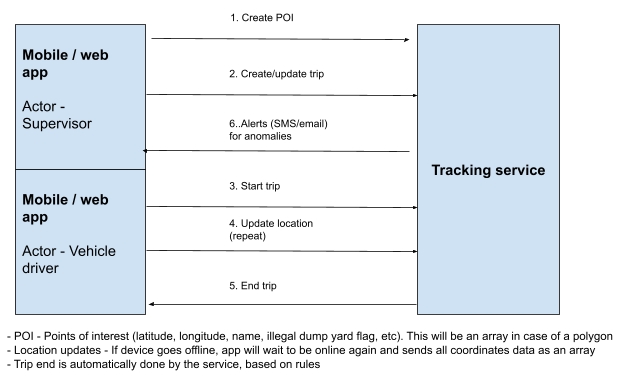
Point of Interest (POI) - Latitude, longitude coordinates of various locations. Types of locations include citizen pickup point, intermediate points, destination location, polygons to identify larger areas and tags to identify anomalies (like illegal dump yards).
Designated route - A sequence of POIs which indicate the route an operator should take.
Trip - Created for each service delivery involving an operator. It is either created based on request or through an automatic scheduler. Trip is made up of operator details and designated routes. Actual route taken by the operator is also associated with the trip.
Actors
Supervisor - Individual is responsible for making configuration level changes. These can be two separate roles or just one
Operator - Travels from source to destination of a trip as part of service delivery.
System - Tracking service has the intelligence to take some actions on its own.
Tech components
Mobile App - User facing application to manage routes, trips and POIs
Tracking service - Stores entities, applies automated rules and generates alerts.
Tracking service has APIs to manage the 3 core entities - Point of interest (POI), Designated route and Trip. Basic details of these APIs are mentioned below.
Following are the list of APIs this service will support. For details of the request and response message structure, please refer to Appendix A in this document.
Point of interest
/poi/_create
/poi/_update
/poi/_search
Event entity has a generic format. Structure of the event is listed below.
Service design
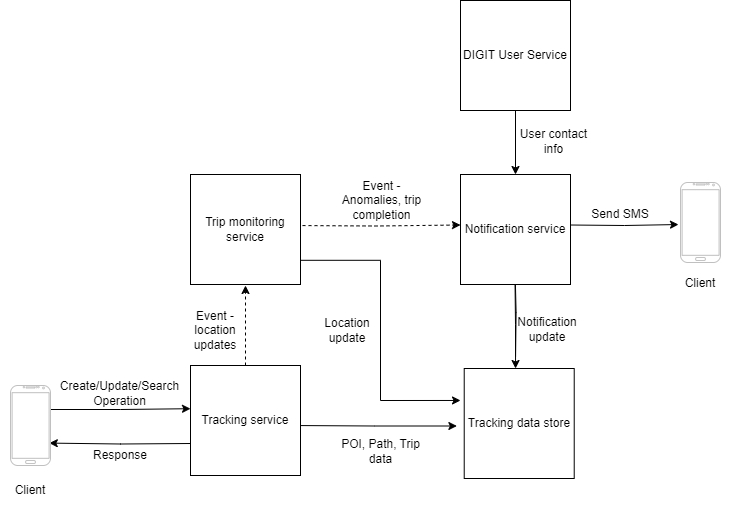
Tracking service [New]
A gateway service for client endpoints. POI, Designated routes and Trips are managed by this service
Location updates received from client are published as events in a standard format
Trip monitoring module [New]
A user with additional responsibilities like creation of a trip, registering points of interest.
Trip
Assignment of a designated route to an operator forms a trip. This is the actual work done by the operator. Monitoring of distance covered, route taken, anomalies, service delivery and payment are linked to completion of trip.
[Offline mode] Process the bulk updates related to geo location and timestamps related to operator movement
User app
UC 1.5
End a trip automatically once the operator reaches the destination. Supervisor can do a manual override
System, Supervisor
UC 1.6
Search for a trip based on trip id, ULB, service, operator, geo codes and other relevant information
Supervisor
UC 2
Citizen service master configuration
UC 2.1
Create designated route for a trip based on points of interest (refer UC 3), ULB and type of service
Supervisor
UC 2.2
Search for designated routes
Supervisor
UC 2.3
Update designated route status to active or inactive
Supervisor
UC 2.4
Register a new operator
Supervisor
UC 3
Points of interests and Geofencing
UC 3.1
Create points of interests based of LatLong coordinates
Supervisor
UC 3.2
Create polygon based geofence using multiple sets of LatLong coordinates
Supervisor
UC 3.3
Associate points of interest and geofences with various tags like pickup points, legal dumpyards, illegal dump yards and so on
Supervisor
UC 3.4
Search for the existing points of interest, geo fences and the associated tags
Supervisor
UC 3.5
Update geo points status to active or inactive
Supervisor
UC 4
Watcher and alerts
UC 4.1
Identify trip anomalies based on geo tags assigned in UC 3.
System
UC 4.2
Identify time based anomalies in a trip based on specific preconfigured rules
System
UC 4.3
Generate alerts (email, SMS) on detection of anomalies
System
UC 4.4
Search for anomalies based on trip id, geo location, ULB id and so on
Supervisor
UC 4.5
End trip if it goes beyond a time limit
System
Designated route
/designated_route/_create
/designated_route/_update
/designated_route/_search
Trip
/trip/_create
/trip/_update
/trip/_progress
/trip/_search
Consumes the location update events received from client (published by Tracking service)
Persists the location data, identifies anomalies, marks trips as complete based on rules
Events that should be notified are published by this service
Notification module [New]
Consumes the notification events
Fetches contact information from DIGIT User Service and sends SMS in predefined format
Tracking data store [New]
Data store for POIs, routes, trips, location updates and notifications
DIGIT user service [Existing]
Provides contact information of the user to which notification will have to be sent
User can be a supervisor or operator
Term
Definition
Actual route
Route recorded by the tracking device. This can be different from the designated route. It is not created upfront.
Designated route
Pre-designated route to be taken by the person/asset.
Tracking service
A software component that stores data related to a trip, applies rules to identify anomalies and notifications.
Operator
A user responsible for delivering the service. For example, a PHC staff member doing a door to door survey to check for health details of citizens in a particular area.
Point of interest (POI)
A place on map that is of interest during service delivery. It consists of the geo location, name and additional tags. For example, a legal dumpyard for fecal sludge or customer location where a service has to be delivered..
Polygon
This is a type of POI which is formed on the basis of multiple geo-coordinates. It helps in identifying large areas on a map, like an illegal dump yard or a cluster of homes and check the trip progress w.r.t to the polygon.
Use Case
Use cases for the backend service
Triggered by
UC 1
Trip management
UC 1.1
Create a new trip based on citizen service, ULB, operator id, starting location, ending location, designated route (refer UC 2), timestamp and other relevant information
Supervisor
UC 1.2
Start an assigned trip
Operator
UC 1.3
Process continuous updates on geo location of the operator assigned to a trip
User app
Field
Description
id
GUID to uniquely identify an event
type
Event type indicates the nature of the event and helps consuming applications identify if/how to process it. For example - tracking service generates an event with type “LocationUpdate”. Similarly, trip monitoring service generated events will have the type “TripAnomaly”, “TripCompleted”
creation_time
Time at which the event is created
source
Application that published this event. This can be a short code / acronym of the source application
data
This is a JSON object. For example, “LocationUpdate” events will have fields like current_location and received_time.
Supervisor
UC 1.4
Urban Local Bodies (ULB) and other government agencies provide citizen centric services. Some of these services involve/require movement of people or assets(eg : vehicle, equipment etc). Below is a sample list of such services:
Pickup of Fecal sludge from a citizen’s premises and offloading at a designated place
Garbage pickup truck visits multiple collection points and deposits the load at a designated waste segregation yard
ULB assigns a drinking water tanker to supply water to schools in a particular area. The water tanker visits the assigned schools and supplies the required amount of water.
Fumigation to contain mosquitoes spread involves an operator moving in a 2-wheeler from one street to another.
Medicines have to be moved from district headquarters to mandal level villages.
Key challenges in the above scenarios are :
Ensuring the vehicle / person took the designated route
Checking if all pickup/dropoff locations are visited
Monitoring if a restricted location is visited
Tracking of live location
Challenges listed above are solved with a new tracking service component. This document captures the technical design of such a tracking service. For functional use cases related to a specific citizen service (Fecal Sludge Management), please refer to .
Tech design for Tracking service addresses following key design goals. These goals are derived from DIGIT’s view of how a service should evolve and also the constraints arising from the usage of client side application.
Client side devices may have network bandwidth constraints, hence the communication between client and Tracking service should be optimized on data.
Tracking service should be generic enough to handle any kind of citizen services that involve movement of assets or service delivery by an operator on move. Type of service being rendered decides the monitoring rules (alerts, notifications) that are applied to the trip.
Within the DIGIT platform, event based models processing should be used so that newer applications can be plugged in by consuming the event messages.
Below is the list of entities, actors and tech components involved in tracking service.
Entities
Point of Interest (POI) - Latitude, longitude coordinates of various locations. Types of locations include citizen pickup point, intermediate points, destination location, polygons to identify larger areas and tags to identify anomalies (like illegal dump yards).
Designated route - A sequence of POIs which indicate the route an operator should take.
Trip - Created for each service delivery involving an operator. It is either created based on request or through an automatic scheduler. Trip is made up of operator details and designated routes. Actual route taken by the operator is also associated with the trip.
Actors
Supervisor - Individual is responsible for making configuration level changes. These can be two separate roles or just one
Operator - Travels from source to destination of a trip as part of service delivery.
System - Tracking service has the intelligence to take some actions on its own.
Tech components
Mobile App - User facing application to manage routes, trips and POIs
Tracking service - Stores entities, applies automated rules and generates alerts.
Low level design
Tracking service
Controller classes
ConfigController, PoiController, RouteController, TripController
Service classes
ConfigService, POIService, RouteService, TripAlertService, TripService
Data access
ConfigDao, PoiDao, RouteDao, TripAlertDao, TripDao, TripProgressDao
Service access
POISao, TripSao
Model
FsmApplication, FsmVehicleTrip, TripAlert
Trip monitoring module
Monitoring logic
Trip data store
Database schema
Rule management schema
3.4.6 Use case to API mapping (with FSM integration)
Vehicle tracking system (VTS) and FMS are the two systems that provide these APIs
Driver use cases (mobile app)
Appendix A - REST APIs for client applications
Note -
(i) Additional attributes will be added to cater to integration with other entities within the DIGIT ecosystem. For example, Tenant Id, User Id, ULB id/name, auth token etc
(ii) All API requests will include timestamps and other information necessary for auditing.
a.1. /poi/_create (Implemented)
Request message
Response message
a.2. /poi/_update (Implemented)
Request
Response
a.3. /poi/_search
** Additional search filters will be added to restrict the results to ULB, user role and other related restrictions.
Request
Response
An array of below objects will be returned for the POIs matching with search criteria.
b.1. /designated_route/_create
Request
Response message
b.2. /designated_route/_update
Request
Response
b.3. /designated_route/_search
** Additional search filters will be added to restrict the results to ULB, user role and other related restrictions.
Request
Response
An array of below objects will be returned for the designated routes matching with search criteria.
c.1. /trip/_create (Implemented)
Request
Response
c.2. /trip/_update
Request
Response
c.3. /trip/_progress
Request
Response
c.4. /trip/_search
** Additional search filters will be added to restrict the results to ULB, user role and other related restrictions.
Request
Response
Array of trips is returned
c.5. /trip/_search/{tripId} (Implemented)
Request
Event type = LocationUpdate
Event data
{
“latitude” :
“longitude” :
“update_time” :
“trip_id” :
}
Event type = TripAnomaly
Event data
{
“anomaly_poi_id” :
“duration_at_poi” :
“update_time” :
“trip_id” :
}
Event type = TripComplete
Event data
{
“update_time” :
“completion_time” :
“trip_id” :
}
Mobile app
FSM portal
locationDetails -> longitude
Decimal
Yes
alert
Array of Strings
No
One or more alert codes can be mapped to the point of interest. This is optional and can be set only in cases where the POI is related to some illegal dump yard etc
userId
Text
Yes
DIGIT user id of the individual performing the create operation
userId
Text
No
DIGIT user id of the individual performing the create operation
location_lattitude
Decimal
No
location_longitude
Decimal
No
geofence_radius
Integer
No
illegal_dumpyard
Boolean
No
location_details
Array
Yes
location_details -> location_lattitude
Decimal
Yes
location_details -> location_longitude
Decimal
Yes
location_details -> geofence_radius
Integer
Yes
location_details -> illegal_dumpyard
Boolean
Yes
intermediate_poi_id
Array <Text>
No
Defaults to null
end_poi_id
Text
Yes
designated_route_traversal_time
Integer
No
Estimated time to complete a trip on this route.
Default value is 0.
start_poi_id
Text
No
intermediate_poi_id
Array <Text>
No
end_poi_id
Text
No
designated_route_traversal_time
Integer
No
start_poi_code
Text
No
intermediate_poi_code
Text
No
end_poi_code
Text
No
start_poi_name
Text
No
intermediate_poi_name
Text
No
end_poi_name
Text
No
start_poi_code
Text
Yes
intermediate_poi_codes
Array
No
end_poi_code
Text
Yes
start_poi_name
Text
Yes
intermediate_poi_names
Array
No
end_poi_name
Text
Yes
designated_route_traversal_time
Integer
No
operator
Object
operator -> id
Text
No
DIGIT user id of the operator delivering this service
operator -> name
Text
No
operator -> email
Text
No
operator -> contactNumber
Text
No
operator -> vehicleNumber
Text
No
plannedStartTime
Text
No
plannedEndTime
Text
No
userId
Text
Yes
DIGIT user id of the person performing this create activity
trip_expected_end_time
Text
No
trip_current_status
Text
Yes
location_details -> location_longitude
Decimal
Yes
location_details -> progress_timestamp
Text
Yes
userId
Text
No
DIGIT id of the person who created the trip
status
Text
No
operator
Object
No
operator -> id
Text
No
DIGIT user id of the operator delivering this service
operator -> name
Text
No
operator -> email
Text
No
operator -> contactNumber
Text
No
operator -> vehicleNumber
Text
No
plannedStartTime
Text
No
plannedEndTime
Text
No
userId
Text
No
DIGIT user id of the person performing this create activity
actualStartTime
Text
No
actualEndTime
Text
No
locationAlerts
Text
No
Alerts are assigned by backend service, in case the operator takes a path that triggers an alert
Name
Type
Mandatory?
Comments
locationName
Text
Yes
locationDetails
Array
Yes
List of locations that are part of a POI. This can be a single LatLong or group of LatLongs (line, polygon)
locationDetails -> lattitude
Decimal
Yes
Name
Type
Mandatory?
Comments
responseCode
Text
Yes
responseMessage
Text
Yes
id
Text
No
GUID of the POI created on success
Name
Type
Mandatory?
Comments
id
Text
Yes
POI to be updated
status
Text
No
Can be set to active or Inactive
locationName
Text
No
Name
Type
Mandatory?
Comments
responseCode
Integer
Yes
responseMessage
Text
Yes
id
Text
No
GUID of the POI updated
Name
Type
Mandatory?
Comments
poi_id
Text
No
poi_status
Text
No
location_name
Text
No
Name
Type
Mandatory?
Comments
poi_id
Text
Yes
poi_status
Text
Yes
location_name
Text
Yes
Name
Type
Mandatory?
Comments
designated_route_name
Text
Yes
designated_route_status
Boolean
No
This will be used to inactivate a route when needed
Default value is true.
start_poi_id
Text
Yes
Name
Type
Mandatory?
Comments
response_code
Numeric
Yes
response_message
Text
Yes
designated_route_id
Text
No
GUID of the Designated route created on success
Name
Type
Mandatory?
Comments
designated_route_id
Text
Yes
designated_route_name
Text
No
designated_route_status
Boolean
No
Name
Type
Mandatory?
Comments
response_code
Integer
Yes
response_message
Text
Yes
designated_route_id
Text
No
GUID of the Designated route updated
Name
Type
Mandatory?
Comments
designated_route_id
Text
No
designated_route_name
Text
No
designated_route_status
Boolean
No
Name
Type
Mandatory?
Comments
designated_route_id
Text
Yes
designated_route_name
Text
Yes
designated_route_status
Boolean
Yes
Name
Type
Mandatory
Comments
routeId
Text
Yes
Predefined route id, which has the list of POIs for that the trip should follow
serviceCode
Text
Yes
Type of service the trip is performing
status
Text
Yes
Client passes “created” value initially
Name
Type
Mandatory?
Comments
responseCode
Text
Yes
responseMessage
Text
Yes
id
Text
No
GUID of the trip created on success
Name
Type
Mandatory
Comments
trip_id
Text
Yes
trip_designated_route_id
Text
No
trip_expected_start_time
Text
No
Name
Type
Mandatory?
Comments
response_code
Integer
Yes
response_message
Text
Yes
Name
Type
Mandatory
Comments
trip_id
Text
Yes
location_details
Array
Yes
Array is used to support bulk updates in case the device comes online after being offline during a trip.
location_details -> location_lattitude
Decimal
Yes
Name
Type
Mandatory?
Comments
response_code
Integer
Yes
response_message
Text
Yes
Name
Type
Mandatory
Comments
operatorId
Text
No
DIGIT id of the person to whom a trip is assigned
tripName
Text
No
Partial name search is supported
status
Text
No
Name
Type
Mandatory?
Comments
id
Text
Yes
Trip id
routeId
Text
No
serviceCode
Text
No
Name
Type
Mandatory
Comments
id
Text
Yes
Trip id to be searched for
Use case
VTS database fields
User login functionality
VTS is not used. DIGIT user login API is invoked
List of trips assigned to driver
VTS API is called but all data is retrieved from FSM vehicle trip APIs.
Additional details stored in VTS db:
Trip.status
Trip.id
Trip.routeId
Route.Id
Route.startPoi
Route.endPoi
Trip details
Trip details are fetched from FSM vehicle trip API. VTS does not store trip details in its db
Trip progress once vehicle moves
VTS db stores trip progress information:
TripProgress.id
TripProgress.tripId
TripProgress.progressReportedTime
TripProgress.userId
TripProgress.positionPoint
TripProgress.progressTime
Illegal dumpyard creation
Illegal dumpyard details are stored in VTS db:
POI.id
POI.locatioName
POI.type
POI.positionPoint
POI.positionLine
POI.positionPolygon
POI.alert
Use case
VTS database fields
Trip details
Fields in VTS db:
Trip.id
Trip.status
Trip.actualStartTime
Trip.actualEndTime
TripAlert.id
TripAlert.tripId
TripAlert.alert
TripAlert.alertDateTime
Trip actual route details
Fields in VTS db:
TripProgress.id
TripProgress.tripId
TripProgress.progressReportedTime
TripProgress.userId
TripProgress.positionPoint
TripProgress.progressTime


