> For the complete documentation index, see [llms.txt](https://docs.digit.org/llms.txt). Markdown versions of documentation pages are available by appending `.md` to page URLs; this page is available as [Markdown](https://docs.digit.org/works/reference-implementations/muktasoft-v2.2/specifications/functional-requirements/user-stories/estimate-template/search-template.md).

# Search Template

## Scope

Search Estimate Template

Home > Estimate Template > Search Template

## Actors <a href="#actors" id="actors"></a>

State: STATE\_MUKTA\_ADMIN

ULB: MUKTA\_ENG\_ADMIN

## Details <a href="#details" id="details"></a>

1. Search Template is provided to list all the template.
2. There are various search parameters to search a template.

<table data-header-hidden><thead><tr><th width="98"></th><th width="153"></th><th width="122"></th><th></th></tr></thead><tbody><tr><td>Sr. No.</td><td>Field Name</td><td>Data Type</td><td>Description</td></tr><tr><td>1</td><td>Project Code</td><td>Drop-down</td><td>Project types</td></tr><tr><td>2</td><td>Template Name</td><td>Text</td><td>It is name of template</td></tr><tr><td>3</td><td>Template Code</td><td>Drop-down</td><td>It is system generated unique code to identify the template</td></tr><tr><td>4</td><td>Status</td><td>Drop-down</td><td>Active/ Inactive.</td></tr></tbody></table>

### **Search Logic**

1. At least one parameter is required to perform the search.
2. Exact search is performed for the values entered/selected.
3. In case multiple parameters values are supplied AND is applied for searching record.

### Search Result

1. Pagination to be enabled.
2. Search result is displayed as given below.

<table data-header-hidden><thead><tr><th width="96"></th><th width="136"></th><th></th></tr></thead><tbody><tr><td>Sr. No.</td><td>Field Name</td><td>Description</td></tr><tr><td>1</td><td>Code</td><td>It is system generated unique code to identify the template</td></tr><tr><td>2</td><td>Name</td><td>Template name.</td></tr><tr><td>3</td><td>Description</td><td>Template description.</td></tr><tr><td>4</td><td>Status</td><td>Active/ Inactive.</td></tr></tbody></table>

### Actions <a href="#actions" id="actions"></a>

1. Search - To perform the search based on the parameters entered.
2. Clear - To clear the values entered for search.
3. *Template Code* - Hyperlink to view the template detail on mouse click.

### Validations <a href="#validations" id="validations"></a>

Not applicable.

### Configuration <a href="#configuration" id="configuration"></a>

Not applicable.

### Notifications <a href="#notifications" id="notifications"></a>

Not applicable.

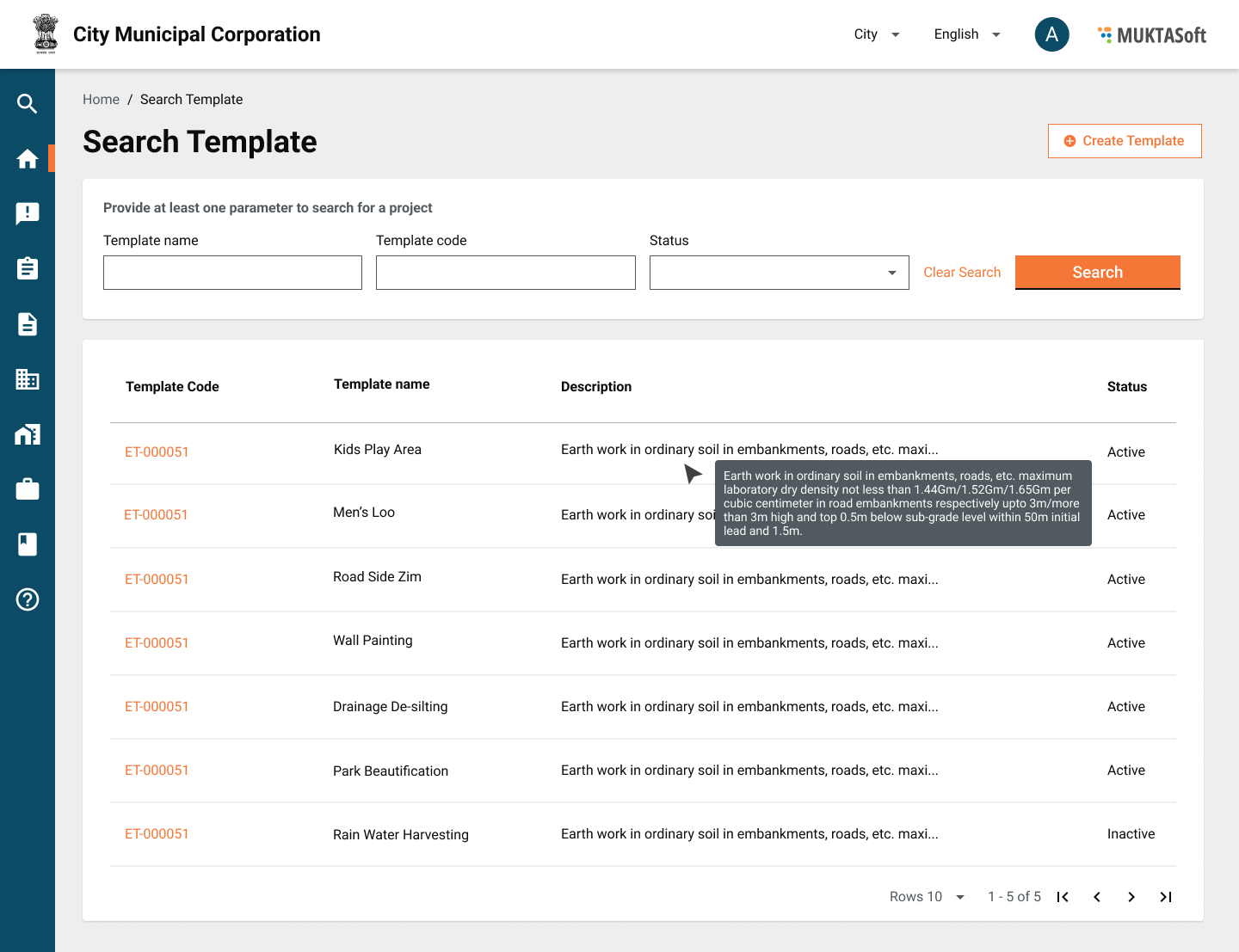
### User Interface <a href="#userinterface" id="userinterface"></a>

<figure><img src="/files/RqcqYnfFA052o5P5qjPd" alt=""><figcaption></figcaption></figure>

## Acceptance Criteria <a href="#acceptancecriteria" id="acceptancecriteria"></a>

1. Search is provided with the parameters provided.
2. Result is shown as provided in the table and wire-frame.
3. Pagination is provided.


---

# Agent Instructions
This documentation is published with GitBook. GitBook is the documentation platform designed so that both humans and AI agents can read, navigate, and reason over technical content effectively. Learn more at gitbook.com.

## Querying This Documentation
If you need additional information that is not directly available in this page, you can query the documentation dynamically by asking a question.

Perform an HTTP GET request on the current page URL with the `ask` query parameter, and the optional `goal` query parameter:

```
GET https://docs.digit.org/works/reference-implementations/muktasoft-v2.2/specifications/functional-requirements/user-stories/estimate-template/search-template.md?ask=<question>&goal=<endgoal>
```

`ask` is the immediate question: it should be specific, self-contained, and written in natural language.
`goal` is optional and describes the broader end goal you are ultimately trying to accomplish on behalf of the user. GitBook uses it to tailor the answer towards what is most useful for that goal.

The response will contain a direct answer to the question and relevant excerpts and sources from the documentation.

Use this mechanism when the answer is not explicitly present in the current page, you need clarification or additional context, or you want to retrieve related documentation sections.
