> For the complete documentation index, see [llms.txt](https://docs.digit.org/llms.txt). Markdown versions of documentation pages are available by appending `.md` to page URLs; this page is available as [Markdown](https://docs.digit.org/works/reference-implementations/muktasoft-v2.2/specifications/functional-requirements/user-stories/rate-analysis/view-rate-analysis.md).

# View Rate Analysis

## Scope

View Rate Analysis

Home > Search SOR > View SOR > View Analysis (Action)

## Actors <a href="#actors" id="actors"></a>

State: MUKTA\_STATE\_ADMIN

ULB: MUKTA\_ENG\_ADMIN

## Details <a href="#details" id="details"></a>

1. To view the rate analysis associated with a SOR, SOR is searched open to view.
2. From view SOR page, select the action “View Analysis”.
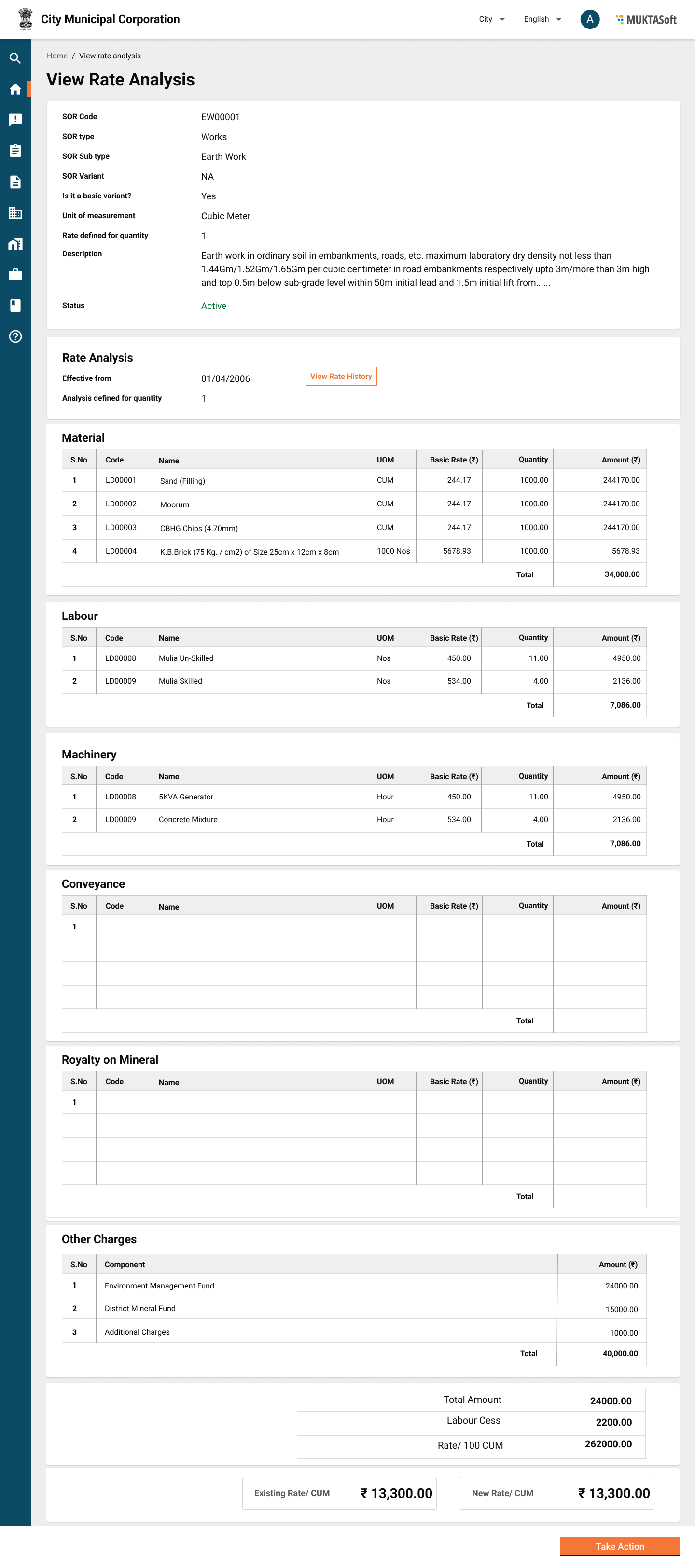
3. View rate analysis display the details of rate analysis with an action to revise the rate.
4. The attributes are display as given below in the table.

<table data-header-hidden><thead><tr><th width="79"></th><th width="136"></th><th></th></tr></thead><tbody><tr><td>Sr. No.</td><td>Field Name</td><td>Description</td></tr><tr><td>1</td><td>SOR Code</td><td>It is system generated unique code to identify the SOR.</td></tr><tr><td>2</td><td>SOR Type</td><td>SOR Type, the values from the SOR Type Master.</td></tr><tr><td>3</td><td>SOR Sub Type</td><td>SOR sub types, the values from SOR Sub Type Master.</td></tr><tr><td>4</td><td>SOR Variant</td><td>SOR variant, the values from the SOR Variant Master.</td></tr><tr><td>5</td><td>Unit</td><td>Unit of measurement.</td></tr><tr><td>6</td><td>Rate Defined for Quantity</td><td>The quantity for which SOR rate is defined.</td></tr><tr><td>7</td><td>SOR Description</td><td>SOR description.</td></tr><tr><td>8</td><td>Status</td><td>Active/Inactive</td></tr><tr><td> </td><td>Constituents</td><td> </td></tr><tr><td>9</td><td>Effective From</td><td>Display the date when it was last modified.</td></tr><tr><td>10</td><td>Analysis Defined for Quantity</td><td>The quantity for which rate analysis is defined.</td></tr><tr><td>11</td><td>Material</td><td> </td></tr><tr><td>11.1</td><td>Code</td><td>Unique code defined for the material item.</td></tr><tr><td>11.2</td><td>Name</td><td>Name of the material item.</td></tr><tr><td>11.3</td><td>Unit</td><td>Unit of measurement on which item is measured.</td></tr><tr><td>11.4</td><td>Basic Rate</td><td>Rate of item defined for a unit, always latest available rate is fetched.</td></tr><tr><td>11.5</td><td>Quantity</td><td>Quantity of the item defined for the given SOR.</td></tr><tr><td>11.6</td><td>Amount</td><td>The total amount for item arrive from Quantity * Rate.</td></tr><tr><td>11.7</td><td>Total</td><td>Grid Total of all the items added under material.</td></tr><tr><td>12</td><td>Labour</td><td> </td></tr><tr><td>12.1</td><td>Code</td><td>Unique code defined for the labour item.</td></tr><tr><td>12.2</td><td>Name</td><td>Name of the labour item.</td></tr><tr><td>12.3</td><td>Unit</td><td>Unit of measurement on which item is measured. Mostly Nos.</td></tr><tr><td>12.4</td><td>Basic Rate</td><td>Rate of item defined for a unit, always latest available rate is fetched.</td></tr><tr><td>12.5</td><td>Quantity</td><td>Quantity of the item defined for the given SOR.</td></tr><tr><td>12.6</td><td>Amount</td><td>The total amount for item arrive from Quantity * Rate.</td></tr><tr><td>12.7</td><td>Total</td><td>Grid Total of all the items added under labour.</td></tr><tr><td>13</td><td>Machinery</td><td> </td></tr><tr><td>13.1</td><td>Code</td><td>Unique code defined for the machinery item.</td></tr><tr><td>13.2</td><td>Name</td><td>Name of the machinery item.</td></tr><tr><td>13.3</td><td>Unit</td><td>Unit of measurement on which item is measured.</td></tr><tr><td>13.4</td><td>Basic Rate</td><td>Rate of item defined for a unit, always latest available rate is fetched.</td></tr><tr><td>13.5</td><td>Quantity</td><td>Quantity of the item defined for the given SOR.</td></tr><tr><td>13.6</td><td>Amount</td><td>The total amount for item arrive from Quantity * Rate.</td></tr><tr><td>13.7</td><td>Total</td><td>Grid Total of all the items added under machinery.</td></tr><tr><td>14</td><td>Conveyance</td><td> </td></tr><tr><td>14.1</td><td>Code</td><td>Unique code defined for the material item.</td></tr><tr><td>14.2</td><td>Name</td><td>Name of the material item.</td></tr><tr><td>14.3</td><td>Unit</td><td>Unit of measurement on which item is measured.</td></tr><tr><td>14.4</td><td>Basic Rate</td><td>Rate of item defined for a unit, always latest available rate is fetched.</td></tr><tr><td>14.5</td><td>Quantity</td><td>Quantity of the item defined for the given SOR.</td></tr><tr><td>14.6</td><td>Amount</td><td>The total amount for item arrive from Quantity * Rate.</td></tr><tr><td>14.7</td><td>Total</td><td>Grid Total of all the items added under material.</td></tr><tr><td>15</td><td>Royalty on Minerals</td><td> </td></tr><tr><td>15.1</td><td>Code</td><td>Unique code defined for the material item.</td></tr><tr><td>15.2</td><td>Name</td><td>Name of the material item.</td></tr><tr><td>15.3</td><td>Unit</td><td>Unit of measurement on which item is measured.</td></tr><tr><td>15.4</td><td>Basic Rate</td><td>Rate of item defined for a unit, always latest available rate is fetched.</td></tr><tr><td>15.5</td><td>Quantity</td><td>Quantity of the item defined for the given SOR.</td></tr><tr><td>15.6</td><td>Amount</td><td>The total amount for item arrive from Quantity * Rate.</td></tr><tr><td>15.7</td><td>Total</td><td>Grid Total of all the items added under material.</td></tr><tr><td>16</td><td>DMF</td><td> </td></tr><tr><td>16.1</td><td>Code</td><td>Unique code defined for the material item.</td></tr><tr><td>16.2</td><td>Name</td><td>Name of the material item.</td></tr><tr><td>16.3</td><td>Unit</td><td>Unit of measurement on which item is measured.</td></tr><tr><td>16.4</td><td>Basic Rate</td><td>Rate of item defined for a unit, always latest available rate is fetched.</td></tr><tr><td>16.5</td><td>Quantity</td><td>Quantity of the item defined for the given SOR.</td></tr><tr><td>16.6</td><td>Amount</td><td>The total amount for item arrive from Quantity * Rate.</td></tr><tr><td>16.7</td><td>Total</td><td>Grid Total of all the items added under material.</td></tr><tr><td>17</td><td>EMF</td><td> </td></tr><tr><td>17.1</td><td>Code</td><td>Unique code defined for the material item.</td></tr><tr><td>17.2</td><td>Name</td><td>Name of the material item.</td></tr><tr><td>17.3</td><td>Unit</td><td>Unit of measurement on which item is measured.</td></tr><tr><td>17.4</td><td>Basic Rate</td><td>Rate of item defined for a unit, always latest available rate is fetched.</td></tr><tr><td>17.5</td><td>Quantity</td><td>Quantity of the item defined for the given SOR.</td></tr><tr><td>17.6</td><td>Amount</td><td>The total amount for item arrive from Quantity * Rate.</td></tr><tr><td>17.7</td><td>Total</td><td>Grid Total of all the items added under material.</td></tr><tr><td>18</td><td>Additional Charges</td><td> </td></tr><tr><td>18.1</td><td>Code</td><td>Unique code defined for the material item.</td></tr><tr><td>18.2</td><td>Name</td><td>Name of the material item.</td></tr><tr><td>18.3</td><td>Unit</td><td>Unit of measurement on which item is measured.</td></tr><tr><td>18.4</td><td>Basic Rate</td><td>Rate of item defined for a unit, always latest available rate is fetched.</td></tr><tr><td>18.5</td><td>Quantity</td><td>Quantity of the item defined for the given SOR.</td></tr><tr><td>18.6</td><td>Amount</td><td>The total amount for item arrive from Quantity * Rate.</td></tr><tr><td>18.7</td><td>Total</td><td>Grid Total of all the items added under material.</td></tr><tr><td>19</td><td>Extra Charges</td><td> </td></tr><tr><td>19.1</td><td>Description</td><td>Extra charge description</td></tr><tr><td>19.2</td><td>Applicable On</td><td>The type of SOR it is applicable, e.g. Material, Labour, and Machinery.</td></tr><tr><td>19.3</td><td>Calculation Type</td><td>Fixed/ Percentage.</td></tr><tr><td>19.4</td><td>Figure</td><td>The figure for fixed or percentage calculation type.</td></tr><tr><td>19.5</td><td>Amount</td><td>The calculated value, Basic Rate * Figure, or user entered fixed value.</td></tr><tr><td>20</td><td>Grand Total</td><td>Total of all Material + Labour + Machinery + Convenance + Royalty + DMF + EMF + Additional Charge</td></tr><tr><td>21</td><td>Labour Cess</td><td>Labour cess = 1% of Grand Total.</td></tr><tr><td>22</td><td>Rate/ Qty UOM</td><td>This is the calculated rate for rate analysis quantity defined.</td></tr><tr><td>23</td><td>Rate/ UOM</td><td>This is the calculated rate for SOR per unit quantity.</td></tr><tr><td>24</td><td>Rate/ UOM</td><td>This is existing rate for SOR per unit quantity.</td></tr><tr><td>25</td><td>View History</td><td>A link to take the user to view rate analysis history page.</td></tr><tr><td>26</td><td>Take Actions</td><td>Add Analysis - Enables users to add a new analysis from new effective date.<br>Edit Analysis - Enable the user to edit analysis with the same effective date.<br>Revise Rate - Enable the user to revise the rate, in case there is difference between existing SOR basic rate and rate according to rate analysis.</td></tr></tbody></table>

### Actions <a href="#actions" id="actions"></a>

View History - It takes the user to view history of rate analysis.

Edit Analysis - It takes the user to the add/modify rate analysis page.

Revise Rate - Enable the user to revise the rate, in case there is difference between existing SOR basic rate and rate according to rate analysis.

### Validations <a href="#validations" id="validations"></a>

Not applicable.

### Configuration <a href="#configuration" id="configuration"></a>

The components/ heads defined to calculate the SOR rates are as given below.

1. Basic Rate
2. Conveyance
3. Royalty on Minerals
4. Environment Management Fund (EMF)
5. District Mineral Fund (DMF)
6. Additional Charges
7. Labour Cess

Calculation Logic

Basic Rate

1. Rate Analysis Basic Rate is calculated for the quantity define for analysis.
2. SOR Basic Rate = (Basic Rate\*Quantity defined for SOR)/ (Quantity defined for Rate Analysis).

Conveyance

1. Conveyance is calculated for the quantity define for analysis.
2. SOR Conveyance = (Conveyance\*Quantity defined for SOR)/ (Quantity defined for Rate Analysis).

Royalty on Minerals

1. Royalty is calculated for the quantity define for analysis.
2. SOR Royalty = (Royalty\*Quantity defined for SOR)/ (Quantity defined for Rate Analysis).

EMF

1. EMF is calculated for the quantity define for analysis.
2. SOR EMF= (EMF\*Quantity defined for SOR)/ (Quantity defined for Rate Analysis).

DMF

1. DMF is calculated for the quantity define for analysis.
2. SOR DMF= (DMF\*Quantity defined for SOR)/ (Quantity defined for Rate Analysis).

Additional Charges

1. Additional charges is calculated for the quantity define for analysis.
2. SOR Additional charges= (Additional charges\*Quantity defined for SOR)/ (Quantity defined for Rate Analysis).

Labour Cess

SOR Labour Cess = 1% of (SOR Basic Rate + SOR Conveyance + SOR Royalty + SOR EMF + SOR DMF + SOR Additional charges);

SOR Rate = Basic Rate + Conveyance + Royalty + EMF + DMF + Additional Charges + Labour Cess;

### Notifications <a href="#notifications" id="notifications"></a>

Not applicable

### User Interface <a href="#userinterface" id="userinterface"></a>

<figure><img src="/files/lEjkG1hZS4McGaXDPPjq" alt=""><figcaption></figcaption></figure>

## Acceptance Criteria <a href="#acceptancecriteria" id="acceptancecriteria"></a>

1. View Rate Analysis display the currently effective rate analysis.
2. It allows the user to view history of rate analysis.
3. Revising rate of single SOR is allowed.


---

# Agent Instructions
This documentation is published with GitBook. GitBook is the documentation platform designed so that both humans and AI agents can read, navigate, and reason over technical content effectively. Learn more at gitbook.com.

## Querying This Documentation
If you need additional information that is not directly available in this page, you can query the documentation dynamically by asking a question.

Perform an HTTP GET request on the current page URL with the `ask` query parameter, and the optional `goal` query parameter:

```
GET https://docs.digit.org/works/reference-implementations/muktasoft-v2.2/specifications/functional-requirements/user-stories/rate-analysis/view-rate-analysis.md?ask=<question>&goal=<endgoal>
```

`ask` is the immediate question: it should be specific, self-contained, and written in natural language.
`goal` is optional and describes the broader end goal you are ultimately trying to accomplish on behalf of the user. GitBook uses it to tailor the answer towards what is most useful for that goal.

The response will contain a direct answer to the question and relevant excerpts and sources from the documentation.

Use this mechanism when the answer is not explicitly present in the current page, you need clarification or additional context, or you want to retrieve related documentation sections.
