# Estimates

## Overview

Estimates are created for each project/sub-project entity.

**Need and Background**

1. An estimate is prepared for each Works project to get technically sanctioned and proceed with tendering/contract.
2. Estimates are created for each project/sub-project entity.
3. There are multiple estimate types for each project prepared with different levels of abstraction (refer to the table below).

<table><thead><tr><th width="160">Estimate Type</th><th>Definition</th></tr></thead><tbody><tr><td>Proposal</td><td>A single line item has the overall project cost against the project title. This requires in-principal Admin sanction. Once approved detailed estimate for the same is created.</td></tr><tr><td>Detailed</td><td>A detailed estimate contains engineering drawings done on AutoCAD &#x26; other drawing tools. Modern tools also abstract out many measurements and materials from drawings created by these tools.</td></tr><tr><td>Abstract</td><td>An abstract estimate is prepared using standard SOR &#x26; Non-SOR Items defined by PWD (mostly ULBs customise SOR and have their own copies). SOR items are created internally using item rates.</td></tr><tr><td>Revised</td><td>When a project's finances are increasing then to what is initially estimated, revision estimates are created and approved. revision estimates may or may not have the same SORs as initial estimates. Revised estimate line items added to initial line items will give overall project cost.</td></tr><tr><td>Deviation</td><td>A deviation statement is a type of estimation when the scope of the project changes but the project cost is meant to remain the same. The deviation statement and revised estimate are the same as far as the estimation process is concerned. The approving authority changes only.</td></tr><tr><td>Spill Over</td><td>For a multi-year project, an estimate is financially broken down into pieces and budget allocation is done for each year instead of allocating the entire budget in the first year.</td></tr></tbody></table>

## Functional Requirements

1. After creating the project (and getting it approved if it is in the workflow) the Junior Engineer estimates it.&#x20;
2. The following details are required to create an estimate -&#x20;
   * Line items from SOR
   * Non-SOR line items
   * Overheads
3. There are 3 ways how estimates can be added.
   * Manually adding from the SOR master list
   * Using estimate template
   * Copying the format of existing similar projects and changing the values
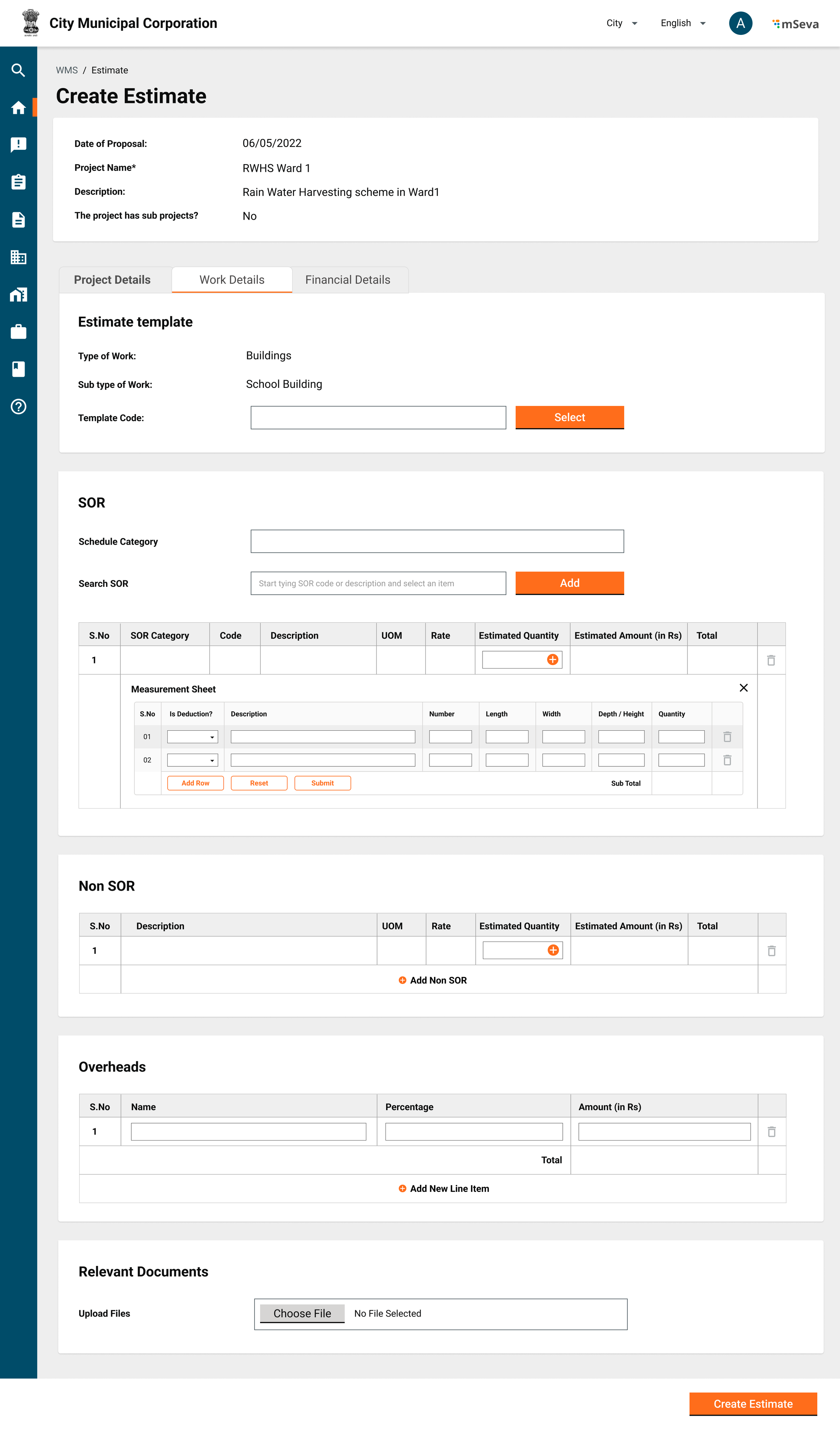
4. To select line items for SOR, select the SOR category, search for the SOR line item by SOR code or SOR description and select the SOR.&#x20;
   * To the SOR line item, add the quantity required for the project.&#x20;
   * SOR standard amount multiplied by this quantity gives the line item-wise cost.&#x20;
5. Measurements are captured at the SOR line item level directly by the specified UOM or length, breadth, height, and quantity are captured and stored in an empty measurement book. The measurement book recordings can be used later.
   * Multiplication of [<mark style="color:blue;">L, B, H, and Q</mark>](#user-content-fn-1)[^1] will give the required quantity of the line item for the estimate.&#x20;
6. A non-SOR line item will not be defined in MDMS and hence will not be searchable using the SOR category or Code.&#x20;
   * Rate, Quantity and Description have to be entered manually.&#x20;
   * Just like SOR, capture [<mark style="color:blue;">L,B,H,Q</mark>](#user-content-fn-2)[^2] details.&#x20;
7. All SOR and Non-SOR items in the way captured in the estimates will be created as empty records in the Measurement Book to capture readings later.&#x20;
8. Overheads are predefined masters.&#x20;
   * The project cost becomes the cost of SOR and non-SOR items plus overheads.
   * Overheads are either added on top of SOR and Non-SoR separately or can be derived from SOR Sub Line items.
   * Overhead amounts will not be going to the contractor but will be going to specific heads defined in the Master for respective overheads. (GST 12% to GST department, Cess 1% to labour dept etc). This means Contracts will selectively capture only a few overheads for contractors.
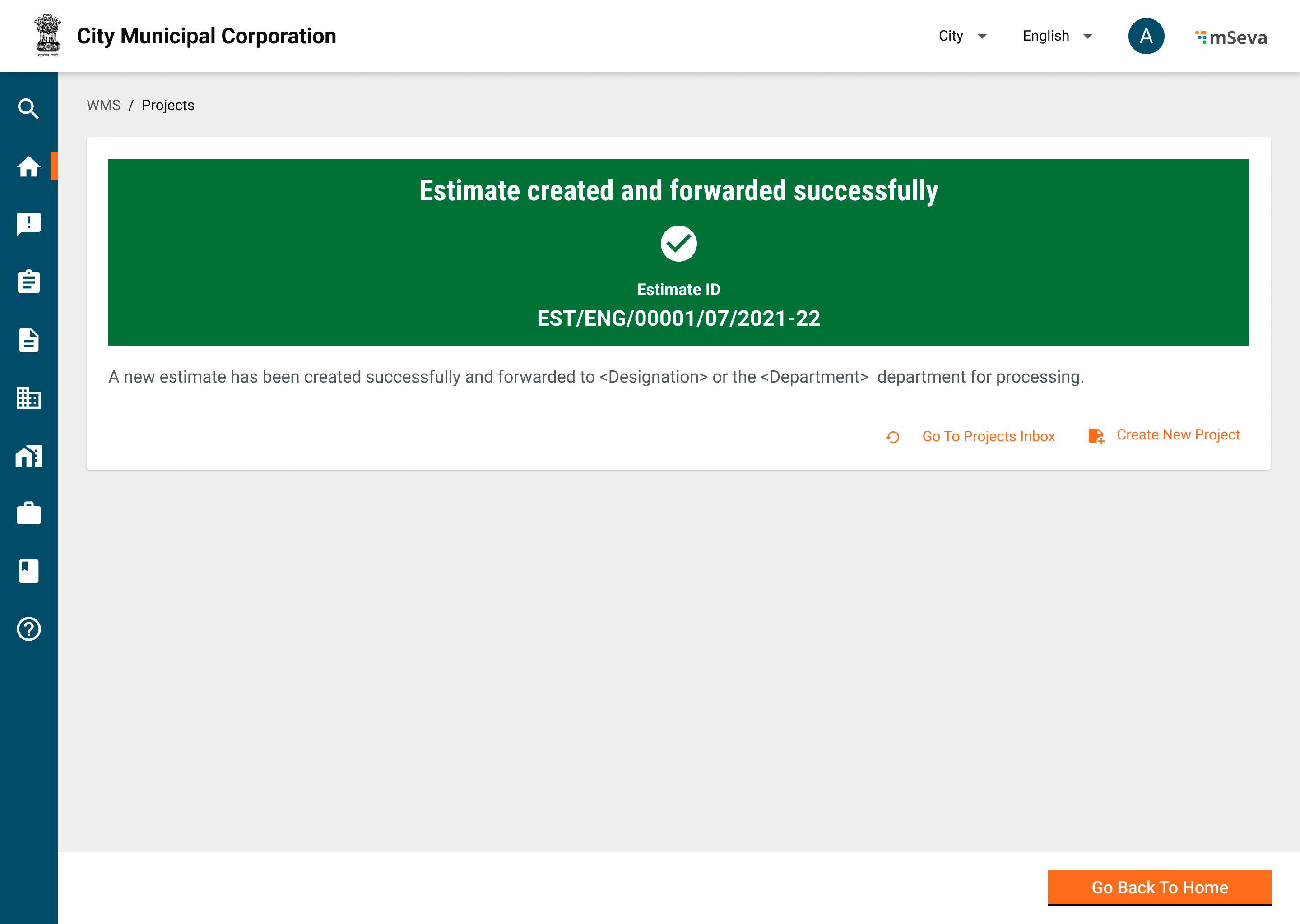
9. Each estimate will have a unique ID that is generated
   * ID: EST/\<ULB/Department Code>/\<Year>/\<month>/\<Date>/\<running sequence number>
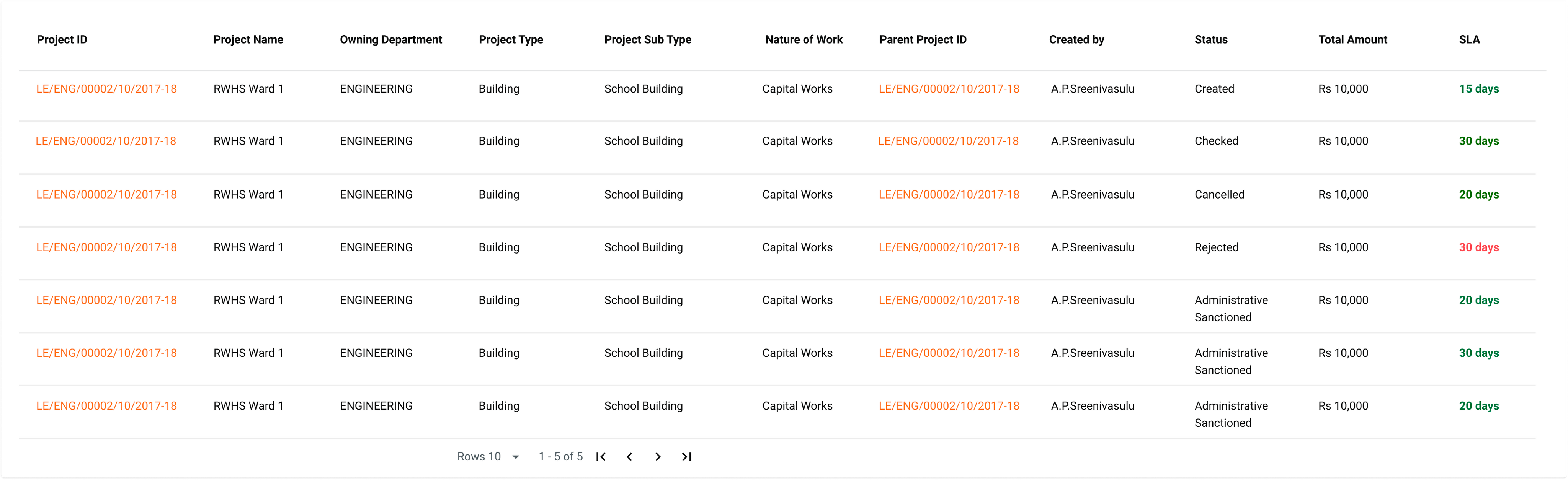
10. Status of an estimate
    * Created
    * In progress
    * Approved
    * Rejected
    * Cancelled

## Masters

### **Schedule of Rates (SOR)**

1. SOR is a line item that represents the rate for a single unit of work. SOR is defined by the Central PWD or state PWD and is revised based on the market needs from time to time. In general, there are about 3000+ SOR line items
2. Each executing authority ULB/Department may modify the rates of these SORs by applying lead charges.
   * Lead Masters will vary for each project as the project site will be different for each.
   * For simplicity, SORs are usually kept constant under a ULB.
3. Each SOR Item may have multiple variants with slight changes in description and amounts.
   * Example: The estimate of tiling for the ground floor and the estimate of tiling for the first floor will change by 15 Rs to capture the carriage charges. These should be captured with .serial\_number. (Parent.Child)

<table><thead><tr><th width="186">Field</th><th width="143">Data Type</th><th width="109">Required (Y/N)</th><th>Comments</th></tr></thead><tbody><tr><td>SOR Category ID</td><td>Drop down</td><td>Y</td><td><p>Options will be the list of Category Code from the SOR category type master</p><p>The combination of category Code and Item code is unique</p></td></tr><tr><td>Item ID</td><td>Alphanumeric</td><td>Y</td><td>System generated</td></tr><tr><td>Item Description</td><td></td><td>Y</td><td>Item description of the selected Item</td></tr><tr><td>Unit of Measurement</td><td></td><td>Y</td><td>Options will be the list from Unit of measurement master</td></tr><tr><td><em>[Array] for specific date ranges</em></td><td></td><td></td><td></td></tr><tr><td>Item Rate</td><td>Numeric</td><td>Y</td><td>Multiple entries can be specified for each Item, but there cannot be an overlap in the rates for a range of dates</td></tr><tr><td>Item rate Applicable From</td><td>Date</td><td>Y</td><td>To be entered in the format dd/mm/yyyy</td></tr><tr><td>Item rate Applicable To</td><td>Date</td><td>N</td><td>To be entered in the format dd/mm/yyyy</td></tr></tbody></table>

**Analysis of Rates**

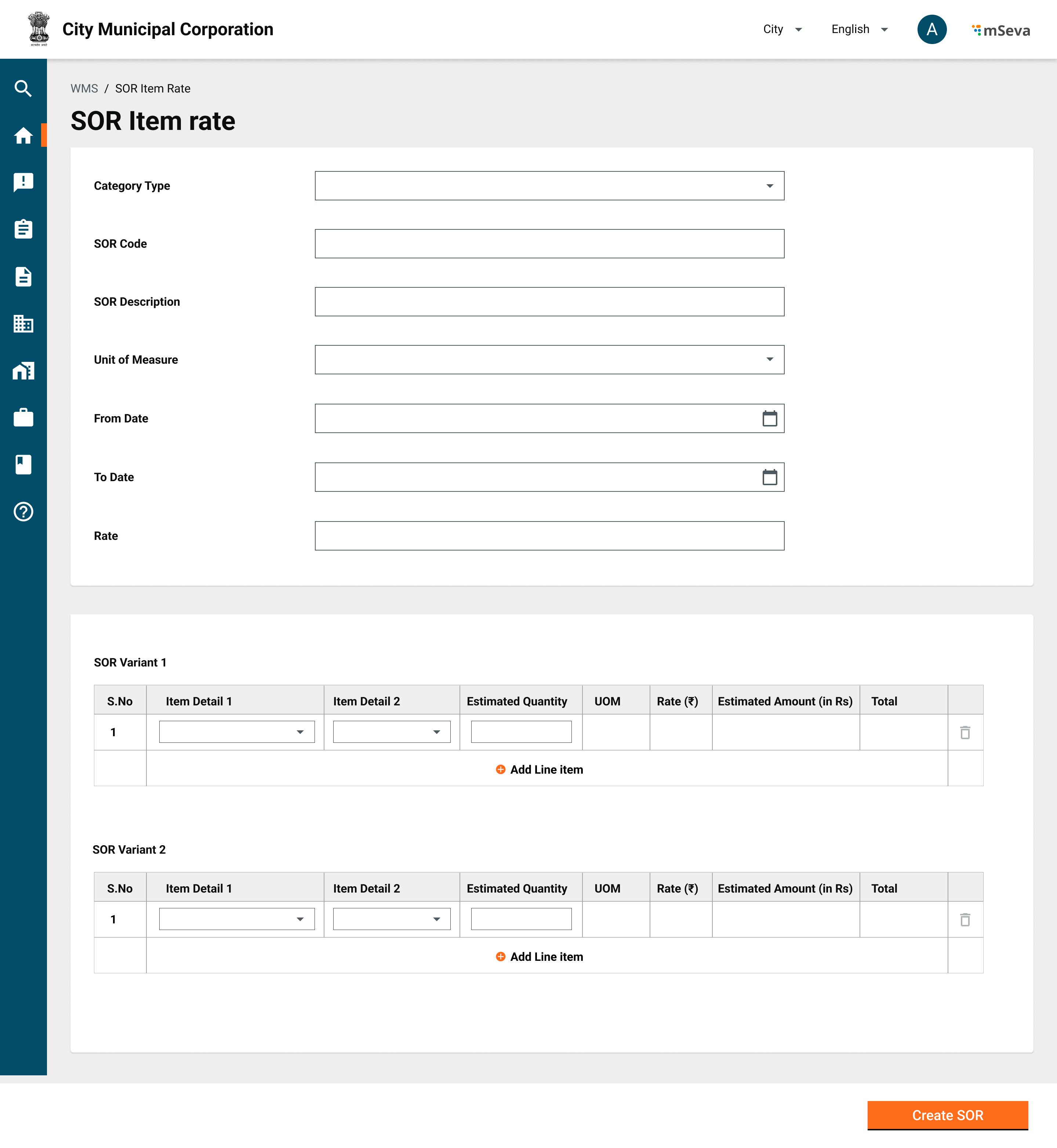
1. Each line item of a SOR master/SOR variant will further be divided into sub-line items that come from a set of category Masters like Labour Master, Material Master, Royalty Master, Carriage Master etc.
   * A group of sub-line items together will form an estimate line item.
   * Each sub-line item will have Item detail 1, item detail 2, quantity, UOM, rate, and estimated amount.
   * The sum of all sub-line items will become the total of the SOR line item
   * Item detail 1 will capture whether it is material/labour/carriage/overhead/royalty etc
   * Item detail 2 will capture the exact details of the item from the respective item master. rates need to be auto-populated.
2. With this when extracted, we should be able to produce labour analysis, material analysis and other standard reports, coming from the estimates.

### **Basic Rates of Materials Master**

<table><thead><tr><th width="160">Field</th><th width="138">Data Type</th><th width="147">Required (Y/N)</th><th>Comments</th></tr></thead><tbody><tr><td>ID</td><td>NA</td><td>Na</td><td>System generated ID</td></tr><tr><td>Department</td><td>Dropdown</td><td>Y</td><td>Labour rates may vary by each department</td></tr><tr><td>Material Category</td><td>Dropdown</td><td>Y</td><td>brick and tile, stone and road, metal and iron etc</td></tr><tr><td>Description of Material</td><td>Alphanumeric</td><td>Y</td><td>Second Class Table Moulded Chamber Burnt Bricks 9" x 41<br>/2" x 3"</td></tr><tr><td>Quantity</td><td>Numeric</td><td>Y</td><td>Quantity for which base rate is defined. Default to 1</td></tr><tr><td>Unit</td><td>Dropdown</td><td>Y</td><td>Number, Tons..etc</td></tr><tr><td><em>[Array] for specific date ranges</em></td><td></td><td></td><td></td></tr><tr><td>Item Rate</td><td>Numeric</td><td>Y</td><td>Multiple entries can be specified for each Item, but there cannot be an overlap in the rates for a range of dates</td></tr><tr><td>Item rate Applicable From</td><td>Date</td><td>Y</td><td>To be entered in the format dd/mm/yyyy</td></tr><tr><td>Item rate Applicable To</td><td>Date</td><td>N</td><td>To be entered in the format dd/mm/yyyy</td></tr></tbody></table>

{% hint style="danger" %}
**Note**: There are roughly about 200 materials, some of whose rates change quarterly.
{% endhint %}

### **Labour Rate Master**

<table><thead><tr><th width="142">Field</th><th width="138">Data Type</th><th width="147">Required (Y/N)</th><th>Comments</th></tr></thead><tbody><tr><td>ID</td><td>NA</td><td>Na</td><td>System generated ID</td></tr><tr><td>Department</td><td>Dropdown</td><td>Y</td><td>Labour rates may vary by each department</td></tr><tr><td>Skill Category</td><td>Dropdown</td><td>Y</td><td>Highly Skilled, Semi Skilled Unskilled etc</td></tr><tr><td>Description of Labour</td><td>Alphanumeric</td><td>Y</td><td>Technical Assistant, Stone Polisher, Smith etc</td></tr><tr><td>Quantity</td><td>Numeric</td><td>Y</td><td>Quantity for which base rate is defined. Default to 1</td></tr><tr><td>Unit</td><td>Dropdown</td><td>Y</td><td>Day/Week/Month</td></tr><tr><td><em>[Array] for specific date ranges</em></td><td></td><td></td><td></td></tr><tr><td>Rate</td><td>Numeric</td><td>Y</td><td>Rate of Labour for specified (Quantity' units)</td></tr><tr><td>From Date</td><td>Date</td><td>Y</td><td>Date from which these rates are applicable</td></tr><tr><td>To Date</td><td>Date</td><td>Y</td><td>Date to which these rates are applicable</td></tr></tbody></table>

There are about 80 types of labour.

### **Lead Master**

The Lead Master will have the carriage and royalty details of each item that goes into the individual SOR items.

<table><thead><tr><th width="136">Field</th><th width="171">Data Type</th><th width="160">Required (Y/N)</th><th>Comments</th></tr></thead><tbody><tr><td>ID</td><td>NA</td><td>NA</td><td>System Generated</td></tr><tr><td>Item ID</td><td>Dropdown</td><td></td><td>Item for which Lead SOR is present</td></tr><tr><td>Item Name</td><td>Autofill/Dropdown</td><td>Y</td><td>Item for which Lead SOR is present</td></tr><tr><td>Name of Quarry</td><td>Dropdown</td><td>N</td><td>For Materials. Doesnt appy for labour</td></tr><tr><td>Unit</td><td>Dropdown</td><td>Y</td><td>Unit of Measurement</td></tr><tr><td>Lead (Km.)</td><td>Numeric</td><td>N</td><td>Distance from quarry</td></tr><tr><td>Basic Cost</td><td>Autofill</td><td>Y</td><td>Basic cost pulled from material rate master or labour rate master</td></tr><tr><td>Conveyance Cost</td><td>Numeric</td><td>N</td><td></td></tr><tr><td>Royalty</td><td>Numeric</td><td>N</td><td>Royalty on applicable material, abstracted, will go into specific head defined during estimation</td></tr><tr><td>Total</td><td>Calculation</td><td>Y</td><td>Total new cost of line item</td></tr></tbody></table>

When a lead master is set on a particular material in a particular ULB, all SOR line items that contain this item will take the amount from the lead master and not from the basic rate master

### **Non-Schedule of Rates (SOR)**

1. CPWD does not define non-SOR items and based on project requirements will get added to the estimate.&#x20;
2. They will have the same attributes as the SOR item but not a defined SOR ID or SOR category.

Example - Purchasing fancy benches & themed dustbins at the Park. The rate, in this case, is fixed by JE upon discussion with potential vendors.

### **Overheads**

Overheads can be of two types.

1. In-Line Overheads - Defined within the SOR line items
2. Estimate Level Overheads -
   * These are defined on top of estimates. Each overhead is defined within a time range with either a percentage or lump sum value of the estimated cost.

We should be able to abstract out similar overheads from multiple SOR line items and groups to form a single overall overhead for the estimate.

<table><thead><tr><th width="138">Field</th><th width="159">Data Type</th><th width="120">Required (Y/N)</th><th>Comments</th></tr></thead><tbody><tr><td>ID</td><td>NA</td><td>NA</td><td>ID generated for each overhead type</td></tr><tr><td>Name</td><td>Alphanumeric</td><td>Y</td><td><p>Name of the overhead</p><p>Ex. Labour Cess, GST, Royalty etc</p></td></tr><tr><td>Description</td><td>Alphanumeric</td><td>N</td><td>Description</td></tr><tr><td>Account head</td><td>Dropdown</td><td>Y</td><td>Account head to which overheads should be credited</td></tr><tr><td><em>[Array] for specific date ranges</em></td><td></td><td></td><td></td></tr><tr><td>From Date</td><td>Date</td><td>Y</td><td>Date from which these rates are applicable</td></tr><tr><td>To Date</td><td>Date</td><td>Y</td><td></td></tr><tr><td>Percentage/ Lumpsum</td><td>Numeric</td><td>Y</td><td>Percentage or Lumpsum amount of estimate including value</td></tr></tbody></table>

**Revised Estimates**

1. Estimate revision can happen before the final bill is submitted and the project is closed. For a revised estimate, the user can come onto the existing estimate and click actions → Revise estimate. This goes for a similar approval cycle as the main estimate.
2. For a revised estimate -
   * New line items can be added.
   * Existing line items can be removed
   * Quantities in existing estimates can be modified.
3. A contract created from this estimate needs to be revised and sent to the contractor for approval.
4. Measurement books accordingly will be changed as per the new estimate.
5. If some part of the estimate is already measured and the bill has been created/approved, a revised estimate for that line item cannot go under that approved bill quantity for that line item.

### **Schedule Category**

A schedule category is a grouping of SORs for easy identification and filtering. There are a total of about 3000 SOR items divided into 15-20 SOR groups

Examples - Earthwork, masonry, brickwork, painting, etc

<table><thead><tr><th width="158">Field</th><th width="145">Data Type</th><th width="152">Required (Y/N)</th><th>Comments</th></tr></thead><tbody><tr><td>Category Code</td><td>Alphanumeric</td><td>Y</td><td>Unique Code Assigned to the Schedule Category</td></tr><tr><td>Category Name</td><td>Alphanumeric</td><td>Y</td><td>Name Assigned to the Schedule Category</td></tr></tbody></table>

### **Estimate Template**

1. Templates are created for specific types and sub-types of work so they can be reused for future use.
2. Templates are groupings of SOR items that combine to complete similar kinds of work.
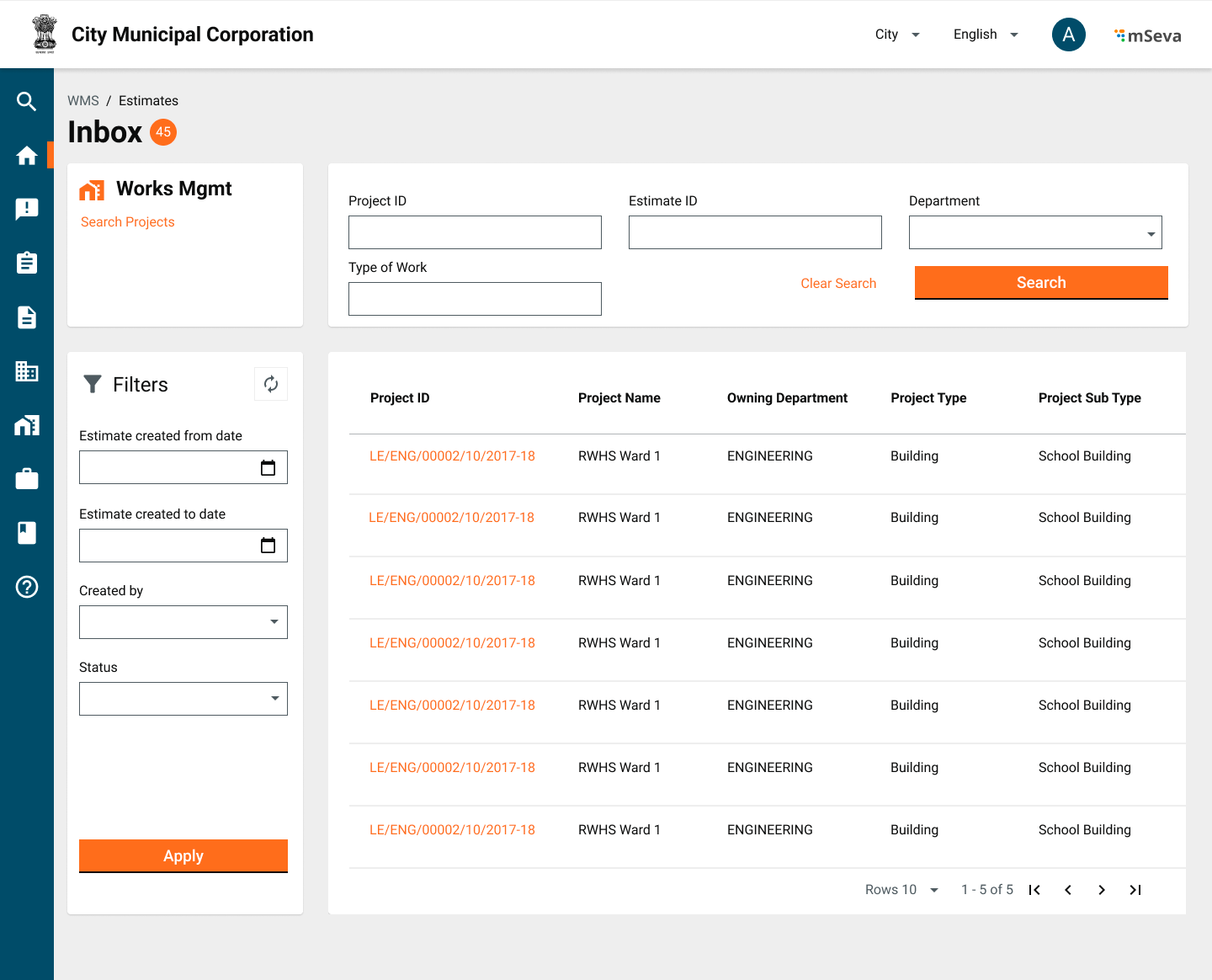
3. On the UI, the Estimates inbox will have an Estimate Template section and users can see a list of templates, create a new template from there, or modify the existing template.

Example - Template to build 100 mt of 20 ft road, Template to build 8\*10 sq ft standard room. &#x20;

<table><thead><tr><th width="203">Field</th><th width="150">Data Type</th><th width="151">Required (Y/N) </th><th>Comments</th></tr></thead><tbody><tr><td>Template Code</td><td>Alphanumeric</td><td>Y</td><td>Define the template code</td></tr><tr><td>Name</td><td>Alphanumeric</td><td>Y</td><td>Name for template</td></tr><tr><td>Description</td><td>Alphanumeric</td><td>Y</td><td>Description of the template</td></tr><tr><td>Status</td><td>Dropdown</td><td>Y</td><td><p>Status of the template</p><ul><li>Active</li><li>Inactive</li></ul></td></tr><tr><td>Work Type</td><td>Dropdown</td><td>Y</td><td>Select the Type of work. All the work types defined in the system should be shown</td></tr><tr><td>Work Sub Type</td><td>Dropdown</td><td>Y</td><td>Select the Sub type of work. All the work sub types defined in the system should be shown here</td></tr><tr><td><em>[Array] for each line item</em></td><td></td><td></td><td></td></tr><tr><td>Schedule Category</td><td>Dropdown</td><td>Y</td><td>Options are the list of SOR categories from the SOR category master.</td></tr><tr><td>SOR</td><td>Alphanumeric</td><td>Y</td><td>Enter the template code and search for it</td></tr><tr><td>Non_SOR Code</td><td>Alphanumeric</td><td>N</td><td></td></tr><tr><td>Non_SOR Description</td><td>Alphanumeric</td><td>N</td><td></td></tr><tr><td>Non_SOR UOM</td><td>Dropdown</td><td>N</td><td>lenght--KM; Area--SQM</td></tr><tr><td>Non_SOR Unit Rate</td><td>Numeric</td><td>N</td><td></td></tr></tbody></table>

### Master Data Sample <a href="#master-data" id="master-data"></a>

<table><thead><tr><th width="145">Master Name</th><th width="400">Sample Data</th><th>Description</th></tr></thead><tbody><tr><td>Overheads</td><td><p></p><pre><code>{
            "id": "1",
            "code": "SC",
            "description": "Supervision Charge",
            "active": true,
            "isAutoCalculated":true,
            "isWorkOrderValue":true,
            "type": "percentage",
            "value": "7.5",
            "effectiveFrom": 1682164954037,
            "effectiveTo": null
 }
</code></pre></td><td>Contains the overhead charges applicable on an estimate.</td></tr><tr><td>SOR</td><td><p>- Sample data for SOR</p><pre><code>{
"id": "SOR_000188",
"uom": "Nos",
"sorType": "W",
"quantity": 1000,
"sorSubType": "NA",
"sorVariant": "NA",
"description": "1000 Bricks for constructing any wall of length 10*10*10"
}
</code></pre></td><td>Contains a comprehensive list of items and rates defined by the department. To be used in preparation of an estimate.</td></tr><tr><td>SOR Rates</td><td><p>- Sample data for Rates</p><pre><code>{
    "rate": 989,
    "sorId": "SOR_000152",
    "validTo": "1697846400000",
    "validFrom": "1697587200000",
    "amountDetails": [
                        {
                            "type": "fixed",
                            "heads": "MH.2",
                            "amount": 979
                        }
                    ]
                }
</code></pre></td><td>Contains a comprehensive list of items and rates defined by the department. To be used in preparation of an estimate.</td></tr><tr><td>Category</td><td><p></p><pre><code>"Category": [
    {
      "name": "Overhead",
      "code": "OVERHEAD",      
	   "active": true
    },
    {
      "name": "SOR",
      "code": "SOR",      
	   "active": true
    },
    {
      "name": "non-SOR",
      "code": "NON-SOR",      
	   "active": true
    }
  ]
</code></pre></td><td>Contains the category of all items. - SOR - NON-SOR - OVERHEAD</td></tr><tr><td>UOM</td><td><p></p><pre><code>{
            "code":"KG",
            "description":"Kilogram",
            "active":true,
            "effectiveFrom":1677044852,
            "effectiveTo":null
        },
</code></pre></td><td>Contains the unit of measurement for all categories.</td></tr></tbody></table>

## **Mockups**

<table data-header-hidden><thead><tr><th width="231">Description</th><th>Mockups</th></tr></thead><tbody><tr><td>Create Estimate</td><td><img src="/files/onf9UbScyPktKbynEgwv" alt=""></td></tr><tr><td>Estimate Successfully Created</td><td><img src="/files/dOacQRFUcI3Av09fX2hB" alt=""></td></tr><tr><td>Estimates Inbox</td><td><img src="/files/fHU7e3cPzw24MVgYUc08" alt=""></td></tr><tr><td>Inbox Table</td><td><img src="/files/cGUtcToxSzUb5TqLh3LU" alt=""></td></tr><tr><td>SOR Data entry screen</td><td><img src="/files/qcYZZLMWaz2J5INkNigf" alt=""></td></tr></tbody></table>

## **User Acceptance Criteria**

A user should be able to -

1. Create an estimate using templates
2. Add SOR items from the SOR Master
3. Change values as required for current work
4. Add/auto-populate overheads
5. Able to generate material analysis and labour analysis
6. Download PDFs of labour analysis, material analysis, and overall estimate

## Related Topics

* [Configure Estimates Service](/works/setup/configure-works/service-configuration/estimate.md)
* [Configure Estimates for MUKTASoft](/works/reference-implementations/muktasoft-v2.2/deployment/configuration/ui-configuration/modules/estimate.md)
* [MUKTASoft Detailed Estimate user stories](/works/reference-implementations/muktasoft-v2.2/specifications/functional-requirements/user-stories/detailed-estimate.md)
* [MUKTASoft - Configure UI for the Estimate module](/works/reference-implementations/muktasoft-v2.2/deployment/configuration/ui-configuration/modules/estimate.md)
* [MUKTASoft - Estimate module user manual](/works/reference-implementations/muktasoft-v2.2/implementation/training-resources/user-manual/web-application-user-manual/estimate.md)

[^1]: Length, Breadth, Height, Quantity

[^2]: Length Breadth Height Quantity


---

# Agent Instructions: Querying This Documentation

If you need additional information that is not directly available in this page, you can query the documentation dynamically by asking a question.

Perform an HTTP GET request on the current page URL with the `ask` query parameter:

```
GET https://docs.digit.org/works/specifications/functional-specifications/estimates.md?ask=<question>
```

The question should be specific, self-contained, and written in natural language.
The response will contain a direct answer to the question and relevant excerpts and sources from the documentation.

Use this mechanism when the answer is not explicitly present in the current page, you need clarification or additional context, or you want to retrieve related documentation sections.