# Expenditure / Billing

## **Overview**

In a government setting, payments can be categorized into two main types: payments made **to** the government and made **by** the government.

Payments made to the government are payments received by the government, categorized as receipts or revenue. Payments to the government can be divided into two types: demand-based collection and non-demand-based collection.

Payments made by the government are expenses incurred by the government. Examples include - Salaries, Wages, Beneficiary payments, Contractor Payments, or Ad Hoc Payments.

**Demand-Based Collection**

1. **Demand Generation**: The government generates a demand for payments.
   * **Examples**: Property Tax, Trade License, Water Tax.
2. **Invoice Issuance**: An invoice is issued by the government detailing the demands. This invoice specifies what is owed to the government, including taxes, charges, or levies.
3. **Payment by Citizen**: The citizen acknowledges the demand and pays the specified amount.
4. **Receipt Issuance**: A receipt is issued to the citizen upon payment, acknowledging the receipt of the amount.

**Non-Demand-Based Collection**

* Collections are made without a prior demand being generated by the government.

The DIGIT demand and billing service is used to manage payments made to governments.

## Approach

For any transaction to happen, there is a payer, payee, amount and entity details

* Payer and payee can be individuals or organizations.&#x20;
* Entity details contain other information which are important for a bill to be generated but not mandatory for payment advice

  *Examples - Invoice ID, Invoice date, Verification details etc*

Every transaction ideally starts with an invoice equivalent that is generated by the supplier/contractor/muster/contract/payroll etc against which a payee generates a bill in the name of the payer.

A bill can have single or multiple beneficiaries depending on verifiable information sources.

*Example - If a muster roll has 20 beneficiaries, Bill also can have 20 beneficiaries. It is not needed to create 20 individual bills.*&#x20;

A single invoice should not be split into multiple bills.

*Example - Even though the material is supplied in tranches, a single PO can lead to multiple invoices and only after the consumption of the entire material as per individual invoice and associated measurement book a bill for that invoiced amount can be created and paid.*&#x20;

Payment advice is generated to enable beneficiary payments and the module is integrated with a payment gateway.

Hence payment advice contains minimal information required for the bank/gateway to make the payment. Limits on the number of beneficiaries and amounts etc are configurable as needed by the integration.&#x20;

### Expenditure

Expenses are created by the JE and approved by ME, EE/ EO depending on the amount and associated approval authority.

This module should have the following components

**Header Details**

1. Bill ID
2. Bill Date
3. Party Bill ID
4. Party Bill Date
5. Bill Type
   * **Salary/Pension Bill** - Based on Payroll, leaves, PF, GPF, other allowances
   * **Advance Bill**&#x20;
     * Unlike other bills which are post-work/service completion and measurement, the advance bill is raised prior and adjusted later.&#x20;
     * Advance bill is horizontal and be applicable on top of all other bill types
   * **Works/Contractor Bill**&#x20;
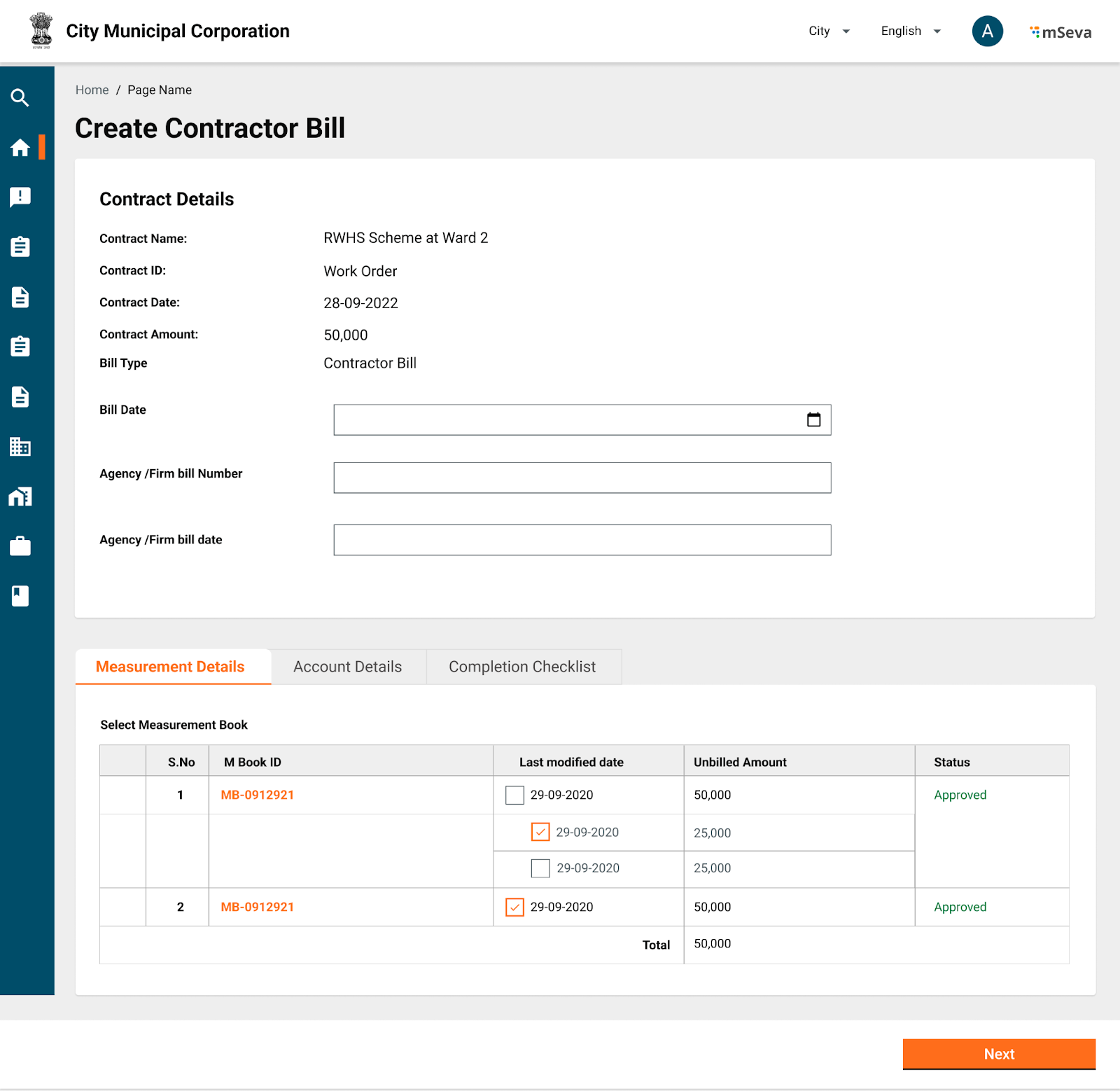
     * A contractor bill is created and measured against the measurement books and contract(work order) objects for verification.&#x20;
     * When a user selects to pay a contractor bill, the user can select against which measurement books of the contract this bill is being raised, and accordingly bill amount will be calculated.
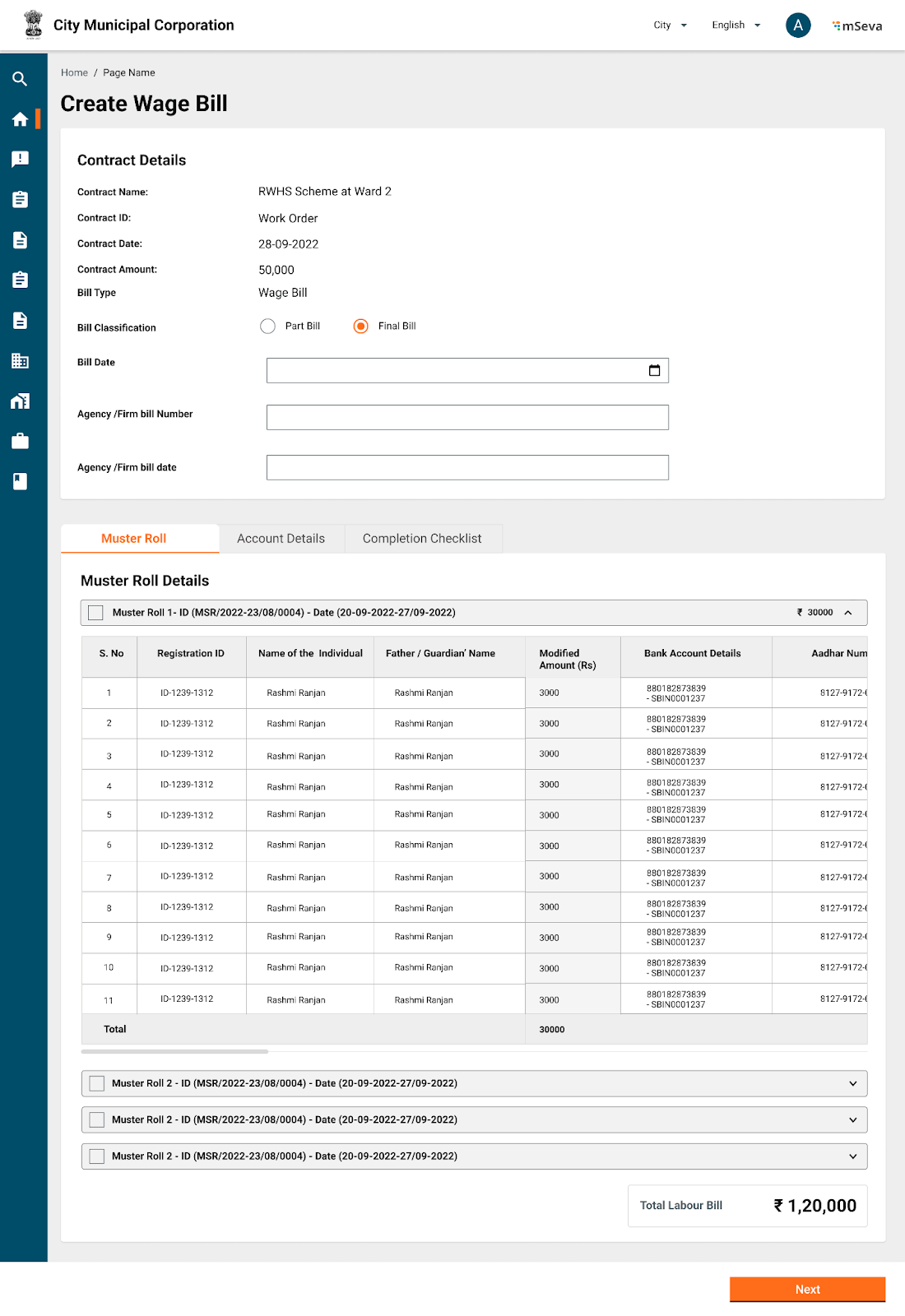
   * **Muster/Labour Bill** - &#x20;
     * A labour bill is created from a muster roll and usually has multiple beneficiaries within the same bill.
     * When a user selects to pay a wages bill, the user can select which muster rolls to process as part of this bill, and accordingly bill amount and array of beneficiaries will be processed.&#x20;
   * **Supplier/Vendor Bill**
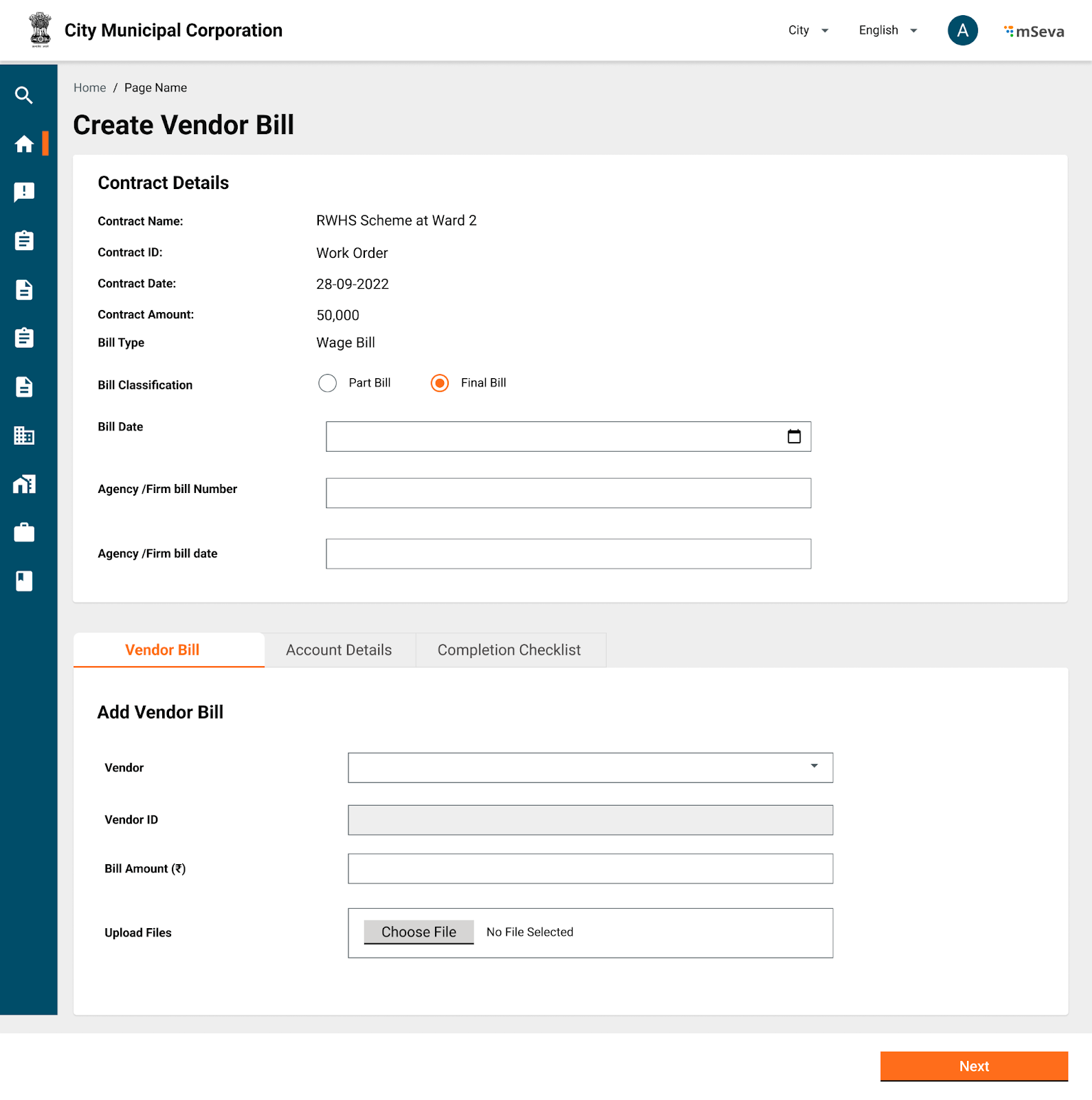
     * A vendor bill is similar to a contractor bill where as here instead of a measurement book and work order, an invoice and material receipt register or purchase order are used for verification.
     * A vendor bill should ideally be against each invoice as submitted by the supplier.
     * Right now, there is no material receipt register or purchase order against which invoices are verified. Hence invoice in V1, cannot be as verifiable as we are verifying wage bills against muster rolls.
   * **Contingency/Expense Bill**
     * Ad Hoc expenses
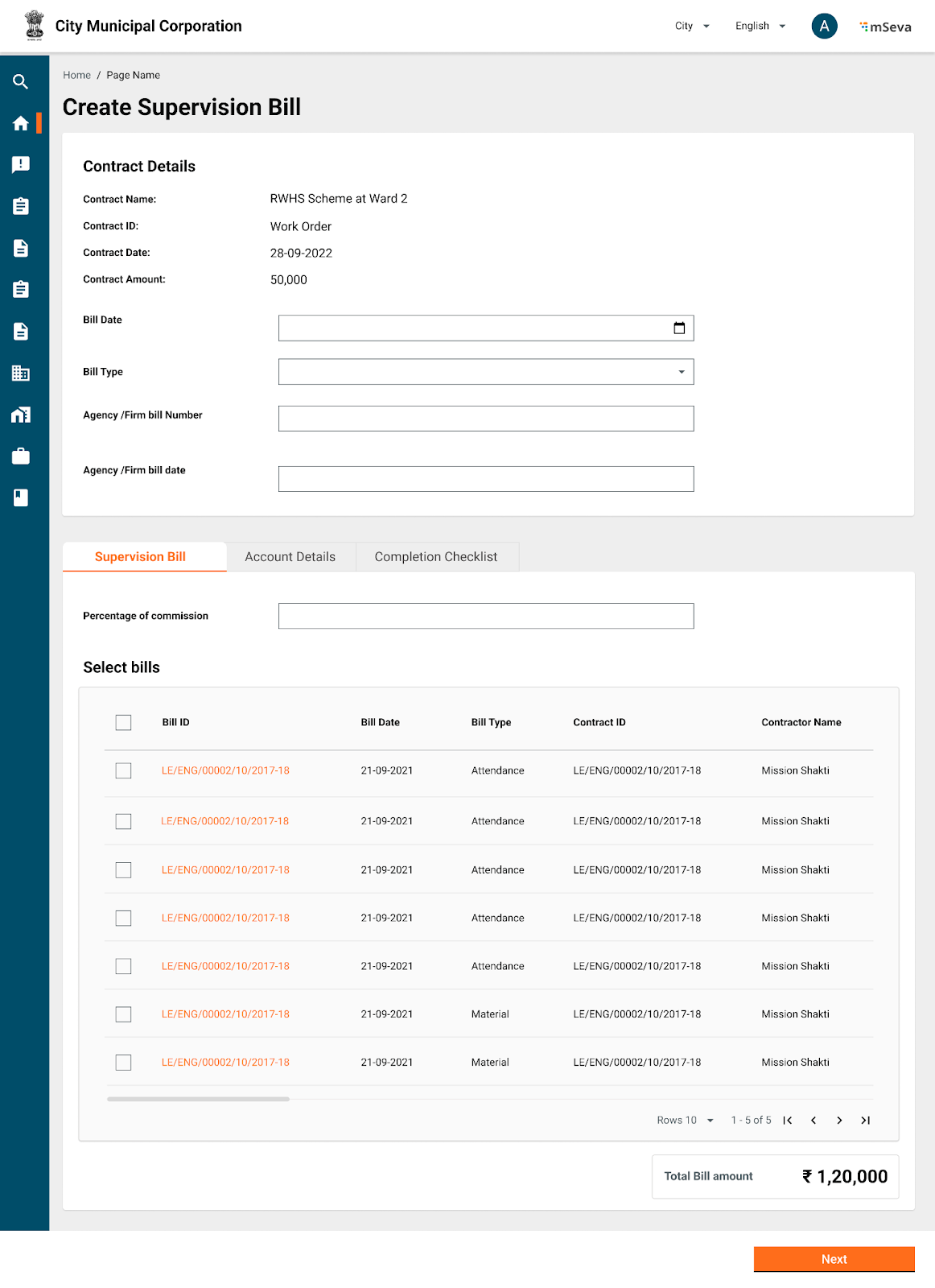
   * **Supervision Bill**
     * This type of Bill is calculated as a percentage on top of other types of approved bills. &#x20;
   * Others (need more use cases)

**Debit Details**

1. Account Code, Account head, Debit Amount
   * Treasury Payments -  {Major, Sub Major, Minor, Sub Minor, Detail, Object head, Debit Amount}
   * ULB Payments - {Fund, Functionary, Budget head, Scheme, Sub Scheme, Debit Amount}
2. This should be configurable at the tenant level to choose what type of accounting system is followed.
3. Debit details should ideally be captured at the time of project creation. This helps in budget checks being done. &#x20;
4. Each Project will be associated with a set of account codes and percentage amounts of the entire project, from where debit will happen.
5. Similarly, respective amounts (lumpsum/percentage) should be chosen from these account codes for each bill created.&#x20;
6. Service should not allow debit more than the initial quoted amount under respective heads against the sum of all the bills created for the project.

**Deductions**

1. The amount that is deducted from the gross value of the bill as these are already included in the work line items
2. Deductions are classified into many types
   * **Internal transfer**
     * Example - SOR line items already include cess 1%. Hence it is deducted here and transferred to the labour welfare account head.
     * &#x20;SOR line items also include royalty on the material. That needs to be deducted from here and transferred to Tahsildar.
   * **Advance recoveries**

     Amounts paid earlier for mobilization advancement or material procurement etc are deducted while creating a new bill.
   * **Retention Money**

     Money is withheld for payments and paid at a later date after the defect liability period.&#x20;
3. Deductions are always done against a beneficiary.&#x20;

   If a bill contains multiple beneficiaries, it needs to be specified against which beneficiary the deductions are made.
4. **Credit Details**

   A bill can have multiple beneficiaries. However, the nature of payments or beneficiary types should be the same for all beneficiaries in one bill.&#x20;

   * Wage seekers bill should contain only beneficiaries for wages
   * Material bills should contain only vendors and be verified against their invoices
5. Once the bill of any type is created, this will go for approval and have wfstatus.&#x20;
6. Every bill will also have a beneficiary payment status.
   * In the absence of intergrations with Banks/IFMS, this status can be updated manually to mark beneficiary payments.
   * In the presence of integration, systems should show the status of payment.
   * Once a bill is approved, payment advice needs to be created and sent to an integrated system. This system will send back the success/failure status along with the reasons.
7. In case of payment failure, Works should allow modifying the bill, marking the changes as mentioned in the error codes and resubmitting.&#x20;
   * This will create a new payment advice, linking reference to an earlier bill.&#x20;

### Figma Link

<table><thead><tr><th width="689">Figma links for different screens</th></tr></thead><tbody><tr><td><a href="https://www.figma.com/file/M2P3O9WlKtxuLCjQKxLLDg/DIGIT-Works?node-id=1240%3A25300&#x26;t=BymAOR4kMJiGsh7Z-4">Inbox</a></td></tr><tr><td><a href="https://www.figma.com/file/M2P3O9WlKtxuLCjQKxLLDg/DIGIT-Works?node-id=1240%3A25299&#x26;t=BymAOR4kMJiGsh7Z-4">Contract Selection and Bill type Selection</a></td></tr><tr><td><a href="https://www.figma.com/file/M2P3O9WlKtxuLCjQKxLLDg/DIGIT-Works?node-id=1997%3A29789&#x26;t=BymAOR4kMJiGsh7Z-4">Contractor Bill Creation</a></td></tr><tr><td><a href="https://www.figma.com/file/M2P3O9WlKtxuLCjQKxLLDg/DIGIT-Works?node-id=2014%3A29796&#x26;t=BymAOR4kMJiGsh7Z-4">Wage Bill Creation</a></td></tr><tr><td><a href="https://www.figma.com/file/M2P3O9WlKtxuLCjQKxLLDg/DIGIT-Works?node-id=2014%3A30151&#x26;t=BymAOR4kMJiGsh7Z-4">Vendor Bill Creation</a></td></tr><tr><td><a href="https://www.figma.com/file/M2P3O9WlKtxuLCjQKxLLDg/DIGIT-Works?node-id=2014%3A35517&#x26;t=BymAOR4kMJiGsh7Z-4">Supervision bill creation</a></td></tr></tbody></table>

## Bill Attributes

<table><thead><tr><th width="99">#</th><th width="163">Field</th><th width="110">Data Type</th><th width="107">Required (Y/N)</th><th>Comments</th></tr></thead><tbody><tr><td></td><td><em>Bill Details</em></td><td></td><td></td><td></td></tr><tr><td>1</td><td>Bill Date</td><td>Date</td><td>Y</td><td>Todays Date</td></tr><tr><td>2</td><td>Party Bill Date</td><td>Date</td><td>N</td><td>Date on which Invoice is given by third party</td></tr><tr><td>3</td><td>Party Bill Number</td><td>Alphanumeric</td><td>N</td><td>Reference number on Invoice given by third party</td></tr><tr><td>4</td><td>Bill Type</td><td>Dropdown</td><td>Y</td><td>Salary, Pension, Works, Advance, Others etc</td></tr><tr><td></td><td><em>Financial Details (For ULB Payments)</em></td><td></td><td></td><td></td></tr><tr><td>5</td><td>Fund</td><td>Dropdown</td><td>Y</td><td>Capital Fund, Municipal Fund, Grant Fund</td></tr><tr><td>6</td><td>Function</td><td>Dropdown</td><td>Y</td><td><p>202107 - Roads and Building Maintenance </p><p>202406 - Street Lighting Maintenance </p><p>202500 - Storm Water Drains </p></td></tr><tr><td>7</td><td>Department</td><td>Dropdown</td><td>Y</td><td><p>Road and highways</p><p>Streetlights</p><p>Storm water drains</p></td></tr><tr><td>8</td><td>Scheme</td><td>Dropdown</td><td>N</td><td><p>Scheme is tied to a fund</p><p>Muncipal Fund, funds schemes such as Housing, employment, Capital fund, funds scheme like buildings &#x26; highways</p></td></tr><tr><td>9</td><td>Sub Scheme</td><td>Dropdown</td><td>N</td><td>Sub Scheme is tied to scheme. </td></tr><tr><td>10</td><td>Fund Source</td><td>Dropdown</td><td>N</td><td>Loans, Own sources, Grants, etc</td></tr><tr><td></td><td><em>Financial Details (For State Department Payments)</em></td><td></td><td></td><td></td></tr><tr><td>11</td><td>Chart of Accounts</td><td>Dropdown</td><td>Y</td><td><p>Length varies from state to state. Punjab has 16 digits. Odisha has 27 Digit Codes. </p><p>Odisha has following format</p><p>Demand Number(2)-Major(4) –</p><p>SubMajor(2) – MinorHead(3)-</p><p>Sub(4)-Detail(5)-Object(3) –</p><p>PlanStatus(2) – ChargedVoted(1) – SectorCode(1)</p><p>Example - 11(Demand Number) –</p><p>2225 (Major Head) – 02 (Sub</p><p>Major Head) - 277 (Minor Head) –</p><p>2367 (Sub Head) – 40004 (Detail</p><p>Head) – 544 (Object Head) – 21</p><p>(Plan Status) – 1 (Charged Voted) – 1 (Sector Code)</p><p>Will be represented as</p><p>112225022772367400045442111.</p></td></tr><tr><td></td><td>Beneficiary Details (Array)</td><td></td><td></td><td></td></tr><tr><td>12</td><td>Beneficiary ID</td><td>Searchable dropdown</td><td>Y</td><td>Registration ID of the beneficiary in the system </td></tr><tr><td>13</td><td>Beneficiary Name</td><td></td><td>Y</td><td>Name of the beneficiary</td></tr><tr><td>14</td><td>Beneficiary Type</td><td></td><td></td><td>Contractor, Employee, Tahsildar, Wage seeker, Asha Worker, Student etc</td></tr><tr><td>15</td><td>Phone Number</td><td></td><td></td><td>Phone Number</td></tr><tr><td>16</td><td>Aadhar Number</td><td></td><td></td><td>Aadhar Number</td></tr><tr><td>17</td><td>Account Number</td><td></td><td>Y</td><td>Account Number</td></tr><tr><td></td><td>Bank Account Name</td><td></td><td>Y</td><td>Name on bank account</td></tr><tr><td>18</td><td>Account Type</td><td></td><td></td><td>Savings, Current, Loan etcRequired in IFMS while processing payments</td></tr><tr><td>19</td><td>IFSC</td><td></td><td>Y</td><td>IFSC</td></tr><tr><td>20</td><td>Amount</td><td>Numeric</td><td>Y</td><td></td></tr><tr><td></td><td><em>Debit Details</em></td><td></td><td></td><td></td></tr><tr><td>21</td><td>Account Code</td><td></td><td>Y</td><td>2723000 ,2101001</td></tr><tr><td>22</td><td>Account Head</td><td></td><td></td><td><p>Roads and Bridges-Roads &#x26; Bridges</p><p>Salaries, Wages and Bonus-Basic Pay</p></td></tr><tr><td>23</td><td>Debit Amount</td><td></td><td>Y</td><td></td></tr><tr><td></td><td><em>Deduction Details</em></td><td></td><td></td><td></td></tr><tr><td>24</td><td>Account Code</td><td></td><td>N</td><td>3502017,</td></tr><tr><td>25</td><td>Account Head</td><td></td><td></td><td>Recoveries payable-LCCS, Creditors-Contractors</td></tr><tr><td>26</td><td>Deduction Amount</td><td></td><td>N</td><td></td></tr><tr><td></td><td><em>Net Payables</em></td><td></td><td></td><td></td></tr><tr><td>27</td><td>Account Code</td><td></td><td>Y</td><td>3501002</td></tr><tr><td>28</td><td>Payable Amount</td><td></td><td>Y</td><td>Debit Amount should be equal to sum of deduction detail plus credit amount. </td></tr><tr><td></td><td><em>DDO Details</em></td><td></td><td></td><td></td></tr><tr><td>29</td><td>DDO Code</td><td></td><td>N</td><td></td></tr><tr><td>30</td><td>DDO Login ID</td><td></td><td>N</td><td>DDO Login id is mandatory if multiple DDO exists for the same DDO code.</td></tr><tr><td></td><td><em>Summary Details</em></td><td></td><td>Y</td><td></td></tr><tr><td>31</td><td>Gross Amount</td><td></td><td>Y</td><td></td></tr><tr><td>32</td><td>Net Amount</td><td></td><td></td><td></td></tr><tr><td>33</td><td>Number of beneficiaries</td><td></td><td>Y</td><td></td></tr><tr><td>34</td><td>PreviousBillReferenceNumber</td><td></td><td>N</td><td>Needed if re-submitting previously objected to the bill.</td></tr><tr><td>35</td><td>Payment Date</td><td></td><td>Y</td><td></td></tr><tr><td>36</td><td>Payment Mode</td><td></td><td>Y</td><td></td></tr></tbody></table>

## Functional Requirements

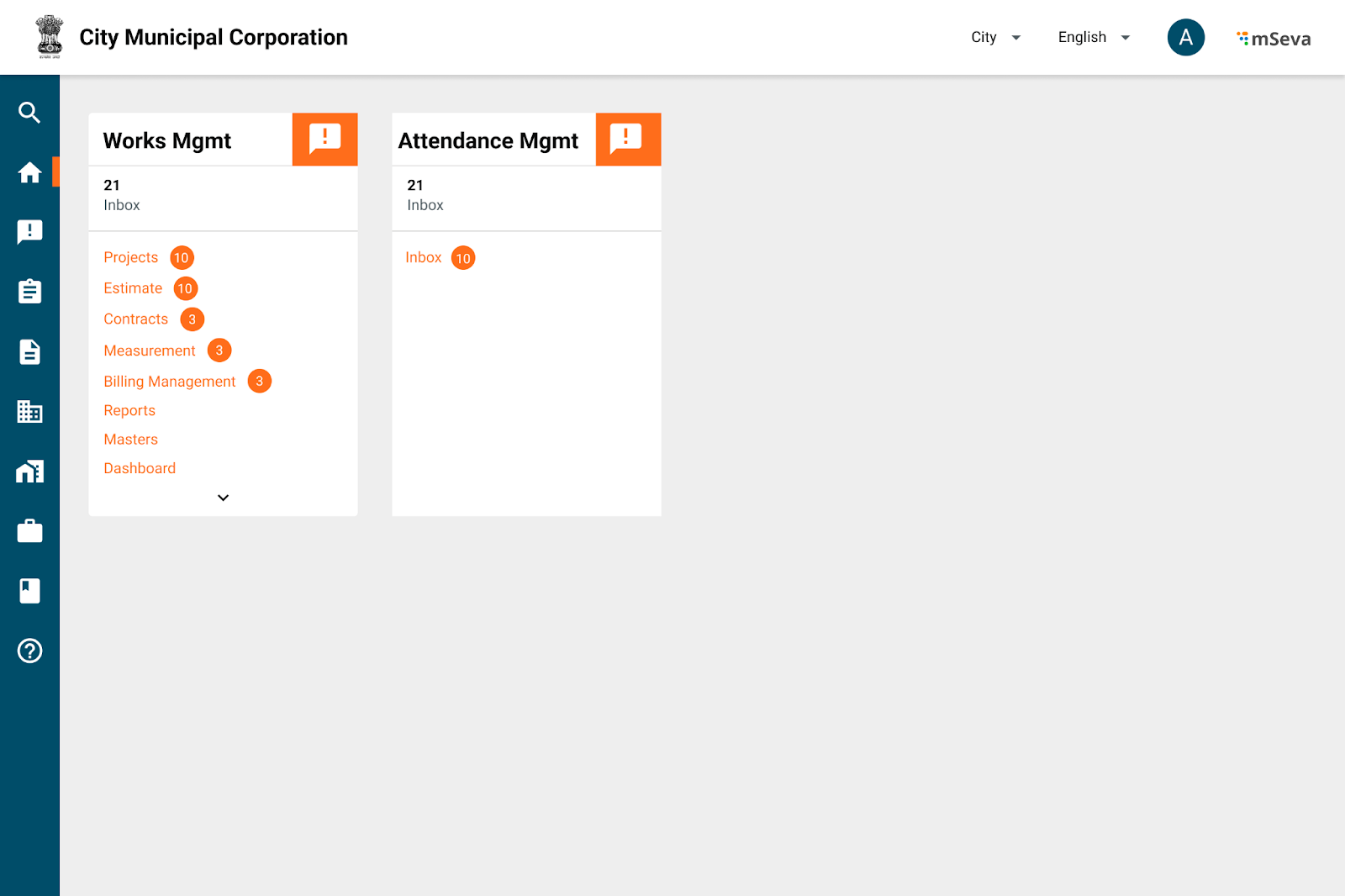
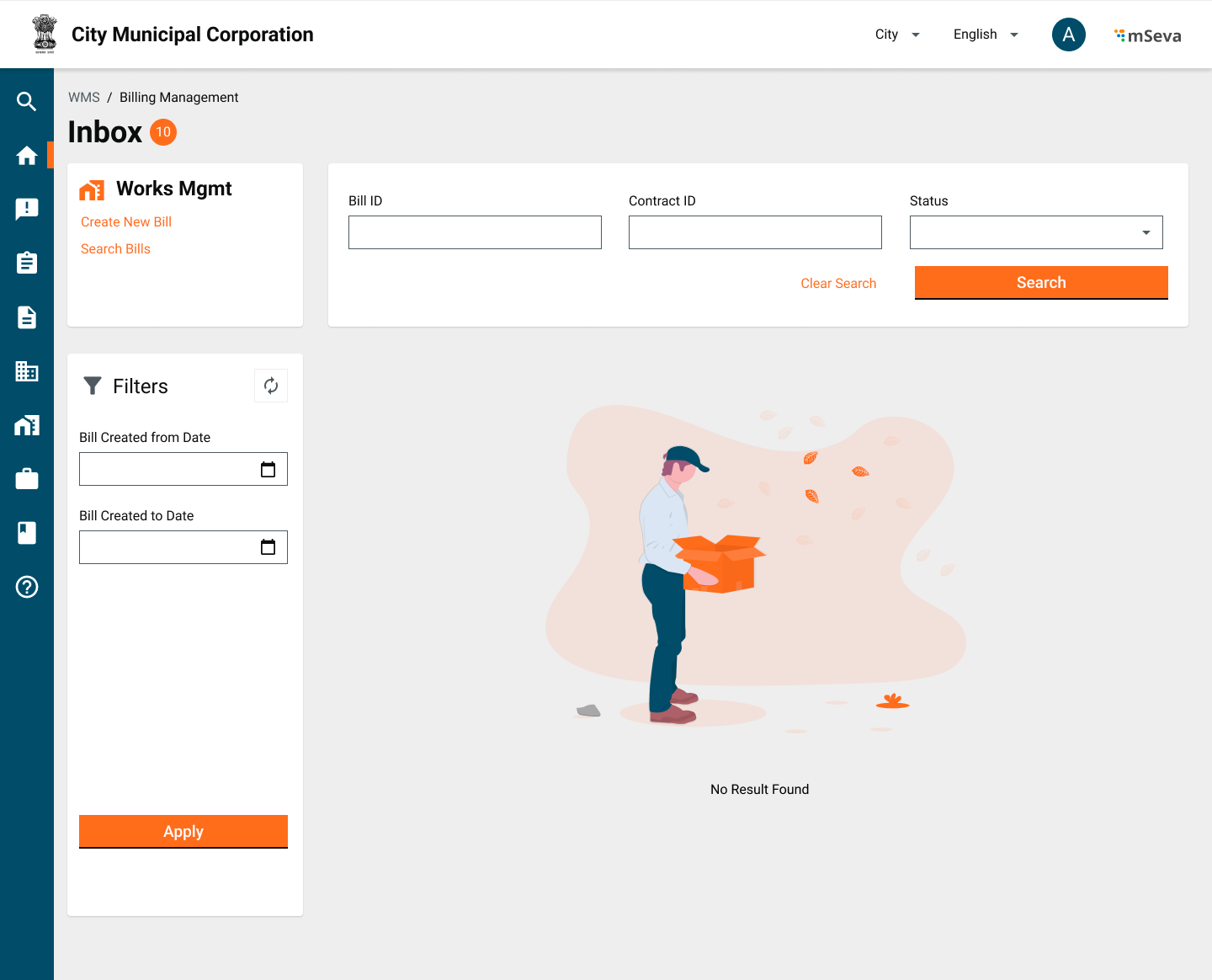
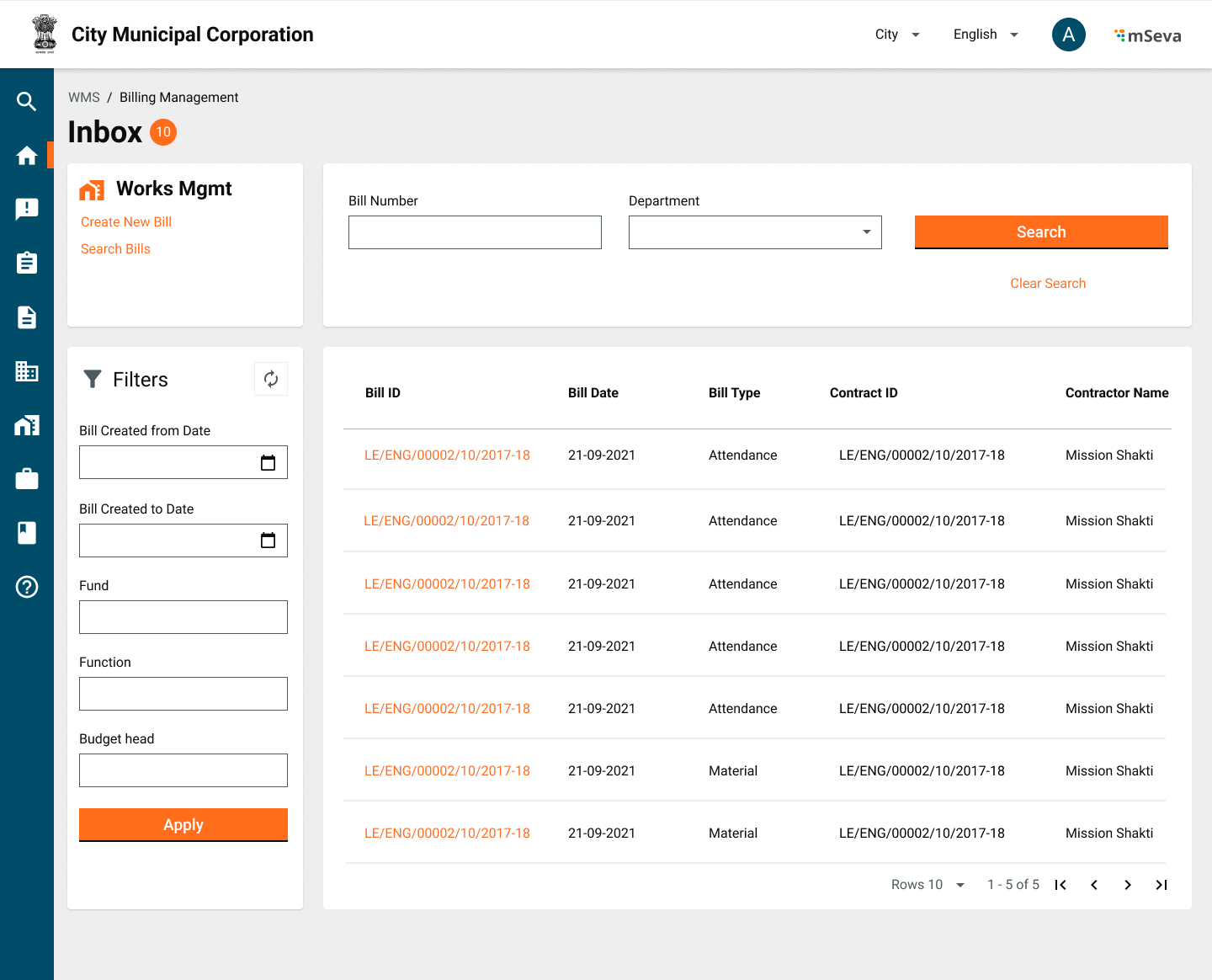
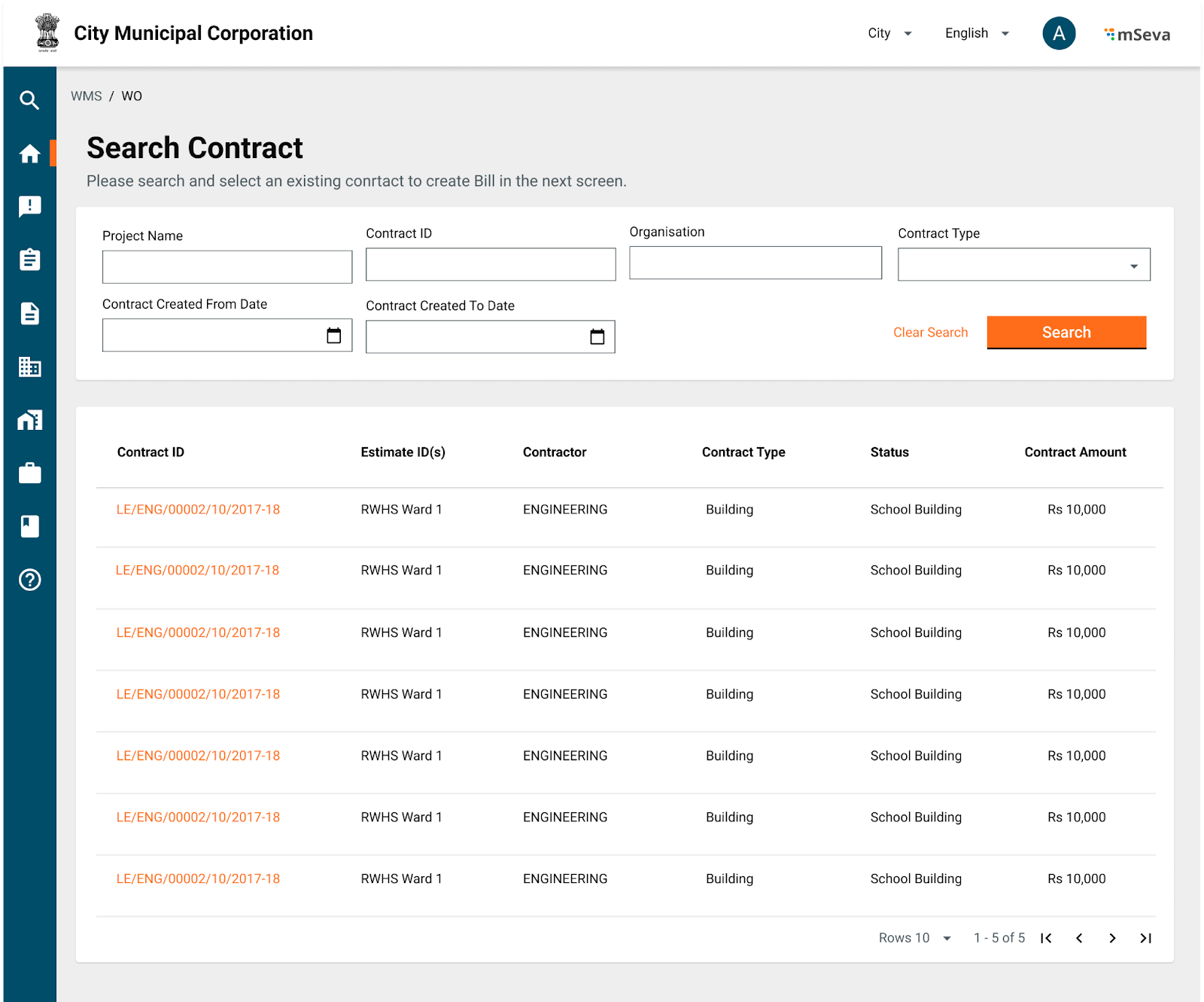
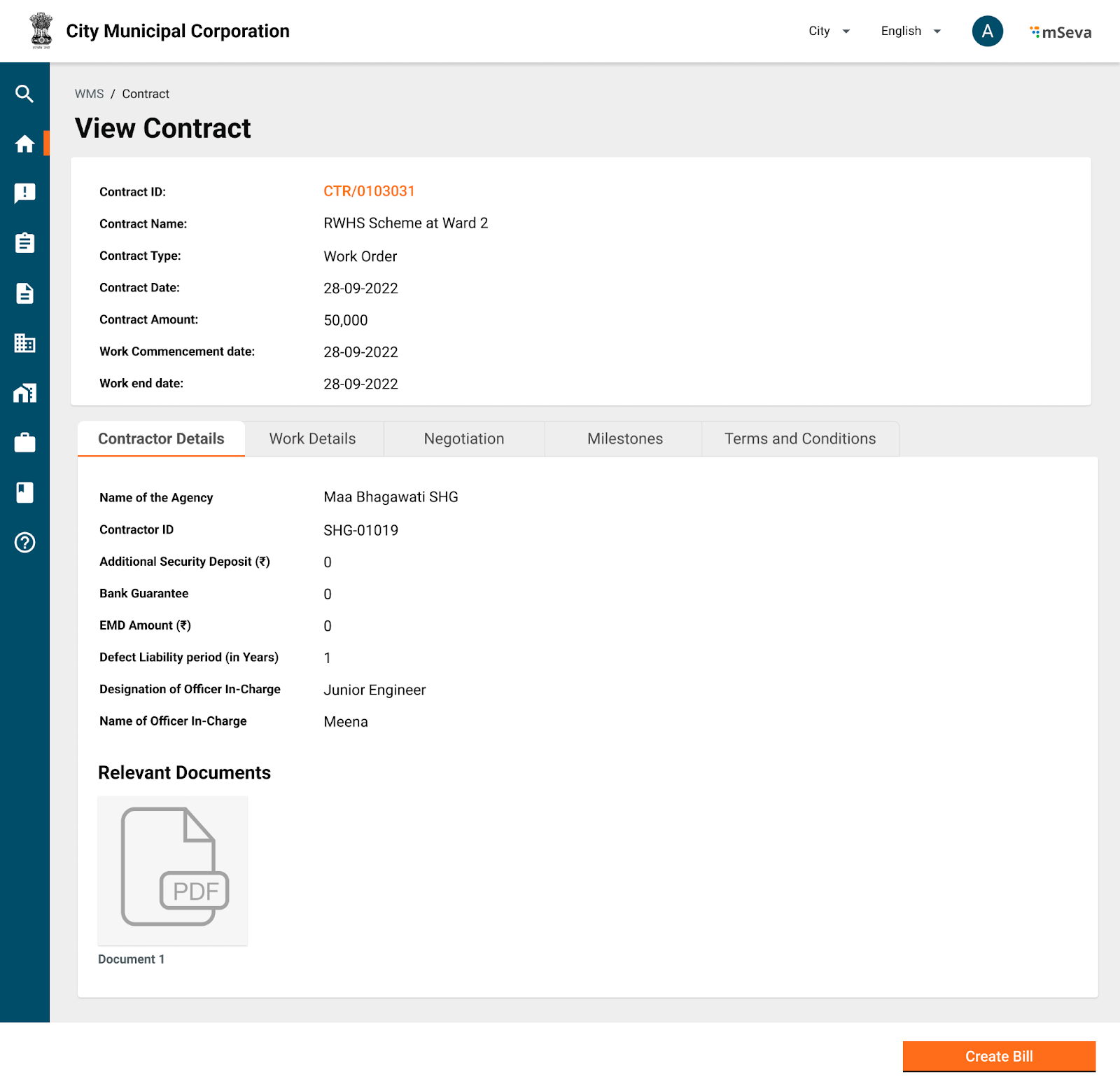
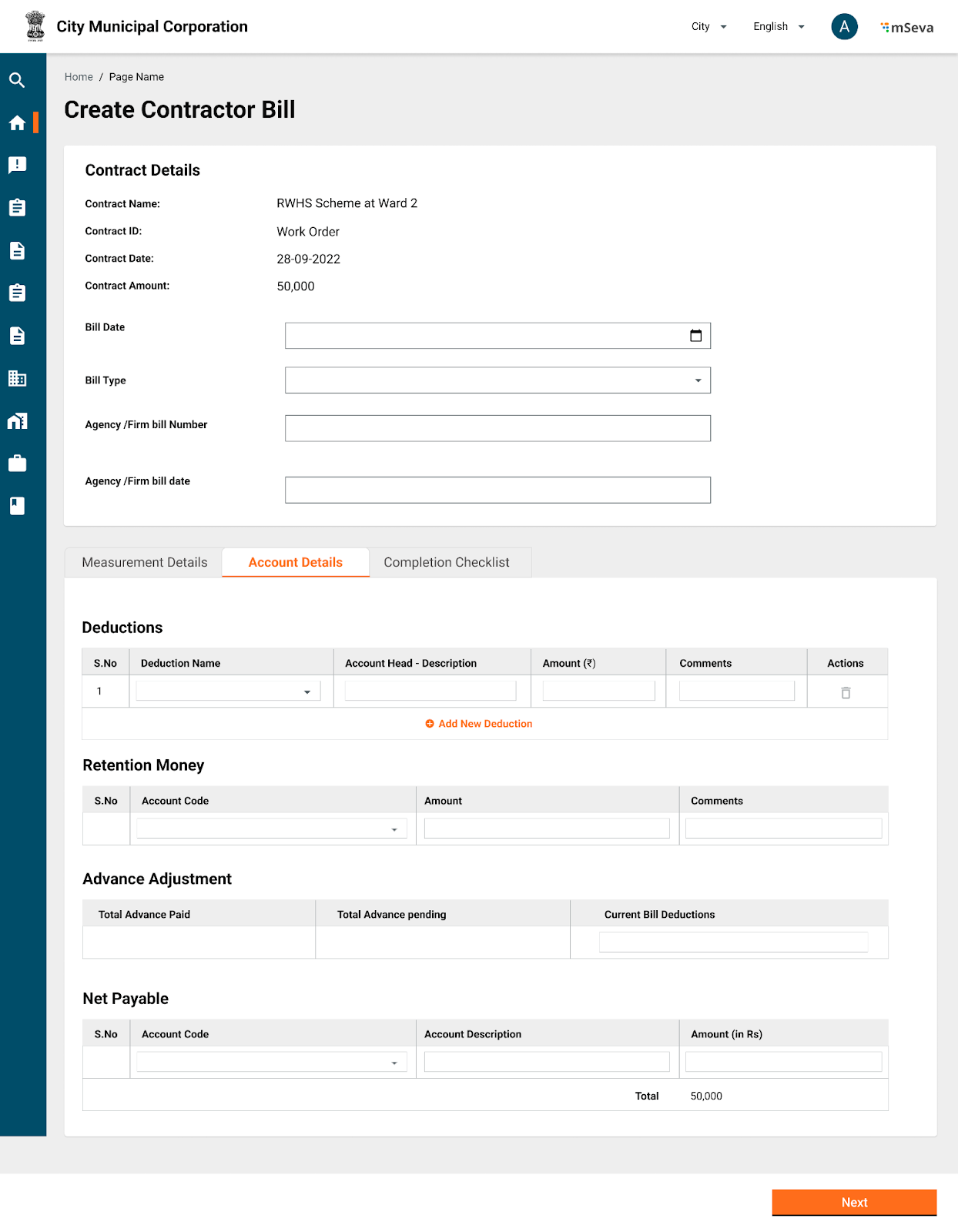
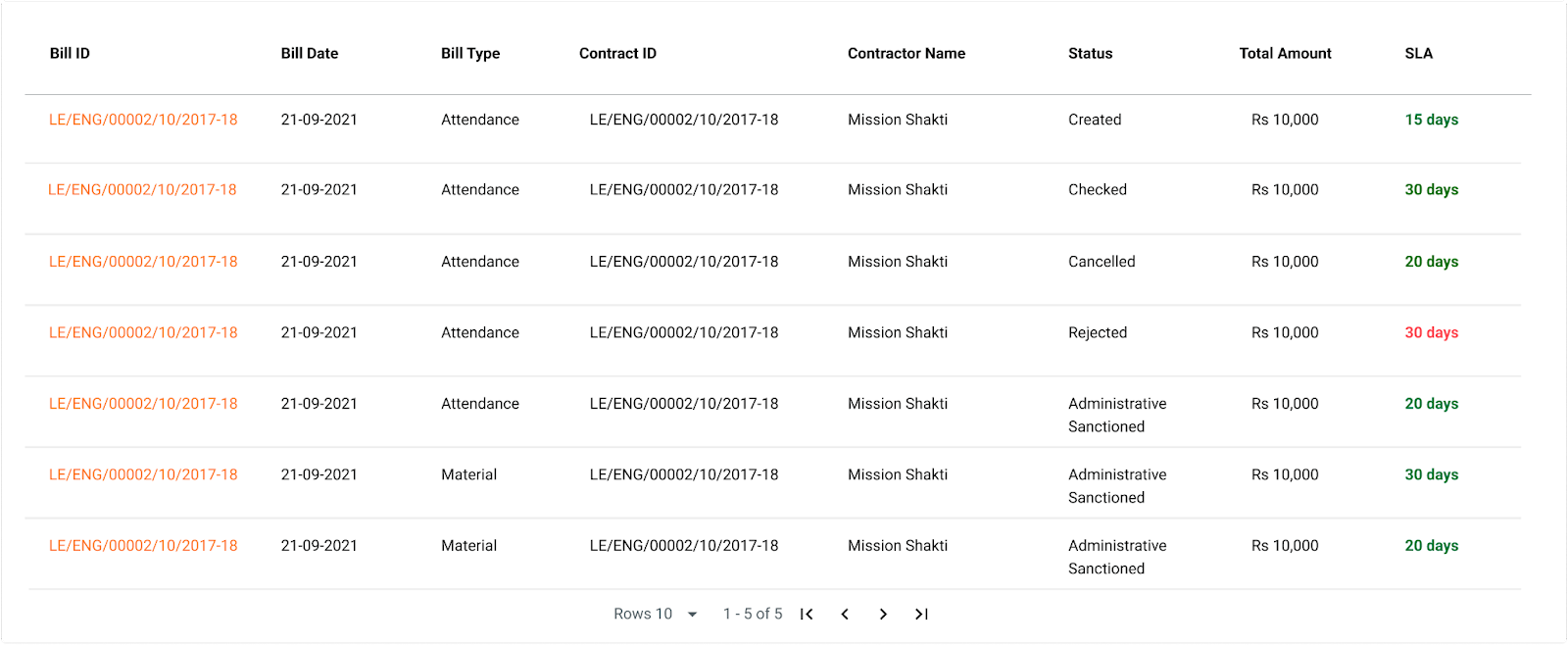
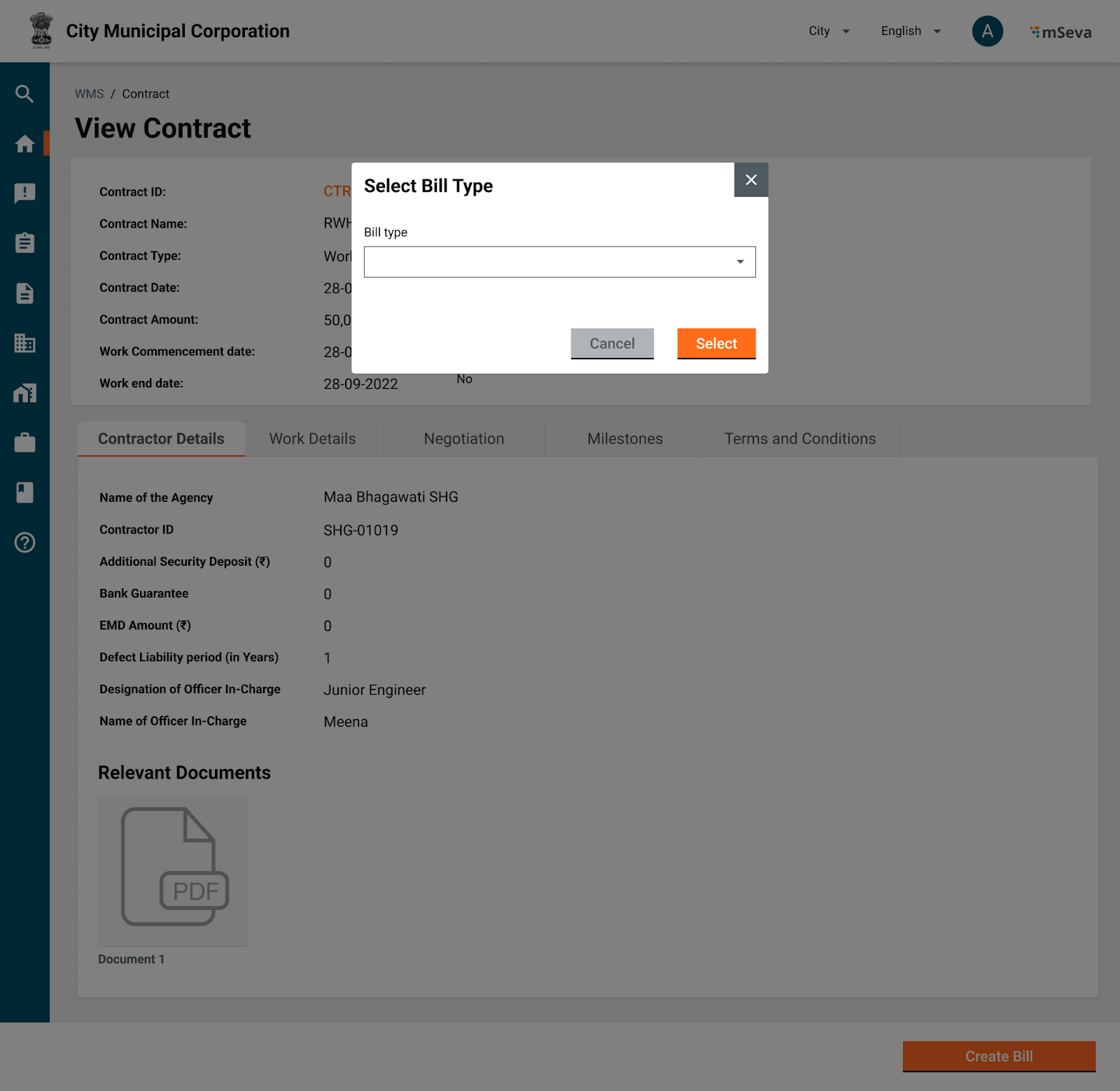
<table><thead><tr><th width="407">Requirement Specification</th><th>Mockup</th></tr></thead><tbody><tr><td><strong>Works Home Screen</strong></td><td></td></tr><tr><td><ol><li>Users having access to billing management can come to the billing inbox by clicking on billing management on the home screen.</li></ol></td><td><img src="/files/qyT15XJBpL4lch9mKGyU" alt=""></td></tr><tr><td><strong>Billing Management Inbox</strong></td><td></td></tr><tr><td><ol><li><p>Billing management inbox will have links to create new bill, search for existing bill and filter bills using</p><ul><li>Bill ID</li><li>Contract ID</li><li>Bill Status</li><li>Bill created from date</li><li>Bill created to date</li></ul></li><li>Initially inbox will be empty as no bills are created.</li><li>When bills are created and assigned to other users for approval, inbox table is filled as shown. </li><li><p>Table columns are</p><ul><li>Bill ID</li><li>Bill date</li><li>Bill Type</li><li>Contract ID</li><li>Contractor Name</li><li>Status</li><li>Total Amount</li><li>SLA</li></ul></li></ol></td><td><img src="/files/vbSreluHNfxojWz9kIhv" alt=""><img src="/files/mgMlfyWieiw8kQa3we1r" alt=""></td></tr><tr><td><strong>Search Contracts to Create Bills</strong></td><td></td></tr><tr><td><ol><li>Users click on create Bill in the billing management inbox and search for existing contracts to create Bills</li><li><p>Search parameters to create Bills</p><ul><li>Contract Name</li><li>Contract ID</li><li>Organization</li><li>Contract Type</li><li>Contract Created from Date</li><li>Contract Created to Date </li></ul></li><li><p>Search results in the table to show</p><ul><li>Contract ID</li><li>Estimate ID(s)</li><li>Contractor</li><li>Contract Type</li><li>Status</li><li>Contract Amount</li><li>Billed Amount</li><li>Actions</li></ul></li></ol><p>Validations</p><ol><li>Show only contracts whose project closure is not done</li><li>Show contracts for which billed amount is equal to contract amount. But do not give option to create a new bill in Actions</li><li>Create a New Bill in actions will only be present for contracts whose bill amount is less than contract amount. </li></ol></td><td><img src="/files/z2o5BmhyvO5VOBHez5jz" alt=""><img src="/files/vWK4IBRcCcTjYfkbbIdg" alt=""></td></tr><tr><td><ol><li>Clicking on Contract ID in first tab should show contact view screen exactly as it would open from contracts flow on home screen. </li><li><p>Primary CTA here will be same as what Actions menu shows on the previous screen. </p><ul><li>Create Bill (If Billed Amount &#x3C; Contract Amount)</li><li>None (Billed Amount = Contract Amount but project not closed)</li></ul></li><li></li></ol></td><td><img src="/files/F4ampJXwTmTUDUZEQzlK" alt=""></td></tr><tr><td><strong>Choosing Bill Type</strong></td><td></td></tr><tr><td><ol><li>Clicking on create bill should ask the user to select a particular bill type, next screen will be displayed accordingly. </li><li>Expenditure service may have many bill types like Salary/Pension Bill, Contractor Bill, Wage Bill, Vendor Bill, Supervision Bill, Advance Bill etc</li><li><p>Works Product will only show </p><ul><li>Advance Bill </li><li>Contractor Bill</li><li>Vendor Bill</li></ul></li><li><p>In specific implementations such as Mukta, this can extend to</p><ul><li>Contractor Bill</li><li>Vendor Bill</li><li>Wage Bill</li><li>Supervision Bill</li></ul></li></ol><p>Validations</p><p>Mapping of Contract Type to Bill Type</p><ol><li><p>WO.Work_Items </p><ul><li>Contractor Bill</li></ul></li><li><p>WO.Labour_and_Material</p><ul><li>Vendor Bill</li><li>Wage Bill </li><li>Supervision Bill</li></ul></li><li><p>PO</p><ul><li>Vendor Bill</li></ul></li><li><p>Mixed (ex. Mukta// Custom implementation)</p><ul><li>Wage Bill <em>(But has validations of contractor Bill)</em></li><li>Vendor Bill <em>(But choose to pay to contractor or vendor depending on internal validations)</em></li><li>Supervision Bill</li></ul></li><li>To create any type of bill under a contract, current billed amount shouldn’t have crossed the contract amount. </li></ol></td><td><img src="/files/Heoy1zGDhSD08ewf3ru0" alt=""></td></tr><tr><td><strong>Contractor Bill</strong></td><td></td></tr><tr><td><ol><li><p>Header details will capture</p><ul><li>Bill Date -  Default to todays, but allow to change to previous date</li><li>Agency/ Firm Bill Number</li><li>Agency/Firm Bill Date - Date on which the agency has generated bill in their system. This should be before Bill Date</li></ul></li><li><p>Contractor Bill is completely based on measurement book</p><ul><li>If a contract is formed by combining multiple estimates it will have 1 Mbook for each estimate. </li><li>All the readings from multiple Mbooks under this contract, that are recorded and approved, but not yet paid will show in measurement details</li><li><p>User can select upto what date of the mbook reading payments can be made.</p><ul><li>It is not mandatory to pay for entire approved readings. </li></ul></li><li>Upon selection of days of readings, final calculation of gross amount payables is calculated and displayed.</li></ul></li></ol></td><td><img src="/files/BHDHpaZ3Z66EEoEMu1gK" alt=""></td></tr><tr><td><ol><li>In the second Tab, account details to be selected</li><li><p>Deductions</p><ul><li>Deductions will be predefined master</li><li><p>Selecting Deduction Name in searchable dropdown will autopopulate Account head description and Amount</p><ol><li>Amount is either percentage of Bill or Lumpsum</li><li>User can add comments</li></ol></li><li>Deductions cannot be more than gross bill amount.</li></ul></li><li><p>Retention Money</p><ul><li>Retention money is the amount retained within the source as part of every bill. </li><li>Retention money account heads will be defined in master.</li><li>Amount should be entered from UI</li><li>Retention money cannot be more than current bill amount - deductions</li></ul></li><li><p>Advance Adjustment</p><ul><li>Total Advance Paid - Sum of all the advances paid to this contractor under this contract.</li><li>Total Advance pending -  Advance given - Advance Paid</li><li>Current Bill Deductions -  Deductions that will be written off against balance amount. </li><li>Current Bill deductions cannot be more than gross Bill Amount - Deductions - Retention money</li></ul></li><li><p>Net Payables</p><ul><li>Net payables is the account code from which payment has to be made. </li><li><p>If we are capturing this at time of project creation, make this a default view only screen. </p><ul><li>Otherwise, if user is entering it first time while bill creation, make this an inputtable field from UI with selectable dropdowns.</li></ul></li></ul></li><li><p>Bill will have the following statuses</p><ul><li>Created</li><li>Checked</li><li>Approved</li><li>Rejected</li><li>Re-submitted</li><li>Cancelled</li></ul></li></ol></td><td><img src="/files/CVhpbzsutjwRq9lSyx9k" alt=""></td></tr><tr><td><strong>Completion Checklist</strong></td><td></td></tr><tr><td><p>Only for final bills</p><ol><li>Along with bill certain checklist and attachments need to be added to it can trigger project closure.</li></ol></td><td></td></tr><tr><td><strong>Wage Bill</strong></td><td></td></tr><tr><td><ol><li>Header information is same for all types of Bills</li><li>Unlike a contractor Bill, Wage bill is verified against Muster rolls. </li><li><p>All Muster rolls that are created and approved under that contract are shown here for user to select which muster rolls can become part of this bill.</p><ul><li>User can do multi select and final amount is shown as gross amount of the bill</li></ul></li><li><p>Deductions on each beneficiary</p><ul><li>Similar to Contractor Deductions, each individual also can attract deductions.</li><li>User can choose to add deductions by each individual by clicking on edit icon.</li><li>A popup shows asking for deduction details.</li><li>User can also select to apply same deduction calculationf for all wage seekers from all musters that are selected. </li><li>Gross amount is calculated accordingly </li><li>Hence deductions in Account details(next tab) is view only field, a sum of all deductions by each deduction head.</li></ul></li><li><p>Similar columns should be present for Retention money and Advance Adjustment where details against each individual will be captured in a popup and choosent to be applied to all individuals if needed.</p><ul><li>Hence, retention money and advance adjustment are also view only fields in next screen.</li></ul></li><li>Functionality of net payables is same as contractor bill. </li></ol></td><td><img src="/files/5D5tATXKVafJNFrg1Cd1" alt=""></td></tr><tr><td><strong>Vendor Bill</strong></td><td></td></tr><tr><td><ol><li>A vendor bill should be verified against Purchase order that is given to the supplier.</li><li>A purchase order can contain n*m (line items *quantity) and each invoice can be a subset of these items only. </li><li><p>Since in V1, we do not have complete Purchase Order detailed out.</p><ul><li>A vendor bill is simply an invoice submitted from the vendor for payments. </li><li><p>It will have </p><ul><li>Vendor ID (Ideally comes from contract details if it is PO. Incase of Mixed, or Material and Labour contract this should be captured from UI at the time of Bill creation) </li><li>Bill Amount</li><li>File Attachment</li></ul></li></ul></li><li>Deductions, Retention Money, Advance Adjustment and net payables are same as contractor Bill</li></ol></td><td><img src="/files/T0KcI3AjZIh1NU186kwx" alt=""></td></tr><tr><td><strong>Advance Bill</strong></td><td></td></tr><tr><td><ol><li>Advance Bill is just an amount that is given to the vendor/contractor/individual to commence the work.</li><li><p>Advance bill can be given at any time of the contract.</p><ul><li>Advance bill will not have to be verified against any other document</li></ul></li><li><p>Advance amount should be</p><ul><li>&#x3C; contract value - Billed Amount - Advance Adjustment</li></ul></li><li>There should be provision to adjust Advance Amount in each bill</li></ol></td><td></td></tr><tr><td><strong>Supervision Bill</strong></td><td></td></tr><tr><td><ol><li>A supervision bill is a special type of bill that will be processed as percentage on top of existing bills.</li><li>User can select bills under that contract and select percentage to be given as commission. This will be created as new bill in the system</li><li>Deductions, Retention money, Advance adjustment and net payables act same as contractor bill.</li></ol></td><td><img src="/files/fUchMkMbjHc9XJ7KODAi" alt=""></td></tr></tbody></table>
#### Bill Objection - Reasons&#x20;

Actions to resolve: [Works Specifications](https://docs.google.com/spreadsheets/d/1-aAiCK60CIQgI59JKZYbOwmPzXUDnHlZ8t-IlVghHAA/edit#gid=1777378960)

<table><thead><tr><th width="81">#</th><th>Error Code</th><th width="348">Description</th><th width="133">Action</th><th>Comments</th></tr></thead><tbody><tr><td>1</td><td>EX0005</td><td>Could not find the XML in the Zip File</td><td>Technical</td><td></td></tr><tr><td>2</td><td>EX0006</td><td>Digital Signature File Missing in the Zip File</td><td>Technical</td><td></td></tr><tr><td>3</td><td>EX0007</td><td>Digital Certificate found to be Revoked</td><td>Technical</td><td></td></tr><tr><td>4</td><td>EX0008</td><td>Digital Certificate found to be Expired</td><td>Technical</td><td></td></tr><tr><td>5</td><td>EX0009</td><td>Certificate Serial Mismatch</td><td>Technical</td><td></td></tr><tr><td>6</td><td>EX0010</td><td>Signature Verification Failed</td><td>Technical</td><td></td></tr><tr><td>7</td><td>EX0030</td><td>Invalid Zip File</td><td>Technical</td><td></td></tr><tr><td>8</td><td>EX0033</td><td>Invalid File Naming Convention</td><td>Technical</td><td></td></tr><tr><td>9</td><td>EX0034</td><td>Public key not available for Signature verification</td><td>Technical</td><td></td></tr><tr><td>10</td><td>EX0903</td><td>XSD Validation Failure</td><td>Technical</td><td></td></tr><tr><td>11</td><td>FV0004</td><td>Duplicate File / Message</td><td>Technical</td><td></td></tr><tr><td>12</td><td>FV0005</td><td>Number of Transaction mentioned in the Header mismatch with the actual transaction</td><td>Technical</td><td></td></tr><tr><td>13</td><td>FV0006</td><td>Amount mentioned in the net amount mismatch with the actual transaction amount</td><td></td><td>How is this possible?</td></tr><tr><td>14</td><td>FV0007</td><td>ePayments Subscription not done for the Initiating Party</td><td></td><td>What is ePayments Subscription?</td></tr><tr><td>15</td><td>FV0008</td><td>Mismatch in Department Code or Service Code</td><td>Technical / Mapping</td><td></td></tr><tr><td>16</td><td>FV0058</td><td>Invalid File Name</td><td>Technical</td><td></td></tr><tr><td>17</td><td>FV0059</td><td>File Creation Date is greater than CBD</td><td>Technical</td><td></td></tr><tr><td>18</td><td>PV0007</td><td>Debtor Account Closed</td><td>Modify and Resubmit the Bill</td><td></td></tr><tr><td>19</td><td>PV0008</td><td>Debtor Account Freezed</td><td>Modify and Resubmit the Bill</td><td></td></tr><tr><td>20</td><td>PV0009</td><td>Debtor Account In-Operative</td><td>Modify and Resubmit the Bill</td><td></td></tr><tr><td>21</td><td>PV0010</td><td>Debtor Account Dormant</td><td>Modify and Resubmit the Bill</td><td></td></tr><tr><td>22</td><td>PV0014</td><td>Invalid Debtor IFSC</td><td>Modify and Resubmit the Bill</td><td></td></tr><tr><td>23</td><td>PV0070</td><td>Debtor IFSC and Creditor IFSC should not be same</td><td>Modify and Resubmit the Bill</td><td></td></tr><tr><td>24</td><td>PV0072</td><td>Invalid Payment Information ID Format</td><td></td><td></td></tr><tr><td>25</td><td>PV0073</td><td>Duplicate Payment Information Id</td><td></td><td></td></tr><tr><td>26</td><td>TV0002</td><td>Invalid Currency</td><td></td><td></td></tr><tr><td>27</td><td>TV0003</td><td>Invalid Creditor IFSC</td><td>Modify and Resubmit the Bill</td><td></td></tr><tr><td>28</td><td>TV0004</td><td>Duplicate End to End ID</td><td></td><td></td></tr><tr><td>29</td><td>TV0121</td><td>Creditor Account Closed</td><td>Modify and Resubmit the Bill</td><td></td></tr><tr><td>30</td><td>TV0122</td><td>Creditor Account Freezed</td><td>Modify and Resubmit the Bill</td><td></td></tr><tr><td>31</td><td>TV0123</td><td>Creditor Account In-operative</td><td>Modify and Resubmit the Bill</td><td></td></tr><tr><td>32</td><td>TV0124</td><td>Creditor Account Dormant</td><td>Modify and Resubmit the Bill</td><td></td></tr><tr><td>33</td><td>TV0130</td><td>Creditor Account Invalid</td><td>Modify and Resubmit the Bill</td><td></td></tr><tr><td>34</td><td>TV0133</td><td>Creditor Account Type Invalid</td><td>Modify and Resubmit the Bill</td><td></td></tr><tr><td>35</td><td>TV0161</td><td>Invalid IIN</td><td></td><td>What is IIN?</td></tr><tr><td>36</td><td>TV0162</td><td>Invalid Aadhaar format</td><td>Not required</td><td></td></tr><tr><td>37</td><td>TV0163</td><td>Invalid User Number</td><td>Not required</td><td></td></tr><tr><td>38</td><td>TR0001</td><td>Previous financial year bill not allowed</td><td>Modify and Resubmit the Bill</td><td></td></tr><tr><td>39</td><td>TR0002</td><td>Wrong bill head of account</td><td>Modify and Resubmit the Bill</td><td></td></tr><tr><td>40</td><td>TR0003</td><td>Duplicate bill number</td><td></td><td>Bill Number is generated Automatically by the system. It should ensure that this doesnt happen. if so, create another bill with new bill number</td></tr><tr><td>41</td><td>TR0004</td><td>Wrong object breakup head of account</td><td>Modify and Resubmit the Bill</td><td></td></tr><tr><td>42</td><td>TR0005</td><td>Wrong by transfer head of account</td><td>Modify and Resubmit the Bill</td><td></td></tr><tr><td>43</td><td>TR0006</td><td>Bill objected</td><td></td><td>Why?</td></tr><tr><td>44</td><td>TR0007</td><td>Payment failed</td><td></td><td>Why?</td></tr><tr><td>45</td><td>TR9999</td><td>Internal system error</td><td>Technical</td><td></td></tr><tr><td>46</td><td>0</td><td>Processed successfully</td><td></td><td></td></tr></tbody></table>

## Expenditure Service Domain Modeling

**Budget Checks**

1. Input to expenditure service is when a project is created and an estimate is to be approved.&#x20;
   * Expenditure will query the program service to get the status of fund availability.

**Budget Blocking**

1. In case funds are available, the expenditure service can also ask the program service to block respective funds (from estimation) for this project.&#x20;
   * The budget hence is blocked and won’t be available for the next projects.&#x20;

**Release Blocked Budget**

1. The expenditure module should also have a provision to release the pre-blocked budget. So this can be used for other projects. Or the existing project for which the budget has been blocked is deferred.&#x20;

**Expense Planning**

1. The expenditure service will also have a planning module which will give timelines of expenses and respective amounts to funding agencies.
   * The blocking module also feeds into the planning module to block funds on time.

**Billing management**

1. Bills are created under contracts (projects)&#x20;
2. A contract is issued by Payer to Payee.&#x20;
   * The contract can be materials, labour, services, supervision etc
3. A payee in turn issues invoices against the contract on the supply of material/services.
   * After successful verification of supplies and invoices, the payer adds bills into the finance system
   * A voucher is created in the accounting system for auditing purposes.
   * Payment advice is sent to the bank for making financial transactions.
   * The voucher and bill statutes are updated once the payments are made.&#x20;
4. **Validations**
   1. A contract can have multiple invoices raised by the payee before the contract is deemed closed.
   2. An invoice can be a material invoice, labour invoice (Muster roll), or invoice for supervision charges.
   3. PS: Not every time an invoice is required to generate a bill.
      * Ex. Salary Bill, Advance bill, contingency bill etc don't need any invoices.&#x20;
   4. An invoice can have multiple line items.
      * In case of a restaurant bill -  Restaurant captures additional GST amount on net amount. All line items are paid immediately by the service seeker. They pay the taxes collected from all invoices to respective government bodies at set intervals.
      * In the case of a salary bill - All line items are not immediately paid to the service provider (Employee). Instead, the employer deducts TDS and only pays part amount to the employee. Employer remits this amount to a government body. Even the employee remits his part of the tax at regular intervals.
      * An invoice can also have multiple beneficiaries and head-wise breakdowns for each beneficiary.
   5. An invoice when entered into the system creates a Bill. A billing entity internally will have multiple line items each by payer, beneficiary, amount and head combination.&#x20;
      * So a muster roll with 1 payer, 3 payees, each payee having 500 rs payable and 50 rs deduction on ESI can be on 1 bill with 6 line items.
   6. This bill when processed will create a voucher in the accounting system
   7. A payment voucher however can be a combination of multiple payers and payees by line items. From above example
      * There can be a minimum of 2 payment advises one for all payables of 450 rs to each individual
      * Other for all ESI deductions directed to the ESI department.&#x20;
      * This will help payments go faster to respective departments. &#x20;
   8. Once the payments are made, respective bill line items will be updated with statuses. Once all bill line items are updated, the overall bill will be updated with status.


---

# Agent Instructions: Querying This Documentation

If you need additional information that is not directly available in this page, you can query the documentation dynamically by asking a question.

Perform an HTTP GET request on the current page URL with the `ask` query parameter:

```
GET https://docs.digit.org/works/specifications/functional-specifications/expenditure-billing.md?ask=<question>
```

The question should be specific, self-contained, and written in natural language.
The response will contain a direct answer to the question and relevant excerpts and sources from the documentation.

Use this mechanism when the answer is not explicitly present in the current page, you need clarification or additional context, or you want to retrieve related documentation sections.