
Create Campaign API Endpoints
Endpoint
POST /project-type/create
Request Structure
Body Parameters
RequestInfo: Object containing RequestInfo.
CampaignDetails: Object containing the details of the campaign to be created.
tenantId: Tenant identifier.
hierarchyType: Type of hierarchy.
action: Action type (
createordraft).boundaries: Array of boundaries.
resources: Array of resources.
projectType: Type of the project.
deliveryRules: Array of delivery rules.
Additional request info
Response Structure
Success Response
ResponseInfo: Object containing ResponseInfo.
CampaignDetails: The created campaign details.
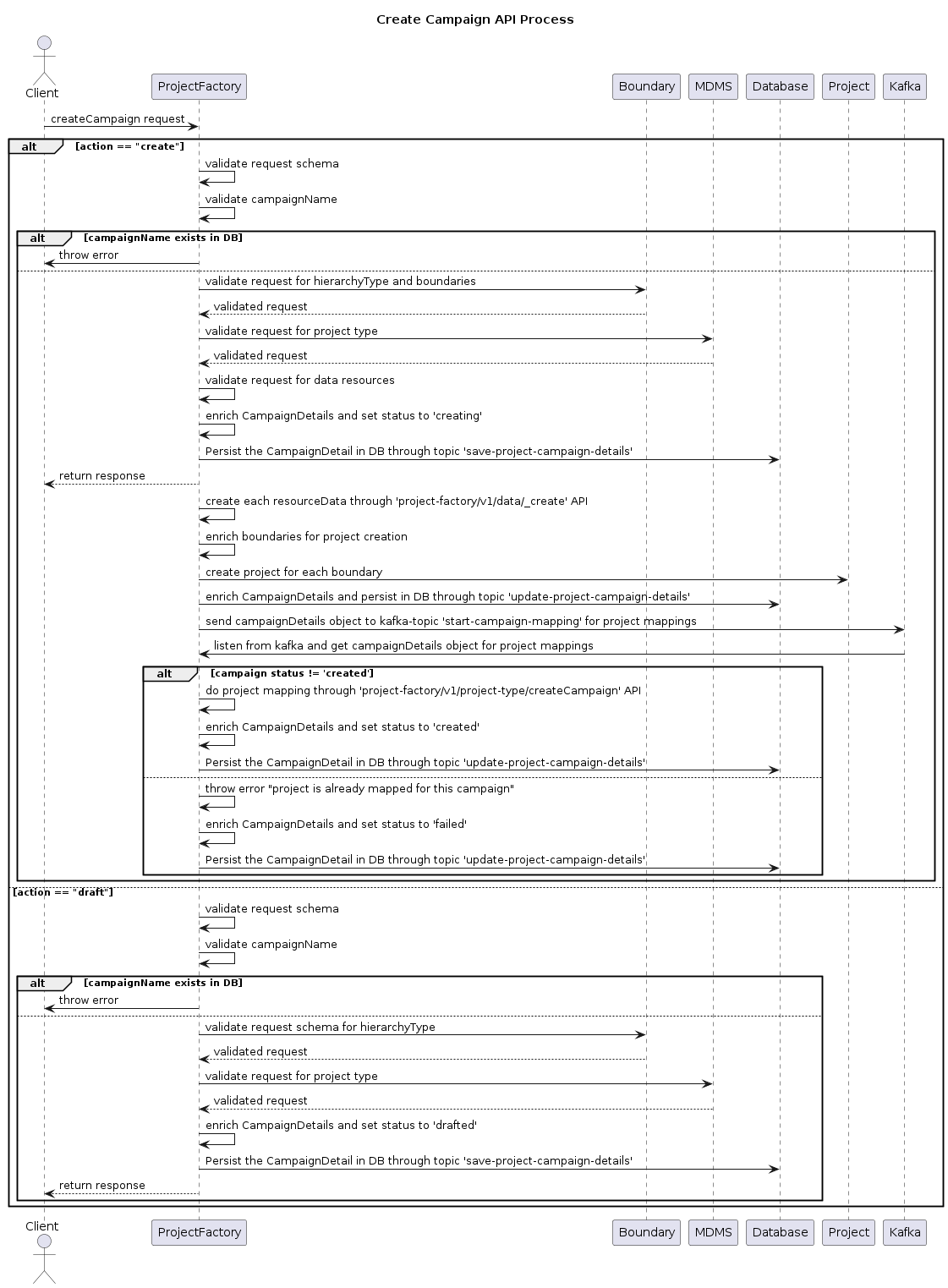
Flow
Client Initiates Request
The client initiates a createCampaign request to the Project Factory Service.
Validate Request
If the action is 'create':
The Project Factory Service validates the request schema.
It also validates the uniqueness of the campaign name in the database.
If the campaign name exists, an error is thrown.
If the action is 'draft':
The Project Factory Service validates the request schema.
It also validates the uniqueness of the campaign name in the database.
If the campaign name exists, an error is thrown.
Boundary and MDMS Validation
For both 'create' and 'draft' actions:
The Project Factory Service validates the request for hierarchy type and boundaries with the Boundary Service.
It validates the request for the project type code from MDMS.
Create Campaign
If the action is 'create':
The Project Factory Service validates the request for data resources.
It enriches the CampaignDetails and sets the status to 'creating'.
The CampaignDetails are persisted in the database.
For each resource data, the Project Factory Service creates resources through the
/project-factory/v1/data/_createAPI.It enriches boundaries for project creation and creates projects for each boundary with the Health Project Service.
The enriched CampaignDetails are persisted in the database.
The CampaignDetails object is sent to a Kafka topic for project mappings.
If the campaign status is not "created", project mappings are performed through the
/project-factory/v1/project-type/createCampaignAPI and the status is updated to 'created'.If the campaign status is already 'created', an error is thrown, and the status is updated to 'failed'.
If the action is 'draft':
The CampaignDetails are enriched, and the status is set to 'drafted'.
The enriched CampaignDetails are persisted in the database.
Response
The Project Factory Service sends the response back to the client.
Unified Campaign Vs Regular Campaign
Unified Campaign: An advanced campaign flow in which the Excel Ingestion Service handles complex Excel-based data upload, validation, and processing using a single sheet (user, facility, boundary(target) ). To support the single-sheet flow,
isUnifiedCampaignmust be passed astrueinadditionalDetails. Additionally, inresources, the file store ID must be provided with the resource type set to"unified-console-resources".
Regular Campaign: In this flow, we use three separate sheets—User, Facility, and Boundary (Target). The corresponding file store IDs must be passed in
resourcesas shown below:
Flow Diagram
(a) Regular Campaign – Uses Three Separate Sheets
(b) Unified Campaign - single sheet

Last updated
Was this helpful?